


Best CPA Accounting software of 2026

- Popular Comparisons
- Buyers Guide
Compare Products
Showing 1 - 25 of 126 products
Compare Products
Sort by
Reviews: Sorts listings by the number of user reviews we have published, greatest to least.
Average Rating: Sorts listings by overall star rating based on user reviews, highest to lowest.
Alphabetically (A-Z): Sorts listings by product name from A to Z.

Sage Intacct operates within the Sage Business Cloud portfolio as a comprehensive cloud-based financial management software, exp...Read more about Sage Intacct


Sage Intacct's Best Rated Features
See All
Sage Intacct's Worst Rated Features
See All

Xledger is a cloud-based enterprise resource planning (ERP) solution that caters to midsize and large businesses and helps them ...Read more about Xledger


NetSuite is an AI-powered cloud-based business management suite that incorporates ERP, financial management, CRM and eCommerce f...Read more about NetSuite


NetSuite's Best Rated Features
See All
NetSuite's Worst Rated Features
See All

AccountMate is a hybrid accounting solution that caters to small and midsize businesses and offers them tools and functionalitie...Read more about AccountMate


Striven is a cloud-based enterprise resource planning (ERP) solution suitable for many industries and organizations of all sizes...Read more about Striven

Striven's Best Rated Features
See All
Striven's Worst Rated Features
See All

Procurify is a procurement and spend management software designed to automate the intake-to-pay process for organizations. It co...Read more about Procurify


Procurify's Best Rated Features
See All
Procurify's Worst Rated Features
See All

Sage Accounting is a cloud-based accounting and invoice management solution for small to midsize businesses. It offers accountin...Read more about Sage Accounting


Sage Accounting's Best Rated Features
See All
Sage Accounting's Worst Rated Features
See All

Canopy is a cloud-based practice management and tax resolution platform for accounting firms, tax professionals, tax attorneys a...Read more about Canopy
Canopy's Best Rated Features
See All
Canopy's Worst Rated Features
See All

SAP S/4HANA Cloud is a cloud-based and on-premise enterprise resource planning (ERP) solution. It is suitable for small, midsize...Read more about SAP S/4HANA Cloud


SAP S/4HANA Cloud's Best Rated Features
See All
SAP S/4HANA Cloud's Worst Rated Features
See All

M3 Accounting Core Software is a cloud-based accounting solution that helps streamline financial operations for small to large b...Read more about M3 Accounting Core


Sage X3 is a powerful ERP software solution designed for midsized national and global manufacturers, distributors, and after-sal...Read more about Sage X3


Sage X3's Best Rated Features
See All
Sage X3's Worst Rated Features
See All

Beyond Software is a project accounting and management software system available for small to mid-size companies. The system all...Read more about Beyond Software

TimeSolv is a cloud-based legal time tracking and billing solution that caters to law firms, accountants, consultants, architect...Read more about TimeSolv Legal Billing


TimeSolv Legal Billing's Best Rated Features
See All
TimeSolv Legal Billing's Worst Rated Features
See All

Focus X is an all-inclusive enterprise resource planning (ERP) system that helps you connect every aspect of your business opera...Read more about Focus X
Focus X's Best Rated Features
See All
Focus X's Worst Rated Features
See All

BQE CORE is a cloud-based accounting and invoicing software designed for architecture, engineering, and consulting firms. The pl...Read more about BQE CORE Suite

BQE CORE Suite's Best Rated Features
See All
BQE CORE Suite's Worst Rated Features
See All

Elorus is an online invoicing, time-tracking, billing and expense management platform. At heart, it is the ideal professional so...Read more about Elorus
Elorus's Best Rated Features
See All
Elorus's Worst Rated Features
See All

Zoho Invoice is a 100% free cloud-based invoicing solution designed to help small businesses with invoicing, tracking expenses a...Read more about Zoho Invoice

Zoho Invoice's Best Rated Features
See All
Zoho Invoice's Worst Rated Features
See All

Agiled is an all in one business management platform. It comes with built-in CRM, HRM, Financial Management, Project Management ...Read more about Agiled
Agiled's Best Rated Features
See All
Agiled's Worst Rated Features
See All

Patriot Accounting offers accounting software for American businesses and accountants. Patriot Accounting is affordable and easy...Read more about Patriot Accounting
Patriot Accounting's Best Rated Features
See All
Patriot Accounting's Worst Rated Features
See All

Happay is a first-of-its-kind all-in-one Integrated Solution for Corporate Travel, Expense, and Payments Management. With over 7...Read more about Happay


Happay's Best Rated Features
See All
Happay's Worst Rated Features
See All

FloQast, an Accounting Automation Platform created by accountants for accountants, enables organizations to automate a variety o...Read more about FloQast

FloQast's Best Rated Features
See All
FloQast's Worst Rated Features
See All

Create. Send. Get Paid. Invoice Ninja is the leading small-business platform to invoice, accept payments, track expenses & time...Read more about Invoice Ninja
Invoice Ninja's Best Rated Features
See All
Invoice Ninja's Worst Rated Features
See All

QuickBooks Enterprise is an accounting solution designed for SMBs across different industry verticals such as construction, nonp...Read more about QuickBooks Enterprise
QuickBooks Enterprise's Best Rated Features
See All
QuickBooks Enterprise's Worst Rated Features
See All

N2F is a cloud-based expense report management software that enables enterprises to streamline processes related to expense reim...Read more about N2F

N2F 's Best Rated Features
See All
N2F 's Worst Rated Features
See All

Easy online accounting software for small businesses. From tracking invoices to paying employees, staying in control of cash flo...Read more about Reckon One

Reckon One's Best Rated Features
See All
Reckon One's Worst Rated Features
See All
Popular Comparisons


Buyers Guide
This detailed guide will help you find and buy the right cpa accounting software for you and your business.
Last Updated on January 27, 2025Here’s what we’ll cover:
What is CPA accounting software?
What are the common features of CPA accounting software?
CPA accounting software pricing
What are the deployment options for CPA accounting software?
What are some other considerations when selecting a platform?
How to evaluate accounting software for Certified Public Accountants?
What is CPA accounting software?
Since Certified Public Accountants (CPAs) manage the finances for dozens, or even hundreds of corporations and individuals, they need software that can keep up. CPA-specific accounting programs will be designed for payroll, expense and reporting for multiple companies, and will also include useful tools like auditing, tax preparation and time-based billing.
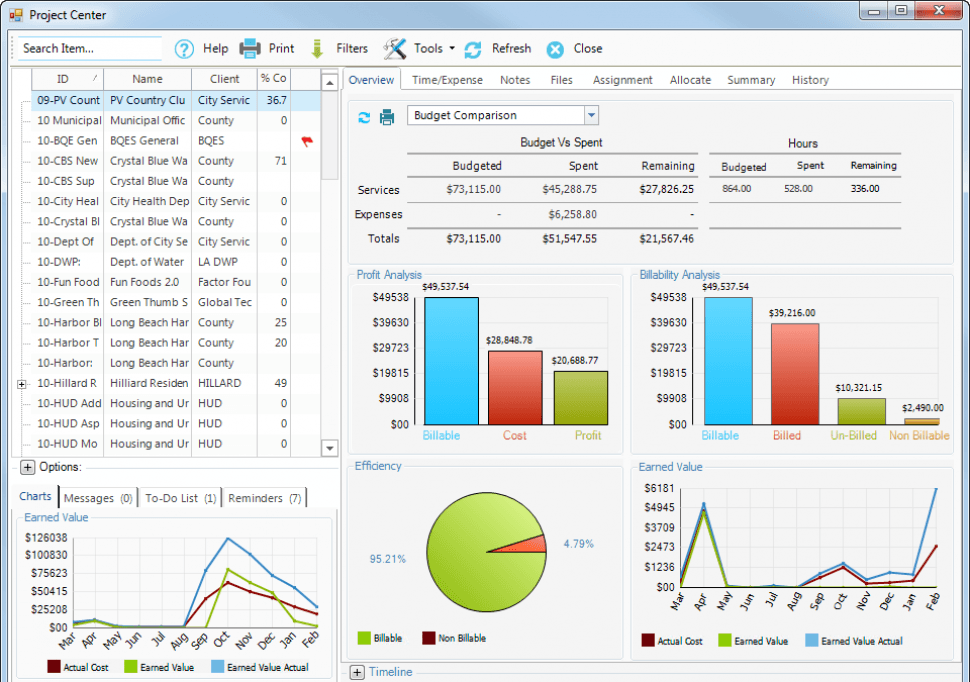
Screenshot of BillQuick user dashboard
Accounting software for CPAs isn’t just regular accounting software. CPAs typically need greater functionality and more features in order to handle multiple clients or otherwise ensure regulatory compliance.
In this guide, we'll cover:
The functionality CPAs should be looking for when considering software solutions; and
Best practices for evaluating CPA-specific systems.
What are the common features of CPA accounting software?
Accounting software for banks, mortgage companies and financial services institutions will include the following industry-specific features:
Multi-company accounting | Unlike other industries, professional accountants need to manage the accounting for multiple companies, so the software should allow you to categorize access all their data to keep it separated but easy to recall. Non-accountant-specific programs can sometimes become overloaded by all the records, so it’s critical that your software can handle large volumes of data. |
Tax preparation | The U.S. tax code is thousands of pages long, and it changes every year. Tax preparation is a major part of a CPA’s job, and CPA-specific systems will contain specialized data to support preparation for all your clients. These will include updated tax tables, automated calculations and electronic filing for individuals and corporations on a state, local and federal level. |
Time & billing | Time and billing refers to the ability to track the time spent on certain projects and then bill clients based on the number of hours spent. Accounting software for any service provider should include time and billing capabilities. |
Regulations compliance | The system needs to comply with federal, state and local regulations and statutes like FASB, GASB 34, IFRS and DCAA. Ensure the software you select complies with these regulations and updates it for any changes. |
Financial reports | Reporting is a critical component for freelance accountants. In addition to standard executive reports, charts and summary statements, the software should be able to build customized reports using an intuitive interface. |
CPA accounting software pricing
Accounting software used by CPAs is generally priced one of two ways: subscription and perpetual licensing.
Subscription. The software is priced as a monthly fee, typically based on the number of users. While no upfront fee is paid, an organization might have to pay annual fees for support and maintenance.
Perpetual license. With a perpetual license, an organization pays an upfront fee and then in turn owns the software in perpetuity. The upfront fee is also typically based on the number of users or the relative size of the organization based on its annual revenue. However, organizations will still generally have to pay annual fees for support, maintenance and updates. A general rule of thumb is that an organization can expect to pay 20 percent of the perpetual license fee annually on those other associated fees.
What are the deployment options for CPA accounting software?
CPA Accounting software can be deployed one of several ways: cloud-based, on-premise and hybrid.
Cloud-based. Cloud-based software is hosted on the vendor’s servers and is accessed through a web browser. Cloud-based deployment has become increasingly popular in recent years. Typically, cloud-based software is most associated with subscription pricing.
On-premise. The organization installs and hosts the software on their own computers and servers. Typically, on-premise software is most associated with perpetual licensing.
Hybrid. There are several hybrid approaches out there, but the most common is when an organization licenses a cloud-based platform to have it run on the organization’s own internal servers. This is done so the organization can have the flexibility of using cloud-based software while also having more control over how its data is stored.
One consideration to keep in mind is indeed data security. While cloud-based platforms can be just as secure as on-premise platforms, some organizations will nevertheless prefer to store their own data internally. CPAs might have certain clients who would prefer that their data never leave the CPA’s office, so at any rate it is critical for CPAs to understand where their clients’ data is being stored and how secure it is.
What are some other considerations when selecting a platform?
The strength of vendors offering CPA accounting software can often be determined by how agile they are when it comes to ensuring that their platform is continuously updated to reflect new regulations and laws pertaining to tax compliance. When selecting a platform, be sure to vet vendors’ commitment to updating their platform.
Also consider a vendor’s long term viability. The major players in this space can generally be seen as safe bets, while there can be less certainty smaller vendors. Smaller vendors may more adequately serve a particular niche, and may have more competitive pricing, but there is less of a guarantee as to how long that vendor will be around. As such, it’s important to note that every vendor has its own unique advantages and disadvantages in this regard.
How to evaluate accounting software for Certified Public Accountants?
When evaluating CPA-specific systems, the most important criteria to consider are the nature of your business and the number of clients. Do you primarily deal with tax preparation for individuals, or general ledger and payroll for corporations? Do you have two or three clients or 100?
In particular, CPAs seeking software should ask the following questions:
How many individual records will you need access to at a given time? Is the software designed for that level of usage?
Do you primarily serve individuals or corporations?
Will you need support on regulatory compliance?
Do you need to keep track of billable hours?