


Best Restaurant Scheduling software of 2026

- Popular Comparisons
- Buyers Guide
Compare Products
Showing 1 - 25 of 47 products
Compare Products
Sort by
Reviews: Sorts listings by the number of user reviews we have published, greatest to least.
Average Rating: Sorts listings by overall star rating based on user reviews, highest to lowest.
Alphabetically (A-Z): Sorts listings by product name from A to Z.

Teambridge brings together every staffing tool you need, like scheduling, time tracking, and team chat, on a composable, mobile-...Read more about Teambridge


Employment Hero is a cloud-based human resource management (HRM) system for small and medium businesses on the up. The solution ...Read more about Employment Hero

Employment Hero's Best Rated Features
See All
Employment Hero's Worst Rated Features
See All

TimeClock Plus is a cloud-based workforce management solution designed to make the day-to-day of your organization efficient. Ti...Read more about TimeClock Plus


TimeClock Plus's Best Rated Features
See All
TimeClock Plus's Worst Rated Features
See All

NetSuite is an AI-powered cloud-based business management suite that incorporates ERP, financial management, CRM and eCommerce f...Read more about NetSuite

NetSuite's Best Rated Features
See All
NetSuite's Worst Rated Features
See All

With functionality for employee recordkeeping, PTO tracking, recruiting, and more, Built for Teams offers a web-based HR platfor...Read more about Built


Calamari is a platform with tools for collecting and sharing information about people and their work. Pay only for the tools yo...Read more about Calamari

Calamari's Best Rated Features
See All
Calamari's Worst Rated Features
See All

7shifts is a comprehensive employee scheduling tool designed specifically for the restaurant industry. It aims to streamline wor...Read more about 7shifts

7shifts's Best Rated Features
See All
7shifts's Worst Rated Features
See All

PeopleBookHR is a cloud-based human resources (HR) management solution. Primary features include employee information management...Read more about PeopleBookHR

Homebase is a comprehensive platform designed to simplify the management of hourly work for businesses of all sizes. Through its...Read more about Homebase

Homebase's Best Rated Features
See All
Homebase's Worst Rated Features
See All

Deputy is a workforce management solution designed to streamline various HR processes, including employee scheduling, timesheets...Read more about Deputy


Deputy's Best Rated Features
See All
Deputy's Worst Rated Features
See All

Jolt is an operations management software designed to help businesses in the food, retail, and hospitality industries. The softw...Read more about Jolt


Jolt's Best Rated Features
See All
Jolt's Worst Rated Features
See All

Celayix is an employee scheduling software designed to streamline workforce management for businesses across a variety of indust...Read more about Celayix


Celayix's Best Rated Features
See All
Celayix's Worst Rated Features
See All

Bizimply is a cloud-based employee scheduling software designed for small and midsize retail and hospitality business including ...Read more about Bizimply


Bizimply's Best Rated Features
See All
Bizimply's Worst Rated Features
See All

Prospr is a mobile and desktop app employees choose to connect with their teams, engage at work, and manage their schedules. B...Read more about Prospr At Work
Prospr At Work's Best Rated Features
See All
Prospr At Work's Worst Rated Features
See All

PeopleQlik is a cloud-based human resources solution that allows businesses of all sizes to streamline core HR administration, t...Read more about PeopleQlik

Push Operations is a cloud-based restaurant labor management platform designed to help HR managers and recruiters automate proce...Read more about Push Operations


Webtimeclock is an online employee time clock software designed to help SMBs track employee hours and streamline task management...Read more about WebTimeClock


Schedule101 is an employee workforce management solution built for managers in the restaurant and hospitality industries looking...Read more about Schedule101

Activ Absence is a cloud-based absence management solution that helps businesses of any size track absences and plan holidays in...Read more about Activ Absence


Sirenum Staff Management is a cloud-based solution specializing in large-scale staff scheduling. It caters to staffing, transpor...Read more about Sirenum Staff Management Platform


Infor WFM offers visibility into key workforce performance indicators including labor spend, overtime and attendance. At-a-glanc...Read more about Infor Workforce Management

Product description missing...Read more about Time and Attendance

Reflexis Workforce Manager is an ACA-compliant solution that helps midsize and large companies in the retail, hospitality and qu...Read more about Reflexis Workforce Scheduler

TimeWellScheduled is a cloud-based time and attendance tracking solution built for organizations of various sizes. With this too...Read more about TimeWellScheduled
TimeWellScheduled's Best Rated Features
See All
TimeWellScheduled's Worst Rated Features
See All

Visual Planning is a powerful, customizable platform designed to help businesses plan, schedule, and manage resources efficientl...Read more about Visual Planning
Visual Planning's Best Rated Features
See All
Visual Planning's Worst Rated Features
See All
Popular Comparisons


Buyers Guide
This detailed guide will help you find and buy the right restaurant scheduling software for you and your business.
Last Updated on January 27, 2025What Is Restaurant Scheduling Software?
Restaurant scheduling software is a tool that allows restaurant owners/managers to create and manage work schedules of waiters, chefs, and other restaurant employees. The software also helps track employee availability and requests for time off.
Manually creating schedules for all the employees in your restaurant can sometimes lead to major errors. Such errors can result in high employee turnover, which impacts overall productivity. Poor scheduling can cause confusion among managers and reduce employee morale. Low employee retention and job dissatisfaction will ultimately lower your restaurant’s profitability.
When managing a restaurant, the last thing you want to worry about is whether your cooks and waitstaff are going to show up for their shifts. That’s why you should consider dedicated restaurant scheduling software: It can help you better manage and automate tedious scheduling tasks, while ensuring staff know where they need to be and when.
In this Buyer’s Guide, we’ll cover everything you need to know to choose the right restaurant scheduling software for your business, including:
What Is Restaurant Scheduling Software?
Benefits of Restaurant Scheduling Software
Common Functionality of Restaurant Scheduling Software
How Is Restaurant Scheduling Software Priced?
Key Considerations for Restaurant Scheduling Software
Benefits of Restaurant Scheduling Software
Still doing scheduling with paper or spreadsheets? As we found in a recent report, dedicated scheduling software offers a number of benefits over manual methods, including:
Increased automation. Tools, such as reusable templates and “copy and paste” scheduling, can make many tedious aspects of shift schedule management disappear. Employee-facing capabilities, such as automated shift reminders and shift swapping, can also transfer some of the burden to your workers.
Improved communication. With real-time scheduling, workers and managers can stay up to date if a schedule changes or someone is unable to come in. Text or email notifications can also be enabled so that everyone is in the know, even when away from a computer.
More accurate scheduling. Keeping track of changing worker availability, preferences and certifications manually can lead to errors. With software, all these factors are tracked automatically—that is, potential shift-scheduling conflicts are identified ahead of time.
Controlled labor costs. Integrating your scheduling platform with your payroll system allows you to accurately compensate employees for the hours they worked, saving you money.
Remotely track time and attendance. Mobile access is increasingly a key feature offered by scheduling software, helping restaurant managers and owners to track the time spent by employees at work. They can also monitor time reports on a daily, weekly or monthly basis.
Common Functionality of Restaurant Scheduling Software
There are a number of common capabilities found in restaurant scheduling applications that are mentioned in the below diagram:
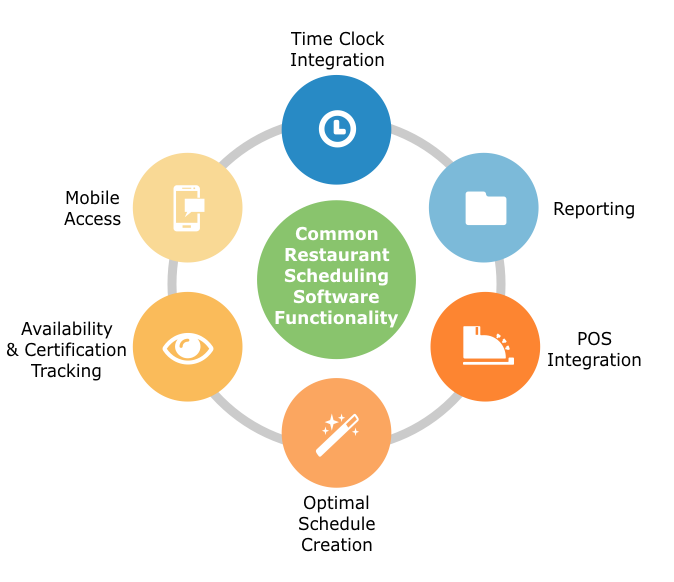
Time clock integration | Keeps track of clock-ins and clock-outs through a wall clock or an online web portal. This data can also be used by the finance team to calculate labor costs and pay them accordingly. |
Reporting | Generates reports about labor budgets, hours worked and more. Detailed reports about paid time-offs, sick leaves or other leaves requested by employees can be downloaded by restaurant managers. These reports help them to plan staff scheduling and allocating. |
POS integration | Integrates the scheduling system with your point-of-sale software to forecast sales and labor requirements. |
Optimal schedule creation | With all the important factors, such as employee availability, leave details and business requirement, being tracked, optimal schedules can be created to avoid any conflicts. The software also tries to keep the labor cost within the budget and ensures that a few senior employees are always present in the restaurant. |
Availability and certification tracking | Shows you when your workers are available, and which ones have proper certification for things such as ServSafe. |
Mobile access | Allows users to view and modify schedules and availability from their mobile device. Some systems offer native mobile apps for the best experience. |
Scheduling notifications and reminders | An automatic notification is sent to the employees to inform them about their shift timings. It can also offer them the flexibility to swap their shifts with another colleague in case of an emergency. Shift reminders are sent on mobile devices to ensure that people are available on time. |
How Is Restaurant Scheduling Software Priced?
Restaurant scheduling software is usually priced under one of two models: subscription-based or a perpetual license.
Subscription-based | A monthly or annual fee to use the software that is typically based on the number of employees who need to access it. |
Perpetual license | A one-time fee paid up front to use the software indefinitely. |
Most restaurant scheduling software platforms are cloud-based and typically sold under a subscription model. However, there are some on-premise solutions, sold under a perpetual license, which offer more customizations and greater data control.
The subscription-based model generally enables users to upgrade or add features when their business starts to flourish. It is mostly prefered by SMBs as it doesn’t require a huge investment. Your business needs, size and budget will determine what’s best for you.
Key Considerations for Restaurant Scheduling Software
Here are a few other things to keep in mind when you’re evaluating restaurant scheduling software for your business:
Scalability. The solution should be scalable to meet the growing needs of your business. It should also offer advanced features that users can use once they are well versed with the basic functionality of the software. These advanced features may be provided at an additional cost.
Easy-to-use interface. The solution should require minimal training and should be easy to navigate for anyone across the organization. Managers should be able to set schedules for various shifts and employees can view their reporting timings with minimum effort. This will lead to a higher adoption rate that defines the success of any scheduling software.
Forecast capabilities. A few solutions offer sales and labor forecast capabilities that enable managers to predict the number of employees required on a particular day and time. This reduces the requirement for on-call personnel and helps managers prepare smarter schedules.
Enhanced transparency. The transparent scheduling solution allows all the employees to view the schedules of their colleagues and interchange shifts with them in case of a personal emergency. Employees can also pick their own shifts, which helps in improving the staff’s efficiency and their satisfaction with work.