

Find the best Project Management Software
Compare Products
Showing 1 - 20 of 2296 products
Sort by
Reviews: Sorts listings by the number of user reviews we have published, greatest to least.
Sponsored: Sorts listings by software vendors running active bidding campaigns, from the highest to lowest bid. Vendors who have paid for placement have a ‘Visit Website’ button, whereas unpaid vendors have a ‘Learn More’ button.
Avg Rating: Sorts listings by overall star rating based on user reviews, highest to lowest.
A to Z: Sorts listings by product name from A to Z.


monday.com
monday.com
monday.com is an award-winning work and project management platform that helps teams of all sizes plan, prioritize, manage, and execute their work more effectively. The platform offers solutions for a wide range of use-cases such...Read more about monday.com

Adobe Workfront
Adobe Workfront
Adobe Workfront is a collaborative work management solution that addresses the challenges of disconnected teams, siloed tools, and the relentless pace of enterprise work. Workfront includes capabilities to capture and plan, assign...Read more about Adobe Workfront

BigTime
BigTime
BigTime is an online time and billing solution designed to serve professional service firms like accounting, engineering, government contracting, legal and IT services. The integrated solution offers features like time and expense...Read more about BigTime

Quickbase
Quickbase
Quickbase is a no-code collaborative work management platform that empowers citizen developers to improve operations through real-time insights and automations across complex processes and disparate systems. Here's why Quickbase i...Read more about Quickbase
Talk with us for a free
15-minute consultationSoftware Advice is free because vendors pay us when they receive sales opportunities.
This allows us to provide comprehensive software lists and an advisor service at no cost to you.
This allows us to provide comprehensive software lists and an advisor service at no cost to you.


Meet Eric, a software expert who has helped 1,534 companies select the right product for their needs.
Talk with us for a free
15-minute consultationSoftware Advice is free because vendors pay us when they receive sales opportunities.
This allows us to provide comprehensive software lists and an advisor service at no cost to you.
This allows us to provide comprehensive software lists and an advisor service at no cost to you.
Tell us more about your business and an advisor will reach out with a list of software recommendations customized for your specific needs.
STEP 1 OF 4
How many users do you have?

Wrike
Wrike
Wrike is a cloud-based project management platform for teams of 20+ that is suitable for both large enterprises and SMBs. It supports remote work for various teams. This solution comes with Gantt charts, calendars, workload view f...Read more about Wrike

NetSuite OpenAir
NetSuite OpenAir
NetSuite OpenAir offers buyers a collection of applications designed to support every stage of the professional services delivery lifecycle. Offered as Software-as-a-Service, the platform includes applications to manage projects, ...Read more about NetSuite OpenAir
kintone
kintone
Kintone is a cloud-based, customizable workflow management platform suitable for businesses of all sizes. The key features of the solution include compliance management, approval process control, forms management, event monitoring...Read more about kintone

Striven
Striven
Striven is a cloud-based enterprise resource planning (ERP) solution suitable for many industries and organizations of all sizes. It offers features for accounting, inventory management, human resources, customer relationship mana...Read more about Striven

BQE CORE Suite
BQE CORE Suite
BQE’s powerful all-in-one platform and expert support give Architecture, Consulting, and Engineering firms the intuitive tools they need to meet the demands of their firm, empower their team, maximize profitability, and deliver su...Read more about BQE CORE Suite

WorkOtter
WorkOtter
FrontRunners 2024
WorkOtter™ is purpose-built, by Project Managers for Project Managers, and helps PM professionals to deliver more successful project outcomes and align their work to the strategic objectives of the organization. Our solution is si...Read more about WorkOtter

Project Insight
Project Insight
Project Insight (PI) is award-winning work & project management software that helps companies manage and visualize projects, allocate personnel, streamline accounting, and track what work is being done throughout their entire orga...Read more about Project Insight

TrackVia
TrackVia
You know how some companies struggle to get work done as efficiently as they should or could because of internal bottlenecks, bad data and lack of real-time coordination between back-office and front-line employees? Well, TrackVia...Read more about TrackVia

Smartsheet
Smartsheet
Smartsheet is a work execution platform and collaboration tool with a familiar spreadsheet-like interface that helps teams plan, track, and manage projects in real-time. Smartsheet features include a range of project management to...Read more about Smartsheet

Scoro
Scoro
Scoro is a comprehensive work management software specifically designed to cater to the unique needs of service businesses that have grown weary of dealing with disjointed systems, unpredictable workloads, and shrinking profit ma...Read more about Scoro

Ravetree
Ravetree
Ravetree is a cloud-based project management solution with integrated resource planning, customer relationship management and time and expense tracking capabilities. The solution helps users manage project workflows, task assignme...Read more about Ravetree

Workzone
Workzone
FrontRunners 2024
Workzone is a project management solution that offers document management, project collaboration, customizable reporting, resource and task management and time tracking. The software is cloud-based and offers automated emailed rep...Read more about Workzone

Planisware Enterprise
Planisware Enterprise
Planisware Enterprise is a global provider of solutions that break the boundaries of traditional PPM by connecting strategy, finance, application, and products. With a comprehensive PPM suite, Planisware Enterprise accelerates ma...Read more about Planisware Enterprise

KolApp
KolApp
KolApp is a project management solution designed to ensure project success. With a focus on project, portfolio, work, and task management, KolApp offers a comprehensive suite of features to streamline project organization, plannin...Read more about KolApp

Proggio
Proggio
Proggio is a project and portfolio management solution for professionals. -No more confusing waterfall charts that scroll endlessly down a page. Instead, understand the full scope of your elaborate portfolio in just one quick sn...Read more about Proggio
Deltek Ajera
Deltek Ajera
Deltek Ajera is an integrated accounting and project management solution built for architecture and engineering (A/E) firms. It is suitable for small to mid-size firms seeking an industry-tailored solution to improve project level...Read more about Deltek Ajera
Popular Comparisons


Buyers Guide
Last Updated: March 16, 2023Project management software describes a range of solutions that allows individuals and teams to track the progress of projects, from conception to completion.
Currently, there are hundreds of these solutions on the market, ranging from basic free online task trackers to highly complex project management tools that allow users to manage every aspect of a project, from business case creation to final payment.
We’ve created a buyers guide to help improve your understanding of software features and buying decisions that need to be considered for project management software.
Here's what we'll cover:
What Is Project Management Software?
Project management software is a software tool designed to track the lifecycle of projects that take weeks, months, or years to complete, providing project managers and other team members a single platform for real-time updates on the project's status. Most software solutions available on the market include, but are not limited to, the following capabilities:
Planning
Budgeting
Invoicing
Inventory management
Gantt charts
Task management (including to-do lists, task lists, subtasks)
File sharing
Collaboration
The primary goal is to increase company efficiency by making the entire project lifecycle visible to all team members. Team members are each given a unique login, allowing them to customize their view, report progress, track time, and monitor the progress of others.
Most project teams find themselves to be more efficient in an intuitive and user-friendly project management platform. It allows people to identify problems before or as they arise, view due dates, and eliminate questions about the current status of any outstanding project tasks. It also provides team members with a collaboration tool to share task progress, set up Kanban boards, and manage to-do lists.
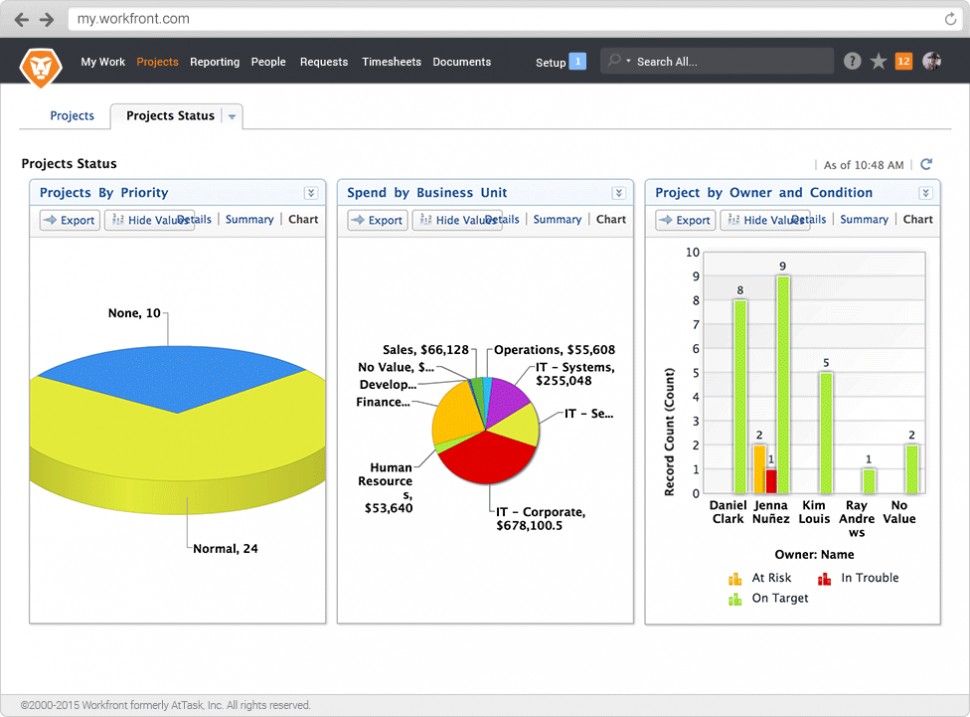
Project status view in Workfront
Industries that commonly use project management software include construction, large-scale manufacturing (e.g., aerospace), software development, high tech, marketing, research, and consulting or professional services. Help desk, quality control, and time tracking are additional uses for certain types of project management software.
A Comparison of Top Project Management Software
There are many popular project management software solutions on the market, and it can be hard to know what distinguishes one product from another and which is right for you. To help you better understand how the top project management systems stack up against one another, we created a series of side-by-side product comparison pages that break down the details of what each solution offers in terms of pricing, applications, ease of use, customer support, and more:
Top Asana Comparisons | Top Basecamp Comparisons | Top Evernote Comparisons |
Asana vs. JIRA Asana vs. Slack Asana vs. Smartsheet Asana vs. Wrike | Basecamp vs. Evernote Basecamp vs. Slack Basecamp vs. Smartsheet Basecamp vs. Wrike | Evernote vs. Basecamp Evernote vs. Slack Evernote vs. Trello |
Top JIRA Comparisons | Top Pivotal Tracker Comparisons | Top Slack Comparisons |
Slack vs. Asana Slack vs. Basecamp Slack vs. Evernote Slack vs. Trello Slack vs. Wrike | ||
Top Smartsheet Comparisons | Top Trello Comparisons |
|
Trello vs. Evernote Trello vs. Pivotal Tracker Trello vs. Slack Trello vs. Wrike |
Common Features of Project Management Software
Most systems allow the user to define the scope of the project; establish due dates; and create, track, and close essential tasks and deliverables. More complex project systems include strong project planning capabilities and the other features described below. | |
Multi-user interface | Since the purpose is to allow multiple users to monitor their own and others’ progress, a system will have logins for each user with personalized functionality, different types of permission settings, and ways to share and track relevant information between individuals. |
Scheduling | Most project management software systems include basic calendar functionality to allow users to schedule their projects. More advanced industry-specific solutions build on this, providing specialized intelligent support based on the known phases associated with a typical project. The number of project team members and complexity of resource management could determine which is the best project management system for your business. |
Document management | Another capability common to almost all solutions, this feature allows users to store documents in a central location, share them with the relevant parties, track changes, and manage different versions of the documents. |
Budgeting, expense, and time tracking | For many companies, particularly those tracking large one-off projects (e.g., construction, large manufacturing, professional services), each project must be individually budgeted, with time and/or expenses tracked. These companies will likely require a solution that incorporates such functionality. Doing so allows bids, budgets, expenses, and revenue to be directly connected to the projects they're associated with. |
Billing and invoicing | The next level up from budgeting and expense tracking, many products on the market also include full accounting functionality, allowing users the simplicity of using a single system for all functions related to the management and accounting of the project. |
Resource management allows project managers to account for and assign all resources a project will require. Resources can include both inventory and personnel. | |
Some of the more robust solutions provide the capability of identifying potential risks associated with projects or activities and raising flags to alert the relevant team members. | |
Customer management | For companies that consider each sale a task to be established, tracked, and closed, customer management can be a valuable addition to the standard capabilities. This moves into the realm of CRM software, in which leads can be tracked and connected to product deliverables. This capability can help track and improve sales cycles. |
Suited for companies looking to track the entire lifecycle (growth, maturity, and decline) of products, including planning, production, marketing, and management. Support for agile projects with kanban boards and project team scrum scheduling is also common. |
What Type of Buyer Are You?
Individuals. Since project management for an individual tends to be a far simpler endeavor, there are a number of low-cost solutions that provide basic project management capabilities such as scheduling, task management, Gantt charts, and file sharing.
Small businesses. Companies with more than a couple of employees will want a system that allows for team collaboration, but usually don’t want the added expense of advanced budgeting, invoicing, resource management, or advanced portfolio management features.
Development-oriented companies. This includes any business for which a single project, once complete, results in multiple sales (e.g., software) as distinct from single-project-single-sale businesses (e.g., construction). These companies will want strong collaborative capabilities—including robust document sharing, version control, and bug reports—possibly with resource allocation as well. These companies typically will not want invoicing, customer management, or other advanced features.
Large or specialty buyers. Construction is the best example of an industry that uses highly specialized project management systems, incorporating budgeting, inventory management, and many other features to manage the lifecycle of an entire project, from lead generation all the way through to final payment. Similar needs extend to other industries (e.g., custom IT solutions, large-scale manufacturing), each of which will have highly specialized solutions specific to that industry. Companies that manage concurrent, complex projects may want to explore project portfolio management (PPM) suites.
Key considerations when purchasing project management software
Project management software can be a useful tool for boosting team collaboration and tracking tasks effectively. However, its usefulness depends on how well it suits your business requirements. Below are some top considerations to keep in mind to avoid purchasing the wrong tool.
Collaboration for remote teams: The need for remote work is on the rise, and to effectively manage a remote workforce, you need a project management solution that supports remote team collaboration. Many project management tools come with built-in collaboration features, such as an interactive Kanban dashboard with task commenting and team chat channels with file sharing. Whether you have a small team managing a few projects remotely or a large team handling multiple projects, you need a project management tool that supports online team collaboration.
On-premise vs. cloud-based project management solution: A cloud-based project management tool typically comes with subscription-based pricing, and the vendor takes care of software maintenance and hosting. An on-premise solution, on the other hand, requires you to make a one-time software purchase. You then install the software on your computer and manage maintenance and updates on your own. If you have a low budget and few IT staff, a cloud-based tool could be your better choice. For an in-depth review of cloud-based systems, review our buyers guide for online project management software.
Availability of mobile applications: Many employees need access to their software in the field as well as the office. With a project management app, you can assign tasks to your team members, view the status of individual tasks, and track the overall project progress, even when you’re on the go.
Make sure to take your mobile needs and the availability of a mobile app into consideration when evaluating different systems. For information on products particularly suited to Mac devices, check out our Mac project management software guide.
Note: The application selected in this article is an example to show a feature in context and is not intended as an endorsement or recommendation. It was obtained from sources believed to be reliable at the time of publication.