


Best eLearning Authoring Tools Software of 2026
Updated March 25, 2026 at 5:31 AM

Written by Ashish Upadhyay
Writer

Edited by Parul Sharma
Editor
- FrontRunners
- Popular Comparisons
- Buyers Guide
Compare Products
Showing 1 - 25 of 268 products
Compare Products
Sort by
Reviews: Sorts listings by the number of user reviews we have published, greatest to least.
Average Rating: Sorts listings by overall star rating based on user reviews, highest to lowest.
Alphabetically (A-Z): Sorts listings by product name from A to Z.

Absorb LMS is a learning management system designed to help enterprises scale training programs. The platform caters to a wide r...Read more about Absorb LMS


Absorb LMS's Best Rated Features
See All
Absorb LMS's Worst Rated Features
See All

SkyPrep LMS is a cloud-based learning management solution that offers a platform to training administrators for creating, managi...Read more about SkyPrep

SkyPrep's Best Rated Features
See All
SkyPrep's Worst Rated Features
See All

Docebo Learning Platform is a digital solution designed to help organizations create, deliver, and manage training programs for ...Read more about Docebo
Docebo's Best Rated Features
See All
Docebo's Worst Rated Features
See All

Echo360 is a hybrid learning and engagement software designed to help businesses in corporate, education, public sector and othe...Read more about Echo360


Thinkific is an online course platform designed for creating, managing, and delivering learning products through a centralized s...Read more about Thinkific
Thinkific's Best Rated Features
See All
Thinkific's Worst Rated Features
See All

Microcasting’s Customer Experience and Learning Management (LMS) Platform helps growing companies deliver smarter training and s...Read more about Microcasting


WorkRamp, a Learning Pool company, is the Next Gen learning management system (LMS) that helps organizations manage employees, c...Read more about WorkRamp

WorkRamp's Best Rated Features
See All
WorkRamp's Worst Rated Features
See All

360Learning is a collaborative LMS tool that helps businesses author and conduct interactive learning experiences so learners ca...Read more about 360Learning
360Learning's Best Rated Features
See All
360Learning's Worst Rated Features
See All

ACI Learning delivers hands-on IT and cybersecurity training built for real-world results. Our outcome-driven approach equips le...Read more about ACI Learning
ACI Learning's Best Rated Features
See All
ACI Learning's Worst Rated Features
See All

CYPHER Learning exists to give learners the power to succeed in a rapidly changing world. Trainers, learning and development (L&...Read more about CYPHER Learning
CYPHER Learning's Best Rated Features
See All
CYPHER Learning's Worst Rated Features
See All

LearnUpon is a learning management system (LMS) designed to provide a streamlined and engaging learning experience for diverse a...Read more about LearnUpon
LearnUpon's Best Rated Features
See All
LearnUpon's Worst Rated Features
See All

Transform employee learning into measurable business impact: Learning Pool Platform is an intelligent, data-powered learning ec...Read more about Learning Pool Platform

Empower your workforce or RTO with Cloud Assess, the assessment-first training and compliance platform purpose-built for high-pe...Read more about Cloud Assess


Cloud Assess's Best Rated Features
See All
Cloud Assess's Worst Rated Features
See All

dominKnow provides enterprise course authoring and management software to deliver responsive, re-usable, and interactive eLearni...Read more about dominKnow | ONE


Cornerstone LMS is a learning management system that helps organizations across various industries, including businesses, health...Read more about Cornerstone LMS


Cornerstone LMS's Best Rated Features
See All
Cornerstone LMS's Worst Rated Features
See All

"Articulate 360 is the #1 e-learning platform for creating workplace training. It’s one subscription that empowers you to: - Get...Read more about Articulate 360
Articulate 360's Best Rated Features
See All
Articulate 360's Worst Rated Features
See All

Teachlr Organizations is a cloud-based learning management solution designed for businesses of all sizes, from small startups to...Read more about Teachlr Organizations
Teachlr Organizations's Best Rated Features
See All
Teachlr Organizations's Worst Rated Features
See All

Easygenerator is a cloud-based e-learning authoring solution. The tool allows users to create e-learning courses from scratch wi...Read more about Easygenerator


Easygenerator's Best Rated Features
See All
Easygenerator's Worst Rated Features
See All

LearnWorlds is a learning management system (LMS) designed for organizations and creators who want to run online learning as a s...Read more about LearnWorlds

LearnWorlds's Best Rated Features
See All
LearnWorlds's Worst Rated Features
See All

GoSkills is an award-winning online learning platform that helps organizations deliver engaging, personalized training with ease...Read more about GoSkills
GoSkills's Best Rated Features
See All
GoSkills's Worst Rated Features
See All

Continu is a modern learning management system (LMS) designed for mid to large-scale organizations. The platform is built to cen...Read more about Continu
Continu's Best Rated Features
See All
Continu's Worst Rated Features
See All

Transform your organization's learning experience with Tovuti LMS, the all-in-one learning platform that makes training effortle...Read more about Tovuti

Tovuti's Best Rated Features
See All
Tovuti's Worst Rated Features
See All

evolCampus is a cloud-based learning management system that helps enterprises and educational institutions create custom courses...Read more about evolCampus

evolCampus's Best Rated Features
See All
evolCampus's Worst Rated Features
See All

Bites is a training platform designed to boost productivity through engaging, bite-sized learning. The platform is suitable for ...Read more about Bites

Bites's Best Rated Features
See All
Bites's Worst Rated Features
See All

Eurekos is a learning management system (LMS) designed for training customers and partners. The platform provides an onboarding ...Read more about Eurekos
Eurekos's Best Rated Features
See All
Eurekos's Worst Rated Features
See All
Popular Comparisons



Your Guide to Top eLearning Authoring Tools Software, June 2025
Software Advice uses reviews from real software users to highlight the top-rated eLearning Authoring Tools products in North America.
Learn how products are chosenExplore FrontRunners


“Usability” includes user ratings for Functionality and Ease of Use.
“Customer Satisfaction” includes user ratings for Customer Support, Likelihood to Recommend and Value for Money.
Reviews analysis period: The reviews analysis period spans two years and ends the 15th of the month prior to publication.

Buyers Guide
This detailed guide will help you find and buy the right e-learning authoring software for you and your business.
Last Updated on April 24, 2025E-learning software, also known as e-learning authoring software, is a subset of learning management system (LMS) software that enables users to develop and deliver customized training courses. The term “e-learning” most commonly refers to online distance learning, but also applies to other educational contexts such as employee training or online certification classes in which software and computers are used more than pen and paper.
E-learning software is primarily used for digital course creation. The tool is used in traditional educational settings, such as schools and universities, as well as workplace settings, to create both external and internal educational resources. In this guide, we’ll cover:
What is e-learning software?
E-learning software or e-learning authoring software is used in a virtual classroom to facilitate online education. Its other use includes conducting corporate training. The primary purpose of e-learning tools is to author, or create, educational assets. With this type of software, trainers and educators can:
Combine and arrange disparate media (text, video, presentations) into comprehensive, logically sequenced e-learning assets and courses.
Add animations and customized response cues to facilitate learner engagement with e-learning course material.
Safely store e-learning assets for future editing and reapplication with new learning initiatives.
Publish completed e-learning courses in a variety of compatible formats.
There are other, related types of software that manage different aspects of e-learning. For example, broader learning management systems (LMSs) automate the administration, testing, tracking, and reporting of learner progress through online courses. E-learning software has a narrower scope: It provides the tools needed to create those online courses in the first place.
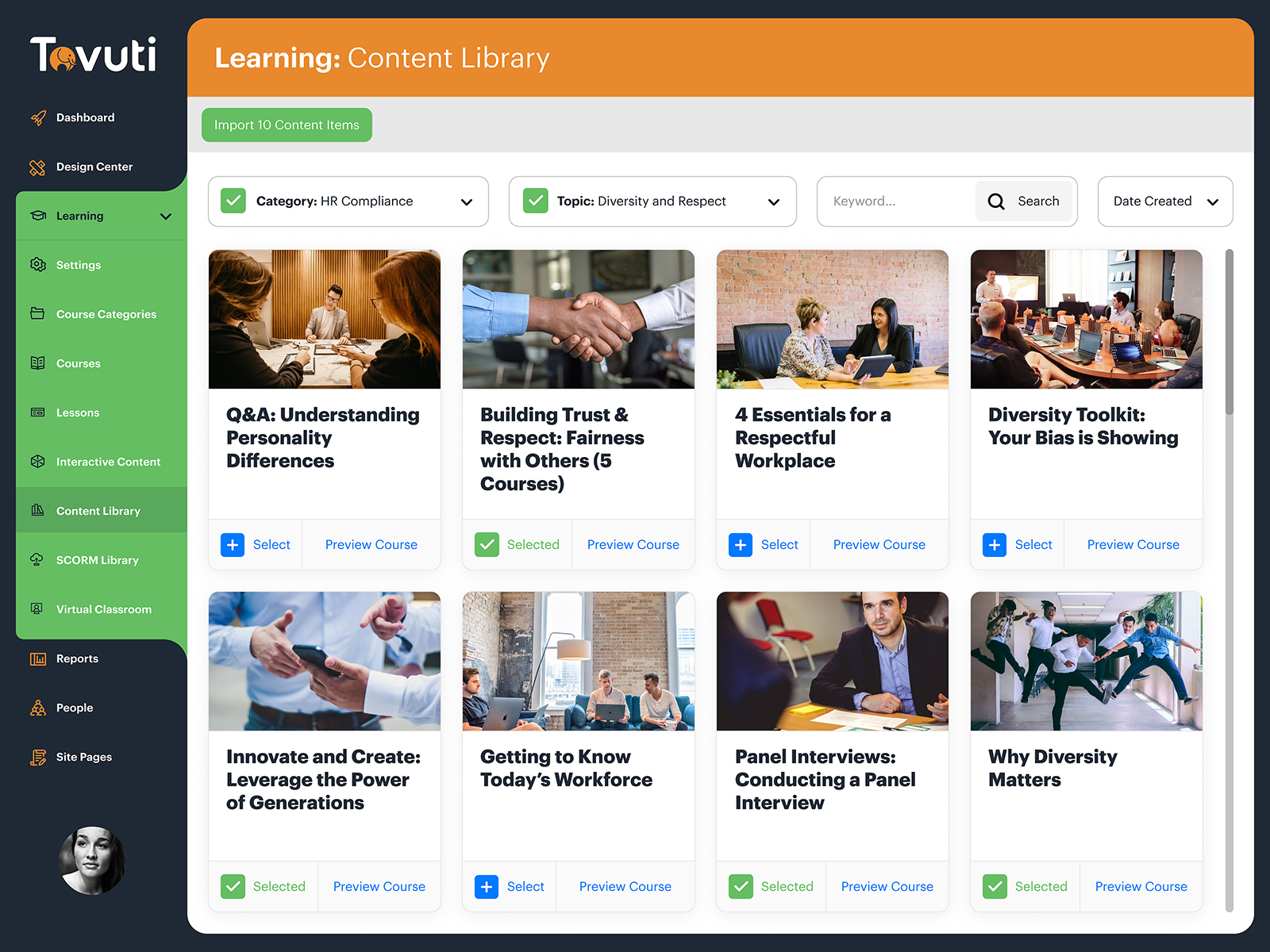
Accessing a content library in Tovuti (Source)
Common features of e-learning software
E-learning platforms are used to create a wide variety of educational and training materials for use in many industries, both in the public and private sectors. Due to this, the e-learning software landscape includes a large selection of applications.
As a software buyer, choosing among such a large selection of e-learning vendors can be a challenge. To help you understand the choices available, here is a list of applications included in many e-learning tools:
Templates | Provide pre-configured models for different types of e-learning materials and training content, such as lessons or quizzes. This makes it easier for users to create learning content since it doesn’t need to be designed from scratch. |
Multimedia tools | Allow users to upload and integrate multimedia files (i.e., videos and images) into e-learning resources, as well as do basic editing on learning content. |
SCORM-compliance | SCORM is a set of technical standards that e-learning solutions must follow. Products with SCORM support help users create materials that can be combined and integrated with any other SCORM-compliant materials. |
Testing tools | Allow users to add quizzes, tests, and exams to e-learning courses, which can be used to track or determine student progress. |
Customization tools | Help users create e-learning resources that match the look and feel of their company’s digital assets (such as its website). |
Storyline editing | E-learning courses often progress much like stories, with a linear beginning and end. Storyline editing functions let authors mix, match, and rearrange e-learning components to create an articulate storyline. |
Interaction tools | Let authors add elements that students will interact with during a lesson or course. Interactions can include free-form text entry, picture selection, or simple mouse clicks. |
What type of buyer are you?
Depending on what type of buyer you are, different types of systems may be better for your needs.
Corporate Buyer: From training new employees to helping old employees learn new policies and processes, e-learning software is used very often in the business world. Corporate buyers typically look for e-learning platforms and authoring tools that can integrate with the software used by their human resources (HR) department.
Alternatively, there are HR platforms that offer e-learning applications either out of the box or as add-on applications.
Educational institution buyer: Schools, colleges, and universities are increasingly offering e-learning courses to their traditional, remote, and continuing education students. There are e-learning software platforms that address the needs of each of these use cases, including applications for creating age-appropriate materials and review lessons as well as for automating student progression across an online course.
Public sector buyer: Government agencies use e-learning software to create courses to train and assist both employees and members of the public. Some government agencies have mandatory training requirements; many e-learning tools learning management systems include functionality—such as security and privacy protection measures—to ensure the training is presented and completed according to regulations.
For more assistance with your search, please contact our software advisors. They can explain the options available to you, help you create a shortlist of products to learn more about, and ensure your search for e-learning software gets started on the right foot.
Benefits of e-learning software
An e-learning authoring tool can offer a lot of benefits to users looking for the right educational tool for their students or employees.
Increases cost-effectiveness: E-learning is significantly cost-effective when compared to traditional on-site training. Since an e-learning tool offers online modules, students and employees can revisit any module and watch recorded sessions. This trumps the need to rehire training instructors, should your team need multiple sessions.
Additionally, with an e-learning tool, the cost of printing training material is eliminated due to the online nature of the training.
Increases learner engagement: E-learning tools are interactive and offer a better learning experience than traditional in-person training. Many offline courses struggle to retain students through the length of the course but with e-learning tools, organizers can create engaging multimedia content that is intuitive and makes students stick with the program.
To further attract learners, there’s greater scope for users to customize modules to suit the requirements of their learners.
Improves productivity and performance: Unlike instructor-led training, an e-learning authoring tool allows learners to train at their own pace. With such flexibility, learners finish courses faster and achieve better results.
Finally, with an e-learning authoring tool, it is easier to assess student performance, track their progress, and provide insights for improvement.
Key considerations
While there are many options to choose from, when you’re investing in an e-learning platform, there are some considerations to keep in mind before making the final decision.
Price and hidden costs: When looking at options, make sure to check the kind of features a tool offers and whether there are any hidden costs involved for specific features, upgrades, and licenses.
Ease of use for learners: The e-learning tool that you choose must be intuitive and shouldn’t confuse the learner when they use it for training and lessons. And if the platform comes with training support, that’s an added advantage.
Integration support: For schools and universities, e-learning tools that integrate with their student information system (SIS) or other LMS tools are favorable. In the absence of integration support, tracking learner progress can become challenging.
Deployment options: Is the tool cloud-based or does it only offer on-premise deployment? That can be a crucial factor in deciding which tool to invest in. Ideally, an e-learning tool should be cloud-based so that learners can access their modules and lessons from anywhere without hassle.
Note: The application selected in this article is an example to show a feature in context and is not intended as an endorsement or recommendation. It has been obtained from sources believed to be reliable at the time of publication.