


Best Service Dispatch Software of 2026
Updated December 12, 2025 at 9:20 AM

Written by Giorgia Pisano
Content Associate

Edited by Kathryn Todd
Senior Editor

Reviewed by Jakub Vaughn
Senior Advisor

Talk with us for a free 15-min consultation
Expert advisors like Jacqueline, who have helped 1,000+ companies, can find the right software for your needs.
- All Software
- Top Software
- Buyer's Guide
- Frequently Asked Questions
- Popular Comparisons
Service dispatch software simplifies scheduling, routing, and communication for field service teams. With an ever-expanding industry and a vast list of 340+ products on Software Advice, picking the right tool can be tricky. To guide you through, I’ve drawn on our software advisors’ expertise in curating the top picks. See the list below or read the buyer’s guide for more information.
Service Dispatch Software
Sort by
Reviews: Sorts listings by the number of user reviews we have published, greatest to least.
Average Rating: Sorts listings by overall star rating based on user reviews, highest to lowest.
Alphabetically (A-Z): Sorts listings by product name from A to Z.

AllyPro is a complete web-based solution designed for the portable sanitation and service industries. It was built to provide a ...Read more about AllyPro
No reviews yet
recommendations


Housecall Pro is a business solution for home service professionals. Available on web and mobile, Housecall Pro helps home servi...Read more about Housecall Pro


Housecall Pro's Best Rated Features
See All
Housecall Pro's Worst Rated Features
See All

FieldAware by GPS Insight is a field service management software made specifically for businesses who have a mobile workforce an...Read more about FieldAware


Salesforce Service Cloud is a customer service platform designed to support organizations in managing interactions across multip...Read more about Salesforce Service Cloud

Salesforce Service Cloud's Best Rated Features
See All
Salesforce Service Cloud's Worst Rated Features
See All

Simpro is a field service management solution designed for trade and field service businesses. It streamlines operational workfl...Read more about Simpro

Simpro's Best Rated Features
See All
Simpro's Worst Rated Features
See All
Best Service Dispatch Software for 2025

(5012)

(2736)

(323)

(1289)

(208)

(403)

(339)

(386)

(1420)

(289)
Highest Rated

Connecteam

Among the most popular service dispatch software, Connecteam has the highest overall rating on Software Advice.
Connecteam is an employee management software application offering features including scheduling, payroll, operations, task management, and communications tools. The software also includes a logistics tracking system for dispatching trucks and employees. Our reviewers have given the software an average rating of 4.7 out of 5 stars. Reviewers cite Connecteam’s simplicity and ease of use, customer support, and frequent updates as benefits of the software.
- Reviewers Perspective
“Team members find it intuitive and our Admin team enjoy having so many functions all in one place.”
DTDevin Torres
Director of Operations
Used for 1-2 years
We analyzed 343 verified user reviews for Connecteam to find out what actual users really think.
Employee management
Users appreciate Connecteam for its comprehensive employee management capabilities, including time tracking and payroll management. They find the mobile app particularly useful for managing employees on the go and simplifying tasks such as shift scheduling and expense reporting. Additionally, users highlight the ease of processing payroll, which significantly reduces the time and effort required for payroll operations.Employee time clock
Users benefit from Connecteam's employee clock features, noting the ease of clocking in and out and the functionality of the time clock. They particularly appreciate the geolocation feature, which ensures employees are on-site when clocking in. Additionally, the integration of the time clock with shift scheduling helps users accurately track hours and manage projects efficiently.Team management
Users find Connecteam effective for team management, praising its intuitive interface and the availability of various functions in one place. They appreciate the constant improvements and the support team's readiness to assist with any issues. Moreover, users value the collaborative environment it fosters, making it easier to keep distributed teams informed and engaged. - Key FeaturesConnecteam's scoreCategory average
Mobile Access
4.664.35 category average
Scheduling
4.654.55 category average
Service History
4.454.44 category average
- Screenshots


Best for Cleaning Services

Among the most popular service dispatch platforms, Housecall Pro is the most requested by users in cleaning services.
Housecall Pro is a software for home services businesses in a wide range of fields, from cleaning and pest control to HVAC and plumbing. For cleaning services, the platform offers features including scheduling for recurring jobs, job history tracking, client self service, and more. Housecall Pro is a good fit for small to medium size cleaning service companies that need a comprehensive tech solution.
- Reviewers Perspective
“Housecall Pro is an amazing program that allows our service team members to be scheduled and on track.”
JRJohn Ross
Energy Consultant
Used for 1-2 years
We analyzed 2,807 verified user reviews for Housecall Pro to find out what actual users really think.
Customer service
Users appreciate the customer service features in Housecall Pro, which enhance communication and organization. They find it beneficial to track customer information, manage bookings, and communicate directly with customers through the app. Additionally, users value the ability to customize customer profiles and maintain a comprehensive customer database, which helps in providing professional service.Scheduling
Users find Housecall Pro's scheduling capabilities efficient and customizable, allowing them to manage jobs and employee schedules effectively. They appreciate the ability to plan routes, track field technicians, and view all open jobs in one place, which enhances overall organization. Additionally, users value the flexibility to schedule jobs from various locations and the convenience of mobile access for scheduling tasks on the go.Customer notifications
Users appreciate the customer notification features in Housecall Pro, which keep customers informed about appointments and job statuses. They find the automatic text and email reminders professional and helpful in maintaining communication with customers. Additionally, users highlight the customization options for notifications, which allow them to tailor messages to their specific needs and improve customer satisfaction. - Key FeaturesHousecall Pro's scoreCategory average
Mobile Access
4.204.35 category average
Scheduling
4.474.55 category average
Service History
4.394.44 category average
- Screenshots


Best for HVAC Services

ServiceTitan

Among the most popular service dispatch software, ServiceTitan is the most requested by users in the HVAC industry.
ServiceTitan is a software application for contractor businesses that service both residential and commercial buildings within multiple trades—including HVAC. ServiceTitan can help HVAC companies draft proposals, perform costing and estimating, define service agreements, and grow the business with dedicated reports and insights. The software includes a dispatch board for scheduling, tracking, and communicating with technicians.
- Reviewers Perspective
“ServiceTitan has more features and capability of anything else out there for the home services industry.”
AHAmy Hart
Owner and General Manager
Used for 2+ years
We analyzed 263 verified user reviews for ServiceTitan to find out what actual users really think.
Customer support
Users appreciate ServiceTitan's customer support for its responsiveness and willingness to listen to customer feedback. They find the customer service team helpful in addressing issues and making the software easier to use. Additionally, users value the company's commitment to continually improving the product based on customer suggestions.Functionality
Reviewers highlight ServiceTitan's comprehensive features and cutting-edge technology tailored for the home services industry. They appreciate the software's ability to provide detailed insights into business operations and its role in modernizing service-related businesses. Users also commend the excellent customer service that supports their use of the software.Technician tools
Users value ServiceTitan's technician tools for improving scheduling and empowering technicians in the field. They find the technician-driven software provides essential tools for estimating, selling, and repairing. Additionally, users praise the technical support team for their knowledge and responsiveness, which enhances the overall experience. - Key FeaturesServiceTitan's scoreCategory average
Mobile Access
4.064.35 category average
Scheduling
4.244.55 category average
Service History
4.294.44 category average
- Screenshots


Best Free

Odoo

Among the most popular service dispatch software, Odoo is the most popular solution with a free plan.
Odoo is a business management software suite for customer relationship management (CRM) and enterprise resource planning (ERP). The software includes a dispatch management system for assigning products to delivery trucks and tracking the vehicles’ location. The Odoo code base is open-source, and customers on the free plan can select a single application (e.g., sales, marketing, CRM, accounting.) with unlimited users.
- Reviewers Perspective
“For SME business, Odoo offers very good value, excellent functionality across a multitude of useful apps and the support is professional and unparalleled.”
ASAshley Schep
Accountant
Used for 2+ years
We analyzed 1,156 verified user reviews for Odoo to find out what actual users really think.
Customization
Users find Odoo's platform highly customizable, allowing them to tailor the system to their specific business needs. They appreciate the ease of customization and the flexibility it offers, making it suitable for various industries and requirements. Additionally, users highlight the intuitive user interface and the extensive features available out of the box, which enhance their overall experience.Modularity
Users value the wide range of modules available in Odoo, which cater to different business areas and management needs. They find the comprehensive and customizable modules effective in streamlining business operations and improving efficiency. Furthermore, users appreciate the ability to create their own modules, which allows for greater flexibility and adaptability to their specific requirements.ERP solutions
Users find Odoo to be a comprehensive and cost-effective ERP solution that integrates various business processes seamlessly. They appreciate the extensive range of ERP features, which help them manage and optimize their operations efficiently. Additionally, users highlight the affordability of Odoo compared to other ERP systems, making it an attractive option for businesses of all sizes. - Key FeaturesOdoo 's scoreCategory average
Mobile Access
4.154.35 category average
Scheduling
4.114.55 category average
Service History
3.334.44 category average
- Screenshots


Most Affordable

GoCanvas

Among the most popular service dispatch software, GoCanvas offers the lowest-priced paid plan.
GoCanvas is a cloud-based platform for field operations and jobsite inspections that helps small and midsize businesses digitize their workflows. The software allows users to build custom input forms, schedule and dispatch workers, capture images and videos, track GPS locations and more. GoCanvas pricing starts at $49 per user per month, with a minimum of three users, which gives access to most of the platform’s functionality.
- Reviewers Perspective
“GoCanvas is an amazing tool, easy to use, and very easy to customise, our integration was smooth.”
CACan Akgün
General Manager
Used for 2+ years
We analyzed 205 verified user reviews for GoCanvas to find out what actual users really think.
Mobile forms
Users appreciate GoCanvas for its mobile form creation capabilities, which allow them to fill out forms on various mobile devices. They find the platform compatible with both Android and iOS, making it convenient for on-the-go access and quick form completion. The ease of use on mobile devices is particularly beneficial for those needing to manage forms outside the office.Customization
Users value the customizability of GoCanvas, noting that it allows them to tailor forms and apps to meet specific needs. They appreciate the ability to personalize documents and reports, enhancing the software's flexibility for various industries. The platform's ease of use in creating and customizing apps is frequently highlighted as a significant advantage.Paperless documentation
Users are pleased with GoCanvas's ability to facilitate paperless documentation, reducing the need for physical paperwork. They find the transition to digital forms beneficial for improving tracking, data storage, and overall efficiency. The reduction in paperwork is particularly advantageous for businesses looking to streamline their processes and minimize waste. - Key FeaturesGoCanvas's scoreCategory average
Mobile Access
4.204.35 category average
Scheduling
3.504.55 category average
Service History
2.604.44 category average
- Screenshots


Best Value for Money

FieldPulse

Among the most popular service dispatch software, FieldPulse has the highest rating for value for money.
FieldPulse is a field service management software designed for small to midsize service companies. The platform comes with features for scheduling and dispatching service teams, with GPS tracking that enables real-time updates in the field. While FieldPulse pricing information is not publicly available, our reviewers have given it an average rating of 4.7 out of 5 stars when it comes to value for money, making it a leader in this category.
- Reviewers Perspective
“It keeps us organized, as well as providing very good communication between our customers and our team!”
JSJoshua Smith
CEO
Used for 2+ years
We analyzed 147 verified user reviews for FieldPulse to find out what actual users really think.
Customer management
Users appreciate FieldPulse's built-in communication tools, which allow them to maintain constant contact with clients and provide real-time updates. They find the centralized customer management system beneficial for organizing different types of work and customer records in one place.Customer support
Users find the chat feature in FieldPulse extremely useful for obtaining quick answers and support. They appreciate the prompt responses from the customer success specialists, who are always ready to assist with any inquiries. Reviewers also value the kindness and helpfulness of the customer success specialists, which enhances their overall experience with the product.Invoicing and estimates
Users like FieldPulse's features for tracking estimates and invoices, as well as the ability to send them via email and text. They appreciate the integration with QuickBooks, which streamlines the process of updating tickets, invoicing clients, and collecting payments. Additionally, reviewers find the combination of scheduling, customer tracking, and invoicing in one place makes their day-to-day operations more efficient. - Key FeaturesFieldPulse's scoreCategory average
Mobile Access
4.494.35 category average
Scheduling
4.644.55 category average
Service History
4.514.44 category average
- Screenshots


Best Ease of Use

ServiceTrade

Among the most popular service dispatch software, ServiceTrade has the highest rating for ease of use.
ServiceTrade is a field service management software for commercial contractors in HVAC, mechanical, and fire. The software is intended for a wide range of users, including office workers performing scheduling and dispatching, technicians using the mobile app in the field, and managers gaining data-driven insights. Our reviewers have scored ServiceTrade 4.5 out of 5 stars in the “ease of use” category, citing the software’s user-friendly interface and integration with mobile devices.
- Reviewers Perspective
“It has made our day to day service operations a lot easier and more productive.”
BSBilly Strong
Director of Service
Used for 2+ years
We analyzed 328 verified user reviews for ServiceTrade to find out what actual users really think.
Customer service
Users appreciate ServiceTrade's quoting features, which streamline the process and enhance customer communication. They find it easy to keep track of customer information and ensure timely completion of work, improving overall service quality. Additionally, users value the ability to provide customers with access to their information and the responsive customer support that listens to their needs.Scheduling
Users find ServiceTrade's scheduling tools highly effective for managing technicians and jobs. They appreciate the intuitive and fast scheduling process, which simplifies planning and improves efficiency. Additionally, users highlight the visual scheduling feature and the ease of scheduling multiple technicians for various stops, making daily operations smoother.Information access
Users benefit from ServiceTrade's efficient information storage and sharing capabilities, which enhance collaboration between technicians and office staff. They appreciate the real-time information sharing that eliminates friction and improves service delivery. Furthermore, users value the comprehensive training resources available, which help them quickly adapt to the software and utilize its features effectively. - Key FeaturesServiceTrade's scoreCategory average
Mobile Access
4.324.35 category average
Scheduling
4.554.55 category average
Service History
4.644.44 category average
- Screenshots


Best Customer Service

Kickserv

Among the most popular service dispatch software, Kickserv has the highest rating for customer service.
Kickserv is a field service management software platform intended for small businesses in the home services industry, with a dispatch map and timeline for scheduling and viewing the status of technicians. The software offers customer support via phone and email, and a knowledge center provides answers to common questions. With an average of 4.4 out of 5 stars for customer service, Kickserv has received top marks from our reviewers in this category.
- Reviewers Perspective
“The ease of use and the ability to make adjustments and changes on the fly have increased our productivity and our profitability as well as our customer service.”
TSTed Sullivan
President
Used for 2+ years
We analyzed 378 verified user reviews for Kickserv to find out what actual users really think.
Customer management
Users find the customer database and search options useful for managing contact information and accessing customer details quickly. Additionally, users enjoy the ease of use and customization options available in the customer portal, which enhance their overall experience.Scheduling
Users find Kickserv's scheduling features easy to use, allowing them to manage and organize tasks efficiently. They appreciate the mobile app integration, which enables them to view and update schedules on multiple devices. Additionally, users highlight the color-coded job types and real-time updates as beneficial for keeping track of technicians and job statuses.Employee management
Users benefit from Kickserv's ability to track employees and assign jobs, which helps streamline business operations. They find it useful for keeping office and field workers on the same page, ensuring everyone is informed and coordinated. Additionally, users appreciate the customer support provided by Kickserv, which enhances their overall experience with the software. - Key FeaturesKickserv's scoreCategory average
Mobile Access
4.274.35 category average
Scheduling
4.604.55 category average
Service History
4.804.44 category average
- Screenshots


Best Functionality

Jobber

Among the most popular service dispatch software, Jobber has the highest rating for functionality.
Jobber is a software platform that helps small to midsize home and commercial service businesses with scheduling and dispatching, client management, customer communications, quoting, invoicing, reporting and more. The software includes a drag-and-drop calendar, job forms and instructions for technicians to follow, text messages informing customers of an upcoming visit, and GPS vehicle tracking. Our reviewers have rated Jobber 4.2 out of 5 stars for its functionality, setting it apart in this category.
- Reviewers Perspective
“It's become an essential tool for us, allowing us to easily manage scheduling, reminders, and online bookings. Plus, it's made a noticeable difference in keeping our business organized and running smoothly.”
CECarlos Eder Lima
Owner
Used for 6-12 months
We analyzed 855 verified user reviews for Jobber to find out what actual users really think.
Invoicing and quoting
Users appreciate Jobber's seamless job-to-invoice flow, which simplifies the entire process from quote to payment. They find the mobile app functionality particularly useful for creating and sending professional invoices on the go. Additionally, automated invoice follow-ups and the ability to attach documentation and photos enhance the overall efficiency and professionalism of their invoicing system.Customer service
Users value Jobber's customer service, highlighting the efficient management of customer information and the helpful support team. They find the ability to attach notes to customer profiles and jobs beneficial for personalized service. Moreover, the integration of contact forms into websites and the quick response from customer support contribute to a smoother business operation.Scheduling
Users find Jobber's scheduling features highly effective for managing both employee and task schedules. They appreciate the ease of scheduling, which helps keep their business organized and their staff on the same page. The platform's ability to track time and manage appointments efficiently is particularly beneficial for businesses with dynamic schedules. - Key FeaturesJobber's scoreCategory average
Mobile Access
4.434.35 category average
Scheduling
4.644.55 category average
Service History
4.344.44 category average
- Screenshots


Best for Mobile Access


Among the most popular service dispatch software, Service Fusion is the most requested by users seeking mobile access.
Service Fusion is a field service management software platform that helps companies in industries such as HVAC, plumbing, electrical, appliances, and locksmiths. The software offers a mobile app for Android and iOS devices, improving visibility and communication between field technicians and office workers. Businesses that care about mobile access can use the Service Fusion app to set job progress and status, send messages to clients, view equipment catalogs and more.
- Reviewers Perspective
“I like the ability to schedule workers, schedule payment notifications, and do job costing all from the same place.”
HHHannah Havemann
Assistant to CEO
Used for 2+ years
We analyzed 247 verified user reviews for Service Fusion to find out what actual users really think.
Training and learning
Users appreciate the training videos and initial training provided by Service Fusion, which help them understand the software's capabilities. They find the learning curve manageable, especially with the support of helpful videos and responsive tech support. Many users continue to discover new features and functionalities, enhancing their overall experience with the software.Scheduling
Users value Service Fusion's scheduling management features, highlighting the ease of scheduling appointments and jobs. They find the calendar sync and live information particularly useful for accurate scheduling and dispatching. The ability to manage scheduling, billing, and communication from a single platform is a significant advantage for many users.Field service management
Users appreciate Service Fusion's comprehensive field service management capabilities, which cater to various industry-specific needs. They find the field app functionality beneficial for managing tasks on the go, although some mention the need for a reliable connection. Overall, users feel more organized and efficient using Service Fusion for their field service operations. - Key FeaturesService Fusion's scoreCategory average
Mobile Access
4.054.35 category average
Scheduling
4.374.55 category average
Service History
4.074.44 category average
- Screenshots


Methodology
The research for the best service dispatch software list was conducted in October 2024. We evaluated data (user reviews and demand signals) from the past 24 months as of the research date. Read the complete methodology.
Popular Service Dispatch Comparisons


Buyer's Guide
This detailed guide will help you find and buy the right service dispatch software for you and your business.
Last Updated on February 04, 2025Here's what we'll cover:
What is service dispatch software?
Who uses service dispatch software?
Features of service dispatch software
How to choose the right service dispatch software
Service dispatch software essentials
Dispatching is a crucial function of field service management (FSM) software—so much so that some products focus exclusively in this one area. These systems typically include features for route planning, scheduling services, and managing work orders, among other dispatching-specific activities.
Field service management tools, such as service order software, are typically priced on a per-month basis, starting at $119 for entry-level systems for one to 10 users. [1] High-end platforms (20+ users) can cost upwards of $450 and often include premium support services and in-house or outsourced IT consultants. Be aware, however, that businesses often overestimate the number of users they will need, which can drive up estimated costs.
First-time buyers should consider their budget, the number of users needed, specific use cases, and necessary integrations. Consulting stakeholders to determine key questions for vendors can help you find the best system. Questions for vendors may include:
Does the tool have a free trial or demo version I can try out first?
What does inventory tracking look like in your product?
How does your product integrate with other maintenance tools?
Because there are 27 different service dispatch vendors on Software Advice, choosing the right option can be a long process. In this guide, you’ll learn the essential components of service dispatch tools and get step-by-step guidance on how to choose the right system for your company. If you’d prefer to contact one of our experienced field service software advisors, such as Jakub Vaughn—who has led buyers to the right software for over two years—schedule a call or start a chat with us.
What is service dispatch software?
Dispatch scheduling systems perform the crucial functions associated with sending technicians into the field to solve customer support issues that can’t be handled remotely. This covers a myriad of industries including construction, plumbing, HVAC, carpet cleaning, home and mobile auto repair, among others. Using technology that’s specifically designed for this purpose can result in massive improvements in scheduling efficiency and customer satisfaction, reducing costs and increasing the bottom line.
When shopping for service dispatch software, you’ll want to clarify who will be using your system and what permissions those individual users should have. “Whenever we address the topic of users in the field service market,” explains Vaughn, “buyers tend to say, ‘There are only a couple people we’ll designate as dispatchers.’ But in the field service market, there are office or admin users and field users. An office or admin user has the ability to make the schedule and assign work orders to scheduled events, whereas field users can view the schedule, close out those work orders, and things like that.”
This matters because different user permissions can have different price tags in service dispatch software. “There's one system that charges about $125 per admin user per month, which would be an office user, and then field users are only like $20 or something per field user per month. So I usually like to educate the buyer on what you consider an admin or office user and what you consider a field user.”
Who uses service dispatch software?
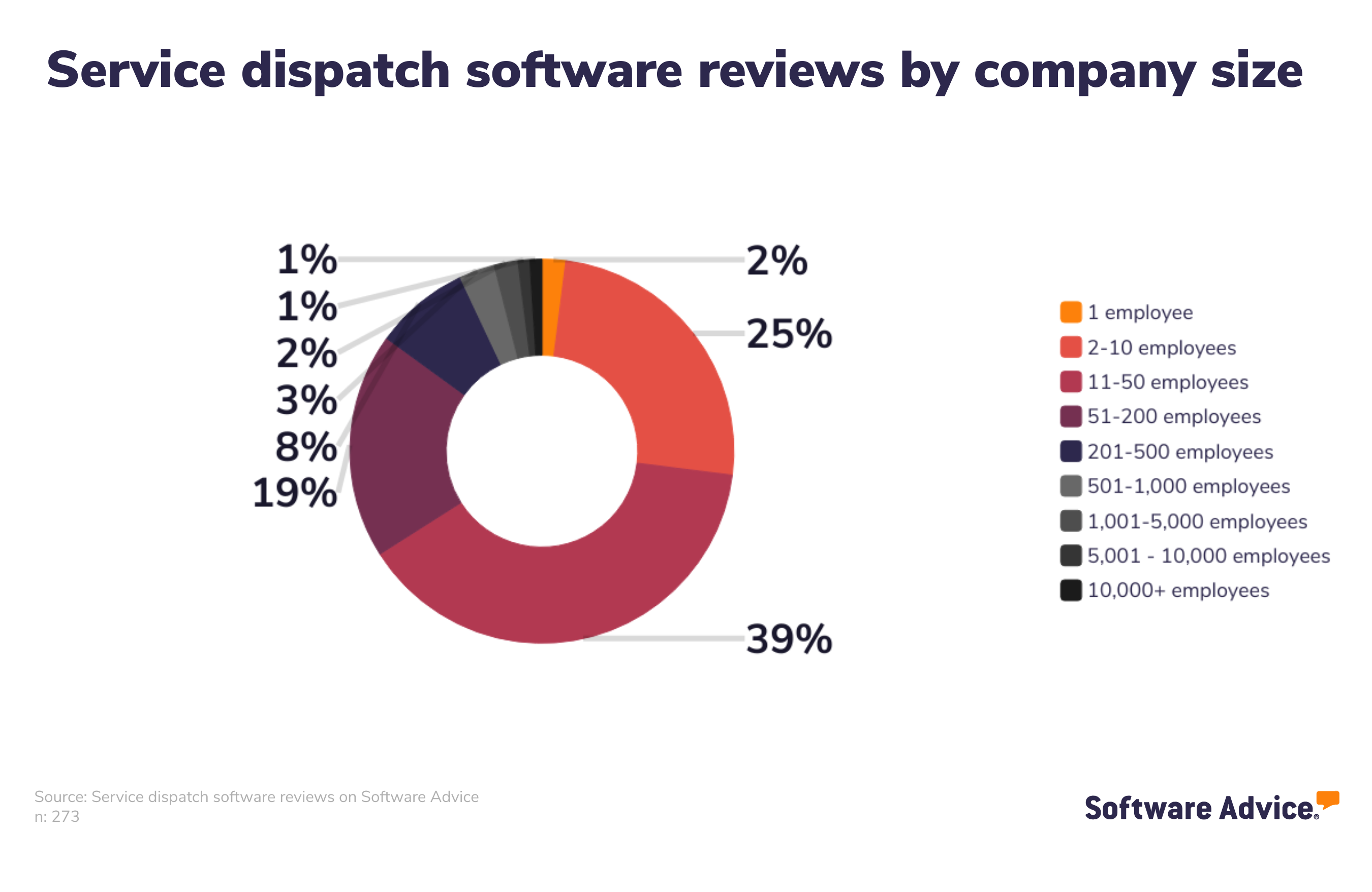
We analyzed our collection of service dispatch software reviews and found that a wide variety of industries use this type of software, including construction, consumer services, transportation/trucking/railroad, and information technology and some services such as home and auto repair. [2] Fifty-eight percent of those reviews come from small to midsize businesses having 11-200 employees, and 15% of buyers are from enterprise-grade companies with over 200 employees.
Features of service dispatch software
All service dispatch software includes scheduling, dispatch management, and technician management features. Most share a variety of common features such as alerts/notifications, billing and invoicing, customer database, electronic signature, and job management features.
Core service dispatch software features
Feature | Description |
|---|---|
Scheduling | Plan availability and assign specific time slots for tasks and resources. 91% of service dispatch software users we spoke to rate this feature as critical or highly important. |
Dispatch management | Manage sending personnel and resources to a site as needed. |
Technician management | Oversee technicians and track their assigned work orders. |
Common service dispatch software features
Feature | Description |
|---|---|
Mobile access | Access software remotely via mobile devices. 91% of work order software users we spoke to rate this feature as critical or highly important. |
Billing and invoicing | Create, manage, and send invoices or bills to customers. 83% of work order software users we spoke to rate this feature as critical or highly important. |
Alerts/notifications | Alerts or notifications of various types such as pop-up messages, sounds, banners, or badges. |
Customer database | A collection of customer information such as contact details, demographics, previous interactions, etc. |
Electronic signature | Digitally sign online documents. |
GPS | System to support the positioning, navigation, and timing (PNT) measurements of an object or individual. |
Job management | Manage and track all job information and associated tasks. |
Job tracking | Track and visualize the status of an ongoing job and the time spent on tasks or projects. |
Maintenance scheduling | Schedule predetermined or ad hoc maintenance services and labor requests. |
Quotes/estimates | Generate quotes or estimates for customers. |
Real-time updates | Receive system updates as soon as any changes are made. |
Reporting and statistics | Collection, analysis, and representation of numerical data and generation of reports to understand various patterns. |
Routing | Plan daily routes to optimize employee scheduling and provide directions. |
Third-party integrations | Set up connections to third-party platforms to improve business processes. |
Work order management | Creating, assign, and track jobs and/or tasks for work orders. |
Common service dispatch software integrations
A full field dispatcher software suite will almost always integrate service dispatch solutions with other essential functions, including help desk, contract management, forecasting and reporting, equipment tracking, failure analysis, accounting, and more. As Vaughn points out, “you're never going to see a best of breed for any field service software category. If a buyer is just looking for, say, a scheduling or dispatching system, well, what are you sending your team out to do? What work are they doing? Ten times out of 10, you're integrating a work order and scheduling and dispatching system because these are the services they're providing.”
How to choose the right service dispatch software
When you start the process of checking out potential service dispatch solutions, you should detail all your requirements and categorize them based on their importance. Nice-to-have features, such as driver ETA, can come at the very end. Therefore, the solutions you’re considering should address all your crucial needs first.
Step 1: Define your requirements
Before you talk to a single service dispatch software vendor, you first have to decide on your priorities. These might include:
Your preferred deployment method. Service dispatch software can be deployed over the web (also known as Software-as-a-Service or SaaS) or installed on your premises. Both options have benefits and drawbacks, so it’s important to consider which one is best suited for your situation. For instance, web-based or “cloud” software has lower initial costs and reduces the need for a dedicated IT team because the vendor provides support. However, if your facility is based in a remote location with poor internet bandwidth, this may not be the best option. Additionally, if you need complex customizations, SaaS may not be the best fit. Meanwhile, on-premise systems generally cost more upfront and may require IT for maintenance and upgrades.
Whether or not you’ll need mobile access. Most service dispatch systems now offer mobile capabilities, which means that technicians in the field can complete tasks and access information on the go. For example, field users can:
Check in/out upon arrival at a jobsite
Close out tickets
Use GPS for directions and tracking
Upload photos for field support
Transfer parts between trucks
These mobile capabilities expedite service order resolution, boost staff efficiency, cut costs, and improve communication between personnel and management.
Step 2: Make a shortlist of service dispatch software
With so many service dispatch software options to choose from, it can be a challenge to narrow down the options that are right for your business—but with the right resources and support, it doesn’t have to be.
Get qualified help from an advisor
At Software Advice, our advisors, such as Vaughn, have experience helping hundreds of field service professionals identify solutions that match their needs and budgets.
If you need guidance, you can chat online now with an advisor or schedule a phone call. In just a few minutes, your advisor will help you identify a shortlist of options that align with your organization’s requirements.
Explore our list of work order FrontRunners
If you’re not ready to speak to an advisor just yet, you can also start compiling your shortlist of service dispatch software with our FrontRunners report. Only products that earn top user ratings make this list. To be eligible for consideration, a product must:
Have at least 20 unique user reviews in the last 24 months
Be a stand-alone service dispatch software product
Offer these features: scheduling, dispatch management, and technician management
Check out our full methodology description for more detail on how the report is compiled.
Step 3: Schedule vendor demos to help you select your best option
Now that you’ve compiled a list of top choices, you should start scheduling vendor demos.
These sessions help you explore features, understand pricing, and ultimately make the right investment. Preparation is key to getting the most out of these sessions.
How to prepare for vendor demos
Once you’ve compiled your shortlist of service dispatch software systems, schedule demo sessions with each vendor in order to learn more about their product. This is your chance to ask questions about service dispatch-specific features they offer, pricing, technical support, training tools, and anything else that might be an important factor in choosing the right system.
Some questions you should consider asking vendors in each demo include:
Does the tool have a free trial or demo version? A free trial or a demo version of service dispatch software allows you to assess the software's suitability for your specific needs without commitment. It offers hands-on experience, showcasing features, ease of use, and compatibility. You can evaluate if the software aligns with your business’s requirements and workflows, ensuring you make an informed decision, mitigate risks, and avoid investing in a solution that may not meet your expectations or deliver the desired ROI.
Is there an open source version of the software? Open source versions of service dispatch software offer greater flexibility and control. They allow you to access, modify, and customize the code to fit your unique requirements. This fosters independence from vendor restrictions, reduces long-term costs, and ensures adaptability to evolving needs. Additionally, the open source community provides ongoing support and enhancements. Exploring this option allows you to harness the benefits of transparency, collaboration, and cost-efficiency in your service dispatch solution.
Are there any add-on functionalities? Add-on functionalities in service dispatch software ensure that the software can evolve with the business's changing needs. By considering add-ons during the purchase, you can plan for future growth, prevent the need for costly software replacements, and maintain a competitive edge with a work order solution that adapts to evolving field service requirements.
Note: Questions and responses have been edited for brevity and clarity.
About our contributors
Author
Giorgia Pisano is a content associate at Software Advice. She is always in search of the latest technology trends for small and midsize businesses, with a focus on retail and customer experience insights.
Giorgia’s research and analysis is informed by more than 120,000 authentic user reviews on Software Advice and nearly 8,000 interactions between Software Advice software advisors and retail software buyers. Giorgia also regularly analyzes market sentiment by conducting surveys of retail and restaurant leaders, as well as consumers, so she can provide the most up-to-date and helpful information to small and midsize businesses purchasing software or services.
Her research has been featured in various media publications including ANSA, Today, and La Nazione. She has a bachelor's degree in public relations and a master's degree in marketing and management.
Editor
Kathryn Todd is a senior editor at Software Advice. She specializes in editing data-driven research reports that cover the latest technology trends. She has almost a decade of experience writing and editing content to help small businesses stay ahead of trends and find the best tech solutions for their needs.
Kathryn holds a bachelor's degree in English language and linguistics from Sheffield Hallam University in the U.K. When not editing content herself, she enjoys reading content other people have edited and can usually be found with her head in a fiction book and a cup of tea in hand.
Advisor
Jakub Vaughn is a senior advisor. He joined Software Advice in 2022 as a software advisor. He is based in Fort Myers, FL.
As part of the software advisor team, Jakub helps professionals from a wide range of industries who are seeking tools including CMMS, manufacturing, inventory management, and help desk software. He provides a shortlist of personalized technology recommendations based on budget, business goals, and other specific needs.
Jakub’s favorite part of being a software advisor is educating buyers with different needs on software systems available to them and their business.
Sources
Software Advice software pricing data: Only products with publicly available pricing information and qualified software products within the category, as of April 19, 2024, are included in the pricing analysis.
Software Advice reviews data: Software Advice reviews are collected from verified users for individual software products. For this report, we analyzed reviews from August 31, 2023 to August 31, 2024.
Your Guide to Top Service Dispatch Software, November 2024


Service Dispatch FAQs
- What software do police dispatchers use?
Although police dispatchers do technically require some of the features of service dispatch software—like dispatch planning and tracking—there are other tools better suited to their needs, such as law enforcement software with dispatch management features. These tools help public safety organizations effectively manage crime investigations, reports, and data, and are more focused on reporting, investigation, and case management tools needed to protect officers and their communities.
- What is dispatch software?
Dispatch software refers to any system that makes it easier for organizations to send workers to the customer’s location. On Software Advice, we offer service dispatch software, which is used by HVAC repair, plumbing, carpet cleaning, and other service-based companies, and transportation dispatch, which helps track fleets for, say, taxi companies. Learn more about transportation dispatch tools here.
- What is TMS dispatch software?
TMS stands for transportation management system. TMS dispatch software, also known as transportation dispatch software, allows dispatchers to view, track and manage dispatch activities from one central location. These solutions can track courier, delivery, and service vehicles as well as trucking data.
- What is service dispatch?
Service dispatch refers to the process of assigning technicians or field workers to a customer’s location in order to serve that customer. Scheduling, route planning, and clear communication are all essential parts of this process and ensure that the right person is sent to each job.
- What is a dispatch field?
A dispatch field could refer to one of two things: 1) The physical area served by a field service organization, and 2) A process where tasks are assigned to field technicians to address customer issues.