
Best Digital Signage Software of 2026
Updated January 14, 2026 at 5:36 AM

Written by Molly Burke
Senior Specialist Analyst

Edited by Caroline Rousseau
Senior Editor
- All Software
- Software Advice FrontRunners
- Popular Comparisons
- Buyer's Guide
- Frequently Asked Questions
Digital signage software lets users schedule and display content on digital screens, eliminating the cost and hassle of printed signage. There are more than 150 tools listed on Software Advice, making it tough to choose one. To help you narrow it down, I've curated a list of highly-rated productsi and the digital signage software FrontRunners based on user reviews. For further information, digital signage software buyer's guide.
Digital Signage Software
Sort by
Reviews: Sorts listings by the number of user reviews we have published, greatest to least.
Average Rating: Sorts listings by overall star rating based on user reviews, highest to lowest.
Alphabetically (A-Z): Sorts listings by product name from A to Z.

Yodeck is a cloud-based digital signage software thatallows businesses and organizations to transform any screen or TV into a dy...Read more about Yodeck


Yodeck's Best Rated Features
See All
Yodeck's Worst Rated Features
See All

TelemetryTV is a cloud-based digital signage software. It helps organizations manage content and devices across their screen net...Read more about TelemetryTV

TelemetryTV's Best Rated Features
See All
TelemetryTV's Worst Rated Features
See All

OptiSigns is a cloud-based solution that helps businesses manage digital displays for promotional content and advertising using ...Read more about OptiSigns

OptiSigns's Best Rated Features
See All
OptiSigns's Worst Rated Features
See All

Scala is a cloud-based digital signage solution that helps brands, retailers and marketers with digital content management and a...Read more about Scala

Hexnode MDM is a hybrid mobile device management (MDM) solution that provides businesses, tools and functionalities to monitor a...Read more about Hexnode UEM


Hexnode UEM's Best Rated Features
See All
Hexnode UEM's Worst Rated Features
See All
Software Advice FrontRunners 2026

(4529)

(4377)

(283)

(250)

(55)

(731)

(118)

(166)

(66)

(187)
Best for Quick Implementation
Yodeck

- Key FeaturesYodeck's scoreCategory average
Playlist Management
4.714.70 category average
Remote Display Management
4.824.78 category average
- Screenshots

Highly Rated for Quick Adoption/Easy Adoption
OptiSigns

- Key FeaturesOptiSigns's scoreCategory average
Content Personalization
4.774.71 category average
Playlist Management
4.744.70 category average
Remote Display Management
4.794.78 category average
- Screenshots


Highly Rated for User Interface

ScreenCloud

- Key FeaturesScreenCloud's scoreCategory average
Content Personalization
4.504.71 category average
Playlist Management
4.784.70 category average
Remote Display Management
4.764.78 category average
- Screenshots


Highly Rated for Customization

Rise Vision

- Key FeaturesRise Vision's scoreCategory average
Content Personalization
4.674.71 category average
Playlist Management
4.614.70 category average
Remote Display Management
4.764.78 category average
- Screenshots


Most Used By Education Management

Carousel

- Key FeaturesCarousel's scoreCategory average
Playlist Management
4.674.70 category average
Remote Display Management
4.774.78 category average
- Screenshots


Highly Rated for Mobile app


- Key FeaturesPlay Digital Signage's scoreCategory average
Playlist Management
4.684.70 category average
Remote Display Management
4.774.78 category average
- Screenshots


Most Used By Marketing and Advertising

NoviSign

- Key FeaturesNoviSign's scoreCategory average
Content Personalization
5.04.71 category average
Playlist Management
4.924.70 category average
Remote Display Management
4.894.78 category average
- Screenshots


Most Rated for SMBs
TelemetryTV

- Key FeaturesTelemetryTV's scoreCategory average
Playlist Management
4.704.70 category average
Remote Display Management
4.834.78 category average
- Screenshots


Most Used By Program Development

Fugo

- Key FeaturesFugo's scoreCategory average
Playlist Management
4.574.70 category average
Remote Display Management
4.554.78 category average
- Screenshots


Best for Usability


- Key FeaturesNento Signage's scoreCategory average
Playlist Management
4.924.70 category average
Remote Display Management
4.844.78 category average
- Screenshots


- Key FeaturesLook Digital Signage's scoreCategory average
Content Personalization
5.04.71 category average
Playlist Management
4.884.70 category average
Remote Display Management
4.984.78 category average
- Screenshots


L Squared

- Key FeaturesL Squared's scoreCategory average
Content Personalization
5.04.71 category average
Playlist Management
4.364.70 category average
Remote Display Management
4.04.78 category average
- Screenshots

Zeetaminds

- Key FeaturesZeetaminds's scoreCategory average
Playlist Management
4.894.70 category average
Remote Display Management
4.844.78 category average
- Screenshots


- Screenshots


Methodology
The research for the best digital signage software list was conducted in October 2025. We evaluated data (user reviews and demand signals) from the past 24 months as of the research date. Read the complete methodology.
Popular Digital Signage Comparisons


Buyer's Guide
This detailed guide will help you find and buy the right digital signage software for you and your business.
Last Updated on March 26, 2025Here's what we'll cover:
What you need to know about digital signage software
What is digital signage software?
Essential features of digital signage software
Benefits and competitive advantages of using digital signage software
How to choose the best digital signage software for your business
Software related to digital signage
More resources for your digital signage journey
What you need to know about digital signage software
Digital signage software lets users schedule and display content on screens remotely, without having to manually update signage hardware (typically, LED or LCD monitors or tablets). Digital signage offers many advantages over traditional physical signage. Most notably, it allows businesses to display dynamic content, including video and interactive menus. With automated content templates, social media integrations, and remote access, this software also saves businesses money, time, and labor on designing, printing, and installing updated materials.
Digital signage is becoming ubiquitous in both employee-facing and customer-facing use cases. In both settings, it serves to boost engagement with digital content and enrich the in-person experience. Employers increasingly look to digital signage to increase employee engagement with intranet communications, making it easy for frontline workers who are not bound to a desk or may not have access to company-provisioned devices to receive important messages. [1] On the customer-facing side, luxury retailers are using digital signage to bring digital content to physical storefronts, thereby providing a 360-degree campaign experience. Other brands have explored using digital signage to display interactive, AI-powered shopping assistants in physical stores. [2]
We list over 200 digital signage products on our site, and we’ve published nearly 4,500 verified user reviews for this category in the past year alone. [3]
Digital signage software offers affordable entry points, with starter subscriptions priced from $7.99 to $13.50 per screen per month, and many vendors offer free plans or free trials. [4] Higher-end products with more features and functionality are priced higher. As not all subscription plans support multiple displays, certain content types, or multiple user seats, the complexity of your operations will help determine what you pay for this software.
First-time buyers should start their search for digital signage software after determining some key requirements for their new investment, including the number of displays and user seats they need to support, the types of content they’d like to display to specific audiences, and their budget. They should ask the following questions when convening stakeholders for product research:
How many user seats will we need?
How much customization do we want this tool to offer? For instance, do we need a tool with templates we can customize to reflect our branding?
What kinds of content will we display, and where? Will this content be customer-facing or employee-facing? Do we need to support video, social media integration, or interactive content?
Will we need to integrate this software with any tools in our existing tech stack, such as our CRM, point-of-sale, or ERP, to display certain content?
With over 200 digital signage products listed on our site, it can be difficult to narrow down your options and find the right tool for your business. This guide is here to help—in it, you’ll learn about essential features of digital signage software, pricing, benefits, and tips for selecting and onboarding your new software.
What is digital signage software?
Digital signage software enables businesses to create, manage, and display digital content on screens such as TV monitors or LED billboards. This can include images, videos, live feeds, or interactive interfaces to advertise products/services or share information in public spaces such as retail stores, restaurants, hotels, and corporate buildings. Digital signage can be displayed in customer-facing or employee-facing settings.
The software allows users to schedule which content plays, when, and where from their devices. It provides an efficient way of engaging with audiences by creating visually appealing displays that grab attention easily and enhance communication efforts effectively while saving time and resources.
Businesses use digital signage to display a variety of content, including marketing content, productivity metrics, safety protocols, wayfinding tools, and news.
Essential features of digital signage software
It’s important to choose a digital signage product that has the specific features your business needs. All software in this category comes with a set of core features for storing and scheduling content and remotely displaying content across multiple screens. Other common features allow users to customize templates, edit content, manage playlists, import social media content, and protect sensitive data. We analyzed thousands of reviews from the past year to show you the most critical digital signage software features, according to real users.
Core digital signage software features
Content scheduling | Schedule specific content to publish on social media platforms, screens, etc. 74% of reviewers rate this feature as critical or highly important. |
Media library | Collection of images, videos and other digital content that can be published. 81% of reviewers rate this feature as critical or highly important. |
Multi-screen support | Facilitate the display of multimedia content across multiple screens. 63% of reviewers rate this feature as critical or highly important. |
Remote display management | Remotely schedule and display multimedia content regardless of where you are. 93% of reviewers rate this feature as critical or highly important. |
Common digital signage software features
Access controls/permissions | Define levels of authorization for access to specific files or systems. 76% of reviewers rate this feature as critical or highly important. |
Auto update | Automatic update of information/software. 74% of reviewers rate this feature as critical or highly important. |
Customizable branding | Add customized logos and colors to align with company branding. 66% of reviewers rate this feature as critical or highly important. |
Customizable templates | Pre-designed layouts that can be customized to match preferences and requirements. 68% of reviewers rate this feature as critical or highly important. |
Data security | Protect sensitive data for digital privacy. 70% of reviewers rate this feature as critical or highly important. |
Digital menu boards | Electronically display menu item options for customers to make selections from. |
Layout and design | Configure content layout before publishing. 85% of reviewers rate this feature as critical or highly important. |
Playlist management | Create playlists of content and media types and manage the distribution of those playlists to display screens. 90% of reviewers rate this feature as critical or highly important. |
Visual editor | Program to edit text files that renders the content in accordance with embedded markup code such as HTML. |
XML/RSS | Expand the format in which multimedia files and web content are delivered in RSS feeds. |
Benefits and competitive advantages of using digital signage software
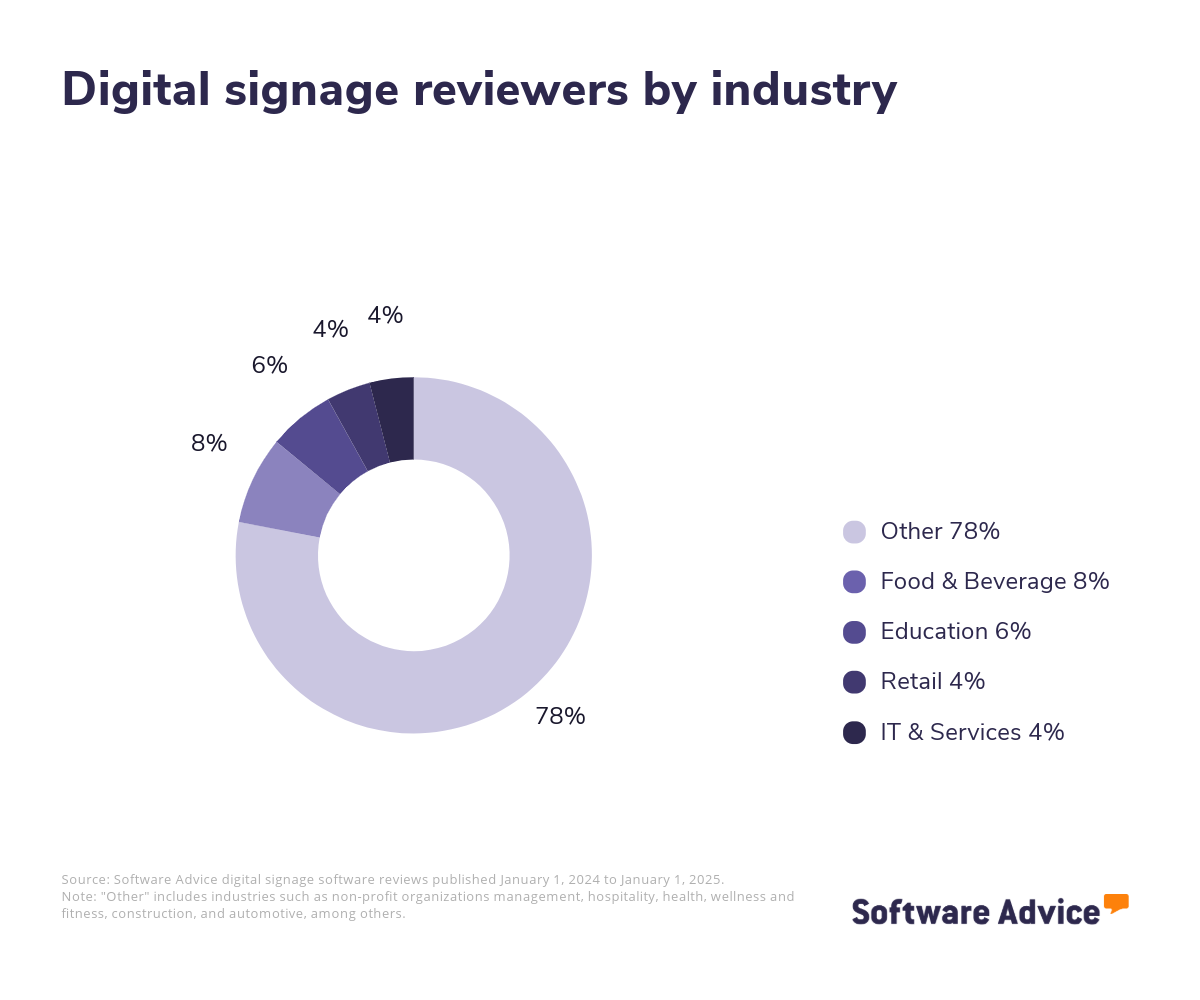
We analyzed over 4,000 verified reviews from users across industries including food service, education, retail, and healthcare to understand how digital signage software benefits their businesses. In a nutshell, this software saves businesses time and money by allowing them to flexibly update signage without the overhead costs and headache of physically printing and installing new materials.
Other benefits include:
The ability to display dynamic content such as videos, GIFs, and interactive content such as QR codes. This content provides more entertainment and information and increases the likelihood that audiences will engage with the display.
When used to display productivity metrics or safety protocols in employee-facing settings, this software helps make workplaces more organized.
Displaying personalized announcements, QR code-enabled surveys, and calendars improves the customer experience and supports employee communication and morale.
The specific benefits to your business will vary based on how you use digital signage within your organization.
How to choose the best digital signage software for your business
1. Assess your business’s needs
You can’t find the right software without knowing how you’ll need it to support your business. Get started by figuring out how you’ll use the tool, how it needs to mesh with your existing tech stack, and how much you want to spend.
Identify use cases
You should know how you plan to use your digital signage before you start your product search. This includes the following considerations:
Your audience: Will you display content for customers, employees, or both?
Content types: What kinds of content do you plan to display? This may include static images, videos, data and performance metrics, safety protocols, wayfinding tools, and menus, among other types.
Users and screens: How many user seats, screens, and physical locations will you need to support? Some subscription tiers limit these factors.
Customization needs: Do you plan to use content templates that come with the software, or will you want to modify them or create custom templates from scratch? How do you want to apply your branding to the content?
Playlists and timing: How much variety will your content have, and will your playlists change based on the time of day? If you plan to vary your content quite a bit, you’ll want to select a tool with great playlist management functionality.
Know what integrations you need
Depending on your desired use cases, you may need to integrate your digital signage software with other tools in your tech stack. This could include your point-of-sale tool, your content management platform, CRM, analytics tools, website builder, or content editor. Look for tools that support these integrations.
Set a budget
Knowing how much you can afford will help narrow your search for digital signage software. There are plenty of affordable and free digital signage products on the market, so you can get started for very little money. As you level up your content, you may have to pay more to support dynamic and interactive content types, as well as adding user seats and locations.
2. Evaluate your options and make a shortlist
Once you have a solid understanding of your use cases, desired integrations, budget, and any other important requirements, start creating a list of possible options. This list should include products you’ve heard about through marketing campaigns, as well as new-to-you products you learn about through product research. Eventually, you should narrow this list down to two to three vendors to engage with further, through demos and free trials.
Browse top-rated digital signage tools
To kick off your product research, explore our list of digital signage FrontRunners. To be eligible for consideration as a FrontRunner, products must:
Have at least 20 unique user reviews from the last 24 months
Be a stand-alone digital signage product
Offer these core features: content scheduling, media library, multi-screen support, and remote display management
Check out our full methodology for a more detailed understanding of how we compiled the FrontRunners list.
3. Make your selection
With your shortlist narrowed down to two or three options, start reaching out to vendors to get to know these products up close.
Schedule product demos
In a vendor demo, your team can watch how the software works and get personalized answers about features, pricing, technical support, and training. Including end users in demos is a good idea, so they can give feedback on how the tool could fit into their day-to-day work. You should seek out demos with all of the vendors on your shortlist to get a complete picture of your options.
Take advantage of free trials
Before you make your final selection, let your end users practice using the software through a free trial. Use this time (typically two to four weeks) to verify the benefits and usability of the tool that you learned about in the product research and vendor demo. You might find that you discover bugs or issues with user-friendliness that weren’t included in the sales pitch. You can’t lose with a free trial—you’ll either save yourself from making a disastrous purchase, or you’ll soften the landing for end users if you ultimately decide to adopt the software.
Don’t hesitate to make a decision
If the free trial goes well, go ahead and purchase the software. Our research shows that software buyers achieve the most satisfaction from their purchases when they spend three months or fewer making their decision. [5]
4. Make the most of your digital signage software
Now it’s time to start using your new software. Put these tips to use to ensure a smooth outcome.
Train your team
Take advantage of any hands-on training the vendor offers and explore online resources such as tutorial videos, user guides, or support articles. Reach out to the vendor promptly for support if you run into issues during onboarding.
Vary your content and leverage customizations
To get the most engagement from your digital signage tool, make full use of the different content types and customizations it offers. Explore video content and interactive content, and apply your branding where possible. This content will be more engaging to viewers and will help build brand awareness and legitimize the content you display.
For more help with the implementation stage, check out our five-step guide to a successful software implementation.
Software related to digital signage
Kiosk software: Kiosk software is designed for interactive terminals that display content and provide access to specific software functions for end users. It transforms PCs, tablets, and mobile devices into interactive self-service kiosks.
iPad kiosk software: Specifically designed for the Apple iPad.
Android kiosk software: Specifically designed for Android devices.
Live streaming software: Live streaming software helps companies transmit live events over the internet while engaging with their target audience. Businesses use live streaming software to broadcast company events, promote products, and entertain followers.
More resources for your digital signage journey
Want To Boost Revenue and Loyalty? Retailers Should Invest in Digital Accessibility
How Automation Enhances (or Hinders) Sensory Experiences in Retail and Food Service
What Is Digital Signage? Using a Modern Message To Take Your Marketing to the Next Level
About our contributors
Author
Molly Burke is a senior analyst and writer for Software Advice. She covers customer experience and marketing in the retail and restaurant industries, with a focus on how emerging technology is transforming the way everyday people shop. Her research helps business owners make software investment decisions that will help them navigate the ever-shifting retail landscape.
Molly’s research and analysis is informed by more than 120,000 authentic user reviews on Software Advice and nearly 8,000 interactions between Software Advice software advisors and retail software buyers. Molly also regularly analyzes market sentiment by conducting surveys of retail and restaurant leaders, as well as consumers, so she can provide the most up-to-date and helpful information to small and midsize businesses purchasing software or services.
Her insights on generative AI, social media, and other tech trends have been featured in The New York Times, Vogue, BBC, CNBC, Forbes, and the Financial Times, among other publications.
Editor
Caroline Rousseau is a content editor at Software Advice. A former content analyst, Caroline has, for the past five years, built, written and edited research reports about technological trends, opportunities, and challenges with a SMB audience in mind. Her content has been featured in French Tier 1 media including Le Monde, L’Express and Le Figaro, among other publications.
Her previous experience as a graphic designer, translator and LQA specialist in various industries converged into a skill set that allows her to create compelling content about today’s business matters. Caroline’s personal interests include literature and art and she has a passion for Albert Camus, graphic novels and drawing.
Sources
Modernize Your Intranet to Advance Digital Workplace Goals, Gartner
Digital IQ Outlook: Luxury Retail, Gartner (available for Gartner clients)
Software Advice reviews data: Software Advice reviews are collected from verified users for individual software products. For this report, we analyzed reviews from the past year as of the production date. Read the complete methodology.
Software Advice software pricing data: Only products with publicly available pricing information and qualified software products within the category, as of the production date, are included in the pricing analysis. Read the complete methodology.
Software Advice’s 2025 Tech Trends Survey was conducted online in August 2024 among 3,500 respondents in the U.S. (n=700), U.K. (n=350), Canada (n=350), Australia (n=350), France (n=350), India (n=350), Germany (n=350), Brazil (n=350), and Japan (n=350), at businesses across multiple industries and company sizes (five or more employees). The survey was designed to understand the timeline, organizational challenges, adoption & budget, vendor research behaviors, ROI expectations and satisfaction levels for software buyers. Respondents were screened to ensure their involvement in business software purchasing decisions.
Digital Signage FAQs
- What is the best free digital signage software?
Yodeck is the highest rated out of our list of the most popular digital signage tools.
- How do I start digital signage?
To get started with digital signage, you’ll need digital signage software to create and publish content, as well as a digital screen, such as a tablet or TV monitor, to display the content. Many digital signage software vendors offer free tools or free trials of paid subscription plans so you can get started at no cost.
- What apps do surveyors use?
An affordable way to get started with digital signage is to adopt a free subscription plan or use a free trial of a paid plan.
- What is the cheapest way to do digital signage?
According to our analysis of the most popular survey software, Google Forms has been particularly praised for its free plan.
- What is the difference between digital signage and DOOH?
DOOH, short for digital out-of-home advertising, is a form of digital signage that presents advertising to consumers in public spaces. Digital billboards are an example of DOOH, which falls under the umbrella of digital signage. Digital signage also includes other kinds of content, such as menu boards for restaurants, self-service kiosks in retail stores, and interactive wayfinding tools in office buildings and medical facilities.
- How much does it cost to install digital signage?
Paid subscriptions for digital signage software start at $7.99 per screen per month, though many vendors offer forever free versions of their products or free trials of paid plans. Software buyers should factor the cost of digital signage hardware, such as screens and media players, into the total cost of adoption of a digital signage system.
- Are digital signs worth it?
Digital signage saves businesses time and money on physical signage, drives audience engagement with dynamic content, and simplifies the process of updating content. Users say pricing for these tools is reasonable and transparent.
- What is meant by digital signage?
Digital signage refers to content displayed on digital screens. Compared to traditional signage made of physical materials, digital signage gives much more flexibility in terms of the type of content you can display.
- How does digital signage software work?
A digital signage system includes hardware in the form of digital screens where content is displayed, plus the device, such as a computer or smartphone, that you’ll use to host the digital signage software that connects to the screens. With digital signage software, you can create, schedule, and publish digital content onto your screens.