


Best Room Scheduling Software of 2026
Updated January 27, 2025 at 9:56 AM
- Popular Comparisons
- Buyers Guide
Compare Products
Showing 1 - 25 of 44 products
Compare Products
Sort by
Reviews: Sorts listings by the number of user reviews we have published, greatest to least.
Average Rating: Sorts listings by overall star rating based on user reviews, highest to lowest.
Alphabetically (A-Z): Sorts listings by product name from A to Z.

MaintainX is a maintenance and asset management platform built for industrial and frontline teams. It helps organizations stream...Read more about MaintainX


MaintainX's Best Rated Features
See All
MaintainX's Worst Rated Features
See All

Empower your workforce with Archibus by Eptura, a single integrated platform for managing all aspects of your organization’s fac...Read more about Archibus

MRI Evolution is a fully scalable CMMS and Workforce Management solution which enables FM managers to gain complete oversight of...Read more about MRI Evolution


TheWorxHub, designed by Brightly Software specifically for healthcare, is the most user-friendly, cloud-based CMMS solution toda...Read more about TheWorxHub
TheWorxHub's Best Rated Features
See All
TheWorxHub's Worst Rated Features
See All

Collectiveview software is a cloud-based facilities management solution suitable for midsize to large businesses. Key features i...Read more about viewWORK

IBM TRIRIGA Application Suite (TAS) is an integrated workplace management solution (IWMS) that includes modules designed to acco...Read more about IBM TRIRIGA Application Suite (TAS)


Apex42 is a workplace technology and advisory firm that helps organizations bring clarity and structure to space management and ...Read more about Wisp

Skedda is a leading global desk management and hybrid work platform, serving over 12,000 customers and nearly two million users,...Read more about Skedda

Skedda's Best Rated Features
See All
Skedda's Worst Rated Features
See All

Joan is a room scheduling and booking solution that helps businesses of all sizes find and reserve available meeting rooms and w...Read more about Joan

Joan's Best Rated Features
See All
Joan's Worst Rated Features
See All

Concept3D is a cloud-based mapping platform designed to help businesses in healthcare, education, hospitality and other sectors ...Read more about Concept3D


YAROOMS is the complete workplace management platform that helps organizations coordinate people, spaces, and schedules - espec...Read more about YAROOMS

YAROOMS's Best Rated Features
See All
YAROOMS's Worst Rated Features
See All

Falcony is a cloud-based application fit for mobile and tablet use. It can be used by businesses of all sizes. This tool is made...Read more about Falcony


Accordant is a Space Management application that combines Space Planning, Move Management, Occupancy Tracking, Utilization Measu...Read more about Accordant


Robin is a cloud-based scheduling solution that caters to businesses across various industries such as real estate, consumer ele...Read more about Robin
Robin's Best Rated Features
See All
Robin's Worst Rated Features
See All

DRAWBASE Software has been a worldwide provider of CAFM, DCIM and Visual Plant Management solutions for over 30 years. The appli...Read more about Drawbase

POC System is a cloud-based facility management solution designed for midsize and large companies such as realty companies, comm...Read more about POC System

Floor Plan Mapper by LaudonTech is a cloud-based office floor plan mapping solution that offers space and movement management to...Read more about Floor Plan Mapper

deskbird is the workplace management platform that puts employees first. With an intuitive booking system for desk and other res...Read more about deskbird
deskbird's Best Rated Features
See All
deskbird's Worst Rated Features
See All

Accruent helps businesses around the world unify their built environment. Our comprehensive software solutions connect facilitie...Read more about Accruent


EAMbrace is a facility management software platform available for either cloud-based or on-premise deployment. It is intended to...Read more about EAMbrace

Q Ware CMMS is a cloud-based maintenance management solution designed for small and midsize businesses. It offers work order man...Read more about Q Ware CMMS

Q Ware CMMS's Best Rated Features
See All
Q Ware CMMS's Worst Rated Features
See All

Smarten Spaces offers workplace safety and flexibility on one experience app to help businesses navigate the new Hybrid Workplac...Read more about Smarten Spaces Hybrid Workplace Software


Smarten Spaces Hybrid Workplace Software's Best Rated Features
See All
Smarten Spaces Hybrid Workplace Software's Worst Rated Features
See All

Spacewell offers the software and technology tools to simplify facility operations, reduce costs and energy consumption, and cre...Read more about Spacewell


Planon is a building management solution that connects buildings, people and processes, by eliminating data silos and aligning s...Read more about Planon


Xyicon is a cloud-based facility management platform that helps small to large enterprises monitor employee occupancy across cor...Read more about Xyicon

Popular Comparisons


Buyers Guide
This detailed guide will help you find and buy the right room scheduling software for you and your business.
Last Updated on January 27, 2025Communication is critical for effective teams, and meetings are essential for effective communication. So scheduling meeting rooms should be quick and easy, right?
It's often not. Between finding an appropriate space, determining who should be included, what resources are needed and who to notify, scheduling dozens of meetings each month can eat into valuable time. If you're booking spaces for lessons or social events, the frustrations are the same.
The best way to streamline this additional task is through automation. This guide is designed to help software buyers learn the functionality and applications of room scheduling software so businesses and individuals can book rooms quickly and move on with their day.
We'll cover the following topics:
What Is Room Scheduling Software?
Common Room Scheduling Software Functionality
Types of Room Scheduling Software Buyers
What Is Room Scheduling Software?
As we mentioned, scheduling meetings involves gathering rooms, resources and people. Room scheduling software is designed to coordinate these various parts so planners can schedule with awareness of timing or resource conflicts.
No matter what type of room scheduling or reservations you're making, software makes the process quicker and simpler. This includes:
Booking a meeting room in an office
Reserving a space for private lessons
Renting equipment for a conference
These capabilities benefit everyone when used organization-wide, as the software offers a shared view into which spaces are in-use or claimed for a specific time in the future. And permission settings allow managers to restrict access to scheduling tools to avoid confusion.
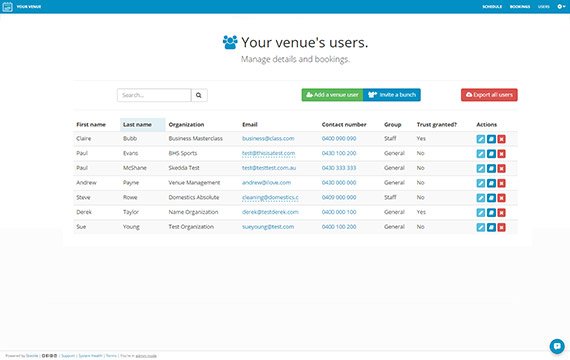
A list of recent users in Skedda
Most vendors in this space offer similar functionality, so the biggest factors in your decision will include ease-of-use and cost. We'll review the common functionality below.
Common Room Scheduling Software Functionality
Booking calendar | Allows users to schedule meetings or events with a few clicks, and schedules can be dragged and dropped to switch dates or times. Customizable views (by day, week or month) and color-coded events offer comprehensive views at a glance. This view serves as a dashboard for anyone using the system. |
Notifications | Once an event is set, users can set up and send customized notification emails or texts to attendees to confirm the details of the meeting. Some notifications include registration or confirmation buttons so planners know how many people are attending. |
Space management | Spaces in an office are limited, so room scheduling software keeps track of which are available so users can always find a spot based on real-time information. |
Equipment scheduling | Business meeting and special event planners often need to reserve equipment in addition to a room. Scheduling software allows users to make sure resources are available on certain days by reserving them and linking them to an event. |
Self-service portal | Managers can allow any employee to use the system to schedule rooms or workspaces through various methods, including a web browser, mobile device, email and more. |
Payments | Some users own the spaces and use the software to rent them out. These users can integrate online payment capabilities so that customers can pay and reserve conveniently. |
User management and permissions | Manage user access to different capabilities and grant full access to managers. Administrators can also see who is using the system and put them into specific groups for easier scheduling. |
Digital signage | This type of software is often used to manage space for conventions or other large gatherings with multiple rooms and start times. Some vendors include digital signage capabilities—for example, planners can use tablet computers at each room to display important details, such as start time, reservation status, name of the event, room number or a daily schedule. |
Analytics | Administrators can view data gathered over time to identify key indicators that can help optimize the use of space. For example, find out which rooms are used most or least often and peak usage hours. |
Types of Room Scheduling Software Buyers
Room scheduling software is adaptable to most applications and industries, but the specific set of features you need can depend on your business:
Facilities managers. These professionals are responsible for creating a productive atmosphere for employees in an office building, and a critical part of this is managing spaces. Facilities managers can use room scheduling software to enable workers to reserve rooms, equipment and desks (called office hoteling, which can reduce facility costs).
Facilities managers of a college campus can also use software in a similar way to schedule and manage speaking or student association events in buildings across campus. Some systems can integrate existing student information system (SIS) data to help determine the most appropriate classroom assignments.
Event coordinators. Those who plan events, such as weddings or conferences, can use room scheduling software to send confirmation emails and receive registration information to better gauge attendee numbers. During events, the coordinator can use the system to ensure space is utilized efficiently.
Instructors and tutors. Independent teachers and tutors can use room scheduling software to manage their own private lessons. Students can access the online scheduling wizard to make appointments.
Users with their own studios and team of instructors can use it in the same way, but also be able to assign lessons and other teachers to specific rooms.
How Is It Priced?
Pricing models for room scheduling software are generally consistent, but buyers should be aware of other limitations or added costs they may encounter when seeking a system.
Most vendors offer room scheduling software with a basic fee per month pricing, and these usually have limitations on the number of rooms to manage or number of users who can use the system.
However, it's not uncommon to see special pricing models that allow users to pay a flat fee for each event they schedule. These versions typically have more strict limitations on functionality.
Finally, keep in mind vendors often offer three or more versions of their systems, with the functionality increasing along with the pricing. It's crucial to carefully evaluate the differences in each version of the software to find the capabilities you truly need, and avoid paying for features you won't use.