


Best Risk Management Software of 2026
Updated February 18, 2026 at 5:11 AM

Written by Alejandra Aranda
Content Analyst

Edited by Mehar Luthra
Team Lead, Content

Talk with us for a free 15-min consultation
Expert advisors like Jacqueline, who have helped 1,000+ companies, can find the right software for your needs.
- All Software
- Software Advice FrontRunners
- Popular Comparisons
- Buyer's Guide
- Frequently Asked Questions
Risk management software helps compliance officers, operations leads, and executives identify, assess, and mitigate business risks across departments. Across 590 tools tailored to varied regulatory needs, workflows, and risk models, buyers face a complex landscape. To help you narrow it down, I worked with our risk management software advisors to curate a list of recommended productsi and a list of the risk management software FrontRunners based on user reviews. For further information, read my risk management software buyer's guide.
Risk Management Software
Sort by
Reviews: Sorts listings by the number of user reviews we have published, greatest to least.
Average Rating: Sorts listings by overall star rating based on user reviews, highest to lowest.
Alphabetically (A-Z): Sorts listings by product name from A to Z.

Resolver’s risk management software is a cloud-based solution for midsize to larger enterprises that serves customers across a v...Read more about Resolver


Resolver's Best Rated Features
See All
Resolver's Worst Rated Features
See All

VelocityEHS is different. We’re not just a software company, we’re expert problem solvers who know how to simplify complex issue...Read more about VelocityEHS
VelocityEHS's Best Rated Features
See All
VelocityEHS's Worst Rated Features
See All

Sprinto is a cloud-based security compliance automation platform that helps small to large businesses manage their compliance pr...Read more about Sprinto

Sprinto's Best Rated Features
See All
Sprinto's Worst Rated Features
See All

Noggin is a cloud-based incident management platform designed to help organizations manage disruptions through tools for securit...Read more about Noggin


Recognized as a Leader in the Gartner® Magic Quadrant for both IT Risk Management and IT Vendor Risk Management, NAVEX IRM bring...Read more about NAVEX IRM

Software Advice FrontRunners 2026

(414)

(253)

(133)

(105)

(102)

(57)

(79)

(129)

(56)

(198)
Best for User Interface

AuditBoard

In our analysis of Risk Management products with the most market demand, AuditBoard is the highest rated for its user interface out of the most popular tools.
AuditBoard is best for organizations prioritizing a strong user interface in audit management. Our reviewers say its intuitive design and customizable dashboards make it easy for teams to organize audits, track issues, and streamline workflows, reducing manual effort and improving efficiency.
- Reviewers Perspective
"AuditBoard is innovating the audit, risk, and compliance space using their extensive knowledge as practitioners in this area to provide seamless solutions to organizations and their teams."
MPMelissa Pici
Sr. IT Audit Manager
Used for 2+ years
We analyzed 298 verified user reviews for AuditBoard to find out what actual users really think.
Audit Management
AuditBoard centralizes audit management, organizing workpapers, tracking issues, and streamlining documentation. Automation and customizable workflows improve efficiency and collaboration across audit, risk, and compliance teams.Ease of Use
AuditBoard’s user-friendly design supports straightforward navigation and task completion. Teams onboard quickly, requiring minimal training, and benefit from clear resources and seamless workflows for audit and compliance activities.Features
AuditBoard offers a wide range of features for audit, risk, and compliance management. Automation, real-time status tracking, and collaborative tools support daily operations, though some users note module inconsistencies and limitations tied to subscription tiers. - Key FeaturesAuditBoard's scoreCategory average
Risk Assessment
4.204.54 category average
Risk Reporting
3.734.38 category average
Risk Scoring
3.674.46 category average
- Screenshots


Best for Security and Access Control


According to our user reviews, SafetyCulture is the most requested by users for security and access control out of the most popular tools.
SafetyCulture is best for businesses seeking robust security and access control in their audit and inspection processes. Our reviewers point out that its customizable templates, automated alerts, and real-time collaboration features help standardize protocols and reduce administrative workload.
- Reviewers Perspective
"SafetyCulture helps us standardize review protocols—and by automating data capture and record-keeping, it’s cut most of our admin work, making audits smoother —no more scattered reports or endless paperwork."
JHJoshua Hendricks
Network Engineer
Used for 1-2 years
We analyzed 185 verified user reviews for SafetyCulture to find out what actual users really think.
Audits
SafetyCulture streamlines audit processes by digitizing forms and automating data capture. Teams customize templates, add photos and notes, and track audits across devices, supporting consistent evaluations and reducing administrative work.Reporting
Organizations generate detailed, professional reports using SafetyCulture’s customizable templates and real-time analytics. Automatic notifications help centralize information, track issues, and monitor team performance, enhancing communication and productivity.Ease of Use
SafetyCulture’s user-friendly interface allows teams to adapt quickly for various business needs. Flexible customization options and responsive features simplify workflows, making onboarding and daily operations efficient. - Key FeaturesSafetyCulture's scoreCategory average
Risk Assessment
4.784.54 category average
Risk Reporting
5.04.38 category average
- Screenshots


Best for Automation Capabilities


In our analysis of Risk Management products with the most market demand, Scrut Automation is the most requested by users for automation capabilities out of the most popular tools.
Scrut Automation is best for teams focused on maximizing automation capabilities in compliance and audit management. Our reviewers say its automated workflows, integrations, and guided dashboards significantly reduce manual effort and make audit readiness more structured and efficient.
- Reviewers Perspective
"What I like most about Scrut Automation is its streamlined compliance management—it simplifies complex frameworks like SOC 2, ISO 27001, and GDPR with automation."
CJChetan Joshi
Vendor Engineer
Used for 1-2 years
We analyzed 97 verified user reviews for Scrut Automation to find out what actual users really think.
Compliance Management
Scrut Automation centralizes compliance frameworks, controls, evidence collection, and audits. Teams reduce manual effort and streamline processes using dashboards, guided workflows, and automation to track compliance posture and maintain audit readiness.Audit Management
Audit preparation is organized with Scrut Automation’s control-linked evidence repository. Security and compliance teams use automation, dashboards, and real-time monitoring to stay audit-ready year-round, improving visibility and reducing manual work.Customer Support
Scrut Automation’s support team is available to resolve issues quickly and efficiently. Organizations benefit from dedicated points of contact and collaborative guidance, making compliance smoother and addressing technical challenges such as agent connectivity. - Key FeaturesScrut Automation's scoreCategory average
Risk Assessment
4.574.54 category average
Risk Scoring
5.04.46 category average
- Screenshots


Best for Customer Satisfaction

Onspring

According to our user reviews, Onspring is the highest rated for customer satisfaction out of the most popular tools.
Onspring is best for organizations seeking high customer satisfaction in their GRC and workflow management. Our reviewers highlight its intuitive, customizable dashboards and flexible reporting, which enable quick onboarding and efficient tailoring to unique business needs.
- Reviewers Perspective
"Onspring provides opportunities to fully customize solutions to fit my needs."
JVJillene VanNostrand
cybersecurity analyst
Used for 6-12 months
We analyzed 79 verified user reviews for Onspring to find out what actual users really think.
Customization
Onspring lets organizations adapt applications, dashboards, and workflows to match business priorities. Customizable features and organized layouts support both off-the-shelf solutions and extensive customization, enabling scaling as needs change.Configuration
Teams build workflows and applications aligned with business processes using Onspring’s no-code configuration. Helpful documentation and automation options allow task management without advanced technical skills, simplifying expansion and maintenance.Ease of Use
Onspring’s user-friendly interface supports straightforward navigation and adoption. End users become productive with minimal training, and organizations streamline workflows for a wide range of users, improving operational efficiency. - Key FeaturesOnspring's scoreCategory average
Risk Assessment
4.824.54 category average
Risk Scoring
4.04.46 category average
- Screenshots


Best for Quick Implementation

Hyperproof

According to our user reviews, Hyperproof is the most requested by users for quick implementation out of the most popular tools.
Hyperproof is best for organizations needing quick implementation of compliance and risk management solutions. Our reviewers say the platform’s intuitive setup and responsive support enable teams to centralize controls and evidence rapidly, streamlining audit readiness and ongoing compliance.
- Reviewers Perspective
"Features like control mapping, automation of evidence collection, and real-time dashboards make compliance tasks more streamlined and transparent."
CSchaitanya said
IT Security Analyst
Used for 1-2 years
We analyzed 77 verified user reviews for Hyperproof to find out what actual users really think.
Compliance and Risk Management
Hyperproof centralizes compliance frameworks, risk tracking, and vendor management. Organizations use control mapping and automated evidence collection to reduce manual effort and streamline compliance tasks, improving proactive risk monitoring.Audit and Evidence Collection
Audit evidence is organized in one location with Hyperproof. Teams automate evidence collection, map evidence to controls, and reuse documentation across frameworks, saving time and reducing manual work during audits.Ease of Use
Hyperproof’s intuitive interface simplifies navigation and task completion for technical and non-technical staff. Onboarding and setup are quick, and logical workflows make managing GRC activities efficient with minimal training. - Key FeaturesHyperproof's scoreCategory average
Risk Assessment
4.614.54 category average
Risk Reporting
4.604.38 category average
Risk Scoring
4.404.46 category average
- Screenshots


Highly Rated for User Interface

Secureframe

According to our user reviews, Secureframe is the highest rated for user interface out of the most popular tools.
Secureframe is highly rated for its user interface, making it ideal for teams seeking a user-friendly compliance management solution. Our reviewers note the intuitive design, clear guidance for onboarding, and efficient evidence collection, which simplify complex compliance tasks.
- Reviewers Perspective
"Our team receives security questionnaires at least weekly from our prospective customers, which can come in a variety of formats (Excel, Word, external site, etc). While there is a questionnaire library feature within Secureframe, it is currently limited to being able to read and fill out Excel spreadsheets. If this were the only way we received questionnaires, it would be perfect."
GBGavynn Baldwin
Solutions Consultant
Used for 1-2 years
We analyzed 52 verified user reviews for Secureframe to find out what actual users really think.
- Key FeaturesSecureframe's scoreCategory average
Risk Assessment
4.644.54 category average
Risk Reporting
4.504.38 category average
- Screenshots


Most Rated for SMBs
Resolver

Of the products listed on our FrontRunners report, Resolver is the most requested by small businesses out of the most popular tools.
Resolver is most rated for SMBs looking to streamline risk and compliance management. Our reviewers say it helps manage complex information across multiple sites, offers advanced reporting, and, once trained, enables efficient risk tracking and compliance processes.
- Reviewers Perspective
"Resolver provides solid features for risk management and supplier/ vendor management, helping us track and analyse potential issues effectively."
오혜오니 혜
Risk Analyst
Used for 6-12 months
We analyzed 59 verified user reviews for Resolver to find out what actual users really think.
Risk Management
Resolver enables organizations to manage risk, compliance, and incidents across IT, healthcare, and physical security. Teams use comprehensive risk assessment tools and configurable analytics to identify, prioritize, and mitigate risks, improving reporting accuracy and supporting informed decisions.Ease of Use
Daily tasks are streamlined by Resolver’s modern interface and automation features. Both technical and non-technical staff benefit from clear guides and workflows, making implementation and learning straightforward after the initial training phase.Customer Support
Resolver’s support team provides timely help and values user feedback. Service desk responsiveness aids organizations in adapting to changes and resolving technical challenges, enhancing overall satisfaction and smooth adoption. - Key FeaturesResolver's scoreCategory average
Risk Assessment
4.504.54 category average
Risk Reporting
4.474.38 category average
Risk Scoring
4.544.46 category average
- Screenshots


Best for Quick Adoption/Easy Adoption

Novara Flex

In our analysis of Risk Management products with the most market demand, KPA Flex is the highest rated for its ease of adoption out of the most popular tools.
KPA Flex is best for organizations seeking quick and easy adoption of training and compliance management tools. Our reviewers point out its user-friendly interface and customizable training modules, which simplify onboarding and allow rapid digitization of training and forms.
- Reviewers Perspective
"How user friendly the platform is and how helpful the team are in helping you sort out any issues"
DMD'Angelo Marshall
HSE Manager
Used for 1-2 years
We analyzed 109 verified user reviews for KPA Flex to find out what actual users really think.
Training and Learning Curve
KPA Flex enables organizations to digitize and customize training, forms, and compliance documentation. Teams convert instructor-led courses to digital formats, streamlining onboarding and ongoing education for compliance and safety initiatives.Form Creation
KPA Flex’s form creation tools let organizations digitize and tailor forms for operational needs. Employees complete and submit forms from anywhere, improving efficiency and document management across field and office locations.Customer Support
KPA Flex’s support team addresses questions and resolves issues quickly. Onboarding assistance and ongoing support are proactive, ensuring organizations maximize software utility and maintain open communication with development teams. - Key FeaturesNovara Flex's scoreCategory average
Risk Assessment
4.204.54 category average
Risk Reporting
4.04.38 category average
- Screenshots


Most Used By Mechanical/Industrial Engineering

OneTrust

In our analysis of Risk Management products with the most market demand, OneTrust is the most requested by users in mechanical/industrial engineering out of the most popular tools.
OneTrust is most used by mechanical and industrial engineering firms needing comprehensive compliance and privacy management. Our reviewers highlight its customizable modules, integration capabilities, and robust support for regulatory requirements, making it valuable for complex environments.
- Reviewers Perspective
"Likewise, it helps us to assess and monitor risks related to third parties and to automate risk management and compliance tasks, thereby optimizing our teams' resources, among other functionalities."
CHChristine Holler
Senior Director Information Technology
Used for 2+ years
We analyzed 55 verified user reviews for OneTrust to find out what actual users really think.
- Key FeaturesOneTrust's scoreCategory average
Risk Assessment
4.564.54 category average
Risk Scoring
4.674.46 category average
- Screenshots


Highly Rated for Customization

Pirani

According to our user reviews, Pirani is the highest rated for customization out of the most popular tools.
Pirani is highly rated for customization, making it well-suited for organizations needing adaptable risk management solutions. Our reviewers say its intuitive interface and flexible modules support efficient risk tracking, reporting, and alignment with various methodologies.
- Reviewers Perspective
"Using a risk management (RM) tool allows you to centralize all operational risk information, improve data quality, and automate tasks such as classifying inherent and residual risk."
YNYuly Natalia Cordoba Ruiz
Coordinador de riesgos
Used for 2+ years
We analyzed 161 verified user reviews for Pirani to find out what actual users really think.
Risk Management
Pirani centralizes operational risk information, streamlining identification and tracking of risks, controls, and action plans. Organizations use automation and intuitive interfaces to facilitate regulatory compliance and improve process efficiency.Customer Support
Pirani’s customer support team provides tailored help during implementation and ongoing use. Consultants offer clear communication and training resources, enabling quick resolution of questions and smooth onboarding.Ease of Use
Pirani’s practical interface supports straightforward navigation for risk and asset management. Both new and experienced users adapt quickly, enhancing operational simplicity and contributing to efficient daily workflows. - Key FeaturesPirani's scoreCategory average
Risk Assessment
4.464.54 category average
Risk Reporting
4.074.38 category average
Risk Scoring
4.454.46 category average
- Screenshots


QT9 QMS

- Reviewers Perspective
"The system has everything you would want and need in an EQMs and a great customer support team behind it."
JSJohn Schaftenaar
President
Used for 6-12 months
We analyzed 89 verified user reviews for QT9 QMS to find out what actual users really think.
Ease of Use
Staff navigate QT9 QMS easily, adapting quickly to its consistent design across modules. The interface streamlines daily tasks and minimizes the learning curve for both new and experienced users.Document Management
Organizations transition from paper-based systems to digital platforms, using QT9 QMS for revision tracking, electronic signatures, and easy retrieval. Custom fields and collaboration tools simplify compliance and audit preparation.Quality Management
Teams automate quality processes and maintain operational continuity with QT9 QMS. The platform supports standards like ISO 9001, organizes records, and provides customizable reporting and analytics. - Screenshots


Cority

- Reviewers Perspective
"Cority's out of the box features and capabilities means effort in implementing solution is on the lower side, and at the same time high configurability of the product makes it easy to realize custom business requirements."
JAJacob Abraham
Business Analyst
Used for 2+ years
We analyzed 78 verified user reviews for Cority to find out what actual users really think.
Features
Organizations configure Cority’s out-of-the-box features to meet diverse business requirements. The platform’s business rules, reporting tools, and specialized modules streamline tasks and improve efficiency.Reporting
Departments set up automated emails and tailored reports using Cority’s reporting tools. The module facilitates quick information sharing and supports a wide range of analytics and communication needs.Ease of Use
Users navigate Cority’s simplified layout easily, completing day-to-day activities efficiently. Multiple pathways and a user-friendly interface support straightforward task management once familiar with the system. - Key FeaturesCority's scoreCategory average
Risk Assessment
4.04.54 category average
Risk Reporting
5.04.38 category average
Risk Scoring
5.04.46 category average
- Screenshots


- Reviewers Perspective
"I have Splunk forwarder installed over 100 servers to have logs sending over to Splunk Enterprise server, and the data ingest is very reliable."
PYPhilip Yan
Head of IT OPS
Used for 2+ years
We analyzed 194 verified user reviews for Splunk Enterprise to find out what actual users really think.
Dashboard Monitoring
Teams monitor system health and application performance using customizable dashboards. Real-time tracking, trend visualization, and automated alerts streamline monitoring workflows and support root cause analysis.Data Analysis
Organizations handle large volumes of structured and unstructured data, generating insights and supporting real-time monitoring. Splunk simplifies data exploration, trend identification, and reporting for technical and business users.Alerts and Notifications
IT and security teams set up real-time alerts based on customizable queries and thresholds. Splunk automates incident response, monitors compliance, and keeps teams informed about critical events. - Screenshots


EcoOnline

- Reviewers Perspective
"I enjoy the different parts of the platform used for our learning and training it is also easy to use and navigate."
JGJacqueline Geason
Raw Materials Coordinator
Used for 6-12 months
We analyzed 54 verified user reviews for EcoOnline to find out what actual users really think.
Employee Management
HR and safety managers track staff status, communicate, and follow up on corrective actions. EcoOnline supports onboarding for employees and subcontractors, engaging frontline staff in safety programs and reducing administrative burden.Safety Management
Organizations centralize safety documents, manage training, and monitor responsibilities. EcoOnline streamlines safety program engagement, tracks completed requirements, and provides tools for incident management.Mobile User Experience
Teams perform safety inspections and access features in the field using EcoOnline’s mobile app. Offline functionality and user-friendly design support quick communication and information access while on the go. - Screenshots


- Reviewers Perspective
"LogicGate Risk Cloud stands out for its user-friendly interface and customizable workflows, enabling organizations to effectively manage risk with real-time reporting and automation"
EKEmanuel Kibet
Risk Management Analyst
Used for 1-2 years
We analyzed 59 verified user reviews for LogicGate Risk Cloud to find out what actual users really think.
Risk Management
Organizations document, analyze, and track risks using LogicGate’s user-friendly interface and customizable workflows. Automation and real-time reporting support governance, risk, and compliance needs.Workflow Customization
Teams construct and modify workflows with no-code tools, assigning roles and automating notifications. LogicGate supports continuous improvement as compliance and operational needs evolve.Build Customization
Managers build, edit, and scale applications without advanced technical skills. The platform enables real-time changes, automates tasks, and adapts to organizational structure and policies. - Key FeaturesLogicGate Risk Cloud's scoreCategory average
Risk Assessment
4.504.54 category average
Risk Reporting
4.534.38 category average
Risk Scoring
4.504.46 category average
- Screenshots


- Reviewers Perspective
"Implementing AQEM had its bumps in terms of figuring out roles and rights, but the support team does an incredible job helping with getting all actions completely correctly for a successful build in test/prod sites."
PCPatricia Cardona
Associate Quality Manager
Used for 1-2 years
We analyzed 371 verified user reviews for MasterControl Quality Excellence to find out what actual users really think.
Ease of Use
Staff manage daily tasks efficiently using MasterControl’s user-friendly interface. The platform centralizes features, enabling process management across departments, though some workflows require additional training.Customer Support
Teams rely on MasterControl’s responsive support for resolving issues and smooth onboarding. The support staff listens to feedback, addresses pain points, and guides users throughout implementation and ongoing use.Training and Learning Curve
Organizations use MasterControl’s training resources and self-study library to adapt to the platform’s comprehensive features. The training module streamlines assignment, tracking, and compliance, supporting employee development and regulatory requirements. - Key FeaturesMasterControl Quality Excellence's scoreCategory average
Risk Assessment
3.794.54 category average
Risk Reporting
4.04.38 category average
Risk Scoring
3.04.46 category average
- Screenshots


- Reviewers Perspective
"Qualityze helped us customize the platform to best fit our needs and they are always available for questions and readily solved any issues we encountered."
AHAllison Hacker
Team Lead, Quality Engineering
Used for 1-2 years
We analyzed 55 verified user reviews for Qualityze Suite to find out what actual users really think.
Customer Support
Teams receive attentive support from Qualityze, with staff available for questions and custom configurations. The support team helps resolve issues promptly and guides organizations through implementation and ongoing changes.Quality Management Processes
Organizations transform quality management practices using Qualityze’s tools for high standards and continuous improvement. Customizable modules and proactive updates consolidate complex quality tasks and align processes with industry standards.Module Implementation
Managers streamline quality systems by selecting and implementing modules with Qualityze’s guidance. The platform’s flexibility and comprehensive coverage support migration to a single platform and impress auditors during operations. - Screenshots


- Reviewers Perspective
"I am using Standard Fusion to manage ISO27001 compliance and Vendor Management, and it helped me to get rid of word and excel files and manage the framework with efficiency"
ZZZisis Ziogas
CISO
Used for 1-2 years
We analyzed 38 verified user reviews for StandardFusion to find out what actual users really think.
- Key FeaturesStandardFusion's scoreCategory average
Risk Assessment
4.504.54 category average
Risk Reporting
4.334.38 category average
Risk Scoring
4.334.46 category average
- Screenshots


GOAT Risk

- Reviewers Perspective
"GOAT is a must have for everyone steering a (regulated) firm through the current challenging times - with an constant changing regulatory compliance and AML regulations landscape - GOAT helps you to stay on top of all your risks - implement mitigating factors - and support your business to thrive and make use of all the growth opportunities out there."
JGJoris Greeuw
Head of Compliance and MLRO
Used for 1-2 years
We analyzed 63 verified user reviews for GOAT Risk to find out what actual users really think.
Risk Management
Teams document, manage, and report risks across complex environments. GOAT Risk supports compliance and adapts to regulatory changes, simplifying risk management processes and providing clear visibility of risk status. Assigning responsibilities makes risk ownership accessible to both experts and non-experts.Customer Support
Organizations receive responsive, knowledgeable support from GOAT Risk’s team. Customer support addresses questions, guides customization, and provides resources like tutorials and webinars, assisting during implementation and ongoing use.Ease of Use
Users navigate GOAT Risk’s interface easily, requiring minimal training. The system’s simplicity enables quick adoption at all organizational levels, with in-built tips, tutorials, and dashboards streamlining risk management tasks. - Key FeaturesGOAT Risk's scoreCategory average
Risk Assessment
4.654.54 category average
Risk Reporting
4.454.38 category average
Risk Scoring
4.774.46 category average
- Screenshots


- Reviewers Perspective
"A very effective solution for managing audit lifecycle activities starting from Risk Based Planning to Issue tracking and closure with good visibility of lifecycle stages through configurable dashboards for monitoring the progress"
KVKalpesh Vashi
Director - Internal Audit
Used for 2+ years
We analyzed 101 verified user reviews for TeamMate+ Audit to find out what actual users really think.
Audit Management
Audit teams manage planning, risk assessment, reporting, and issue tracking from a single platform. TeamMate+ streamlines process management, compliance tracking, and automation, maintaining accountability and visibility throughout audits.Ease of Use
Staff navigate TeamMate+ easily, adapting to its modern layout and customizable options. The platform simplifies documentation and workflow management, allowing quick access to essential features.Features
Teams leverage robust functionality, including document linking and advanced reporting tools. TeamMate+ offers flexibility and efficiency-enhancing features, though some users note challenges with missing options and performance on complex tasks. - Key FeaturesTeamMate Audit's scoreCategory average
Risk Assessment
4.244.54 category average
Risk Reporting
4.04.38 category average
Risk Scoring
5.04.46 category average
- Screenshots


- Reviewers Perspective
"Overall, Ideagen Quality Management is really user friendly and efficient when it comes to documentation."
BCBien Canilao
System and Service Operations Analyst IT
Used for 2+ years
We analyzed 133 verified user reviews for Ideagen Quality Management to find out what actual users really think.
Customer Support
Users consistently highlight Ideagen Quality Management's customer support as attentive, knowledgeable, and quick to respond to inquiries and issues. They appreciate having access to dedicated account managers, helpful support staff, and ongoing communication, which makes resolving problems and learning new features easier. Many reviewers note that the support team provides valuable training resources, clear guidance during upgrades, and a proactive approach that fosters strong customer relationships.Ease of Use
Users find Ideagen Quality Management intuitive and straightforward, with features that make daily administration and user management simple. They appreciate the flexibility of permissions, customizable user groups, and the ability to set up the system according to organizational needs, which streamlines workflows and reduces administrative burden. Reviewers frequently mention that the platform is user-friendly for both beginners and experienced administrators, making adoption and ongoing use accessible for all staff.Training and Learning Curve
Users value Ideagen Quality Management for its comprehensive training modules and the ability to automate staff assignments, helping organizations stay compliant and track competency. They appreciate the thorough onboarding process and skilled trainers, but some reviewers find the training workflow limited and report that additional training can be costly and time-consuming. Several users mention challenges with reporting, module usability, and the need for more accessible training resources, which can make mastering the system difficult for some teams. - Key FeaturesIdeagen Quality Management's scoreCategory average
Risk Assessment
4.174.54 category average
Risk Reporting
5.04.38 category average
- Screenshots
Methodology
The research for the best Risk Management software list was conducted in October 2025. We evaluated data (user reviews and demand signals) from the past 24 months as of the research date. Read the complete methodology.
Popular Risk Management Comparisons


Buyer's Guide
This detailed guide will help you find and buy the right risk management software for you and your business.
Last Updated on May 14, 2025Here's what we'll cover:
What you need to know about risk management software
What is risk management software?
Essential features of risk management software
Benefits and competitive advantages of using risk management software
How to choose the best risk management software
Software related to risk management
More resources for your risk management journey
What you need to know about risk management software
Risk management software helps organizations prevent or manage critical risks such as financial, legal, regulatory compliance-related, as well as strategic and operational risks. In addition, this software helps companies organize and track their risks, so they can prioritize tasks needed to manage and/or overcome the various risks they face.
A risk management system includes features such as risk assessment, which typically uses methodologies like failure mode and effects analysis (FMEA) or hazard and operability study (HAZOP) to systematically evaluate risks. Another essential feature is risk reporting, as such tools often enable users to generate key risk indicators (KRIs) and risk heat maps to visually represent the severity and likelihood of risks.
To give you an idea of the market, we have over 600 different risk management vendors on our site, and we’ve published more than 4,000 reviews for risk management products in the last two years alone. In the realm of risk management, the decision isn't about whether to adopt a risk management software system; rather, it's about determining which type of software aligns best with your organization's unique requirements.
Factors like pricing will obviously have a big impact on this decision. Risk management tools are generally priced on a ‘per user, per month’ basis, and the cost will depend on the system’s complexity and capabilities. Basic systems can cost $88 while more advanced platforms can cost upwards of $577 and often include features such as advanced dashboards, a risk-simulation engine, a dedicated test system, data loss prevention, and multi-level permissions [4].
First-time buyers starting their purchase software journey should begin by assessing integration capabilities, costs, customer support services, and other pertinent factors. Selecting the right risk management software is essential for effectively managing risks and streamlining processes. Consider asking the following questions to ensure the software aligns with your risk management needs:
How does the software integrate with other company systems, such as project management, enterprise resource planning (ERP), and customer relationship management (CRM) tools, to get a wide view of organizational risks and for real-time risk tracking?
How does the software facilitate collaboration among cross-functional teams?
Does the software offer customizable risk assessment frameworks, such as FMEA or HAZOP, to suit different industry standards and practices?
What is the scalability of the software, and how does it handle increasing volumes of data and users as the organization grows?
Does the software include automated alerts and notifications for timely updates on emerging risks and compliance deadlines?
Because there are so many different vendors available, choosing the right option can be a daunting process. To help you choose the right fit, we cover various aspects of risk management software, tips, and how-tos in this guide.
What is risk management software?
Risk management software is a suite of tools that helps companies prevent or manage critical risks that all businesses face, including financial, legal, and strategic and operational risks.
Risk management software can help organize and track your risks, so you can prioritize tasks needed to manage and/or overcome the various risks you face.
Essential features of risk management software
All risk management software includes core features risk assessment, risk reporting, and dashboard as essential features. Most systems also share several common functionalities, such as risk analysis, compliance management, document management, risk scoring, and more. We analyzed thousands of reviews and spoke to hundreds of risk management professionals to determine what we believe are the essential features of risk management software.
Core features
Risk assessment | Initiate the collection and analysis of known risks. 88% of users rate this feature as critical or highly important. |
Risk reporting | Report risks associated with specific actions, events, or entities. 85% rate this feature as critical or highly important. |
Dashboard | Leverage graphs and charts for visualizing and tracking statistics/metrics. |
Common features
Risk analysis | Analyze potential risks across the organization. 85% of users rate this feature as critical or highly important. |
Compliance management | Track and manage adherence to policies for any service, product, process, or supplier. 72% rate this feature as critical or highly important. |
Document management | Store, manage, and track all electronic documents in a centralized location. 71% rate this feature as critical or highly important. |
Alerts/notifications | Share alerts or notifications of various types, such as pop-up messages, sounds, banners, or badges. |
Audit management | Plan, schedule, and audit the organization's accounts and assets to ensure compliance with policies and laws. |
Internal controls management | Ensure internal objectives are met and policies are complied with. |
Mobile access | Access software remotely via mobile devices. |
Prioritization | Arrange tasks based on the level of priority or urgency. |
Response management | Plan and manage resources and procedures to mitigate the impact of events and incidents. |
Risk scoring | Assess and score risks using risk matrices. |
Scenario planning | Develop potential scenarios to identify risks and opportunities. |
Benefits and competitive advantages of using risk management software
We analyzed more than 4,000 verified reviews from users across industries, including financial services, IT, construction, and hospital and healthcare, to understand how risk management software benefits their businesses. Some of the most important benefits we gleaned are:
Improved staff management: Risk management software enhances organizational efficiency by providing intuitive, user-friendly tools that centralize management processes, streamline communication, and improve employee engagement and productivity. It also offers robust support and flexibility, allowing organizations to tailor the system to their specific needs, thereby facilitating seamless integration and continuous improvement across various departments.
Efficient audit management: The software integrates risk, audit, and compliance elements into a single platform, streamlining workflows, enhancing the accuracy and efficiency of audit processes, and providing tools for easy documentation, evidence collection, and reporting. This helps reduce redundancy, improves collaboration, and ensures readiness for audits across various organizational functions.
Comprehensive compliance management: Risk management software streamlines and automates compliance processes. It also integrates regulatory requirements, and provides tools for the efficient tracking, reporting, and management of compliance tasks, thereby ensuring adherence to standards, reducing risks, and enhancing organizational efficiency across various regulatory frameworks.
Better data management: The advantage of data management in risk management software lies in its ability to offer robust tools for data integration, storage, and analysis, ensuring data accuracy, security, and accessibility. This facilitates real-time decision-making and enables comprehensive reporting and visualization, which supports informed risk assessment and management.
How to choose the best risk management software
Step 1: Define your requirements
Before embarking on the selection process for risk management software, it's essential to first identify your business's specific needs, such as risk reporting, audit management, and risk scoring. This approach will not only lead you to a software solution that fulfills your immediate risk management needs, but also ensures you choose a tool that aligns with the long-term goals for your business.
What is the cost of risk management software?
Risk management software typically comes with a subscription cost, which can be a ‘per user, per month’ or a ‘flat rate, per month’ subscription type.
Per user, per month price ranges:
Entry level: Prices start at $88 and can go up to $1,200
Mid tier: These plans range from $188 to $2,265
High end: Prices start at $577 and can cost up to $3,235
Flat rate, per month price ranges:
Entry level: Prices start at $228 and can rise up to $1,245
Mid tier: Prices range from $1,044 to $5,390
High end: Prices start at $7,224 and can go up up to $53,885
Knowing the features commonly included in each pricing tier is essential to determine which subscription type your business needs:
Entry-level tiers commonly offer features such as document management, data security and backup, report generation, analytics and insights, electronic-signature support, compliance management, audit tracking, and automated workflows and alerts.
Mid-range tiers can include functionalities like ISO 27001, GDPR standards, the integration of multiple GRC domains, customizable fields, quality management, multi-currency support, project management, advanced reporting, and application programming interface (API) access and integration.
High-end tiers often come with features such as single sign-on (SSO), multi-level permissions, a dedicated account manager, tailored onboarding, customizable workflows, advanced dashboards, a risk-simulation engine, a dedicated test system, user activity monitoring, and data loss prevention.
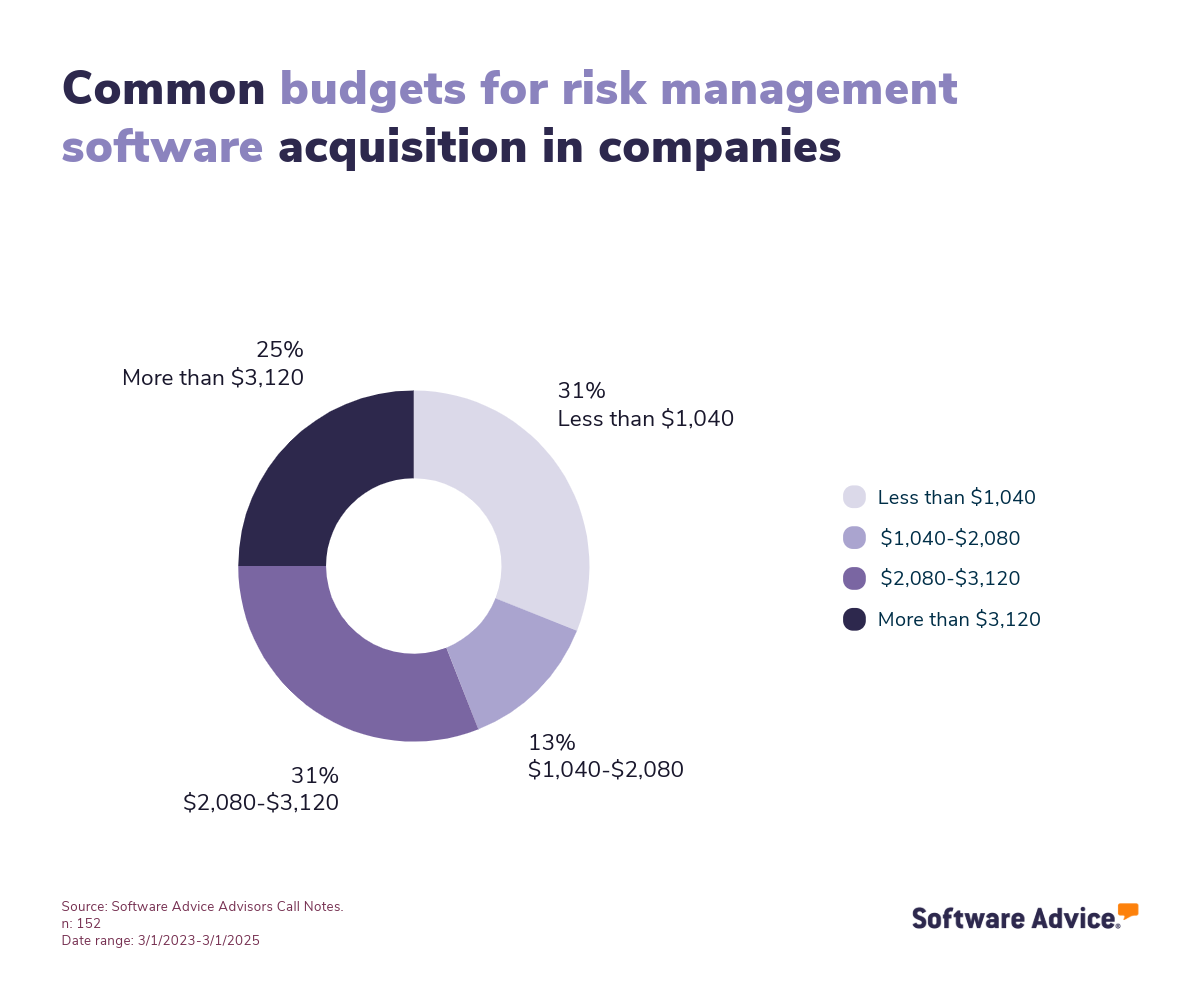
The following graph illustrates the common budget ranges across various industries to help readers better understand how companies allocate resources for risk management solutions.
Get input from stakeholders
Engaging with stakeholders is crucial when selecting risk management software. This ensures that the solution aligns with your organization's diverse needs and meets department-specific requirements, such as compliance tracking for legal teams or real-time data access for IT associates. Gather insights from various departments, including risk managers, compliance officers, IT staff, and senior executives, to understand the features that will best support their roles and responsibilities.
Step 2: Make a shortlist of risk management software
With so many software options to choose from, selecting the best risk management software for your business can be challenging, but with the right resources and support, it doesn’t have to be.
Explore our list of risk management software FrontRunners
You can start compiling your shortlist of risk management software with our 2025 FrontRunners report for risk management software. Only products that earn top user ratings make this list. You can also check out our full methodology description for more details on how the report is compiled.
For more help creating a shortlist and a free comparison chart, check out our Ultimate Software Vendor Evaluation Guide. This will help you compare software evaluation criteria for each prospective vendor by tracking aspects such as functionalities, support offerings, costs, and deployment options.
Step 3: Pick your best option
Once your shortlist is narrowed down to two or three options, start contacting vendors to learn more about these products and prepare for demos.
Get ready for vendor demos
Here are some questions you should consider asking risk management software vendors during demos:
How does the software integrate with existing systems like ERP, CRM, or project management tools?
Integration capabilities are crucial for ensuring seamless data flow and real-time risk tracking across various platforms within your organization. Getting answers to this question will help you determine if the software can provide a comprehensive view of organizational risks.
Can the software facilitate collaboration among cross-functional teams?
Risk management often requires input and coordination from various departments. This question assesses whether the software supports collaborative efforts, enabling teams to work together efficiently on risk identification, assessment, and mitigation.
Does the software offer customizable risk assessment frameworks to suit industry-specific standards?
Risk management requirements will vary depending on the industry. By asking this question, you can ensure the software provides support for various risk assessment methodologies, such as FMEA or HAZOP, allowing you to tailor the system to your industry's specific needs and practices.
Step 4: Make the most of your risk management software
Now it’s time to start using your new risk management software. Follow these tips to ensure a smooth implementation process:
Training: Leverage online resources and vendor-provided training sessions to familiarize all team members with the software's features and functionalities, ensuring they can effectively utilize the system for risk management tasks.
Communication: Set up clear communication channels within the software to facilitate seamless information sharing among departments, enhancing collaboration and ensuring everyone is informed about risk-related updates.
Data management: Ensure all risk-related data is securely stored and easily accessible, and establish regular data backup protocols to prevent loss and maintain data integrity.
Software related to risk management
Depending on which risk management software you choose, you may need to supplement some features with related software systems in order to cover and secure all your business operations. Some types of software that are closely related to risk management, but may or may not be included in your risk management system, include:
Audit software: Helps organizations plan for, address, and mitigate risks that could compromise the safety and/or quality of the goods or services they provide.
Business intelligence software: Business intelligence software is data visualization and data analytics software that helps organizations make more well-informed decisions.
Compliance software: Continually track, monitor, and audit business processes to ensure they’re aligned with applicable laws, organizational policies, and the standards of consumers and business partners.
Financial risk management software: Helps businesses identify, assess, and mitigate financial risks by providing analytics, reporting, and compliance features to enhance decision-making and safeguard assets.
Governance, risk, and compliance (GRC) software: Aids companies in incorporating synchronized data governance, risk, and compliance management strategies into various business processes. It makes it possible to enforce frameworks that govern how data is stored and used, how risks are dealt with, and how policies are implemented.
HIPAA compliance software: Helps healthcare organizations comply with all the necessary security and privacy provisions to protect patients’ data.
Integrated risk management software: A tool that helps companies measure and address various kinds of business risks.
Strategic planning software: Enables organizations to identify and define short- and long-term goals and priorities.
More resources for your risk management journey
What You Need to Know About Effective Compliance Risk Management
5 Steps To Build a Risk Management Process for Your Business
Accelerate Your Risk Management Software Implementation by Learning From Buyers With Experience
About our contributors
Author
Alejandra Aranda is a content analyst at Software Advice, specializing in technology trends while always on the lookout for strategic insights for small and midsize businesses. Her areas of focus are brand management, performance marketing, and anything related to digital marketing.
Alejandra’s research and analysis is informed by more than 150,000 authentic user reviews on Software Advice and over 15,000 interactions between Software Advice software advisors and marketing software buyers. Alejandra also regularly analyzes market sentiment by conducting surveys of marketing leaders so she can provide the most up-to-date and helpful information to small and midsize businesses purchasing software or services.
Alejandra led the session “Q-Commerce & M-Commerce in Spain 2023: How is consumption evolving thanks to technology” at Universidad Complutense de Madrid and has had research published in Spanish publications such as El Economista, Corresponsables, and El Español.
When she is not on the lookout for new marketing trends, she is probably exploring a bookshop or researching a new travel destination.
Editor
Mehar Luthra is a team lead at Software Advice and specializes in editing reports that cover the latest trends affecting small businesses. With nearly a decade of experience, she has edited a multitude of research articles, top-rated software reports, and thought leadership articles for diverse markets such as Brazil, Japan, Canada, France, Australia, and India. She finds it particularly rewarding to produce content that provides small-business owners with practical tips and helpful advice on topics such as the digitalisation of small businesses, eCommerce trends, and HR developments.
Armed with a double bachelor’s in law (LL.B.) and business economics from Delhi University, she won a full scholarship to study for a master’s in creative writing at the National University of Ireland, Galway. In addition, she has written blog articles spanning a variety of topics such as fiction and non-fiction books, mental health and anxiety, the latest restaurants, and more. Her articles have been featured in Ireland’s national magazine The Village, among other publications. A die-hard journaling fan, she enjoys watching psychological thrillers, reading fiction books, and drinking iced coffee (even in the winter).
Sources
Software Advice reviews data: Software Advice reviews are collected from verified users for individual software products. For this report, we analyzed reviews from March 1, 2023 to March 1, 2025. Read the complete methodology.
Software Advice advisor call notes: Findings are based on data from telephonic conversations that Software Advice’s advisor team had with businesses seeking risk management software. For this report, we analyzed phone interactions from March 1, 2023, to March 1, 2025. Read the complete methodology.
How to Stand Out in Your Category: Buyer Insights for Risk Management Software, Gartner
Software Advice software pricing data: Only products with publicly available pricing information and qualified software products within the category, as of November 2024, are included in the pricing analysis.
Risk Management FAQs
- What is a risk management software?
Risk management software is a system that helps companies prevent or manage critical risks that businesses typically face. These include financial, legal, regulatory compliance, and strategic and operational risks.
- What is the most popular risk management tool?
AuditBoard is the most reviewed risk management software on Software Advice among the most popular and highly rated products.
- Who uses risk management software?
Risk management software users include professionals in a wide range of roles, such as risk managers, compliance officers, safety managers, quality assurance managers, and IT security managers.
- What are the 5 stages of risk management?
The 5 stages of risk management include: 1. Identification of potential risks, 2.Analysis of the risks, 3. Evaluation of the risks’ severity, 4. Management of the risk, 5.Monitoring and reviewing the risk.