


Best Web Analytics Software of 2026
Updated March 20, 2026 at 9:20 AM
- Popular Comparisons
- FrontRunners
- Buyers Guide
Compare Products
Showing 1 - 25 of 233 products
Compare Products
Sort by
Reviews: Sorts listings by the number of user reviews we have published, greatest to least.
Average Rating: Sorts listings by overall star rating based on user reviews, highest to lowest.
Alphabetically (A-Z): Sorts listings by product name from A to Z.

Funnel is a marketing intelligence platform designed to aggregate data from various marketing channels and provide tools for rep...Read more about Funnel


AccuRanker is a cloud-based solution that helps marketing agencies handle SEO activities, track keyword ranking and analyze orga...Read more about AccuRanker

AccuRanker's Best Rated Features
See All
AccuRanker's Worst Rated Features
See All

Screpy is a website monitoring software designed to help businesses analyze web pages and track metrics using AI-enabled tools. ...Read more about Screpy
Screpy's Best Rated Features
See All
Screpy's Worst Rated Features
See All

Custom Platform to increase Adoption, Conversion and Retention, at a fraction of the cost. Germain UX helps Monitor, Analyze, I...Read more about Germain UX


AgencyAnalytics is the only marketing platform built specifically for agencies. Save time, boost revenue and impress clients wit...Read more about AgencyAnalytics

AgencyAnalytics's Best Rated Features
See All
AgencyAnalytics's Worst Rated Features
See All

Contentsquare is for brands who offer products or services on websites or apps and are interested in offering an extraordinary e...Read more about Contentsquare

Contentsquare's Best Rated Features
See All
Contentsquare's Worst Rated Features
See All

Ensure customers find your most valuable digital content with 24/7 website monitoring from ContentKing, now part of the #1 enter...Read more about ContentKing

ContentKing's Best Rated Features
See All
ContentKing's Worst Rated Features
See All

Google Analytics 360 is an enterprise-level analytics platform with in-depth performance indicators, such as ROI analysis report...Read more about Google Analytics 360
Google Analytics 360's Best Rated Features
See All
Google Analytics 360's Worst Rated Features
See All

Designed for businesses in insurance, travel, telecommunications, retail and other industries, Glassbox is a cloud-based solutio...Read more about Glassbox

Glassbox's Best Rated Features
See All
Glassbox's Worst Rated Features
See All

Ahrefs is a suite of SEO tools that familiarizes users with the ins and outs of content marketing. It helps users do competitor ...Read more about Ahrefs
Ahrefs's Best Rated Features
See All
Ahrefs's Worst Rated Features
See All

With a SoftwareAdvice rating of 4.8 out of 5 stars, Happierleads is the perfect lead-gen tool designed to provide insight on eve...Read more about Happierleads


Happierleads's Best Rated Features
See All
Happierleads's Worst Rated Features
See All

Lucky Orange is a suite of conversion optimization tools designed to help businesses track and engage with visitors using heatma...Read more about Lucky Orange
Lucky Orange's Best Rated Features
See All
Lucky Orange's Worst Rated Features
See All

Learn more at TWIPLA.com. 𝗧𝗛𝗘 𝗖𝗢𝗠𝗣𝗟𝗘𝗧𝗘 𝗪𝗘𝗕𝗦𝗜𝗧𝗘 𝗜𝗡𝗧𝗘𝗟𝗟𝗜𝗚𝗘𝗡𝗖𝗘 𝗣𝗟𝗔𝗧𝗙𝗢𝗥𝗠 Finally get the ful...Read more about TWIPLA

TWIPLA's Best Rated Features
See All
TWIPLA's Worst Rated Features
See All

ClickCease operates advanced algorithms and real-time monitoring capabilities to detect and block those harmful sources from cau...Read more about ClickCease

ClickCease's Best Rated Features
See All
ClickCease's Worst Rated Features
See All

Are you spending your marketing budget effectively? Which products or channels bring in the best long-term customers? What are c...Read more about Lebesgue

Lebesgue's Best Rated Features
See All
Lebesgue's Worst Rated Features
See All

Microsoft Clarity is a tool that captures how visitors interact with websites. It is free, easy to use, and can be set up quickl...Read more about Microsoft Clarity
Microsoft Clarity's Best Rated Features
See All
Microsoft Clarity's Worst Rated Features
See All

Dreamdata is a B2B Activation & Attribution Platform that provides the most complete B2B customer journey map anywhere. This em...Read more about Dreamdata

Dreamdata's Best Rated Features
See All
Dreamdata's Worst Rated Features
See All

Reportei is a cloud-based software designed to help businesses integrate with third-party applications and generate professional...Read more about Reportei
Reportei's Best Rated Features
See All
Reportei's Worst Rated Features
See All

Semji is an AI-powered platform that helps businesses optimize their content for search engine visibility and marketing performa...Read more about Semji
Semji's Best Rated Features
See All
Semji's Worst Rated Features
See All

EngageBay is an AI-powered all-in-one CRM that helps small businesses and startups manage marketing, sales, and customer service...Read more about EngageBay CRM

EngageBay CRM's Best Rated Features
See All
EngageBay CRM's Worst Rated Features
See All

At Similarweb, we help businesses make smarter decisions in the digital age. Whether it’s understanding your competitors or unco...Read more about Similarweb
Similarweb's Best Rated Features
See All
Similarweb's Worst Rated Features
See All

Plytix is Product Information Management (PIM) software purpose-built for small and medium businesses that need enterprise-grade...Read more about Plytix

Plytix's Best Rated Features
See All
Plytix's Worst Rated Features
See All

Upnify CRM is a customer relationship management solution designed by business leaders for the international market. It allows u...Read more about Upnify CRM
Upnify CRM's Best Rated Features
See All
Upnify CRM's Worst Rated Features
See All

ConvertCart is a website monitoring solution that helps businesses streamline processes related to a/b testing, funnel analytics...Read more about ConvertCart

ConvertCart's Best Rated Features
See All
ConvertCart's Worst Rated Features
See All

We want to help you to make full use of our tools so that you're set up for winning from day zero. Bloomreach connects the dots...Read more about Bloomreach

Bloomreach's Best Rated Features
See All
Bloomreach's Worst Rated Features
See All
Popular Comparisons



Your Guide to Top Web Analytics Software, May 2023
Software Advice uses reviews from real software users to highlight the top-rated Web Analytics products in North America.
Learn how products are chosenExplore FrontRunners


“Usability” includes user ratings for Functionality and Ease of Use.
“Customer Satisfaction” includes user ratings for Customer Support, Likelihood to Recommend and Value for Money.
Reviews analysis period: The reviews analysis period spans two years and ends the 15th of the month prior to publication.
Buyers Guide
This detailed guide will help you find and buy the right web analytics software for you and your business.
Last Updated on January 27, 2025As a business, it’s necessary to measure the performance of your website. How many daily visitors do you get? How many of those visitors convert into customers? How much revenue is your website generating?
You can’t have answers to these and related questions unless you track your website’s metrics, such as the number of page views, average time on page, and overall session duration. Web analytics software lets you track these metrics and provides real-time insights to optimize your website content according to the needs of visitors.
There are different types of website analytics tools available on the market, but one size doesn’t fit all. To help you, we’ve created a buyers guide that has all the information you’ll need to make the right software choice for your business.
Here’s what we’ll cover:
What is web analytics software?
Web analytics software is a software tool that helps measure, collect, analyze, and report website traffic and usage data. It lets you track visitor activity, including their location, how they found your site, the time they spend on your site, and the actions they take on your website. It also tracks metrics such as the web traffic source, pages per session, bounce rate, conversion rate, and number of social media shares.
Web analytics tools can help you understand potential traffic opportunities through keyword tracking. They can collect data from search engines, third-party websites, and other sources to predict what type of content is likely to generate more click-through rates, social shares, and on-page clicks.
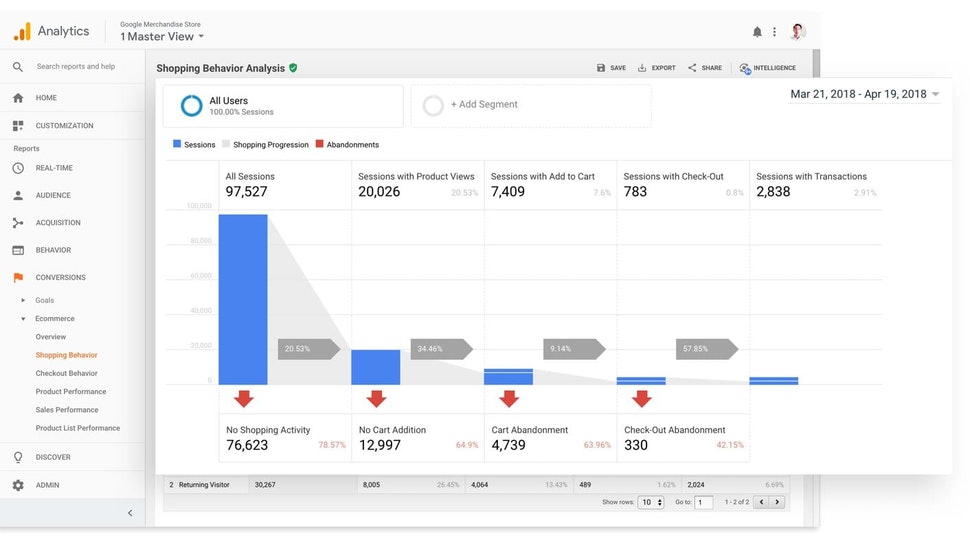
Tracking site visitors using Google Analytics (Source)
Common features of web analytics software
Here are some common features to look out for when choosing web analytics software.
Feature | Description |
Clickstream analysis | Track and measure website metrics such as the number of page views, average time spent on a page, bounce rate, and click rate. |
Attribution management | Track conversion paths by channel—i.e., which channels (e.g., social media, organic, or paid advertisements) are driving traffic to your website. |
Tag management | Collect and share user data between your website and third-party sites via snippets of codes that perform specific tasks such as setting up cookies or integrating third-party widgets. |
Benchmarking | Compare the performance of your website against competitor or industry benchmarks, based on parameters such as the average time on site, click-through rate, and revenue per session. |
Campaign management | Track the results of marketing campaigns through A/B and multivariate testing. Create two versions of key campaign webpages to compare which is performing better. |
Dashboards and reporting | Report key metrics such as the number of page views, conversion rate, and bounce rate using data visualization capabilities and shareable dashboards. |
What type of buyer are you?
While web analytics tools help all kinds of businesses, some firms tend to use them more than others to ensure sales and competitive advantage. Most buyers belong to one of the following categories:
Online or digital businesses: Internet-based companies and ecommerce firms need web analytics tools to not only measure website traffic but also track shopping cart abandonments, visits to “pay-per-click” pages, and failed online payments, all of which directly affect revenue. They also need to track visitors for lead generation and sales growth. These buyers should invest in a web analytics tool that helps track and report multiple metrics and can integrate with their existing tools such as customer relationship management (CRM) or marketing software. Attribution management, tag management, and reporting are the key features these buyers should look for in the software they purchase.
Nondigital businesses: For businesses that maintain a website purely for informational purposes, tracking metrics such as cart abandonment or failed payments isn’t an absolute necessity. These buyers need a web analytics solution to track customer engagement (e.g., time spent on a page, number of social media shares) and lead collection. They should opt for a basic version of web analytics software or choose a software tool such as landing page or CRM software with embedded web analytics features. Clickstream analytics to track metrics such as page views, time on site, and repeat sessions is a key feature they should consider.
Benefits of web analytics software
Let’s discuss some of the key benefits of using a website analytics tool.
Understand your audience better: Web analytics software helps you understand your customers better—what type of content they find engaging, what topics they search for, which channels they use frequently, etc. This can help you build more accurate buyer personas and create content that helps increase your web conversion rate.
Define and track key performance indicators of your website: Without the right web analytics tool, you’ll not be able to understand if your website is bringing in more revenue. Website analytics software helps track key website performance indicators such as page sessions and the bounce rate over a period of time as well as benchmark these against competitor data. This lets you measure profitability by comparing your ROI against the investment required for creating and maintaining your website.
Refine your content marketing goals and strategy: Website analytics tools provide insights that can help create specific, measurable, achievable, realistic, and timely (SMART) content marketing goals and refine your strategy to better achieve those goals. For example, if you want to double the number of leads generated from your web content, web analytics software can help identify where within your webpage you should embed a lead form to have a better chance of capturing customer data.
Key considerations when selecting web analytics software
With plenty of software solutions available on the market, choosing the right one can feel overwhelming. Let’s talk about the key factors you should consider when selecting a website analytic tool.
Cloud vs. on-premise software: The choice between a cloud-based web analytics platform or an on-premise solution is a key decision you should make early on in the purchase process. On-premise tools allow you to customize the product and offer more control over the website data you collect, but they can be difficult to maintain and update if you don’t have an IT team. Cloud-based solutions, on the other hand, are easier to set up and scale but often don’t allow you a choice regarding data control, storage, or processing (e.g., where your data warehouse or center will be located).
Stand-alone vs. embedded web analytics tools: You can choose between a dedicated web analytics tool or a software solution such as CRM, content management, or business intelligence (BI) that offers built-in web analytics capabilities. Stand-alone tools offer a broader range of features and are a good option for businesses that extensively use web analytics metrics to drive their digital marketing strategies. Embedded web analytics tools are a good option for small businesses that are looking for software to explore various functions including how website traffic metrics can help their marketing processes. Also, embedded tools track basic web metrics such as the number of page sessions, whereas stand-alone platforms support advanced functions such as tracking traffic sources, repeat sessions, and clicks on the website.
Free vs. paid web analytics solutions: Free tools or free plans are a great way to get started, but they have limitations in their features and capabilities. Free software plans can limit web tracking to a certain number of pages and metrics. Paid plans, on the other hand, offer better integrations, customer support, and reporting and data visualization capabilities. If you’re opting for a paid tool or paid plan, ensure it is within your budget and offers good ROI. Research and compare the features of multiple paid tools to select one that balances your needs and budget.
Market trends to understand
Understanding website analytics software market trends can help you make a better purchase decision. Here are some recent trends you should be aware of.
Emphasis on digital marketing efforts is driving demand for web analytics tools. With customers increasingly using online channels to interact with businesses, the emphasis on digital marketing and marketing automation has increased. Web analytics platforms can help measure digital marketing efforts and track how they assist with conversion. Ecommerce firms are using web analytics tools to track cart abandonment and get actionable insights into site visitors and traffic sources to improve sales.
Demand for mobile analytics is expected to increase. Mobile analytics involves collecting user behavior data for mobile apps. With an increase in the number of customers using mobile devices to visit websites and make online purchases, demand for mobile analytics software and features is also increasing. Understanding the buying patterns of prospects and customers on mobile platforms is helping businesses improve their sales and conversion.
Data privacy regulations are impacting the web analytics software market. Collecting user details from the web has raised a storm of questions around data privacy violations. Countries have enacted strict regulations such as GDPR to give customers more control over how their data is used, processed, and stored. With countries strengthening their online data privacy rules, companies are investing in web analytics tools that are compliant with international and local regulations. Accordingly, software vendors are ensuring their offerings are achieving compliance with privacy laws.
Note: The application selected in this article is an example to show a feature in context and is not intended as an endorsement or recommendation. It has been obtained from sources believed to be reliable at the time of publication.