


Best Legal Calendar Software of 2026
Updated January 27, 2025 at 9:57 AM
- Popular Comparisons
- FrontRunners
- Buyers Guide
- Related Software
Compare Products
Showing 1 - 25 of 58 products
Compare Products
Sort by
Reviews: Sorts listings by the number of user reviews we have published, greatest to least.
Average Rating: Sorts listings by overall star rating based on user reviews, highest to lowest.
Alphabetically (A-Z): Sorts listings by product name from A to Z.

Filevine offers a comprehensive legal practice management platform designed to streamline document management, communication and...Read more about Filevine


Filevine's Best Rated Features
See All
Filevine's Worst Rated Features
See All

PracticePanther is a cloud-based legal practice management software designed to support law firms of all sizes and across variou...Read more about PracticePanther Legal Software

PracticePanther Legal Software's Best Rated Features
See All
PracticePanther Legal Software's Worst Rated Features
See All

Clio provides a cloud-based solution designed to streamline various aspects of law firm operations. Its platform supports essent...Read more about Clio

Clio's Best Rated Features
See All
Clio's Worst Rated Features
See All

8am MyCase is a cloud-based law practice management solution that helps small and midsize law firms streamline client communicat...Read more about 8am MyCase


8am MyCase's Best Rated Features
See All
8am MyCase's Worst Rated Features
See All

CosmoLex is a cloud-based legal management solution that offers features including time tracking, billing, trust accounting, tas...Read more about CosmoLex
CosmoLex's Best Rated Features
See All
CosmoLex's Worst Rated Features
See All

CaseCloud is a comprehensive cloud-based legal operations platform that empowers legal teams of all sizes and structures to stre...Read more about CaseCloud
No reviews yet
recommendations


Built on the most powerful cloud-based solution, Curo365 resides on the Microsoft Dynamics 365 platform built specifically for l...Read more about Curo365


Centerbase is a cloud-based legal practice management software designed to support law firms in managing billing, client informa...Read more about Centerbase

Centerbase's Best Rated Features
See All
Centerbase's Worst Rated Features
See All

SmartAdvocate is a legal case management software designed to support various practice areas including personal injury, mass tor...Read more about SmartAdvocate

SmartAdvocate's Best Rated Features
See All
SmartAdvocate's Worst Rated Features
See All

CloudLex is a case management software designed for personal injury law firms to organize operations from client intake to case ...Read more about CloudLex
CloudLex's Best Rated Features
See All
CloudLex's Worst Rated Features
See All

Litify is a cloud-based legal practice management platform designed for various legal practices including personal injury firms,...Read more about Litify
Litify's Best Rated Features
See All
Litify's Worst Rated Features
See All

Are you still manually calculating & calendaring legal deadlines? Make your work easier with a court date calculator inside Outl...Read more about LawToolBox


Amberlo is a cloud-based law practice management software that enables small to large law firms to manage clients, records, time...Read more about Amberlo

Amberlo's Best Rated Features
See All
Amberlo's Worst Rated Features
See All

MerusCase is a cloud-based legal practice management solution tailored for legal firms and businesses of all sizes. Designed to ...Read more about MerusCase
MerusCase's Best Rated Features
See All
MerusCase's Worst Rated Features
See All

Lawcus is a legal practice management solution that can be used by legal teams of any size. It is designed to streamline workflo...Read more about Lawcus
Lawcus's Best Rated Features
See All
Lawcus's Worst Rated Features
See All

uLawPractice is a practice management and legal accounting solution for sole practitioners, paralegals, and small law firms. Wi...Read more about uLawPractice
uLawPractice's Best Rated Features
See All
uLawPractice's Worst Rated Features
See All

CaseFleet is cloud-based, legal case management software that helps users organize case facts, track deadlines and manage litiga...Read more about CaseFleet
CaseFleet's Best Rated Features
See All
CaseFleet's Worst Rated Features
See All

Soluno is a cloud-based time, billing, and accounting solution designed for law firms of all sizes. It streamlines back-office p...Read more about Actionstep Legal Accounting


Actionstep Legal Accounting's Best Rated Features
See All
Actionstep Legal Accounting's Worst Rated Features
See All

Legal Files is a legal case management software that helps government agencies, corporations, universities, and insurance compan...Read more about Legal Files


Docket Alarm is a cloud-based legal management platform that helps businesses access court records and streamline administrative...Read more about Docket Alarm


The Legal Assistant is a cloud-based and on-premise legal management solution available for either cloud-based or on-premise dep...Read more about The Legal Assistant


BHL Insight is a cloud-based and on-premise legal management solution that helps law firms manage workflows, accounting operatio...Read more about BHL Insight

Rocket Matter is a cloud-based legal practice management software designed to assist law firms in organizing their operations. I...Read more about Rocket Matter
Rocket Matter's Best Rated Features
See All
Rocket Matter's Worst Rated Features
See All

Quill is a cloud-based legal management solution that lets law firms streamline the entire litigation lifecycle, from managing m...Read more about Quill

Quill's Best Rated Features
See All
Quill's Worst Rated Features
See All

HoudiniEsq is a hybrid law practice management solution that caters to law practices of all sizes and provides them the function...Read more about HoudiniESQ
Popular Comparisons



Your Guide to Top Legal Calendar Software, November 2022
Software Advice uses reviews from real software users to highlight the top-rated Legal Calendar products in North America.
Learn how products are chosenExplore FrontRunners


“Usability” includes user ratings for Functionality and Ease of Use.
“Customer Satisfaction” includes user ratings for Customer Support, Likelihood to Recommend and Value for Money.
Reviews analysis period: The reviews analysis period spans two years and ends the 15th of the month prior to publication.

Buyers Guide
This detailed guide will help you find and buy the right legal calendaring & docketing software for you and your business.
Last Updated on January 27, 2025A significant percentage of legal malpractice claims stem from calendar and docket issues, according to data gathered by the American Bar Association (ABA). Together, the following make up roughly 25 percent of malpractice claims:
Failure to calendar properly
Failure to know or ascertain a deadline correctly
Procrastination in performing services or lack or a follow-up
Failure to react to calendar
These claims are hard to dispute: You either made a deadline or you didn't. Any firm—but small firms especially—can't afford to put themselves at risk for a malpractice suit from something so easily preventable.
Before you brush off that statement, consider that in 2015, over 440 legal malpractice claims resulted in claimants receiving over $1 million dollars in payment, according to a profile of the ABA's study of Legal Malpractice Claims from 2012 to 2015.
To combat this risk, many firms use calendaring and docketing software to provide early warnings and reminders of due dates for filings, court dates and case-related tasks and to create an audit trail for compliance and regulation review.
We've created this guide to outline what you can expect to find in calendaring and docketing software and help you understand how it fits within the larger legal software marketplace.
Here's what we'll cover:
What Is Legal Calendaring and Docketing Software?
Common Features of Legal Calendaring and Docketing Software
What Is Legal Calendaring and Docketing Software?
Calendaring and docketing software helps lawyers manage their files, tasks, deadlines and appointments surrounding cases and trials.
In an industry where missing deadlines has serious legal consequences, having a transparent, collaborative and redundant (i.e., a backed up or duplicated) system in place to manage calendaring and docketing is an important part of a firm's risk management strategy.
These tools automate what historically had been a very manual and tedious process surrounding case file maintenance and management.
Prior to automated calendaring and docketing software, a typical process looked something like this:
Manual Docketing Process
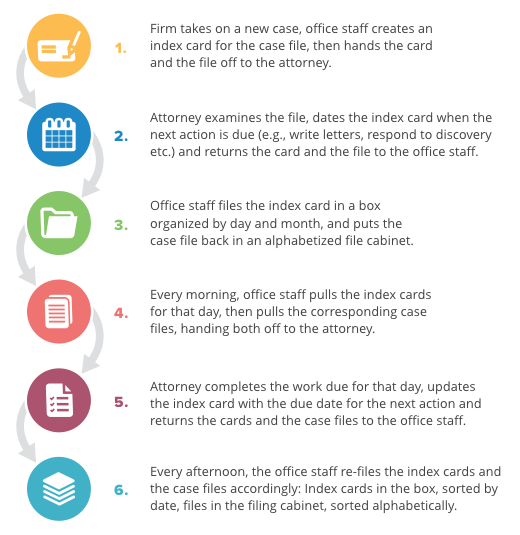
The dated index card is called a “tickler." Sometimes a due date on a tickler was used simply to remind the attorney to review a case and check on it's status (rather than complete a specific action item). On a recurring basis (typically once a month), office staff was responsible for reviewing the tickler box to ensure cards weren't misfiled or hadn't been overlooked.
This was how firms handled files. There was a separate, but related, process for managing schedules for appointments, court appearances and client meetings.
Now, docketing software helps firms create an automated process to manage all tasks, files and deadlines associated with cases and ensure reminders are set and schedules are accurate.
Typically, one person (or more, depending on the size of your firm) is responsible for inputting dates into the system for each case and assuring compliance with court rules and deadlines.
A separate person is responsible for managing calendars, both the individual calendars of the attorneys and shared calendars among the firm. This person reviews mail, email, faxes etc. for dates and deadlines and adds them to the appropriate schedule.
Then, the system acts to provide checks and reminders of impending due dates and case-related tasks. This not only makes the attorney and office staff more organized (and audit ready), but it promotes a better attorney-client relationship as there are less mistakes and missed deadlines.
Because the cards in the manual system were referred to as “ticklers," you may still see this term used to refer to the automated organization system in docketing software. For example, TrialWorks, is a case management software that uses a digital “tickler system."
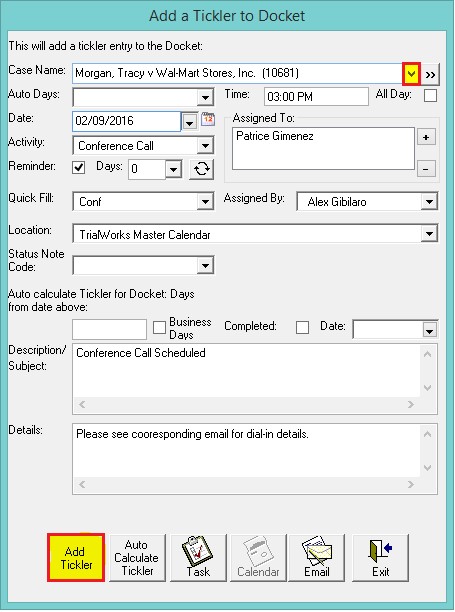
Adding a tickler to a docket in TrialWorks
Some cloud-based systems, such as Clio, will auto-generate dates for court rules within the attorney's jurisdiction based on the “trigger" event being logged.
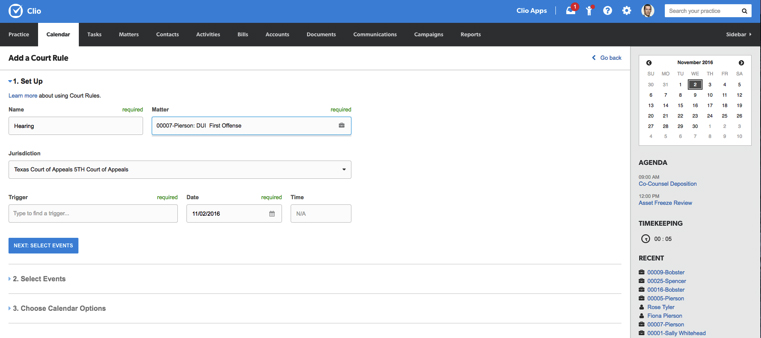
Adding items to the docket using “Court Rules" functionality in Clio
Calendaring and docketing tools are available as best-of-breed solutions (BoB), or as an application within a larger practice management suite.
Firms looking for highly collaborative solutions should consider cloud-based tools as they'll offer the highest degree of transparency and to-the-minute updates.
For example, if an attorney is out of the office and a paralegal receives an email about an urgent discovery item, they can update the attorney's calendar from the office. The system will alert the attorney that a new task has been added to their calendar, and the attorney can check it on their mobile device or laptop.
Maintaining strict rules and protocol around calendaring and docketing is crucial for risk management and ensuring compliance with regulations. This includes workflows dictating who adds tasks and due dates, that there are “read" receipts in the system for when the attorney receives them, that there is a saved history of when auto-generated reminders for deadlines were sent out and of course when the task was completed along with relevant documentation.
Common Features of Calendaring & Docketing Software
Expect to see some or all of the following capabilities as you evaluate calendaring and docketing software:
Email integration | Integration with common email platforms, including Microsoft Outlook and Gmail. Users can create tasks or calendar events directly from email and can view appointments across devices. |
Task management | Review cases and create task lists encompassing action items to be completed by the attorney (and firm staff) to bring the case to a close. Assign to users and schedule due dates. Save task lists to easily load workflows into future, similar cases. |
Calendar management | View tasks, appointments, meetings and docket items by day, week, month or year. Schedule due dates in accordance with court rules. Filter by attorney, case file or client. Link related events and if there is rescheduling, due dates for related events will shift as well. |
Upload, share and attach files to cases in a secure format. Use versioning to view and if necessary, restore previous versions. Use access controls to dictate who can access, change and share files. | |
Store and retrieve case information (including contact information, documents, tasks and schedules) in a centralized, searchable database. Check for conflicts of interest and statute of limitations. | |
Court rules/ rules-based scheduling | Import court-specified due dates for various tasks relating to your cases by jurisdiction from a database. Set up rules for events or category so dates auto-generate when that event is selected. |
Automatic reminders | Schedule notifications to remind assigned users of upcoming deadlines for case-related tasks (e.g., court filings, client meetings, responding to discovery etc.). Set up alerts with enough lead time so the task can be completed and logged. |
Audit trail | Save a history of all calendaring and docketing action-items, “read" receipts for tasks and a history of reminders sent out about tasks. The audit trail protects the firm and the attorney in the event of a malpractice suit and keeps users compliant with regulations. |
What Type of Buyer Are You?
According to 2016 U.S. lawyer demographic research by the ABA (highlighted in this infographic by PracticePanther), 75 percent of attorneys in the private sector work for small firms with 20 or fewer practicing attorneys. Of that, 49 percent work at solo practices.
Below is how your calendaring and docketing needs should break down across your size of business:
Solo practice (one attorney): Look for email integration with a shared calendar tool, task management and matter management (i.e., BoB calendaring and docketing will suffice).
Small practice (two to 20 attorneys): Everything for the solo attorney plus look for case management software that includes calendaring and docketing and document management.
Midsize practice (21 - 50 attorneys): Everything for the small practice, and in addition look for time keeping and a legal billing solution.
Large law firm (more than 50 attorneys): Large law firms will need a comprehensive practice management solution, often one geared toward their specific practice area (see below).
Purchase Considerations
The specific calendar and docket needs of your firm may vary based on your practice area. Common case-related calendar and docket tasks for different practice areas include:
Litigation:
Court filings, court dates and appearances, pleading deadlines, discovery dates and opposing party deadlines. * Patent, copyright or trademark: Deadlines for filing applications, dates of annuity and maintenance payments.
Real estate: Deadlines for contracts, loans, inspection dates, closing dates and lien notification dates.
Corporate/commercial: Annual meetings and deadlines for tax returns, financial statements and regulatory filings.