


Best Call Center Workforce Management Software of 2026
Updated January 27, 2025 at 9:55 AM
- Popular Comparisons
- Buyers Guide
Compare Products
Showing 1 - 25 of 57 products
Compare Products
Sort by
Reviews: Sorts listings by the number of user reviews we have published, greatest to least.
Average Rating: Sorts listings by overall star rating based on user reviews, highest to lowest.
Alphabetically (A-Z): Sorts listings by product name from A to Z.

Five9 is an all-in-one cloud contact center solution for inbound, outbound, blended and omnichannel contact centers world-wide. ...Read more about Five9


Five9's Best Rated Features
See All
Five9's Worst Rated Features
See All

The world of support operations is evolving at an aggressive pace — in-house agents have more demanding roles, outsourcing is st...Read more about Assembled


Assembled's Best Rated Features
See All
Assembled's Worst Rated Features
See All

DVSAnalytics Encore Workforce Optimization is a cloud-based service designed to enhance employee performance and efficiency, del...Read more about DVSAnalytics Workforce Optimization


Gong is an AI-based revenue intelligence platform that helps businesses centralize revenue workflows in a unified platform. The ...Read more about Gong.io
Gong.io's Best Rated Features
See All
Gong.io's Worst Rated Features
See All

Enhance contact center productivity using Playvox Workforce Engagement Management. Maintain service excellence with precise staf...Read more about Playvox
Playvox's Best Rated Features
See All
Playvox's Worst Rated Features
See All

Kixie: AI-Powered Revenue Communication for High-Performing Teams Kixie is a next-generation revenue engagement platform that h...Read more about Kixie PowerCall
Kixie PowerCall's Best Rated Features
See All
Kixie PowerCall's Worst Rated Features
See All

Calabrio ONE is a workforce performance software that helps contact centers work smarter, faster, and better. The true-cloud pla...Read more about Calabrio ONE
Calabrio ONE's Best Rated Features
See All
Calabrio ONE's Worst Rated Features
See All

Talkdesk is a cloud-based call center solution that helps businesses improve customer satisfaction while simultaneously reducing...Read more about Talkdesk
Talkdesk's Best Rated Features
See All
Talkdesk's Worst Rated Features
See All

ZIWO is a cloud-based call center workforce management solution that helps streamline customer interactions via virtual phone nu...Read more about ZIWO

ZIWO's Best Rated Features
See All
ZIWO's Worst Rated Features
See All

Salesforce Service Cloud is a customer service platform designed to support organizations in managing interactions across multip...Read more about Salesforce Service Cloud

Salesforce Service Cloud's Best Rated Features
See All
Salesforce Service Cloud's Worst Rated Features
See All

Monster VoIP is a Unified Communications as a Service (UCaaS) solution that helps voice-over-internet-protocol (VoIP) providers ...Read more about Monster VoIP

Nextiva Contact Center is an AI-enabled solution that helps businesses manage customer interactions. The platform includes featu...Read more about Nextiva Contact Center
Nextiva Contact Center's Best Rated Features
See All
Nextiva Contact Center's Worst Rated Features
See All

MaxContact is the AI-powered customer engagement platform that transforms customer conversations into measurable business outcom...Read more about MaxContact


MaxContact's Best Rated Features
See All
MaxContact's Worst Rated Features
See All

OXON is a cloud-based contact center suite suitable for businesses of all sizes. It allows users to manage inbound support calls...Read more about OXON


TCN is a cloud-based call center solution that caters to various industry verticals, including health care, automotive, and busi...Read more about TCN
TCN's Best Rated Features
See All
TCN's Worst Rated Features
See All

Cloud Voice for Microsoft Teams from UniVoIP Why Use Microsoft Teams as a Phone System? ● You already have M365, so maximize ...Read more about UniVoIP

Call Center Studio is a next-gen cloud-born contact center solution that helps businesses build the best experiences for both th...Read more about Call Center Studio

Call Center Studio's Best Rated Features
See All
Call Center Studio's Worst Rated Features
See All

RingCentral's predictive dialer makes missed calls and ones that go directly to voicemail a thing of the past. Reduce agent down...Read more about RingCentral Engage Voice

RingCentral Engage Voice's Best Rated Features
See All
RingCentral Engage Voice's Worst Rated Features
See All

Sharpen’s cloud-native platform is a SaaS contact center solution for midsize to large enterprise businesses. As an all-in-one s...Read more about Sharpen

yoummday is a comprehensive outsourcing software solution that combines workforce recruitment, training, scheduling, and managem...Read more about yoummday


Cisco Unified Contact Center Express software is designed for midsize and large companies. This software provides a combination ...Read more about Cisco Unified Contact Center Express

Sales Sling’s cloud-based call center software offers the latest technology in dialing systems in an easy to use dashboard that ...Read more about Sales Sling

Vantage Point is a workforce management solution that helps organizations manage workforce planning, scheduling, forecasting and...Read more about Vantage Point

Mitel MiContact Center is a hybrid contact center solution that caters to businesses across various industries such as hospitali...Read more about MiContact Center Business

Workforce Optimization (WFO) is a cloud-based workforce optimization software that enables call centers to manage staff scheduli...Read more about Workforce Optimization (WFO)
Popular Comparisons


Buyers Guide
This detailed guide will help you find and buy the right call center workforce management software for you and your business.
Last Updated on January 27, 2025So, you already have skills-based routing, advanced IVR menus and agent desktops in place at your contact center—what next?
While contact center systems enable inbound, outbound and multichannel interactions, efficiently scheduling agents to handle each channel can be a daunting challenge. Moreover, most contact center supervisors will want additional control over agent performance and the quality of customer interactions.
This is where contact center workforce optimization (WFO) and workforce management (WFM) software come in. Workforce optimization software is generally a separate solution that integrates with modules in your existing call center management software, particularly your automatic call distribution (ACD) system.
WFM is generally part of a WFO solution and enables automated scheduling and forecasting of staffing needs. WFO suites are broader than WFM applications, and also cover quality and performance management.
We’ll take a look at the major components of a WFO solution and explain which types of contact centers can benefit the most from implementing a system. Here’s what we’ll discuss:
What Is Workforce Optimization Software?
Workforce Management Software Features
Quality Management Software Features
Performance Management Software Features
What Are the Benefits of Call Center WFO?
Business Model and Industry-Specific Considerations
What Is Workforce Optimization Software?
Workforce optimization software isn’t a single application, but an integrated suite of applications. Some vendors only sell WFO as a suite, whereas others sell individual modules on a standalone basis.
Standard Modules in Workforce Optimization Suites
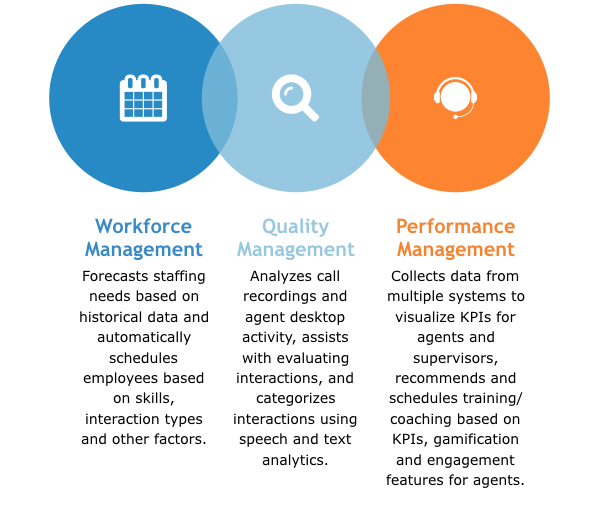
At first glance, you might think that these modules don’t have all that much to do with each other, and you’d be right.
Originally, workforce management systems for employee scheduling were standalone solutions, as were the quality management systems that evolved on top of basic call recording software.
Over the past decade or so, quality management has become an increasingly complex task with the advent of multi-channel contact centers and sophisticated analytics, and the need for greater agent engagement has become more apparent. Performance management software solutions have thus emerged to complement existing quality management systems.
Each of the modules in the above chart includes a complex set of features, so we’ll tackle them one at a time. Based on how your contact center is set up and your pain points with managing your operations, you may need one, two or all three of these modules.
It’s important to note that not all vendors use the same terms for these modules, or group features in the same way.
For instance, some vendors lump KPI dashboards and scorecards in with performance management, while others group these features in with quality management. Some vendors treat interaction analytics as part of a quality management module, whereas others sell separate interaction analytics model.
The major decision you need to make is whether you need an integrated suite or just a few select standalone solutions. If you’re going the standalone route, pay attention to how different vendors group features in modules, so that you can buy as few modules as possible.
If possible, try to find a solution from the same vendor that provides your contact center infrastructure to enable integrated capabilities. Some vendors even offer contact center management suites that include integrated WFM or full-blown WFO.
Workforce Management Software Features
Workforce management modules are primarily designed to do two things:
Enable contact center supervisors to forecast staffing needs
Automate the complex task of scheduling agents
Forecasting is a vital capability: Many contact centers deal with fluctuating call volume based on seasonal demand, product launches and promotional offers, as well as technical issues with products that necessitate intensive customer support etc.
WFM modules can forecast the volume of calls or other interaction types based on historical data collected from sources such as your ACD system and network switches. They can also forecast how many agents you’ll need to have in place to handle this volume. Advanced solutions can even factor agents’ skills and service goals (average wrap time, time to answer etc.) into forecasts.
Most contact center supervisors won’t need an explanation of the benefits of automated scheduling. Simply scheduling agents according to their preferences is already complex enough when using an Excel sheet, but when you factor in the coverage needs of a multichannel contact center, scheduling can quickly become a nightmarishly complex process.
Contact center WFM software completely eliminates the complexity of scheduling by automating it based on rules that take the following factors into account:
Agent skills
Agent requests
Time of day
Events (e.g., server maintenance)
Channel (voice, email, text, web chat etc.)
Department-level needs
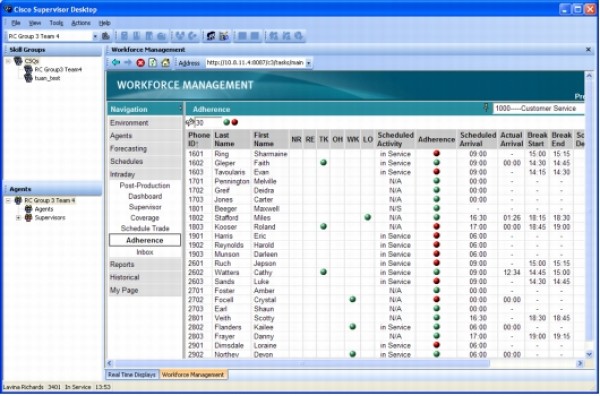
Monitoring schedule adherence in WFM module of Cisco Unified Contact Center
One way in which WFM solutions boost agent engagement is by allowing agents to enter requests for time off and shift changes via self-service web portals and mobile apps. The system then automatically factors in requests when developing schedules.
Advanced solutions also include the following features:
“What-if” simulations | Assist in understanding the impact of potential operational changes, such as sudden spikes in call volume, changes to the ACD queue and/or IVR system, scheduled server maintenance etc. |
Self-service portals and mobile apps | Allow agents both to view schedules in real time and to request time off and make other schedule changes remotely. |
Back-office scheduling | Enables automated scheduling of back-office staff as well as agents. Sometimes sold as a separate add-on module. |
Intra-day scheduling | Allows for task-level scheduling throughout the day to keep agents busy during periods of low call volume. Not all vendors offer this capability. |
Quality Management Software Features
The most basic form of quality management used in contact centers will be immediately familiar to most supervisors and managers: call recording.
Contact centers have been recording calls for decades, but there’s a catch: What happens to all these calls after you’ve recorded them? Contact centers still need to decide on:
The number of calls supervisors should listen to
Some type of mechanism for collecting scores, conveying them to agents and storing them for reporting
Supplementary mechanisms for collecting customer opinions in addition to supervisor opinions
Ways to evaluate interactions that don’t happen over the phone
The approach taken by many call centers in the past was to select a random sample of calls for analysis. For contact centers that deal with a high volume of interactions, however, the danger arises that a random sample won’t be representative, and in particular that it won’t capture the problem interactions that cost the business the most money.
Thankfully, there are now solutions to all of these issues:
Speech and text analytics. New analytics technologies have made it possible to evaluate 100 percent of a contact center’s recordings instead of taking a random sample. For instance, speech analytics can be used to sift through and categorize recorded calls to spot signs of trouble by using keywords and determining the emotional state of a caller through tone of voice. Similarly, text analytics can be used on emails, SMS text messages, web chat interactions etc.
Solutions with speech and text analytics automatically flag problem interactions for supervisor evaluation via a rules engine that defines what counts as “problematic,” and/or allow supervisors to search recorded calls and interactions for keywords and other signs of trouble.
Desktop analytics. This form of analytics addresses the problem of evaluating interactions that take place within software applications rather than over the phone. Desktop analytics captures how agents use software (e.g., clicks, time spent in applications).
Solutions with advanced desktop analytics allow supervisors to define processes for how agents should use applications, then measure whether agents are adhering. Such solutions allow for extensive quality control over interactions that don’t involve a phone call.
Evaluation form templates and scorecards. Finally, quality management systems support templated forms for scoring calls, and feed call scores into key performance indicator (KPI) dashboards and scorecards for agents and supervisors.
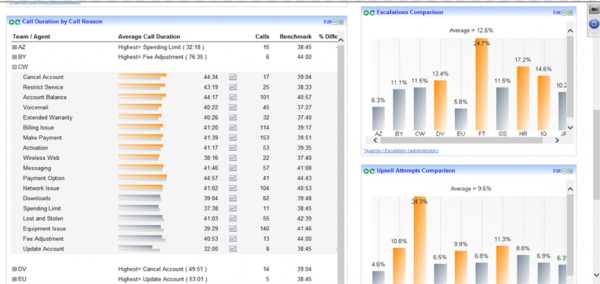
Quality management scorecard in Genesys
Performance Management Software Features
Performance management modules go beyond basic quality management with the following features:
KPI monitoring (sometimes found in quality management modules)
Features for managing agent training via e-learning modules
Features for managing agent coaching
Gamification
KPI monitoring is vital for both agents and supervisors. Generally, historical data is collected from sources such as the ACD system and the WFM system. It is then analyzed by the solution and fed into dashboards and reports that visualize KPIs.
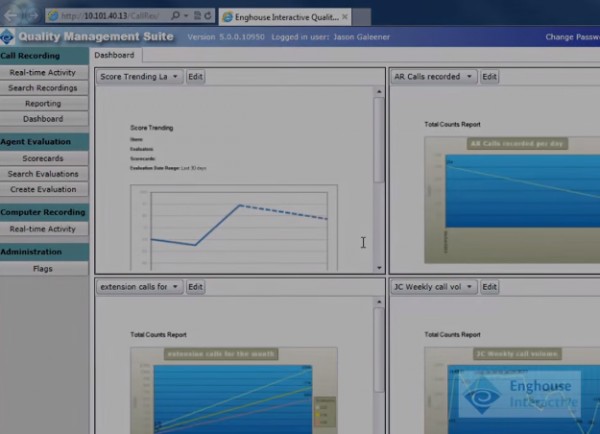
KPI dashboard in quality management module of Enghouse Interactive
KPI dashboards and scorecards for agents give them overviews of their individual performance, while dashboards for supervisors allow insight into broader performance trends. Supervisors can view KPIs and create reports at the following levels:
Individual agents
Teams
Departments
Sites
Real-time compliance monitoring. In addition to visualizing KPIs, performance management solutions can automatically notify supervisors when KPIs drop below predefined thresholds. Modules that integrate with WFM systems can also compare agents’ schedules to their activities in real time to ensure adequate coverage and adherence to best practices.
Agent training and coaching. Performance management extends into e-learning territory generally covered by learning management systems (LMSs). When an agent’s KPIs drop, the system can automatically schedule an e-learning module for an agent to address the underlying issue at the most convenient time for the contact center (another use case for WFM integration).
Performance management solutions can also automatically recommend and schedule one-on-one coaching sessions between agents and supervisors, and track the impact of coaching through continuous KPI monitoring.
Gamification. Finally, performance management generally includes gamification capabilities for enhancing agent engagement. Common functionality includes tracking KPIs in terms of points, awarding badges to high performers and leaderboard displays for motivating competitive agents. We’ve touched on how gamification can improve customer service in a guest post we wrote for Freshdesk.
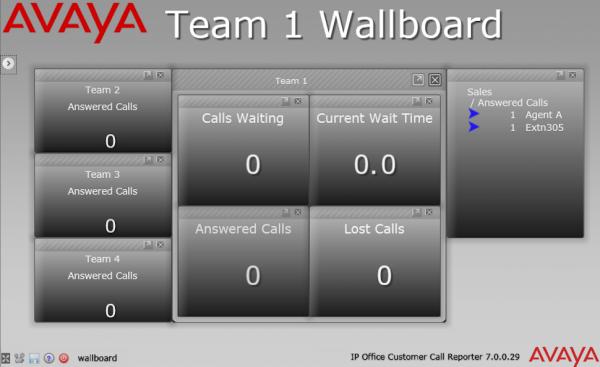
Team-level leaderboard in Avaya IP Office Contact Center
What Are the Benefits of Call Center WFO?
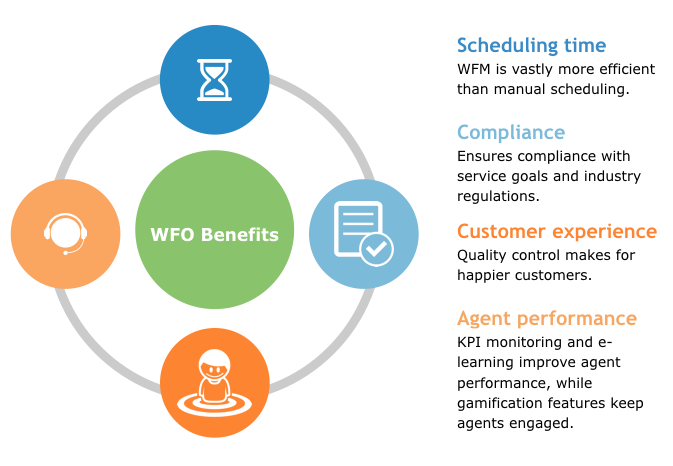
Contact center WFO offers benefits in a number of mission-critical areas. For an illustration, see the chart below:
Benefits of Performance, Quality and Workforce Management
Business Model and Industry-Specific Considerations
Contact centers serve a number of functions across a variety of industries, so it’s not surprising that some niche WFM capabilities are specific to certain verticals:
In financial services, retail and other industries with complex networks of branch sites, visibility is needed into KPIs for individual employees at each branch. Generally, desktop analytics helps to measure the performance of branch office employees who aren’t simply dedicated to answering calls. Some vendors offer dedicated solutions for branch offices.
Organizations that deal with payment card data must comply with PCI (Payment Card Industry) regulations concerning the storage of this data in call recordings. Advanced systems can detect payment card data in recordings (via time stamps and other techniques) and censor it.
Organizations with large back-office teams will need solutions that extend WFM to these employees.
Multichannel contact centers will need text analytics in addition to speech analytics for quality management.
Organizations with numerous teams and/or departments will need a WFM solution that fully takes account of agent skills, not just coverage requirements for different channels in the ACD queue (voice, email, web chat etc.).
Organizations that rely heavily on outsourcing or remote workers, also known as virtual contact centers, will need a solution with web portals and mobile apps that allow agents working from home to use the WFM system, view KPIs etc.