


Best Service Work Order software of 2026

- Popular Comparisons
- Buyers Guide
Compare Products
Showing 1 - 25 of 195 products
Compare Products
Sort by
Reviews: Sorts listings by the number of user reviews we have published, greatest to least.
Average Rating: Sorts listings by overall star rating based on user reviews, highest to lowest.
Alphabetically (A-Z): Sorts listings by product name from A to Z.

Housecall Pro is a business solution for home service professionals. Available on web and mobile, Housecall Pro helps home servi...Read more about Housecall Pro


Housecall Pro's Best Rated Features
See All
Housecall Pro's Worst Rated Features
See All

BiznusSoft Field Service is a cloud-based solution designed to help businesses manage and control their operational cycle. Key f...Read more about BiznusSoft Field Service


ArborNote is the industry-leading Commercial Tree Care & Landscape Maintenance software 🌳 - Tree Inventory Mapping - CRM & Sal...Read more about ArborNote


ServiceTitan is a cloud and mobile-based platform for residential and commercial field service businesses. The solution helps bo...Read more about ServiceTitan


ServiceTitan's Best Rated Features
See All
ServiceTitan's Worst Rated Features
See All

FieldAware by GPS Insight is a field service management software made specifically for businesses who have a mobile workforce an...Read more about FieldAware


Dataforma is a cloud-based solution designed for construction trades, including electrical, plumbing and HVAC. It is a web-based...Read more about Dataforma


FieldPulse is a web-based field service management solution that creates synergy between office and field teams through automati...Read more about FieldPulse

FieldPulse's Best Rated Features
See All
FieldPulse's Worst Rated Features
See All

Salesforce Service Cloud is a customer service platform designed to support organizations in managing interactions across multip...Read more about Salesforce Service Cloud

Salesforce Service Cloud's Best Rated Features
See All
Salesforce Service Cloud's Worst Rated Features
See All

Striven is a cloud-based enterprise resource planning (ERP) solution suitable for many industries and organizations of all sizes...Read more about Striven

Striven's Best Rated Features
See All
Striven's Worst Rated Features
See All

Simpro is a field service management solution designed for trade and field service businesses. It streamlines operational workfl...Read more about Simpro

Simpro's Best Rated Features
See All
Simpro's Worst Rated Features
See All

Briostack is an all-in-one, cloud-based field service management platform tailored for pest control and lawn care professionals ...Read more about Briostack

Briostack's Best Rated Features
See All
Briostack's Worst Rated Features
See All

Knowify helps contractors budget, manage and invoice every construction project and service job with precision and get insights....Read more about Knowify

Knowify's Best Rated Features
See All
Knowify's Worst Rated Features
See All

Service Fusion is an all-in-one field service management software built to help service contractors simplify operations and grow...Read more about Service Fusion
Service Fusion's Best Rated Features
See All
Service Fusion's Worst Rated Features
See All

Grow quickly, scale smartly, and serve your customers relentlessly with FieldRoutes Cloud-based, mobile solutions for field serv...Read more about FieldRoutes
FieldRoutes's Best Rated Features
See All
FieldRoutes's Worst Rated Features
See All

An Inc. 5000 fastest growing private company, recognized by Gartner as a top viable vendor for Integrated Revenue and Customer M...Read more about Symphony

Vonigo is a cloud-based field service solution for service businesses of all sizes. The solution's suite of applications is desi...Read more about Vonigo

Vonigo's Best Rated Features
See All
Vonigo's Worst Rated Features
See All

BlueFolder's field service management is a web and mobile-based solution that helps optimize equipment uptime, streamline preven...Read more about BlueFolder
BlueFolder's Best Rated Features
See All
BlueFolder's Worst Rated Features
See All

Joblogic is a field service management solution designed to connect the back office, mobile workforce and customers. Users can m...Read more about Joblogic

Joblogic's Best Rated Features
See All
Joblogic's Worst Rated Features
See All

TrackTik is a cloud-based security workforce management solution that provides users with data and monitoring tools for field op...Read more about TrackTik


MobiWork© is the leading field services management software solution and is the perfect fit for any small, mid-size, or large fi...Read more about MobiWork

MobiWork's Best Rated Features
See All
MobiWork's Worst Rated Features
See All

IFS Field Service Management (FSM) offers tools that cover the entire service lifecycle. The solution is available on-premise or...Read more about IFS Field Service Management


FieldEdge is a cloud-based field service management solution for home service contractors in fields including HVAC, plumbing, el...Read more about FieldEdge

FieldEdge's Best Rated Features
See All
FieldEdge's Worst Rated Features
See All

Leap is the complete platform for home improvement contractors — built by people who understand how contractors actually sell an...Read more about Leap


Leap's Best Rated Features
See All
Leap's Worst Rated Features
See All

Focus X is an all-inclusive enterprise resource planning (ERP) system that helps you connect every aspect of your business opera...Read more about Focus X
Focus X's Best Rated Features
See All
Focus X's Worst Rated Features
See All

PestPac, a WorkWave software, is a web-based field service management solution, offering features to help improve productivity, ...Read more about PestPac

PestPac's Best Rated Features
See All
PestPac's Worst Rated Features
See All
Popular Comparisons


Buyers Guide
This detailed guide will help you find and buy the right service work order software for you and your business.
Last Updated on February 05, 2025Here's what we'll cover:
What is service order software?
Who uses service order software?
Top-rated features of service order software
How to choose the right service order software
Service order software essentials
If you work for a field service company, you know how important it is to get the right technician to do the right repairs for the right customer—and to complete the work order all in a reasonable amount of time. Successfully coordinating all these moving parts can be very challenging to accomplish, especially if you’re using manual methods.
Here’s where service order software comes in. Adopting and integrating service order software into your daily operations can help streamline and automate otherwise tedious processes, both in the field and the back office. Such automation leads to greater efficiency and lets you and your employees focus on providing better customer service.
Field service management (FSM) tools, such as service order software, are typically priced on a per-month basis, starting at $119 for entry-level systems for one to 10 users. [1] High-end platforms (20+ users) can cost upwards of $450 and often include premium support services and in-house or outsourced IT consultants.
First-time buyers should consider their budget, the number of users needed, specific use cases, and necessary integrations. Consulting stakeholders to determine key questions for vendors can help you find the best system. Questions for vendors may include:
Does the tool have a free trial or demo version I can try out first?
What does inventory tracking look like in your product?
How does your product integrate with other field service tools?
Because there are 226 different service order vendors on Software Advice, choosing the right option can be a lengthy process. In this guide, you’ll learn the essential components of service order tools and get step-by-step guidance on how to choose the right system for your company. If you’d prefer to chat with one of our experienced field service software advisors, such as Cameron Pugh and Jakub Vaughn—who have led buyers to the right software for over a combined four years—schedule a call or start a chat with us.
What is service order software?
Service order software, also known as service work order software, is designed to help manage work orders sent to technicians and increase back office organization of work order history. Additionally, service order software helps back-office staff respond to customer requests quickly, manage repairs and inventory across the service network, and run reports to get valuable insight on service operations. It can also help easily identify the right technician for the job and dispatch them quickly.
Service order systems offer three core functionalities (aside from common reporting and accounting/financial capabilities and integrations):
Document management: Keep track of work orders, service contracts, and other valuable documents.
Customer relationship management: Manage customer job histories. Automate marketing functions such as email reminders for monthly or yearly service.
Telematics: Monitor mobile assets in the field, including trucks, tools/equipment, and employees. Optimize routes based on real-time traffic reports. Identify misuse of company assets.
What’s more, systems with mobile access allow technicians to get all the information they need to complete work accurately and on time while in the field. These systems also update customer and repair data, service histories and inventory levels automatically, so technicians don’t have to re-enter information when they get back to the office. This saves time and reduces the potential for human error.
Many service order systems offer customer self-service functionality. This can streamline the service order submission and creation process even further, and provides the opportunity for customers to leave valuable feedback about the service they receive. It also offers access to real-time information for customers who need answers quickly or after hours.
Something that gets overlooked about service order products is their versatility, says Pugh. “They can actually be pretty robust. They can track large jobs, but also things as basic as singular tasks, just to break down the details about a job.” Buyers also tend to underestimate how accessible these products can be, budget-wise. “There's so many different options out there, and there's some affordable options that can work for anyone and everyone.”
Who uses service order software?
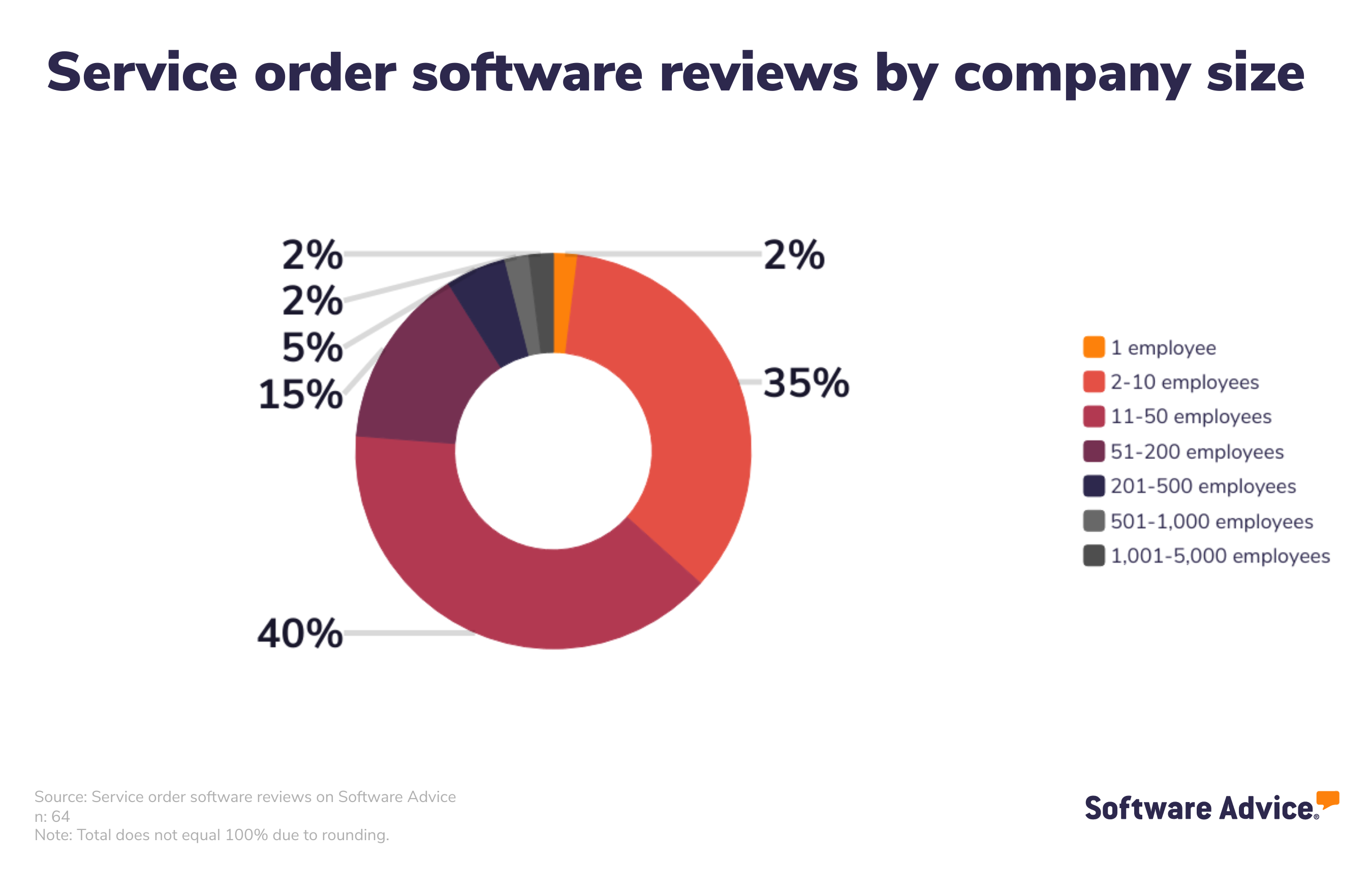
We analyzed our collection of service order software reviews and found that a wide variety of industries use service order software, including construction, consumer services, education management, and health and wellness. [2] The vast majority (90%) of those reviews come from small to midsize businesses with 200 or fewer employees.
Top-rated features of service order software
Each year we speak to dozens of service order software users. [3] We have analyzed those conversations to give you a better understanding of which features are most critical to field service professionals.
Feature | Description |
Dispatch management | Manage sending personnel and resources to a site as needed. 100% of service order software users we spoke to rate this feature as critical or highly important. |
Preventive maintenance | Minimize equipment failures and optimize asset reliability through scheduled inspections, repairs, and replacements. 100% of service order software users we spoke to rate this feature as critical or highly important. |
Quotes/estimates | Generate quotes or estimates for customers. 100% of service order software users we spoke to rate this feature as critical or highly important. |
Real-time data | Receive data and information in real time. 100% of service order software users we spoke to rate this feature as critical or highly important. |
Work order management | Create, assign, and track jobs and/or tasks for work orders. 100% of service order software users we spoke to rate this feature as critical or highly important. |
Service history | Track work performed and resources used for past customers, sites, or assets. 75% of service order software users we spoke to rate this feature as critical or highly important. |
Scheduling | Plan availability and assign specific time slots for tasks and resources. 65% of service order software users we spoke to rate this feature as critical or highly important. |
Billing and invoicing | Create, manage, and send invoices or bills to customers. 55% of service order software users we spoke to rate this feature as critical or highly important. |
Mobile access | Access software remotely via mobile devices. 53% of service order software users we spoke to rate this feature as critical or highly important. |
Customizable forms | Customize contracts and forms to collect specific information. 46% of service order software users we spoke to rate this feature as critical or highly important. |
Customer database | A collection of customer information such as contact details, demographics, previous interactions, etc. 37% of service order software users we spoke to rate this feature as critical or highly important. |
Calendar management | Track and manage schedules and meetings via an integrated calendar. 34% of service order software users we spoke to rate this feature as critical or highly important. |
One other important functionality that’s fairly universal among service order platforms is the ability to include photos with a service order, says Vaughn. “Buyers want the option to include pictures in service orders, and they're often concerned about whether the product they’re eyeing will have this feature. I try to reassure them that all of these systems will have that.”
How to choose the right service order software
When you start evaluating service order solutions, you should detail all your requirements and categorize them based on their importance. Nice-to-have features can come at the very end. Therefore, the solutions you’re considering should address your most crucial needs first.
Step 1: Define your requirements
Before you talk to a single service order software vendor, you first have to decide on your priorities. These might include:
Integrations with other software systems. Make sure the system you choose can integrate with other software your company uses, such as accounting, customer relationship management or enterprise resource planning systems. Solutions that support integration out-of-the-box will be easier to implement than those that require customization.
GPS capabilities. Some systems come with GPS capabilities that are able to locate and monitor technicians on the map and provide turn-by-turn directions to service locations. This technology can also help keep technicians accountable while in the field. Consider a GPS-enabled system if you frequently send technicians to unfamiliar locations, and/or if you want to keep closer tabs on field service workers.
Preventive maintenance functionality. Some service order systems offer tools that support preventive maintenance. These include automatic work order scheduling and dispatch for key assets showing signs of potential failure. Look for systems with this type of functionality if you want to implement a preventive maintenance strategy at your organization.
Mobile payment processing. Some service businesses are taking advantage of the affordability and ease-of-use of today’s mobile payment processor. Service organizations are using platforms like Square to collect payments at the point of service. This greatly expedites the invoicing process and gets money into service companies’ accounts much faster.
Step 2: Make a shortlist of service order software
With so many service order software options to choose from, it can be a challenge to narrow down the options that are right for your business—but with the right resources and support, it doesn’t have to be.
At Software Advice, our advisors have experience helping hundreds of field service professionals identify solutions that match their needs and budgets.
If you need guidance, you can chat online now with an advisor or schedule a phone call. In just a few minutes, your advisor will help you identify a shortlist of options that align with your organization’s requirements.
Step 3: Schedule vendor demos to help you select your best option
Now that you’ve compiled a list of top choices, you should start scheduling vendor demos.
These sessions help you explore features, understand pricing, and ultimately make the right investment. Preparation is key to getting the most out of these sessions.
How to prepare for vendor demos
Once you’ve compiled your shortlist of service order software systems, schedule demo sessions with each vendor in order to learn more about their product. This is your chance to ask questions about service order-specific features they offer, pricing, technical support, training tools, and anything else that might be an important factor in choosing the right system.
Some questions you should consider asking vendors in each demo include:
Does the tool have a free trial or demo version? A free trial or a demo version of service order software allows you to assess the software's suitability for your specific needs without commitment. It offers hands-on experience, showcasing features, ease of use, and compatibility. You can evaluate if the software aligns with your company’s requirements and workflows, ensuring you make an informed decision, mitigate risks, and avoid investing in a solution that may not meet your expectations or deliver the desired ROI.
Is there an open source version of the software? Open source versions of service order software offer greater flexibility and control. It allows you to access, modify, and customize the code to fit your unique requirements. This fosters independence from vendor restrictions, reduces long-term costs, and ensures adaptability to evolving needs. Additionally, the open source community provides ongoing support and enhancements. Exploring this option allows you to harness the benefits of transparency, collaboration, and cost-efficiency in your service order solution.
Are there any add-on functionalities? Add-on functionalities in service order software ensure that the software can evolve with the business's changing needs. These add-ons provide the flexibility to expand and enhance the system's capabilities. Here are few examples:
Website integration: The software can integrate web forms into your website, so that clients, customers, or employees can enter a service order from wherever they have access to the internet.
Mobile access: Mobile access offers managers a convenient way to keep track of assets from their mobile device. A fleet truck driver, for example, could enter a request as soon as an issue arises, even if the vehicle breaks down on the road.
By considering add-ons during the purchase, you can plan for future growth, prevent the need for costly software replacements, and maintain a competitive edge with a service order solution that adapts to evolving field service requirements.
Note: Questions and responses have been edited for brevity and clarity.
About our contributors
Author
Lauren Spiller is a senior content writer at Software Advice, covering sales and CRM with a focus on retail and customer experience. After receiving an MA in rhetoric and composition from Texas State University, Lauren has pursued a career that allows her to help others through writing.
Lauren’s research and writing for Software Advice is informed by nearly 300,000 authentic user reviews and more than 15,000 interactions between Software Advice software advisors and CRM or sales software buyers. Lauren also regularly speaks to leaders in the sales and CRM space so she can provide the most up-to-date and helpful information to small and midsize businesses purchasing software or services.
Lauren previously taught college writing and served as writing center assistant director at Texas State University. She has presented at the European Writing Centers Association, Canadian Writing Centres Association, and the International Writing Centers Association conferences. She currently lives in Wimberley, Texas, with her husband and their three cat sons.
Editor
Carolyn Santa Maria is a senior editor at Software Advice.
Carolyn has been working in content for more than five years as an editor. With her keen eye for detail, technical experience, and cross-team collaborative expertise, she has developed new content types, briefs, and processes for a variety of different projects and teams. She has edited a large variety of content, including research reports, white papers, eBooks, email marketing campaigns, and many other types of technical papers.
When she isn’t correcting grammar or changing the structural flow of an article, Carolyn is spending her time with her nose in a book, cuddling with her dog Mac, or traversing Austin looking for the best meal.
Advisors
Cameron Pugh is a senior advisor. He joined Software Advice in 2022, and he is based in Austin, TX.
Cameron works directly with small-business leaders to connect them with best fit software providers. He assesses the technology needs of small businesses seeking tools such as CMMS, inventory management, call center, and facilities software through one-to-one conversations and provides a short list of potential matches.
His favorite part of being a software advisor is experiencing the buyer’s gratitude and relief when he finds the best software solution for their needs.
Jakub Vaughn is a senior advisor. He joined Software Advice in 2022 as a software advisor. He is based in Fort Myers, FL.
As part of the software advisor team, Jakub helps professionals from a wide range of industries who are seeking tools including CMMS, manufacturing, inventory management, and help desk software. He provides a short list of personalized technology recommendations based on budget, business goals, and other specific needs.
Jakub’s favorite part of being a software advisor is educating buyers with different needs on software systems available to them and their business.
Sources
Software Advice software pricing data: Only products with publicly available pricing information and qualified software products within the category, as of April 19, 2024, are included in the pricing analysis.
Software Advice reviews data: Software Advice reviews are collected from verified users for individual software products. For this report, we analyzed reviews from August 31, 2023 to August 31, 2024.
Software Advice advisor call notes: Findings are based on data from telephonic conversations that Software Advice’s advisor team had with small-to-midsize businesses seeking CMMS tools. For this report, we analyzed phone interactions from August 31, 2023 to August 31, 2024.