


Best Bar POS Software of 2026
Updated March 23, 2026 at 8:16 PM
- FrontRunners
- Popular Comparisons
- Buyers Guide
Compare Products
Showing 1 - 25 of 79 products
Compare Products
Sort by
Reviews: Sorts listings by the number of user reviews we have published, greatest to least.
Average Rating: Sorts listings by overall star rating based on user reviews, highest to lowest.
Alphabetically (A-Z): Sorts listings by product name from A to Z.

Clover is a POS system designed to help small businesses streamline their operations. The system offers a range of features, inc...Read more about Clover


Clover's Best Rated Features
See All
Clover's Worst Rated Features
See All

Toast POS is a comprehensive point-of-sale system designed specifically for the restaurant industry. It is more than just a tool...Read more about Toast POS


Toast POS's Best Rated Features
See All
Toast POS's Worst Rated Features
See All

Epos Now POS systems are an effective business management, sales, and payment solution for single-site, multi-site, and online b...Read more about Epos Now


Epos Now's Best Rated Features
See All
Epos Now's Worst Rated Features
See All

Rezku is the premier POS, used by successful restaurants, bars and pizzerias to compete at a higher level, earn new business and...Read more about Rezku POS

Rezku POS's Best Rated Features
See All
Rezku POS's Worst Rated Features
See All

Spirits is a comprehensive POS system designed specifically for liquor stores. We streamline essential operations like inventory...Read more about SPIRITS
No reviews yet
recommendations


Loyverse POS is a cloud-based, mobile point-of-sale solution aimed at small retail, restaurant and salon establishments. With th...Read more about Loyverse POS

Loyverse POS's Best Rated Features
See All
Loyverse POS's Worst Rated Features
See All

Square Point of Sale is a cloud-based system designed to process payments and manage business operations across various industri...Read more about Square Point of Sale

Square Point of Sale's Best Rated Features
See All
Square Point of Sale's Worst Rated Features
See All

CAKE provides a comprehensive and easy-to-use POS designed specifically for restaurants. The software benefits independent resta...Read more about CAKE POS
CAKE POS's Best Rated Features
See All
CAKE POS's Worst Rated Features
See All

Poster is a cloud-based mobile point of sale (POS) and inventory management solution for food service industry. The inventory ma...Read more about Poster POS

Poster POS's Best Rated Features
See All
Poster POS's Worst Rated Features
See All

Arryved is an all-in-one POS and hospitality management system. Built for dynamic bars, taprooms and restaurants, Arryved is rem...Read more about Arryved

Arryved's Best Rated Features
See All
Arryved's Worst Rated Features
See All

Magestore POS is a Magento-native point of sale that syncs inventory to Magento in real time, no connector needed. Powered by P...Read more about Magestore

Magestore's Best Rated Features
See All
Magestore's Worst Rated Features
See All

Petpooja is a comprehensive restaurant management platform that works both online and offline. We have developed a single point ...Read more about Petpooja


Petpooja's Best Rated Features
See All
Petpooja's Worst Rated Features
See All

BentoBox is a restaurant POS software designed to help businesses design websites, add content, and connect with customers throu...Read more about BentoBox


EasyAs is an on-premise software designed to help businesses in retail, health and beauty, hospitality and other industries mana...Read more about EasyAs

SkyTab POS is designed for restaurants, the hospitality environments, and the food and beverage industry. Built to meet the uniq...Read more about Skytab POS
Skytab POS's Best Rated Features
See All
Skytab POS's Worst Rated Features
See All

eHopper is a cross-platform point-of-sale software designed for retail and restaurants and available for Windows and Android dev...Read more about eHopper

eHopper's Best Rated Features
See All
eHopper's Worst Rated Features
See All

With Tabology’s EPOS and management suite, tech never gets in the way of outstanding service. It gives you everything you need t...Read more about Tabology EPOS
Tabology EPOS's Best Rated Features
See All
Tabology EPOS's Worst Rated Features
See All

Ovvi is an on-premise POS solution that can be used by restaurants, retail stores, grocery shops, non-profit organizations, conv...Read more about OVVI POS


Lightspeed Restaurant is a cloud-based point of sale (POS) solution for restaurants suitable for full-or quick-service restauran...Read more about Lightspeed Restaurant

Lightspeed Restaurant's Best Rated Features
See All
Lightspeed Restaurant's Worst Rated Features
See All

ready2order is the faster POS system with payment for small businesses. ready2order ensures faster ordering, checkout, and admin...Read more about ready2order
ready2order's Best Rated Features
See All
ready2order's Worst Rated Features
See All

Square for Restaurants is a cloud-based solution designed to help restaurants of all sizes manage menus, tables, orders, payment...Read more about Square for Restaurants
Square for Restaurants's Best Rated Features
See All
Square for Restaurants's Worst Rated Features
See All

Self Ordering Kiosk is a cloud-based restaurant POS solution that lets users reduce labor costs, sell additional items, and impr...Read more about Applova Self Ordering Kiosk

uniCenta oPOS is a cloud-based and on-premise retail solution that helps small to large enterprises streamline point-of-sale ope...Read more about uniCenta

RMS POS is a secure, fast and reliable point of sale solution for hospitality businesses. From quick service cafes to fine-dinin...Read more about RMS POS


Aloha EPOS is a cloud-based software that helps businesses in the hospitality industry manage point of sale operations across mu...Read more about Aloha EPOS
Aloha EPOS's Best Rated Features
See All
Aloha EPOS's Worst Rated Features
See All
Popular Comparisons



Your Guide to Top Bar POS Software, March 2023
Software Advice uses reviews from real software users to highlight the top-rated Bar POS products in North America.
Learn how products are chosenExplore FrontRunners


“Usability” includes user ratings for Functionality and Ease of Use.
“Customer Satisfaction” includes user ratings for Customer Support, Likelihood to Recommend and Value for Money.
Reviews analysis period: The reviews analysis period spans two years and ends the 15th of the month prior to publication.

Buyers Guide
This detailed guide will help you find and buy the right bar point of sale (pos) software for you and your business.
Last Updated on January 27, 2025What are POS systems for bars?
Point-of-sale (POS) systems for bars are software platforms that make it easier for establishments to ring up custom orders, manage tabs, process payments, track inventory, run sales reports, and more. Acting as the digital hub of your business, POS systems can lighten the burden of running a bar while increasing security and transparency.
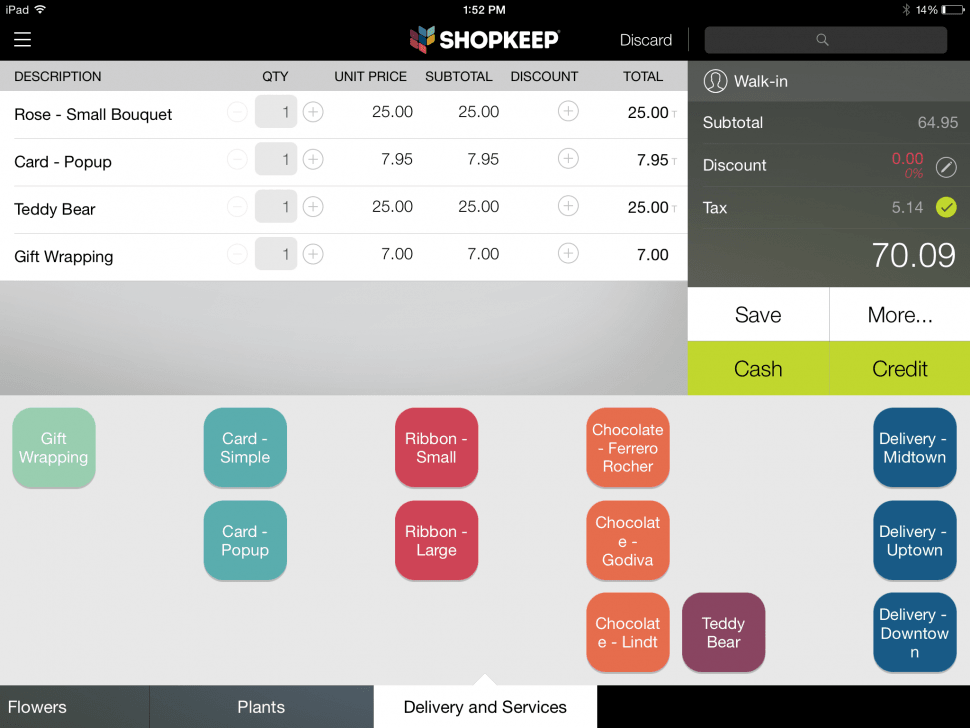
Screenshot of Shopkeep POS dashboard
Here's what we'll cover:
Benefits of bar POS systems
The ideal bar POS system helps keep a check on the food inventory, finances and sales. The system also simplifies their bookkeeping requirements.
Quick and easy sales tracking: As bars and restaurants handle a large volume of credit cards and cash every day, the ideal system should help them track all sales up to the very last penny. The solution also tracks menu items that are selling the most along with the unpopular ones. Therefore, it allows owners to modify their menus based on the demand.
Smooth processing of credit card transactions: Almost all bar POS systems offer easy handling of credit and debit card processing. It enables the management to get rid of peripherals and additional systems. Therefore, it results in customers and bar owners accepting credit and debit card transactions as a secure and easy proposition.
Fast and easy preparation of financial statements: The solution offers all the required financial figures, such as profit and loss statements, at the required time, thus, saving a significant amount of manual effort.
Improved security: The solution offers increased security to bar owners because servers are fully accountable for all sales and they cannot change customer checks without entering the correct password. This step also eliminates the chances of employee theft as well as inappropriate discounts for family and friends.
Check on employees: The bar POS software also keeps an eye on the employees by acting as a time tracker and preparing the establishment’s payroll. The solution maintains a record of the sign-in and sign-out times of employees, which facilitates the creation of accurate payroll.
Enhanced inventory tracking: The software also allows bar and restaurant owners to keep an eye on the usage of food and the complete stock. It enables users to identify different usage patterns so that they can eliminate instances of food shortage and over-ordering, and thus, allow better planning of food purchasing.
Offsite control: An advanced bar POS software also enables managers and owners to log in the system through a web connection. It allows users to remotely monitor sales and employee patterns to identify any problems and anticipate future issues.
Efficient utilization of human resources: Setting up a bar POS software also relieves the staff from tedious and time-consuming tasks such as double-checking discrepancies in sales figures and manually reconciling the cash register.
Common features of bar POS software
These are the features that bar owners should look for when evaluating point of sale systems that meet their specific needs:
Recipe definition and customization | These systems should allow users to customize drink orders, as well as look up drink components from definitions. Users can access a “hotlist” of popular drinks and then modify them on a per-item basis. |
Order entry | The important order entry aspects of these systems include tab transfers, repeat orders and check consolidation. Most features are commonly accessible from the main order-entry dashboard. |
Price scheduling | Multiple menus, specials, happy hours and other promotions need to be easily managed and customized within the system. Rotating prices should automatically change with the system’s internal clock. |
Multi-user compatibility | Since a single terminal is often shared by multiple bartenders, these systems should include integrated login features for users. Card readers, fingerprint scanners or just numerical keypads are some of the popular integrations. |
Tip tracking and payroll | Tips should be linked to user accounts to assist with both end-of-shift payouts and IRS recording purposes. These systems often integrate tip tracking with a time clock module to assist with payroll management. |
Video and security system integration | These solutions often integrate with video surveillance systems to reduce shrink (beverage “sweethearting”) and loss. In addition, it’s becoming increasingly common for systems to integrate directly with bars’ security systems. |
Customer relationship management (CRM) | While not a traditional module within these systems, vendors are now providing CRM functionality as many bars are using social media to promote events and specials, as well as connect with local patrons. Email marketing is one of the more common features. |
Inventory management, ordering and receiving | Bar POS systems will need reporting and management features to manage inventory that moves quickly and fluctuates regularly. Bars will often establish regular shipping schedules with suppliers, so these systems will need to be able to accept automatic shipment notices (ASNs). |
What type of buyer are you?
Whether you’re a small neighborhood sports pub, metropolitan wine bar, or full service brewery and taproom with a 50-person staff, there’s a bar POS system for you.
Small bars. If you have a single location, you should be able to get everything you need from a standard bar POS system with basic features such as tab management and payment processing.
Midsize bars. If you operate an expanding business with several serving areas and a high volume of customers, you'll likely benefit from some additional and more advanced bar POS features such as reporting and analytics, a drink database, and inventory management.
Large bars. Operators of larger bars with multiple locations should choose from advanced bar POS options with enterprise level dashboards and analytics, online ordering, and multiple locations management.
Key considerations when buying bar POS systems
Here are a few other things to keep in mind when you evaluate a bar POS system:
Flexibility options: As technology changes very fast, you need to select a POS system that provides regular upgrades and has an open API. This will enable it to be integrated with various new technologies and third-party apps in the future.
Employee and sales tracking: The bar POS system should allow the tracking of working hours, salaries and other employee metrics. It must also enable setting work schedules and forecasting sales to predict staffing needs better.
Effective inventory tools: The software should also provide inventory management tools for accurate inventory calculation and reduction of storage costs.
Reporting and analytics: The solution should be able to provide customer and sales insights using accurate charts and numbers.
Reliable support: The solution should also provide complementary expert training and round-the-clock support. It should also have a track record of proven customer satisfaction.