
Best Virtual Data Room Software of 2026
Updated March 26, 2026 at 12:55 PM
- FrontRunners
- Popular Comparisons
- Buyers Guide
Compare Products
Showing 1 - 25 of 95 products
Compare Products
Sort by
Reviews: Sorts listings by the number of user reviews we have published, greatest to least.
Average Rating: Sorts listings by overall star rating based on user reviews, highest to lowest.
Alphabetically (A-Z): Sorts listings by product name from A to Z.

Datasite provides a Saas solution for the M&A lifecycle. Its flagship product, Datasite Diligence, offers sophisticated analytic...Read more about Datasite Diligence Virtual Data Room
Datasite Diligence Virtual Data Room's Best Rated Features
See All
Datasite Diligence Virtual Data Room's Worst Rated Features
See All

Ideals offers on-premise and cloud-based virtual data rooms solutions. It caters to investment banks, legal firms, life sciences...Read more about Ideals Virtual Data Room


Ideals Virtual Data Room's Best Rated Features
See All
Ideals Virtual Data Room's Worst Rated Features
See All

The world's favorite Virtual Data Room. Easy-to-use and beautifully designed data rooms, bank-grade security, AI automation & ...Read more about Ansarada

Ansarada's Best Rated Features
See All
Ansarada's Worst Rated Features
See All

CapLinked is a cloud-based virtual data room for file sharing and document management that helps businesses seeking to exchange ...Read more about CapLinked
CapLinked's Best Rated Features
See All
CapLinked's Worst Rated Features
See All

Digify is a virtual data room solution for businesses of all sizes. The platform integrates data encryption, access control, rig...Read more about Digify
Digify's Best Rated Features
See All
Digify's Worst Rated Features
See All

The Imprima Virtual Data Room is highly secure, reliable and easy to use. Suitable for any type of Due Diligence transaction. I...Read more about Imprima Virtual Data Room
Imprima Virtual Data Room's Best Rated Features
See All
Imprima Virtual Data Room's Worst Rated Features
See All

Firmex Virtual Data Rooms is a HIPAA-compliant cloud-based virtual data room solution for small, midsize and large enterprises. ...Read more about Firmex Virtual Data Room
Firmex Virtual Data Room's Best Rated Features
See All
Firmex Virtual Data Room's Worst Rated Features
See All

ComplyKEY SISCIN is a cloud-based file management platform that allows organizations to manage, store, share and recover files. ...Read more about ComplyKEY SISCIN


Google Drive helps users store company data in one place. Users can access files from desktop and mobile devices and control how...Read more about Google Drive


Google Drive's Best Rated Features
See All
Google Drive's Worst Rated Features
See All

Google Workspace (formerly G Suite) is a cloud-based suite of collaboration and document management tools designed to help busin...Read more about Google Workspace
Google Workspace's Best Rated Features
See All
Google Workspace's Worst Rated Features
See All

SecureDocs is a virtual data room tool used for storing and sharing confidential documents both internally and externally. It is...Read more about SecureDocs Data Room
SecureDocs Data Room's Best Rated Features
See All
SecureDocs Data Room's Worst Rated Features
See All

Paperflite is a cloud-based content management system that assists marketing and sales teams with collaboration and prospect eng...Read more about Paperflite
Paperflite's Best Rated Features
See All
Paperflite's Worst Rated Features
See All

Clinked is a powerful cloud-based portal software that provides an efficient platform for businesses to collaborate, manage proj...Read more about Clinked
Clinked's Best Rated Features
See All
Clinked's Worst Rated Features
See All

The Italian solution for Team collaboration and structured document sharing with Clients, Collaborators, Suppliers, Partners, Sa...Read more about Kamzan
Kamzan's Best Rated Features
See All
Kamzan's Worst Rated Features
See All

FileInvite is a document collection solution built to streamline how businesses gather documents, signatures, and client data. D...Read more about FileInvite
FileInvite's Best Rated Features
See All
FileInvite's Worst Rated Features
See All

FileHold Enterprise: Powerful Document Management for Large Organizations! FileHold Enterprise is a comprehensive document mana...Read more about FileHold


FileHold's Best Rated Features
See All
FileHold's Worst Rated Features
See All

dMACQ DMS+ is a cutting-edge Document Management System designed to streamline operations for enterprises of all sizes. Ideal fo...Read more about dMACQ DMS+


ContractZen — Governance Cloud for Every Company. Everywhere. ContractZen is an AI-powered governance cloud designed to replace...Read more about ContractZen

Virtual Vaults is a software for businesses that want to keep their data secure. It provides a vault where you can store your fi...Read more about Virtual Vaults
Virtual Vaults's Best Rated Features
See All
Virtual Vaults's Worst Rated Features
See All

Private Cloud File Sharing software using your storage -SMB/NAS/Azure. Web, Mapped Drive and Mobile Apps. No migrating of files...Read more about MyWorkDrive

MyWorkDrive's Best Rated Features
See All
MyWorkDrive's Worst Rated Features
See All

Orangedox is a secure document-sharing and virtual data room (VDR) platform designed to help businesses, startups, investors, le...Read more about Orangedox

The WOWS Deal Room is a powerful virtual data room designed to streamline and secure investment processes for startups, companie...Read more about WOWS Deal Room
WOWS Deal Room's Best Rated Features
See All
WOWS Deal Room's Worst Rated Features
See All

Vitrium is a cloud-based document management and digital rights management (DRM) solution that empowers businesses to securely s...Read more about Vitrium Security

Vitrium Security's Best Rated Features
See All
Vitrium Security's Worst Rated Features
See All

netfiles Deal Room is a virtual data room software that helps businesses securely store and exchange confidential data across te...Read more about netfiles Deal Room

HelpRange is a cloud-based platform that lets businesses securely share or sell documents and files with real-time controls, e-s...Read more about HelpRange
Popular Comparisons



Your Guide to Top Virtual Data Room Software, June 2022
Software Advice uses reviews from real software users to highlight the top-rated Virtual Data Room products in North America.
Learn how products are chosenExplore FrontRunners


“Usability” includes user ratings for Functionality and Ease of Use.
“Customer Satisfaction” includes user ratings for Customer Support, Likelihood to Recommend and Value for Money.
Reviews analysis period: The reviews analysis period spans two years and ends the 15th of the month prior to publication.
Buyers Guide
This detailed guide will help you find and buy the right virtual data room software for you and your business.
Last Updated on January 27, 2025The best thing about the internet is how easily it lets people share information. That can be the worst thing about it, too.
A virtual data room (VDR) is a software-as-a-service (SaaS) that lets companies share sensitive information via the internet, while preserving full control and exclusive ownership of it. VDRs play an important role in supporting external-facing workflows in many fields, including finance—mergers and acquisitions and initial public offerings (IPOs) are two common use cases— law and scientific research.
In this buyer's guide, we answer and explain:
What Is Virtual Data Room Software?
Common Features of Virtual Data Room Software
What Is Virtual Data Room Software?
A VDR's main function is to store and serve documents in a secure manner. You can think of a VDR as a highly secure alternative to using email to share documents.
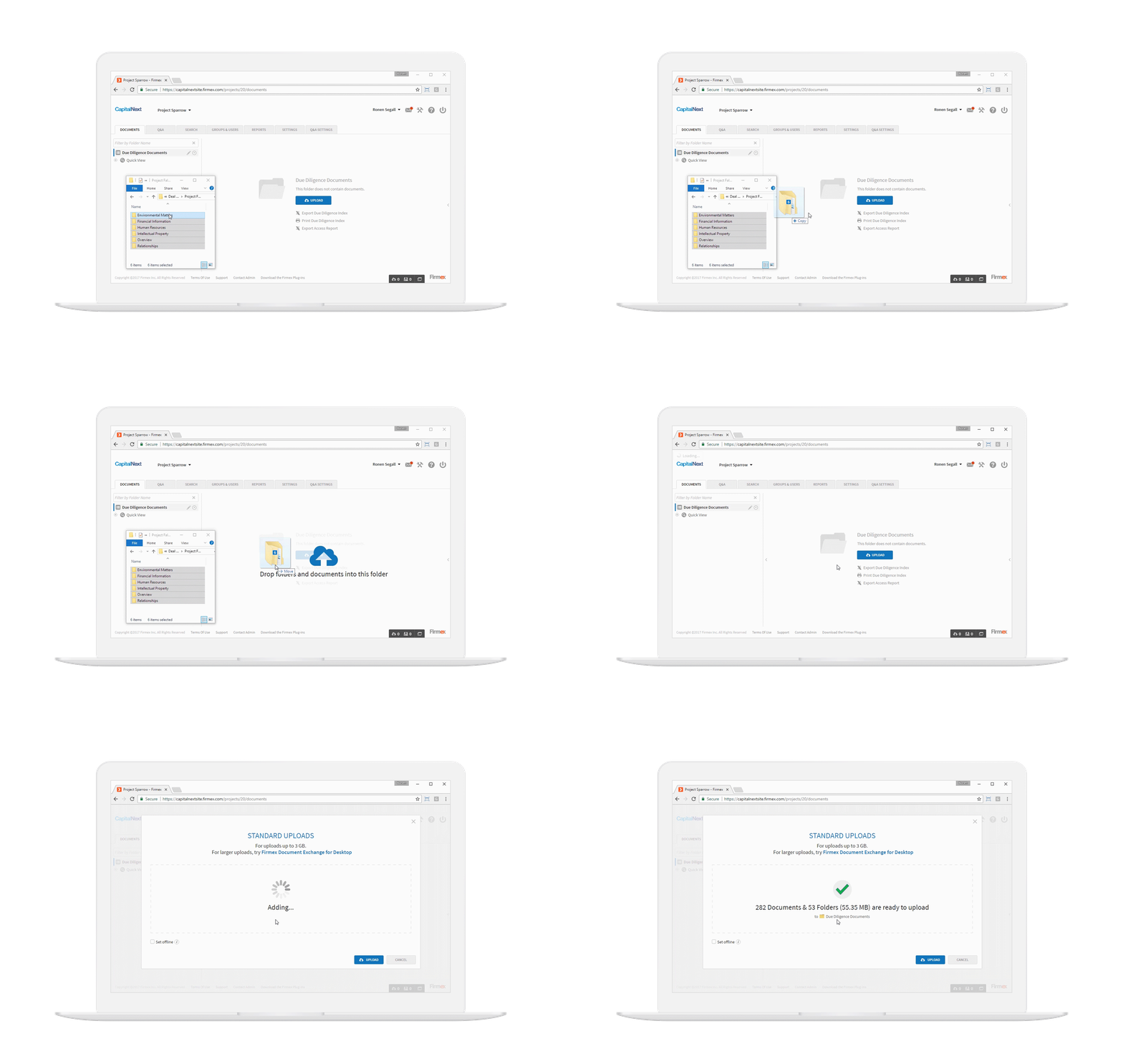
Screenshot showing drag-and-drop file upload in Firmex's VDR
To understand why a VDR is more secure, first consider the many insecurities introduced when relying on email attachments. For example, let's say your company emails a contract as a .PDF or .DOC file to a customer for a signature. In theory, that customer could:
Claim they never received it, couldn't open it or view it
Print out or copy the contract and use it to solicit better bids from competitors
Download the contract to an insecure workstation where it gets leaked
Use software to surreptitiously change parts of the contract and claim it as the original
Now imagine that instead of a contract, you need to share confidential information that has regulatory or legal protections, like a client's investment or health records. Sharing sensitive documents via email opens up a host of legal liabilities.
It's important to remember that other file sharing tools, such as Dropbox and Sharepoint, can also introduce the same vulnerabilities as sharing files via email. While convenient, file sharing services like these are not a viable alternative to a VDR.
Keep in mind that a company can be on the right side of the law, but still lose money proving it in court. VDRs are designed to prevent these scenarios from happening in the first place. They do this by adding a variety of features and protections that email services lack.
Common Features of Virtual Data Room Software
Because of the unique role they play, VDRs can seem like an amalgam of several different genres of software. They typically provide applications in four main areas: Security, Document Management, Communication and Collaboration and Integrations. These are discussed individually below.
Stronger Security is the primary motivation for purchasing VDR software. VDR software helps a company securely share information by means of the following applications:
Access control | Limit who can view, edit and share stored documents, including internal and external access |
Encryption | Encrypt data (either at rest, in transit or both) to prevent unauthorized access |
Digital Rights management | Prevent unauthorized downloading, copying and printing of stored documents |
Secure browsing | Allow users to view and browse documents while online, but prevents saving or printing them |
Document Management applications help control and monitor who can access and edit documents stored in the VDR with applications such as:
Check-in/Check-out | Control the chain of custody for digital documents, preventing version and ownership conflicts |
Version control | Add versioning functionality to individual documents, providing reversion options and maintaining a record of changes |
Communication and Collaboration tools help communicate with clients about documents and information stored within the VDR. They handle:
Alerts and notifications | Send alerts to clients (via standard email) to notify them when actions are required (to, for example, view and sign a document) |
Q & A | Add simple communication functionality so clients can ask questions within the VDR environment |
Tools for working collaboratively (adding comments and making suggestions to documents) within the VDR environment |
Integrations applications help connect the VDR to existing content management systems. They assist with:
Integration with CMS | Link VDR to an existing content management system for more seamless sharing and publishing workflows |
Branding and customization | Add design layout options to help match the VDR interface to your company brand |
What Type of Buyer Are You?
Many VDR vendors tailor the applications and functionality of their products to use cases within specific industry verticals. Others offer more general purpose VDRs that can be customized to various use cases by means of workflow templates.
VDRs commonly support workflows in three general areas:
Financial: Mergers and acquisitions (M&As) are the most common scenario requiring use of a VDR. With M&As, the number of parties needing to access the information changes over time as a deal is considered, analyzed, discussed and agreed to or rejected. VDRs also provide records of access, which can be very useful for settling disputes and proving that the necessary disclosures were made. Initial public offerings (IPOs) are another common activity for which VDRs are employed.
Scientific: VDRs play an important role in scientific industries, allowing for the secure sharing of data between research institutions, manufacturers, trial partners, healthcare providers and regulatory agencies. VDR collaboration tools are particularly important for many scientific processes and workflows.
Legal: Some VDR vendors specialize in tools designed to support legal litigation. Lawsuits can involve massive quantities of documentation which needs to be shared, selectively, with one or more outside parties. VDRs play an important role in not only making certain information available, but also in preventing accidental disclosure.
If you require a VDR for a use case not listed above, you're not out of luck. VDR vendors offer a fairly wide range of both industry specific and general purpose functionality. As with any software purchase, your job as the buyer is to find the product that will best support your company's existing workflows and overall strategy.