
Best Live Streaming Software of 2026
Updated April 24, 2025 at 8:25 AM

Written by Supriya Deka
Market Research Specialist

Edited by Rina Rai
Senior Editor
- Popular Comparisons
- FrontRunners
- Buyers Guide
- Related Software
Compare Products
Showing 1 - 25 of 176 products
Compare Products
Sort by
Reviews: Sorts listings by the number of user reviews we have published, greatest to least.
Average Rating: Sorts listings by overall star rating based on user reviews, highest to lowest.
Alphabetically (A-Z): Sorts listings by product name from A to Z.

Wistia is the complete video platform for business, with over 425,000 clients around the world. With Wistia, you can create, hos...Read more about Wistia
Wistia's Best Rated Features
See All
Wistia's Worst Rated Features
See All

Afton Tickets & LiveStream was built by event organizers, for event organizers. Featuring online ticketing, in-person event tick...Read more about Afton Tickets


Afton Tickets's Best Rated Features
See All
Afton Tickets's Worst Rated Features
See All

Riverside is an all-in-one podcast and video studio for businesses and content creators who demand professional quality without ...Read more about Riverside
Riverside's Best Rated Features
See All
Riverside's Worst Rated Features
See All

GrowthZone Community Platform, for associations, empowers you to create a modern, fresh, and vibrant space where connections are...Read more about GrowthZone Community Platform


Castr is a professional live video streaming platform for both business and individual use. Castr allows users to simultaneously...Read more about Castr

Castr's Best Rated Features
See All
Castr's Worst Rated Features
See All

Ecamm Live is an all-in-one live streaming & video production studio for Mac. With Ecamm Live, video creation is easy, professio...Read more about Ecamm Live

Ecamm Live's Best Rated Features
See All
Ecamm Live's Worst Rated Features
See All

Live Now, the go-to mobile live streaming app, empowers content creators from all walks of life to effortlessly share their uniq...Read more about Live Now - Live Stream
Live Now - Live Stream's Best Rated Features
See All
Live Now - Live Stream's Worst Rated Features
See All

Zoom Workplace brings communication, employee engagement, spaces, and productivity solutions together on a single platform with ...Read more about Zoom Workplace


Zoom Workplace's Best Rated Features
See All
Zoom Workplace's Worst Rated Features
See All

We still do not consent to being listed here....Read more about OBS Studio

OBS Studio's Best Rated Features
See All
OBS Studio's Worst Rated Features
See All

Livestorm enables powerful, yet pain-free video engagements at scale. Our end-to-end video engagement platform enables organizat...Read more about Livestorm

Livestorm's Best Rated Features
See All
Livestorm's Worst Rated Features
See All

Uscreen is an all-in-one membership platform built for video creators to launch paid memberships that include an on-demand video...Read more about Uscreen

Uscreen's Best Rated Features
See All
Uscreen's Worst Rated Features
See All

ProPresenter is a church management software, which helps churches display lyrics, chord charts and presentations in real-time. ...Read more about ProPresenter


ProPresenter's Best Rated Features
See All
ProPresenter's Worst Rated Features
See All

Ant Media provides ready-to-use, highly scalable real-time video streaming (0.5 seconds latency) solutions for live video stream...Read more about Ant Media Server


Ant Media Server's Best Rated Features
See All
Ant Media Server's Worst Rated Features
See All

PromoTix is a ticketing and marketing software product for events that was built by event creators who wanted more from their ti...Read more about PromoTix

PromoTix's Best Rated Features
See All
PromoTix's Worst Rated Features
See All

Viloud is an intuitive online video platform that empowers users to create, stream, and monetize on-demand, linear, and FAST TV ...Read more about Viloud
Viloud's Best Rated Features
See All
Viloud's Worst Rated Features
See All

Demio is a browser-based webinar platform, which helps revenue generating teams drive engagement and ROI, while building relatio...Read more about Demio
Demio's Best Rated Features
See All
Demio's Worst Rated Features
See All

5centsCDN is a cloud-based video streaming solution designed to help businesses manage content publication, video recordings, de...Read more about 5centsCDN
5centsCDN's Best Rated Features
See All
5centsCDN's Worst Rated Features
See All

EventMobi is a cloud-based event management solution for businesses of any size across a variety of industries. Primary features...Read more about EventMobi

EventMobi's Best Rated Features
See All
EventMobi's Worst Rated Features
See All

WebinarGeek is webinar software designed to help businesses stream presentations, record live webinars, share prerecorded videos...Read more about WebinarGeek
WebinarGeek's Best Rated Features
See All
WebinarGeek's Worst Rated Features
See All

Wave.video is a cloud-based video marketing software that provides businesses with tools to create, edit and stream videos throu...Read more about Wave.video

Wave.video's Best Rated Features
See All
Wave.video's Worst Rated Features
See All

Crowdcast helps businesses and content creators launch and manage webinars, question-and-answer sessions, workshops, live stream...Read more about Crowdcast

Crowdcast's Best Rated Features
See All
Crowdcast's Worst Rated Features
See All

iotum’s white-label platform gives you complete customization of the video and voice experience without building it from scratch...Read more about iotum
iotum's Best Rated Features
See All
iotum's Worst Rated Features
See All

Event Hub is a cloud-based customer relationship management solution that helps businesses manage partnership applications, pape...Read more about Events Locker


Glisser is an audience engagement solution that helps organizations manage virtual meetings, live events, courses and more. The ...Read more about Glisser


OneStream Live is a B2B cloud-based solution that enables consumers to live stream real-time and pre-recorded videos to over 45+...Read more about OneStream Live
OneStream Live's Best Rated Features
See All
OneStream Live's Worst Rated Features
See All
Popular Comparisons



Your Guide to Top Live Streaming Software, October 2024
Software Advice uses reviews from real software users to highlight the top-rated Live Streaming products in North America.
Learn how products are chosenExplore FrontRunners


“Usability” includes user ratings for Functionality and Ease of Use.
“Customer Satisfaction” includes user ratings for Customer Support, Likelihood to Recommend and Value for Money.
Reviews analysis period: The reviews analysis period spans two years and ends the 15th of the month prior to publication.
Buyers Guide
This detailed guide will help you find and buy the right live streaming software for you and your business.
Last Updated on April 24, 2025All types of businesses, including small firms and corporates, stream content online to attract and engage their audiences. Streaming live events, such as seminars, conferences, and concerts, allows businesses to reach out to global audiences who can’t be physically present at an event.
However, recording and broadcasting videos in real time require technical knowledge. You’ll have to hire experts to encode videos to your desired streaming platform or your website. Also, the process is time-consuming, and if elements such as the background or volume are not edited professionally, audience engagement can take a hit.
This is where live streaming software becomes useful. With a built-in encoder, the tool converts your videos into the digital format so you can stream them on a platform of your choice. It broadcasts live events over the internet while allowing you to measure streaming performance and audience feedback and engagement.
In this buyers guide, we explain what live streaming software is, its features and benefits, and the considerations you should keep in mind to select the right platform for your business.
Here’s what we'll cover:
What is live streaming software?
Live streaming software is a software tool that encodes live videos and feeds into a suitable format to broadcast over the internet in real time. It’s used by businesses and individuals to promote themselves and entertain a live audience over social media channels, YouTube, or other platforms.
A live streaming platform lets users capture, stream, record, and share live content as well as interact with the audience through real-time engagement options, such as live chat.
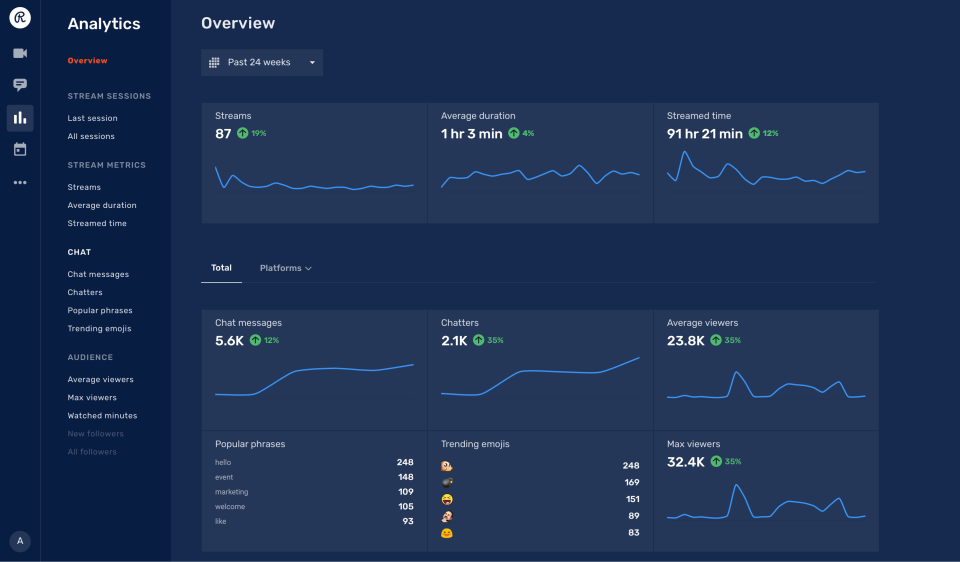
Audience analytics in Restream software (Source)
Common features of live streaming software
Software features vary by product or vendor, but most live streaming software tools have the following overlapping features:
Real-time broadcasting | Live broadcast video, audio, or other media over the internet. Allow your audience to not only watch or listen but also participate in events via engagement options such as live chat. |
Audience analytics | Track and analyze viewership metrics such as audience behavior, engagement, geographical breakdown, duration of views, and viewership by device. This information will help you develop a stronger target audience, improve content for future events, and boost performance. |
Audience engagement | Engage viewers using tools such as live surveys, live polls, chats, and Q&A sessions. Turn your attendees into active participants, and understand their opinions to serve them better. |
Access controls/permissions | Use permission settings to control who within or outside your organization can access your live streams. |
Performance Monitoring | Use analytics to monitor streaming performance. Track details such as average watch time or the number of viewers during a specific period to analyze the performance of live streams and make changes in upcoming programs. |
Session recording | Record live video sessions for future use. Share the recorded videos on different platforms or embed them on your website to increase reach. |
Social media streaming | Live stream content on social media channels, such as Twitter, Instagram, and Facebook, to attract viewers and bring them back to your own website. |
Event scheduling | Plan the time of a virtual event (e.g., meeting, conference, product launch), duration of the event, agenda of the event, etc. |
Video monetization tools | Get paid for the videos you stream online. This can be done by inserting ads, charging audiences to access your video, or letting viewers purchase an interaction with the streamer. You can also generate revenue by selling digital products, such as paid memberships, online courses, or digital downloads. |
What type of buyer are you?
Before purchasing live video streaming software, you should assess which buyer category you belong to. The majority of buyers fall into the following categories:
Individuals: Buyers in this category are mainly artists, travelers, and hobbyists who live stream to entertain their audience, promote their talent, or interact with viewers. Such users need a tool that provides live broadcasting along with basic features such as engagement tracking metrics, chat activity, and screen sharing. An easy-to-use live streaming software platform that provides all basic features free of cost would be beneficial for such buyers. Free streaming software products are suitable for small to midsize events.
Businesses: Businesses mostly use live video streams to inform and engage their followers, provide product updates, promote new products, and host large events to attract new consumers. They need a tool that can deliver high-quality videos, generate leads, and be configured to any platform or device. These buyers should opt for a live streaming software platform that can embed streams to their company websites; provide customizable templates and video captioning; support content monetization; and offer a live analytics dashboard that offers insights into metrics such as audience demographics, viewing behaviors, and highest viewing hours. These features will help businesses increase reach to engage stakeholders and customers better.
Benefits of live streaming software
Listed below are some benefits you can expect from using a live streaming app:
Real-time engagement: Live streaming software lets you broadcast your content to thousands of people across the globe in real time. For example, you can create live Q&As to reply to audience questions, create weekly shows to maximize exposure, chat with your viewers during events, and much more. Real-time interaction helps you understand your customers better and build stronger relationships with them.
Increased awareness and reach: Unlike physical events, live streams let you invite as many people as you want to your events since they don’t have any space constraints. Viewers from across the globe can attend your live event. You can also record the events and share them later on to engage even more people.
Analytics tracking: Live streaming software offers a built-in activity dashboard to measure the success of your events. The dashboard helps track performance metrics such as the number of viewers, audience behavior patterns, viewer engagement, geographical breakdown, duration of views, and viewership by device. This information will allow you to identify your audience, discover new opportunities, and refine your strategies for future broadcasts.
Key considerations
Here’s something to keep in mind when purchasing a live streaming system:
Business needs: Live streaming tools are unique in terms of features and pricing models. Price can vary based on the number of hosts, events, hours, or participants you want. Many vendors also provide a free or an open source software version that you can consider. Therefore, assess your needs before making a purchase.
If your company hosts live events for a large number of participants and requires advanced features such as access control and permissions, video editing, animation, unlimited viewers, and live channels, you can opt for a subscription-based platform. But if you stream to fewer viewers, look for a free live video streaming app with basic features such as compatibility with video editing platforms, limited streaming hours, screen sharing, and custom graphics.
Market trends to understand
Here’s a trend in the live streaming software market that you should be aware of:
Edge computing is enhancing the quality and speed of streaming content. Live streaming software has made it easy for companies to reach audiences across geographies. But a large number of live viewers can degrade the video quality, cause network lag, and lead to untimely buffering, among other issues. To overcome these, live streaming software providers are using edge computing technology, which can offer greater scalability and rapid delivery of content by reducing the volume of data moving through networks. Using advanced artificial intelligence and machine learning capabilities, the technology allows users to offer effective content searchability, content suggestions, interactive video features, and a personalized audience experience.
Note: The application selected in this article is an example to show a feature in context and is not intended as an endorsement or recommendation. It has been obtained from sources believed to be reliable at the time of publication.