


Best Data Analysis software of 2026

- FrontRunners
- Popular Comparisons
- Buyers Guide
Compare Products
Showing 1 - 25 of 660 products
Compare Products
Sort by
Reviews: Sorts listings by the number of user reviews we have published, greatest to least.
Average Rating: Sorts listings by overall star rating based on user reviews, highest to lowest.
Alphabetically (A-Z): Sorts listings by product name from A to Z.

Grow is a cloud-based, business analytics and reporting solution suitable for small to midsize organizations. The solution allow...Read more about Grow


Grow's Best Rated Features
See All
Grow's Worst Rated Features
See All

SAS Viya is a cloud-native platform designed for data analytics, machine learning and data management. It supports organizations...Read more about SAS Viya

SAS Viya's Best Rated Features
See All
SAS Viya's Worst Rated Features
See All

SAP BTP is a solution for businesses of all sizes. It provides a single platform to manage all aspects of business transformatio...Read more about SAP BTP
No reviews yet
recommendations

OriginPro is a cloud-based data analysis and graphing solution, which assists academic institutions, government organizations, n...Read more about OriginPro
OriginPro's Best Rated Features
See All
OriginPro's Worst Rated Features
See All

Google Cloud is a suite of cloud computing services that allows businesses to build, deploy, and scale applications. The platfor...Read more about Google Cloud

Google Cloud's Best Rated Features
See All
Google Cloud's Worst Rated Features
See All

Entrinsik Informer is a business intelligence tool that is designed for business and IT professionals. Key features include a da...Read more about Informer


Alteryx Designer is a desktop-based self-service data profiling, preparation, blending, and analytics product used to create vis...Read more about Alteryx Designer


Alteryx Designer's Best Rated Features
See All
Alteryx Designer's Worst Rated Features
See All

Hexowatch is a business intelligence (BI) software that helps enterprises leverage artificial intelligence (AI) technology to mo...Read more about Hexowatch


Hexowatch's Best Rated Features
See All
Hexowatch's Worst Rated Features
See All

Phocas is a SaaS platform designed to help mid-market businesses in manufacturing, wholesale distribution, and retail make data-...Read more about Phocas


Phocas's Best Rated Features
See All
Phocas's Worst Rated Features
See All

Toucan Toco offers a powerful embedded analytics solution designed to help businesses unlock the full potential of their data. W...Read more about Toucan
Toucan's Best Rated Features
See All
Toucan's Worst Rated Features
See All

datapine is a business intelligence software designed to empower companies in exploring, visualizing, analyzing, and sharing the...Read more about datapine


The leading CRM and Market Insights platform for post-acute providers and suppliers. Designed for the fast-paced needs of healt...Read more about Trella Health Marketscape


Trella Health Marketscape's Best Rated Features
See All
Trella Health Marketscape's Worst Rated Features
See All

BrightGauge is a business intelligence solution that enables enterprises to gain visibility into key performance indicators (KPI...Read more about BrightGauge


BrightGauge's Best Rated Features
See All
BrightGauge's Worst Rated Features
See All

Diver Platform from Dimensional Insight is a data management and business intelligence (BI) platform. The solution can be used i...Read more about Diver Platform

ClicData is a modern data platform providing data teams a complete set of tools: data integration, built-in data lakehouse, data...Read more about ClicData

ClicData's Best Rated Features
See All
ClicData's Worst Rated Features
See All

Take back control with Matomo. You own 100% of your website data so you ensure complete customer privacy. Data compliance cover...Read more about Matomo


Matomo's Best Rated Features
See All
Matomo's Worst Rated Features
See All

Funnel is a marketing intelligence platform designed to aggregate data from various marketing channels and provide tools for rep...Read more about Funnel


Discover actionable insights in your data silos! Lumenore democratizes business intelligence with no-code analytics. Empower yo...Read more about Lumenore
Lumenore's Best Rated Features
See All
Lumenore's Worst Rated Features
See All

Inzata is a cloud-based business intelligence platform that helps automate and manage processes of data collection, preparation,...Read more about Inzata

Infoveave is a data platform that integrates data automation, analytics, and AI capabilities to transform raw data into actionab...Read more about Infoveave

Reeport is a cloud-based data analytics platform, which helps businesses of all sizes automate the collection of data from multi...Read more about Reeport


Decile harnesses the power of customer data to deliver business intelligence and customer insights proven to drive profitability...Read more about Decile

Decile's Best Rated Features
See All
Decile's Worst Rated Features
See All

How quickly can you get answers from your data? Meet DataGPT: Your personal AI analyst bringing you instant analysis as effortle...Read more about DataGPT

Microsoft Power BI is a comprehensive data visualization tool that forms part of the Power Platform suite of products. Power BI ...Read more about Microsoft Power BI

Microsoft Power BI's Best Rated Features
See All
Microsoft Power BI's Worst Rated Features
See All

Market Inside is a cloud-based trade intelligence platform that helps businesses view and analyze trade data via a unified porta...Read more about Market Intelligence Platform
Popular Comparisons



Your Guide to Top Data Analysis Software, August 2024
Software Advice uses reviews from real software users to highlight the top-rated Data Analysis products in North America.
Learn how products are chosenExplore FrontRunners


“Usability” includes user ratings for Functionality and Ease of Use.
“Customer Satisfaction” includes user ratings for Customer Support, Likelihood to Recommend and Value for Money.
Reviews analysis period: The reviews analysis period spans two years and ends the 15th of the month prior to publication.
Buyers Guide
This detailed guide will help you find and buy the right data analysis tools software for you and your business.
Last Updated on January 27, 2025What are Data Analysis Tools?
Data Analysis Tools is a set of technology that enable users to analyze and visualize data in order to identify trends and correlations with the goal of supporting decision making.
Gartner defines BI as “the applications, infrastructure and tools and best practices that enable access to, and analysis of, information to improve and optimize decisions and performance.”
Given this, data analysis software is a central requirement for any business that wants to improve BI. In this guide, we’ll outline the main role of data analysis software and describe its functionality. This can help buyers select the best solution for their needs. We’ll cover:
What Is the Role of Data Analysis in BI?
Data Analysis Software Explained
Common Functionality of Data Analysis Software
Benefits of Data Analysis Programs
What Is the Role of Data Analysis in BI?
While the term "data analysis" is self-explanatory, it’s usually encountered in the context of BI, which is much more complicated. Thus, it’s helpful to begin by explaining how software for data analysis fits into the larger BI context.
The diagram below shows the major components of a BI system. All the data originates from the various data sources on the left, is colocated in the data warehouse (in the center) and then is analyzed by end users—using data analysis software—on the right.
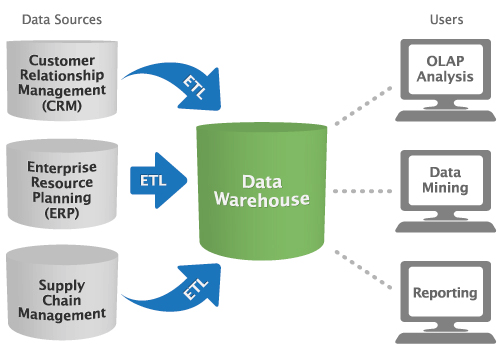
Data analysis software is often the final, or second-to-last, link in the long chain of BI: This chain begins with loosely related and unstructured data, and ends with actionable intelligence.
Data Analysis Software Explained
Data analysis software is also known as “data analytics” tools. No matter what you call them, these should be able to handle five key capabilities, which include:
Dashboards. These provide a real-time overview of key performance indicators (KPIs) in a visual format that is easily sharable. Some data analysis tools allow users to create their own dashboards so they can get a clearer picture of specific business operations.
Data set creation. Your business forecasts are only as reliable as the quality and quantity of data behind them. Software for data analysis should allow users to scrub, aggregate and split data as needed.
Interactive exploration. Static pie charts and line graphs are practically passé by today’s standards. Tools that enable interactive exploration provide eye-catching ways to visualize trends, such as heat maps and time motion views. Heat maps are 2D representations of data where values are represented by colors and time motion views are moving images depicting how data changes over time.
Sharing. Collaboration and social sharing functionalities are important because they allow business leaders to work together more efficiently. When everyone is seeing the same data sets, it’s easier to interpret the information in the same way.
Ease of use. A good data analytics tool should not require an advanced computer science degree to operate. While usability will vary depending on how robust and technical your platform is, the interface should be intuitive enough for trained staff to use with minimal support.
Common Functionality
As you research the various options available in the data analysis software market, you’ll notice that vendors describe and name their solutions differently. This can make product selection, and apples-to-apples comparisons, difficult. So, here’s an overview of the general categories of software for data analysis:
Functionality | Description |
Querying | Querying is the process of “asking” the database a question. The answer is returned via the analysis tool in the form of data or data patterns, and is often presented as a “report.” |
Reporting | Reports are the results returned from a database query. They can take many different shapes and sizes depending on the software used, the available data and the specific nature of the query. |
Managed Query Environment (MQE) | MQE functionality lets administrators set role-based restrictions on the types of queries employees can submit, which databases those queries will access and the types of reports they’ll produce. |
Online analytical processing (OLAP) | Analyzes multidimensional data from multiple perspectives. It’s usually comprised of three analytical operations: data consolidation, data sorting and classification ("drill-down") and analysis of data from a particular perspective ("slice-and-dice"). |
Makes predictions about future risks and opportunities. For example, predictive analytics could be used to test the effectiveness of marketing campaigns based on the performance of past campaigns. | |
Semantic and text analytics | Analyzes large volumes of text to identify patterns, relationships and sentiment. These tools are often applied to comments on social media, live chat conversations and emailed communications. |
Benefits of Data Analysis Software
The benefits of data analysis software are, essentially, the benefits of business intelligence. They vary tremendously depending on the individual case. Generally, however, they help identify, interpret and predict trends and patterns that affect the business.
Data analysis software can help, for example:
Clarify the correlation between new marketing initiatives and improved sales
Better predict customers’ needs by analyzing past purchases and browsing habits
Improve internal workflows and suggest solutions to common bottlenecks
By extracting these kinds of meaningful insights from your data, you’re in a better position to understand what it will take for your business to increase profitability. When you analyze a data set, you’re reflecting on what is (or isn’t) running smoothly at your business. The great advantage of using software for this purpose is it’s often more reliable—and less time-consuming—than manual data coding methods.
Key Considerations for Buyers
Businesses hoping to purchase data analysis tools in the near future should consider the following when evaluating solutions:
Customer support. Even in the most user-friendly of data analysis programs, it’s common to encounter some technical difficulties. Be sure to evaluate all the training and support services a vendor offers before committing to their system. This may include 24/7 live chat, online case submissions, webinars and more.
Mobile access. Business leaders who travel frequently will be especially interested in ensuring their data analysis tools are compatible with various mobile devices, such as tablets and smartphones. Click here for a more comprehensive guide on mobile BI software.
Integrations. Make a list of all the different software your business currently uses to check what the integration process is like with BI platforms on your shortlist. For example, a vendor’s BI platform may not integrate with your existing CRM system.