


Best Cloud LMS Software of 2026
Updated March 25, 2026 at 5:31 AM
- Popular Comparisons
- Buyers Guide
Compare Products
Showing 1 - 25 of 248 products
Compare Products
Sort by
Reviews: Sorts listings by the number of user reviews we have published, greatest to least.
Average Rating: Sorts listings by overall star rating based on user reviews, highest to lowest.
Alphabetically (A-Z): Sorts listings by product name from A to Z.

Absorb LMS is a learning management system designed to help enterprises scale training programs. The platform caters to a wide r...Read more about Absorb LMS


Absorb LMS's Best Rated Features
See All
Absorb LMS's Worst Rated Features
See All

DigitalChalk is the LMS you want and the PARTNER you deserve. We are the LMS you want. We offer a full-featured LMS that indust...Read more about DigitalChalk


"Path LMS™ empowers organizations to create engaging learning experiences that make it easy for professionals to advance their c...Read more about Path LMS


Ziiva's suite of Prosperity software systems is designed to help businesses manage their employee training programs. It is suita...Read more about Prosperity LMS


SkyPrep LMS is a cloud-based learning management solution that offers a platform to training administrators for creating, managi...Read more about SkyPrep

SkyPrep's Best Rated Features
See All
SkyPrep's Worst Rated Features
See All

Docebo Learning Platform is a digital solution designed to help organizations create, deliver, and manage training programs for ...Read more about Docebo
Docebo's Best Rated Features
See All
Docebo's Worst Rated Features
See All

Acorn Performance LMS (PLMS) is the dynamic AI-powered platform for Learning and Development (L&D) experiences synchronized to b...Read more about Acorn

Acorn's Best Rated Features
See All
Acorn's Worst Rated Features
See All

Thinkific is an online course platform designed for creating, managing, and delivering learning products through a centralized s...Read more about Thinkific
Thinkific's Best Rated Features
See All
Thinkific's Worst Rated Features
See All

WorkRamp, a Learning Pool company, is the Next Gen learning management system (LMS) that helps organizations manage employees, c...Read more about WorkRamp

WorkRamp's Best Rated Features
See All
WorkRamp's Worst Rated Features
See All

Kallidus Learn is a cloud-based learning management system (LMS) featuring certification and compliance management, a built-in c...Read more about Kallidus Learn


Kallidus Learn's Best Rated Features
See All
Kallidus Learn's Worst Rated Features
See All

360Learning is a collaborative LMS tool that helps businesses author and conduct interactive learning experiences so learners ca...Read more about 360Learning
360Learning's Best Rated Features
See All
360Learning's Worst Rated Features
See All

iTacit is a workforce app designed to simplify communication and improve engagement between employers and teams. This solution i...Read more about iTacit


iTacit's Best Rated Features
See All
iTacit's Worst Rated Features
See All

Travitor is a cloud-based learning management system that helps organizations create, deliver, and track employee training progr...Read more about Travitor

Travitor's Best Rated Features
See All
Travitor's Worst Rated Features
See All

LearnUpon is a learning management system (LMS) designed to provide a streamlined and engaging learning experience for diverse a...Read more about LearnUpon
LearnUpon's Best Rated Features
See All
LearnUpon's Worst Rated Features
See All

Transform employee learning into measurable business impact: Learning Pool Platform is an intelligent, data-powered learning ec...Read more about Learning Pool Platform


Mitratech Learn is a learning management system that helps organizations build, deliver, and track effective training programs. ...Read more about Trakstar Learn

Axonify is the frontline enablement solution that’s science-backed and proven to maximize the productivity of workforces. Throug...Read more about Axonify


Axonify's Best Rated Features
See All
Axonify's Worst Rated Features
See All

Syberworks is a hybrid learning management (LMS) solution that caters to small and midsize businesses across industries such as ...Read more about SyberWorks

Brightspace is a learning management system designed to transform the learning experience. It supports unique learning journeys ...Read more about Brightspace
Brightspace's Best Rated Features
See All
Brightspace's Worst Rated Features
See All

Adobe Learning Manager an award-winning cloud-based learning management system (LMS) that addresses personalized learning experi...Read more about Adobe Learning Manager

Adobe Learning Manager's Best Rated Features
See All
Adobe Learning Manager's Worst Rated Features
See All

Totara Learn is an enterprise learning management system (LMS) powered by open source technology and trusted by the USDA, Wester...Read more about Totara Learn

Totara Learn's Best Rated Features
See All
Totara Learn's Worst Rated Features
See All

UL Solutions' ComplianceWire is the best-in-class SaaS platform designed specifically for Life Sciences. Our team designed the p...Read more about ComplianceWire


Cornerstone LMS is a learning management system that helps organizations across various industries, including businesses, health...Read more about Cornerstone LMS

Cornerstone LMS's Best Rated Features
See All
Cornerstone LMS's Worst Rated Features
See All

Your employees don’t have time to waste on an LMS they don’t use, and neither do you. That’s why Looop removes the redundancies ...Read more about Looop
Looop's Best Rated Features
See All
Looop's Worst Rated Features
See All

Kahoot! is a learning management system (LMS), which helps schools and higher education institutions create games, interact with...Read more about Kahoot!
Kahoot!'s Best Rated Features
See All
Kahoot!'s Worst Rated Features
See All
Popular Comparisons


Buyers Guide
This detailed guide will help you find and buy the right cloud lms software for you and your business.
Last Updated on January 27, 2025If you’re in the market for a cloud-based learning management system (LMS) which is accessible from any Web-enabled device, you’re not alone. A survey conducted by Capterra in 2015 found that 87 percent of LMS users rely on a cloud-based system.
But just because something’s popular doesn’t necessarily mean it’s right for you and your organization. That’s why we’ve created this buyer’s guide to help you understand everything you need to know about cloud-based LMS software.
Here’s what we’ll cover:
What Type of Online LMS Buyer Are You?
Pros and Cons of a Cloud-Based LMS
How Much Does Cloud LMS Software Cost?
Common Features of an Online LMS
What Is Cloud LMS Software?
If knowledge is power, then consider LMS software to be the electrical grid that delivers that power to your business or school. These systems allow managers, trainers and teachers to administer more flexible digital e-learning courses through computers or smartphones, using premade or self-created teaching materials.
With an LMS, you can test learner knowledge with customized assessments, track worker certifications, measure learner engagement and more.
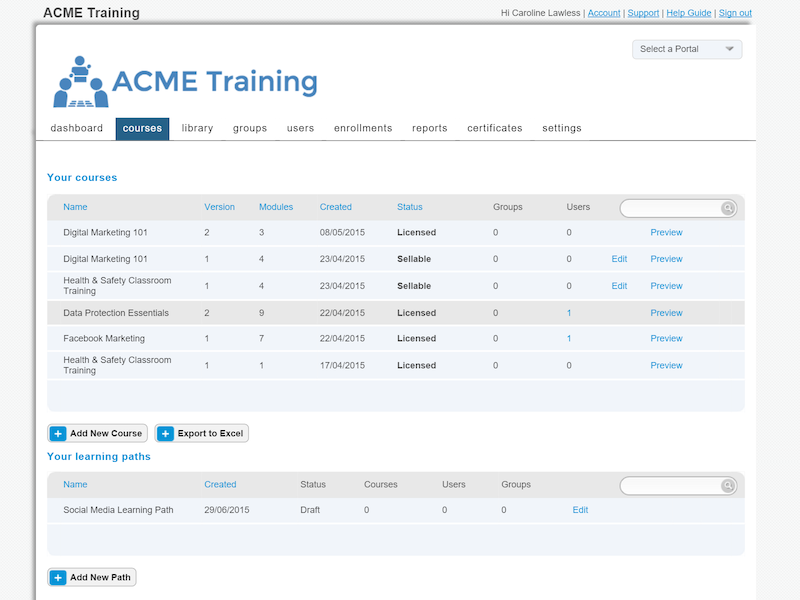
Courses in LearnUpon LMS
Cloud LMS software, also called Web-based or SaaS (software-as-a-service) LMS software, is software deployed through a Web browser. Unlike on-premise systems, which users host and maintain on their own servers, cloud platforms are hosted and maintained by the software vendor.
Buyers pay a subscription fee—typically monthly or annually—to access cloud-based LMS software. As long as you have a web-enabled device and an Internet connection, you can access your account from anywhere in the world.
Cloud-based products are popular for a few common reasons. First, the subscription pricing that typically accompanies a cloud product offers lower up-front costs to buyers (though that subscription fee does recurr monthly or annually, depending on the contract). Second, because the software is hosted online or "in the cloud," remote access is a breeze. And finally, software updates are pushed out automatically (whereas with an on-premise system, buyers typically have to manually install upgrades themselves).
However, organizations with a large or resource-rich IT department sometimes prefer on-premise solutions so that they can manage the software on their own servers. Additionally, for some businesses, the larger up-front and smaller recurring costs may be appealing. (Either way, the cost of on-premise and cloud-based systems tends to converge over the life of the software.)
What Type of Online LMS Buyer Are You?
Buyers of cloud-based LMS software typically fall into one of two categories:
Education professionals. Schools and universities are increasingly relying on cloud-based LMS platforms to deliver lessons and assignments to students. If you’re considering cloud-based LMS software for your school, some features to look out for include:
Social learning functionality, such as class forums and student blogs to increase engagement
Responsive design to cater your courses to varying screen sizes on tablets and phones
Corporate trainers. Within the corporate sphere, cloud-based LMSs allow trainers to develop their workforce and also get external groups such as channel partners or customers up to speed.
If you’re a buyer in this category, look for extended enterprise functionality that allows for custom branding to tailor the e-learning experience to different learner audiences, while gamification features such as badges and leaderboards can increase course participation.
Some corporate LMSs also offer integrated content authoring, but there are standalone tools for this as well.
Pros and Cons of a Cloud-Based LMS
Having a cloud-based LMS carries a number of benefits over an on-premise system, but also some drawbacks:
Pros | Cons |
Reduced IT costs Because the software is hosted on the vendor’s servers, there is no need for buyers to pay for their own servers or IT staff to maintain them. This can be a huge cost-saving measure, especially for small organizations. | Lack of customization Though cloud systems have some options to customize the solution to individual needs, these pale in comparison to tailored on-premise platforms that can look vastly different from client to client, and which better integrate with proprietary solutions. |
Added flexibility Cloud-based LMS software accessible through a web browser means your learners can choose where and when they can take their e-learning courses, instead of being forced to use the software during operating hours at one location. | Connectivity dependency If your users have a stable internet connection, your cloud-based LMS is good to go. But if that connection is weak and unstable, or you experience an outage, you won’t be able to access the system. On-premise systems don’t need an internet connection. |
How Much Does Cloud LMS Software Cost?
Cloud LMS software is typically priced on a per-user basis, meaning your monthly or annual fee depends on how many users you have in the system. This price can vary widely from $5/user for small organizations to $0.50/user for large ones.
A common misconception is that cloud-based software is cheaper than on-premise options. Although the upfront cost for cloud-based software is certainly less, the cost of both types of systems ends up being around the same over time when you factor in recurring expenses.
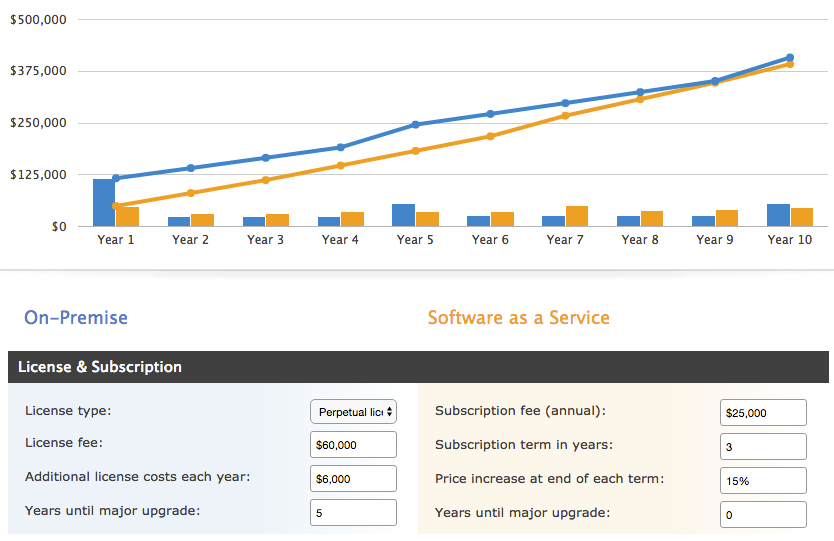
Example on-premise vs. SaaS software cost
Common Features of an Online LMS
The most common features of LMS software are found universally in both on-premise and cloud-based solutions. These include:
Learning management | The core functionality of any LMS helps educational or business organizations create, store, organize and administer learning materials. |
Certification / compliance management | Tracks and manages compliance training, as well as certification programs that some industries may require for performing certain jobs. |
Facilitates live, remote training sessions, typically led via video. | |
Proficiency reporting / testing | Facilitates the administration of tests to gauge users' learning of the course material. Allows for reporting of test scores to identify proficiencies or gaps in learning. |
Content authoring | Allows users to create or "author" their own course content, which is in turn delivered through the LMS. |