
Best Event Management Software of 2026
Updated February 18, 2026 at 9:05 AM

Written by Andrew Blair
Content Analyst

Edited by Parul Sharma
Editor
- All Software
- Software Advice FrontRunners
- Popular Comparisons
- Buyer's Guide
- Frequently Asked Questions
Event management software helps marketing, operations, and planning teams manage registrations, logistics, and engagement for virtual, hybrid, and in‑person events. With 400 tools covering varied operational models, integration needs, or regulatory contexts, choosing the right system can be daunting. To help you narrow it down, I have curated a list of highly-rated productsi and the event management software FrontRunners based on user reviews. For further information, read my event management software buyer's guide.
Event Management Software
Sort by
Reviews: Sorts listings by the number of user reviews we have published, greatest to least.
Average Rating: Sorts listings by overall star rating based on user reviews, highest to lowest.
Alphabetically (A-Z): Sorts listings by product name from A to Z.

iVvy is AI-enabled event & venue management software that feels like an extra team member. Built for venues, hotels, and event s...Read more about iVvy Venue Management


iVvy Venue Management's Best Rated Features
See All
iVvy Venue Management's Worst Rated Features
See All

Eventsquid is cloud-based event management solution for small, midsize and large businesses that caters to corporations, sports ...Read more about Eventsquid

Eventsquid's Best Rated Features
See All
Eventsquid's Worst Rated Features
See All

Cvent Event Management is a cloud-based solution that helps midsize organizations and enterprises with venue sourcing, online ev...Read more about Cvent Event Management


Cvent Event Management's Best Rated Features
See All
Cvent Event Management's Worst Rated Features
See All

A2Z Events is the premier event management solution that caters to the diverse needs of modern show planners and event organizer...Read more about A2Z Events


A2Z Events's Best Rated Features
See All
A2Z Events's Worst Rated Features
See All

EventMobi is a cloud-based event management solution for businesses of any size across a variety of industries. Primary features...Read more about EventMobi

EventMobi's Best Rated Features
See All
EventMobi's Worst Rated Features
See All
Software Advice FrontRunners 2026

(5744)

(2413)

(774)

(97)

(623)

(422)

(75)

(110)

(82)

(200)
Best for Quick Adoption/Easy Adoption

Eventbrite

Eventbrite is the highest rated for easy adoption out of the most popular tools, based on our analysis of Event Management products with the most market demand.
Eventbrite is best for organizations seeking quick adoption and streamlined event setup. Our reviewers say the intuitive interface and step-by-step guidance make it easy to create, manage, and promote events, with automated reminders and calendar integrations simplifying attendee engagement.
- Reviewers Perspective
"Eventbrite offers a clean, intuitive interface that makes it easy for users to create, manage, and promote events. Whether you’re hosting a small workshop or a large conference, the platform guides you through the process step by step."
VKVik K
Analyst
Used for 6-12 months
We analyzed 869 verified user reviews for Eventbrite to find out what actual users really think.
Event Management
Event teams organize, promote, and track events of all sizes using one platform. Customizable ticketing, analytics, and event discovery tools support efficient registration and attendee engagement.Ease of Use
Organizers and attendees navigate Eventbrite’s interface with minimal training. The platform’s clear design and guided processes reduce the time needed to create, manage, or join events.Email Notifications
Eventbrite sends confirmation emails, reminders, and digital tickets automatically. Scheduling updates and bulk emails keep attendees informed, while organizers manage lists and reduce manual follow-up. - Key FeaturesEventbrite's scoreCategory average
Event Scheduling
4.684.69 category average
Registration Management
4.604.64 category average
- Screenshots


Best for Customization

Whova

Of the products listed on our FrontRunners report, Whova is the most requested by users for customization out of the most popular tools.
Whova is ideal for teams prioritizing customization in their event management platform. Our reviewers point out that Whova enables tailored registration pages, personalized agendas, and interactive networking features, which help organizers efficiently engage attendees and manage event logistics.
- Reviewers Perspective
"It invites each attendee to engage in meaningful ways and makes it easy for event organizers to provide updates, link to session resources, and spotlight speakers."
AFAndrea Ferrero
CoFounder and Executive Director
Used for 6-12 months
We analyzed 685 verified user reviews for Whova to find out what actual users really think.
Conference Event
Event managers centralize schedules, resources, and attendee networking in one app. Attendees access event details, connect with others, and participate in interactive features, streamlining conference logistics.Ease of Use
Users of all experience levels quickly adapt to Whova’s interface. Essential event information is clearly organized, reducing confusion and the need for printed materials during conferences.Agenda
Participants build custom agendas, receive reminders, and access session details on mobile devices. Features for note-taking and calendar syncing help attendees stay organized throughout events. - Key FeaturesWhova's scoreCategory average
Agenda Management
4.794.71 category average
Event Scheduling
4.774.69 category average
Registration Management
4.714.64 category average
- Screenshots


Best for Usability

EventCreate

In our analysis of Event Management products with the most market demand, EventCreate is the highest rated for its usability out of the most popular tools.
EventCreate is best for users who value usability and need to quickly build event websites. Our reviewers say the platform’s intuitive design, ready-made templates, and straightforward event setup process make it easy to create, customize, and manage events without technical expertise.
- Reviewers Perspective
"It helps track attendees, send reminders automatically, create templates and so much more!"
DHDaysi Hopkins
HR Administrator
Used for 1-2 years
We analyzed 444 verified user reviews for EventCreate to find out what actual users really think.
Event Creation
Planners build event websites, manage registrations, and handle ticket sales from a single platform. Automation and customization features support both personal and professional events.Ease of Use
Users set up and manage events with minimal effort, even without technical expertise. The platform streamlines complex tasks like RSVP tracking and report generation for small business teams.Page Customization
EventCreate provides drag-and-drop tools and editable templates for personalizing event pages. Organizers add custom questions and branding elements to match specific event requirements. - Key FeaturesEventCreate's scoreCategory average
Event Scheduling
4.894.69 category average
Registration Management
4.814.64 category average
- Screenshots


Most Used By Education

Sched

Sched is the most requested by users in education management out of the most popular tools, based on our analysis of Event Management products with the most market demand.
Sched is most used by education management professionals who need to organize multi-session events. Our reviewers say its intuitive interface and customizable scheduling tools help attendees easily build personal agendas and keep track of sessions, making it especially valuable for academic conferences.
- Reviewers Perspective
"Sched allowed our team to quickly set up an entire event for 600+ people with the new Call for Papers!"
MSMisty Smith
Application Integration Specialist
Used for 2+ years
We analyzed 90 verified user reviews for Sched to find out what actual users really think.
Conference Scheduling
Attendees view, select, and personalize overlapping sessions for multi-day conferences. Visual layouts and reminders help users navigate busy agendas for both virtual and in-person events.Event Attendees
Organizers use attendee directories, messaging, and email reminders to enhance communication and engagement. These features support interaction between participants, speakers, and event staff.Ease of Use
Both administrators and participants benefit from Sched’s straightforward setup and clear layouts. Fast loading times and mobile compatibility support efficient event management for large groups. - Key FeaturesSched's scoreCategory average
Event Scheduling
4.794.69 category average
Registration Management
4.404.64 category average
- Screenshots


Best for Customer Satisfaction

vFairs

vFairs is the highest rated for customer satisfaction out of the most popular tools, based on our analysis of Event Management products with the most market demand.
vFairs is best for organizations seeking high customer satisfaction in virtual and hybrid event management. Our reviewers highlight the platform’s responsive support team, collaborative setup process, and ability to adapt to unique event needs, ensuring a smooth experience for both organizers and attendees.
- Reviewers Perspective
"What truly sets vFairs apart is that it’s a comprehensive, all-in-one platform that allows you to manage your entire event from start to finish—seamlessly and efficiently."
NBNathan Barnett
Business Application Analyst
Used for 6-12 months
We analyzed 406 verified user reviews for vFairs to find out what actual users really think.
Customer Support
Event organizers receive proactive, knowledgeable support throughout planning and execution. Access to representatives across time zones ensures issues are resolved quickly, even for teams with limited technical resources.Event Management
Organizations manage planning, branding, scheduling, and logistics in one platform. Dedicated project managers guide users through setup, supporting hybrid and virtual formats and post-event analytics.Customization
Event teams tailor the platform’s appearance and features to match organizational branding and event requirements. Tools for modifying templates and creating unique environments support a range of industries. - Key FeaturesvFairs's scoreCategory average
Agenda Management
4.794.71 category average
Event Scheduling
4.794.69 category average
Registration Management
4.744.64 category average
- Screenshots


Most Rated for SMBs

RSVPify

RSVPify is the most requested by small businesses out of the most popular tools, based on our analysis of Event Management products with the most market demand.
RSVPify is most rated for SMBs needing efficient RSVP and event management. Our reviewers say the platform streamlines invitation sending, guest tracking, and check-in, with flexible customization options and an easy onboarding process that saves time for both planners and attendees.
- Reviewers Perspective
"This is a super helpful tool for those planning a casual event to those planning a more in-depth function."
DCDalton Clouse
Senior Manager of Marketing and Communications
Used for 6-12 months
We analyzed 325 verified user reviews for RSVPify to find out what actual users really think.
Event Management
Teams manage guest lists, invitations, and event details from one platform. This helps streamline planning for both simple and complex events, supporting branding and attendance tracking for organizations handling multiple functions.RSVP Management
Businesses use RSVPify to collect and track guest responses efficiently. Customizable RSVP forms, instant notifications, and flexible invitation methods help maintain accurate headcounts for meetings, fundraisers, or celebrations.Customer Support
Event planners benefit from fast, clear support via chat and help desk. Guidance during setup and troubleshooting ensures users of all technical backgrounds can resolve issues and keep events running smoothly. - Key FeaturesRSVPify's scoreCategory average
Event Scheduling
4.784.69 category average
Registration Management
4.864.64 category average
- Screenshots


Best for Automation Capabilities


Of the products listed on our FrontRunners report, Perfect Venue is the most requested by users for automation capabilities out of the most popular tools.
Perfect Venue is best for businesses seeking strong automation capabilities in event and venue management. Our reviewers point out that automated workflows and centralized event information help teams stay organized, reduce manual tasks, and improve communication across staff.
- Reviewers Perspective
"Having our event calendar at our fingertips is priceless, indeed, and the app is continually being enhanced and updated to meet changes in our market as well as communication demands."
BZBrenda Zimmerman
Assistant Manager
Used for 1-2 years
We analyzed 67 verified user reviews for Perfect Venue to find out what actual users really think.
Event Management
Event teams organize calendars, communications, and event details in one location. This keeps teams aligned and supports scheduling recurring events and referencing past information.Customer Support
Staff access responsive support for onboarding, training, and issue resolution. Feedback is welcomed and often leads to system improvements, keeping teams organized and in sync.Ease of Use
Users transition from other platforms with minimal friction. The interface is well-organized and intuitive, helping staff stay organized and streamline daily event tasks. - Key FeaturesPerfect Venue's scoreCategory average
Event Scheduling
4.844.69 category average
Registration Management
4.804.64 category average
- Screenshots


Best for Quick Implementation

Expo Pass

Of the products listed on our FrontRunners report, Expo Pass is the most requested by users for quick implementation out of the most popular tools.
Expo Pass is best for organizations needing quick implementation for event check-in and badge printing. Our reviewers say the platform’s efficient onsite badge printing and real-time attendee tracking streamline event setup and save staff significant time during busy events.
- Reviewers Perspective
"From seamless online registration to incredibly efficient onsite badge printing, everything was designed to make check-in quick and easy for our attendees."
SSSabree Simmons
Partnerships and Events Manager
Used for 1-2 years
We analyzed 98 verified user reviews for Expo Pass to find out what actual users really think.
Badge Printing
Event staff print customized badges in real time, eliminating pre-printing and streamlining check-in. Features like QR codes and session tracking support attendee management for conferences and expos.Event Management
Organizers manage setup, attendee tracking, and onsite logistics from one platform. Customizable tools and robust support help teams coordinate virtual, hybrid, and in-person events efficiently.Attendee Check-In
Expo Pass enables quick attendee registration, session scheduling, and real-time updates. Mobile app support and high-volume handling improve organization for events of all sizes. - Key FeaturesExpo Pass's scoreCategory average
Agenda Management
5.04.71 category average
Event Scheduling
4.384.69 category average
Registration Management
4.664.64 category average
- Screenshots


Best for User Interface

Swoogo

According to our user reviews, Swoogo is the highest rated for its user interface out of the most popular tools.
Swoogo is best for users who prioritize a modern, user-friendly interface in event management. Our reviewers say its intuitive event builder, customizable registration forms, and responsive support make it easy to manage complex events and deliver a seamless experience for both organizers and attendees.
- Reviewers Perspective
"Such an easy to use product but has such a major impact on event management and planning."
OTOfa Tafa
Performance and Customer Service Officer
Used for 1-2 years
We analyzed 71 verified user reviews for Swoogo to find out what actual users really think.
Event Registration
Organizers configure registration forms and workflows to fit diverse event needs. This supports industries with complex requirements, enabling efficient data collection and communication with participants.Customer Support
Event teams access live trainings, webinars, and a knowledge base for onboarding and troubleshooting. Support staff are available around the clock, helping resolve issues and ensuring smooth event execution.Customization
Planners customize event websites, forms, and branded experiences without advanced technical skills. Automation options and design templates help organizations deliver personalized, professional events. - Key FeaturesSwoogo's scoreCategory average
Event Scheduling
4.744.69 category average
Registration Management
4.644.64 category average
- Screenshots


Highly Rated for Mobile app

KonfHub

Of the products listed on our FrontRunners report, KonfHub is the highest rated for mobile app out of the most popular tools.
KonfHub is highly rated for its mobile app, making it a strong choice for organizers and attendees who need robust event management on the go. Our reviewers highlight the intuitive mobile interface, real-time notifications, and comprehensive event features that support efficient event participation and management.
- Reviewers Perspective
"KonfHub offers a structured way of navigating to all different sections including’Agenda,’ ‘Speakers,’ ‘About,’ and more."
STShruti Tiwari
Sr. Product Marketing Manager
Used for 1-2 years
We analyzed 160 verified user reviews for KonfHub to find out what actual users really think.
Customer Support
Organizers receive quick resolutions and hands-on guidance during event setup and execution. The support team is attentive and adapts the platform based on user feedback.Ticketing
Teams create, customize, and track tickets for online, hybrid, or in-person events. Real-time analytics and embedded sales tools support efficient attendee tracking and payment settlements.Event Registration
KonfHub’s registration tools simplify online sign-up, ticket generation, and attendee authentication. Analytics features help organizers monitor participation and reduce manual effort. - Key FeaturesKonfHub's scoreCategory average
Event Scheduling
4.764.69 category average
Registration Management
4.694.64 category average
- Screenshots


- Reviewers Perspective
"The platform brings together everything needed to plan and run events, registration, communications, check-in, and reporting into one system, which saved a lot of time and improved the attendee experience."
MKMarjorie Knust
Founder
Used for 1-2 years
We analyzed 583 verified user reviews for Cvent Event Management to find out what actual users really think.
Event Management
Planners consolidate websites, attendee lists, and reporting in one system. Cvent supports hybrid and in-person events, session tracking, badge printing, and analytics for SMBs managing diverse event formats.Customer Support
Users access live chat, account managers, and help articles for troubleshooting and onboarding. Support staff offer creative solutions, helping SMBs adapt to new features and resolve unique event needs.Event Registration
Teams manage complex registration paths, payments, and attendee data within a single platform. Automated confirmations and intuitive workflows simplify organizing and monitoring registrations for events of any size. - Key FeaturesCvent Event Management's scoreCategory average
Agenda Management
4.714.71 category average
Event Scheduling
4.444.69 category average
Registration Management
4.644.64 category average
- Screenshots


zkipster

- Reviewers Perspective
"It is very simple to use and allows you to create great looking registration pages, collect attendee information, and complete check in easily for an event all in one spot."
HSHannah Snow
Senior Event Manager
Used for 6-12 months
We analyzed 68 verified user reviews for zkipster to find out what actual users really think.
Event Management
Organizers create registration pages, automate confirmations, and track guests. zkipster supports both small and large events, helping SMBs coordinate multiple events and adapt to changing requirements.Customer Support
Teams use live chat and onboarding support for troubleshooting and feedback. Support staff help users of all experience levels maximize zkipster’s features.User Interface
Administrators tailor RSVP forms and layouts to branding and workflow needs. The interface is user-friendly, allowing SMBs to quickly adapt and manage event details. - Screenshots


- Reviewers Perspective
"We run our business on Zoom, and its suite of functions helps us manage the scheduling, invitation, tracking, and post-event follow-up that we need."
JCJames Charles
Customer Success Manager
Used for 1-2 years
We analyzed 912 verified user reviews for Zoom Events and Webinars to find out what actual users really think.
Meetings
Teams organize, schedule, and join meetings from any location or device. Features like breakout rooms and calendar integrations streamline collaboration for SMBs with distributed staff.Features
Zoom supports screen sharing, recording, polling, and customizable controls. SMBs use these tools to manage events efficiently and engage participants across webinars and meetings.Ease of Use
Both new and experienced users quickly organize or join events. The clean interface and simple setup process reduce training needs for SMBs managing virtual or hybrid events. - Key FeaturesZoom Events and Webinars's scoreCategory average
Event Scheduling
4.514.69 category average
Registration Management
4.554.64 category average
- Screenshots
EventMobi

- Reviewers Perspective
"I use EventMobi to centralize event information and manage the agenda for large educational and networking events, and I really appreciate that it allows us to keep all our event information in one place, which reduces waste with printed agendas."
DPDanielle Petrullo
Senior Marketing and Design Specialist
Used for 2+ years
We analyzed 93 verified user reviews for EventMobi to find out what actual users really think.
Event Management
Teams manage agendas, registration, and check-in for conferences and meetings. EventMobi reduces paper use, improves attendee communication, and adapts to in-person and virtual formats.Ease of Use
Administrators and attendees navigate EventMobi easily. Setup and customization require minimal training, allowing SMBs to focus on event delivery.Customer Support
Support staff assist with onboarding, live events, and feedback. Teams receive prompt guidance, boosting confidence and positive outcomes for SMB events. - Key FeaturesEventMobi's scoreCategory average
Agenda Management
4.884.71 category average
Event Scheduling
4.584.69 category average
Registration Management
4.604.64 category average
- Screenshots


Eventleaf

- Reviewers Perspective
"As a faith-based non-profit it is essential to have a tool that you can rely on to give robost event support for a wide range of participants without sacrificing quality."
CMCheryl McGibbon
Founder
Used for 2+ years
We analyzed 162 verified user reviews for Eventleaf to find out what actual users really think.
Event Management
Teams manage events of various sizes, customize pages, and centralize details. Eventleaf reduces administrative workload and supports both in-person and virtual events for SMBs.Event Registration
Managers create flexible registration forms, automate confirmations, and track attendee information. Eventleaf supports different ticket types and streamlines check-in for SMB events.Customer Support
Support staff respond promptly to questions and implement user suggestions. Accessible technical support helps SMBs resolve issues and improve event outcomes. - Key FeaturesEventleaf's scoreCategory average
Event Scheduling
4.704.69 category average
Registration Management
4.804.64 category average
- Screenshots


Eventcombo

- Reviewers Perspective
"As an event planner, I find Eventcombo easy to navigate and has everything I need in event management."
AJAmira Jemly Maranan
Copywriter
Used for Less than 6 months
We analyzed 57 verified user reviews for Eventcombo to find out what actual users really think.
Event Management
Teams manage ticketing, registration, and attendee engagement from one platform. Eventcombo supports in-person and virtual events, enabling SMBs to track analytics and automate communications.Customer Support
Support staff guide users through setup, troubleshooting, and ongoing management. Prompt responses make the platform accessible for SMBs new to event technology.Customization Options
Organizers tailor event pages, emails, and ticketing to unique requirements. Eventcombo’s continuous improvements empower SMBs to create events reflecting their vision. - Key FeaturesEventcombo's scoreCategory average
Event Scheduling
4.924.69 category average
Registration Management
4.934.64 category average
- Screenshots

Accelevents

- Reviewers Perspective
"One of our events serves Higher Ed Technology Professionals and seamless web experience is important for reinforcing trust and ensuring attendees are confident that they're purchasing tickets for a real event and not a scam."
SBStephanie Burns
Director, Marketing and Communications
Used for 6-12 months
We analyzed 144 verified user reviews for Accelevents to find out what actual users really think.
Event Management
Teams organize virtual, hybrid, and live events with ticketing, branding, and attendee engagement. Accelevents streamlines logistics, sponsor management, and analytics for SMBs needing flexible event solutions.Customer Support
Support staff offer 24/7 guidance, resolve issues, and incorporate user feedback. This boosts SMB confidence and helps teams execute events successfully.Online Auctions
Organizers host online auctions with easy item uploads, bid tracking, and closing tools. Accelevents enables nonprofits and charities to maximize fundraising and reach broader audiences. - Key FeaturesAccelevents's scoreCategory average
Agenda Management
4.254.71 category average
Event Scheduling
4.694.69 category average
Registration Management
4.674.64 category average
- Screenshots


Bizzabo

- Reviewers Perspective
"Bizzabo's teams are fluent in all kinds of events and can help you get invitations out, interactive landing pages up, and event ticketing easily set up."
JTJeremy Tank
Senior Brand Manager
Used for 1-2 years
We analyzed 152 verified user reviews for Bizzabo to find out what actual users really think.
Event Management
You can streamline event logistics with Bizzabo’s integrated suite—covering ticketing, registration, communications, and engagement. This helps SMBs quickly create event websites, manage attendee data, and coordinate logistics for events of any scale.Customer Support
Teams get guidance via email, phone, and live chat, plus access to a knowledge library. Support staff are quick to respond and implement user feedback, aiding onboarding and troubleshooting for SMB event managers.Ease of Use
Bizzabo’s interface simplifies navigation and event setup. Both new and experienced planners can manage events efficiently, reducing training time and technical barriers for small business teams. - Key FeaturesBizzabo's scoreCategory average
Agenda Management
4.04.71 category average
Event Scheduling
4.504.69 category average
Registration Management
4.314.64 category average
- Screenshots


LineUpr

- Reviewers Perspective
"Communication, program overviews, and last-minute changes were easily managed, which was a huge relief with approximately 250 participants."
JSJulia Schmidt
Ehrenamtliche Projektleitung Pfadfinderveranstaltungen
Used for 6-12 months
We analyzed 81 verified user reviews for LineUpr to find out what actual users really think.
Event Management
Organizers use LineUpr to communicate program changes and manage schedules in real time. This reduces stress and keeps participants informed, supporting events of various sizes.Ease of Use
LineUpr’s interface lets administrators and attendees access event details with minimal training. Teams can build and edit event apps quickly, streamlining onboarding for SMBs.Customization Options
Event managers adjust colors, menus, and content to match branding and event themes. LineUpr adapts to different event types, making it suitable for both commercial and non-commercial SMB settings. - Key FeaturesLineUpr's scoreCategory average
Agenda Management
4.834.71 category average
Event Scheduling
4.864.69 category average
Registration Management
4.784.64 category average
- Screenshots


Eventzilla

- Reviewers Perspective
"The best thing about eventzilla is how simple and easy it was to edit and look at all of the information regarding the event that I put on! If I needed to edit or change any of my registrations from the event, when people contacted me, I could go in and do that instantly and easily!!!"
CBChristian Barrington
Student Ministries Director
Used for 1-2 years
We analyzed 298 verified user reviews for Eventzilla to find out what actual users really think.
Event Management
Eventzilla lets SMBs tailor tickets, event pages, and communications. Teams track registrations, manage payments, and update event details in real time, improving efficiency for small and large gatherings.Ease of Use
Administrators and attendees navigate Eventzilla’s interface easily. Setup and customization require little technical expertise, streamlining event management for SMBs with limited resources.Event Registration
Managers monitor registration status, set limits, and collect attendee information. Embedding registration links and generating reports helps SMBs prepare and communicate effectively. - Key FeaturesEventzilla's scoreCategory average
Agenda Management
4.674.71 category average
Event Scheduling
4.564.69 category average
Registration Management
4.484.64 category average
- Screenshots


Eventtia

- Reviewers Perspective
"Being a robust, reliable, and highly adaptable platform, it allowed us to manage every stage of our events efficiently and professionally."
MRMontserrat Reneaum
Chapter administrator
Used for 1-2 years
We analyzed 180 verified user reviews for Eventtia to find out what actual users really think.
Event Management
Teams synchronize work, manage capacity, and customize events. Eventtia adapts to conferences, trade shows, and recurring meetings, helping SMBs save time and resources.Customer Support
Users access chat, account managers, and technical support for troubleshooting and onboarding. The support team implements suggestions and resolves issues, aiding SMBs in smooth event execution.Ease of Use
Eventtia’s interface enables fast setup and team onboarding. Clear navigation and practical features help SMBs configure events without extensive training or technical experience. - Key FeaturesEventtia's scoreCategory average
Event Scheduling
4.514.69 category average
Registration Management
4.414.64 category average
- Screenshots


Just Attend

- Reviewers Perspective
"I just love having everything I need for my event in one system, before it was one for speaker, one for sessions, one for tickets, one for vendors - you get it. With Just Attend we have one system that support all of our system needs <3."
ASAmanda Sterner
Co-organizer
Used for 1-2 years
We analyzed 49 verified user reviews for Just Attend to find out what actual users really think.
- Key FeaturesJust Attend's scoreCategory average
Agenda Management
4.574.71 category average
Event Scheduling
4.334.69 category average
Registration Management
4.504.64 category average
- Screenshots


idloom

- Reviewers Perspective
"I've organized over 100 B2B events (conferences, webinars, themed workshops) on Idloom since March 2020, and I'm generally very satisfied with the platform's features, especially its focus on meeting the needs of B2B clients compared to most other solutions on the market, which are often better suited to B2C activities."
JDJean DUBREUIL
Marketing director
Used for 2+ years
We analyzed 89 verified user reviews for idloom to find out what actual users really think.
Customer Support
Support staff address requests and technical challenges quickly. Teams benefit from proactive assistance and stability during large events, making idloom easier to manage for SMBs.Ease of Use
Organizers create events, registrations, and check-ins with clear navigation. The platform’s design reduces administrative workload and simplifies daily operations for SMBs.Event Management
Teams manage small to large events, including multi-day and multi-location formats. Customizable websites, ticketing, and participant tracking streamline promotion and administration for SMBs. - Key Featuresidloom's scoreCategory average
Event Scheduling
4.734.69 category average
Registration Management
4.534.64 category average
- Screenshots


- Reviewers Perspective
"Momentus is nice to see all of our events in one place, I can look at the calendar and view all of our upcoming performances, as well as pull up a select account to view contract information, which helps me to complete my job tasks."
SMShannon Modec
Lead Box Office Associate
Used for 1-2 years
We analyzed 91 verified user reviews for Momentus Technologies to find out what actual users really think.
Event Calendar
Staff view upcoming events, manage bookings, and access contract details. Color coding and customizable displays streamline planning and coordination for SMBs with multiple event types.Ease of Use
New staff learn the platform quickly, and teams adapt it to business needs. Momentus streamlines processes and reduces training time for SMBs across departments.Customer Support
Account managers and customer success reps provide regular communication and documentation. Support staff listen to feedback and help SMBs maximize software benefits. - Key FeaturesMomentus Technologies's scoreCategory average
Event Scheduling
4.454.69 category average
Registration Management
4.504.64 category average
- Screenshots


Methodology
The research for the best event management software list was conducted in October 2025. We evaluated data (user reviews and demand signals) from the past 24 months as of the research date.. Read the complete methodology.
Popular Event Management Comparisons


Buyer's Guide
This detailed guide will help you find and buy the right event management software for you and your business.
Last Updated on May 12, 2025Here’s what we’ll cover:
What you need to know about event management software
What is event management software?
Essential features of event management software
Benefits and competitive advantages of using event management software
How to choose the best event management software for your business
Software related to event management software
More resources for your event management journey
What you need to know about event management software
Event management software helps organizations better plan, organize, and execute events via features such as registration management, attendee management, and event scheduling. By reducing manual tasks, event management software helps firms automate scheduling and registration tasks and empowers users to track progress and communicate with stakeholders through a centralized platform.
To give you an idea of the market, we have over 496 different event management vendors on our site, and we've published over 6,000 reviews in the past year for event management products. [1]
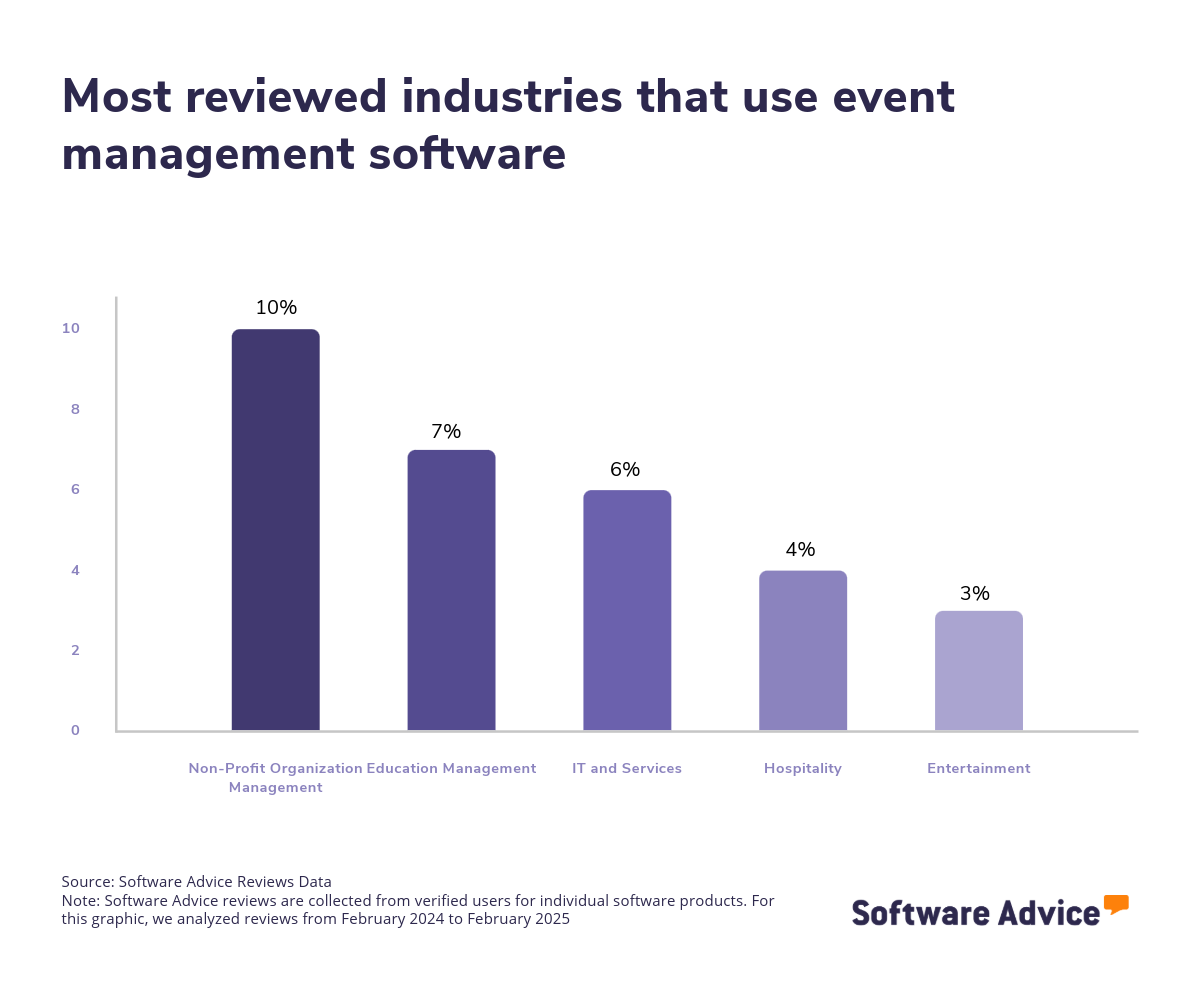
The event management market is vast, with hundreds of solutions available to cater to various industries. This diversity allows organizations to find an event management solution designed to support specific industries, whether they are in education, nonprofit, healthcare, or IT and services industries. However, the market size and complexity can be daunting, making it essential for buyers to evaluate their options carefully.
Pricing for event management software varies depending on the vendor, features offered, and scalability. Some solutions offer tiered pricing models based on specific organizational requirements. To put things into perspective, we’ve found that prices for high-end plans that have advanced event management features average $88 per month and over, while entry-level pricing ranges from $4 to $32 per month for basic functionality. [2]
First-time buyers should begin evaluating with a budget, number of users, specific needs, and necessary integrations in mind. Ensure you’ve consulted with stakeholders on a list of critical questions to help you evaluate systems based on your needs, such as:
What specific features does the software offer, and how do they align with the organization's needs?
Is the software scalable to accommodate multiple events and future growth?
Does the software integrate with other tools and systems your organization currently uses?
What level of customization is available to tailor the software to your specific processes?
How user-friendly is the software, and what kind of support and training is provided?
Because there are so many event management systems available, choosing the right option can be a long, daunting process. In this guide, you’ll learn about the essential components of event management software and get step-by-step guidance on how to choose the right solution for your business. To get expert guidance, schedule a free consultation or start a chat with us today.
What is event management software?
Event management software is a digital platform that supports businesses and event planners to effectively organize and execute meetings and events. This software typically includes a range of features designed to streamline various aspects of event management. Key functionalities often encompass marketing tools to promote events, attendee registration systems for seamless sign-ups, and badge creation for easy identification and access control. Additionally, it offers calendar generation to manage event schedules and venue space management to optimize the use of physical locations.
Event management software significantly reduces manual effort and minimizes errors by automating tasks such as event planning, scheduling, registration, and coordination. It also enhances efficiency and ensures a smooth event experience. Furthermore, the software provides various self-service functions for event attendees, including online registration for convenient sign-up, content delivery for accessing event materials, and fee payment processing to handle transactions securely. These features collectively enhance the attendee experience and contribute to the overall success of events.
Essential features of event management software
When comparing event management software systems, it's important to know what features you can expect to see and which features are more advanced add-ons or uncommon. Some functionalities like attendee management, event scheduling, and registration management are core features that will be available in every event management software. Other features, such as payment processing, ticketing, social promotion, and reporting/analytics, are still common. We analyzed thousands of reviews to determine what we believe are core features of event management software:
Core features
Attendee management | Process of managing, tracking, and communicating with individuals who are registered to attend an event. This feature helps ensure a seamless and personalized experience for attendees, improving satisfaction and engagement while reducing administrative burdens for the organizers. 87% of our reviewers rate this feature as critical or highly important. |
Event scheduling | Plan an event's time and location. It ensures that all event components are well-coordinated, avoiding conflicts and maximizing the use of available resources, which leads to a smooth and efficient event flow. 87% of our reviewers rate this feature as critical or highly important. |
Registration management | Oversee and coordinate the registration of attendees, visitors, customers, events, and activities. This feature is essential for streamlining the attendee onboarding process, ensuring accurate data collection, and enhancing the overall attendee experience by providing easy access to event information and updates. 87% of our reviewers rate this feature as critical or highly important. |
Common features
Alerts/Notifications | Alerts or notifications of various types, such as pop-up messages, sounds, banners, or badges. These help keep attendees and organizers informed of important updates, deadlines, or changes, ensuring timely communication and reducing the risk of missed information. 80% of our reviewers rate this feature as critical or highly important. |
Reporting/Analytics | View and track pertinent metrics to find patterns and gain insights from data. This feature allows organizations to evaluate event success, understand attendee behavior, and make data-driven decisions for future improvements. 77% of our reviewers rate this feature as critical or highly important. |
Website management | Built-in website builder or integration with a third-party site. This feature helps create a professional online presence for the event, providing a centralized platform for information dissemination and enhancing marketing efforts. 73% of our reviewers rate this feature as critical or highly important. |
Payment processing | Accept, record, and reconcile financial transactions. This feature ensures secure and efficient handling of payments, reducing administrative workload and improving the financial management of events. 55% of our reviewers rate this feature as critical or highly important. |
Ticketing | Customize, sell, and distribute tickets. This feature allows for flexible ticket options and easy distribution, enhancing the purchasing experience for attendees and maximizing event attendance. |
Exhibit/Vendor management | Manage location logistics and coordinate exhibitors' or vendors' participation in an event. This feature streamlines the coordination process, ensuring exhibitors and vendors have the necessary resources and support to contribute to the event's success. |
Social promotion | Market events via social media tools. This feature helps increase event visibility and reach, engaging a broader audience and driving higher attendance through targeted social media campaigns. |
Email marketing | Create and send emails to multiple recipients and create lists for event campaigns. This feature facilitates effective communication with potential and registered attendees, boosting engagement and providing important updates and promotional content. |
Volunteer management | Manage volunteer information and direct volunteer resources. This feature helps optimize volunteer efforts, ensuring they are effectively utilized and enhancing the overall event experience for both attendees and staff. |
Surveys and feedback | Gauge satisfaction and receive information for improvement and success. This feature provides valuable insights into attendee experiences, helping organizations identify strengths and areas for improvement to enhance future events. |
Benefits and competitive advantages of using event management software
Our analysis of over 6,000 user reviews in the past year shows that staff management, conference management, event management, and meeting management are the top-rated benefits of event management software. These features directly address the core needs of event management software, including communication and coordination across teams, optimal use of time and resources for organizing and attendee management.
Better manage staff and resources: Event management software streamlines the allocation and coordination of staff and resources by enhancing communication and operational efficiency. It provides real-time updates and progress tracking to ensure all staff members are aligned for event planning and organization.
Streamline conference management: With comprehensive planning tools, event management software simplifies conference logistics, supports attendee management, and provides event planners with key data insights.
Enhance event management: Event management software automates routine tasks, saving time and resources. This allows event organizers to focus on strategic growth and ensure consistency across multiple events.
Optimize meeting management: Event management software optimizes meeting scheduling and integrates collaboration tools. The software enables users to foster seamless communication and remote participation and creates a collaborative meeting experience.
How to choose the best event management software for your business
Choosing the right event management software can be quite overwhelming, with so many options offering varying features and capabilities. Here are some steps that can make this process more streamlined and successful:
1. Define your requirements
When defining your business's requirements for event management software, it's important to consider several key factors to ensure that you get the solution that aligns with your organizational needs and goals.
Evaluate your business goals and objectives
First, clearly outlining your business goals and how event management software can achieve them is the best place to start. Ask yourself what is slowing down your business operations and what solutions you need to solve those issues. Consider whether you need to improve coordination, planning, team collaboration, and communication, or automate tasks for optimized resource management.
Take into account your business size and scalability
It’s important to identify the size of your business and which software is appropriate for your needs. Is your business undergoing exponential growth, or do you plan to invest in event management software that will grow with your business? Consider the software's scalability and ensure that it can grow with your business and accommodate an increasing number of events or advanced reporting and customization functionality without sacrificing performance.
Identify budget constraints
Next, consider how much you want to spend on event management software. While it's difficult to generalize the price of event management software because of varying individual needs and other factors that can affect price, a good starting point is to identify how many users your business requires and the features you need to fulfill your business objectives. With that in mind, consider initial costs, subscription fees, and any other additional expenses for training and support. Additionally, some vendors may offer unbundled costs, which means that while their prices may seem competitive in comparison, additional costs may place constraints on your original budget.
2. Make a shortlist of event management software
After carefully defining your requirements, it's time to start narrowing down your options to create a shortlist and seek professional help in making an informed choice.
Get qualified help from an advisor
At Software Advice, our advisors have experience helping hundreds of businesses identify solutions that suit their business needs. If you need guidance on how to make a shortlist or have any doubts regarding your business requirements, you can chat online now with an advisor or schedule a phone consultation.
Explore our list of event management FrontRunners
If you’re not ready to speak to an advisor just yet, you can also start compiling your shortlist of event management software with our FrontRunners report. Only products that earn top user ratings make this list. Check out our full methodology description for more details on how the report is compiled.
For more help creating a shortlist and a free, downloadable comparison chart, check out The Ultimate Software Vendor Evaluation Guide. This guide and comparison chart will help you compare software evaluation criteria for each prospective vendor by tracking functionalities, training and support offerings, costs, and deployment options.
3. Pick your best option
Now that you have your curated shortlist, it's time to pick the best option. But how? Picking the best option means you need to try to get hands-on experience with the chosen software to ensure that it can fulfill a set of criteria before making your final choice. Here are a few things to consider before committing to a vendor:
Schedule a vendor demo
Vendor demos are sessions provided by the vendor to help get you familiar with the features of the product, its capabilities, and understand their pricing. Here, you have the chance to learn more about the product and ask questions to ensure that it aligns with your business needs. Be sure to ask about what is included in the price and whether technical support and training resources are available.
Evaluate your integration needs
Check the software’s ability to integrate with your existing systems and tools, such as email marketing software, CRM software, social media platforms, and calendar applications. A software solution with seamless integration is vital to streamlined workflows and improved data consistency across platforms.
Determine customizable options
When making your final choice, it's also important to determine the level of customization the software offers to meet your specific business processes and requirements. A customizable software solution can enhance the software's relevance and effectiveness for your business.
4. Make the most of your event management software
Finally, once you’ve shortlisted and selected the event management software that fits your business needs, it's important to take steps to ensure successful implementation and to maximize its benefits. Here are a few things to consider to make the most of your chosen event management software:
Develop an implementation plan
When onboarding a new software solution, a detailed implementation plan should include installation, configuration, data migration, and testing to ensure a smooth transition. Additionally, it should outline the timeline, key milestones, and responsibilities. Key stakeholders from different departments should also be engaged to gather input to help tailor the software and ensure alignment with business goals.
Provide comprehensive training
Offer thorough training sessions for all users to ensure they understand how to use the software effectively. The training should cover an explanation of the software's core features, best practices, and any customizable functionalities specific to your organization.
Monitor and evaluate performance
Monitor the software's performance regularly and evaluate its impact on your business operations. Collect user feedback to understand their experiences and challenges with the software. Use this feedback to fine-tune the software so that it continues to meet evolving needs. Finally, use analytics and reporting features to track key metrics and identify areas for improvement.
Software related to event management software
Depending on which event management software you choose, you may need to supplement some features with related software systems in order to support organization, coordination, scheduling, or marketing. Some types of software that are closely related to event management software, but may or may not be included in your event management system, include:
Catering software: Catering software manages business functions for the catering, event planning, and banquet management industries. It provides an integrated solution for coordinating essential business processes, including client details, locations, scheduling, inventory management, menu planning, waitstaff coordination, payroll, and marketing and budgeting functions.
Conference software: Conference software provides and automates tools for promoting, registering, and organizing live or online conferences and events.
Event Check In software: Event Check In software helps significantly speed up the check-in process at conferences, performances, and other events. This type of software can be deployed on mobile devices, such as smartphones and tablets, as well as kiosks, and often provides badge printing capabilities. Many organizations use Event Check In software to capture attendee information for lead-generating purposes.
Live streaming software: Live Streaming software allows organizations to broadcast live event feeds over the internet and engage with their target audience. This type of software comes with recording and real-time video editing capabilities that can be used for events, conferences, shows, and more.
Meeting software: Meeting software coordinates schedules and plans various types of meetings. It typically offers scheduling features, agenda management, collaboration tools, minutes recording, and more.
Mobile Event Apps software: Mobile Event Apps enable event organizers to consistently distribute important event information to the attendees in real time and facilitate networking among attendees.
Registration software: Registration software automates the process of registering for conferences, meetings, classes, and events. These applications offer a customizable solution for attendance tracking and event or meeting registration tasks. They also provide tools for processing payments either in advance or onsite, as well as donation collection and volunteer coordination features. Registration solutions also offer various self-service functions, such as online registration, content delivery, and fee payment.
Ticketing software: Ticketing software automates online, kiosk, and box office ticketing processing for events across theaters, parks, festivals, fairs, travel, and other activities. These applications help manage seat selections, exhibitor data, performer assignments, and locations, as well as online and onsite payment processing operations.
Venue management software: Venue Management solutions aim to help event planners market and schedule their facilities, ensuring that appropriate services and resources are provided for each event and that the facility's capacity is optimally utilized.
More resources for your event management journey
About our contributors
Author
Andrew Blair is a content analyst at Software Advice, covering marketing, cybersecurity, and emerging technologies across industries. He leverages his technical expertise and business acumen, acquired from experience as a web developer in the eCommerce industry, to deliver data-driven insights on market and business operations, empowering businesses to embrace the right technology.
Andrew’s research and analysis are informed by more than 150,000 authentic user reviews on Software Advice and nearly 3,000 interactions between Software Advice software advisors and software buyers. Andrew also regularly analyzes market sentiment by conducting surveys of IT and marketing leaders so he can provide the most up-to-date and helpful information to small and midsize businesses purchasing software or services.
His research and data insights for small and midsize businesses have been featured in SBS Media, IT Brief Australia, and Technology Decisions media publications. Andrew’s commentary on tech trends is published in various content forms, including podcasts, videos, and written interviews. In his free time, he enjoys sports and spending time outdoors.
Editor
Parul Sharma is a content editor at Software Advice with expertise in curating content for various niches, including SaaS, digital marketing, and search engine optimization. With over half a decade of experience in content writing and editing, Parul has the expertise to simplify complex terms into engaging, valuable content for targeted audiences. She completed her graduation and post-graduation in English literature from Delhi University and was awarded the Dr. Asha Sahni Memorial Award for being the highest scorer in her graduating class.
Parul has contributed to the news, lifestyle, education, and health verticle of DNA India, India’s premier media channel. Outside of work, she can be found curating healthy recipes, coloring in mandala books, and spending quality time with her family.
Sources
Software Advice reviews data: Software Advice reviews are collected from verified users for individual software products. Read the complete methodology.
Software Advice software pricing data: Only products with publicly available pricing information and qualified software products within the category, are included in the pricing analysis. Read the complete methodology.
Event Management FAQs
- What is the best event management software?
According to our analysis of products with high market demand and reviews, Whova has the highest overall rating from verified reviewers on Software Advice. It offers features such as registration, ticketing, attendee management, and analytics.
- What are the 3 types of event management?
The three types of event management are corporate events, social events, and virtual/hybrid events. Corporate events include conferences, trade shows, and meetings. Social events cover weddings, parties, and community gatherings. Virtual/hybrid events combine online and in-person elements, offering flexibility and broader reach.
- What are the 5 P's of event planning?
The 5 P's of event marketing are Product, Price, Place, Promotion, and People. Product refers to the event itself and its offerings. Price involves ticketing and pricing strategies. Place covers the venue and distribution channels. Promotion includes marketing efforts to attract attendees. People focus on targeting the right audience.
- What is event management software used for?
Event management software streamlines event planning, execution, and analysis. It handles tasks like registration, ticketing, scheduling, and attendee management. The software enhances communication, improves efficiency, and provides valuable insights through analytics, making it essential for successful event coordination.
- How much does an event management system cost?
The cost of event management software varies by vendor, features, and scalability. Pricing often follows tiered models based on organizational needs. High-end plans with advanced features typically average $88 per month and over, while entry-level options with basic functionality start around $4 per month.
- What is CRM event management?
CRM event management involves using Customer Relationship Management (CRM) tools to enhance event planning and execution. It focuses on managing attendee data, tracking interactions, and nurturing relationships. Integrating CRM with event management software helps personalize communication, improve engagement, and drive event success through targeted marketing efforts.
- What are the 7 stages in event management planning?
The seven stages in event management planning are: 1. Conceptualization, defining the event's purpose and objectives; 2. Planning, outlining logistics and resources; 3. Budgeting, estimating costs and revenue; 4 Marketing, promoting the event; 5. Execution, managing the event day; 6. Evaluation, assessing success; 7. Follow-up, engaging attendees post-event.
- What skills are required for event management?
Event management requires strong organizational skills, attention to detail, and the ability to multitask. Effective communication and interpersonal skills are crucial for coordinating with vendors, clients, and attendees. Problem-solving abilities, creativity, and adaptability help navigate challenges. Budget management and marketing skills are also valuable for successful event execution.
- What are the 5 elements of event management?
The five elements of event management are planning, which involves logistics and timelines; budgeting, which manages financial resources; promotion, which markets the event; execution, which ensures smooth operations on the event day; and evaluation, which analyzes outcomes and feedback to measure success and identify areas for improvement in future events.
- What is an event checklist?
An event checklist is a detailed list of tasks and items needed for successful event planning and execution. It includes timelines, responsibilities, and resources required for each stage of the event. A checklist ensures nothing is overlooked, helping organizers stay organized and on track throughout the event proces.