


Best LMS for Nonprofits Software of 2026
Updated March 25, 2026 at 5:02 AM
- Popular Comparisons
- Buyers Guide
Compare Products
Showing 1 - 25 of 112 products
Compare Products
Sort by
Reviews: Sorts listings by the number of user reviews we have published, greatest to least.
Average Rating: Sorts listings by overall star rating based on user reviews, highest to lowest.
Alphabetically (A-Z): Sorts listings by product name from A to Z.

Absorb LMS is a learning management system designed to help enterprises scale training programs. The platform caters to a wide r...Read more about Absorb LMS


Absorb LMS's Best Rated Features
See All
Absorb LMS's Worst Rated Features
See All

DigitalChalk is the LMS you want and the PARTNER you deserve. We are the LMS you want. We offer a full-featured LMS that indust...Read more about DigitalChalk


"Path LMS™ empowers organizations to create engaging learning experiences that make it easy for professionals to advance their c...Read more about Path LMS


Docebo Learning Platform is a digital solution designed to help organizations create, deliver, and manage training programs for ...Read more about Docebo

Docebo's Best Rated Features
See All
Docebo's Worst Rated Features
See All

Thinkific is an online course platform designed for creating, managing, and delivering learning products through a centralized s...Read more about Thinkific
Thinkific's Best Rated Features
See All
Thinkific's Worst Rated Features
See All

Kallidus Learn is a cloud-based learning management system (LMS) featuring certification and compliance management, a built-in c...Read more about Kallidus Learn


Kallidus Learn's Best Rated Features
See All
Kallidus Learn's Worst Rated Features
See All

360Learning is a collaborative LMS tool that helps businesses author and conduct interactive learning experiences so learners ca...Read more about 360Learning

360Learning's Best Rated Features
See All
360Learning's Worst Rated Features
See All

iTacit is a workforce app designed to simplify communication and improve engagement between employers and teams. This solution i...Read more about iTacit


iTacit's Best Rated Features
See All
iTacit's Worst Rated Features
See All

Travitor is a cloud-based learning management system that helps organizations create, deliver, and track employee training progr...Read more about Travitor

Travitor's Best Rated Features
See All
Travitor's Worst Rated Features
See All

Mitratech Learn is a learning management system that helps organizations build, deliver, and track effective training programs. ...Read more about Trakstar Learn

LearnUpon is a learning management system (LMS) designed to provide a streamlined and engaging learning experience for diverse a...Read more about LearnUpon
LearnUpon's Best Rated Features
See All
LearnUpon's Worst Rated Features
See All

Transform employee learning into measurable business impact: Learning Pool Platform is an intelligent, data-powered learning ec...Read more about Learning Pool Platform


Brightspace is a learning management system designed to transform the learning experience. It supports unique learning journeys ...Read more about Brightspace
Brightspace's Best Rated Features
See All
Brightspace's Worst Rated Features
See All

Adobe Learning Manager an award-winning cloud-based learning management system (LMS) that addresses personalized learning experi...Read more about Adobe Learning Manager


Adobe Learning Manager's Best Rated Features
See All
Adobe Learning Manager's Worst Rated Features
See All

Cornerstone LMS is a learning management system that helps organizations across various industries, including businesses, health...Read more about Cornerstone LMS

Cornerstone LMS's Best Rated Features
See All
Cornerstone LMS's Worst Rated Features
See All

Totara Learn is an enterprise learning management system (LMS) powered by open source technology and trusted by the USDA, Wester...Read more about Totara Learn

Totara Learn's Best Rated Features
See All
Totara Learn's Worst Rated Features
See All

Easygenerator is a cloud-based e-learning authoring solution. The tool allows users to create e-learning courses from scratch wi...Read more about Easygenerator


Easygenerator's Best Rated Features
See All
Easygenerator's Worst Rated Features
See All

LearnWorlds is a learning management system (LMS) designed for organizations and creators who want to run online learning as a s...Read more about LearnWorlds

LearnWorlds's Best Rated Features
See All
LearnWorlds's Worst Rated Features
See All

Lessonly by Seismic is a cloud-based learning management system that allows users to build, share and track training materials a...Read more about Lessonly
Lessonly 's Best Rated Features
See All
Lessonly 's Worst Rated Features
See All

TalentLMS is a learning management system that helps organizations deliver online training. The platform caters to a range of in...Read more about TalentLMS
TalentLMS's Best Rated Features
See All
TalentLMS's Worst Rated Features
See All

Workleap is the people management platform that builds engaged and high-performing teams, one step at a time. With Workleap, sm...Read more about Workleap

Workleap's Best Rated Features
See All
Workleap's Worst Rated Features
See All

iSpring LMS is a corporate learning management system designed to support employee onboarding, compliance training, and professi...Read more about iSpring LMS

iSpring LMS's Best Rated Features
See All
iSpring LMS's Worst Rated Features
See All

Transform your organization's learning experience with Tovuti LMS, the all-in-one learning platform that makes training effortle...Read more about Tovuti
Tovuti's Best Rated Features
See All
Tovuti's Worst Rated Features
See All

OpenEdX is a cloud-based, open-source learning management solution offered by edX. The solution is used by small and midsize bus...Read more about OpenEdX
OpenEdX's Best Rated Features
See All
OpenEdX's Worst Rated Features
See All

evolCampus is a cloud-based learning management system that helps enterprises and educational institutions create custom courses...Read more about evolCampus
evolCampus's Best Rated Features
See All
evolCampus's Worst Rated Features
See All
Popular Comparisons


Buyers Guide
This detailed guide will help you find and buy the right lms for nonprofits software for you and your business.
Last Updated on January 27, 2025Nonprofit organizations have the same training needs as large or small businesses. They need to share their objectives, best practices, code of conduct etc., with volunteers, donors and support staff. They also need to build exceptional engagement skills in their volunteers, so that the staff can develop strong connections with the community.
Unfortunately, nonprofits lack the resources and budget to organize regular training sessions, which require hiring trainers, booking venues to host training, funding travel etc. However, they can make training accessible to their whole staff and cheaper by using a learning management system (LMS).
LMS for nonprofits helps them create and assign training programs to a group or individual by role and requirement. The tool offers mobile learning and social learning capabilities, which allow learners to access the training materials on their own time and convenience.
What could be challenging for nonprofits is finding the right LMS tool among the hundreds in the market. Knowing which features you need and understanding the benefits to be gained will help you purchase the right tool. To help you out, we have listed the features, benefits and important considerations when choosing an LMS.
Here's what we'll cover:
Common Features of LMS for Nonprofits
Benefits of LMS for Nonprofits
Key Considerations for Nonprofits
What Is LMS for Nonprofits?
LMS for nonprofits is software that helps you create, schedule and manage online training content for donors, community members, staff and volunteers on any device.
The tool automates the training process, which allows employees to learn on their own time, at any location and on any device. This saves your nonprofit essential time and money that could be spent on fundraising. For instance, you can schedule automatic email reminders for staff who need to complete compliance training such as against discrimination or harassment.
The software also allows trainers to assess learner skills with the help of online quizzes and tests. They can also build reports to analyze the success of the skill development programs.
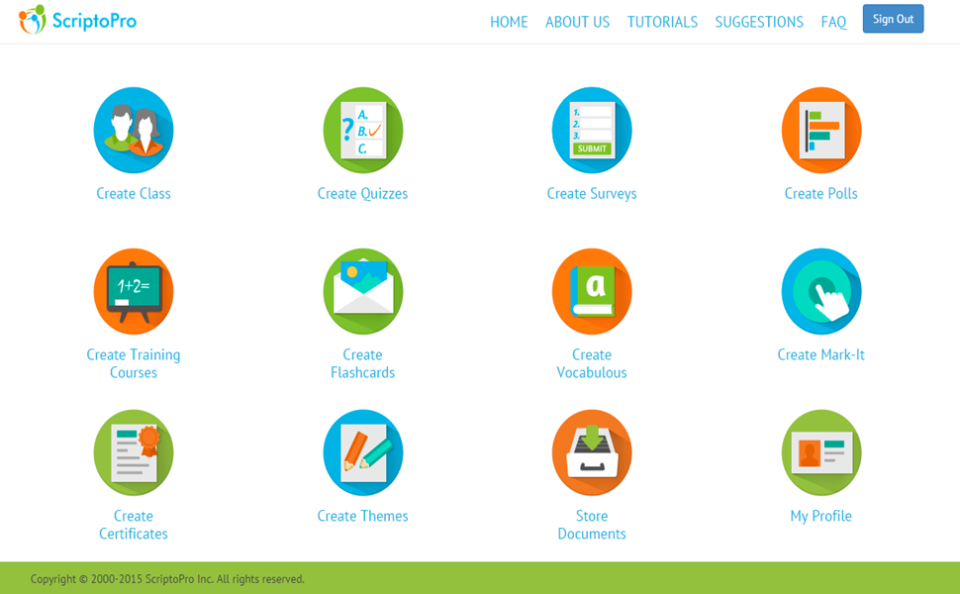
The LMS features dashboard in ScriptoPro (Source)
Common Features of LMS for Nonprofits
In this section, we cover the key software features that a buyer should be aware of before purchasing a solution. Most nonprofit organizations will need some (or all) of these features in their LMS:
E-learning management | Helps users define course objectives, administer course enrollments and manage content distribution. |
Course tracking | Tracks the progress of learners in the administered courses and programs. |
Course authoring | Allows users to create or customize their own content using multimedia images, videos and other engaging elements. |
Proficiency testing/Reporting | Allows users to create quizzes that gauge learner knowledge or skill. This feature also includes reporting functionality to identify skill gaps. |
Mobile learning | Lets users access online training courses on mobile devices such as smartphones and tablets. |
Course catalog | Provides a prebuilt library of training courses for general training requirements (e.g., NGO management). |
Social learning | Allows learners to share course ratings, comments, and discuss ideas on course forums. |
Certification and compliance management | Helps trainers generate certificates on course completion and manage compliance training/programs as per the standards and policies of a specific industry. |
What Type of Buyer Are You?
Before you start shortlisting LMS vendors , you need to understand the type of buyer you are based on your training needs. This will help you analyze all the available options and prioritize software features as "must-have" and "optional."
In this section, we've categorized buyers into two main groups:
Charitable organizations: These buyers provide their staff specific training on budgeting and fundraising, business awareness, social guidelines etc. Seventy-five percent of charitable organizations believe that improving digital skills will help them increase fundraising.
But they have tight training budgets and lack the resources to organize training events. The right LMS can help them organize online workshops to train staff who are in different locations. Staff can log into the LMS tool and attend virtual training events or watch the recordings/videos of training programs.
Advocacy groups: They provide education, certification and advocacy on behalf of various industries and charitable organizations. To succeed in their mission, advocacy groups need to provide instructional material and certification courses to deprived people who are in need of employment. An LMS tool with built-in course authoring functionality can help them create and customize courses. They can also develop online assessments to test a learner's practice skills.
Benefits of LMS for Nonprofits
LMS tools for nonprofits make it easy to disseminate knowledge and train volunteers, investors and other important members. Here are some of the benefits that nonprofits can reap by using the tool:
Better fundraising skills: LMS tools can help nonprofits create, store and leverage training courses for critical skills to do various tasks such as writing grant proposals and managing budgets. Trained volunteers who possess these skills tend to raise more funds than untrained ones.
Lower training costs: Using LMS eliminates the need to specially organize training events as learners have access to training anytime, anywhere. You save the costs of hiring trainers, booking venues to host the training and paying for the travel or food expenses.
Greater compliance to regulations: LMS tools help nonprofits stay up-to-date on required legal compliance and clearances for their volunteers and staff. The software allows them to track which volunteer needs to complete a certification and then schedule automatic reminders to do said task.
Key Considerations for Nonprofits
Selecting software requires you to consider various factors such as the features your nonprofit can't do without. Do you need multi-device training material or multi-lingual courses? Which features are absolutely essential and are they affordable?
These are among the few questions you should be asking yourself and the vendor. Here are some other factors that should influence your purchasing decision:
Medium of content delivery: LMS tools offer training content in two modes. The first is virtual instructor-led training (VILT), where learners connect to the training program remotely in a virtual classroom. The other is online self-paced training, where learners watch videos, take quizzes, and submit assessments online at their own convenience. Assess which medium suits your nonprofit's training requirements best and shortlist vendors who offer your preferred medium.
Compliance with e-learning technical standards: The tool should support the e-learning content standards of Aviation Industry Computer-based Training Committee (AICC) and Sharable Content Object Reference Model (SCORM). These compliance standards are mandatory technical specifications for standardizing the integration of e-learning content with other LMSs.
Budget constraints and scalability: The LMS should fit your budget and not have any hidden costs. Sign up for free trials and demos, which will help you understand how an LMS works. Most tools offer free trials for 14 to 30 days. Shortlist a few tools that meet most, if not all, of your needs. Also, ensure that the tool is scalable in terms of number of licenses/users, so that you can add new learners without having to pay a lot of money every time.