
Best Note-Taking Software of 2026
Updated March 17, 2026 at 10:02 AM
- Popular Comparisons
- Buyers Guide
Compare Products
Showing 1 - 25 of 73 products
Compare Products
Sort by
Reviews: Sorts listings by the number of user reviews we have published, greatest to least.
Average Rating: Sorts listings by overall star rating based on user reviews, highest to lowest.
Alphabetically (A-Z): Sorts listings by product name from A to Z.

Transkriptor is an artificial intelligence (AI)-enabled online transcription solution that converts audio and video content with...Read more about Transkriptor


Transkriptor's Best Rated Features
See All
Transkriptor's Worst Rated Features
See All

Notion is a digital workspace that lets small to large businesses streamline and manage notes, tasks, projects, records, calenda...Read more about Notion

Notion's Best Rated Features
See All
Notion's Worst Rated Features
See All

Plottr is a visual book planning and story bible software that helps writers outline and organize their books. Plottr lets novel...Read more about Plottr

Plottr's Best Rated Features
See All
Plottr's Worst Rated Features
See All

Aha! is a product development software designed to support teams in managing the entire product lifecycle. It is used by roles s...Read more about Aha!

Aha!'s Best Rated Features
See All
Aha!'s Worst Rated Features
See All

Google Keep is a web-based note-taking tool designed to help professionals and individuals create, edit and share notes from a u...Read more about Google Keep
Google Keep's Best Rated Features
See All
Google Keep's Worst Rated Features
See All

Talkatoo is a speech recognition and dictation solution that helps veterinary organizations utilize the power of speech-to-text ...Read more about Talkatoo
Talkatoo's Best Rated Features
See All
Talkatoo's Worst Rated Features
See All

Notebird is a pastoral care application designed for churches, nonprofits, and ministries seeking to enhance their care efforts....Read more about Notebird


Notebird's Best Rated Features
See All
Notebird's Worst Rated Features
See All

Notehouse is a relationship management software designed to cater to the specific needs of professionals such as lawyers, guidan...Read more about Notehouse
Notehouse's Best Rated Features
See All
Notehouse's Worst Rated Features
See All

FuseBase is an AI-powered, all-in-one client collaboration tool designed to help professional services streamline workflow and d...Read more about Fusebase
Fusebase's Best Rated Features
See All
Fusebase's Worst Rated Features
See All

Microsoft OneNote is a digital note taking app that can be accessed via Android, Chrome, Windows, iOS and Mac devices. The solut...Read more about Microsoft OneNote


Microsoft OneNote's Best Rated Features
See All
Microsoft OneNote's Worst Rated Features
See All

Leexi is a cloud-based conversational intelligence platform that enables businesses to analyze, summarize, and transcribe audio ...Read more about Leexi

Leexi's Best Rated Features
See All
Leexi's Worst Rated Features
See All

Obsidian is a cloud-based knowledge management solution that provides local folders of text files and note-publishing options to...Read more about Obsidian
Obsidian's Best Rated Features
See All
Obsidian's Worst Rated Features
See All

LiquidText is a note-taking solution that helps businesses collate ideas, create note relationships, handle search processes, an...Read more about LiquidText


LiquidText's Best Rated Features
See All
LiquidText's Worst Rated Features
See All

Scrintal is a note-taking and mind-mapping tool catering to individuals, teams, knowledge workers, students, and businesses. Sc...Read more about Scrintal
Scrintal's Best Rated Features
See All
Scrintal's Worst Rated Features
See All

In Cling, the focus is on the team and smooth collaboration. Flexible boards always ensure an optimal overview of the tasks. No ...Read more about Cling
Cling's Best Rated Features
See All
Cling's Worst Rated Features
See All

Demodesk Coaching & AI is a platform designed to record, transcribe, and analyze customer meetings using artificial intelligence...Read more about Demodesk Coaching & AI

Demodesk Coaching & AI's Best Rated Features
See All
Demodesk Coaching & AI's Worst Rated Features
See All

Kiroku is a cloud-based dental charting solution that helps clinicians (primarily dentists and veterinarians) take notes and mai...Read more about Kiroku
Kiroku's Best Rated Features
See All
Kiroku's Worst Rated Features
See All

EssentialPIM is a personal information management solution that enables businesses to manage notes, appointments, contacts, task...Read more about EssentialPIM

EssentialPIM's Best Rated Features
See All
EssentialPIM's Worst Rated Features
See All

Akiflow is a productivity application that combines tasks and calendars. It is built focusing on speeding up the fundamentals of...Read more about Akiflow

Akiflow's Best Rated Features
See All
Akiflow's Worst Rated Features
See All

It is software for taking notes on videos on youtube, Vimeo and many other platforms. It can be used as a Chrome Plugin or you c...Read more about ReClipped


ReClipped's Best Rated Features
See All
ReClipped's Worst Rated Features
See All

Eric.ai is an AI-powered meeting assistant. It automates the tasks of note-taking, transcription, and action item tracking. Desi...Read more about Eric.ai
Eric.ai's Best Rated Features
See All
Eric.ai's Worst Rated Features
See All

Spoke is an instant note-taking tool for Zoom, Microsoft Teams, Google Meet and more. It automatically creates a video clip of t...Read more about Spoke

Spoke's Best Rated Features
See All
Spoke's Worst Rated Features
See All

Vinton is an AI notetaker and meeting intelligence app built exclusively for Salesforce. Vinton joins video calls, in-person mee...Read more about Vinton


Vinton's Best Rated Features
See All
Vinton's Worst Rated Features
See All

TheBrain is an innovative software tool that serves as the ultimate digital memory for individuals seeking to enhance their thin...Read more about TheBrain
TheBrain's Best Rated Features
See All
TheBrain's Worst Rated Features
See All

Spike is an AI-powered email app built for professionals and small teams who live in their inbox. It turns traditional email int...Read more about Spike
Spike's Best Rated Features
See All
Spike's Worst Rated Features
See All
Popular Comparisons


Buyers Guide
This detailed guide will help you find and buy the right note-taking software for you and your business.
Last Updated on January 27, 2025People take notes to keep track of information that might otherwise be lost or forgotten. Notes can be taken anytime, anywhere on a piece of paper, at the back of a notebook, on a sticky note—the list continues. And though this sounds convenient, chances are you may end up misplacing a sticky note or piece of paper.
Using note-taking software can be beneficial in such situations. The software helps capture and store important information and ideas at a centralized location. You can access the information any time and even share it with your friends or teammates.
Given the many options available on the market, it can be confusing to decide which software to choose. In this buyers guide, we provide all the information you need to purchase a note-taking tool that suits your business needs.
Here's what we'll cover:
What is note-taking software?
Note-taking software is a software tool that allows users to capture, store, and manage voice and text notes on different devices. Using the software is similar to organizing sticky notes and notebooks but in a digital space. It helps ensure secure document management while providing users quick access to the stored information.
Calendar integration, document annotations, search filters, multidevice support, voice notes, activity history, cloud storage, and file sharing are some of the key features of the software.
Note-taking software can integrate with other tools such as team collaboration and task management software to enhance accessibility. It is used by small, midsize, and large enterprises; educational institutions; entrepreneurs; and individuals alike.
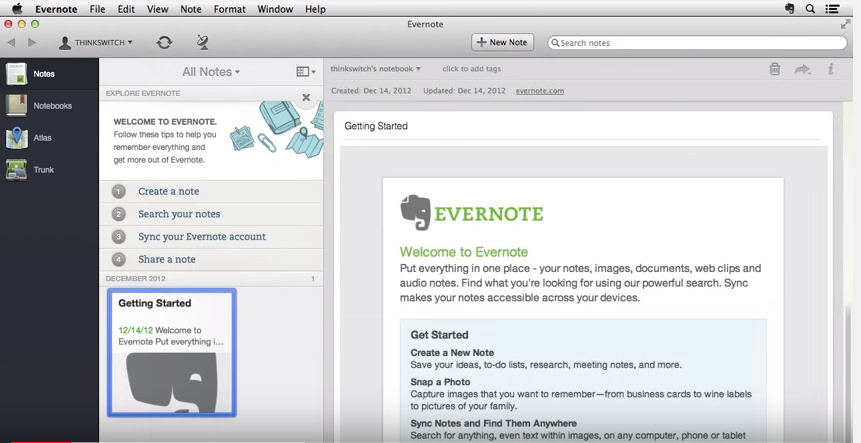
Dashboard in Evernote note-taking software (Source)
Common features of note-taking software
Most note-taking software platforms have the following features in common:
Sharing | Share task-related notes, documents, and collective knowledge with authorized stakeholders and always stay in sync. |
Comments | Allows your team to add comments to collaborate in real time, take feedback on ideas, or check if they have anything to add. |
Search filter | Look for specific points or keywords in a single document or an entire folder by entering the query in the search filter. |
Data import/export | Upload files to add to the digital notebook or download the stored data to create a backup on your system. |
Document classification | Make the documents searchable by classifying them as personal or task-related and tagging them to relevant tasks. |
Multidevice support | Access the stored documents on a laptop, PC, tablet, or mobile device with single sign-on (SSO) and stay connected anytime, anywhere. |
What type of buyer are you?
Before evaluating note-taking software options, determine what you plan to use it for. Most buyers of the software belong to the following categories:
Educational institutions: Notes are an essential source of reference to recall important information from a discussion, whether it is a classroom session or staff meeting. The captured information can be used to enhance work efficiency and boost productivity.
Note-taking software with features such as collaboration, comments, and data import/export, in addition to document management, would be a suitable choice for educational institutions.
Businesses: Meetings and training sessions are common in organizations, be it small, midsize, or large. Although these discussions are essential, back-to-back sessions may overwork the attendees, and that may lead to missing out on important information. To this end, a note-taking tool can help quickly capture information by drawing, typing, or talking (think voice notes); the captured information can be accessed anytime, on any device.
Features such as multidevice support, collaboration, and document classification would work well for businesses to ensure a smooth flow of work with their teams.
Benefits of note-taking software
Implementing a note-taking platform has various benefits, including:
Real-time sharing: Sharing notes with one or multiple teams helps understand different perspectives on improvising or putting an idea to work. Doing this in real time makes the document available to stakeholders while you can continue adding information or making changes. This eliminates the need to share and wait for inputs, saving time and effort for all involved teams.
Information security: Notes can be taken for business-related concerns or ideas; however, both are intellectual properties and hence need to be protected. A note-taking software tool that ensures information protection proves to be a one-stop solution that allows secure capturing, storing, and sharing of information. Look for security features such as two-factor authentication that uses a password or secret code to allow access to authorized stakeholders.
Key considerations when selecting note-taking software
Here are a few things to keep in mind when purchasing a note-taking software solution:
Integrations: Note-taking software limits usability to taking notes. However, allowing integration with software tools such as team communication, project management, and teleconferencing enables multitasking. For instance, you can make real-time changes in a document during an on-call discussion. Having a single platform to connect and capture information will help boost productivity and enhance work efficiency while saving time.
Multidevice support: Carrying a laptop to every meeting may not be possible, and that highlights the importance of multidevice support. This feature lets you log in to your account from different devices, such as smartphones and laptops, and access the data anytime, anywhere. It not just ensures quick note-taking but also reduces downtime if one device is not working.
Market trends to understand
Here’s a recent note-taking software market trend that you should be aware of:
Automatic note-taking with AI. Note-taking solutions are leveraging AI technology to enhance the process of taking notes. AI-powered note-taking software can enable automatic capturing of information along with real-time summarizing. This eliminates the chances of missing out on important information while saving time that would otherwise be spent on summarizing the information later. While AI technology is currently used by a few market players, efforts are being made to further enhance the software with features such as real-time spelling and punctuation review, and speech recognition.
Note: The application selected in this guide is an example to show a feature in context and is not intended as an endorsement or recommendation. It has been taken from sources believed to be reliable at the time of publication.