
Best Reputation Management Software of 2026
Updated February 18, 2026 at 5:24 AM

Written by Marcela Gava
Senior Content Analyst

Edited by Parul Sharma
Editor

Reviewed by Blake Morgan
Contributor
- All Software
- Buyer's Guide
- Software Advice FrontRunners
- Frequently Asked Questions
- Popular Comparisons
Reputation management software helps marketing teams request reviews, respond to feedback, and protect brand image. With over 200 products each designed for different industries, team sizes, and review platforms choosing the right one can feel overwhelming. To help you narrow it down, I've curated a list of highly rated products and the reputation management software FrontRunners based on user reviews. For further information, reputation management software buyer's guide.
Reputation Management Software
Sort by
Reviews: Sorts listings by the number of user reviews we have published, greatest to least.
Average Rating: Sorts listings by overall star rating based on user reviews, highest to lowest.
Alphabetically (A-Z): Sorts listings by product name from A to Z.

ReviewInc is a reputation and review management software designed to help businesses manage their online presence. It supports i...Read more about ReviewInc


ReviewInc's Best Rated Features
See All
ReviewInc's Worst Rated Features
See All

Stratus features a customizable 'Review Notifications' feature that allows businesses to keep up with multiple locations. It sen...Read more about Stratus


Brandwatch is a social suite designed to help businesses understand and engage with customers on digital platforms. It serves in...Read more about Brandwatch


Brandwatch's Best Rated Features
See All
Brandwatch's Worst Rated Features
See All

Agility PR Solutions is an AI-powered PR software to optimize your communications workflows. Some popular solutions include Medi...Read more about Agility PR Solutions

Reviewpro Reputation is the leading guest experience management software helping hospitality become more profitable by gathering...Read more about Reviewpro Reputation
Software Advice FrontRunners 2026

(666)

(3794)

(148)

(146)

(701)

(253)

(89)

(80)

(605)

(121)
Best for Mobile app

Weave

According to our user reviews, Weave is the most requested by users for mobile app out of the most popular tools.
Weave is best for practices that prioritize mobile communication, such as dental or medical offices needing to manage calls, texts, and schedules on the go. Our reviewers say the mobile app enables staff to access schedules, respond to patient messages, and handle appointment reminders efficiently from anywhere, streamlining daily workflows.
- Reviewers Perspective
"I have been using Weave for over three years now and it truly helps our office with every aspect of communication - chatting with team members within the office, being able to text patients, and sending digital forms."
ALAbby Luker
Administrative Coordinator
Used for 2+ years
We analyzed 412 verified user reviews for Weave to find out what actual users really think.
Client Support
Weave lets offices manage patient texts, calls, and digital forms from anywhere. Medical practices streamline workflow and maintain patient engagement using real-time messaging and cloud-based access.Ease of Use
Staff of all ages and technical backgrounds quickly learn Weave’s desktop and mobile apps. Offices benefit from easy navigation and the ability to access functions remotely, simplifying daily operations.Appointment Reminders
Practices use Weave to send customizable appointment reminders and confirmations via text or email. Schedules are managed efficiently, reducing no-shows and improving patient follow-up. - Key FeaturesWeave's scoreCategory average
Negative Feedback Management
3.834.56 category average
Review Monitoring
4.314.64 category average
Review Request
4.634.63 category average
- Screenshots


Best for Automation Capabilities

Hootsuite

Of the products listed on our FrontRunners report, Hootsuite is the most requested by users for automation capabilities out of the most popular tools.
Hootsuite is best for organizations seeking strong automation capabilities in social media management. Our reviewers point out that Hootsuite’s automated post scheduling and content management features save significant time, allowing users to plan, schedule, and monitor posts across multiple platforms from a single dashboard.
- Reviewers Perspective
"Hootsuite has helped me save a lot of time, by being able to monitor all social networks in one place, allowing me to schedule content in advance in a more dynamic and efficient way and see the detailed results of the impact generated."
ACAlimberth Campos Z
Affiliate Marketer
Used for 1-2 years
We analyzed 844 verified user reviews for Hootsuite to find out what actual users really think.
Social Media Management
Teams manage multiple social media accounts, schedule content, and track engagement from a single dashboard. Businesses streamline planning and maintain consistent online presence across platforms.Post Scheduling
Users plan and automate content publishing across platforms. Non-marketing teams visualize, adjust, and preview scheduled posts, reducing manual work and freeing up time for other priorities.Social Media Accounts
Organizations oversee, schedule, and analyze content for multiple brands or clients without switching platforms. Collaboration tools support team workflows and maintain cohesive presence. - Screenshots


Best for Usability

TrueReview

In our analysis of Reputation Management products with the most market demand, TrueReview is the highest rated for its usability out of the most popular tools.
TrueReview is best for teams seeking high usability in review management. Our reviewers say the platform is easy to set up and navigate, with automated review requests and a simple interface that streamlines collecting and responding to customer feedback, reducing manual effort for busy SMBs.
- Reviewers Perspective
"I especially love how it integrates with multiple platforms, making it seamless to collect reviews and respond to them."
CQCornelius Qualley
Onwer
Used for 1-2 years
We analyzed 111 verified user reviews for TrueReview to find out what actual users really think.
Review Management
TrueReview streamlines collecting and managing customer reviews across platforms. Businesses automate review requests, customize follow-ups, and track interactions, increasing review volume and quality.Ease of Use
Staff navigate TrueReview’s straightforward interface, upload contacts, and manage campaigns quickly. The user-friendly design enables efficient teaching and integration into daily operations.Customer Support
Users reach support via phone and video calls for onboarding and troubleshooting. Responsive staff help resolve issues, contributing to overall satisfaction with the platform. - Key FeaturesTrueReview's scoreCategory average
Negative Feedback Management
4.774.56 category average
Review Monitoring
4.824.64 category average
Review Request
4.924.63 category average
- Screenshots


Best for Customer Satisfaction

Emitrr

Emitrr is the highest rated for customer satisfaction out of the most popular tools, based on our analysis of Reputation Management products with the most market demand.
Emitrr is best for businesses focused on customer satisfaction through responsive support and communication. Our reviewers highlight the platform’s attentive customer service, user-friendly interface, and ability to centralize messaging, making it easy for teams to quickly address customer needs and improve engagement.
- Reviewers Perspective
"Our business has many segments that reach different customers, so its nice to be able to segment them out and send quickly."
TBThomas Blackwell
Director, Leagues
Used for 1-2 years
We analyzed 106 verified user reviews for Emitrr to find out what actual users really think.
Customer Support
Emitrr’s support staff addresses user needs quickly and adapts the system for new requests. Businesses benefit from thorough assistance and consistent communication, enhancing platform experience.Text Messaging
Emitrr streamlines communication with customers and employees. Offices send long SMS texts, manage contact groups, and use templates for efficient outreach and engagement.User Interface
Staff interact with Emitrr’s user-friendly dashboard and automatic translation features. New hires onboard quickly, and both technical and non-technical users manage daily tasks with minimal friction. - Key FeaturesEmitrr's scoreCategory average
Review Monitoring
4.924.64 category average
Review Request
5.04.63 category average
- Screenshots


Best for AI powered

Birdeye

According to our user reviews, Birdeye is the most requested by users for AI powered out of the most popular tools.
Birdeye is best for SMBs seeking AI-powered tools to manage and grow their online reputation. Our reviewers say its AI features automate review requests and responses, consolidate feedback from multiple channels, and streamline workflows, making it easier to monitor and enhance customer experience.
- Reviewers Perspective
"The Birdeye platform is super helpful to allow us to see all of our feedback in one place and respond accordingly so we can consistently monitor our online reputation."
LMLisbeth McCracking
Marketing Manager
Used for 2+ years
We analyzed 462 verified user reviews for Birdeye to find out what actual users really think.
Review Management
Birdeye enables businesses to organize, request, and respond to reviews across multiple platforms. Teams consolidate feedback, automate responses, and monitor customer sentiment efficiently, streamlining workflows for proactive reputation management.Customer Support
Birdeye’s support team resolves issues quickly and guides users through setup and ongoing use. Administrative staff benefit from detailed FAQ resources, personalized onboarding, and prompt help with technical challenges, maximizing platform features.Ease of Use
Staff can switch between accounts, access features on mobile devices, and train new team members with minimal effort. The clear dashboard and logical structure allow efficient review management without extensive technical knowledge. - Key FeaturesBirdeye's scoreCategory average
Negative Feedback Management
4.574.56 category average
Review Monitoring
4.664.64 category average
Review Request
4.634.63 category average
- Screenshots


Best for Quick Implementation

Brand24

In our analysis of Reputation Management products with the most market demand, Brand24 is the most requested by users for quick implementation out of the most popular tools.
Brand24 is best for organizations needing quick implementation of brand monitoring and analytics. Our reviewers point out that onboarding is smooth, the dashboard is intuitive, and users can rapidly access actionable insights and set up reports, enabling teams to respond to brand mentions efficiently.
- Reviewers Perspective
"I also value the Storm Reports that highlight trending discussions and hot mentions — especially useful for tracking competitors. And I love the comparison features, which let me analyze our brand against others and gain valuable marketing insights."
ISIzabela Sękowska
Brand Manager
Used for 2+ years
We analyzed 161 verified user reviews for Brand24 to find out what actual users really think.
Brand Monitoring
Brand24 tracks brand mentions and reputation across channels. Marketing teams use real-time alerts and comparison features to benchmark against competitors and respond rapidly to emerging conversations.Reporting
Users generate clean, exportable reports and visualize key metrics for brands and clients. Agencies personalize reports with filters and branding, streamlining sharing of insights.Ease of Use
Teams set up and operate Brand24 with minimal learning curve. The platform’s clear instructions and straightforward account management simplify training and multi-project management. - Screenshots


Most Rated for SMBs


According to our user reviews, Experience.com is the most requested by small businesses out of the most popular tools.
Experience.com is most rated for SMBs looking to consolidate and automate review management. Our reviewers say it centralizes reviews from multiple platforms, automates review requests, and makes it easy to reply and monitor feedback, helping businesses efficiently manage their online reputation.
- Reviewers Perspective
"Its a great source to put all your reviews into one spot, so any customers can get a full shot of all the info and reviews before working with someone etc."
KMKris M
Branch Manager
Used for 2+ years
We analyzed 77 verified user reviews for Experience.com to find out what actual users really think.
Reviews
Consolidating reviews from multiple platforms, Experience.com lets SMBs showcase client feedback in one location. Automation of review requests and direct responses streamlines workflow, while sharing links and customizing review levels supports efficient client engagement.Customer Support
Setting up Experience.com is straightforward for SMBs, but support reliability varies. Some users report prompt, informative assistance, while others face delays and frequent account rep changes, impacting issue resolution and billing.Ease of Use
Managing reviews and business optimization tasks is simplified by Experience.com’s user-friendly interface. The intuitive dashboard and efficient workflow help SMBs access features quickly, improving operational efficiency. - Key FeaturesExperience.com's scoreCategory average
Negative Feedback Management
4.464.56 category average
Review Monitoring
4.754.64 category average
- Screenshots


Most Used By Staffing and Recruiting

Whippy

Whippy is the most requested by users in staffing and recruiting out of the most popular tools.
Whippy is most used by staffing and recruiting teams that need collaborative, user-friendly communication tools. Our reviewers highlight the ease of onboarding, responsive customer support, and features that streamline team workflows, making it well-suited for fast-paced recruiting environments.
- Reviewers Perspective
"The level of customer service and support consistently exceeds expectations. Whenever an issue arises, the support team responds promptly and ensures an effective resolution. When new products were introduced, our CS Specialist, [sensitive content hidden] , collaborated closely with us to customize solutions that fit our unique needs, streamlining workflows and maximizing efficiency."
BBBrandon Buytaert
Operations Manager
Used for 2+ years
We analyzed 64 verified user reviews for Whippy to find out what actual users really think.
Customer Support
Whippy’s support team responds quickly and customizes solutions for unique business needs. Operations managers benefit from hands-on help, ongoing training, and proactive feedback handling.Ease of Use
Staff access both advanced and simplified versions, adapting to technical skill levels. The intuitive interface and support resources make onboarding and daily use accessible for varied office needs.Team Collaboration
Organizations use Whippy to assign messages, share communication across teams, and automate workflows. Ongoing training and receptive staff support continuous operational improvement. - Key FeaturesWhippy's scoreCategory average
Review Monitoring
5.04.64 category average
Review Request
5.04.63 category average
- Screenshots


Most Used By Marketing and Advertising


Sprout Social is the most requested by users in marketing and advertising out of the most popular tools.
Sprout Social is most used by marketing and advertising teams managing multiple social channels. Our reviewers say it offers intuitive scheduling, robust analytics, and collaborative tools that simplify campaign management and reporting, supporting efficient, data-driven marketing operations.
- Reviewers Perspective
"SproutSocial is a great social media scheduling and engagement report tool and can be used by all types of businesses, companies, and agencies looking to streamline their digital posting and social analytics."
LDLaura Denner
Client Success Specialist
Used for 2+ years
We analyzed 421 verified user reviews for Sprout Social to find out what actual users really think.
Social Media Management
Sprout Social lets teams schedule posts, monitor conversations, and analyze engagement from a single dashboard. Businesses streamline workflows and track performance across multiple accounts.Ease of Use
New team members learn Sprout Social quickly. The intuitive dashboard and minimal training requirements make managing social media accounts efficient for both personal and professional use.Reporting
Users generate clear, visually appealing reports and customize analytics for clients or stakeholders. Exporting, scheduling, and sharing reports is straightforward, supporting informed decision-making. - Screenshots


Most Used By Information Technology and Services


In our analysis of Reputation Management products with the most market demand, SurveySparrow is the most requested by users in Information Technology and Services out of the most popular tools.
SurveySparrow is most used by information technology and services teams seeking flexible, easy-to-use survey tools. Our reviewers note its user-friendly interface, customizable templates, and conversational survey formats, which make setup and feedback collection quick and engaging for both creators and respondents.
- Reviewers Perspective
"I like that our team can create a custom CSAT survey that can then import results back into our tickets in Zendesk."
NGNaomi Greenall
Support Operations
Used for 1-2 years
We analyzed 105 verified user reviews for SurveySparrow to find out what actual users really think.
Surveys
Teams create personalized surveys with conversational interfaces and templates. SurveySparrow supports logic features and easy distribution, helping collect meaningful responses across channels.Ease of Use
Staff quickly learn and navigate SurveySparrow’s user-friendly interface. The clear design streamlines survey creation and editing, making it accessible for both beginners and experienced users.Forms
Users build forms from scratch, customize themes, and gather responses efficiently. The platform’s friendly design and fast setup support market analysis and client satisfaction efforts. - Screenshots


Hibu

- Reviewers Perspective
"It allows me to connect with the client and put a package together for them that suits their needs."
PHPatina Herrington
Wedding and events coordinator
Used for 1-2 years
We analyzed 51 verified user reviews for Hibu to find out what actual users really think.
Customer Support
Hibu’s support team assists SMBs with upgrades, downgrades, and troubleshooting. Localized service combines personal attention with the resources of a larger company, making service management easier.Ease of Use
Editing and navigating Hibu’s platform is straightforward for SMBs. The interface enables fast keyword selection and responses to changes, supporting efficient business management.Sales Representatives
Local Hibu sales reps help identify growth opportunities and provide initial support. However, SMBs report decreased availability and inconsistent follow-through after onboarding, affecting ongoing partnership quality. - Screenshots

Referrizer

- Reviewers Perspective
"Their support team is proactive and genuinely committed to helping you succeed, which makes the entire system even more valuable."
KBKyle Barden
Owner
Used for 2+ years
We analyzed 151 verified user reviews for Referrizer to find out what actual users really think.
Customer Support
Referrizer’s support staff help SMBs with setup, troubleshooting, and ongoing training. This makes navigating new features and resolving issues faster, maximizing the value of loyalty and referral tools.Ease of Use
SMBs access essential features and manage tasks with an intuitive interface. Even users with limited technical experience quickly learn the platform, aided by clear tutorials and onboarding resources.Campaign Emails
Teams easily create, schedule, and manage marketing campaigns via email and text. Templates and automation features streamline communication, supporting consistent client engagement and saving time. - Screenshots


GiveMe5.ai

- Reviewers Perspective
"I have been using it for a number of years now - I like that the emails are customisable, you can add your own domain for white label, you can choose to have the user select stars, thumbs up/down and more - when they review you, there is auto reminders, and the option to pre-vet the reviews (ie if a customer has had a bad experience, they can contact you first to resolve it, prior to leaving a review (a grey area, but the option is great to have)."
APAlex Player
Founder
Used for 2+ years
We analyzed 79 verified user reviews for GiveMe5.ai to find out what actual users really think.
Review Management
SMBs automate review requests, customize feedback formats, and pre-vet negative reviews. This helps address customer concerns privately and consolidates feedback from multiple platforms for easier monitoring.Customer Support
Support teams assist with setup, resolve technical issues, and guide customization. Regular platform updates and a user-friendly interface make account management straightforward for both SMBs and their clients.Ease of Use
Users navigate GiveMe5.ai’s features and manage reviews with little effort. The intuitive interface allows quick sending of review requests and customization, saving time in daily operations. - Key FeaturesGiveMe5.ai's scoreCategory average
Negative Feedback Management
4.724.56 category average
Review Monitoring
4.754.64 category average
Review Request
4.724.63 category average
- Screenshots


- Reviewers Perspective
"Marketing 360 provides an all-in-one solution for managing marketing, CRM, website design, and analytics, which simplifies business operations."
CGClifton Gage
Owner
Used for 6-12 months
We analyzed 604 verified user reviews for Marketing 360 to find out what actual users really think.
Marketing
Users streamline campaign management with Marketing 360’s integrated marketing, CRM, website, and analytics tools. This centralization supports brand consistency and efficient operations for SMBs managing multiple channels.Customer Support
Onboarding is supported by dedicated account managers who help resolve issues and provide personalized guidance. This ensures SMBs can quickly adapt and maximize platform features with minimal disruption.Ease of Use
Teams quickly adapt to Marketing 360’s clear interface and straightforward navigation. Even users with limited technical experience can manage marketing tasks efficiently, reducing training time and complexity. - Screenshots


Methodology
The research for the best reputation management software list was conducted in October 2025. We evaluated data (user reviews and demand signals) from the past 24 months as of the research date. Read the complete methodology.
Popular Reputation Management Comparisons


Buyer's Guide
This detailed guide will help you find and buy the right reputation management software for you and your business.
Last Updated on May 23, 2025Here's what we'll cover:
What you need to know about reputation management software
What is reputation management software?
Essential features of reputation management software
Benefits and competitive advantages of using online reputation management software
How to choose the best reputation management software for your business
Software related to reputation management software
More resources for your reputation management journey
What you need to know about reputation management software
Reputation management software is a tool designed for requesting, tracking, and responding to online reviews, allowing businesses to build a positive and strong online reputation for their brand. Features such as review monitoring, review generation, and social media management are crucial for online reputation management to help companies respond promptly to their customers and encourage positive mentions. We've spoken to more than 390 software buyers to assist them in selecting the right tool for supporting their businesses in creating successful brands. [1]
To provide an overview of the market, we have over 240 different reputation management vendors on our site, and we've published more than 1,400 verified reviews for reputation management products in the past year alone. If your business maintains an online presence, the question should not be whether or not to use online reputation management software, but which tool to pick to meet your company's specific requirements.
Pricing will be a key factor to consider in your search for reputation management software, as it can affect your budget. Entry-level options commonly start at $131 per month, while high-end plans can run as much as $415 per month. [2] Free trials are often available for many products, allowing you to test them before committing to a long-term contract.
First-time buyers should be aware that pricing may vary depending on the chosen billing cycle (monthly or annual) and other factors such as the number of users, seats, social profiles, or domains included in the plan.
Therefore, it's essential to begin your evaluation by considering your budget, the number of users, your specific needs, and any necessary integrations. Collaborate with stakeholders to develop a list of critical questions to guide your evaluation process, such as:
Can this system monitor or track mentions, hashtags, or comments on multiple channels?
How does your software help us understand customer sentiment towards our brand?
Does the software utilize AI to enhance review response capabilities?
What types of alerts can my team receive to be notified of new mentions, comments, or reviews?
Does the software support monitoring across the social media platforms we’re using now?
Choosing the right reputation management software from multiple vendors can be daunting. This guide will inform you about the essential features and benefits of reputation management tools and offer a step-by-step approach to selecting the perfect solution for your unique needs. In addition, you'll also get valuable insights and advice from Blake Morgan, a consumer experience futurist, keynote speaker, and author of three books on customer experience. [3]
What is reputation management software?
Reputation management software is a unified platform to help marketers and marketing teams manage and enhance their brand's online presence. It lets businesses gather and respond to online reviews while tracking and alerting them about online mentions in feedback, comments, or citations.
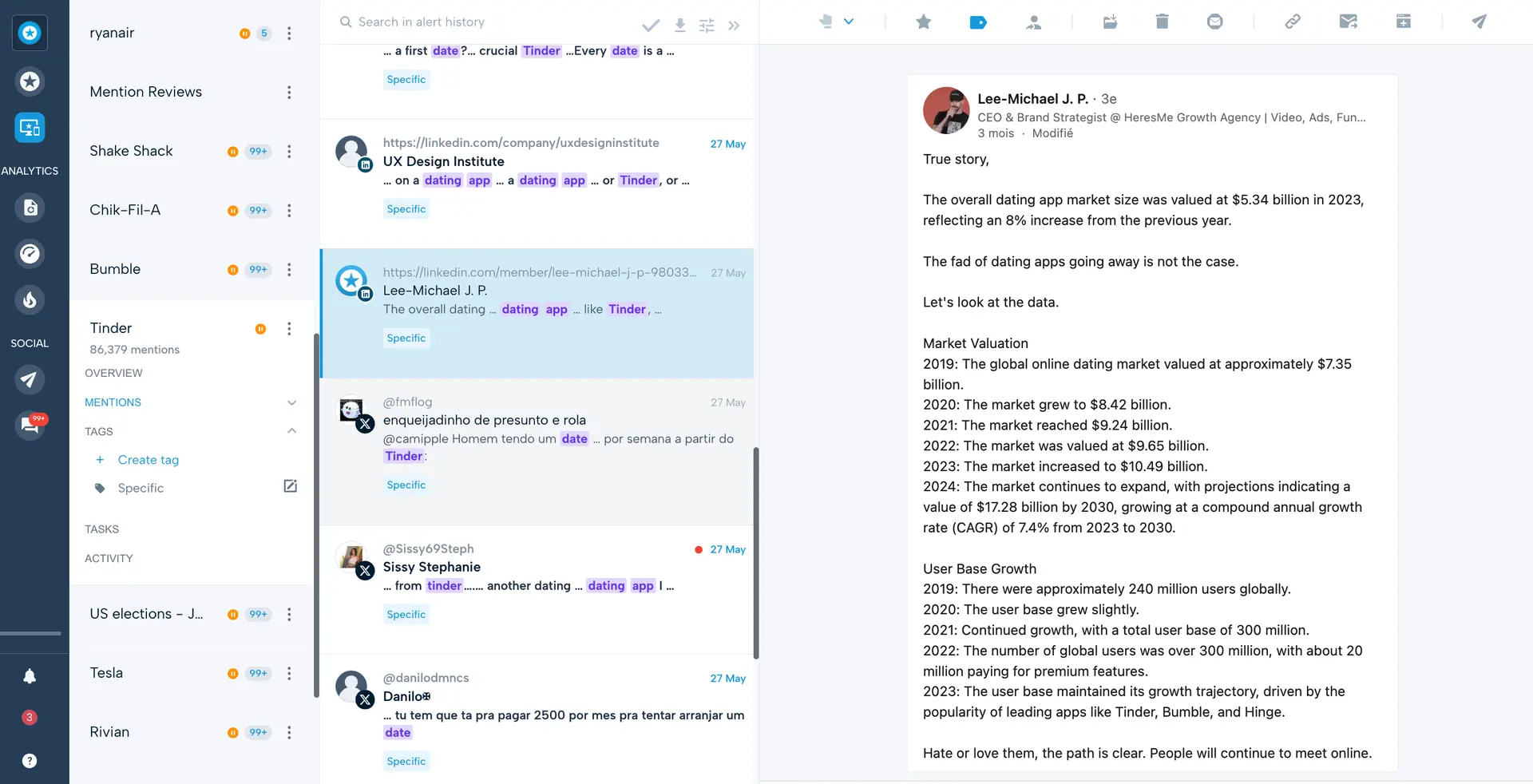
Brand mention monitoring in Mention
Common features of reputation management systems include review monitoring, review generation, social media management, reporting and analytics, and leveraging reviews. Users of online reputation management software can respond to negative reviews in a timely and sympathetic manner, perhaps even getting those reviewers to reconsider their rating. Additionally, the system can be used to encourage regular customers to post positive feedback, thereby increasing rankings and enhancing the brand's online perception.
Essential features of reputation management software
When evaluating reputation management software to find the best fit for your company's needs, it's crucial to know what features you can expect to see. Some resources, like review monitoring and media monitoring, are considered core features that will be available in every reputation management system. Common features include review request, response management, and sentiment analysis, among others. Based on our analysis of various reviews and interviews with marketing managers, we've identified the core features of reputation management software. [4]
Core reputation management features
Review monitoring | Automatically monitor and receive alerts for any new online reviews. 89% of our reviewers rate this feature as critical or highly important. |
Media monitoring | Monitoring brand mentions, clicks, backlinks, and engagement of distributed content, including blogs, press releases, or social media posts. |
Common reputation management features
Review request | Allows businesses to request reviews from customers. 90% of our reviewers rate this feature as critical or highly important. |
Response management | Enables businesses to plan and manage resources and procedures to mitigate the impact of events and incidents. 82% of our reviewers rate this feature as critical or highly important. |
Sentiment analysis | Categorizes emotions expressed in written text or images and identify if they are positive, negative, or neutral. |
Brand management | Simplifies the process of developing, monitoring, and maintaining brand value, reputation, and awareness among the target audience. |
Negative feedback management | Helps identify, track, and respond to negative feedback. |
Prioritizing robust features to offer effective review responses is indispensable for a successful reputation management strategy. Blake Morgan, a leading expert on customer experience, emphasizes the critical role of responding to customer reviews. She argues, "If you listen to a customer that's upset, you let them vent, you address it, you respond and then you make changes based on what they told you. This is so powerful. It's the best marketing that you could ever do."
Blake's observation highlights the value of engaging with customer feedback to strengthen relationships and improve overall brand perception. Neglecting customers’ issues can significantly impact a company's competitive advantage.
Benefits and competitive advantages of using online reputation management software
Our analysis of 285 user reviews from the past year reveals that review management, social media management, and reporting are the top-rated benefits of reputation management software. These features are crucial for supporting essential daily tasks, such as growing an online presence, organizing social media content, and receiving insights through reports and analytics.
Review management: Allows businesses to respond to all reviews, including the ability to effectively manage negative feedback to improve their online presence. Reputation management team members can also receive alerts about new mentions or reviews, enabling them to proactively monitor and protect the brand's online perception.
Social media management: This allows users to track social media accounts and engage with their audience across multiple platforms. Reports and analytics are also available to efficiently help identify relevant content types and determine the right moment for publishing posts.
Reporting: Customizing, exporting, and real-time monitoring help teams stay current with sentiment analysis and gain valuable insights into different key metrics.
While these benefits primarily apply to general reputation management software, they can also significantly contribute to other areas, such as customer experience (CX) strategies. Blake Morgan remembers that social media is very important for CX: “Listening to your customers, gathering feedback and improving your products and services based on that feedback is everything. Additionally, customer service now has expanded to include social media. So customers expect to engage with you on social media as well.”
How to choose the best reputation management software for your business
Step 1: Define your requirements
Before selecting an online reputation management software, it's important to start by defining your specific needs, such as determining the required number of seats or users and identifying necessary integrations with your existing marketing tech stack. These will guide you towards the system that aligns with your current operational demands and supports your long-term goals.
What is the cost of reputation management software?
The price of reputation management software is difficult to generalize because it depends on the factors that vary by buyers, such as:
Number of seats, users, social profile, or domain
Required features
Review invitations
AI-driven tools
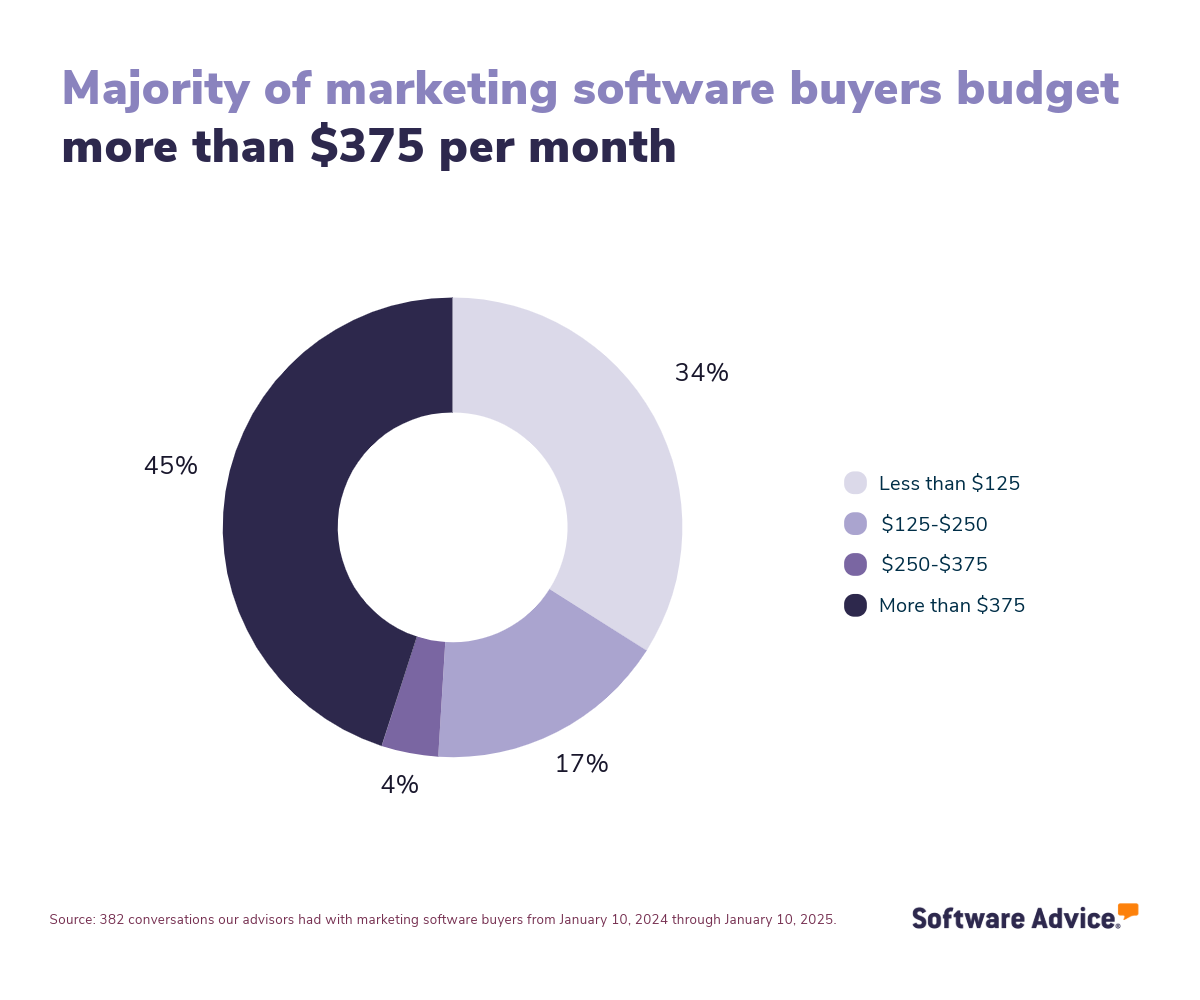
However, our analysis of 382 calls with marketing buyers over the past year indicates that the majority (45%) invest more than $375 per month in their marketing systems.
Integration considerations for reputation management software
Integration capabilities are crucial for reputation management software, especially considering the need to monitor social media profiles, which often requires seamless integration. Therefore, buyers should carefully evaluate the tools and categories the system can integrate with.
Reputation management systems are often integrated with CRM software, eCommerce platforms, and helpdesk software in addition to social media platforms. These integrations enable companies to enhance their online image by soliciting reviews following closed cases, completed sales, or solved tickets.
It's essential to remember that the industry or sector you operate in will likely shape your requirements for reputation management software, especially in terms of integrations. For instance, businesses reliant on appointments, such as healthcare providers, wellness centers, and fitness studios, can integrate their appointment scheduling software with their reputation management platform for automating repetitive tasks. The integration between these systems enables the automated sending of review requests to clients immediately following their appointments.
Prioritize online reputation management platforms that comply with the FTC rule
The Federal Trade Commission (FTC) has introduced a new rule, announced in August 2024, that bans the use of fake reviews and testimonials. This rule applies to businesses across various sectors that utilize customer reviews as part of their marketing strategy. The aim is to prevent deceptive practices that mislead consumers about the quality or performance of products and services, thereby ensuring a fair and transparent marketplace.
For buyers, selecting a reputation management software that aligns with the FTC's rule is essential to ensure compliance and maintain consumer trust. Such software must offer resources that facilitate the collection and display of authentic customer feedback, effectively filter out fraudulent reviews, and provide transparency in review management processes. By using compliant software, businesses can avoid legal repercussions, protect their brand integrity, and foster genuine relationships with their customers.
Be aware of potential drawbacks
While reputation management software offers numerous benefits, it's crucial to be aware of potential pitfalls that may arise during usage. When evaluating online reputation management software options, consider the following key concerns:
Issue resolution: Some platforms can present usability challenges, including bugs and missing features. These issues can frustrate users and hinder effective use of the software. Moreover, due to the constantly evolving market, some vendors prioritize launching new features over addressing existing bugs and maintaining stability. Users may end up spending more time troubleshooting than effectively utilizing the software for their business needs.
Automated messages: Relying too heavily on automated, templated customer responses offered by reputation management software can negatively impact your business's reputation. These generic replies may not effectively address each client's unique needs and concerns, leading to a less personal and potentially unsatisfactory customer experience.
Learning curve: A third consideration is the learning curve associated with reputation management software, which can be quite steep for beginners. Due to the vast number of features available, they may find the software cumbersome and overwhelming. Without sufficient training, users can experience "analysis paralysis," leaving them uncertain about how to proceed or prioritize tasks.
Additionally, it's also important to have realistic expectations when utilizing technology for reputation management. While systems provide valuable features for automating responses to consumer reviews, mentions, or comments, and many tools emphasize their capability to add a human touch to automated messages, effective brand reputation management still relies on human involvement and insight to accurately address consumer needs.
Step 2: Make a shortlist of reputation management software
Explore our list of reputation management FrontRunners
If you're not ready to speak with an advisor right now, you can begin creating your shortlist of reputation management software using our FrontRunners report. For more information on how the report is compiled, check out our full methodology description.
After creating your shortlist for reputation management software, you can access our free, downloadable Software Comparison Chart to analyze your final list of system candidates. This tool enables software buyers to compare up to three vendors side-by-side, focusing on key elements such as integration capabilities, pricing models, and available functionalities.
Step 3: Pick your best option
How to prepare for vendor demos
After compiling your shortlist of reputation management software, consider scheduling demo sessions with vendors to see how each system operates. This is an excellent opportunity to inquire about functionalities, integration, total cost of ownership, technical support, training, and other crucial factors that can influence your decision in selecting the ideal reputation management system for your business.
Here are some questions you might consider asking the vendor during the demo session:
What kind of customer support do you offer during implementation?
One of the primary reasons implementations fall short is the lack of proper client support and assistance. Ensure you inquire with providers about their strategies to assist your team throughout the implementation phase. Additionally, verify with vendors if there are any additional costs associated with this process.
What integrations does your software support?
Understanding the available integrations ensures that the reputation management system can link with your existing social media accounts and tools, preserving your workflow. This inquiry aids in evaluating whether the software will enhance efficiency by automating different tasks, removing manual data entry, and consolidating information across systems. Additionally, you should determine if the integrations you require are standard or tailored options and whether the vendor will implement and/or maintain these integrations.
What happens if I exceed the contracted limit for a service, such as the number of SMS messages included in my plan?
Some software provides a limited number of SMS messages, emails, or review requests each month. To ensure your workflow remains uninterrupted if you surpass the contracted limit, evaluate how simple it is to monitor your usage, how the system alerts you about your consumption, how easily you can obtain additional resources, and the associated costs for these extras.
For getting ready for the demo session, take a look at our guide How To Cut Through the Sales Pitch During Software Demos.
Step 4: Make the most of your reputation management software
After choosing your new reputation management system and signing the contract, you'll embark on the implementation journey. Whether you're transitioning from one reputation management tool to another or moving away from a collection of spreadsheets, there are several key factors you'll want to focus on during this phase:
Pilot project: Deploy the reputation management tool on smaller tasks to evaluate its effectiveness and make any needed modifications before a complete implementation. Utilize this stage to gather feedback, resolve any problems, and fine-tune your change management strategy.
Training: Develop a comprehensive training program to familiarize all users with the new tool, starting with basic features and advancing to more complex functionalities. Clearly communicate the new tool's benefits, explaining how it will improve daily workflows and enhance team efficiency. Encourage engagement with vendor-provided resources, such as video tutorials and FAQs, and supplement these with your own Q&A sessions and a detailed knowledge base.
Transition management: Be prepared for possible delays or confusion when switching to a new tool, which might slow down your team's response to reviews or online comments. To handle these challenges, make sure your customer support team has the right skills and strategies to stay efficient and respond to clients quickly during the transition.
For additional information on ensuring a seamless transition, refer to our guide on 5 Critical Steps to a Successful Software Implementation Plan.
Software related to reputation management software
During your software search, you may find some types of tools that are closely related to reputation management software. Some of them are:
Brand management software: Brand management systems help businesses oversee brand messaging, enabling them to create, organize, and distribute assets to ensure consistent branding across all channels.
Review management software: Review management software assists businesses in efficiently monitoring, managing, and responding to customer reviews across multiple platforms.
Customer experience software: Customer experience software enhances the customer journey by identifying patterns and pain points across customer interactions, enabling businesses to refine processes and improve satisfaction.
Social media monitoring software: Social media monitoring tools enable businesses to track and analyze their social media interactions, enhancing brand visibility and customer engagement.
Social listening tools: Social media listening tools help businesses to track and analyze online conversations. They help teams to identify trends, understand customer sentiment, and respond to online mentions.
Public relations software: Public relations (PR) software allows companies to improve their communication with media outlets by centralizing PR activities.
More resources for your reputation management journey
What Is Social Commerce, and How Does It Transform Business?
Decision Fatigue is Ruining Online Shopping, But Existing Tech Can Help
About our contributors
Author
Marcela Gava is a senior content analyst with more than 14 years covering trends in multiple areas that have an impact on companies. She works as a data-driven writer and trend researcher, focusing her articles on cybersecurity, IT, finance, and digital culture.
Marcela has written nearly 50 research and analysis articles that draw on more than 2 million authentic reviews from software buyers on Capterra in order to help small and medium-sized businesses (SMBs) find the best technology solutions for their needs. In addition, the insights provided by her articles help SMBs make more informed and assertive decisions.
Her research studies have been featured in some of the most important Brazilian media outlets.
Editor
Parul Sharma is a content editor at Software Advice with expertise in curating content for various niches, including SaaS, digital marketing, and search engine optimization. With over half a decade of experience in content writing and editing, Parul has the expertise to simplify complex terms into engaging, valuable content for targeted audiences. She completed her graduation and post-graduation in English literature from Delhi University and was awarded the Dr. Asha Sahni Memorial Award for being the highest scorer in her graduating class.
Parul has contributed to the news, lifestyle, education, and health verticle of DNA India, India’s premier media channel. Outside of work, she can be found curating healthy recipes, coloring in mandala books, and spending quality time with her family.
Contributor
Blake Morgan is a customer experience futurist, keynote speaker, and author of three books on CX.
Sources
Software Advice advisor call notes: Findings are based on data from telephonic conversations that Software Advice’s advisor team had with businesses seeking reputation management software. For this report, we analyzed phone interactions from January 10, 2024, to January 10, 2025. Read the complete methodology.
Software Advice software pricing data: Only products with publicly available pricing information and qualified software products within the category, as of May 2024, are included in the pricing analysis. Read the complete methodology.
Blake Morgan, LinkedIn
Software Advice reviews data: Software Advice reviews are collected from verified users for individual software products. For this report, we analyzed reviews from the past year as of the production date. Read the complete methodology.
Reputation Management FAQs
- What is reputation management software?
Reputation management software is a tool designed to help businesses manage their online presence by requesting, responding to, and monitoring online reviews. These systems equip users with features like review monitoring, review generation, and social media management, allowing businesses to leverage these capabilities to address negative reviews and encourage customers to share feedback.
- Which platform is best for reputation management?
Based on our analysis of popular products, the best reputation management software is Emitrr, which holds the highest overall rating from verified reviewers on Software Advice. However, your optimal choice will depend on your unique needs and preferences.
- How much does reputation management software cost?
Reputation management software pricing typically begins at $131 per month for basic plans, with advanced or premium options reaching up to $415 per month. Factors such as the number of users, seats, or review requests required can impact the final cost, along with the selected billing cycle (annual or monthly).
- How do you do reputation management?
Reputation management involves a multifaceted approach to actively monitoring and shaping a brand's online image. Tools like reputation management software play a crucial role in supporting these efforts by automating tasks such as review monitoring, social media management, and sentiment analysis.
- What comes under reputation management?
Reputation management encompasses various activities and strategies aimed at overseeing and enhancing a brand's perception. Key components include online review monitoring, review requesting, social media tracking, brand monitoring, customer sentiment analysis, and crisis management.