


Best CMMS Software of 2026
Updated January 15, 2026 at 3:16 AM

Written by Laura Burgess
Content Analyst

Edited by Caroline Rousseau
Senior Editor

Reviewed by Cameron Pugh
Senior Advisor

Talk with us for a free 15-min consultation
Expert advisors like Jacqueline, who have helped 1,000+ companies, can find the right software for your needs.
- All Software
- Top Software
- Popular Comparisons
- Buyer's Guide
- Frequently Asked Questions
Computerized maintenance management (CMMS) software standardizes maintenance scheduling, asset tracking, and work order management. With 500+ CMMS products listed on Software Advice, choosing the right tool can be daunting. I’ve partnered with our CMMS software advisors and curated the top solutions. See that list below, or learn more with our CMMS buying guide.
CMMS Software
Sort by
Reviews: Sorts listings by the number of user reviews we have published, greatest to least.
Average Rating: Sorts listings by overall star rating based on user reviews, highest to lowest.
Alphabetically (A-Z): Sorts listings by product name from A to Z.

MaintainX is a maintenance and asset management platform built for industrial and frontline teams. It helps organizations stream...Read more about MaintainX


MaintainX's Best Rated Features
See All
MaintainX's Worst Rated Features
See All

Coast is a leading maintenance management software, designed to help the deskless workforce succeed. Our all-in-one, adaptable s...Read more about Coast
Coast's Best Rated Features
See All
Coast's Worst Rated Features
See All

Fiix is a cloud-based computerized maintenance management system (CMMS) that helps businesses organize their maintenance departm...Read more about Fiix


Fiix's Best Rated Features
See All
Fiix's Worst Rated Features
See All

Click Maint is a maintenance management solution designed for businesses across a wide range of industries such as manufacturing...Read more about Click Maint CMMS
Click Maint CMMS's Best Rated Features
See All
Click Maint CMMS's Worst Rated Features
See All

Maint CMMS is a cloud-based solution that enables maintenance professionals to monitor, capture, store and share historical asse...Read more about eMaint CMMS
eMaint CMMS's Best Rated Features
See All
eMaint CMMS's Worst Rated Features
See All
Best CMMS Software for 2026

(985)

(737)

(104)

(420)

(284)

(628)

(1772)

(384)
Highest Rated
MaintainX

Among maintenance software with the most market demand, MaintainX has the highest customer rating on Software Advice.
MaintainX is a comprehensive CMMS system that helps businesses automate and streamline their industrial maintenance processes. Our reviewers have given MaintainX an average score of 4.8 out of 5 stars, based on over 600 ratings. The software leverages data from a wide range of sources—from Internet of Things sensors to third-party records—to help companies make smarter, more efficient maintenance decisions.
- Reviewers Perspective
“Excellent, it has allowed me to create a maintenance plan for the production area where I work, being able to manage work orders, costs and maintenance times.”
DVDaniel Villate
Mechanical Engineer
Used for 6-12 months
We analyzed verified 683 user reviews for MaintainX to find out what actual users really think.
Work orders
Users appreciate that MaintainX allows them to create, assign, and update work orders from anywhere. They find the mobile work order management functionality particularly beneficial. Additionally, the ability to receive notifications and updates in real time ensures that no work order is overlooked, enhancing overall productivity and organization.Maintenance management
Reviewers highlight MaintainX's effectiveness in maintenance management, praising its features for scheduling, asset tracking, and preventive maintenance. They find that the platform allows them to streamline maintenance tasks and improve team communication, reducing downtime and keeping operations running smoothly.Reporting
Users find MaintainX's reporting features useful for sharing information and tracking trends, which aids in forward planning and productivity. They appreciate the reporting dashboard for its ability to quickly pull critical data, though some wish for more customization options and better filtering capabilities. While the reporting function is generally helpful, a few users find the process cumbersome and feel that the reports could be more dynamic and customizable. - Key FeaturesMaintainX's scoreCategory average
Maintenance Scheduling
4.634.53 category average
Preventive Maintenance
4.784.67 category average
Task Management
4.764.68 category average
- Screenshots


Best for Small Businesses

Limble

In our analysis of the most popular maintenance software, Limble CMMS is the most requested by businesses with under 50 users.
Limble CMMS is a maintenance and asset management solution with features to aid businesses with work order management, asset management, preventative maintenance, inventory tracking, and more. The Basic plan is free for up to four active recurring work orders, making it a good choice for small businesses.
- Reviewers Perspective
“The ability to add custom fields to assets, upload manuals, and pictures with ease is one thing I like most about Limble.”
EDEric Davis
Reliability Engineer
Used for 6-12 months
We analyzed verified 591 user reviews for Limble CMMS to find out what actual users really think.
Maintenance management
Users appreciate Limble CMMS for its comprehensive maintenance tracking capabilities, which save time and improve their ability to verify completed work. They find the software's preventive maintenance features particularly beneficial, allowing them to set up work orders, generate notifications, and optimize maintenance activities.Asset management
Reviewers highlight Limble CMMS's asset management features, praising the ease of managing and customizing asset information. They value the ability to add custom fields, upload manuals, and duplicate assets, which streamlines the setup process and enhances efficiency. Users also appreciate the straightforward import of assets and the ability to organize and access all asset-related information in one centralized location.Work orders
Users find Limble CMMS's mobile app useful for managing and assigning work orders, especially when out in the field. They appreciate the ease of opening work orders, adding invoices, and creating step-by-step guides for tasks. However, some users encounter issues with saving comments, adding photos to purchase orders, and accessing completed work orders on the mobile app, which can be frustrating and time-consuming. - Key FeaturesLimble's scoreCategory average
Maintenance Scheduling
4.694.53 category average
Preventive Maintenance
4.784.67 category average
Task Management
4.754.68 category average
- Screenshots


Best for Value for Money


In our analysis of the most popular maintenance platforms, Maintenance Care has the highest rating for value for money.
Maintenance Care is a facility management and maintenance software that includes features for work order management, parts and inventory tracking, preventive maintenance, reporting and analytics, and more. Our reviewers give Maintenance Care high marks for value for money: it has an average of 4.8 out of 5 stars in this area, making it a good choice for businesses with a small budget.
- Reviewers Perspective
We analyzed verified 98 user reviews for Maintenance Care to find out what actual users really think.
Work orders
The digitization and easy access to work orders have significantly improved efficiency for many reviewers. Staff can quickly submit and address issues, while managers benefit from the ability to assign tasks and track assignments. The app's accessibility from anywhere further facilitates timely responses. Overall, the system allows for a seamless process in submitting, reviewing, and processing work orders.Maintenance management
Users appreciate the ability to manage work orders, track project status, and store maintenance information in one place. The system allows scheduling tasks for operators and technicians, improving efficiency and ensuring important maintenance tasks are not missed.Task management
Users mention that Maintenance Care improves task management by automating scheduling and making it possible to track both completed and pending tasks. Users appreciate the ease of use, which allows maintenance crews to independently manage work orders. - Key FeaturesMaintenance Care's scoreCategory average
Maintenance Scheduling
4.804.53 category average
Preventive Maintenance
4.724.67 category average
Task Management
3.04.68 category average
- Screenshots


Best for Ease of Use

FMX

Based on our analysis of the most popular maintenance software, FMX has the highest rating for ease of use.
FMX is a facilities and maintenance management solution designed for a range of industries including education and government. With an easy-of-use score of 4.7 out of 5 stars based on over 400 reviews, FMX seems to be valued for being user friendly. Reviewers mention FMX’s simplicity and flexibility, making it a platform that can be used by anyone in the organization.
- Reviewers Perspective
“I like that anyone at a "Staff" account level can make an account and submit work orders for my team.”
NGNicole Golliver
Facilities Maintenance Technician
Used for 1-2 years
We analyzed verified 413 user reviews for FMX to find out what actual users really think.
Staff support
Users consistently praise FMX for its exceptional staff support, highlighting the outstanding customer service and technical support they receive. They appreciate the ease of communication with the FMX team, the quick response times, and the proactive assistance provided, which significantly enhances their experience. Reviewers commend the user-friendly training and the helpfulness of the support staff in customizing solutions to meet their specific needs.Maintenance management
Reviewers note FMX's efficiency in facilitating scheduling, maintenance requests, and preventive maintenance. They appreciate that the software centralizes requests, making it easier to organize, track, and prioritize tasks, which leads to improved productivity. Users also highlight the ability to coordinate various services and the comprehensive tracking features that help maintain organization and ensure timely completion of maintenance activities.Reporting
Users appreciate FMX's detailed dashboards and pre-defined reports, which help them manage and present data effectively. However, they find the custom reporting features lacking in flexibility and difficult to use, often describing the process as cumbersome and challenging. Reviewers express frustration with the limitations in generating specific reports and the occasional issues with the reporting dashboard, which can be slow and prone to crashes. - Key FeaturesFMX's scoreCategory average
Maintenance Scheduling
4.904.53 category average
Preventive Maintenance
4.634.67 category average
Task Management
5.04.68 category average
- Screenshots


Best for Customer Service


Among maintenance software with the most market demand, Asset Essentials has the highest rating for customer support.
Asset Essentials is a cloud-based software platform for asset and facility management, helping reduce maintenance costs and boost productivity. Our reviewers have given Asset Essentials an average score of 4.6 out of 5 stars when it comes to customer support, making it a leader in this area. Users can access customer service via phone, email, and live chat, and there is also a community hub for additional knowledge and training.
- Reviewers Perspective
“Asset Essentials helps to streamline the core functions of maintenance management into an easy to use, intuitive software solution at an incredibly attractive price point.”
CDCharles Diss
Business Analyst
Used for 2+ years
We analyzed verified 266 user reviews for Asset Essentials to find out what actual users really think.
Work orders
Users appreciate the ease of creating and entering work orders in Asset Essentials, noting that the process is straightforward and customizable. They also mention that they appreciate its similarity to other systems they have used. However, some users experience difficulty finding submitted work orders, encounter software performance issues, and struggle with deleting work orders, which can be frustrating.User training
Reviewers find the training sessions for Asset Essentials to be of high quality, with instructors who are responsive and helpful. They note that minimal training is required for end users, making the implementation process cost-effective and efficient. Additionally, users find the software easy to use after training, appreciating its simple and straightforward interface.Maintenance management
Users value the fact that Asset Essentials allows for efficient management of maintenance technicians without additional licenses. They find setting up preventive maintenance schedules to be simple and effective. The preventive maintenance features are particularly appreciated for their ability to alert users to necessary maintenance tasks, ensuring smooth operations. - Key FeaturesAsset Essentials's scoreCategory average
Maintenance Scheduling
4.674.53 category average
Preventive Maintenance
4.474.67 category average
Task Management
5.04.68 category average
- Screenshots


Best for Functionality
Fiix

In our analysis of the most popular maintenance software, Fiix has the highest rating for functionality.
Fiix is a CMMS solution that offers many different features including asset management, work order management, parts and supplies management, third-party integrations, reporting and analytics, AI-enabled insights, and more. Our reviewers give Fiix an average rating of 4.2 out of 5 stars for product functionality, making it a good choice for those who are looking for extensive functionality.
- Reviewers Perspective
“Fiix offers great CMMS features and makes maintenance planning, reporting, and tracking easy.”
SGSusan Gifuni
Project Manager
Used for 1-2 years
We analyzed verified 629 user reviews for Fiix to find out what actual users really think.
Maintenance scheduling
Users find Fiix highly effective for maintenance scheduling, praising its ability to streamline planning, reporting, and tracking. They appreciate the user-friendly interface for the scheduling and tracking of maintenance tasks, which ultimately improves equipment reliability and minimizes downtime.Work orders
Reviewers appreciate Fiix for its work order management capabilities, noting the ease of creating, tagging, and tracking work orders. They find the mobile access particularly useful, allowing them to manage work orders on the go and attach relevant documents directly from the field. However, some users experience difficulties with parts management and printing work orders, and they find the system overly complex for certain tasks, which can be time-consuming and cumbersome.Report generation
Users acknowledge the powerful reporting features of Fiix, which include detailed work order analytics and customizable reports. They appreciate the ability to generate comprehensive reports that provide valuable insights into maintenance performance. Nonetheless, many users find the report customization process challenging and the tool itself not very user-friendly, often requiring significant technical knowledge to create the desired reports. - Key FeaturesFiix's scoreCategory average
Maintenance Scheduling
4.594.53 category average
Preventive Maintenance
4.704.67 category average
Task Management
5.04.68 category average
- Screenshots


Best for Preventive Maintenance

Fracttal One

Based on our analysis of the most popular maintenance software, Fracttal is the most requested by users seeking preventive maintenance functionality.
Fracttal is an integrated software and hardware solution for managing and optimizing maintenance processes. Using the Internet of Things and artificial intelligence, Fracttal helps businesses make smarter decisions, from reactive to preventive maintenance. Multiple reviewers on Software Advice have highlighted Fracttal’s ability to help them achieve a truly preventive maintenance workflow and get on top of their maintenance operations.
- Reviewers Perspective
“Considering the power, ability, effectiveness and efficiency that Fractal One has, in a very short period of time it has been possible to register all the equipment with its technical characteristics and the immediate integration of work orders from the implementation of this great platform, but above all I must highlight the information potential that Fracttal provides when making reports to management.”
OROtto Rafael Martinez Pineda
Maintenance Planning and Control
Used for 1-2 years
We analyzed verified 1309 user reviews for Fracttal to find out what actual users really think.
Maintenance management
Users find Fracttal to be an excellent tool for managing both preventive and corrective maintenance tasks. They appreciate its comprehensive reporting capabilities, which make it easier to monitor and plan maintenance activities, as well as its user-friendly interface that simplifies task scheduling and work order tracking.Asset management
Reviewers are impressed with Fracttal's comprehensive asset management features. They find the platform easy to use, with a dynamic and user-friendly design that simplifies the process of tracking and optimizing assets. Users also value the cloud-based management capabilities, which allow them to efficiently manage assets from anywhere, ensuring high levels of reliability and operational efficiency.Work orders
Users appreciate the ease of generating and managing work orders in Fracttal, noting that it simplifies their operational processes significantly. They find the customizable steps and remote access features particularly useful for organizing and tracking work orders. However, some users express frustration with the inability to delete or rearrange work orders, as well as the limitations on bulk importing, which they feel could be improved to enhance the overall functionality. - Key FeaturesFracttal One's scoreCategory average
Maintenance Scheduling
4.624.53 category average
Preventive Maintenance
4.644.67 category average
Task Management
4.634.68 category average
- Screenshots


Best for Work Orders
eMaint CMMS

Among maintenance software with the most market demand, eMaint CMMS is the most requested by users seeking work order capabilities.
eMaint CMMS is designed for maintenance professionals at small and medium-sized businesses to automate their processes and improve productivity. The software comes with robust features for work order management, with advanced functionality such as multi-asset work orders, work order templates, and automated work order creation when certain conditions are triggered.
- Reviewers Perspective
“I like the Work order generator and the machine maintenance history generator the best.”
SKShawn Krooswyk
Plant Manager
Used for 2+ years
We analyzed verified 294 user reviews for eMaint CMMS to find out what actual users really think.
Customer support
Users praise eMaint CMMS for its exceptional customer support, highlighting the responsiveness and professionalism of the support team. They appreciate the immediate assistance and the knowledgeable tech support that resolves issues promptly, often during the initial contact.Maintenance management
Users find eMaint CMMS to be a useful tool for maintenance management, offering a comprehensive solution for tracking work orders, preventive maintenance, and overall maintenance efficiency. They appreciate the software's ability to manage various maintenance tasks, from reactive and emergency maintenance to machine shop requests and inventory management. Reviewers also note that eMaint CMMS has improved its maintenance programs, making it easier to schedule routine tasks and track labor and parts.Reporting
Users appreciate the customizable reports and the flexibility of the reporting functions in eMaint CMMS. However, they find the report creation process challenging, with issues such as clunky formatting and difficulty in setting up reports. Reviewers mention that while the reporting system is powerful, it requires significant time and training to master, which can be frustrating for those unfamiliar with the process. - Key FeatureseMaint CMMS's scoreCategory average
Maintenance Scheduling
4.144.53 category average
Preventive Maintenance
4.354.67 category average
- Screenshots


Methodology
The research for the best CMMS software list was conducted in October 2024. We evaluated data (user reviews and demand signals) from the past 24 months as of the research date. Read the complete methodology.
Popular CMMS Comparisons


Buyer's Guide
This detailed guide will help you find and buy the right web-based cmms software for you and your business.
Last Updated on April 24, 2025Whether you work in manufacturing, retail, healthcare, transportation or another industry, maintaining your machinery and equipment is important. Manual maintenance such as documenting details about a physical plant and listing individual equipment and their performance, can involve multiple spreadsheets that require updates from time to time. Moreover, this fails to give your maintenance professionals real-time data on asset performance and status of scheduled work orders. A web-based computerized maintenance management software (CMMS) solution can help you monitor, measure, and manage day-to-day maintenance operations in real-time through web and mobile applications.
Web-based CMMS Software solutions are hosted on the vendor’s server allowing you to save money on IT purchases related to hardware, operating system licensing, network and configuration, and IT support. All you need is an internet connection to access the cloud based CMMS software from anywhere in the world. This allows managers and maintenance professionals to assign technicians to tasks based on their location. Accordingly, workers are notified on their mobile devices. Since the system is always with you, this reduces travel time between the jobsite and office.
With an array of products available on the market, buying a CMMS solution can be confusing. To help you figure out which tool matches your business needs, we’ve created this buyers guide that has all the essential information related to purchasing web-based CMMS software.
Here’s what we'll cover:
What is web-based CMMS software?
Web-based, or cloud-based CMMS software, helps organizations track the upkeep of their assets and the related maintenance cost via the internet. This includes facility management, equipment (or machinery) maintenance, from anywhere. Web-based CMMS software platforms are deployed in the cloud and can be accessed through a browser or an app.
Cloud-based deployment, or software-as-a-service (SaaS), means the tool is installed on a vendor's server and you can access it via the internet or a web browser. Whereas on-premise CMMS software needs to be downloaded and installed on local computers or servers.
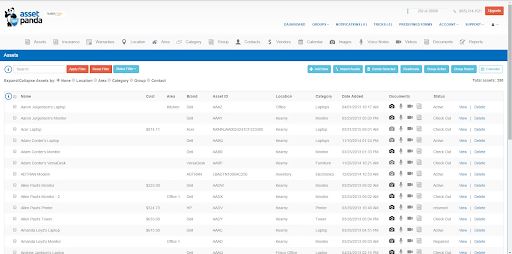
Asset tracking in Asset Panda Software (Source)
Common features of web-based CMMS software
Monitor assets (e.g., equipment, tools, software, hardware, etc.) lifecycle and usage from acquisition to retirement all in the cloud. | |
Plan and perform equipment maintenance within specific time intervals to prevent the likelihood of it failing unexpectedly. | |
Manage work orders and track their status in the cloud environment such as process work requests, resource availability and assignment, warranty tracking, downtime tracking, inventory management, and so on. | |
Manage monetary transactions between parties that involves creating invoices and getting paid. | |
Track the parts, tools, and other materials required to perform routine upkeep in your maintenance program. This helps manage the quantity of resources on hand to maintain proper supply. | |
Mobile access | Access the software remotely from anywhere in mobile devices such as smartphones, tablets, and laptops through an app or browser. |
Scheduling | Plan availability of resources and assign specific maintenance tasks to be completed over a period of time through the web or on the mobile application. |
Service history | Track work performed and maintenance history for past customers along with resources, sites, or assets used to fulfill the tasks on any device. |
Technician management | Track work orders and scheduled services assigned for each technician. The software helps manage their availability and allocate them with specific tasks. Technicians can be assigned work based on their location and receive notifications while out in the field. |
What type of buyer are you?
Before purchasing a web-based CMMS system, you should determine your buyer category so you can choose the right tool. Most buyers fall into the following categories:
Small and mid-size businesses (Up to 500 employees): Small businesses often use spreadsheets to manage their scheduled maintenance of machinery. But as their business grows and becomes complex, maintaining manual spreadsheets with limited functionalities can make it vulnerable to human errors and miss out on important data. Due to limited budgets and resources to set up local servers for maintenance software, such buyers should opt for a web-based CMMS software. With a monthly subscription fee, web-based CMMS solutions are more affordable than on-premise software.
An easy-to-use web-based CMMS platform with features such as asset tracking, preventive maintenance and work order management would be beneficial for such buyers. This will help prevent errors, trigger notifications on scheduled tasks, and compile audit history all in one place to create accurate budgets. A cloud or a web-based CMMS solution does not require any set up costs or dedicated IT staff to maintain or resolve the software issues. All these are taken care of by the vendor.
Large businesses (over 500 employees): Enterprises with large amounts of assets and equipment spread across different locations require routine management at regular intervals to avoid any unexpected downtime. Whether they are working on-site or off-site, it is important to keep your equipment updated for quality service delivery. A web-based CMMS software would be beneficial for the buyers of this segment.
These buyers should opt for a cloud CMMS that can be implemented quickly and offers training support from the vendor. A fully featured web-based CMMS solution with features such as automatic alerts, asset lifecycle management, audit trail, API, compliance management, and technician management can help such buyers reduce unplanned downtime and increase productivity.
Benefits of web-based CMMS software
Cloud CMMS solutions offer the same functionalities as on-premise systems but with a number of additional benefits.
Remote accessibility: A cloud CMMS application can be accessed from any location. All you need is an internet connection. The software can be accessed through a web browser or mobile device such as a laptop, smartphone, or tablet. Remote accessibility of such software lets you manage work orders, submit service requests, and more from any location. This helps you schedule maintenance tasks and improve productivity. Most vendors also provide a mobile app, so you can navigate the mobile friendly interface of the software while on the go.
Timely software updates: Keeping your software updated with new features, and improvements are crucial to improve your business efficiency. With a web-based CMMS solution, updates are included in the subscription fee and your vendor is responsible for these to occur automatically after a certain period of time (i.e. weekly, monthly, or yearly). Timely software upgrades will fix previous bugs, update security features, and provide you with the latest version of the software with no additional cost.
Scalability: Web-based CMMS solutions can be scaled as your business grows in size and becomes more complex. When the software is deployed in the cloud, adding new users, expanding reporting capabilities, and building on new assets and maintenance data while your business environment changes is easy to do. This requires no additional implementation or hardware costs.
Key considerations
Easy-to-use interface: An easy-to-use interface can save the time required to learn the software. You can easily organize maintenance schedules and track asset performance in such tools. Make sure to select a solution that is intuitive for workers to use and is easy for you to assign workers to multiple tasks at once. This can help you make your workers and employees get used to the software faster.
Third party integrations: The software you choose should be able to integrate with other applications that your organization currently uses. These can be inventory management software, asset tracking software, fleet maintenance software, and facility management software. The integration between the chosen web-based CMMS solution and other software applications will allow you to keep all your data in a central location. This avoids any duplicate data entry and helps informed decision making.
Mobile access: It is important for the software you choose to be accessible through a mobile device. Web-based CMMS software can be accessed through a browser on your computer but what if you are on the road and have an important maintenance task to schedule? Or, you need to quickly gain access to updates on the current asset performance? You need to be able to access the solution through your mobile device. Make sure that the cloud CMMS solution provider you choose offers a mobile application or mobile friendly interface of their solution which is compatible with android and iOS devices.
Market trend to understand:
Artificial intelligence (AI) powered CMMS software will enhance predictive maintenance: Artificial intelligence is using the power of analyzing data to revolutionize how different industries such as healthcare, manufacturing, and transportation are maintaining their assets. AI-integrated web-based CMMS software leads to continuous monitoring and self-maintenance. This helps in avoiding unwanted breakdowns in machineries and equipment. Vendors offering AI-powered CMMS solutions help businesses gather real-time data on the performance of their assets and predict the future downtime and breakdowns of their equipment.
Note: The application selected in this article is an example to show a feature in context and is not intended as an endorsement or recommendation. It has been obtained from sources believed to be reliable at the time of publication.
Your Guide to Top CMMS Software, October 2024


CMMS FAQs
- What are two types of CMMS?
The two main types are work order software and preventive maintenance software. Work order tools manage requests and repairs, while preventive systems schedule recurring tasks to reduce downtime.
- What does a computerized maintenance management system do?
A CMMS (Computerized Maintenance Management System) organizes asset data, schedules maintenance, and tracks work orders to improve efficiency and reduce equipment failures.
- What is the main function of a CMMS?
The main function of a CMMS is to centralize and automate maintenance tasks, including asset tracking, scheduling, inventory, and compliance. This helps teams with reliability and productivity.
- What is the best maintenance software?
According to Software Advice, MaintainX holds one of the highest customer ratings among CMMS platforms. Choosing maintenance software depends on your business needs, but it typically includes features such as preventive maintenance, work order tracking, and mobile access.
- Is there free CMMS software?
Yes, several free CMMS systems offer core features, such as work order tracking, asset logs, and maintenance scheduling. These tools are ideal for small teams or businesses starting with digital maintenance management.
- What is the difference between CMMS and EAM software?
The main difference is scope. CMMS software manages maintenance operations, such as work orders and preventive tasks. EAM (Enterprise Asset Management) software covers the full asset lifecycle, including procurement, depreciation, and capital planning.
- What are the benefits of CMMS software?
The benefits of a CMMS include reduced downtime, improved asset reliability, better inventory control, and actionable maintenance analytics for smarter decision-making.
- What is asset management in maintenance software?
Asset maintenance management refers to tracking, scheduling, and optimizing the upkeep of equipment and facilities. Maintenance software ensures assets run efficiently, preventive tasks are completed on time, and costly breakdowns are minimized.
- How much does CMMS software cost?
CMMS software is typically billed monthly, with entry-level plans starting around $21 per month for basic features. Advanced platforms can cost over $649 per month, often including premium support or IT consulting services. Pricing typically scales based on the number of users or seats.
- Which CMMS software integrates with ERP systems?
Many CMMS platforms integrate with ERP systems, facilitating data sharing for work orders, inventory, procurement, and financial reporting. When comparing options, look for software with open APIs or built-in connectors for popular ERP solutions.