
Best Ticketing Software of 2026
Updated February 18, 2026 at 4:58 AM

Written by Sabrina Khoulalène
Content Analyst

Edited by Mehar Luthra
Team Lead, Content
- All Software
- Software Advice FrontRunners
- Popular Comparisons
- Buyer's Guide
- Frequently Asked Questions
Ticketing software helps event organizers manage ticket creation, online sales, attendee tracking, and performance analysis for events of all sizes. With over 200 tools designed to support diverse event types, integration needs, and reporting requirements, selecting the right solution can feel overwhelming. To make it easier, I’ve curated a list of highly-rated productsi and the ticketing software FrontRunners based on verified user reviews. For more details, read my ticketing software buyer’s guide.
Ticketing Software
Sort by
Reviews: Sorts listings by the number of user reviews we have published, greatest to least.
Average Rating: Sorts listings by overall star rating based on user reviews, highest to lowest.
Alphabetically (A-Z): Sorts listings by product name from A to Z.

ROLLER is a cloud-based solution for attractions, entertainment and leisure venues. They help venues manage operations and impro...Read more about ROLLER


ROLLER's Best Rated Features
See All
ROLLER's Worst Rated Features
See All

Purplepass is an enterprise-grade ticketing and admissions platform that helps event professionals sell more tickets, speed entr...Read more about Purplepass

Purplepass's Best Rated Features
See All
Purplepass's Worst Rated Features
See All

ClearEvent is Event Management for Real-World Organizers ClearEvent is a web-based event management platform designed for organ...Read more about ClearEvent


ClearEvent's Best Rated Features
See All
ClearEvent's Worst Rated Features
See All

FareHarbor is a cloud-based tour and activity booking solution that enables tour operators to manage their day-to-day business o...Read more about FareHarbor

FareHarbor's Best Rated Features
See All
FareHarbor's Worst Rated Features
See All

Ticket Tailor is an online platform designed for managing event ticket sales. It allows event organizers to create customizable ...Read more about Ticket Tailor

Ticket Tailor's Best Rated Features
See All
Ticket Tailor's Worst Rated Features
See All
Software Advice FrontRunners 2026

(5745)

(774)

(572)

(302)

(551)

(422)

(623)

(36)

(167)

(271)
Best for Quick Implementation

Eventbrite

According to our user reviews, Eventbrite is the most requested by users for quick implementation out of the most popular tools.
Eventbrite is best for organizations seeking quick implementation for event management and ticketing. Our reviewers say setup is fast and intuitive, with features like automated reminders, calendar integration, and easy attendee tracking making onboarding and event launch efficient.
- Reviewers Perspective
"Eventbrite offers a clean, intuitive interface that makes it easy for users to create, manage, and promote events. Whether you’re hosting a small workshop or a large conference, the platform guides you through the process step by step."
VKVik K
Analyst
Used for 6-12 months
We analyzed 870 verified user reviews for Eventbrite to find out what actual users really think.
Event Management
Event organizers create pages, manage invitations, monitor ticket sales, and access analytics in Eventbrite. The platform supports both small gatherings and large conferences.Ease of Use
Teams launch events and manage details quickly with Eventbrite’s intuitive design. Both beginners and experienced organizers navigate the platform without technical expertise.Event Registration
Administrators set up registration forms, track attendee data, and handle paid or free events. Real-time tracking and calendar integration simplify registration management. - Key FeaturesEventbrite's scoreCategory average
Mobile Access
4.634.56 category average
Sales Reports
4.234.52 category average
Ticket Reservations
4.704.71 category average
- Screenshots


Best for Customization

EventCreate

In our analysis of Ticketing products with the most market demand, EventCreate is the most requested by users for customization out of the most popular tools.
EventCreate is ideal for users prioritizing customization in event creation and website design. Our reviewers say the platform offers a wide variety of templates and flexible design options, allowing them to tailor registration forms and event pages to their specific needs with ease.
- Reviewers Perspective
"It helps track attendees, send reminders automatically, create templates and so much more!"
DHDaysi Hopkins
HR Administrator
Used for 1-2 years
We analyzed 444 verified user reviews for EventCreate to find out what actual users really think.
Ease of Use
Event planners manage registrations, design pages, and track responses with EventCreate’s intuitive dashboard. Minimal training is needed, making setup accessible for all skill levels.Page Customization
Teams use drag-and-drop tools to customize layouts, themes, and questions. EventCreate allows editing content and adjusting branding for unique event websites.Website Creation
Organizers build event websites with step-by-step guidance and an intuitive editor. Custom layouts and easy sharing help distribute information and collect RSVPs efficiently. - Key FeaturesEventCreate's scoreCategory average
Mobile Access
4.754.56 category average
Ticket Reservations
4.744.71 category average
- Screenshots


Highly Rated for Automation

Tripleseat

Of the products listed on our FrontRunners report, Tripleseat is the highest rated for automation out of the most popular tools.
Tripleseat is highly rated for businesses seeking robust automation in event management. Our reviewers point out that automated workflows, customizable templates, and streamlined communication tools save significant time and improve operational efficiency.
- Reviewers Perspective
"Tripleseats ability to organize my events, calendar, contracts and payments literally shaves hours off of my work day."
RRRyan Rosenberry
Director of Events
Used for 2+ years
We analyzed 377 verified user reviews for Tripleseat to find out what actual users really think.
Event Management
Venues use Tripleseat to organize calendars, event details, and contracts in one platform. Customizable features help tailor workflows and save time across hospitality and events operations.Team Collaboration
Staff collaborate on event details, share documents, and track changes in Tripleseat. This prevents miscommunication and supports seamless coordination for flawless event execution.Reporting
Managers generate reports to track sales and analyze event trends. Reporting tools support data compilation, forecasting, and presentation to leadership, aiding operational decisions. - Key FeaturesTripleseat's scoreCategory average
Mobile Access
3.834.56 category average
Sales Reports
4.674.52 category average
- Screenshots


Best for Usability
Purplepass

Of the products listed on our FrontRunners report, Purplepass is the highest rated for its usability out of the most popular tools.
Purplepass is best for those who value usability in ticketing and event management. Our reviewers say the interface is intuitive, making it easy to set up events, customize ticket options, and manage seating, with helpful support resources and smooth onboarding.
- Reviewers Perspective
"Setting up events is intuitive and quick, and the platform offers great flexibility in customizing ticket types, pricing tiers, and event details to suit our unique needs."
SJShehnaaz Jagasia
Founder Creative Director
Used for 2+ years
We analyzed 240 verified user reviews for Purplepass to find out what actual users really think.
Ticketing and Events
Organizers tailor ticket types, pricing, and event details with Purplepass. The platform supports both simple and complex events, streamlining box office operations and online sales.Customer Support
Staff access responsive support via multiple channels. Dedicated representatives assist with setup, answer questions, and provide ongoing help during live events.Ease of Use
Teams set up events, upload graphics, and manage ticket sales quickly. Purplepass minimizes the learning curve, allowing focus on event execution rather than troubleshooting. - Key FeaturesPurplepass's scoreCategory average
Mobile Access
5.04.56 category average
Sales Reports
4.504.52 category average
Ticket Reservations
4.854.71 category average
- Screenshots


Most Rated for SMBs

In our analysis of Ticketing products with the most market demand, Ticket Tailor is the most requested by small businesses out of the most popular tools.
Ticket Tailor is most rated by SMBs looking for flexible, affordable ticketing solutions. Our reviewers say the platform’s straightforward pricing, ease of use, and customizable event pages make it simple to manage events and control costs without complex setup.
- Reviewers Perspective
"Ticket tailor is a simple, friendly box office tool which works well for small-scale events and has a more personal and accessible feel than the likes of Eventbrite."
ACAndrew Chamberlain
Founder
Used for 2+ years
We analyzed 361 verified user reviews for Ticket Tailor to find out what actual users really think.
Event Ticketing
Event organizers use Ticket Tailor to set up, edit, and duplicate events rapidly. This streamlines ticket sales and guest list management for small and midsize events.Customer Support
Administrators benefit from Ticket Tailor’s responsive live chat and well-written help articles. Support assists with onboarding and ongoing use, even for those with limited technical experience.Ease of Use
Teams navigate Ticket Tailor’s dashboard and manage events confidently. The clear interface reduces administrative effort, allowing focus on event execution rather than troubleshooting. - Key FeaturesTicket Tailor's scoreCategory average
Mobile Access
4.424.56 category average
Ticket Reservations
4.884.71 category average
- Screenshots


Most Used By Events Services

RSVPify

RSVPify is the most requested by users in events services out of the most popular tools.
RSVPify is most used by event services professionals who need efficient RSVP and guest management. Our reviewers say it streamlines invitation sending, guest tracking, and check-in, with customizable forms and a user-friendly interface that simplifies event workflows.
- Reviewers Perspective
"This is a super helpful tool for those planning a casual event to those planning a more in-depth function."
DCDalton Clouse
Senior Manager of Marketing and Communications
Used for 6-12 months
We analyzed 325 verified user reviews for RSVPify to find out what actual users really think.
Event Management
You can centralize invitations, guest lists, and event information in RSVPify. This helps event planners in both simple and complex contexts keep all details accessible and organized.RSVP Management
Teams use RSVPify to send invitations, track responses, and customize RSVP forms. This reduces manual effort and streamlines attendee management for weddings, corporate events, and more.Customer Support
Event organizers rely on RSVPify’s support staff for clear guidance and troubleshooting. Support is accessible across channels, assisting with technical issues and recommendations throughout event planning. - Key FeaturesRSVPify's scoreCategory average
Mobile Access
4.884.56 category average
Ticket Reservations
4.754.71 category average
- Screenshots


Most Rated for Enterprise

vFairs

vFairs is the most requested by enterprises out of the most popular tools, based on our analysis of Ticketing products with the most market demand.
vFairs is most rated for enterprise organizations hosting large-scale virtual or hybrid events. Our reviewers highlight the platform’s comprehensive support, customizable features, and collaborative project management, which enable smooth event delivery and attendee engagement.
- Reviewers Perspective
"What truly sets vFairs apart is that it’s a comprehensive, all-in-one platform that allows you to manage your entire event from start to finish—seamlessly and efficiently."
NBNathan Barnett
Business Application Analyst
Used for 6-12 months
We analyzed 406 verified user reviews for vFairs to find out what actual users really think.
Customer Support
Event managers work with vFairs’ support staff for setup, customization, and troubleshooting. The team guides organizations through planning and execution, addressing needs promptly.Event Management
Organizations manage registration, communication, branding, and attendee engagement within vFairs. Project managers help ensure timelines and requirements are met for virtual, hybrid, and in-person events.Customization
Teams modify virtual environments, templates, and communication tools to match brand and event requirements. vFairs supports unique requests and implements changes quickly for tailored experiences. - Key FeaturesvFairs's scoreCategory average
Mobile Access
4.684.56 category average
Ticket Reservations
5.04.71 category average
- Screenshots


Most Used By Information Technology and Services

Tito

Tito is the most requested by users in information technology and services out of the most popular tools.
Tito is most used by information technology and services teams managing complex or multi-format events. Our reviewers say it offers flexible ticketing, seamless website integration, and detailed customization options, making event setup and attendee management efficient.
- Reviewers Perspective
"We run several different event types and Tito provides enough flex that the platform works for all of these, from big conferences with add-on workshops to small free meet-ups."
LALouise Ash
Head of Events
Used for 2+ years
We analyzed 34 verified user reviews for Tito to find out what actual users really think.
- Screenshots

Best for Customer Satisfaction

Beyonk

According to our user reviews, Beyonk is the highest rated for customer satisfaction out of the most popular tools.
Beyonk is best for customer satisfaction among SMBs needing streamlined booking and ticketing. Our reviewers point out the platform’s ease of use, responsive support, and customizable booking options, which help save time and improve the customer experience.
- Reviewers Perspective
"Beyonk has proven to be a dependable system that enhances my workflow, making it a valuable asset to our operations and ticket sales."
KGKieran Galwey
Digital Marketing and Graphic Design
Used for 6-12 months
We analyzed 152 verified user reviews for Beyonk to find out what actual users really think.
Booking
Businesses customize booking forms and view schedules in advance with Beyonk. The platform streamlines operations for both customer-facing and administrative sides.Ticketing
Teams create events, manage ticket types, and process payments. Beyonk integrates with websites and supports quick ticket amendments for seamless event management.Features
Organizations benefit from ongoing feature enhancements and adaptability. Beyonk allows tailoring products and options to business requirements, with proactive communication about updates. - Key FeaturesBeyonk's scoreCategory average
Mobile Access
4.844.56 category average
Sales Reports
4.784.52 category average
Ticket Reservations
4.824.71 category average
- Screenshots


Most Used By Entertainment

ThunderTix

Of the products listed on our FrontRunners report, ThunderTix is the most requested by users in entertainment out of the most popular tools.
ThunderTix is most used by entertainment organizations seeking reliable ticketing and event management. Our reviewers say it is easy to set up, supports efficient ticket sales and reporting, and offers responsive customer support, making it well-suited for busy venues.
- Reviewers Perspective
"Our organization has been selling tickets for nearly 18 years and during the first 17 we used software that was extremely affordable but didn't do everything we needed. When we moved to ThunderTix we undertook a greater expense it's true, but we also saw an accompanying increase in sales that we know has been largely fueled by our use of ThunderTix."
JBJaceSon Barrus
Artistic Director
Used for 1-2 years
We analyzed 233 verified user reviews for ThunderTix to find out what actual users really think.
Ticketing and Events
Organizations manage ticket sales, assigned seating, and multi-level ticket options with ThunderTix. This supports both small and large event operations, streamlining sales and reducing technical issues.Customer Support
Staff can reach ThunderTix’s support team quickly for clear, timely assistance. This is useful for resolving technical issues and incorporating user feedback into platform improvements.Ease of Use
Event teams set up and operate ThunderTix with minimal training. The straightforward interface allows quick event management and guest check-in, making onboarding easier for new staff. - Key FeaturesThunderTix's scoreCategory average
Mobile Access
4.934.56 category average
Sales Reports
4.734.52 category average
Ticket Reservations
4.914.71 category average
- Screenshots


Showpass

- Reviewers Perspective
"In addition, Showpass has payment processing tools that makes it an exceptional tool since most ticketing tools lack such features."
DHDavid Hannah
Co-Founder
Used for 2+ years
We analyzed 294 verified user reviews for Showpass to find out what actual users really think.
Ticketing and Event Management
Event managers oversee ticket sales, scanning, and reporting in a single system. Customization options and mobile access support streamlined event setup and attendee tracking.Ease of Use
Staff and attendees navigate Showpass easily, regardless of technical background. The interface supports quick setup and efficient task completion, reducing onboarding time.Customer Support
Organizers receive prompt help from Showpass’s support team, who resolve issues and answer questions throughout event planning and ticketing. Most users find support easy to access when needed. - Key FeaturesShowpass's scoreCategory average
Mobile Access
4.574.56 category average
Sales Reports
4.424.52 category average
Ticket Reservations
4.634.71 category average
- Screenshots


TicketSource

- Reviewers Perspective
"TicketSource is also brilliant in the way that it can be as simple as you want, or you can go really in-depth and configure your event to exactly how you want it."
ESEthan Sturtridge
Ticketing Administrator
Used for 6-12 months
We analyzed 345 verified user reviews for TicketSource to find out what actual users really think.
Ticket Event Management
Users organize events with TicketSource’s adaptable tools, customizing ticket types, adding items, and managing guest lists. This supports straightforward event setup and digital sales tracking for both small and large gatherings.Customer Support
Teams rely on TicketSource’s support for quick query resolution, using online guides and video tutorials. Regular updates and proactive feedback handling help maintain reliability for organizers and attendees.Ease of Use
Staff and customers navigate TicketSource easily, benefiting from clear instructions and video tutorials. The interface allows quick event setup, pricing adjustments, and attendee management, even for those new to ticketing platforms. - Key FeaturesTicketSource's scoreCategory average
Mobile Access
4.764.56 category average
Sales Reports
4.774.52 category average
Ticket Reservations
4.694.71 category average
- Screenshots


Tix

- Reviewers Perspective
"The ability to pay for reservations online has been a huge help, and we hope for more digital enhancements (namely, the ability for customers to exchange their tickets online) in the future"
KSKatrina Stroup
President
Used for 2+ years
We analyzed 168 verified user reviews for Tix to find out what actual users really think.
Ticket Sales
Organizations manage online and box office sales, accommodating various ticket types and price points. Tix’s tools support customizations, reporting, and donation options for different event sizes.Customer Support
Teams receive fast, thorough support from Tix, with staff available through multiple channels. The support team assists with technical issues, training, and system adaptation.Ease of Use
Event managers and staff navigate Tix’s intuitive interface and clear instructions, reducing complexity in event setup, sales management, and troubleshooting. - Key FeaturesTix's scoreCategory average
Mobile Access
4.074.56 category average
Ticket Reservations
4.894.71 category average
- Screenshots


TicketSpice

- Reviewers Perspective
"There are a ton of customizable features that help make your event ticketing process a success."
ESErin Simcox
Director of Event Services and Housing
Used for 1-2 years
We analyzed 100 verified user reviews for TicketSpice to find out what actual users really think.
Ticketing and Events
Event teams tailor ticketing pages, set up ticket tiers, and manage group or multi-use tickets. The platform supports both simple and complex event scenarios, streamlining ticket creation and attendee check-in.Customer Support
Organizers resolve issues quickly with TicketSpice’s chat, phone, and documentation support. The team provides step-by-step guidance, reducing stress during event setup and execution.Customization Options
Teams design ticketing pages to match branding and event needs, adjusting templates, adding custom fields, and controlling visual elements. Conditional formatting and intuitive tools support events of varying complexity. - Key FeaturesTicketSpice's scoreCategory average
Mobile Access
4.644.56 category average
Sales Reports
4.504.52 category average
Ticket Reservations
4.614.71 category average
- Screenshots


PromoTix

- Reviewers Perspective
"It simplifies ticketing, promotion, and attendee engagement, making it an indispensable tool for event organizers."
DDDrew Dursun
Sales Manager
Used for 1-2 years
We analyzed 85 verified user reviews for PromoTix to find out what actual users really think.
Event Ticketing
Organizers manage ticket sales, registration pages, and attendee lists in PromoTix. The platform supports digital ticket options, marketing tools, and mobile check-ins for efficient event execution.Ease of Use
Teams set up and manage events with a straightforward interface, whether using the website or mobile app. PromoTix reduces complexity for both new and experienced users.Customer Support
Users resolve questions and issues promptly with PromoTix’s support team, who are available through online help and direct communication. The team adapts features and offers guidance during event setup. - Key FeaturesPromoTix's scoreCategory average
Mobile Access
4.904.56 category average
Sales Reports
3.04.52 category average
Ticket Reservations
4.734.71 category average
- Screenshots


KonfHub

- Reviewers Perspective
"What I appreciate most about KonfHub is how it offers a comprehensive solution for managing ticketing and events, whether they’re online, hybrid, or in-person."
OPOm Patel
Executive Member
Used for 1-2 years
We analyzed 160 verified user reviews for KonfHub to find out what actual users really think.
Event Management
Organizers navigate all event sections—agenda, speakers, and more—using KonfHub’s structured interface. The platform supports both corporate and casual events, enhancing engagement and management.Customer Support
Teams resolve queries quickly with KonfHub’s responsive support, receiving direct assistance without AI intermediaries. The team adapts features to urgent requirements and remains available throughout planning.Ticketing
Event staff set up and customize ticket types, monitor sales in real time, and manage refunds. Features like referral contests and barcode generation streamline ticketing for online, hybrid, and in-person events. - Key FeaturesKonfHub's scoreCategory average
Mobile Access
4.534.56 category average
Sales Reports
5.04.52 category average
Ticket Reservations
4.874.71 category average
- Screenshots


Eventcombo

- Reviewers Perspective
"As an event planner, I find Eventcombo easy to navigate and has everything I need in event management."
AJAmira Jemly Maranan
Copywriter
Used for Less than 6 months
We analyzed 57 verified user reviews for Eventcombo to find out what actual users really think.
Event Management
Eventcombo centralizes ticketing, registration, and attendee engagement, allowing event planners to track registrations, send communications, and use live polls or Q&A for both in-person and virtual events.Customer Support
Organizers access round-the-clock support for questions and troubleshooting. The team’s dedication and patience help users learn new features and resolve issues efficiently.Customization Options
Teams tailor event pages, emails, ticket types, and attendee experiences to fit branding and functional requirements. Eventcombo’s templates and unique features support diverse organizational needs. - Key FeaturesEventcombo's scoreCategory average
Mobile Access
5.04.56 category average
Ticket Reservations
5.04.71 category average
- Screenshots

Fienta

- Reviewers Perspective
"Really happy with how it acts as a one-site setup for selling tickets and transferring money to the bank account at a competitive price."
RBRuth Bridcut
Chair of voluntary organising committee
Used for 2+ years
We analyzed 142 verified user reviews for Fienta to find out what actual users really think.
Ticketing and Events
Event teams customize ticket types, set up events, and track sales with Fienta’s intuitive tools. Features like self-service options and CRM tools support efficient event management and ticket validation.Customer Support
Organizers access responsive support, clear guides, and proactive assistance during setup. The support team addresses requests quickly, ensuring a reliable experience for both organizers and attendees.Ease of Use
Staff and ticket buyers navigate Fienta’s logical layout and clear instructions with ease. The platform streamlines event setup and ticket management, making it suitable for beginners and experienced users alike. - Key FeaturesFienta's scoreCategory average
Mobile Access
4.554.56 category average
Sales Reports
4.604.52 category average
Ticket Reservations
4.774.71 category average
- Screenshots

Accelevents

- Reviewers Perspective
"One of our events serves Higher Ed Technology Professionals and seamless web experience is important for reinforcing trust and ensuring attendees are confident that they're purchasing tickets for a real event and not a scam."
SBStephanie Burns
Director, Marketing and Communications
Used for 6-12 months
We analyzed 144 verified user reviews for Accelevents to find out what actual users really think.
Event Management
Organizers plan and execute virtual, hybrid, and live events using Accelevents’ wide range of customization options. Real-time analytics and sponsor/exhibitor management support polished, professional events.Customer Support
Event teams receive timely help and guidance from Accelevents’ support staff. The team’s proactive communication and quick issue resolution make it easier to navigate challenges throughout the event lifecycle.Online Auctions
Fundraising teams facilitate online auctions with customizable pages, real-time bid notifications, and flexible payment processing. These features help maximize fundraising and reach remote bidders efficiently. - Key FeaturesAccelevents's scoreCategory average
Mobile Access
4.834.56 category average
Ticket Reservations
4.504.71 category average
- Screenshots


Eventzilla

- Reviewers Perspective
"There are so many tools and customizations that are integrated into the platform that allow you to get as detailed as you'd like with your event."
TBTiffany Brewster
Community Engagement Director
Used for 6-12 months
We analyzed 298 verified user reviews for Eventzilla to find out what actual users really think.
Event Management
Event organizers tailor event pages, ticket sales, and attendee lists with Eventzilla’s robust customization and tracking tools. This supports professionalism and control for both in-person and virtual events.Ease of Use
Teams set up events and manage registrations without extensive training, thanks to Eventzilla’s logical layout and clear instructions. This reduces complexity and allows focus on attendee engagement.Event Registration
Organizers manage multiple events, set registration limits, and collect participant data through customizable forms and real-time tracking. Embedding registration links and professional event pages simplifies sign-ups. - Key FeaturesEventzilla's scoreCategory average
Mobile Access
4.334.56 category average
Ticket Reservations
4.804.71 category average
- Screenshots


Weeztix

- Reviewers Perspective
"It was very quick and completely clear what was expected of you."
BVBenthe van Loon
Creative designer
Used for Less than 6 months
We analyzed 450 verified user reviews for Weeztix to find out what actual users really think.
Ease of Use
Users complete booking, payment, and navigation tasks quickly with Weeztix’s clean interface. The platform requires minimal setup effort and is accessible for all age groups and experience levels.Ticket Purchase
Organizers and attendees handle group sales, multiple ticket types, and instant ticket access. Weeztix also supports event creation, attendee tracking, and ticket scanning for comprehensive event management.Payment Options
Teams process payments via iDeal, PayPal, credit card, and bank apps. Payments are quick and secure, though some users mention extra fees and a desire for more payment options. - Key FeaturesWeeztix's scoreCategory average
Mobile Access
4.404.56 category average
Sales Reports
4.754.52 category average
Ticket Reservations
4.794.71 category average
- Screenshots

Oveit

- Reviewers Perspective
"I have used it both for advanced online ticketing and box office and the real-time inventory update has eliminated any chance of overbooking or selling twice to the same client, especially during busy events."
JLJean Louis Natta
External Consultant
Used for 1-2 years
We analyzed 63 verified user reviews for Oveit to find out what actual users really think.
Event Management
Event planners streamline setup, track progress, and manage guests for recruitment fairs, workshops, and conferences. Features like dynamic guest management and NFT tickets support both small and large events.Ticket Sales
Teams manage ticket options and embed sales on websites, using real-time inventory updates to prevent overbooking. Digital ticketing and smooth payments support events of all sizes.Cashless Payments
Organizers process electronic payments, issue invoices, and analyze payments. The system supports refunds and order management, though some users note reliance on a single payment processor. - Key FeaturesOveit's scoreCategory average
Sales Reports
4.04.52 category average
Ticket Reservations
4.574.71 category average
- Screenshots


- Reviewers Perspective
"The platform allows for deep customizations, something we’ve taken full advantage of to align ticketing processes with our branding and specific operational needs. Whether we're setting up reserved seating for concerts or general admission for comedy shows, ShoWare provides the flexibility we need."
EKEdward Krempel
Director
Used for 2+ years
We analyzed 67 verified user reviews for accesso ShoWare to find out what actual users really think.
Ticketing
Venues manage event pages, seating charts, pricing, and promotions with accesso ShoWare’s customizable platform. The system handles reserved seating, general admission, and bundled packages with reliable uptime.Patron Management
Patrons select seats, make donations, and navigate schedules with mobile optimization and print-at-home options. These features support membership growth and improve audience satisfaction.Ease of Use
Staff complete tasks efficiently with accesso ShoWare’s user-friendly navigation. The system supports quick onboarding, even under time constraints or in seasonal environments. - Key Featuresaccesso ShoWare's scoreCategory average
Mobile Access
3.914.56 category average
Sales Reports
4.444.52 category average
Ticket Reservations
4.294.71 category average
- Screenshots


Methodology
The research for the best ticketing software list was conducted in October 2025. We evaluated data (user reviews and demand signals) from the past 24 months as of the research date. Read the complete methodology.
Popular Ticketing Comparisons


Buyer's Guide
This detailed guide will help you find and buy the right ticketing software for you and your business.
Last Updated on June 27, 2025Here's what we'll cover:
What you need to know about ticketing software
Ticketing software is designed to optimize the creation and sale of tickets for various events. Key features include point of sale (POS) capabilities, ticket reservations, and comprehensive reporting analytics. By leveraging these tools, event organizers can effectively promote their events, sell tickets, and maintain a thorough understanding of sales performance.
Who uses it? It’s primarily used by industries that manage events, customer support, or service requests, such as entertainment, non-profit organization management, and education management.
To give you an idea of the market, our website showcases a selection of over 200 ticketing software vendors. In the past year alone, we’ve published over 2,400 reviews on various ticketing products, creating a rich repository of information for to help buyers. [1]
For businesses looking to enhance their event promotion and reach the right audience for ticket sales, the decision lies not in whether to adopt a ticketing tool, but in determining which system aligns best with their specific requirements.
As you navigate the ticketing product landscape, it's important to be aware that most options are typically structured on a ‘per user, per month’ pricing model. Entry-level plans generally range from $1.05 to $248 or more. Higher-priced enterprise-level event ticketing platforms often come equipped with additional features such as advanced analytics, service management, event marketing capabilities, custom branding options, dedicated account support, and priority customer service. [2]
Selection prep: Have a clear understanding of user requirements, anticipated ticket sales, and necessary integrations. Engaging with key stakeholders to develop a list of critical questions, such as:
Does the software offer workflow automations to streamline our processes?
Are the ticket templates easily customizable to suit our needs?
Can the platform effectively manage the required data migrations?
Does the system integrate smoothly with the tools we currently use?
Given the multitude of vendors available, selecting the ideal ticketing solution can feel overwhelming. This guide lists the features, advantages, and step-by-step assistance to find the perfect fit for your organization.
What is ticketing software?
Ticketing software streamlines the ticketing process for event organizers, from creation to completion. It enables efficient ticket sales and offers features for tracking sales and analyzing data. Organizers can design various ticket types, like general admissions and VIP, with tailored pricing strategies. The software also collects attendee information for targeted marketing and attendance monitoring. Equipped with reporting and analytics, it provides insights into demographics and event success, aiding future planning and optimization.
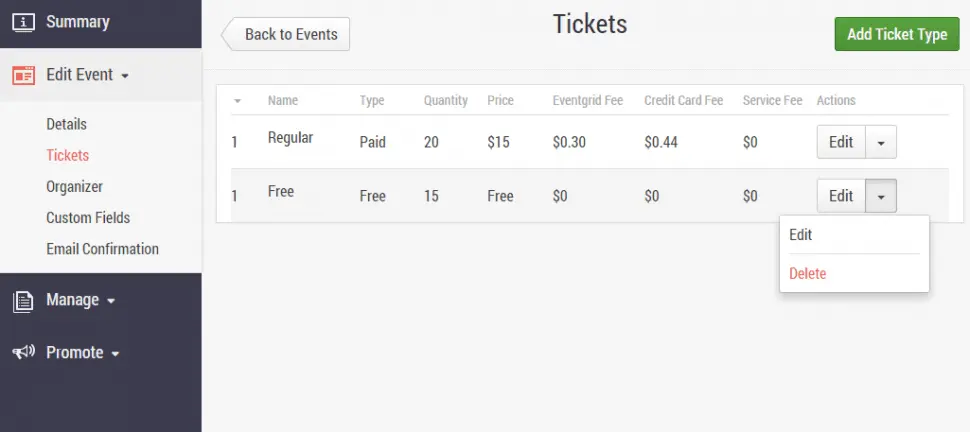
Ticket set up on Eventbrite Source
Essential features of ticketing software
When evaluating ticketing software, it's important to understand the core features typically offered with each platform, such as ticket reservations, point of sale (POS) and reporting/analytics. Common features that may or may not be included with every product are registration management, barcode/ticket scanning, website management, and customer data management, among others. By analyzing thousands of user reviews, we've identified essential features of effective ticketing software. [2] Familiarizing yourself with these will help you make an informed decision that aligns with your needs.
Core ticketing features
Ticket reservations | Create and manage ticket reservations for various events. 90% of reviewers rate this feature as critical or highly important. |
Reporting/analytics | View and track pertinent metrics to find patterns and gain insights from data. 77% rate this feature as critical or highly important. |
Point of sale (POS) | Accept and process payments for products or services using hardware and software. |
Common ticketing features
Registrations management | Oversee and coordinate the registration of attendees, visitors, customers, events, activities, etc. 82% of reviewers rate this feature as critical or highly important. |
Barcode/ticket scanning | Scan barcodes to ensure accurate pricing and label tracking. 75% rate this feature as critical or highly important. |
Website management | Use the built-in website builder or integrate with third-party sites. 70% rate this feature as critical or highly important. |
Customer data management | Searchable repository of information about clients. 66% rate this feature as critical or highly important. |
Benefits and competitive advantages of using ticketing software
Our analysis of over 2,400 user reviews from the past year shows that team support, user feedback and improvements, staff management, ticket scanning, booking management, and event reminders are the top-rated benefits of ticketing software. Here’s a fuller picture:
Boosts team coordination and collaboration: Offers centralized platforms for communication and task tracking, enabling better coordination among event teams.
Helps incorporate user feedback for improvements: Such tools often come with feedback collection features to gather insights and implement necessary improvements.
Improved staff management: Provides features for scheduling, role assignment, and real-time updates to ensure efficient staff deployment and management.
Streamlined ticket scanning: Includes barcode and QR code scanning capabilities that facilitate fast and accurate ticket verification at event entry points.
Optimized booking management: Automates the reservation process, managing seat selection and availability to optimize booking efficiency.
Timely event reminders: Helps automate the scheduling and delivery of reminders via email or SMS, ensuring attendees are informed and engaged leading up to the event.
How to choose the best ticketing software
Step 1: Define your requirements
Take into account the ticketing methodologies currently in use, the number of events you plan to launch simultaneously, and the desired quantity of tickets for each event. These requirements will act as a roadmap leading you to a system that not only aligns with your existing ticketing processes but also supports your long-term objectives.
Your requirements should encompass not just the essential functionalities of the software, but also critical factors such as your budget, the level of training assistance available, data migration needs, and necessary integrations.
A frequently overlooked aspect of implementation costs is the migration of data from your existing systems, such as your customer relationship management (CRM) platform. Typically, vendors can assist with data migration and integrations, but often charge an additional fee, so make sure you discuss this well in advance.
What is the cost of ticketing software?
Our analysis indicates that entry-level plans generally range from $1.05 to $248 or more.
However, determining the price of ticketing software can be a complex endeavor, as costs can vary significantly based on individual buyer needs. Factors such as the number of events, the volume of tickets, and required features all influence pricing.
Based on our list of the best ticketing software for 2025, entry-level platforms like SimpleTix and TicketSpice charge low per-ticket fees, typically ranging from $0.25 to $0.99 plus a small percentage of the ticket price. PromoTix and Brushfire follow a similar model, with fees around 1% and 3% plus a fixed amount per ticket.
Eventbrite offers free use for free events and charges attendees for paid events, with optional monthly plans for added features. Oveit, on the other hand, uses a subscription model with plans starting at $199 per month and going up to $2,000 per month for enterprise-level features. Most platforms support free events at no cost and offer custom pricing for large-scale or complex needs.
Integration considerations for ticketing software
Ticketing tools frequently integrate with email marketing, payment processing, and CRM platforms. These integrations provide substantial advantages for businesses by streamlining workflows, enhancing data consistency, and improving overall customer engagement.
By linking ticketing with email marketing software, organizers can automate personalized communication, ensuring timely updates and targeted promotions reach attendees, ultimately boosting engagement and ticket sales. Integration with payment processing software streamlines transactions, offering a secure and efficient payment experience that reduces friction and enhances customer satisfaction. Additionally, connecting ticketing software with CRM systems facilitates the consolidation of attendee data, enabling event organizers to gain valuable insights into customer behavior and preferences.
Be aware of potential drawbacks
While ticketing software offers numerous benefits, there can be potential drawbacks for event organizers, including:
High cost: Implementing ticketing software often involves upfront costs, subscription fees, or transaction charges that can add up, especially for smaller events.
Complexity: Some ticketing platforms are feature-rich but may require significant time and effort to master, which can be daunting for teams without technical expertise.
Technical issues: Dependence on technology means that any software glitches, bugs, or server outages can disrupt ticket sales and negatively impact the attendee experience. Event organizers must be prepared with contingency plans to address such issues promptly.
Customization limitations: Many ticketing solutions offer standard features that might not fully align with the specific needs or branding of an event, leading to potential compromises. Customizing these platforms to fit unique requirements can be costly or technically challenging.
Data security concerns: Handling sensitive information such as personal and payment details requires robust security protocols to prevent unauthorized access and data breaches. Event organizers should ensure compliance with data protection regulations, which can be resource-intensive.
Dependency on internet connectivity: Cloud-based ticketing systems require reliable internet access, which can be problematic in venues with poor connectivity or during network outages.
Integration challenges: Integrating ticketing software with existing systems like CRM or email marketing tools can be complex and may require additional technical expertise or support. Incompatible systems can lead to data silos and inefficiencies, complicating event management processes.
By being aware of these drawbacks, event organizers can take steps to mitigate them and maximize the effectiveness of their ticketing efforts.
Step 2: Make a shortlist of software
With a plethora of ticketing software options available, selecting the perfect solution for your business can be daunting. However, with the right resources and expert support, the process can be significantly simplified.
Explore our list of ticketing FrontRunners
You can begin crafting your shortlist of ticketing software by exploring our FrontRunners report for ticketing software. This report features only those products that have received top user ratings, ensuring you have access to the best solutions available. For a deeper understanding of the criteria and methodology used to compile this report, be sure to check out our detailed explanation.
Step 3: Pick your best option
After meticulously narrowing down your choices, the next step is to participate in vendor demos. These sessions offer a valuable opportunity to dive deeper into the features of each product, allowing you to ask essential questions that will aid in making a well-informed investment decision.
How to prepare for vendor demos
Once you’ve created a shortlist of potential ticketing systems, it’s time to schedule demo sessions with each vendor to gain a clearer understanding of their offerings. This is your time to inquire about various aspects of their products, including features, pricing, technical support, training, and any other factors that are critical for selecting the right ticketing system tailored to your needs.
Here are some key questions to consider asking vendors during the demos:
How customizable is your software to fit our specific ticketing needs?
Asking about the customizability of the ticketing software during a vendor demo is essential. This aspect determines how well the tool can adapt to your organization’s unique requirements and objectives. Moreover, it influences how seamlessly the software can integrate with existing systems and workflows, ensuring a smooth user experience for both event organizers and attendees.
What integrations does your software support?
Gaining insight into the available integrations helps ensure that the ticketing software can effectively connect with your existing tools. This question allows you to evaluate whether the software will boost productivity by eliminating manual data entry and centralizing information across various systems. Additionally, clarify whether the integrations you require are readily available out-of-the-box or if they necessitate custom solutions. Also, inquire about the vendor's role in performing and maintaining these integrations.
How is ongoing support and training provided?
Effective onboarding and continuous support are key to ensuring smooth adoption and troubleshooting. Team adoption can pose a common challenge when implementing a new ticketing tool, and comprehensive training is one of the most effective strategies for supporting a successful implementation. Be sure to ask about the types of training offered, such as live sessions or self-paced tutorials, as well as the availability of customer support. Understanding the resources and assistance available will instill confidence in your team’s ability to fully leverage the software over the long term.
For more help and additional questions to ask during the demos, check out How To Cut Through the Sales Pitch During Software Demos. This guide is intended to help you prepare for the personalized, real-time software demonstration the vendor is going to show you–not the very initial discussions or video walkthroughs found online.
Step 4: Make the most of your ticketing software
Once you’ve made your selection and finalized your ticketing software purchase, the next critical step is to plan the implementation process. Here are some key considerations:
Data migration: This process includes transferring historical data from your existing ticketing tool to the new system. Effective migration minimizes operational disruptions and errors, ultimately saving time and resources. It’s important to ensure that the new system is compatible with existing data formats for a seamless transition. Maintaining open communication with both your previous and new ticketing providers will help ensure that no critical information is lost during this process.
Training: Once your new system is operational, equip your staff with the necessary skills to utilize it effectively. Whenever possible, leverage the expertise of your new ticketing provider to conduct comprehensive training sessions and provide relevant training materials. Keep in mind that this training process will require a significant time investment; therefore, be prepared to hold multiple sessions and refresher courses until every team member feels competent and confident in using the new software.
Pilot ticket sale: Initiate a pilot ticket sale when adopting new ticketing software, as this approach allows you to test the software in a controlled environment, helping to identify any potential issues or areas for improvement before a full-scale rollout. This will also provide valuable insights into the software's functionality, user interface, and integration capabilities, all while ensuring that staff are adequately trained and comfortable with the system. Additionally, feedback from the pilot can inform the necessary adjustments to optimize the ticketing process.
For more details on how to ensure a smooth transition, check out our guide, 5 Critical Steps to a Successful Software Implementation Plan.
Software related to ticketing
When selecting ticketing software, it's essential to recognize that you may need additional software systems to enhance the quality of your events. Here are a few types of software that are frequently associated with ticketing systems, yet may or may not be included in your chosen platform:
Android kiosk software: Enables Android devices to be used as public access terminals for browsing, feedback submission, online ordering, and more.
Event management software: Automates marketing, registration, coordination, and scheduling of events. Planners use event management applications to manage the planning and process of meetings and events, including marketing, attendee registration, badge creation, calendar generation and venue space management. They also offer a variety of self-service functions for event attendees such as online registration, content delivery, and fee payment.
Registration software: Streamlines the process of registering for conferences, meetings, classes, and events. It offers a customizable solution for attendance tracking and event or meeting registration tasks. In addition, it helps with processing payments either in advance or onsite, as well as donation collection and volunteer coordination. Registration solutions also offer a variety of self-service functions like online registration, content delivery, and fee payment.
Venue management software: Helps event planners market and schedule their facilities, ensuring that appropriate services and resources are provided for each event and that the facility's capacity is optimally utilized.
iPad kiosk software: Enables users to lock iPads into Kiosk mode. This is used to restrict access to certain applications so that a single application can run in the foreground.
Additional resource for your ticketing journey
About our contributors
Author
Sabrina Khoulalène is a content analyst with over a decade of experience in marketing and sales. Her mission? To empower small and medium-sized businesses (SMBs) by keeping them informed about the latest technology trends and guiding them in finding the right software, tailored to their unique needs. Indeed, her valuable insights and practical tips significantly impact the journey of thousands of business owners who come to Capterra to make informed business decisions. By offering relevant guidance, she aims to enable SMBs to navigate their challenges effectively and achieve their goals.
Editor
Mehar Luthra is a team lead at Software Advice and specializes in editing reports that cover the latest trends affecting small businesses. With nearly a decade of experience, she has edited a multitude of research articles, top-rated software reports, and thought leadership articles for diverse markets such as Brazil, Japan, Canada, France, Australia, and India. She finds it particularly rewarding to produce content that provides small-business owners with practical tips and helpful advice on topics such as the digitalisation of small businesses, eCommerce trends, and HR developments.
Armed with a double bachelor’s in law (LL.B.) and business economics from Delhi University, she won a full scholarship to study for a master’s in creative writing at the National University of Ireland, Galway. In addition, she has written blog articles spanning a variety of topics such as fiction and non-fiction books, mental health and anxiety, the latest restaurants, and more. Her articles have been featured in Ireland’s national magazine The Village, among other publications. A die-hard journaling fan, she enjoys watching psychological thrillers, reading fiction books, and drinking iced coffee (even in the winter).
Sources
Software Advice reviews data: Software Advice reviews are collected from verified users for individual software products. For this report, we analyzed reviews from the past year as of the production date. Read the complete methodology.
Software Advice software pricing data: Only products with publicly available pricing information and qualified software products within the category, as of December 2023, are included in the pricing analysis. Read the complete methodology.
Ticketing FAQs
- Which ticketing software is best?
To assist you in making an informed choice, Software Advice has meticulously curated a list of the top ticketing software based on a unique blend of user reviews and overall popularity. Here are the most notable ticketing tools from Software Advice’s list: 1) TicketSpice, Best overall, 2) SimpleTix, Best free, 3) Brushfire, Most affordable, 4) Eventbrite, Best value for money, 5) Oveit, Best ease of use, and 6) PromoTix, Best customer service.
- What is event ticketing software?
Event ticketing software, also called ticketing software, is a digital tool designed to manage the entire process of selling and distributing tickets for events. It enables event organizers to create, promote, and sell tickets online, while also providing features for tracking sales, managing attendee information, and analyzing event performance.
- What is the purpose of a ticketing system?
The purpose of a ticketing system is to streamline the process of selling and distributing tickets for events, ensuring a seamless experience for both organizers and attendees. These systems facilitate the creation, promotion, and management of ticket sales, enabling organizers to efficiently handle various ticket types, pricing strategies, and seating arrangements. Additionally, they provide valuable tools for tracking sales data, managing attendee information, and analyzing event performance. By automating these processes, ticketing systems enhance operational efficiency, improve customer engagement, and provide insights that aid in strategic planning and decision-making for future events.
- Does Microsoft have a ticketing system?
Microsoft does not have a dedicated ticketing system specifically designed for managing event ticket sales. However, Microsoft provides tools such as Microsoft Dynamics 365, which includes CRM features that can be adapted for event management purposes, including handling registrations and attendee data. Additionally, Microsoft Teams can be integrated with third-party ticketing solutions to facilitate event planning and communication. While not a standalone ticketing system, these tools can be leveraged to support various aspects of event management in conjunction with specialized ticketing platforms.
- Who uses ticketing systems?
Ticketing systems are used by a diverse range of individuals and organizations involved in event planning and execution. Event organizers, venue managers, and promoters rely on these systems to streamline ticket sales, manage seating, and analyze audience demographics. Nonprofit organizations use them for fundraising events, while educational institutions use them for managing attendance at ceremonies and productions. Corporate event planners also benefit from ticketing systems for handling registrations and payments at conferences and seminars.