


Best Computer Based Training Software of 2026
Updated March 25, 2026 at 5:31 AM
- FrontRunners
- Popular Comparisons
- Buyers Guide
Compare Products
Showing 1 - 25 of 247 products
Compare Products
Sort by
Reviews: Sorts listings by the number of user reviews we have published, greatest to least.
Average Rating: Sorts listings by overall star rating based on user reviews, highest to lowest.
Alphabetically (A-Z): Sorts listings by product name from A to Z.

Absorb LMS is a learning management system designed to help enterprises scale training programs. The platform caters to a wide r...Read more about Absorb LMS


Absorb LMS's Best Rated Features
See All
Absorb LMS's Worst Rated Features
See All

DigitalChalk is the LMS you want and the PARTNER you deserve. We are the LMS you want. We offer a full-featured LMS that indust...Read more about DigitalChalk


"Path LMS™ empowers organizations to create engaging learning experiences that make it easy for professionals to advance their c...Read more about Path LMS


Ziiva's suite of Prosperity software systems is designed to help businesses manage their employee training programs. It is suita...Read more about Prosperity LMS


SkyPrep LMS is a cloud-based learning management solution that offers a platform to training administrators for creating, managi...Read more about SkyPrep

SkyPrep's Best Rated Features
See All
SkyPrep's Worst Rated Features
See All

Docebo Learning Platform is a digital solution designed to help organizations create, deliver, and manage training programs for ...Read more about Docebo
Docebo's Best Rated Features
See All
Docebo's Worst Rated Features
See All

Acorn Performance LMS (PLMS) is the dynamic AI-powered platform for Learning and Development (L&D) experiences synchronized to b...Read more about Acorn

Acorn's Best Rated Features
See All
Acorn's Worst Rated Features
See All

Thinkific is an online course platform designed for creating, managing, and delivering learning products through a centralized s...Read more about Thinkific
Thinkific's Best Rated Features
See All
Thinkific's Worst Rated Features
See All

WorkRamp, a Learning Pool company, is the Next Gen learning management system (LMS) that helps organizations manage employees, c...Read more about WorkRamp

WorkRamp's Best Rated Features
See All
WorkRamp's Worst Rated Features
See All

Kallidus Learn is a cloud-based learning management system (LMS) featuring certification and compliance management, a built-in c...Read more about Kallidus Learn


Kallidus Learn's Best Rated Features
See All
Kallidus Learn's Worst Rated Features
See All

360Learning is a collaborative LMS tool that helps businesses author and conduct interactive learning experiences so learners ca...Read more about 360Learning
360Learning's Best Rated Features
See All
360Learning's Worst Rated Features
See All

iTacit is a workforce app designed to simplify communication and improve engagement between employers and teams. This solution i...Read more about iTacit


iTacit's Best Rated Features
See All
iTacit's Worst Rated Features
See All

Travitor is a cloud-based learning management system that helps organizations create, deliver, and track employee training progr...Read more about Travitor

Travitor's Best Rated Features
See All
Travitor's Worst Rated Features
See All

LearnUpon is a learning management system (LMS) designed to provide a streamlined and engaging learning experience for diverse a...Read more about LearnUpon
LearnUpon's Best Rated Features
See All
LearnUpon's Worst Rated Features
See All

Transform employee learning into measurable business impact: Learning Pool Platform is an intelligent, data-powered learning ec...Read more about Learning Pool Platform


Mitratech Learn is a learning management system that helps organizations build, deliver, and track effective training programs. ...Read more about Trakstar Learn

Axonify is the frontline enablement solution that’s science-backed and proven to maximize the productivity of workforces. Throug...Read more about Axonify


Axonify's Best Rated Features
See All
Axonify's Worst Rated Features
See All

Syberworks is a hybrid learning management (LMS) solution that caters to small and midsize businesses across industries such as ...Read more about SyberWorks

Brightspace is a learning management system designed to transform the learning experience. It supports unique learning journeys ...Read more about Brightspace
Brightspace's Best Rated Features
See All
Brightspace's Worst Rated Features
See All

Adobe Learning Manager an award-winning cloud-based learning management system (LMS) that addresses personalized learning experi...Read more about Adobe Learning Manager

Adobe Learning Manager's Best Rated Features
See All
Adobe Learning Manager's Worst Rated Features
See All

Totara Learn is an enterprise learning management system (LMS) powered by open source technology and trusted by the USDA, Wester...Read more about Totara Learn

Totara Learn's Best Rated Features
See All
Totara Learn's Worst Rated Features
See All

UL Solutions' ComplianceWire is the best-in-class SaaS platform designed specifically for Life Sciences. Our team designed the p...Read more about ComplianceWire


Cornerstone LMS is a learning management system that helps organizations across various industries, including businesses, health...Read more about Cornerstone LMS

Cornerstone LMS's Best Rated Features
See All
Cornerstone LMS's Worst Rated Features
See All

Your employees don’t have time to waste on an LMS they don’t use, and neither do you. That’s why Looop removes the redundancies ...Read more about Looop
Looop's Best Rated Features
See All
Looop's Worst Rated Features
See All

Kahoot! is a learning management system (LMS), which helps schools and higher education institutions create games, interact with...Read more about Kahoot!
Kahoot!'s Best Rated Features
See All
Kahoot!'s Worst Rated Features
See All
Popular Comparisons



Your Guide to Top Computer Based Training Software, February 2021
Software Advice uses reviews from real software users to highlight the top-rated Computer Based Training products in North America.
Learn how products are chosenExplore FrontRunners


“Usability” includes user ratings for Functionality and Ease of Use.
“Customer Satisfaction” includes user ratings for Customer Support, Likelihood to Recommend and Value for Money.
Reviews analysis period: The reviews analysis period spans two years and ends the 15th of the month prior to publication.

Buyers Guide
This detailed guide will help you find and buy the right computer based training software for you and your business.
Last Updated on January 27, 2025Small and midsize businesses (SMBs) hoping to bring new and important skills into their organization through recruiting and hiring are coming to a stark realization: it's an increasingly tough goal to accomplish. There are more job openings than ever and those openings are going unfilled for longer than ever, costing companies millions in lost productivity.
As a result, more and more businesses are turning inward and prioritizing learning and development with the workers they have; but this too comes with its own share of pitfalls. Historically, classroom-based employee training has been a dull and inflexible process for employees and a pain to administer and track for employers.
Computer based training can cure all of these woes, as it's the means to make it these things happen. But with so many computer based training software systems to choose from, it can be daunting to figure out which one is the best given your organization's budget and needs. To that end, we're here to help.
In this Buyer's Guide, we'll go over everything first-time computer-based training software buyers need to know in order to make an informed purchase decision.
Here's what we'll cover:
What Is Computer Based Training Software?
Common Computer Based Training Software Features
Computer Based Training Software Pricing
Key Considerations When Evaluating Computer Based Training Software
Additional Computer Based Training Software Resources
What Is Computer Based Training Software?
Computer based training software helps organizations bring their employee training out of the classroom and into a more flexible and engaging online environment. Using eLearning courses created in-house or purchased from a third party, these systems allow managers and corporate trainers to customize individual learner paths, dictate course choices and learning pace, track employee progression and more.
Computer based training software also benefits employees, allowing them to do training outside of the office, whenever and wherever it's easiest for them.
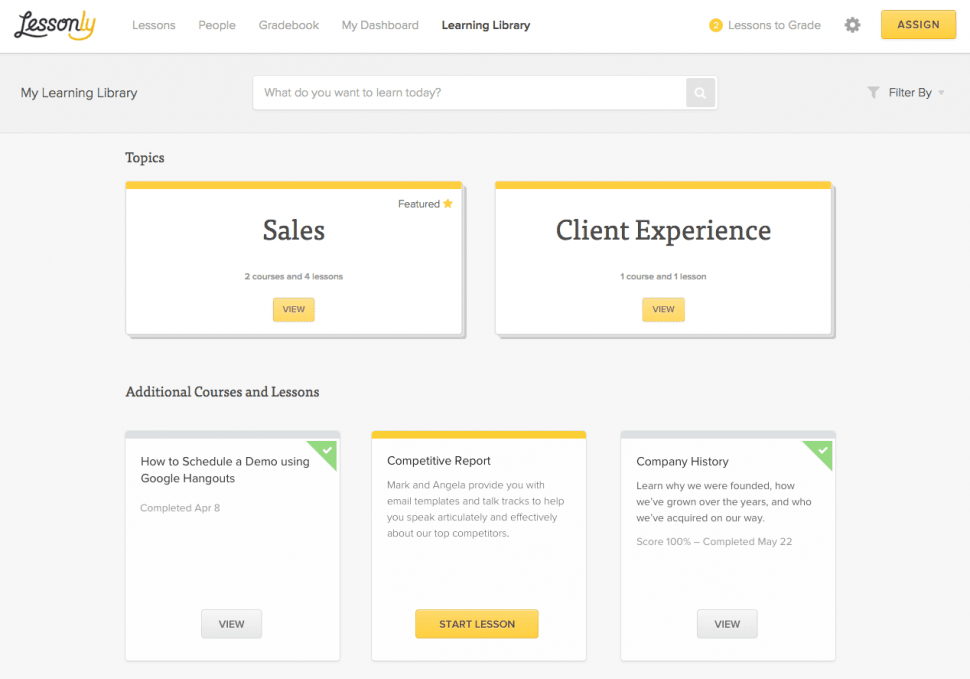
Employee learning library in Lessonly
More commonly known as learning management systems, computer based training software can be purchased standalone. It can also be acquired as an application within a more comprehensive human capital management software suite that also handles things like performance management, payroll and applicant tracking.
Common Computer Based Training Software Features
When evaluating different options, you'll find most computer based training software systems share a ton of features and functionality in common. Here are some examples:
Course management | Upload and manage an inventory of created or purchased training courses. Set rules on how trainees can access and complete them. |
Learner management | Manage and track a roster of employee trainees as they progress through courses and complete assessments. |
Certification management | Training, testing and reporting functionality for certifications required of certain jobs. |
Social learning | Trainees can interact with one another through course ratings, course discussions or individual learner blogs. |
Extended enterprise | Allows companies to rebrand their training environment for external audiences (e.g., customers, channel partners etc.). |
Analytics & reporting | Discover deeper trends regarding course effectiveness and learner progression through customizable reports and dashboards. |
You may need more robust functionality depending on your needs. For example, if you don't already have a course authoring tool to create your own training courses from scratch, some computer based training systems include them in their offering. Vendors may also include course libraries, giving your company access to a ton of pre-made courses that can be utilized for employee training.
Computer Based Training Software Pricing
Companies expecting to pay for new computer based training software upfront are going to be disappointed.
Because most systems are cloud-based (meaning they're hosted on the vendor's servers and accessed by client businesses via a web browser), the most common pricing structure you'll run into is a subscription-based model based on 1) the number of users you have and 2) the level of functionality you want.
For smaller businesses, the monthly fee may be relatively high at around $5/user/month, but this will go down to as low as $0.50/user/month for larger enterprises with a ton of employees. Vendors can also tier their pricing to that you pay a lower monthly fee for basic functionality like learner management and course assessments or a higher fee for more advanced features like extended enterprise management.
There can also be one-time fees for things like implementation or system training, so be sure to ask vendors about the exact breakdown of their cost structure so you can budget for a new system appropriately.
Key Considerations When Evaluating Computer Based Training Software
Cost is a major factor with any new software purchase, but it's not the only one. If you pick a computer based training software system based solely on good reviews and affordability, you risk adopting a product that ends up not being a great fit.
Here are some things you should keep in mind when evaluating different options:
Are my training courses technically compatible? If you already have training courses in the AICC eLearning technical standard, but your software doesn't support AICC courses, that's going to result in hefty reformatting costs. You can learn more about the pros and cons with different eLearning technical standards here.
What will happen to my courses on mobile devices? Nearly half of all organizations use mobile devices in employee training. Some vendors may claim to be “mobile-ready," but there's a big difference between a course that's easy to navigate on smartphones and one that's simply shrunk down and requires a lot of pinching and dragging.
How advanced are the training analytics? If you can only get data on course completions and assessment scores, that's not going to tell you a whole lot to improve employee training. Ask if you can track more advanced stats like interactions and time spent by users to optimize courses and learner paths.
Can I integrate with my HR systems? Training and performance are heavily intertwined. If you already have software to manage performance reviews, ask if your computer based training software can integrate with it to easily transfer training data.
Additional Computer Based Training Software Resources
We've covered the basics of what you need to know with computer based training software, but there's always more you can learn to help choose the right system, implement it successfully and become a top-tier employee training organization.
Here are some additional resources:
“Filling the 5 Biggest Gaps in Your LMS Business Case:" Having trouble convincing executives that computer based training software is a worthwhile investment? Learn about solid arguments you can make to counter their biggest hang-ups.
“Don't Ditch the Classroom: How an LMS Can Support Blended Learning:" Going all-digital with employee training has its downsides too. Learn how to balance the best of online and offline training with your new training software.