


Best Purchasing Software of 2026
Updated January 29, 2026 at 2:30 AM

Written by Olivia Montgomery, PMP
Associate Principal Analyst

Edited by Caroline Rousseau
Senior Editor

Reviewed by Nate Pozen
Buyer Advocate Team Lead

Talk with us for a free 15-min consultation
Expert advisors like Jacqueline, who have helped 1,000+ companies, can find the right software for your needs.
- All Software
- Top Software
- Popular Comparisons
- Buyer's Guide
- Frequently Asked Questions
Purchase order (PO) software is a system specifically designed to manage purchase orders, helping businesses create, approve, track, and report on POs to improve the accuracy and timing of procurement processes. We analyzed data from the 236 PO software buyers who spoke with our team in the last year and 3,234 recent, verified reviews to identify products rated highest for functionality, usability, value, and customer support. Our site features 176 PO software vendors to help you find the right product to meet your needs. To help you narrow it down, I worked with our purchase order (PO) software advisors to curate a list of recommended productsi and a list of highly-rated purchase order (PO) software based on user reviews.
Purchasing Software
Sort by
Reviews: Sorts listings by the number of user reviews we have published, greatest to least.
Average Rating: Sorts listings by overall star rating based on user reviews, highest to lowest.
Alphabetically (A-Z): Sorts listings by product name from A to Z.

NetSuite is an AI-powered cloud-based business management suite that incorporates ERP, financial management, CRM and eCommerce f...Read more about NetSuite


NetSuite's Best Rated Features
See All
NetSuite's Worst Rated Features
See All

Procurify is a procurement and spend management software designed to automate the intake-to-pay process for organizations. It co...Read more about Procurify


Procurify's Best Rated Features
See All
Procurify's Worst Rated Features
See All

Agiloft is a cloud-based contract management software that helps businesses streamline the entire contract lifecycle with custom...Read more about Agiloft


JobBOSS² is a job shop management software designed for custom manufacturers and machine shops. It supports make-to-order manufa...Read more about JobBOSS²


JobBOSS²'s Best Rated Features
See All
JobBOSS²'s Worst Rated Features
See All

Tradogram is a cloud-based procurement management solution. Users can choose from a list of integrated modules such as supplier ...Read more about Tradogram


Tradogram's Best Rated Features
See All
Tradogram's Worst Rated Features
See All
Best Purchase Order Software for 2025


Highest Rated

Precoro

Among the most popular purchase order software, Precoro is the highest-rated on Software Advice.
Precoro is great for small to midsize businesses looking to automate procurement processes and gain real-time budget insights. Its user-friendly interface and robust suite of tools make the platform reliable for efficient purchasing management. The solution’s intuitive automation can help businesses transition from manual procurement processes to future-proofed digital procurement operations.
- Reviewers Perspective
“We have a very complex multi-company set-up and Precoro has helped us to better organize and manage the purchase order process and tracking approvals.”
SVStephanie Velez
Insurance and Development Manager
Used for 2+ years
We analyzed 233 verified user reviews for Precoro to determine what actual users think.
Customer service
Reviewers consistently praise Precoro's customer service for being excellent and responsive. They find the support team helpful and courteous, providing quick solutions to any issues. Small businesses, in particular, appreciate the exceptional support and the positive impact on their operations.Purchase orders
Users appreciate how Precoro simplifies and streamlines the purchase order process, making creating and submitting POs easy. They find the platform helpful for tracking orders from approval to delivery, ensuring everything is correctly allocated. Additionally, users highlight the ease of use and the ability to manage purchase requests and orders efficiently.Budget management
Reviewers value Precoro for its budget management features, which provide real-time access to budget balances and simplify expense tracking. They find the platform helpful for setting up and managing budgets for various projects, categories, and locations. Users also appreciate the transparency and ease of tracking budget statuses, aiding in timely decision-making. - Key FeaturesPrecoro's scoreCategory average
Expense Tracking
4.784.57 category average
Purchase Order Management
4.814.58 category average
Receipt Management
4.534.67 category average
- Screenshots


Best Free

Odoo

Based on our analysis of purchase order software, Odoo was the most popular product with a free plan.
Our analysis indicates that Odoo is best for small businesses looking for a cost-effective solution that scales with their needs or tech-savvy businesses looking to augment their tech stack through open-source code customizations. The platform’s general flexibility and vast potential for integration allow for more granular control over key business processes.
- Reviewers Perspective
“Odoo integrates all areas of the business very well, facilitating the management of business processes from accounting and sales to inventory and marketing.”
GMGustavo Medina
Manager
Used for 1-2 years
We analyzed 1,203 verified user reviews for Odoo to find out what actual users really think.
Customization
Reviewers value Odoo's high degree of customization, which allows them to tailor the software to their specific business needs. They find the platform's flexibility and open-source nature beneficial for creating personalized workflows and modifying functionalities. While some users mention that customization can be complex and time-consuming, they appreciate the extensive customization options available.Modularity
Users highlight the wide range of modules available in Odoo, which cover various business functions and can be customized to meet specific needs. They appreciate the ability to start with a few modules and gradually add more as required, making the system adaptable to their evolving business requirements. The availability of numerous modules and plugins enhances the software's versatility and usability.ERP solutions
Reviewers find Odoo a cost-effective ERP solution offering comprehensive features for managing various business processes. They appreciate the affordability compared to other ERP systems and the extensive range of functionalities provided. Users highlight the platform's ability to integrate ERP, CRM, and other business applications, making it a valuable tool for small and midsize enterprises. - Key FeaturesOdoo 's scoreCategory average
Expense Tracking
4.04.57 category average
Purchase Order Management
4.184.58 category average
- Screenshots


Most Affordable

Pipefy

Our analysis of the most popular purchase order software shows that Pipefy offers the lowest-priced paid plan.
Most suitable for small to midsize businesses seeking an affordable, customizable workflow management tool, Pipefy’s ease of use and flexibility lets users adapt it to meet their unique needs. Pipefy offers the lowest financial barrier to entry among similar tools, making it a great choice for businesses new to procurement software. The platform’s robust array of procurement templates also helps accelerate procurement process deployment without relying on heavy investments in time or resources.
- Reviewers Perspective
“From working with our Account Growth Managers and Customer Success Representatives, to working with our Solutions Engineers, the team has been dedicated to delivering high-quality work and a product worth using.”
MBMaximilian Barzagli-Cunniff
Business Intelligence Manager
Used for 2+ years
We analyzed 317 verified user reviews for Pipefy to find out what actual users really think.
Automation
Users appreciate Pipefy's automation features, which streamline processes and enhance efficiency. They find the AI automation and customization capabilities particularly valuable for automating repetitive tasks and optimizing workflows. Additionally, users highlight the ease of configuring automations to suit their specific needs, making their daily operations more manageable.Task management
Users find Pipefy highly effective for task management, allowing them to assign tasks, set deadlines, and monitor progress efficiently. They appreciate the tool's ability to organize tasks, enhance productivity, and facilitate collaboration. The software's practicality and comprehensive features help users manage their daily tasks and projects seamlessly.Team collaboration
Users commend Pipefy for fostering team collaboration through excellent support and communication tools. They find the software effective in managing team meetings, aligning team efforts, and organizing support needs. The dedicated support team and user-friendly setup make it easier for teams to work together and achieve their goals. - Screenshots


Best Value for Money
Procurify

Our analysis of the most popular purchase order software shows that Procurify has the highest rating for value for money.
Procurify is a solid choice for organizations that enhance spend visibility and control. Reviewers frequently cite the platform’s intuitive interface and real-time expense-tracking features as value-adds for their businesses. Our analysis of reviewer sentiment showed that the spend visibility gained from Procurify was particularly helpful for companies managing multiple departments or locations or that required centralized oversight.
- Reviewers Perspective
“From requisition to approval and tracking, Procurify has streamlined our workflows, reducing the time and effort spent on manual tasks.”
SBShayla Buechnert
Human Resources Specialist
Used for 1-2 years
We analyzed 180 verified user reviews for Procurify to find out what actual users really think.
Approval process
Users appreciate Procurify's efficient and clear approval process, which streamlines workflows and reduces manual tasks. They value the hierarchical approval structure and the ability to track real-time approvals, ensuring transparency and accountability. Additionally, users find it convenient to monitor and approve purchase requests with just a few clicks, enhancing communication and coordination within their teams.Support team
Users consistently praise Procurify's support team for their responsiveness and helpfulness, making issue resolution quick and efficient. They appreciate the easy access to customer support and the development team's willingness to incorporate user suggestions into the software. Additionally, users highlight the outstanding customer service and support systems, which enhance their overall experience with Procurify.User training
Users find Procurify easy to learn and navigate, requiring minimal training for new team members. They appreciate the intuitive design and the ability to quickly adapt to the software's features, making it efficient for onboarding. Additionally, users highlight the simplicity of teaching others to use Procurify, which enhances overall productivity and user satisfaction. - Key FeaturesProcurify's scoreCategory average
Expense Tracking
4.654.57 category average
Purchase Order Management
4.754.58 category average
Receipt Management
4.674.67 category average
- Screenshots


Best Customer Service

Payhawk

Among the most popular purchase order software on Software Advice, Payhawk has the highest rating for customer service.
Businesses prioritizing strong customer support in their financial operations may find Payhawk a great choice. Our research shows users often appreciate Payhawk’s proactive approach to customer service, especially given the breadth of its comprehensive support system. Payhawk’s commitment to smooth, responsive tech support can be an invaluable asset for businesses in critical need of high uptime and rapid issue resolution.
- Reviewers Perspective
We analyzed 118 verified user reviews for Payhawk to find out what actual users really think.
Expense management
Users find Payhawk effective for managing expenses, allowing them to easily upload receipts and automate expense categorization. They appreciate the comprehensive reporting features, which provide a clear view of company spending and help maintain financial order. Additionally, users highlight the platform's ability to streamline the reconciliation process, saving time and reducing administrative burdens.User interface
Reviewers appreciate Payhawk's user-friendly interface, which simplifies navigation and expense management. They find the platform intuitive and easy to use, with minimal training required for new users. However, some users mention occasional glitches and bugs, which can affect the overall experience, but note that the support team is responsive in addressing these issues.Customer support
Users consistently praise Payhawk's customer support for being helpful and responsive. They value the quick and efficient assistance the support team provides, which enhances their overall experience with the platform. Additionally, users appreciate the availability of direct chat with operators and the prompt resolution of any issues or concerns they encounter. - Key FeaturesPayhawk's scoreCategory average
Expense Tracking
4.464.57 category average
Purchase Order Management
5.04.58 category average
Receipt Management
4.474.67 category average
- Screenshots


Best Functionality

Sage Intacct

Among the most popular purchase order software on Software Advice, Sage Intacct has the highest rating for functionality.
Sage Intacct is a great choice for organizations looking to improve their financial reporting processes. The platform incorporates an adaptable solution architecture and data-driven insights, which reviewers often cite as value-adding features. Expansive automations, API access, and a host of industry-specific templates and capabilities are among the many advanced functionalities Sage Intacct provides to SMBs.
- Reviewers Perspective
“We have used Sage Intacct almost 7 years and it has served us well in all aspects of accounting, payables, cash management, General Ledger and Reporting.”
SFSteve Fooskas
Accounting Manager
Used 2+ years
We analyzed 510 verified user reviews for Sage Intacct to find out what actual users really think.
Accounting management
Users find Sage Intacct effective for managing general ledger, financial management, and cloud-based accounting. They appreciate its advanced accounting capabilities and the ability to handle multiple entities and dimensions. The software's cloud-based nature and comprehensive accounting features make it a valuable tool for various industries and workflows.Invoice management
Users value Sage Intacct's efficient invoice management, automated invoicing, and expense tracking features. They say the system facilitates easy invoice entry, matching with POs, and tracking expenses. Automating billing processes and handling a high volume of invoices each week is particularly beneficial for users.Expense management
Users appreciate Sage Intacct's budget management, time tracking, and expense reporting capabilities. They find it helpful to track departmental spending against budgets and manage expenses across multiple dimensions. The software's user-friendly interface and real-time budget visibility enhance the overall expense management process. - Key FeaturesSage Intacct's scoreCategory average
Expense Tracking
4.224.57 category average
Purchase Order Management
3.934.58 category average
Receipt Management
4.444.67 category average
- Screenshots


Methodology
The research for the best purchase order software list was conducted in November 2024. We evaluated data (user reviews and demand signals) from the past 24 months as of the research date. Read the complete methodology.
Popular Purchasing Comparisons


Buyer's Guide
This detailed guide will help you find and buy the right purchase order software for you and your business.
Last Updated on October 16, 2025Here's what we'll cover:
What you need to know about purchase order software
What is purchase order software?
Essential features of purchase order software
Benefits and competitive advantages of using purchase order software
Software related to purchase order software
More resources for your purchase order software journey
What you need to know about purchase order software
Purchase order software is designed to help create, track, and manage purchase orders (POs). Whether procuring inventory from vendors or processing sales orders from customers, purchase order software helps you manage the processes efficiently. Common features include purchase order management, invoice processing, and spend management.
Our experienced software advisor, Nathan Pozen, says, “purchase order software improves procurement by automating approval workflows and enforcing the hierarchy of authority, ensuring purchase requests are quickly routed to the right decision-makers for timely approval.”
Purchase order software is commonly used by purchasing departments, finance teams, and operations managers across industries. The benefits include reduced manual work, improved visibility into spending, and the ability to scale procurement capabilities, helping businesses organize supplier relationships and control costs.
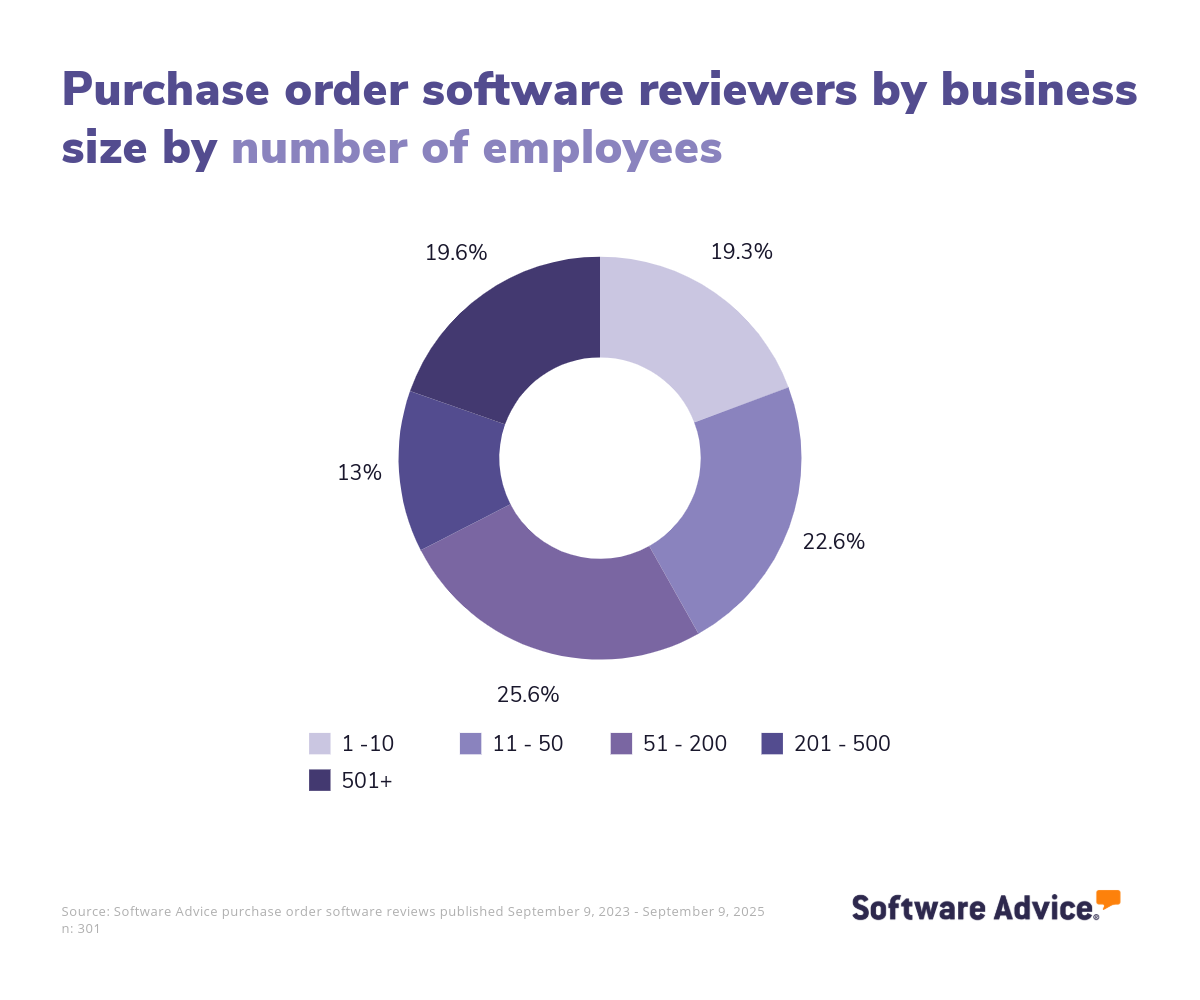
To give you an idea of the market, we have 236 different purchase order products on our site, and we’ve published 3,234 reviews for 107 products in the past year alone. The majority of user reviews come from small to midsize businesses, with 68% of reviewers having 200 or fewer employees. The largest industry represented is construction, followed by education management and non-profit organizations. [1]
Most purchase order software solutions are priced on a “per-month” basis. Entry-level plans commonly offer basic features, such as approval process control and activity dashboards. Enterprise-level plans will typically cost more and may include additional features, such as compliance and inventory management. Be sure to ask potential vendors about free trials to get a feel for their product before signing a contract.
If you’re a first-time buyer, consider your budget, number of users, use cases, and necessary integrations. Consult stakeholders to gather questions you should ask vendors during an evaluation. Questions for vendors can include:
How can you migrate supplier data into the tool?
Can you create a Request for Quote (RFQ) form or template?
Does the system offer inventory management features, if applicable?
Does the system support any compliance or regulatory requirements you have?
Can it integrate with your accounting and/or distribution systems?
If you would prefer to speak with one of our experienced purchase order software advisors like Pozen, schedule a call or start a chat with us.
What is purchase order software?
Purchase order software is a tool for managing essential procurement processes, sometimes called purchasing software. It creates and manages purchase orders (POs), can transmit POs to suppliers, and reconciles supplier invoices to POs, contracts, and other relevant documents. PO software supports invoice processing, requisition, and spend management, helping businesses track and assess costs accurately.
PO software automates the procurement cycle for direct and indirect goods and services. It incorporates security, compliance, and reporting features to provide an accurate and efficient purchase order and requisition process. Many purchasing solutions also include integrated tools for billing and invoicing, inventory control, and asset management.
Purchase order software can be deployed as a standalone software program, an application within a supply chain management system, or enterprise resource planning (ERP) software.
What are the major types of purchase order software?
POs are the beginning of both direct and indirect procurement processes.
Direct procurement involves purchasing goods and services used in products
Indirect procurement is for purchasing goods and services used to support processes.
As such, various types of software deal with purchase orders:
Procure-to-pay (P2P)
Procure-to-pay (P2P) suites are essentially all-purpose tools for managing a business’s procurement activities. Typically, P2P systems cover related areas such as contract management, inventory management, supplier management, and strategic sourcing.
They're the focus of this buyer's guide. Most P2P solutions are cloud-based.
Enterprise resource planning (ERP)
ERP suites typically feature procurement modules, but these modules primarily work in conjunction with other modules in the system, such as production planning. Moreover, these modules lack niche features and user-friendly interfaces that encourage adoption throughout an organization.
Work-stream tools
Work-stream tools are stand-alone applications for managing highly specific procurement processes (for example, telecommunications, temporary workforce, travel spend). These tools offer dedicated interfaces and approval workflows to streamline a single, highly important procurement process.
Typically, if you're looking for a work-stream tool, you're looking to control spending in a specific area and look to the niche vendors that specialize in this area. Hence, our focus here will be multipurpose procure-to-pay (P2P) suites.
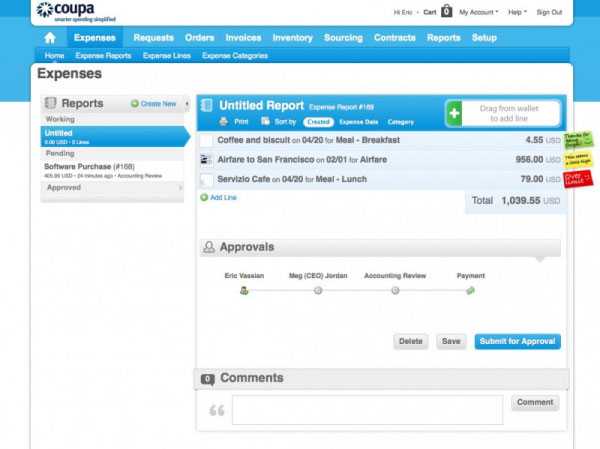
Notifications on expense report in Coupa Cloud Spend Management
Essential features of purchase order software
When evaluating purchase order software for your business, it's essential to understand the features you can expect. Core functionalities, such as invoice processing and purchase order management, are standard in PO software. Additional features, like inventory management and forecasting, are frequently available. We’ve analyzed hundreds of reviews and consulted with our PO software advisors to identify what we believe are the essential features of purchase order software.
Core purchase order software features
Purchase order management | Create, send, and track purchase orders and their statuses. 84% of our reviewers rate this feature as critical or highly important. |
Invoice processing | Creation, processing, verification, and execution of invoices till the payment is made. |
Requisition management | Review, approve, and cancel requests for goods/services to be purchased. |
Spend management | Track the amount of money spent on a certain product or with a certain supplier. |
Common purchase order software features
Inventory management | Track and manage inventory levels to maintain proper supply. 76% of our reviewers rate this feature as critical or highly important. |
Budgeting/forecasting | Create budgets based on historical data and future projections. |
Order management | Manage and track customer orders for goods, investments, or any other purchases. |
Purchasing reports | Reports that analyze a company's purchasing activities, including purchases made, suppliers used, and expenses incurred. |
Benefits and competitive advantages of using purchase order software
Our analysis of 284 user reviews from the past year shows that order tracking, inventory management, vendor procurements, and valuable customization options are the top-rated benefits of purchasing software.
Order tracking: Streamlines the process of monitoring purchase orders from creation to fulfillment, ensuring transparency and efficiency. This feature allows businesses to easily track the status of their orders, reducing delays and improving communication with suppliers.
Inventory management: Enhances control over stock levels, reducing the risk of overstocking or stockouts and optimizing inventory turnover. By providing real-time insights into inventory, businesses can make informed decisions about purchasing and restocking.
Customizations: Allows businesses to tailor the software to meet specific procurement needs and workflows. These customizations help businesses adapt the software to their unique processes, improving overall usability and effectiveness.
Vendor procurement: Facilitates efficient vendor management and procurement processes, improving supplier relationships and negotiation outcomes. Businesses can streamline procurement activities and enhance supplier collaboration by centralizing vendor information and interactions.
What type of buyer are you?
We've seen that there are many software options available for managing POs. Let's take a look at which kinds of buyers should examine particular solutions.
Buyers primarily involved in direct procurement should explore procurement modules in ERP suites, which offer integrated features in other modules for making the most of data generated by direct procurement (e.g., production planning). Additionally, ERP systems offer practical functionality in areas such as vendor-managed inventory/automated replenishment, which are key to streamlining direct procurement processes.
Buyers dealing with both indirect and direct procurement should explore P2P suites, as these suites are robust and rangy enough to handle various types of purchasing.
Departmental buyers should explore work-stream-specific tools that don't require the whole organization to move onto a new procurement platform.
Buyers seeking to control spending in a key area should evaluate work-stream-specific tools.
Buyers with advanced needs, such as job costing and quoting, need to evaluate niche solutions that can track POs against jobs and convert quotes to invoices. Many all-purpose P2P suites lack such features.
Software related to purchase order software
A business might need to evaluate related software to integrate different operational functions, such as procurement, accounting, and inventory management. By using complementary software solutions, businesses can improve data consistency, streamline workflows, and gain comprehensive insights into their operations, ultimately supporting better decision-making and strategic planning.
Accounting software: Track financial statements, cash flow, invoicing, bank accounts, and purchase orders. It can provide real-time financial tracking and reporting, which helps ensure accurate budgeting and financial management throughout the procurement process.
Contract management software: Track and manage contracts through the various stages of their lifecycles, including drafting contracts, negotiating with the parties involved, and executing contracts.
Procurement software: Manage interactions between the originator, buyer, category manager, approver, vendor, and receiver, at every transactional step. It also executes critical tasks such as request initiation, purchase order placement, bid analysis, invoice approval, and final payment.
Spend management software: Used to track, report, and manage expenses quickly and conveniently in a centralized source of expense data, integrating and automating all spend-related activities.
Vendor management software: Designed to manage and procure goods and services from vendors. It provides tools for vendor selection, contract management, performance evaluation, and risk mitigation, helping businesses optimize supplier relationships and ensure compliance with procurement policies.
More resources for your purchase order software journey
After Your Advisor Call: 4 Tips To Keep Your Software Purchase on Track
Accelerate Supply Chain Management Software Implementation by Learning From Buyers With Experience
About our contributors
Author
Olivia Montgomery is an associate principal analyst at Software Advice, covering program and project management with a focus on the strategic alignment of IT and operations to optimize digital transformation. Drawing from her experience as a former IT PMO leader and her background in humanities studies, Olivia delivers data-driven insights that empower business leaders to drive business growth through projects.
Olivia’s research and analysis is informed by nearly 200,000 authentic user reviews on Software Advice and over 10,000 interactions between Software Advice software advisors and project management software buyers. Olivia also regularly analyzes market sentiment by conducting surveys of project managers and PMO leaders so she can provide the most up-to-date and helpful information to small and midsize businesses purchasing software or services.
Her expertise is featured in Forbes, Bloomberg, CIO Dive, and TechRepublic, as well as in podcasts, such as The Digital Project Manager. Recently, she presented her research on emotional intelligence (EQ) and decision-making at PMI's Global Summit conference, shedding light on the crucial role of EQ in driving project success. When she's not analyzing tech trends, you can find Olivia horseback riding or re-watching Jurassic Park.
Editor
Lindsay Page is an editor at Software Advice. She specializes in editing data-driven research and tech trends reports for small to midsize businesses. She has more than a decade of experience writing and editing for a variety of industries, with particular expertise in cybersecurity, corporate and securities regulation, and finance.
When not editing, Lindsay can be found reading a mystery novel, spending time with her family, and playing competitive tennis. Lots and lots of tennis.
Advisor
Nate Pozen is a buyer advocate team leader. He joined Software Advice in 2021 as a software advisor, and now he manages a team of four software advisors. He is based in Austin, TX.
Nate and his team helps small businesses find the right HR, CRM, accounting, project management, and manufacturing software for their needs each year. They’re able to do this through one-to-one conversations designed to narrow down the list of potential tools to only those that are the best fit.
His favorite part of being a Software Advice advisor team manager is partnering with buyers to help them through their entire software journey.
Source
Software Advice reviews data: Software Advice reviews are collected from verified users for individual software products. For this report, we analyzed reviews from August 31, 2023 to November 29, 2024.
Your Guide to Top Purchasing Software, January 2025


Purchasing FAQs
- What is the best software for purchase orders?
The best software for purchase orders is a specifically designed tool called purchase order software. According to our analysis of products with high market demand and reviews, Precoro had the highest overall rating from verified reviewers on Software Advice for purchase order management. Users rate Precoro’s approval workflow, vendor procurement, and order management features highly.
- What is the system to track purchase orders?
A purchase order (PO) software system is designed to track and manage purchase orders in a centralized platform. From order creation to receipt, PO software can automate tasks, including managing requests for quotes (RFQs), replenishment thresholds, and approval process controls. Many systems offer inventory management, which 76% of recent PO software reviewers say is highly important.
- Is there a purchase order template in Word?
Purchase order templates are available for Word that can be customized for your business. While convenient for smaller businesses, Word lacks advanced features offered in specialized PO software, such as automated tracking, supplier management, and approval workflows. For growing businesses, using PO software is more efficient and accurate and provides reporting capabilities for strategic cost analysis.
- What is purchase order management software?
Purchase order management software is specifically designed for creating, tracking, and managing purchase orders (POs) from order creation to receipt. It generates standardized, accurate POs, automates approval workflows, and centralizes supplier communication. PO software helps prevent duplicate orders and improve order accuracy with validation steps. It also has reporting features to help businesses control procurement and spending.
- Can you create purchase orders in Excel?
You can create purchase orders in Excel with manual input of the order details, such as item descriptions, quantities, prices, and supplier information. While it’s a simple solution for small businesses, Excel lacks features that purchase order software offers, including automated tracking, real-time updates, integration with accounting and other systems, reporting, and supplier communication.