


Best Field Service Management Software of 2026
Updated March 4, 2026 at 10:51 PM

Written by Laura Burgess
Content Analyst

Edited by Parul Sharma
Editor

Reviewed by Jakub Vaughn
Senior Advisor

Talk with us for a free 15-min consultation
Expert advisors like Jacqueline, who have helped 1,000+ companies, can find the right software for your needs.
- All Software
- Software Advice FrontRunners
- Popular Comparisons
- Buyer's Guide
- Frequently Asked Questions
Field service management software helps dispatchers, technicians, and service teams manage jobs, schedules, and customer communications. To help you narrow it down, I worked with our field service software advisors to curate a list of recommended productsi and a list of the Field Service Management software FrontRunners based on user reviews. For further information, read my field service software buyer's guide.
Field Service Management Software
Sort by
Reviews: Sorts listings by the number of user reviews we have published, greatest to least.
Average Rating: Sorts listings by overall star rating based on user reviews, highest to lowest.
Alphabetically (A-Z): Sorts listings by product name from A to Z.

Housecall Pro is a business solution for home service professionals. Available on web and mobile, Housecall Pro helps home servi...Read more about Housecall Pro


Housecall Pro's Best Rated Features
See All
Housecall Pro's Worst Rated Features
See All

BiznusSoft Field Service is a cloud-based solution designed to help businesses manage and control their operational cycle. Key f...Read more about BiznusSoft Field Service


JobNimbus is a customer relationship management (CRM) and project management solution tailored to meet the needs of contractors,...Read more about JobNimbus
JobNimbus's Best Rated Features
See All
JobNimbus's Worst Rated Features
See All

Dataforma is a cloud-based solution designed for construction trades, including electrical, plumbing and HVAC. It is a web-based...Read more about Dataforma


ServiceTitan is a cloud and mobile-based platform for residential and commercial field service businesses. The solution helps bo...Read more about ServiceTitan


ServiceTitan's Best Rated Features
See All
ServiceTitan's Worst Rated Features
See All
Software Advice FrontRunners 2026

(1420)

(405)

(339)

(325)

(150)

(36)

(205)

(2736)

(92)

(289)
Best for Automation Capabilities

Jobber

In our analysis of Field Service Management products with the most market demand, Jobber is the most requested by users for automation capabilities out of the most popular tools.
Jobber is best for SMBs seeking strong automation capabilities to streamline daily operations and reduce manual tasks. Our reviewers say its automated scheduling, invoicing, and reminders save significant time and help businesses focus on revenue-generating activities.
- Reviewers Perspective
"We use the grow plan where we can have up to 15 users, manage all of their schedules and maintain our efficient, reliable service, all from one spot."
SESarah E
Director of Operations
Used for 2+ years
We analyzed 670 verified user reviews for Jobber to find out what actual users really think.
Scheduling
Organizations manage team schedules, automate reminders, and adjust appointments with drag-and-drop tools. Jobber’s system supports recurring jobs and keeps all members informed in real time.Invoice Management
Teams create invoices, process payments, and communicate with clients through automated reminders and client portals. Some users note limitations with batch payments and template customization.Quote Management
Staff generate, customize, and send quotes from the field or office. The workflow supports adding images, optional items, and automates follow-ups, improving client communication and conversion rates. - Key FeaturesJobber's scoreCategory average
Customizable Fields
4.284.44 category average
Mobile Access
4.434.37 category average
Scheduling
4.644.49 category average
- Screenshots


Best for Mobile app

FieldPulse

According to our user reviews, FieldPulse is the most requested by users for mobile app out of the most popular tools.
FieldPulse is best for teams that prioritize mobile app functionality for managing field operations. Our reviewers say the mobile app makes scheduling, dispatching, and real-time updates seamless, improving workflow efficiency and team communication.
- Reviewers Perspective
"The platform makes scheduling, dispatching, and tracking jobs seamless, while also providing real-time updates to our team in the field."
JPJulian Pampin
Director of Operational Readiness
Used for 6-12 months
We analyzed 274 verified user reviews for FieldPulse to find out what actual users really think.
Scheduling
Teams organize jobs, assign tasks, and manage calendars with real-time updates. FieldPulse’s flexible scheduling prevents double bookings and consolidates daily operations for SMBs.Ease of Use
Staff and new hires quickly learn FieldPulse thanks to its intuitive design. The platform brings together job management, information tracking, and training in one interface.Team Collaboration
Managers and field workers share project updates, assign tasks, and communicate within the platform. This keeps everyone organized and reduces administrative workload. - Key FeaturesFieldPulse's scoreCategory average
Customizable Fields
4.204.44 category average
Mobile Access
4.494.37 category average
Scheduling
4.644.49 category average
- Screenshots


Highly Rated for Quick Implementation

ServiceTrade

Of the products listed on our FrontRunners report, ServiceTrade is the highest rated for quick implementation out of the most popular tools.
ServiceTrade is highly rated for organizations seeking quick implementation and rapid time-to-value. Our reviewers say the intuitive setup process and responsive support enable businesses to get up and running fast, streamlining workflows and improving customer communication.
- Reviewers Perspective
"It has cut down on the time it takes for scheduling, helps us assure that our repeat services are on track, and makes it easy to communicate deficiencies with our clients."
HMhope mullins
Operations Manager
Used for 1-2 years
We analyzed 258 verified user reviews for ServiceTrade to find out what actual users really think.
Customer Support
ServiceTrade’s support team checks in with users, addresses concerns, and implements feedback. This approach helps SMBs resolve issues quickly and fosters ongoing improvements in daily operations.Ease of Use
Staff can navigate ServiceTrade’s interface with minimal training. The platform streamlines workflows, allowing teams to locate information, take notes, and manage jobs without unnecessary complexity.Scheduling and Payroll
Managers assign jobs, track technician hours, and coordinate recurring appointments using visual scheduling boards and real-time updates. These tools reduce communication delays and improve team productivity. - Key FeaturesServiceTrade's scoreCategory average
Mobile Access
4.324.37 category average
Scheduling
4.554.49 category average
- Screenshots


Most Rated for SMBs
ServiceTitan

In our analysis of Field Service Management products with the most market demand, ServiceTitan is the most requested by small businesses out of the most popular tools.
ServiceTitan is most rated for SMBs in the trades looking for a comprehensive platform to manage operations and growth. Our reviewers say it offers robust features for dispatch, scheduling, and customer management, supporting business scalability and efficiency.
- Reviewers Perspective
"This software has features to help every employee across the company - Customer Service Representatives, dispatchers, sales people, technicians, warehouse clerks, etc."
KKKhiana Klatt
Customer Service Representative
Used for 2+ years
We analyzed 180 verified user reviews for ServiceTitan to find out what actual users really think.
Business Growth
ServiceTitan streamlines operations and supports scaling for service businesses. Ongoing updates and training resources help organizations adapt to evolving needs and improve operational visibility.Office and Field Staff
The platform enhances coordination and accountability for both office and field staff. Employees manage tasks efficiently, and the system supports different management preferences.Service Titan
Companies consolidate multiple business processes—dispatch, CRM, reporting—into one platform. This integration reduces stress and provides valuable insights for daily service operations. - Key FeaturesServiceTitan's scoreCategory average
Mobile Access
4.054.37 category average
Scheduling
4.244.49 category average
- Screenshots


Most Used By Construction

BuildOps

According to our user reviews, BuildOps is the most requested by users in construction out of the most popular tools.
BuildOps is most used by construction firms that require industry-specific features and team collaboration tools. Our reviewers say it centralizes project information and streamlines workflows, making it easier for teams to stay organized and efficient.
- Reviewers Perspective
"Ability to track jobs in real-time and offers insightful reports that help optimize business decisions."
DCDallas Courville
Dispatcher
Used for 1-2 years
We analyzed 113 verified user reviews for BuildOps to find out what actual users really think.
Ease of Use
Teams track jobs, access information, and manage documents efficiently. BuildOps’ clean interface and guides simplify learning and daily use, even for less tech-savvy staff.Team
The BuildOps team guides users through implementation and ongoing use, responding to feedback and supporting workflow improvements for better business outcomes.Reporting
Managers track jobs, standardize technician reports, and access data for decision-making. Reporting modules help consolidate documentation and improve project oversight. - Key FeaturesBuildOps's scoreCategory average
Mobile Access
4.264.37 category average
Scheduling
4.564.49 category average
- Screenshots


Best for Customer Satisfaction

XOi

According to our user reviews, XOi is the highest rated for customer satisfaction out of the most popular tools.
XOi is best for organizations seeking high customer satisfaction through visual documentation and transparency. Our reviewers say its intuitive tools for capturing and sharing photos and videos enhance communication, build trust, and improve service quality.
- Reviewers Perspective
"Our technicians capture relevant service details in pictures, videos, and text, and the AI work summary feature assists in producing professional summaries which are easy to read and act as a great research tool."
BHBrandan Helzer
COO
Used for 2+ years
We analyzed 36 verified user reviews for XOi to find out what actual users really think.
- Screenshots


Highly Rated for User Interface

Contractor+

Contractor+ is the highest rated for user interface out of the most popular tools, based on our analysis of Field Service Management products with the most market demand.
Contractor+ is highly rated for users who value a modern, user-friendly interface for managing estimates, invoices, and client communication. Our reviewers say it simplifies daily tasks and offers easy onboarding, helping contractors stay organized and professional.
- Reviewers Perspective
"It helps with estimates, invoices, pay and so much more"
BWBrian Weber
Owner operator
Used for 6-12 months
We analyzed 131 verified user reviews for Contractor+ to find out what actual users really think.
Estimate Creation
Contractor+ lets users generate and send professional estimates with photos and itemized lists. This helps SMBs present clear, detailed proposals and manage projects efficiently.Ease of Use
Staff find Contractor+ intuitive and straightforward once familiar with its functions. Training resources and a user-friendly interface support efficient business management.Customer Support
The support team provides setup guidance, quick answers, and personalized assistance, making it easier for SMBs to manage clients and daily operations. - Key FeaturesContractor+'s scoreCategory average
Customizable Fields
4.504.44 category average
Mobile Access
4.734.37 category average
Scheduling
4.714.49 category average
- Screenshots


Most Used By Consumer Services

Housecall Pro is the most requested by users in consumer services out of the most popular tools.
Housecall Pro is most used by consumer services businesses needing integrated scheduling, payment processing, and customer communication. Our reviewers say its all-in-one platform and automated notifications improve workflow efficiency and enhance the customer experience.
- Reviewers Perspective
"Housecall Pro is an exceptional tool that makes it easier to organize and schedule services and sends notifications along with updates about services, insights, and performance. And 100% profitability."
MDMARIA DE MELO Carvalho
Educação
Used for 1-2 years
We analyzed 838 verified user reviews for Housecall Pro to find out what actual users really think.
Scheduling
Teams use drag-and-drop calendars, color-coded assignments, and real-time updates to coordinate staff and appointments. The platform supports recurring jobs and route planning for efficient service delivery.Payment Processing
Businesses schedule jobs, invoice customers, and process payments in one system. Housecall Pro accepts various payment methods and tracks status, though some users report challenges with fees and recurring payments.Employee Management
Managers assign jobs, monitor time, and oversee staff in the office and field. Features like GPS tracking and app-based check-ins simplify payroll and accountability. - Key FeaturesHousecall Pro's scoreCategory average
Mobile Access
4.204.37 category average
Scheduling
4.474.49 category average
- Screenshots


BlueFolder

- Reviewers Perspective
"For basic ticketing system needs, it does exceptionally well, and I could see service shops and small IT departments benefiting from it; however, without investments into some basic updates, it's hard to recommend to anybody looking for a ticketing system."
RGRandy Gargotta
AVP - Systems Administrator
Used for 2+ years
We analyzed 73 verified user reviews for BlueFolder to find out what actual users really think.
Ease of Use
New staff get up to speed quickly with BlueFolder’s intuitive interface. Service shops and SMBs organize work requests and operations efficiently without unnecessary complexity.Customer Support
Support teams address user concerns promptly. Businesses receive guidance and feedback implementation, helping them resolve issues and adapt the system to their needs.Mobile Access
Teams access BlueFolder from multiple devices to manage field service tasks. While some users note mobile experience limitations, remote access supports flexibility for field and office staff. - Key FeaturesBlueFolder's scoreCategory average
Customizable Fields
5.04.44 category average
Mobile Access
4.164.37 category average
Scheduling
4.674.49 category average
- Screenshots


- Reviewers Perspective
"Service Fusion helps keep our jobs in order; we are able to process our invoices that have paid out and sync them to QuickBooks too!"
AKAnna Kuhn
Finance Assistant
Used for 2+ years
We analyzed 180 verified user reviews for Service Fusion to find out what actual users really think.
Customer Support
Users access chat and phone support for timely help. Customer information, job notes, and quotes are centralized, improving communication and professionalism for service businesses.Invoicing
Finance teams create estimates, convert them to jobs, and send invoices directly to customers. Integration with QuickBooks streamlines accounting, though some users report issues with progress billing and customization.Ease of Use
Staff with limited technical experience can quickly learn Service Fusion. Dashboards and navigation tools help teams locate job information and manage tasks, reducing daily stress and improving workflow. - Key FeaturesService Fusion's scoreCategory average
Customizable Fields
3.254.44 category average
Mobile Access
4.054.37 category average
Scheduling
4.374.49 category average
- Screenshots


Kickserv

- Reviewers Perspective
"I like the ease it is to schedule and move scheduled jobs."
JHJesus Hernandez
Account Manager
Used for 2+ years
We analyzed 269 verified user reviews for Kickserv to find out what actual users really think.
Ease of Use
Kickserv’s interface allows teams to quickly learn the system and train new members. The clear organization and accessible features simplify daily operations for service businesses.Scheduling
Teams manage calendars across devices with drag-and-drop scheduling and real-time updates. Field techs view and update jobs, improving coordination and responsiveness.Invoicing
Users create, send, and track invoices within Kickserv. Integration with accounting systems and digital signatures streamline billing, though some customization limitations exist. - Key FeaturesKickserv's scoreCategory average
Customizable Fields
4.294.44 category average
Mobile Access
4.274.37 category average
Scheduling
4.604.49 category average
- Screenshots


Fluix

- Reviewers Perspective
"It is the easiest option for sending documents for our clients to sign and having the mobile signature capture is critical especially for consent forms that require it for electronic signatures."
ACAlicia Clark
Program Manager
Used for 2+ years
We analyzed 69 verified user reviews for Fluix to find out what actual users really think.
- Key FeaturesFluix's scoreCategory average
Mobile Access
4.854.37 category average
Scheduling
5.04.49 category average
- Screenshots


Zoho FSM

- Reviewers Perspective
"It is a great value to have notifications, online acceptances , billing, stock issues , appointment scheduling all from one system. And with seamless integration to Zoho Books , customer information , Service and part items make it a breeze to setup."
DJDamien Joynt
General Manager
Used for 6-12 months
We analyzed 36 verified user reviews for Zoho FSM to find out what actual users really think.
- Screenshots


Zuper

- Reviewers Perspective
"Since our team has begun utilizing Zuper it has helped organize our delivery and installation jobs and allowed our processes to be for efficient."
LCLynne Cillo
Customer Service Manager
Used for 1-2 years
We analyzed 37 verified user reviews for Zuper to find out what actual users really think.
- Key FeaturesZuper's scoreCategory average
Customizable Fields
4.114.44 category average
Mobile Access
3.904.37 category average
Scheduling
4.594.49 category average
- Screenshots


ServiceBox

- Reviewers Perspective
"I also like how you can do a search function on different properties to pull up the work orders for just those properties and you don't have to scroll through all the work orders that have been done until you find that particular work order."
GVGary Vestal
HVAC senior service technician
Used for 6-12 months
We analyzed 95 verified user reviews for ServiceBox to find out what actual users really think.
Ease of Use
Staff learn ServiceBox quickly and manage tasks with minimal training. The platform helps users locate information and stay organized, reducing time spent on administrative work.Invoicing and Quotes
Teams convert quotes to work orders and invoices without manual entry. Integration with payment tools and ERP systems supports accurate billing and job history tracking.Features
ServiceBox provides features for various operational aspects in one platform. Ongoing improvements and feedback-driven updates help businesses manage workflow effectively. - Key FeaturesServiceBox's scoreCategory average
Customizable Fields
4.04.44 category average
Mobile Access
4.144.37 category average
Scheduling
4.574.49 category average
- Screenshots


TrueContext

- Reviewers Perspective
"The overall product is good and delivers on its promise to enable form builders to rapidly and reliably create data collection forms with a sufficient number of features, however, lacks in customizability and user experience."
AHAdan Huerta
UIUX Developer
Used for 6-12 months
We analyzed 234 verified user reviews for TrueContext to find out what actual users really think.
Data Collection
Field teams capture, manage, and analyze information using mobile-first tools and offline capabilities. Conditional formatting and photo capture reduce manual errors and improve reporting accuracy.Form Creation
Administrators quickly build and deploy forms for various business needs. Drag-and-drop tools, conditional logic, and reusable components support complex workflows and efficient form management.Ease of Use
Staff with limited technical backgrounds can use TrueContext with little onboarding. The intuitive interface and support resources help streamline tasks and ensure a smooth user experience. - Key FeaturesTrueContext's scoreCategory average
Customizable Fields
4.354.44 category average
Mobile Access
4.774.37 category average
Scheduling
4.114.49 category average
- Screenshots


Commusoft

- Reviewers Perspective
"We are a small company and Commusoft has allowed us the freedom add jobs and invoice on the go."
DGDarren Gregory
Director
Used for 2+ years
We analyzed 181 verified user reviews for Commusoft to find out what actual users really think.
Ease of Use
Users operate Commusoft with minimal training. The platform centralizes scheduling, job details, and real-time updates, enabling office staff and engineers in construction and service industries to coordinate efficiently and go paperless.Customer Support
Teams receive timely assistance and thorough onboarding from Commusoft’s support staff. Tutorials and hint bubbles help users manage jobs, customer records, and communication, making system adoption smoother for SMBs.Invoicing
Users manage jobs, create invoices, and send reports to clients directly in Commusoft. Integration with accounting software and invoice tracking helps keep financials organized, though some tasks require multiple steps. - Key FeaturesCommusoft's scoreCategory average
Customizable Fields
5.04.44 category average
Mobile Access
4.524.37 category average
Scheduling
4.594.49 category average
- Screenshots


mHelpDesk

- Reviewers Perspective
"The platform offers robust tools for job scheduling customer, management, invoicing, and real-time job"
MHMohamed Hadhri
engineer
Used for 2+ years
We analyzed 479 verified user reviews for mHelpDesk to find out what actual users really think.
Ease of Use
Teams transition to mHelpDesk with minimal training. The platform’s structure supports both tech-savvy and less experienced staff, making it easy to manage tasks and access information in service environments.Invoice Management
Field staff create, customize, and send invoices directly from mHelpDesk. Payment tracking and accounting tool integration reduce paperwork and administrative time for SMBs.Customization
Administrators adjust forms, fields, and layouts to fit unique business processes. mHelpDesk adapts to various industries and workflows, supporting ongoing refinement as needs change. - Key FeaturesmHelpDesk's scoreCategory average
Customizable Fields
4.04.44 category average
Mobile Access
4.474.37 category average
Scheduling
4.144.49 category average
- Screenshots


FieldRoutes

- Reviewers Perspective
"Pest control operations run pretty smooth."
RMReece Marion
Owner
Used for 2+ years
We analyzed 220 verified user reviews for FieldRoutes to find out what actual users really think.
Scheduling
Teams manage appointments, recurring services, and communications in one place. The scheduling module supports efficient routing, reminders, and rescheduling for pest control and service industries.Pest Control
Pest control companies track services, manage routes, and maintain compliance documentation. FieldRoutes supports daily workflows for both office staff and technicians.Business Growth
Growing businesses use FieldRoutes’ customization and reporting tools to organize operations and identify profit opportunities. The platform adapts as companies expand, supporting long-term success. - Key FeaturesFieldRoutes's scoreCategory average
Mobile Access
3.874.37 category average
Scheduling
4.194.49 category average
- Screenshots


Leap

- Reviewers Perspective
"By combining sales pro and leap crm, we are able to create estimates for clients, keep track of all client info (securely!), make note of sales in order to aid employee paychecks, process payments, and so much more!"
PHPaige Harvey
General Office Manager
Used for 6-12 months
We analyzed 227 verified user reviews for Leap to find out what actual users really think.
Sales
Sales teams track pipelines, manage estimates, and automate communication with customers. The platform supports on-the-spot selling and sales tracking, though reporting and analytics are limited.Training and Learning Curve
Staff access onboarding sessions and training videos to master Leap’s features. The initial learning curve is steeper, but ongoing training reveals additional workflow optimizations.Ease of Use
Leap’s interface simplifies complex tasks, making it easy for both new and experienced team members to adapt. This reduces administrative workload and supports daily operations. - Key FeaturesLeap's scoreCategory average
Customizable Fields
5.04.44 category average
Mobile Access
4.034.37 category average
Scheduling
4.264.49 category average
- Screenshots


Synchroteam

- Reviewers Perspective
"It is much more than simple scheduling software; it is a comprehensive, cloud-based platform that connects the office with mobile teams in real time, optimizing every stage of the work process."
DSDavide Semi
Segreterio
Used for 1-2 years
We analyzed 59 verified user reviews for Synchroteam to find out what actual users really think.
Ease of Use
Teams adopt Synchroteam quickly with its intuitive interface. Field engineers and office staff require little training, which streamlines onboarding and daily operations for businesses with varying tech skills.Scheduling
Managers use Synchroteam’s scheduling tools to connect office and mobile teams. The platform streamlines dispatching, manages recurring jobs, and keeps workflows organized for both individuals and groups.Reports
Supervisors generate tailored reports for inspections and job histories. Synchroteam’s reporting tools support both simple and complex needs, though setting up custom templates can require extra effort. - Key FeaturesSynchroteam's scoreCategory average
Customizable Fields
4.04.44 category average
Mobile Access
4.234.37 category average
Scheduling
4.464.49 category average
- Screenshots


EyeOnTask

- Reviewers Perspective
"The mobile app is especially helpful because it allows technicians to access job details, update tasks, and collect signatures while onsite — even without internet access."
GEGiannakis Evripidou
Manager
Used for 2+ years
We analyzed 55 verified user reviews for EyeOnTask to find out what actual users really think.
Features
Businesses manage jobs, invoicing, inventory, and reporting from one system. EyeOnTask offers customization for different industries and ongoing feature development.Field Workers
Managers schedule tasks and track field staff activities in real time. The mobile app supports communication and productivity for both office and field teams.Task Management
Teams monitor task statuses and assignments with a clear overview. New employees learn the system quickly, supporting efficient task and contact management. - Key FeaturesEyeOnTask's scoreCategory average
Customizable Fields
5.04.44 category average
Mobile Access
4.584.37 category average
Scheduling
4.564.49 category average
- Screenshots


Methodology
The research for the best field service software list was conducted in October 2025. We evaluated data (user reviews and demand signals) from the past 24 months as of the research date. Read the complete methodology.
Popular Field Service Management Comparisons


Buyer's Guide
This detailed guide will help you find and buy the right best field service management software of 2026 for you and your business.
Last Updated on March 04, 2026Here's what we'll cover:
What is field service management software?
What are the features of field service management software?
What advanced field service management capabilities should you consider?
Who uses field service management software?
5 steps to buying field service management software
What is field service management software?
Field Service Management (FSM) software helps service businesses schedule, dispatch, and manage technicians in the field. It centralizes work orders, customer data, invoicing and mobile updates so teams can stay aligned and respond faster.
Software investment is rising across the field service sector, even as operational pressures persist. Technological advancements, such as AI adoption, and ongoing labor shortages, are reshaping daily operations. With 60% of field service businesses planning to increase software spending in 2026, demand remains strong for tools that improve scheduling efficiency, workforce visibility and service performance. [1]
What are the features of field service management software?
Core field service management software features
Each year, we speak to hundreds of FSM software users. We have analyzed those conversations [2] to better understand which features are most critical to construction professionals.
Feature | Description |
Scheduling | Plan availability and assign specific time slots for tasks and resources. 90% of field service management software users we spoke to rate this feature as critical or highly important. |
Work order management | Create, assign, and track jobs and/or tasks for work orders. 88% of FSM software users we spoke to rate this feature as critical or highly important. |
Dispatch management | Manage sending personnel and resources to a site as needed. 69% of field service management software users we spoke to rate this feature as critical or highly important. |
Common FSM software features
Feature | Description |
Mobile access | Access software remotely via mobile devices. 89% of FSM software users we spoke to rate this feature as critical or highly important. |
Service history | Track work performed and resources used for past customers, sites, or assets. 81% of field service management software users we spoke to rate this feature as critical or highly important. |
Billing and invoicing | Create, manage, and send invoices or bills to customers. 79% of FSM software users we spoke to rate this feature as critical or highly important. |
Quotes/estimates | Generate quotes or estimates for customers. 66% of field service management software users we spoke to rate this feature as critical or highly important. |
What advanced field service management capabilities should you consider?
Core field service management software features may be sufficient for small teams and early growth stages, but scaling service businesses often require more advanced capabilities. Look for platforms that offer the following:
GPS tracking and route optimization for real-time technician visibility.
Automated scheduling and dispatching to reduce travel time and delays.
Customer portals and notifications to improve communication and transparency.
Mobile access so technicians can update jobs and capture signatures on-site.
Beyond these capabilities, many field service software vendors are introducing new functionality designed to improve efficiency and decision-making, such as:
AI-powered predictive scheduling to anticipate delays and optimize workloads.
Workforce capacity forecasting to balance demand and technician availability.
Voice-to-text job updates for hands-free field documentation.
Advanced analytics for revenue tracking and service performance optimization.
These advanced features enable SMBs to shift from reactive dispatching to proactive workforce planning and service optimization. As you evaluate vendors, consider which capabilities align with your growth plans. This will make it easier to build a focused shortlist in the next step and highlight the importance of involving the right internal stakeholders early in the process.
Expert tip for SMBs:
“Once service businesses move beyond basic scheduling, they start asking for predictive insights, route optimization, and performance dashboards. These features help teams improve first-time fix rates and deliver more consistent service.” – Laura Burgess, Content Analyst specializing in field service and construction software
Who uses field service management software?
Field service management software is used by businesses that deliver on-site services and manage mobile teams. The most common business types to use FSM tools are:
Cleaning services
HVAC contractors
Electrical services
Plumbing companies
Landscaping and lawn care
Our analysis of thousands of field service buyer conversations shows that most inquiries come directly from business owners, followed by office managers and operations leaders. This highlights the owner-led nature of buying decisions in many small and mid-size service businesses. [2]
What are common use cases of field service management software?
While needs vary by service type and team size, field service businesses typically rely on software for the following use cases:
Job scheduling and dispatch
Scheduling: Assign jobs to technicians and adjust schedules as priorities change.
Dispatch management: Coordinate field teams by location, availability, and skill set.
Work order management: Create, track, and update service requests in real time.
Mobile workflows and communication
Mobile access: View job details, capture photos and collect signatures.
Customer communication: Send automated reminders and status updates.
Team coordination: Share updates between office staff and field technicians instantly.
Billing and job profitability
Invoicing and payments: Create invoices and collect payments on-site.
Estimates and quotes: Build quotes and convert them to work orders.
Job costing: Monitor labor, materials, and service profitability by job or customer.
Understanding how FSM software supports dispatch, mobile workflows, and billing can help you identify which capabilities matter most to your business.
As operations scale, centralized scheduling, real-time visibility, and tighter cost tracking become increasingly important for maintaining service quality and protecting margins. With these priorities in mind, choosing the right software requires a structured approach.
5 steps to buying field service management software
Field service teams face many sectoral pressures. Challenges such as tight labor pools, increasing job complexity, and higher customer expectations have significantly affected buyers in recent times. The right tools can help things run more smoothly. However, 47% in the sector expressed disappointment with one or more software purchases made in the last 18 months, showing that finding the right tool is a key factor. [1]
Before considering field management software options, it’s vital to define the key goals you want the system to address. Whether you want to improve communication with field staff, add functionality such as asset management, or simplify invoicing and billing, understanding your focal areas will help guide your selection and avoid potential mismatches.
Our research on global software buyers shows that planning is integral to successful software selection.
34% successfully found the right software without regret or disruption.
40% experienced disruption or regret from their choice.
Our five-step buyer’s guide uses proven methods used by successful buyers to demystify this process. It can help SMBs avoid mistakes most buyers make and choose FSM software that supports their business growth.
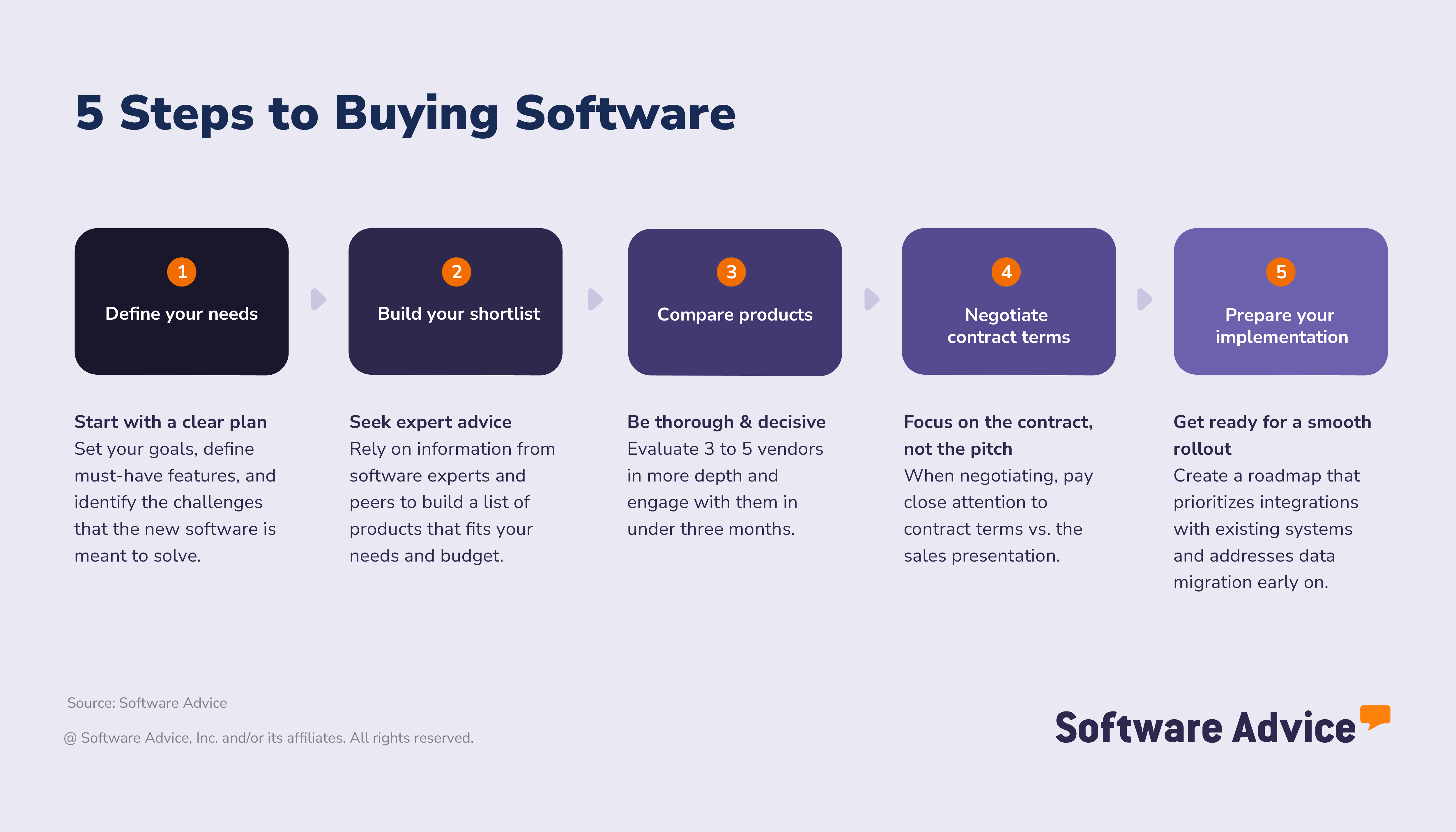
Step 1. Define your field service needs and goals
Forward planning makes a big difference for teams adopting new software. Our research revealed that over half (54%) of successful buyers plan and define their desired outcomes clearly, while fewer (44%) disappointed buyers do so.
Starting with a clear idea of what your software should do to achieve the goals you set helps avoid costly mistakes and potential implementation missteps. Here, it is important to align around the elements that will help you choose a field service system successfully. That means understanding:
Your organization’s primary objectives
Which benefits and features of FSM software align with your goals
Which business stakeholders will be crucial in informing your decision
Set your goals: What challenges should FSM software solve?
Start by defining the outcomes you want from your field service management software. Real scenarios make it easier to connect common challenges to clear, measurable goals. This helps you choose software based on your specific operational needs, not broad industry expectations.
Examples of common business goals and field service management software benefits:
Reducing delays and disruptions: Real-time job status, centralized work history, and technician updates create smoother workflows and avoid bottlenecks that could lead to missed appointments.
Improving compliance and documentation: Digital forms, service histories, and customer notes help centralize and maintain accurate service records.
Increasing technician productivity: Mobile access and streamlined workflows can help field technicians and staff access job records and instructions faster, with less friction.
Enhancing service quality: Scheduling tools, skill-based routing, GPS mapping, and digital checklists can help reduce travel time and errors when on-site with customers.
More proactive maintenance tasks: Tools that offer preventive maintenance features, such as automatic work order scheduling and dispatch for key assets at risk of failure, can help businesses avoid unexpected costs and downtime.
Mobile-friendly payment: Mobile payments enable faster invoicing and quicker customer receipt turnaround.
Set measurable success metrics
Use performance data to track progress, qualify return on investment (ROI), and show
Examples of key field service success metrics for SMBs:
Shorter response times (measure before and after deployment)
More proactive asset management
Better technician/staff utilization
Quicker invoicing and payment
Better customer satisfaction (assessed by post-service reviews and surveys)
Set your requirements: Map business goals to features
Start with the essentials
Understanding the key field service features that align with your company’s strategic goals can help you choose a tool that delivers the outcomes desired. Some common targets that field service companies might prioritize include:
Goal area | Business goal (outcome) | Helpful features |
Scheduling and dispatching | Improve job assignment speed and accuracy | Smart scheduling tools Skill and location-based dispatch Routing tools |
Work order management | Enhance task visibility and response times | Work order dashboard Mobile app Real-time status updates |
Technician productivity | Allow faster and better job completion quality | Digital signatures Time tracking Mobile app |
Customer communication | Provide clearer updates and avoid missed appointments | Appointment reminders Technician ETA notifications Customer self-service portal |
Asset and equipment tracking | Maintain tools and keep accurate records on assets and equipment | Equipment history logs GPS location mapping Barcode QR, RFID scanning |
Reporting and performance tracking | Understand performance better and find improvement areas | Customizable reports Audit trails KPI dashboards |
Our advisors can help you identify your field service priorities to better understand how your goals might map to features. Schedule a call or chat online with one of our team members today for personalized assistance.
After mapping goals to features, consider how your needs will evolve. Even if you start with basics, look at advanced features that may become important as you scale.
Identify stakeholders: who needs to be involved for a successful field service software purchase?
Having a strong team around you helps you to find software that works well for your business needs. That means involving the right stakeholders and doing this early can help improve your chances of success.
Many field service software buyers often neglect this step. Only 36% prioritize forming a cross-functional stakeholder team. While field service teams and managers will be your primary users, you should involve IT, finance and compliance teams in the decision to avoid roadblocks. The result: a purchase that supports the whole operation—not just one team. Consider the following:
Which teams should evaluate terms and fine print?
Generally, it is best to involve both field staff and those dispatching them, such as managers, to understand functional needs from both sides of the operation. Additionally, finance and IT should be involved to make sure technical requirements are understood and contract terms are reviewed correctly.
Who should approve the purchase?
The final decision should be assessed by your company leadership and by any internal procurement and legal teams.
Expert tip for SMBs:
“Finding the right FSM tool requires speaking to the people who use and manage service operations daily, such as dispatchers and technicians, to understand any requirement oversights and pinpoint where you can obtain the most value.” - Laura Burgess, Content Analyst specializing in field service and construction software
Step 2. Build your shortlist and seek expert advice
There are key differences in decision-making between successful and disappointed software buyers when approaching market research. For example, it is more common for successful adopters to methodically compare options using expert-backed sources and user feedback.
When looking at our analysis of successful adopters vs. disappointed buyers, we see the following disparities:
52% of successful adopters use industry experts vs. 38% of disappointed buyers
43% used software comparison sites, compared to 35%
33% checked user reviews vs. 32%
Disappointed buyers, however, focused more on generative AI tools (42% vs 32%)
More generic AI tools are generally better at providing quick summaries of information than at deeper, more structured analysis of verified data. This can make them less reliable for high-stakes decisions, or for more refined product research you might need in software selection.
Get advice from real people
Field management software advisors provide expert guidance on software selection and help SMBs avoid common buying mistakes. This is thanks to structured guidance and real-world implementation examples rather than simply product specifications or marketing buzz.
Advisors can help SMBs:
Understand how FSM features align around workflows, sectoral needs, or business size.
Compare vendors based on support, ease of use, and integration risks.
Plan a smoother implementation and onboarding process.
Speaking with an advisor helps field service software buyers gain more clarity on their shortlist and avoid a costly mistake. If you need any help in choosing a field service management software platform, connect with an advisor for one-on-one guidance.
How to leverage user reviews
User feedback is another way to get an objective overview of a field service management product. This can prove powerful, with almost four-in-ten FSM professionals considering them an influential source of information on software.
To make sure reviews support your decision, it’s best to approach them with these points in mind:
Align on feedback from similar companies: As field service management spans a broad range of businesses, try to find reviews from teams in a similar situation to yours.
Look for detailed feedback: Pay especially close attention to comments on dispatching, routing, mobile access, and job order management.
Prioritize recent reviews: Sort feedback to focus on the last 6-12 months to reflect any product changes, upgrades, or pricing differences.
Compare star ratings and written feedback: A simple 5-star rating with little detail won’t tell you as much as a lower rating with a detailed explanation.
Spot recurring themes: Pay attention to issues that occur frequently, especially if they mention mobile app issues, integration issues, or a lack of customer support, which may require deeper investigation during research.
Expert tip for SMBs:
“After conducting research, narrow down your list to 3-4 top candidates that you can engage with for demos and free trials. This makes it easier to compare the relative strengths of the final choices.” - Laura Burgess
How much does field service management software typically cost?
Pricing for field service software is usually charged on a monthly subscription basis. These start at $55 or under per month for simpler, entry-level options, while more advanced, premium systems can cost $165 per month or higher. [4]
However, as some systems use per-user, per-month pricing, keeping on top of how many user licenses you buy can be important to prevent costs running away from expectations.
Budgeting tip: While FSM tools are usually charged at a monthly flat rate or per-user, per-month, it is important to look beyond the monthly costs and consider the full cost of ownership. This is especially true if there are extra costs involved for other elements, such as transactions, data migration, or integration access.
How do FSM pricing models compare?
When choosing an FSM system, pay careful attention to the pricing model to avoid unexpected costs and to properly weigh up the value proposition for your business.
Subscription vs. per-user pricing: Monthly or annual fees are usually charged per user, per site, or at a flat rate.
Flexible models: Some platforms offer ‘freemium’ tiers or trials, tiered subscriptions, or other pay-as-you-go options.
Hidden fees: Check for additional fees for feature add-ons, onboarding, integrations, or premium support.
When assessing software options in FSM, it’s sensible to prioritize transparent pricing and subscription tiers that provide, as closely as possible, the essential functionality your business needs, to avoid paying for unnecessary features.
Expert tip for SMBs:
“Get as much detail as you can from vendors. Always ask to see a detailed price breakdown for your scenario that accounts for implementation, training support, and upgrades. This can help you compare your shortlisted software more comprehensively.” - Laura Burgess
Step 3. Compare field service products and take decisive action
After exploring the options, the next step is to narrow your list and identify your final choice. At this point, it’s essential to gain hands-on experience through tests, such as trials and demos.
Generally, successful software buyers get to this stage within a relatively concise time frame and create focused shortlists:
92% list five or fewer products on their shortlist
68% decide on software in under three months
There are hundreds of field service-aligned software systems that companies can use for functionality, which is why screening vendors carefully is critical. To make sure you can pinpoint an option that fits your company’s needs effectively, focus on:
Business fit: Focus on software that fits your operation’s size and set-up, such as if you operate across multiple sites.
Sector focus: Prioritize products that fit your precise sector better, such as HVAC, electrical contracting, or cleaning.
Regulatory compliance: Ensure the options you shortlist have the means to comply with the regulatory frameworks in your sector, for example, OSHA or HIPAA.
Integration flexibility: Look carefully at options that can connect easily with other software in your tech stack.
Implementation support: Consider vendors that offer unambiguous training resources, onboarding, and customer support.
Transparent pricing: Focus on products that clearly outline pricing tiers, trial options, and subscription flexibility.
User experience: Check verified feedback from similar businesses in size and focus to yours, and identify how the software helped them solve issues and tackle day-to-day tasks.
After deciding on your shortlist, you’re ready to move on to the next step: evaluating vendors based on the specific features and functionality you need for strong ROI.
Evaluation checklist
Use our checklist to make a more informed decision about whether a field service system aligns with your business requirements and operations. This can help you identify practical factors and quantify usability, scalability, and long-term value as you manage trials and demos.
How to schedule demos with FSM vendors
As you get closer to your final decision, hands-on experience with the software becomes increasingly necessary. Booking a demo with a vendor allows you to better understand whether the system works as intended across your workflows, integrations, and use cases. This can help, especially if you need your ideal tool to fit a specific sector, such as lawn care, plumbing, or HVAC.
Request tailored demos: Ask vendors to walk you through specific tasks you need done, such as rescheduling field staff or updating tasks while on the job.
Test mobile access: Ensure field teams can access systems without disruption.
Expert tip for SMBs:
“It can help to request more than one demo to cater to different types of stakeholder decision-making. For instance, book one for your main field service team to assess everyday work tasks in the system and another for your technical team to focus on security, compliance, and integration.” - Laura Burgess
What should you ask vendors when evaluating options?
When evaluating options, SMBs shouldn’t just plan around features and pricing. Ask questions that help you probe deeper into how well the product can fit around your specific operations and workflows, team skills, and goals in the long term.
Try starting with these questions:
How does the platform allow me to reassign field staff?
What kind of real-time notifications and updates are available?
Does the system allow us to track tools and assets as well?
How is onboarding and training support offered?
How are data backups and security managed?
What integrations can be connected within this package?
Step 4. Negotiate the contract terms and pricing
Before finalizing your purchase, it’s vital to understand the costs, contract details, and internal teams you’ll need involved to strike the final deal. Focusing your efforts on understanding the terms of the package and pricing to help avoid disappointment and extra costs down the line.
Glossary of field service management contract terms
When evaluating a contract with a field service management software vendor, understanding the key terms that define responsibilities, service expectations, and security and data protection is crucial. These will lay the foundation for a reliable agreement and minimize operational issues.
Master Services Agreement (MSA): The primary contract between the FSM software vendor and your company. This sets the scope for responsibilities, services, payment, data handling, and dispute resolutions.
Service Level Agreement (SLA): Defines measurable service levels for uptime, support response time, system performance, and related metrics. This governs how quickly issues such as software maintenance, login failures, and mobile app disruptions are to be resolved, and what compensation applies when targets are missed.
Work order and scheduling terms: Clarify how work orders are created, processed, and stored, which parties control scheduling rules, and whether the system supports field updates, automated notifications, and job history retention.
Data and asset management terms: Outline data ownership, access rights, retention policies, and liability for customer information, service histories, technician data, asset information, and any other key records kept on the system.
Compliance and reporting requirements: Details how both parties must ensure regulatory practices (OSHA, HIPAA, etc) are kept and who provides documentation or audit material.
Vendor and subcontractor management: Explains how third-party contractors, field staff, or integrated partner tools are handled in the contract, including responsibilities with regard to data accuracy, mobile access, and performance monitoring.
Downtime and performance penalties: Define acceptable downtime thresholds, how performance issues should be measured, and remediation if reliability levels aren’t maintained.
Expert tip for SMBs:
“Make sure the key operational requirements, like scheduling, mobile access, or reporting, are clearly defined before you sign the agreement. Check any vague language and make sure it is clarified in writing to avoid potential disruption or misunderstandings about contract scope.” - Laura Burgess
What tips can help you negotiate with FSM software vendors?
There is still room for negotiation, even if vendors list specific pricing packages. Discussing these options with a vendor, rather than accepting a standard bundle of features, can help reduce costs or help ensure you receive additional functionality.
Here are some focal areas you can discuss:
Support and service levels: Request specific commitments on support hours, response times, escalation paths, and the availability of live support when needed.
Price locks and renewal caps: Check if there are limits on annual price increases to keep costs predictable over time.
Negotiate data ownership and compliance terms: Ensure your business retains ownership of its service data and that the vendor meets your security, privacy, and reporting requirements.
Customize your package: Ask to remove any unnecessary features and focus on adding features that better fit your workflow.
Review contract flexibility: Study and investigate ways that you can scale plans, seats, or add-ons up and down, or exit the contract without incurring harsh penalties.
Negotiate pricing: Explore possibilities for multi-year discounts, bundled modules, lower per-user pricing, or longer payment cycles. Also, ask whether vendors will match competitor quotes.
Always clarify which team members specifically need licenses to keep costs down. Not every member of staff will need full access to the platform. For example:
Dispatchers/office managers: Will need full scheduling, work order, and reporting access.
Field staff: Will often just need mobile access to update on job status, send photos from assignments or add notes, and signatures.
Supervisors/project leads: May need access to read-only status reports and dashboards.
Expert tip for SMBs:
“Request sample contracts early on in the process. This can give you more time to review the terms ahead of the negotiation, prepare questions, and for your legal or procurement teams to spot problematic clauses.” - Laura Burgess
Step 5. Prepare the implementation steps to ensure long-term success
There’s still work to be done once you make your pick and sign a contract for FSM software. Ensuring a smooth rollout is vital to make sure the tool can be adopted quickly, with as little disruption or resistance as possible. Here are some tips to make sure the implementation phase goes well.
Your implementation game plan: onboarding, migration and everything inbetween
Creating a structured implementation plan for a new field service system reduces disruption, speeds adoption, and keeps your team aligned. Focus on the following essentials:
Onboarding
Point of contact (POC): Choose a primary contact for your business, and ask the vendor for a direct POC to manage communication, approvals, and troubleshooting.
Timeframe: Define the onboarding milestones, covering all steps from setup to full rollout. Make sure to set realistic timelines for configuration, testing, and staff training.
Team involvement: Identify the functional teams that will need to help with implementation (e.g., dispatch, finance, IT, or a select group of field technicians). Involving a mix of skills at this stage helps improve adoption and reduces resistance.
Integration and data migration
Data to migrate: Decide which records need to be imported, such as customer data, inventory lists, job history, or service agreements.
Integrations: Identify the required connections to other systems in your tech stack, such as accounting, CRM, and GPS.
Vendor support: Understand the level of support available from the vendor for integrations and data migration.
Testing
Configuration checks: Ask staff to test real workflows, mobile tasks, invoicing, and other essential functions to ensure the setup is tuned to your daily operations.
Efficiency review: Ensure the configuration aligns with your process and reduces time and effort. Adjust based on initial feedback before the main rollout.
Documentation and rollout
Process documentation: Assign responsibility for documenting best practices, mobile workflows, and escalation paths.
Training: Choose the person who will teach your dispatchers and field staff how to use the software. Make sure to plan regular catch-ups and refreshers over the first months of rollout.
Expert tip for SMBs:
“Schedule a post-launch review post the first 1-2 months after you go live fully to go over feedback, focus on issues that need addressing, and improve workflows. This will help continuously improve the FSM tool for the long term.” - Laura Burgess
About our contributors
Author
Laura Burgess is a content analyst at Software Advice with more than a decade of journalism experience and particular knowledge of human resources-related topics.
Laura’s research and analysis is informed by more than 350,000 authentic user reviews on Software Advice and over 60,000 interactions between Software Advice software advisors and software buyers. Laura also regularly analyzes market sentiment by conducting surveys of business leaders in the HR, sales, and construction tech spaces so she can provide the most up-to-date and helpful information to small and midsize businesses purchasing software or services.
She has written for various industries on technology trends. Laura's research has been featured in Australian publications such as ABC News, HR Leader, Inside Retail, Dynamic Business, Retail Biz, and Technology Decisions. She has also appeared in various news segments on Ticker News, Channel 9 News, and SBS Mandarin, quoting her research.
When Laura isn't helping small to midsize businesses with insight on tech trends, she enjoys traveling and seeing her favorite music artists live.
Editor
Parul Sharma is a content editor at Software Advice with expertise in curating content for various niches, including SaaS, digital marketing, and search engine optimization. With over half a decade of experience in content writing and editing, Parul has the expertise to simplify complex terms into engaging, valuable content for targeted audiences. She completed her graduation and post-graduation in English literature from Delhi University and was awarded the Dr. Asha Sahni Memorial Award for being the highest scorer in her graduating class.
Parul has contributed to the news, lifestyle, education, and health verticle of DNA India, India’s premier media channel. Outside of work, she can be found curating healthy recipes, coloring in mandala books, and spending quality time with her family.
Advisor
Jakub Vaughn is a senior advisor. He joined Software Advice in 2022 as a software advisor. He is based in Fort Myers, FL.
As part of the software advisor team, Jakub helps professionals from a wide range of industries who are seeking tools, including CMMS, manufacturing, inventory management, and help desk software. He provides a short list of personalized technology recommendations based on budget, business goals, and other specific needs.
Jakub’s favorite part of being a software advisor is educating buyers with different needs on software systems available to them and their business.
Sources
The 2026 Software Buying Trends survey was conducted online in August 2025 among 3,385 respondents in Australia (n=281), Brazil (n=278), Canada (n=293), France (n=283), Germany (n=279), India (n=260), Italy (n=263), Mexico (n=288), Spain (n=273), the U.K. (n=299), and the U.S. (n=588), at businesses across multiple industries, ages (1 year in business or longer), and sizes (5 or more employees). Business sizes represented in the survey include: 1,676 small (5-249 full-time employees), 822 midsize (250-999), and 887 enterprise (1,000+). The goal of this study was to understand the timelines, organizational challenges, research behaviors, and adoption processes of business software buyers. Respondents were screened to ensure their involvement in business software purchasing decisions.
Software Advice reviews data: Reviews are collected from verified users for individual software products.
Software Advice advisor call notes: Findings are based on data from telephonic conversations that Software Advice’s advisor team had with small to mid-sized businesses seeking field service management tools.
Software Advice software pricing data: Only products with publicly available pricing information and qualified software products within the category are included in the pricing analysis.
Field Service Management FAQs
- What is the best field management software?
According to our analysis of reviews, Jobber has the highest overall average score among our list of FSM FrontRunners, as rated by verified reviewers on Software Advice.
- What does field service management software do?
Field service management software assists organizations in managing resources and maintaining communication with field employees. These systems boost productivity by facilitating continuous contact between the dispatch office and off-site personnel. They can also enhance the customer experience by providing field staff access to service histories, mapping services, scheduling tools, and the organization's knowledge base.
- How much does field service management software cost?
Field service management software is typically priced monthly, either as a flat fee or per user per month. Starting prices vary, but many buyers expect to spend $55 or less per month on entry-level systems [3]. Additionally, some vendors offer free tiers of their more basic packages. However, at the other end of the pricing scale, more advanced or premium systems can cost buyers up to $165 per month.
- What is a field service example?
HVAC maintenance is one example of field service, since it is performed by a company at the customer’s home or business rather than at the service provider’s office. Other examples include plumbing, locksmithing, pest control, landscaping, and appliance installation.
- What are the three key elements of field service management?
The three key elements of field service management are performance tracking, real-time communication, and scheduling and dispatching. Performance tracking involves monitoring and analyzing metrics like response times, first-time fix rates, and customer satisfaction. Real-time communication allows field service professionals to interact with support and management, enabling instant updates, remote diagnostics, and quick issue resolution. Scheduling and dispatching allocates tasks to technicians based on their skills, location, and availability.