
Best Portal Software of 2026
Updated January 27, 2025 at 9:53 AM
- Popular Comparisons
- FrontRunners
- Buyers Guide
Compare Products
Showing 1 - 25 of 178 products
Compare Products
Sort by
Reviews: Sorts listings by the number of user reviews we have published, greatest to least.
Average Rating: Sorts listings by overall star rating based on user reviews, highest to lowest.
Alphabetically (A-Z): Sorts listings by product name from A to Z.

Nasdaq Boardvantage is a comprehensive board management solution and portal. It is designed to enhance efficiency, productivity ...Read more about Nasdaq Boardvantage


Nasdaq Boardvantage's Best Rated Features
See All
Nasdaq Boardvantage's Worst Rated Features
See All

Workfolio Client Microsites allows businesses to demonstrate relevant, real-life examples of work to clients, prospects and refe...Read more about Workfolio Client Microsites


OnBoard is an AI-powered board management software designed to simplify governance processes for boards and leadership teams acr...Read more about OnBoard

OnBoard's Best Rated Features
See All
OnBoard's Worst Rated Features
See All

HUB is the go-to intranet for SMEs looking to find a smarter way to work and communicate as a team, at an affordable rate. With...Read more about Hub

Hub's Best Rated Features
See All
Hub's Worst Rated Features
See All

Unily is the award-winning Employee Experience Platform trusted by many of the world’s most iconic enterprises—from British Airw...Read more about Unily

Unily's Best Rated Features
See All
Unily's Worst Rated Features
See All

LaunchBay is the all-in-one client onboarding automation platform for growing B2B service and software teams. We replace scatter...Read more about LaunchBay


LaunchBay's Best Rated Features
See All
LaunchBay's Worst Rated Features
See All

Aprio is a comprehensive board management software that streamlines the board meeting process. The software caters to a wide ran...Read more about Aprio

Aprio's Best Rated Features
See All
Aprio's Worst Rated Features
See All

SuiteDash is the ultimate All-in-One Business Software multi-tool tailored for small to medium-sized businesses, designed to str...Read more about SuiteDash


SuiteDash's Best Rated Features
See All
SuiteDash's Worst Rated Features
See All

BoardPro is a cloud-based board management platform to manage board workflows, daily enterprise functions and documentation. It ...Read more about BoardPro
BoardPro's Best Rated Features
See All
BoardPro's Worst Rated Features
See All

Clinked is a powerful cloud-based portal software that provides an efficient platform for businesses to collaborate, manage proj...Read more about Clinked

Clinked's Best Rated Features
See All
Clinked's Worst Rated Features
See All

kitchen.co is a client portal software for agencies that enables users to centralize all projects, client requests, tasks, messa...Read more about kitchen.co
kitchen.co's Best Rated Features
See All
kitchen.co's Worst Rated Features
See All

Buk is Latin America’s leading all-in-one HR platform. We provide software that centralizes, digitizes, and automates the entir...Read more about Buk


Buk's Best Rated Features
See All
Buk's Worst Rated Features
See All

Knowa is a multi-award-winning Board Management and Governance platform, recognised for its AI-powered technology, ease of use, ...Read more about Knowa


Knowa's Best Rated Features
See All
Knowa's Worst Rated Features
See All

Simpplr is an AI-powered employee experience platform designed to enhance workplace communication, engagement, and task manageme...Read more about Simpplr
Simpplr's Best Rated Features
See All
Simpplr's Worst Rated Features
See All

HulerHub reduces tech sprawl and supports HR teams to deliver first-class personalised digital experiences to employees on any d...Read more about HulerHub

HulerHub's Best Rated Features
See All
HulerHub's Worst Rated Features
See All

ThoughtFarmer is a best-in-class intranet platform that helps organizations connect employees, streamline internal communication...Read more about ThoughtFarmer
ThoughtFarmer's Best Rated Features
See All
ThoughtFarmer's Worst Rated Features
See All

Glasscubes offers cloud-based collaboration solution for businesses. It provides for file sharing, collaboration and document ma...Read more about Glasscubes

Glasscubes's Best Rated Features
See All
Glasscubes's Worst Rated Features
See All

Malcom! is a customer self service platform that helps businesses of all sizes in any sector provide a self service solution to ...Read more about Malcolm!


Build beautiful forms, access-controlled databases, and highly customizable business apps without any code - all in one place. ...Read more about Formaloo
Formaloo's Best Rated Features
See All
Formaloo's Worst Rated Features
See All

Continu is a modern learning management system (LMS) designed for mid to large-scale organizations. The platform is built to cen...Read more about Continu
Continu's Best Rated Features
See All
Continu's Worst Rated Features
See All

Govenda is a cloud-based board success platform designed to be a corporation's trusted technology partner in meeting modern gov...Read more about Govenda
Govenda's Best Rated Features
See All
Govenda's Worst Rated Features
See All

Origami by Sharemuch Software is an intranet solution designed for various industry verticals. The solution helps organizations ...Read more about Origami Connect

Origami Connect's Best Rated Features
See All
Origami Connect's Worst Rated Features
See All

If you serve clients, you'll know how frustrating it can be to get information from them. Delays can often span weeks or months...Read more about Content Snare

CyberSentriq is the unified brand created through the merger of TitanHQ and Redstor, bringing together more than 25 years of awa...Read more about LiveAgent
LiveAgent's Best Rated Features
See All
LiveAgent's Worst Rated Features
See All

eHabilis is a cloud-based training and learning management software that helps companies manage their knowledge assets, foster c...Read more about eHabilis

Popular Comparisons



Your Guide to Top Portal Software, April 2025
Software Advice uses reviews from real software users to highlight the top-rated Portal products in North America.
Learn how products are chosenExplore FrontRunners


“Usability” includes user ratings for Functionality and Ease of Use.
“Customer Satisfaction” includes user ratings for Customer Support, Likelihood to Recommend and Value for Money.
Reviews analysis period: The reviews analysis period spans two years and ends the 15th of the month prior to publication.
Buyers Guide
This detailed guide will help you find and buy the right portal software for you and your business.
Last Updated on January 27, 2025Your business doesn’t operate in a bubble, so why should your business software? Depending on who you ask, different parties related to your organization are going to have drastically different needs with regards to your internal systems and information.
For example, if you have an ad agency on retainer, they need easy access to your marketing materials. Your distributors, on the other hand, need to be able to look up important product information at a moment’s notice. Employees need a comprehensive intranet to collaborate and direct themselves to various applications, while customers require a more tailored interface to do things like create an online account and submit support tickets.
If you’re having trouble curating the online experience for different user groups, consider investing in portal software. These applications can help you customize the “entryway” to your enterprise business systems.
In this Buyer’s Guide, you’ll learn what portal software is, common functionality, pricing information and more.
Let’s get started:
Common Functionality of Portal Software Systems
How Much Does Portal Software Cost?
Additional Portal Software Resources
What Is Portal Software?
Portal software allows companies to customize the digital gateway through which different types of users access enterprise software systems. If first impressions matter (and they do), portal software helps your business make a great one on employees, customers, business partners and more.
Portal software is somewhat of a catch-all term for a variety of different software systems that cater to the needs of different end users. Here are some common examples:
Employee portals, or intranets, allow workers to share and discuss information, read company announcements and log into different internal business applications.
Customer portals allow patrons to create an online account, search through your knowledge base, pay bills and submit service requests.
Client portals allow external users to securely access internal digital files, information and tools.
Patient portals are designed for medical practices so patients can log in and perform tasks related to scheduling, billing and more.
Board portals or board management software helps businesses with all aspects of corporate governance such as scheduling, content sharing, and other features.
Web portal software helps businesses collate information from multiple sources together to provide employees, customers and suppliers with a single access point to all information.
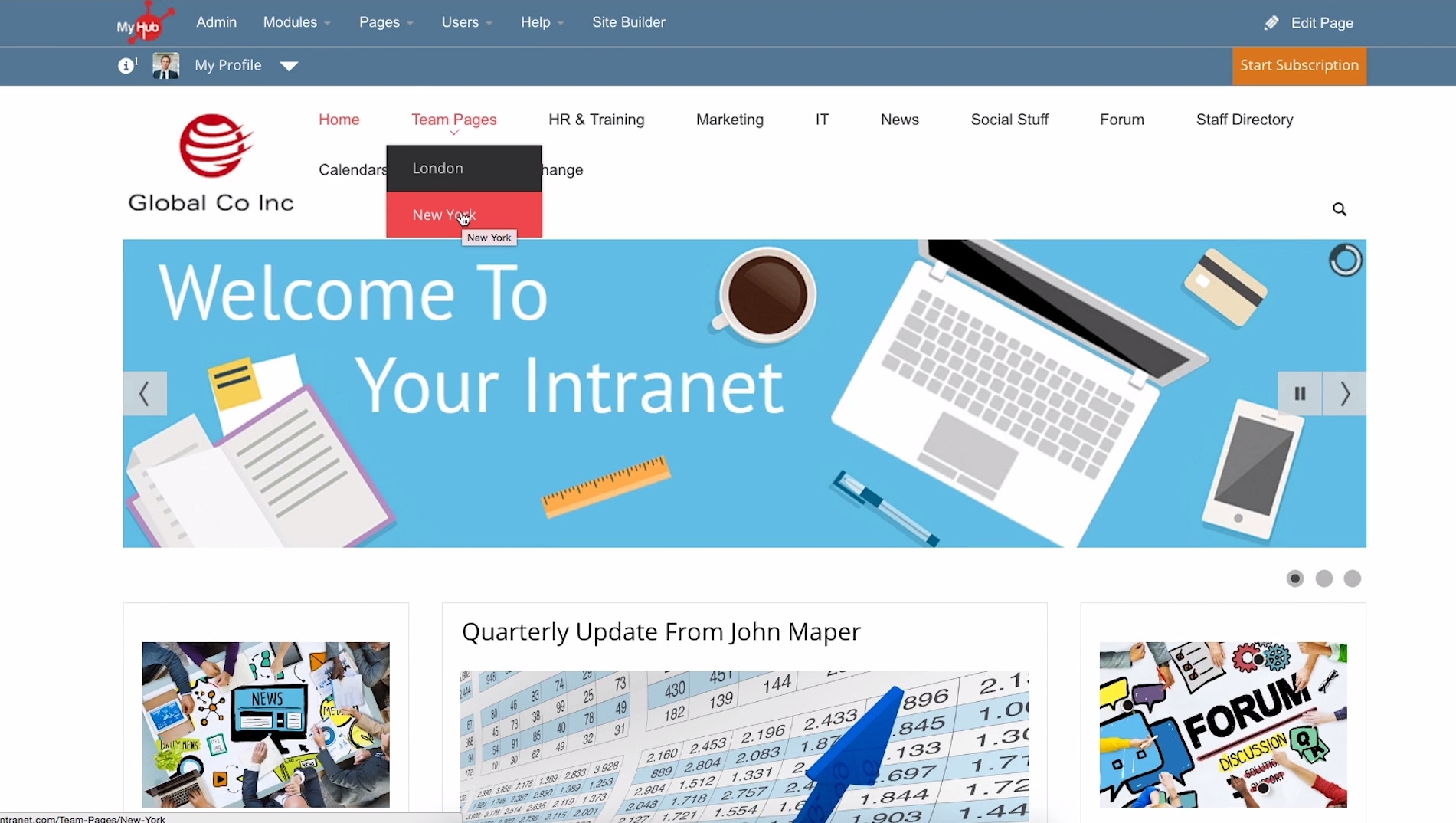
Company intranet in MyHub
Portal software is somewhat of a catch-all term for a variety of different software systems that cater to the needs of different end users. Here are some common examples:
Employee portals, or intranets, allow workers to share and discuss information, read company announcements and log into different internal business applications.
Customer portals allow patrons to create an online account, search through your knowledge base, pay bills and submit service requests.
Client portals allow external users to securely access internal digital files, information and tools.
Patient portals are designed for medical practices so patients can log in and perform tasks related to scheduling, billing and more.
Board portals or board management software helps businesses with all aspects of corporate governance such as scheduling, content sharing, and other features.
Common Functionality of Portal Software Systems
Though web portal software can have wildly different functionality depending on the intended end user, there are a number of common core features that tie these systems together:
Software integration | Integrate with other internal software systems (ERP, EMR, CRM) so users can access necessary functions securely through the portal. |
Single sign on (SSO) | Users create a unique login and password to access a number of separate platforms at once. |
System directory | Point users in the right direction for different business applications and functions. |
Custom user permissions | Group users together and control the information and tools that each group can access. |
Benefits of Portal Software
When implemented properly, portal software can offer a slew of benefits to different organizations. If you’re having trouble convincing higher-ups to invest in a dedicated web portal system, consider throwing these benefits in your business case:
Portal software saves precious time. According to a 2016 survey by Adobe, white-collar workers in the U.S. spend an average of 4.1 hours a day reading and answering emails. If you’re constantly emailing back-and-forth with customers or business partners, portal software can alleviate a lot of this workload by empowering users to find information or troubleshoot issues themselves.
Portal software improves business relations. Self-service doesn’t just benefit internal users. In a Software Advice survey, we found almost three-quarters of customers first search for answers online when they encounter a problem. Another survey by ZenDesk adds that two-thirds of customers prefer self-service over speaking to a company representative. Implementing self-service capabilities through portal software can let customers, clients, employees and more solve problems using their preferred method. This can eliminate inconveniences and improve relations.
What Consumers Do First When They Have Questions for a Company
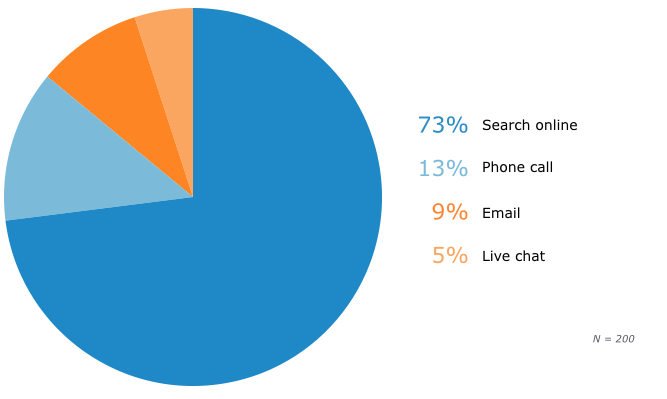
Source: How a Customer Self-Service Portal Improves Customer Experience
Portal software strengthens security. Handing external users access to sensitive internal materials is always a scary proposition, and user permissions preset in central business systems aren’t always up to the task of alleviating fears. Often times, these permissions can be too lax (giving users access to capabilities/information they shouldn’t have) or too restrictive (not allowing end users to do what they need). With portal software, companies get more options with regards to user access in order to better customize permissions for different groups and strengthen security.
How Much Does Portal Software Cost?
How much a specific portal software system costs and how often your business has to make payments depends on your preferred method of deployment. There are generally two different types of deployment models for portal software with different pricing structures:
With an on-premise deployment, you pay one large fee upfront to host the software on your own servers. Portal software vendors typically offer different pricing tiers depending on how many users you’ll need (one tier for 2,000 users, one for 5,000, etc.). This upfront fee can range anywhere from $10,000 to more than $100,000.
With a software-as-a-service (SaaS) deployment, you pay a month-to-month subscription fee for the vendor to host the software on their own servers for you to access via a web browser. In this model, the subscription fee is often based on each individual user your system has and can range from $5 to $15+ per user per month.
There may be other costs associated with your portal software as well, for things like setup, training or support. It’s important to note, however, that neither deployment option is necessarily better or cheaper than the other in most cases.
Additional Portal Software Resources
The information found in the Buyer’s Guide is just a starting point. If you want to learn more about portal software, here are a few resources that can help:
Find out what the best patient portals have in common. If you’re a medical practice overwhelmed by patient portal options, this helpful article talks about top features, implementation tips and more.
Learn how portal software can improve the customer experience. We’ve barely skimmed the surface on how portal software can benefit your customers. This in-depth article goes into more detail on how these systems are crucial to the online customer experience.