


Best Remote Desktop Software of 2026
Updated January 27, 2025 at 9:56 AM
- Popular Comparisons
- FrontRunners
- Buyers Guide
- Related Software
Compare Products
Showing 1 - 25 of 89 products
Compare Products
Sort by
Reviews: Sorts listings by the number of user reviews we have published, greatest to least.
Average Rating: Sorts listings by overall star rating based on user reviews, highest to lowest.
Alphabetically (A-Z): Sorts listings by product name from A to Z.

ISL Online is a remote support solution for virtually all industry verticals including healthcare, information technology, unive...Read more about ISL Light


ISL Light's Best Rated Features
See All
ISL Light's Worst Rated Features
See All

GoToMyPC is a remote access solution that enables businesses to access and share data across multiple devices such as desktops a...Read more about GoToMyPC
GoToMyPC's Best Rated Features
See All
GoToMyPC's Worst Rated Features
See All

Zoho Assist is a cloud-based remote support software designed for organizations of all sizes. The solution allows IT technicians...Read more about Zoho Assist


Zoho Assist's Best Rated Features
See All
Zoho Assist's Worst Rated Features
See All

Splashtop is a software solution for both remote access and remote support. Boasting 30+ million customers worldwide and users a...Read more about Splashtop


Splashtop's Best Rated Features
See All
Splashtop's Worst Rated Features
See All

RemotePC is a cloud-based and on-premise remote access management solution designed to help businesses communicate with clients,...Read more about RemotePC
RemotePC's Best Rated Features
See All
RemotePC's Worst Rated Features
See All

ScreenConnect is a cloud-based operations management solution that allows technicians to perform remote support, gain remote acc...Read more about ScreenConnect

ScreenConnect's Best Rated Features
See All
ScreenConnect's Worst Rated Features
See All

Supremo is a remote desktop software for Windows, macOS, iOS, Android, and Linux. Using placed servers throughout the world, it ...Read more about Supremo Remote Desktop
Supremo Remote Desktop 's Best Rated Features
See All
Supremo Remote Desktop 's Worst Rated Features
See All

Endpoint Central MSP is an on-premise desktop and mobile device management (MDM) solution designed for managed service providers...Read more about ManageEngine Endpoint Central MSP
ManageEngine Endpoint Central MSP's Best Rated Features
See All
ManageEngine Endpoint Central MSP's Worst Rated Features
See All

MobaXterm is a remote desktop solution which provides businesses with networking tools such as VNC, RDP or FTP and various Unix ...Read more about MobaXTerm
MobaXTerm's Best Rated Features
See All
MobaXTerm's Worst Rated Features
See All

EV Reach is an on-premise IT remote system management solution. Key features include advanced remote control, background system ...Read more about EV Reach

EV Reach's Best Rated Features
See All
EV Reach's Worst Rated Features
See All

Remote Utilities is an advanced remote desktop solution designed to empower IT professionals. It enables the monitoring of scree...Read more about Remote Utilities
Remote Utilities's Best Rated Features
See All
Remote Utilities's Worst Rated Features
See All

LogMeIn Rescue by GoTo is a cloud-based remote support tool that helps organizations provide technical support to their customer...Read more about LogMeIn Rescue
LogMeIn Rescue's Best Rated Features
See All
LogMeIn Rescue's Worst Rated Features
See All

Remote Desktop Manager (RDM) is an all-in-one remote connection and credential management solution designed to help IT professio...Read more about Remote Desktop Manager

Remote Desktop Manager's Best Rated Features
See All
Remote Desktop Manager's Worst Rated Features
See All

As a leading global technology company, TeamViewer offers a comprehensive suite of digital solutions, anchored by its industry-l...Read more about TeamViewer

TeamViewer's Best Rated Features
See All
TeamViewer's Worst Rated Features
See All

AnyDesk is a remote support solution that helps users access files and documents on any device across multiple locations. Key fe...Read more about AnyDesk
AnyDesk's Best Rated Features
See All
AnyDesk's Worst Rated Features
See All

Amazon WorkSpaces is a cloud-based solution which enables businesses to provision virtual Microsoft Windows or Amazon Linux desk...Read more about Amazon WorkSpaces
Amazon WorkSpaces's Best Rated Features
See All
Amazon WorkSpaces's Worst Rated Features
See All

Built with today's SMBs in mind, LogMeIn Resolve is an all-in-one IT support software that offers everything you need to run you...Read more about LogMeIn Resolve


LogMeIn Resolve's Best Rated Features
See All
LogMeIn Resolve's Worst Rated Features
See All

VNC Connect allows businesses to download and share files instantly using the cloud or through direct line (LAN) activity. ...Read more about RealVNC Connect


RealVNC Connect's Best Rated Features
See All
RealVNC Connect's Worst Rated Features
See All

dualmon is a remote support solution designed for small and midsize companies. It offers file transfer, remote printing, user ma...Read more about dualmon


dualmon's Best Rated Features
See All
dualmon's Worst Rated Features
See All

FixMe.IT is a remote support software that enables users to connect to any remote computer. It caters to users from sole proprie...Read more about FixMe.IT
FixMe.IT's Best Rated Features
See All
FixMe.IT's Worst Rated Features
See All

Getscreen.me is a cloud-based SaaS platform for remote access to computers, servers and mobile devices right from the browser. C...Read more about Getscreen.me

Getscreen.me's Best Rated Features
See All
Getscreen.me's Worst Rated Features
See All

GoodAccess is a cybersecurity platform (SASE/SSE) that empowers medium-sized enterprises to easily implement Zero Trust Architec...Read more about GoodAccess

GoodAccess's Best Rated Features
See All
GoodAccess's Worst Rated Features
See All

Admin By Request is a cybersecurity solution designed to make comprehensive security simple. Our main goal is to enable enterpri...Read more about Admin By Request
Admin By Request's Best Rated Features
See All
Admin By Request's Worst Rated Features
See All

Need a remote access infrastructure to get your team to work remotely? Discover TSplus Remote Access, the best value-for-money ...Read more about TSPlus
TSPlus's Best Rated Features
See All
TSPlus's Worst Rated Features
See All

Kasm Workspaces is a container streaming platform for delivering browser, desktop and application workloads to the web browser. ...Read more about Kasm Workspaces


Kasm Workspaces's Best Rated Features
See All
Kasm Workspaces's Worst Rated Features
See All
Popular Comparisons



Your Guide to Top Remote Desktop Software, May 2025
Software Advice uses reviews from real software users to highlight the top-rated Remote Desktop products in North America.
Learn how products are chosenExplore FrontRunners


“Usability” includes user ratings for Functionality and Ease of Use.
“Customer Satisfaction” includes user ratings for Customer Support, Likelihood to Recommend and Value for Money.
Reviews analysis period: The reviews analysis period spans two years and ends the 15th of the month prior to publication.
Buyers Guide
This detailed guide will help you find and buy the right remote desktop software for you and your business.
Last Updated on January 27, 2025Most professionals working in a corporate environment are familiar with contacting IT support for technical glitches in their systems. In such scenarios, they usually begin with the tedious task of explaining the issue they are facing, which at times they themselves don’t fully understand.
This poses a challenge to the person seeking help as well as the person providing help, as offering assistance remotely can be tricky when the problem is unclear. Additionally, remotely instructing the complainant on how to fix the issue can be taxing and time-consuming for the IT support staff.
This is where remote desktop software comes in. Using this software, an IT support person can request access and control of a remote computer system. It allows them to operate the system remotely to find and troubleshoot the issue, after which they can transfer the control back to the original user.
While this is a classic use case of remote desktop software, it is not the only one. The tool can be used by technology vendors, software developers, independent professionals, and almost anyone who needs remote access to systems.
The tool has many uses and benefits such as reduced hardware costs and faster query resolution. We will discuss these and other essential details about the tool in this buyers guide.
Here's what we'll cover:
What is remote desktop software?
Remote desktop software is a tool that provides access to one or more computer systems that are not physically present on-site. This helps with activities such as accessing files, fixing technical glitches, or printing documents on remotely located systems.
The tool is provided either by the respective operating system vendor, such as Microsoft or Apple, or by a third-party vendor in the form of an app.
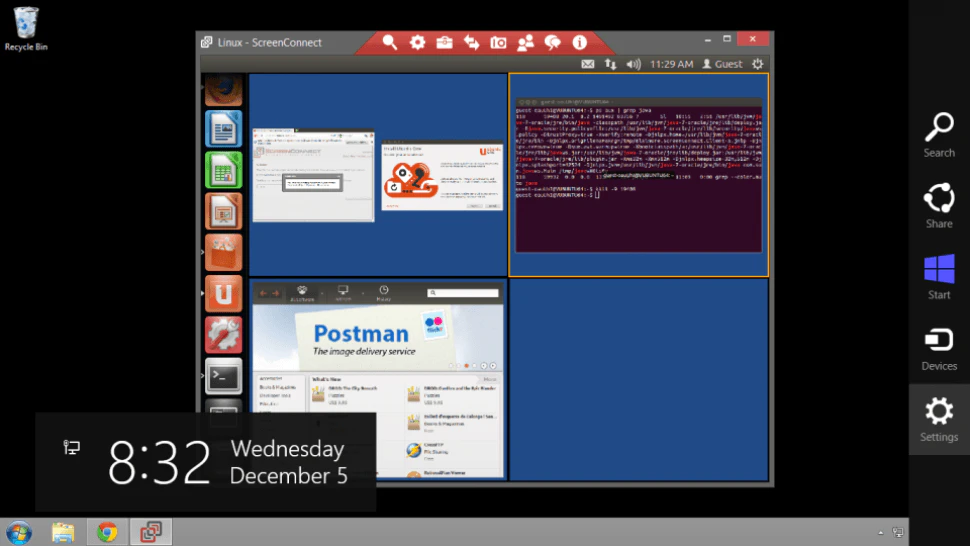
Remote desktop view in ConnectWise Control (Source)
Common features of remote desktop software
In this section, we’ll look at some of the common features of remote desktop software. These features will help you understand the basic capabilities a solution must offer for effective access to remote systems.
Access control | Take control of a computer system to operate it remotely by requesting access from the user. The control can be transferred back to the user later on. |
Real-time chat | Chat with the original user of the remote computer for queries or information such as passwords or query resolution status. |
Screen sharing | View and control a remote system’s screen and interact with it as you would with a local system. |
Screen recording | Record on-screen activity while sharing the screen. This helps audit activity and maintain screen recordings for future reference. |
Remote printing | Get access to files stored on a remote computer and print them using a local printer. This feature is particularly helpful for on-the-go employees as they can remotely access the files in their original system. |
What type of buyer are you?
There are two key types of buyers of remote desktop software. They differ based on their requirements and primary concerns.
Buyers looking for a commercial tool: Commercial remote access software is usually purchased by, but not limited to, business organizations. These tools are available for a fee and offer advanced features commonly required by businesses and enterprises.
Buyers looking for a free tool: Free remote access solutions are great for independent professionals or users that need the tool for personal use. These buyers usually have limited feature requirements and lack the budget needed for premium subscriptions.
Benefits of remote desktop software
The following are the key benefits of remote desktop software. These benefits enlist the business functions that are positively impacted by the tool and how they may improve.
Faster issue resolution: Ability to access computer systems remotely allows IT support teams to provide tech assistance as they would do in person. Being able to view and control computers remotely allows them to make changes to resolve technical issues.
Improved productivity: With this tool, employees can work from anywhere by accessing their computer systems remotely. This is particularly useful for software developers who may not be able to access or run code stored on their system without remote access.
Increased savings: Investing in additional hardware and servers to provide systems to geographically-scattered or on-the-move employees can put a strain on the IT budget. Businesses can avoid these costs by providing remote system access to employees while they use their personal systems to access the work computers.
Key considerations for selecting remote desktop software
As the last step to selecting a tool, keep a few additional factors in mind. These will help select a tool that is best suited to your business goals.
Usability: Before purchasing the tool, it’s essential to check if the tool can be operated without advanced IT knowledge or skills. For users without extensive technical know-how, the tool should provide remote access within a few simple steps and not after a complex and elaborate procedure.
Data security: It is essential to check if the vendor has been a victim of any data breach or hacking in the past as this can put your sensitive business or personal data at risk. A vendor with a clean record is always a safer option. Also, go through their data security features and check if they comply with the latest industry standards.
Connectivity speed: The more geographically-dispersed servers a vendor has, the better will be the connectivity. So check with the vendor about the count and location of servers.
Note: The applications selected in this article are examples to show a feature in context and are not intended as endorsements or recommendations. They have been obtained from sources believed to be reliable at the time of publication.