


Best Records Management software of 2026

- Popular Comparisons
- Buyers Guide
Compare Products
Showing 1 - 25 of 169 products
Compare Products
Sort by
Reviews: Sorts listings by the number of user reviews we have published, greatest to least.
Average Rating: Sorts listings by overall star rating based on user reviews, highest to lowest.
Alphabetically (A-Z): Sorts listings by product name from A to Z.

Revver is a cloud-based document management solution that helps businesses organize, find, sign and share digital documents on a...Read more about Revver


Revver's Best Rated Features
See All
Revver's Worst Rated Features
See All

Contentverse is document management for every department in every industry. It's a blank slate for your team to recreate your st...Read more about Contentverse


FileHold Enterprise: Powerful Document Management for Large Organizations! FileHold Enterprise is a comprehensive document mana...Read more about FileHold


FileHold's Best Rated Features
See All
FileHold's Worst Rated Features
See All

DocStar Enterprise Content Management helps midsize and large organizations securely capture, store, organize, and share documen...Read more about DocStar ECM

DocStar ECM's Best Rated Features
See All
DocStar ECM's Worst Rated Features
See All

Centralpoint, by Oxcyon is featured in Gartner’s Magic Quadrant for Digital Experience Platforms is a Microsoft based technology...Read more about Centralpoint


Since 2001, Doc.It Suite, a document management platform, has been available to accounting and tax professionals. Doc.It Suite o...Read more about Doc.It Suite

Optix document management and workflow solutions transform organizations from a jumbled, disorganized shared folder to a structu...Read more about Optix


Laserfiche is a cloud-based and on-premise document management platform suitable for businesses of all sizes in industries such ...Read more about Laserfiche
Laserfiche's Best Rated Features
See All
Laserfiche's Worst Rated Features
See All

Flexible and easy to use, Acquia DAM (Widen) helps brands manage and distribute assets across teams, tools, and channels. A high...Read more about Acquia DAM (Widen)

Acquia DAM (Widen)'s Best Rated Features
See All
Acquia DAM (Widen)'s Worst Rated Features
See All

ContractZen — Governance Cloud for Every Company. Everywhere. ContractZen is an AI-powered governance cloud designed to replace...Read more about ContractZen

Document Locator is enterprise document management software that is uniquely integrated into Microsoft Windows. The platform is ...Read more about Document Locator
Document Locator's Best Rated Features
See All
Document Locator's Worst Rated Features
See All

PhotoShelter is a powerful DAM solution that helps you manage your digital content with ease. From organizing and distributing a...Read more about PhotoShelter for Brands
PhotoShelter for Brands's Best Rated Features
See All
PhotoShelter for Brands's Worst Rated Features
See All

HotDocs is the premier document automation solution designed for businesses of any size or type, empowering users to convert fre...Read more about Mitratech HotDocs


Google Drive helps users store company data in one place. Users can access files from desktop and mobile devices and control how...Read more about Google Drive

Google Drive's Best Rated Features
See All
Google Drive's Worst Rated Features
See All

Google Workspace (formerly G Suite) is a cloud-based suite of collaboration and document management tools designed to help busin...Read more about Google Workspace
Google Workspace's Best Rated Features
See All
Google Workspace's Worst Rated Features
See All

Firmex Virtual Data Rooms is a HIPAA-compliant cloud-based virtual data room solution for small, midsize and large enterprises. ...Read more about Firmex Virtual Data Room
Firmex Virtual Data Room's Best Rated Features
See All
Firmex Virtual Data Room's Worst Rated Features
See All

Glasscubes offers cloud-based collaboration solution for businesses. It provides for file sharing, collaboration and document ma...Read more about Glasscubes

Glasscubes's Best Rated Features
See All
Glasscubes's Worst Rated Features
See All

Microsoft 365, formerly Office 365, is a suite of office collaboration and productivity applications. The software encompasses m...Read more about Microsoft 365
Microsoft 365's Best Rated Features
See All
Microsoft 365's Worst Rated Features
See All

Paperflite is a cloud-based content management system that assists marketing and sales teams with collaboration and prospect eng...Read more about Paperflite

Paperflite's Best Rated Features
See All
Paperflite's Worst Rated Features
See All

Brandfolder is a cloud-based asset management solution that provides various processes to organize, store and retrieve media ass...Read more about Brandfolder

Brandfolder's Best Rated Features
See All
Brandfolder's Worst Rated Features
See All

Kontainer is a digital asset management (DAM) and product information management (PIM) system. It helps companies organize their...Read more about Kontainer
Kontainer's Best Rated Features
See All
Kontainer's Worst Rated Features
See All

Fluix is a mobile-first platform that helps field teams work faster, safer, and stay compliant. Designed for industries like con...Read more about Fluix
Fluix's Best Rated Features
See All
Fluix's Worst Rated Features
See All

Tresorit is an end-to-end encrypted, cloud-based file sync and sharing solution. It is designed for various industry verticals s...Read more about Tresorit

Tresorit's Best Rated Features
See All
Tresorit's Worst Rated Features
See All

SmartDocs is a content management software designed to help Microsoft Word and SharePoint users collate content from various doc...Read more about SmartDocs
SmartDocs's Best Rated Features
See All
SmartDocs's Worst Rated Features
See All

Dokmee from OfficeGemini is a enterprise content management solution for businesses of all sizes. It can be installed on-premise...Read more about Dokmee ECM

Dokmee ECM's Best Rated Features
See All
Dokmee ECM's Worst Rated Features
See All
Popular Comparisons


Buyers Guide
This detailed guide will help you find and buy the right records management software for you and your business.
Last Updated on January 27, 2025You might assume that records management and document management are the same thing. After all, the terms “records” and “documents” are often used interchangeably. However, that doesn’t mean they are the same. And if you want to protect your business from legal, regulatory or compliance problems, you really should know the difference.
Records are a specific type of document or file, which can be either physical (paper) or digital. What sets records apart is the fact that they can be used as legal proof that something (or some relationship) exists or existed at the time the record was created. The preservation and management of records is an absolutely critical aspect of businesses that rely on them. Records management software ensures that nothing is lost or overlooked.
In this Buyer’s Guide, we’ll focus on records management software and discusses the following topics:
What Is Records Management Software?
Common Features of Records Management Systems
Advice for Choosing Records Management Software
What Is Records Management Software?
A records management system serves two general functions. The first, discussed below, is to ensure that a company meets legal and regulatory requirements.
But records management systems also serves a more general function: They greatly simplify the many workflow processes required to create, distribute and maintain accurate records. They have this in common with (the more general purpose) document management software, and for this reason there are many similarities between the two.
As mentioned above, records are a very specific type of document that can serve as legal proof or evidence. (Think of it like squares and rectangles: a record is a type of document, but not all documents are records.) As such, records are often necessary in order to prove compliance with regulations and laws.
In some industries, compliance must be shown at periodic intervals. For example, a food distributor uses records to demonstrate compliance with food safety regulations and may need to do so every year or every quarter, as mandated by local regulations.
In other cases, records may not be requested until after an incident. If a worker gets injured at work, for example, a resulting lawsuit could compel the employer to demonstrate that safety guidelines were followed. Without the appropriate records showing that the safety guidelines were in place, the business could be exposed to increased liability.
Common Features of Records Management Systems
Many vendors offer records management software, and there can be substantial differences among their offerings. However, there are some basic features that are common to most records management systems.
To give you a better understanding of the core functionality, we've created a table outlining those most common features.
Inventory management | The core feature of a records management system. Includes basic functions, such as scanning, duplicating, sending and saving, as well as more advanced functions, such as automation based on a company’s retention and classification policies. |
Search tools | Make sure employees can find the correct records when they’re needed. These usually work with a variety of search operators or content fields, so users can locate a record even if they only know, for example, the record’s date of production or last use. |
Compliance tracking | Assists with ensuring records are maintained (updated) as required by law or company policy. A compliance tracking function might, for example, issue periodic alerts that certain records need to be updated, modified or replaced. |
System of record | Used to organize multiple versions of the same record, ensuring that the master copy reflects any changes made to other versions and lets administrators track changes and record ownership as records move through an organization. |
Retention and classification tools | Retention tools ensure documents are saved in the system for as long as needed, either as required by law or company policy. Classification tools help automate the organization, storage and retrieval of records by grouping them into categories depending on their business function. |
Advice for Choosing Records Management Software
Choose the wrong customer service software, and you might start to lose customers. On the other hand, if your company has poor records management, it could end up facing fines, penalties, lawsuits, and even criminal prosecution. Clearly, neither situation is ideal, but at least there are warning signs if customers start to leave. If you have the wrong records management software, you may not even be aware of the problem until it’s too late.
If your company has a large amount of paper records that it hopes to digitize, then look for records management software with integrated scanning capabilities.
If your company has so many paper records that digitizing them all would be unfeasible, but you still need to organize and manage them, consider solutions with radio-frequency identification (RFID) tracking to help bridge the gap between digital and paper.
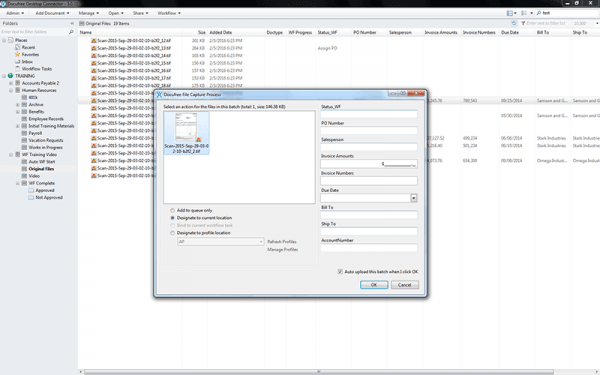
Record scanning app in Docufree's Path to Paperless Software
Finally, ensure that records management software is really what you need. Sometimes companies think they need records management software, but they’d actually be better served with a document management platform. And the opposite can also be true. Ultimately, companies must find the right balance of functionalities that will improve existing workflow processes while adding a layer of safety and oversight to its management of important records.
If you’re unsure which type of system best fits your organizational needs, make sure you examine both types before making a decision. Alternatively, give us a call, and we’ll help you decide.