


Best Medical Billing Software of 2026
Updated January 14, 2026 at 5:55 AM

Written by Lisa Morris
Associate Principal Analyst

Edited by Mehar Luthra
Team Lead, Content

Reviewed by Lexi Smith
Software Advisor

Talk with us for a free 15-min consultation
Expert advisors like Jacqueline, who have helped 1,000+ practices, can find the right software for your needs.
- All Software
- Software Advice FrontRunners
- Popular Comparisons
- Buyer's Guide
- Frequently Asked Questions
Medical billing software helps healthcare providers and billing professionals automate the claims process, track payments from insurance companies, and manage patient billing. This software streamlines the revenue cycle by verifying insurance eligibility, ensuring coding accuracy, and reducing claim denials to improve practice cash flow. With over 200 tools covering varied operational models, integration needs, or regulatory contexts, choosing the right system can be daunting. To help you narrow it down, I worked with our medical billing software advisors to curate a list of recommended productsi and a list of the medical billing software FrontRunners based on user reviews. For further information, read my medical billing software buyer's guide.
Medical Billing Software
Sort by
Reviews: Sorts listings by the number of user reviews we have published, greatest to least.
Average Rating: Sorts listings by overall star rating based on user reviews, highest to lowest.
Alphabetically (A-Z): Sorts listings by product name from A to Z.

RXNT’s cloud-based, ONC-certified medical software—Billing, Practice Management, EHR, and more—improves clinical outcomes & reve...Read more about RXNT


RXNT's Best Rated Features
See All
RXNT's Worst Rated Features
See All

athenaOne® is the most comprehensive all-in-one solution for healthcare practices to remain independent. It includes electronic ...Read more about athenaOne
athenaOne's Best Rated Features
See All
athenaOne's Worst Rated Features
See All

CharmHealth is a comprehensive suite of healthcare solutions designed to streamline practice management, revenue cycle managemen...Read more about CharmHealth


CharmHealth's Best Rated Features
See All
CharmHealth's Worst Rated Features
See All

Tebra helps independent medical practices plug the revenue leaks caused by no-shows, manual processes, and slow reimbursements. ...Read more about Tebra


Tebra's Best Rated Features
See All
Tebra's Worst Rated Features
See All

NextGen® Office is an all-in-one, cloud-based support system designed to help independent practices improve clinical outcomes, i...Read more about NextGen Office


NextGen Office's Best Rated Features
See All
NextGen Office's Worst Rated Features
See All
Software Advice FrontRunners 2026

(484)

(363)

(444)

(514)

(96)

(73)

(116)

(495)

(900)

(1343)
Best for Customer Satisfaction

Jane

- Key FeaturesJane's scoreCategory average
Billing & Invoicing
4.594.28 category average
Charting
4.724.46 category average
HIPAA Compliant
4.884.75 category average
- Screenshots


Best for Quick Adoption/Easy Adoption

ModMed

- Key FeaturesModMed's scoreCategory average
Billing & Invoicing
4.514.28 category average
Charting
4.694.46 category average
HIPAA Compliant
4.864.75 category average
- Screenshots


Best for Customization

Epic

- Key FeaturesEpic's scoreCategory average
Billing & Invoicing
4.354.28 category average
Charting
4.554.46 category average
HIPAA Compliant
4.934.75 category average
- Screenshots
Best for User Interface

Carepatron

- Key FeaturesCarepatron's scoreCategory average
Billing & Invoicing
4.594.28 category average
Charting
4.424.46 category average
HIPAA Compliant
4.774.75 category average
- Screenshots


Best for Quick Implementation


- Key FeaturesPractice Better's scoreCategory average
Billing & Invoicing
4.674.28 category average
Charting
4.744.46 category average
HIPAA Compliant
4.954.75 category average
- Screenshots


Best for Usability

DocVilla

- Key FeaturesDocVilla's scoreCategory average
Charting
4.984.46 category average
HIPAA Compliant
4.984.75 category average
- Screenshots


Most Used By Health, Wellness and Fitness

Healthie

- Key FeaturesHealthie's scoreCategory average
Billing & Invoicing
4.304.28 category average
Charting
4.344.46 category average
HIPAA Compliant
4.674.75 category average
- Screenshots


Most Used By Mental Health Care
RXNT

- Key FeaturesRXNT's scoreCategory average
Billing & Invoicing
3.934.28 category average
Charting
4.144.46 category average
HIPAA Compliant
4.784.75 category average
- Screenshots


Most Rated for Enterprise
athenaOne

- Key FeaturesathenaOne's scoreCategory average
Billing & Invoicing
4.094.28 category average
Charting
4.164.46 category average
HIPAA Compliant
4.684.75 category average
- Screenshots


Most Rated for SMBs
Tebra

- Key FeaturesTebra's scoreCategory average
Billing & Invoicing
3.764.28 category average
Charting
3.694.46 category average
HIPAA Compliant
4.344.75 category average
- Screenshots


Remedly

- Key FeaturesRemedly's scoreCategory average
Billing & Invoicing
4.474.28 category average
Charting
4.484.46 category average
HIPAA Compliant
4.724.75 category average
- Screenshots


- Key FeaturesCollaborateMD's scoreCategory average
Billing & Invoicing
4.384.28 category average
HIPAA Compliant
4.704.75 category average
- Screenshots


CharmHealth

- Key FeaturesCharmHealth's scoreCategory average
Billing & Invoicing
4.504.28 category average
Charting
4.124.46 category average
HIPAA Compliant
4.664.75 category average
- Screenshots


Practice EHR

- Key FeaturesPractice EHR's scoreCategory average
Charting
4.404.46 category average
HIPAA Compliant
4.954.75 category average
- Screenshots


CureMD

- Key FeaturesCureMD's scoreCategory average
Billing & Invoicing
4.04.28 category average
Charting
3.754.46 category average
HIPAA Compliant
4.404.75 category average
- Screenshots


Nexus EHR

- Key FeaturesNexus EHR's scoreCategory average
Charting
4.734.46 category average
HIPAA Compliant
4.544.75 category average
- Screenshots


MDnet EHR

- Key FeaturesMDnet EHR's scoreCategory average
Billing & Invoicing
4.604.28 category average
Charting
4.534.46 category average
HIPAA Compliant
4.604.75 category average
- Screenshots
Methodology
The research for the best medical billing software list was conducted in October 2025. We evaluated data (user reviews and demand signals) from the past 24 months as of the research date. Read the complete methodology.
Popular Medical Billing Comparisons


Buyer's Guide
This detailed guide will help you find and buy the right medical billing software for you and your business.
Last Updated on January 27, 2025What is medical billing software?
Medical billing software is used by healthcare providers to automate their manual billing tasks, such as verifying patients’ insurance, processing and submitting claims, processing payments, and following up on denied claims. The software helps providers increase their collections by avoiding repetitive and cumbersome administrative tasks.
The software can be purchased either as a standalone system; as an integrated part of an electronic health records (EHR) solution; or as an integrated part of a practice management suite.
Medical billing software automates repetitive and error-prone billing tasks. It helps medical offices:
Increase collections
Code claims properly
Verify patients’ insurance coverage
Post payments and EOBs
Provide reports on collections and rejections
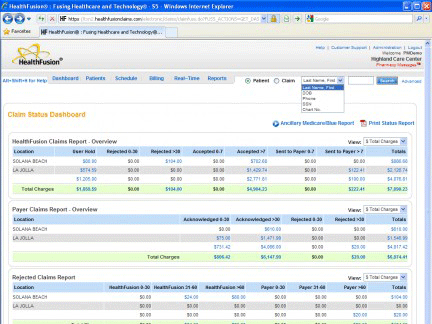
Claim Status Dashboard in MediTouch by HealthFusion
There are hundreds of computerized medical billing systems on the market and they range from functionally simple to very sophisticated. The most basic systems help providers generate paper statements based on demographics and billing codes input by the user. Additionally, medical office billing software allows providers to submit claims electronically, scrub claims, post payments, pull advanced reports and more.
In this guide we discuss the following:
What is Medical Billing Software?
Common Features of Medical Billing Software
Benefits of Medical Billing Software
Popular Medical Billing Software Comparisons
Common Features of Medical Billing Software
When comparing different medical billing software, it’s helpful to have an understanding of the common features offered with this software. Here are some of the features you can typically expect in a medical billing system:
Claims processing | Automates the process of creating, submitting, tracking, and processing medical insurance claims in order to collect payment from providers. |
Claims scrubbing | Run claims through an auditing procedure before submitting them to find and correct any errors in coding. This feature helps reduce denied or rejected claims and increase approval rates. |
Insurance verification | Checks patient insurance eligibility ahead of appointments to ensure procedures and services will be covered by patient insurance. |
What Type of Buyer Are You?
Most practices we speak with match one of these common buyer types:
Inpatient care providers. This category of buyer includes hospitals and long-term care facilities that need to submit claims using UB-04 forms. This type of form typically requires a system designed for inpatient billing, although some outpatient healthcare billing software systems do have a module for UB-04 billing.
Outpatient care providers. This category is made up of the private practices that submit claims on the CMS-1500 forms. These buyers need to submit electronic claims to Medicare, Medicaid and private insurance companies using Medicare billing software/Medicaid billing software. Software needs do not vary much by size of organization, although larger organizations will need a more robust, scalable medical insurance billing software program.
Specialists. Specialists such as chiropractors, naturopathic doctors and mental health providers of varying designations typically see patients that pay directly via cash or credit card. Moreover, their patients typically do not submit many (if any) claims to insurance companies or government payers. As a result, these providers have more lightweight needs.
Outsourced billing services. These buyers are third-party companies that submit claims on behalf of providers. They are typically paid a percentage of collections by providers. They have similar functional requirements to their respective provider clients, but may require a very broad, flexible system if they bill for clients of varying specialties or types of care.
Integrated suite buyers. These buyers require billing functionality, but would rather implement one integrated suite for scheduling and EMR. Their vendor selections are often driven by the EMR functionality, since most integrated systems are differentiated by their EMR offering, not their billing modules.
Benefits and Potential Issues
Billing software is an integral part of the overall revenue cycle management process. Billing and other administrative tasks are notoriously paper-laden and cumbersome. A modern medical billing software system allows billers to be as efficient as possible at coding, submitting and following up on claims.
Moreover, staff will find that medical billing and coding software helps them code claims accurately to avoid errors. As a result, most providers find their collection rates increase when going from manually submitting claims to using medical claim software.
Finally, advanced reporting tools typically provide insights that are tough to gain without a medical billing solution. By collecting important data around claims and payers, such as which claims get rejected most often and which payers pay the slowest, providers can make data-driven decisions to improve collections.
Most practices and billing services we speak with face a common set of billing challenges, and consequently, they’re considering purchasing (or replacing) software to address those challenges. Here are common scenarios we often hear about during our phone consultations:
Transitioning from paper claims. Typically, solo or small practices are making the move from paper claims to an electronic system (though that is not always the case). They have a difficult time keeping track of patients and who owes what. They will implement medical billing software for the first time to reduce paperwork, track all data in a central place and improve efficiency overall.
Bringing billing in-house. Another common scenario, most practices choose to bring billing in house—as opposed to outsourcing to a third-party service—to cut costs, have more control of their billing and accounts receivable and get everything centrally located.
Replacing antiquated software. Finally, offices replacing their existing system do so because it’s outdated and expensive to maintain, it doesn’t meet their technical requirements (e.g., integration with electronic medical record software) or they have a difficult time using it. In this scenario, Web-based medical billing software is an attractive option because it’s modern and easy to use, costs less up front and updates automatically as vendors release new versions and enhancements.
Medical Coding Software
Many medical billing software solutions include functionality that enables HIPAA-compliant medical coding. Users can enter procedure and diagnosis codes and even look up codes online to find the correct ones. This capability allows users to file and track claims more easily and helps in the tracking of data over time. Many medical billing software solutions will also update codes automatically to ensure the accurate ones are always being used.
Costs and Return on Investment
The prices of medical billing software programs often depend on the application’s deployment model. On-premise systems will require upfront costs for licenses, servers and other necessary hardware, setup and training. Buyers of on-premise systems will also need to pay ongoing maintenance and support fees, which are typically 15-20 percent of the upfront licensing costs.
Software-as-a-Service (SaaS) applications typically require lower upfront costs and ongoing monthly fees that cover licensing, support and upgrades. Finally, there are free medical billing software options that are supported by alternative revenue streams, such as advertising.
Most buyers who have successfully implemented systems will be able to generate returns on their investments through improved accuracy of filings, improved billing efficiency, and subsequently, increased collections.
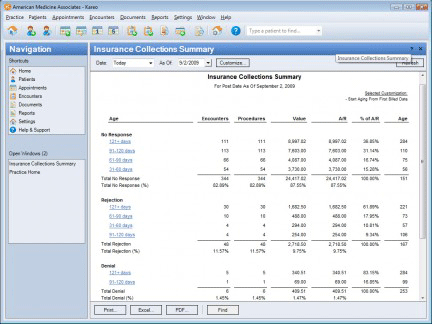
Collections Management in Kareo speeds payment
Important Considerations
Integrated suites vs. stand-alone billing solutions. Buyers will need to decide if they want to implement a standalone system, a system integrated with patient scheduling (typically called “practice management”) or a fully integrated billing, scheduling and electronic medical records (EMR) system. Many vendors such as AdvancedMD and NueMD offer all three options. Medical billing solutions have long been the only or primary applications used in many doctors’ offices, and they are usually the first systems new practices will implement. Despite government legislation requiring the adoption of EMRs, we still hear from many practices looking for standalone billing or practice management systems.
On-premise vs. Web-based. SaaS or Web-based medical billing systems have become very popular and comprise well over 50 percent of new solution sales. Low upfront costs, greater accessibility and little to no IT requirements are contributing factors to so many buyers preferring Web-based systems. Assuming buyers have reliable Internet access, we typically recommend they consider these programs.
Security. A primary concern we hear from buyers regards data security. Since medical billing involves the storage and transmission of so much sensitive patient data, buyers will want to make sure they implement a secure system. Vendors are well aware of this need and offer HIPAA-compliant systems.
User adoption. Usability tends to be more a function of the end user and how the system is configured than the medical claims software itself. Users with medical experience can typically adopt most systems quickly. Many complaints regarding usability tend to be related to setup and maintenance of servers and other hardware, not the applications themselves.
Popular Medical Billing Software Comparisons
Practice Fusion vs NextGen Office
Medical Billing FAQs
- What is the difference between medical billing and practice management software?
The main difference between medical billing and [practice management](https://www.softwareadvice.com/medical/practice-management-softwareity. Medical billing software handles patient billing, insurance claims, and payments, while practice management software manages broader tasks like scheduling and administration—some platforms combine both for an all-in-one solution.
- What is the best medical billing software?
The best medical billing, based on Medical Billing FrontRunners highest overall user ratings.
- What are the three types of medical billing systems?
Closed medical billing systems, open billing systems, and isolated billing systems are the three main types of medical billing systems.
- What does medical billing software do?
Medical billing software automates the process of submitting insurance claims and tracking payments for healthcare services.
- What is the cost of medical billing software?
As of January 2026, entry-level plans for [medical billing](https://www.softwareadvice.com/medical/medical-billing-so start at around $11 per provider, per month, while comprehensive solutions with advanced functionality can exceed $319 per provider, per month. Pricing varies by vendor and feature set, and many providers offer free trials or tiered pricing for different practice sizes.