


Best HVAC Software of 2026
Updated February 18, 2026 at 6:10 AM

Written by Giorgia Pisano
Content Associate

Edited by Kathryn Todd
Senior Editor

Reviewed by Jakub Vaughn
Senior Advisor

Talk with us for a free 15-min consultation
Expert advisors like Jacqueline, who have helped 1,000+ companies, can find the right software for your needs.
- All Software
- Software Advice FrontRunners
- Popular Comparisons
- Buyer's Guide
- Frequently Asked Questions
HVAC software helps service managers, technicians, and dispatch teams schedule jobs, manage work orders, and handle billing. Navigating 200 products, each built for different business sizes, field workflows, or customer needs, can be overwhelming. To help you narrow it down, I worked with our HVAC software advisors to curate a list of recommended productsi and a list of the HVAC software FrontRunners based on user reviews. For further information, read my HVAC software buyer's guide.
HVAC Software
Sort by
Reviews: Sorts listings by the number of user reviews we have published, greatest to least.
Average Rating: Sorts listings by overall star rating based on user reviews, highest to lowest.
Alphabetically (A-Z): Sorts listings by product name from A to Z.

Housecall Pro is a business solution for home service professionals. Available on web and mobile, Housecall Pro helps home servi...Read more about Housecall Pro


Housecall Pro's Best Rated Features
See All
Housecall Pro's Worst Rated Features
See All

3C Connect is an all-in-one HVAC business management software that allows contractors to streamline operations and increase prof...Read more about 3C Connect


Dataforma is a cloud-based solution designed for construction trades, including electrical, plumbing and HVAC. It is a web-based...Read more about Dataforma


FieldAware by GPS Insight is a field service management software made specifically for businesses who have a mobile workforce an...Read more about FieldAware


ServiceTitan is a cloud and mobile-based platform for residential and commercial field service businesses. The solution helps bo...Read more about ServiceTitan


ServiceTitan's Best Rated Features
See All
ServiceTitan's Worst Rated Features
See All
Software Advice FrontRunners 2026

(5032)

(1420)

(406)

(325)

(339)

(205)

(151)

(2736)

(92)

(289)
Best for Mobile app

Connecteam

Of the products listed on our FrontRunners report, Connecteam is the most requested by users for mobile app out of the most popular tools.
Connecteam is best for SMBs managing mobile or deskless teams who need robust mobile app capabilities. Our reviewers say the intuitive mobile interface streamlines scheduling, time tracking, and communication, making it easy for staff to access schedules, clock in/out, and stay connected on the go.
- Reviewers Perspective
"That I can schedule teams, record time to develop pay, chat with members and send positive updates while creating reports all in real time in the field or at the office."
JRJonathan Roach
Operations Manager
Used for 1-2 years
We analyzed 891 verified user reviews for Connecteam to find out what actual users really think.
Scheduling
Users centralize scheduling, time tracking, and communication in one platform, streamlining daily operations and reducing confusion. Mobile access and customizable templates support managing teams across locations and roles.Ease of Use
Teams onboard quickly with Connecteam’s straightforward setup and accessible tutorials. The uncluttered interface and easy navigation help manage multiple tasks and projects without technical difficulties.Team Management
Organizations use Connecteam to group employees, share resources, and manage tasks in one place. This saves time and improves accountability, especially for remote and field teams. - Key FeaturesConnecteam's scoreCategory average
Mobile Access
4.664.38 category average
Scheduling
4.654.52 category average
Service History
4.454.40 category average
- Screenshots


Best for Automation Capabilities

Jobber

Jobber is the most requested by users for automation capabilities out of the most popular tools, based on our analysis of HVAC products with the most market demand.
Jobber is ideal for businesses seeking strong automation capabilities to streamline operations. Our reviewers say automated scheduling, invoicing, and follow-up reminders save time and reduce manual tasks, while the platform’s ease of use supports efficient day-to-day management.
- Reviewers Perspective
"We use the grow plan where we can have up to 15 users, manage all of their schedules and maintain our efficient, reliable service, all from one spot."
SESarah E
Director of Operations
Used for 2+ years
We analyzed 670 verified user reviews for Jobber to find out what actual users really think.
Ease of Use
Teams quickly learn and manage business tasks with Jobber’s clean interface and clear instructions. The design streamlines processes and reduces the complexity of managing jobs, quotes, and customer communications.Invoice Management
Jobber streamlines invoice creation, payment collection, and client communication. The system supports on-site invoicing, payment tracking, and client access to open invoices, improving billing efficiency.Scheduling
Users assign jobs, manage recurring appointments, and keep teams organized. Drag-and-drop scheduling, automated reminders, and route mapping reduce errors and improve communication with staff and clients. - Key FeaturesJobber's scoreCategory average
Mobile Access
4.434.38 category average
Scheduling
4.644.52 category average
Service History
4.344.40 category average
- Screenshots


Highly Rated for Quick Implementation

FieldPulse

Of the products listed on our FrontRunners report, FieldPulse is the highest rated for quick implementation out of the most popular tools.
FieldPulse is highly rated for SMBs needing quick implementation and fast onboarding. Our reviewers point out that setup is straightforward, allowing teams to get up and running rapidly, and the user-friendly interface helps streamline scheduling and job management from day one.
- Reviewers Perspective
"The platform makes scheduling, dispatching, and tracking jobs seamless, while also providing real-time updates to our team in the field."
JPJulian Pampin
Director of Operational Readiness
Used for 6-12 months
We analyzed 274 verified user reviews for FieldPulse to find out what actual users really think.
Scheduling
FieldPulse helps teams organize scheduling, dispatching, and job tracking. Automated notifications, color-coded calendars, and job assignment tools keep operations efficient and reduce double bookings.Ease of Use
Managers and staff adapt quickly to FieldPulse’s intuitive design. The platform reduces the learning curve, supports onboarding, and simplifies daily business operations.Team Collaboration
Teams communicate efficiently, assign tasks, and share updates in real time. Group notes, project timelines, and mobile access keep everyone informed, whether in the office or field. - Key FeaturesFieldPulse's scoreCategory average
Mobile Access
4.494.38 category average
Scheduling
4.644.52 category average
Service History
4.514.40 category average
- Screenshots


Most Rated for SMBs
ServiceTitan

In our analysis of HVAC products with the most market demand, ServiceTitan is the most requested by small businesses out of the most popular tools.
ServiceTitan is most rated for SMBs looking for a comprehensive field service management platform. Our reviewers say it supports both office and field staff with intuitive dispatch, scheduling, and customer management features that improve workflow efficiency and team coordination.
- Reviewers Perspective
"This software has features to help every employee across the company - Customer Service Representatives, dispatchers, sales people, technicians, warehouse clerks, etc."
KKKhiana Klatt
Customer Service Representative
Used for 2+ years
We analyzed 180 verified user reviews for ServiceTitan to find out what actual users really think.
Business Growth
Companies use ServiceTitan’s evolving features, training resources, and automation to streamline processes and increase revenue. The platform adapts to changing industry needs, enabling operational efficiency and scalability.Office and Field Staff
ServiceTitan enhances coordination between office and field staff. The intuitive design supports both administrative and mobile workflows, allowing teams to complete tasks efficiently and improve accountability.Service Titan
Organizations rely on ServiceTitan to consolidate multiple business functions. The platform’s versatility and ease of use help technicians and office staff access job information, communicate with customers, and track performance. - Key FeaturesServiceTitan's scoreCategory average
Mobile Access
4.054.38 category average
Scheduling
4.244.52 category average
Service History
4.304.40 category average
- Screenshots


Best for Usability

ServiceTrade

In our analysis of HVAC products with the most market demand, ServiceTrade is the highest rated for its usability out of the most popular tools.
ServiceTrade is best for SMBs prioritizing usability in their field service operations. Our reviewers say the platform’s intuitive interface and streamlined workflows make it easy to schedule jobs, manage customer information, and improve communication between teams and clients.
- Reviewers Perspective
"It has cut down on the time it takes for scheduling, helps us assure that our repeat services are on track, and makes it easy to communicate deficiencies with our clients."
HMhope mullins
Operations Manager
Used for 1-2 years
We analyzed 258 verified user reviews for ServiceTrade to find out what actual users really think.
Customer Support
Users contact ServiceTrade for support that addresses questions and resolves issues quickly. The team listens to feedback, implements requested features, and provides thorough onboarding and training.Ease of Use
Staff navigate ServiceTrade’s intuitive interface with little training. The clear layout supports quick learning and efficient task completion, helping teams stay organized and productive.Scheduling and Payroll
Organizations schedule jobs, track technician hours, and manage recurring services from any device. Visual scheduling tools and integrated timekeeping streamline communication and workforce management. - Key FeaturesServiceTrade's scoreCategory average
Mobile Access
4.324.38 category average
Scheduling
4.554.52 category average
Service History
4.644.40 category average
- Screenshots


Best for Customer Satisfaction

Contractor+

Contractor+ is the highest rated for customer satisfaction out of the most popular tools.
Contractor+ is best for customer satisfaction among SMB contractors seeking an all-in-one solution. Our reviewers say it simplifies estimates, invoicing, and client communication, with an easy-to-use interface that helps keep projects organized and clients informed.
- Reviewers Perspective
"It helps with estimates, invoices, pay and so much more"
BWBrian Weber
Owner operator
Used for 6-12 months
We analyzed 131 verified user reviews for Contractor+ to find out what actual users really think.
Ease of Use
Contractor+ consolidates business management tasks into a single app. Clear explanations, training resources, and responsive support contribute to positive onboarding and ongoing ease of use.Customer Support
Users receive personalized support and quick responses from Contractor+. The support team provides clear guidance and additional resources, helping businesses address questions and maximize software capabilities.Estimate Creation
Businesses generate professional, detailed estimates with Contractor+. Entering client information, separating items, and including photos or supply lists enhances proposal quality and clarity. - Key FeaturesContractor+'s scoreCategory average
Mobile Access
4.734.38 category average
Scheduling
4.714.52 category average
- Screenshots


Most Used By Construction

BuildOps

In our analysis of HVAC products with the most market demand, BuildOps is the most requested by users in construction out of the most popular tools.
BuildOps is most used by construction firms needing an industry-focused platform. Our reviewers say it supports complex workflows with features like job tracking, reporting, and responsive customer support, making it suitable for construction teams managing multiple projects.
- Reviewers Perspective
"Ability to track jobs in real-time and offers insightful reports that help optimize business decisions."
DCDallas Courville
Dispatcher
Used for 1-2 years
We analyzed 113 verified user reviews for BuildOps to find out what actual users really think.
Ease of Use
Staff track jobs and projects with BuildOps’ clean interface and smart search bar. The platform is accessible for both experienced and novice users, supporting efficient daily operations and collaboration.Reporting
Organizations use BuildOps for real-time job tracking and customizable reporting. Standardized technician reports and custom forms support oversight and decision-making, saving time on recordkeeping.Team
BuildOps’ team works closely with staff to improve functionality and maintain strong customer relationships. The platform helps organizations stay organized and accountable as requirements evolve. - Key FeaturesBuildOps's scoreCategory average
Mobile Access
4.264.38 category average
Scheduling
4.564.52 category average
Service History
4.484.40 category average
- Screenshots


Most Used By Commercial Real Estate

Of the products listed on our FrontRunners report, Housecall Pro is the most requested by users in commercial real estate out of the most popular tools.
Housecall Pro is most used by commercial real estate and service businesses needing integrated scheduling and payment tools. Our reviewers say its mobile app streamlines scheduling, payment processing, and customer communication, improving efficiency for both office and field staff.
- Reviewers Perspective
"Housecall Pro is an exceptional tool that makes it easier to organize and schedule services and sends notifications along with updates about services, insights, and performance. And 100% profitability."
MDMARIA DE MELO Carvalho
Educação
Used for 1-2 years
We analyzed 839 verified user reviews for Housecall Pro to find out what actual users really think.
Scheduling
Users organize and manage job scheduling, assign jobs, and track technician availability. Drag-and-drop scheduling, color-coded calendars, and real-time updates help coordinate teams and reduce administrative workload.Payment Processing
Businesses schedule jobs and process payments within Housecall Pro. Features like online payments, customer tipping, and QuickBooks integration streamline billing and improve cash flow.Employee Management
Managers assign jobs, track time, and monitor field staff activities in real time. Color-coded schedules, employee profiles, and mobile access support team coordination and accountability. - Key FeaturesHousecall Pro's scoreCategory average
Mobile Access
4.204.38 category average
Scheduling
4.474.52 category average
Service History
4.394.40 category average
- Screenshots


Most Used By Facilities Services

BlueFolder

Of the products listed on our FrontRunners report, BlueFolder is the most requested by users in facilities services out of the most popular tools.
BlueFolder is most used by facilities services teams seeking a straightforward service management tool. Our reviewers say it offers easy work order management, quick access to customer information, and responsive customer support, helping teams stay organized and productive.
- Reviewers Perspective
"It is a great tool for small and medium businesses to build out a field service platform. As organizations scale, like ours, it tends to give way towards a more comprehensive option."
CDChristian D'Addario
Manager
Used for 2+ years
We analyzed 73 verified user reviews for BlueFolder to find out what actual users really think.
Customer Support
Users rely on BlueFolder’s support team for quick answers and guidance. SMBs benefit from attentive onboarding and ongoing help, with staff listening to feedback and communicating clearly to resolve issues.Ease of Use
Managers organize operations with BlueFolder’s straightforward interface. The clean navigation allows new staff to get up to speed rapidly, reducing training time and keeping work orders organized.Mobile Access
Field service teams manage tasks remotely using BlueFolder’s cloud-based platform. Accessing customer and job info from multiple devices supports workflows, though the mobile app and web experience can be challenging due to occasional bugs. - Key FeaturesBlueFolder's scoreCategory average
Mobile Access
4.164.38 category average
Scheduling
4.674.52 category average
Service History
4.574.40 category average
- Screenshots


Most Used By Mechanical/Industrial Engineering


Service Fusion is the most requested by users in mechanical/industrial engineering out of the most popular tools.
Service Fusion is most used by mechanical and industrial engineering firms needing an all-in-one field service platform. Our reviewers say it combines scheduling, invoicing, and fleet management in a user-friendly interface, with features like QuickBooks integration and real-time updates.
- Reviewers Perspective
"Having customer history, job notes, and quotes in one system improves response time and accuracy."
TWTRAVIS WEITGENANT
Service Manager
Used for 1-2 years
We analyzed 179 verified user reviews for Service Fusion to find out what actual users really think.
Customer Support
Users contact Service Fusion’s support for fast, knowledgeable assistance. The support team resolves issues, offers step-by-step guidance, and takes feature requests seriously, helping businesses feel confident using the software.Invoicing
Finance teams manage estimates, jobs, and payments with Service Fusion’s invoicing features. Syncing with QuickBooks and direct email invoicing simplify billing, while tracking status and converting tasks to invoices supports daily operations.Ease of Use
Managers set up Service Fusion quickly, even with limited technical experience. The interface helps users find information and manage jobs and billing, reducing stress and improving efficiency. - Key FeaturesService Fusion's scoreCategory average
Mobile Access
4.054.38 category average
Scheduling
4.374.52 category average
Service History
4.074.40 category average
- Screenshots


Kickserv

- Reviewers Perspective
"Very easy to use."
THThomas Homola
CEO
Used for 2+ years
We analyzed 269 verified user reviews for Kickserv to find out what actual users really think.
Ease of Use
Users find Kickserv easy to learn and use, highlighting its intuitive interface and minimal training requirements for new hires. They appreciate how quickly they can navigate the platform, teach others, and access essential functions without extensive onboarding. While some users recommend additional training sessions for advanced features, most agree that Kickserv streamlines daily tasks and adapts well to their workflow.Scheduling
Users rely on Kickserv to simplify scheduling, benefiting from features like drag-and-drop job assignment, real-time updates, and color-coded calendars. They enjoy being able to view and adjust technician schedules from multiple devices, which helps keep teams organized and informed. Although some users would like more customization and reporting options, they find the scheduling tools flexible and effective for managing busy operations.Invoicing
Users appreciate that Kickserv allows them to create, send, and track invoices, with features for online payments and syncing to accounting software. They like being able to manage quotes, payments, and customer history in one place, making invoicing straightforward for most needs. However, some users wish for more advanced customization, easier batch processing, and better mobile compatibility, noting limitations in editing synced invoices and occasional formatting issues. - Key FeaturesKickserv's scoreCategory average
Mobile Access
4.274.38 category average
Scheduling
4.604.52 category average
Service History
4.814.40 category average
- Screenshots


Zuper

- Reviewers Perspective
"Since our team has begun utilizing Zuper it has helped organize our delivery and installation jobs and allowed our processes to be for efficient."
LCLynne Cillo
Customer Service Manager
Used for 1-2 years
We analyzed 37 verified user reviews for Zuper to find out what actual users really think.
- Key FeaturesZuper's scoreCategory average
Mobile Access
3.904.38 category average
Scheduling
4.594.52 category average
Service History
3.334.40 category average
- Screenshots


ServiceBox

- Reviewers Perspective
"I find Service box to be easy to use and understand and if there is a problem someone is always available to help and answer your questions."
PRPhoebee Renz
Office Administration
Used for 1-2 years
We analyzed 95 verified user reviews for ServiceBox to find out what actual users really think.
Ease of Use
Users describe ServiceBox as user-friendly and intuitive, making it easy to learn and navigate for both new and experienced staff. They find that the software streamlines daily operations, allowing them to quickly locate job site information and manage tasks efficiently. Reviewers also note that ServiceBox is convenient for training new employees, as its logical layout and clear features reduce the learning curve and support smooth onboarding.Work Orders
Users benefit from ServiceBox's digital work order system, which allows them to create, access, and manage work orders without relying on paper documents. They appreciate features like attaching files, tracking job history, and enabling customers to sign work orders electronically, as well as the ability to link labor and purchase order details directly within each work order. However, reviewers mention that search functions and filtering options for work orders could be improved, as finding specific records or sorting by date and relevance can sometimes be cumbersome or inconsistent.Invoicing and Quotes
Users value ServiceBox for its ability to connect quoting, work orders, and invoicing in a single workflow, which helps them keep all related information organized and accessible. They find that quotes can be easily converted into work orders and invoices, reducing manual data entry and minimizing errors in the billing process. Reviewers also highlight the system's compatibility with payment solutions and accounting tools, which streamlines billing, payment processing, and follow-up for outstanding jobs. - Key FeaturesServiceBox's scoreCategory average
Mobile Access
4.144.38 category average
Scheduling
4.574.52 category average
Service History
4.154.40 category average
- Screenshots


vcita

- Reviewers Perspective
"I appreciated the personal tutorial at the beginning which helped me know how to best use the service."
FSFaith Sample
Owner Educator
Used for 1-2 years
We analyzed 217 verified user reviews for vcita to find out what actual users really think.
Ease of Use
Users consistently describe vcita as easy to use, highlighting its intuitive interface and straightforward setup that allows them to manage their business efficiently. They appreciate features like color-coded calendars, responsive customer service, and helpful tutorials that make onboarding and daily operations simple for both technical and non-technical users. The platform’s clean design and accessible dashboard enable users and their teams to quickly learn and implement vcita without a steep learning curve.Client Management
Users value vcita for its client management capabilities, noting the convenience of a centralized portal for communication, document sharing, and tracking client interactions. They appreciate being able to keep client notes, manage packages, and offer secure access to information, which helps them stay organized and maintain strong relationships. The customizable client portal and widgets are praised for making it easy for clients to engage with their business, improving overall efficiency and satisfaction.Integrations
Users highlight vcita’s seamless integration with websites, mentioning how easily they can embed scheduling widgets and client portals into their online presence. They appreciate compatibility with platforms like WordPress and Wix, as well as integrations with payment gateways and tools such as Zoom, which enhance their workflow. Some users wish for more robust integration options with accounting software and other CRMs, but overall, they find the setup process quick and the system reliable for daily business needs. - Key Featuresvcita's scoreCategory average
Mobile Access
4.364.38 category average
Scheduling
4.834.52 category average
- Screenshots


Zoho FSM

- Reviewers Perspective
"It is a great value to have notifications, online acceptances , billing, stock issues , appointment scheduling all from one system. And with seamless integration to Zoho Books , customer information , Service and part items make it a breeze to setup."
DJDamien Joynt
General Manager
Used for 6-12 months
We analyzed 36 verified user reviews for Zoho FSM to find out what actual users really think.
- Key FeaturesZoho FSM's scoreCategory average
Mobile Access
4.444.38 category average
Service History
4.754.40 category average
- Screenshots


Leap

- Reviewers Perspective
"LEAP had a steeper learning curve than other CRM's we have used but once we had our "light bulb" moment and things started falling into place and making sense, it is been a freight train of nothing but good things!"
FWFrank Wasilewski
Vice President
Used for 6-12 months
We analyzed 227 verified user reviews for Leap to find out what actual users really think.
Sales
Users find that Leap streamlines their sales process by helping them track leads, manage customer information, and automate communication throughout each stage of the sales pipeline. They appreciate features that allow for on-the-spot job selling, easy organization, and integration with payment and proposal tools, which help keep sales teams and customers organized. However, reviewers note that reporting and analytics for sales performance are limited, and navigating through multiple menus or extracting detailed sales data can be cumbersome for management.Training and Learning Curve
Users describe Leap as having a learning curve, especially for those less familiar with technology, but they find that the software becomes intuitive with regular use and training. They appreciate the availability of training sessions, onboarding support, and video tutorials, which help them and their teams become proficient in using the platform’s many features. Reviewers mention that additional training resources and more in-depth tutorials would further enhance their ability to maximize Leap’s capabilities and adapt it to their workflows.Ease of Use
Users find Leap easy to use, with a straightforward interface that allows them to quickly manage daily tasks and keep up with production needs. They appreciate how the software centralizes information and simplifies processes, making it convenient for both experienced and less tech-savvy team members. Reviewers note that Leap’s user-friendly design helps them stay organized and efficient, reducing the time spent on administrative work. - Key FeaturesLeap's scoreCategory average
Mobile Access
4.034.38 category average
Scheduling
4.264.52 category average
Service History
4.04.40 category average
- Screenshots


mHelpDesk

- Reviewers Perspective
"The platform offers robust tools for job scheduling customer, management, invoicing, and real-time job"
MHMohamed Hadhri
engineer
Used for 2+ years
We analyzed 479 verified user reviews for mHelpDesk to find out what actual users really think.
Customer Support
Users find mHelpDesk’s customer support to be responsive, knowledgeable, and willing to address their questions and concerns through multiple channels such as chat, phone, and email. They appreciate that the support team listens to feedback, offers guidance during setup, and provides ongoing assistance for troubleshooting or customization requests. Additionally, users value the helpful resources, personalized onboarding, and the team’s commitment to improving the software based on customer suggestions, which enhances their overall experience and operational efficiency.Ease of Use
Users describe mHelpDesk as an easy-to-learn and user-friendly platform that simplifies daily operations and onboarding for both tech-savvy and less experienced staff. They find the interface intuitive, navigation straightforward, and setup processes manageable, with many highlighting the smooth transition from other systems and the helpfulness of tutorials. Additionally, users appreciate that mHelpDesk allows them to quickly adapt the software to their workflow, making business management more efficient and less time-consuming.Invoice Management
Users appreciate that mHelpDesk centralizes invoicing, scheduling, and payment processing, making it easier to manage client billing and track payments in real time. They highlight features like customizable invoice templates, mobile invoicing, and integration with accounting tools, which streamline their workflow and reduce paperwork. However, users note challenges with invoice customization, occasional syncing issues with accounting software, and a desire for more advanced reporting and automation options to further improve the invoicing process. - Key FeaturesmHelpDesk's scoreCategory average
Mobile Access
4.474.38 category average
Scheduling
4.144.52 category average
Service History
4.04.40 category average
- Screenshots


Commusoft

- Reviewers Perspective
"My overall experience was very positive—easy to use, reliable, and helpful for organizing daily operations, though a few minor glitches and feature limits occasionally got in the way."
HGHaroon Gajra
Gas engineer
Used for 2+ years
We analyzed 181 verified user reviews for Commusoft to find out what actual users really think.
Ease of Use
Users find Commusoft straightforward and intuitive, making daily operations and scheduling seamless for both office staff and engineers. They appreciate being able to keep all job information, notes, certificates, and images in one place, which reduces paperwork and improves communication across teams. The system's real-time updates, customization options, and user-friendly interface help users manage jobs efficiently, though some mention minor feature limitations and occasional requests for additional personalization.Customer Support
Users consistently praise Commusoft for its responsive and knowledgeable customer support team, who provide thorough assistance during onboarding and ongoing use. They value the helpful training, clear communication, and willingness of support staff to address questions or adapt the system to business needs. The availability of guidance, prompt responses, and comprehensive help resources ensure users feel supported, making it easier to manage their operations and deliver professional service to customers.Invoicing
Users appreciate that Commusoft streamlines the entire invoicing process, from job completion to sending invoices and tracking payments, with useful reporting tools and accounting software compatibility. They find invoicing quick and organized, but note that some tasks require multiple steps, and certain features like editing sent invoices or customizing invoice text could be improved. Users mention occasional challenges with invoice management and integration details, but overall value the ability to manage jobs, quotes, and invoices in one system. - Key FeaturesCommusoft's scoreCategory average
Mobile Access
4.524.38 category average
Scheduling
4.594.52 category average
Service History
4.234.40 category average
- Screenshots


Synchroteam

- Reviewers Perspective
"It is much more than simple scheduling software; it is a comprehensive, cloud-based platform that connects the office with mobile teams in real time, optimizing every stage of the work process."
DSDavide Semi
Segreterio
Used for 1-2 years
We analyzed 59 verified user reviews for Synchroteam to find out what actual users really think.
Ease of Use
Users find Synchroteam intuitive and straightforward, making it accessible even for those with limited technical experience. They appreciate that the interface is well-designed and that the software requires minimal training for both new and experienced staff. Many reviewers note that Synchroteam streamlines daily tasks, allowing them to work efficiently without needing specialized knowledge or extensive onboarding.Scheduling
Users highlight that Synchroteam simplifies the process of organizing and dispatching jobs, helping them manage teams and resources efficiently. They value the flexibility to schedule work for individuals or groups, and the clarity provided by the robust calendar and scheduling tools. Reviewers mention that the platform supports real-time coordination and helps maintain an organized workflow, which is especially useful for teams working in the field.Reports
Users appreciate that Synchroteam offers customizable reporting tools, allowing them to tailor reports to their business needs and track job details effectively. They find the ability to generate various types of reports useful, but some mention that creating and editing custom templates can be confusing or time-consuming. While the platform supports ongoing improvements, reviewers note challenges with report setup, limited checklist options, and occasional issues with data visibility in revised reports. - Key FeaturesSynchroteam's scoreCategory average
Mobile Access
4.234.38 category average
Scheduling
4.464.52 category average
Service History
4.134.40 category average
- Screenshots


ServiceWorks

- Reviewers Perspective
"Overall, ServiceWorks is a user friendly software that allows us to complete our work with out having to worry about the amdin side of our business."
RMRichard Moro
President
Used for 2+ years
We analyzed 75 verified user reviews for ServiceWorks to find out what actual users really think.
Scheduling and Dispatch
Users find ServiceWorks effective for managing scheduling and dispatch, noting that the calendar views and drag-and-drop features simplify appointment management. They appreciate being able to assign jobs, track technicians in real time, and optimize routes, which streamlines daily operations and improves workflow. Additionally, users highlight the ease of booking, rescheduling, and dispatching service calls, as well as the ability to manage multiple tickets and third-party contractors efficiently.Ease of Use
Users describe ServiceWorks as a user-friendly software that enables them to complete tasks efficiently and transition toward a paperless workflow. They appreciate the intuitive interface, straightforward navigation, and helpful video tutorials that make it easier for both office staff and technicians to learn and use the platform. Many users note that after some initial exploration, ServiceWorks becomes even easier to use, supporting their day-to-day business activities without unnecessary complexity.Customer Support
Users value ServiceWorks for its responsive customer support team, which is often available to address questions and provide assistance with setup and ongoing needs. They appreciate the software’s ability to keep accurate service records and offer customization options that help tailor the platform to their business requirements. However, users report challenges such as slow response times, lack of follow-up, and limited product knowledge from support staff, which can lead to frustration and unresolved issues. - Key FeaturesServiceWorks's scoreCategory average
Mobile Access
3.294.38 category average
Scheduling
3.984.52 category average
Service History
4.294.40 category average
- Screenshots


Joblogic

- Reviewers Perspective
"One thing I really liked about Joblogic is that the system is very easy to use and train people on."
ANAli Najaf
Operations Lead
Used for 6-12 months
We analyzed 55 verified user reviews for Joblogic to find out what actual users really think.
Ease of Use
Users find Joblogic easy to set up and navigate, which allows them to quickly adapt to the software and reduce paperwork in their daily operations. They appreciate that the platform is intuitive, making it straightforward to train new staff and manage tasks efficiently. Reviewers mention that Joblogic’s familiar processes and terminology contribute to a seamless experience, enabling them to work more productively.Customer Support
Users value Joblogic for its responsive and knowledgeable support team, who are available through multiple channels such as live chat, phone, and email. They find the onboarding process smooth, with helpful manuals, videos, and proactive assistance that makes implementation and ongoing use easier. Reviewers consistently highlight the personal approach, rapid problem resolution, and the sense that Joblogic’s staff genuinely care about their customers’ success.Training and Learning Curve
Users describe Joblogic’s training as informative and accessible, with trainers who explain features in a clear, non-technical manner. They note that classroom sessions and onboarding support help new users become comfortable with the system, even when the learning curve feels steep at first. Reviewers appreciate that Joblogic enables quick staff training and ongoing support, ensuring they feel confident as they transition to the software. - Key FeaturesJoblogic's scoreCategory average
Mobile Access
3.974.38 category average
Scheduling
4.094.52 category average
Service History
3.754.40 category average
- Screenshots


EyeOnTask

- Reviewers Perspective
"The mobile app is especially helpful because it allows technicians to access job details, update tasks, and collect signatures while onsite — even without internet access."
GEGiannakis Evripidou
Manager
Used for 2+ years
We analyzed 55 verified user reviews for EyeOnTask to find out what actual users really think.
Features
Users highlight that EyeOnTask offers a wide range of features that cover most operational needs, from job management to inventory and reporting tools. They appreciate the ability to customize templates, receive low stock alerts, and access options that streamline billing and approvals within the platform. While some reviewers mention a desire for even more robust or flexible features, they note that the development team is receptive to feedback and regularly adds new capabilities.Field Workers
Users find EyeOnTask especially beneficial for managing field workers, as it simplifies job scheduling, real-time tracking, and communication between teams. They note that the intuitive interface and instant updates between the admin portal and mobile app make it easy for field staff to stay informed and productive. Reviewers also mention that minimal training is required for field workers to adapt to the system, which helps improve efficiency and reduces onboarding time.Task Management
Users appreciate EyeOnTask for its intuitive platform that provides a clear overview of task statuses and assignments in real time. They find that the system is easy to use for both new and existing staff, making it straightforward to manage tasks and contacts across different departments. Reviewers also mention that EyeOnTask supports productivity by continuously developing new functions and offering strong customer support for any task management needs. - Key FeaturesEyeOnTask's scoreCategory average
Mobile Access
4.584.38 category average
Scheduling
4.564.52 category average
Service History
4.774.40 category average
- Screenshots


Methodology
The research for the best HVAC software list was conducted in October 2025. We evaluated data (user reviews and demand signals) from the past 24 months as of the research date. Read the complete methodology.
Popular HVAC Comparisons


Buyer's Guide
This detailed guide will help you find and buy the right hvac service software for you and your business.
Last Updated on February 04, 2025Here's what we'll cover:
What you need to know about HVAC software
Essential features of HVAC software
Benefits and competitive advantages of using HVAC software
How to choose the best HVAC software for your business
More resources for your HVAC software search
What you need to know about HVAC software
HVAC software is designed to optimize and improve the efficiency of heating, ventilation and air conditioning company operations. It helps field technicians by automating scheduling, optimizing energy consumption, and ensuring compliance with industry standards. It also provides valuable information through data analysis, enabling companies to make informed decisions that improve service delivery and reduce operating costs.
Among the many uses of HVAC software, field technicians use it to check their schedule, provide estimates, gather information from the customer on job specifications, and provide invoice and payment information. Office employees, on the other hand, use the software to schedule customer appointments, schedule field technicians, respond to customer service requests, and manage the overall project schedule.
According to Gartner, volatile energy prices and weakening energy security, added to existing climate concerns, are transforming organizations’ relationships with energy. [1] Energy management and optimization of systems is becoming more and more important. In the last year alone, we analyzed data from 4,415 field service management buyers who spoke with our advisors, [2] and from the 2,202 verified HVAC user reviews we’ve received on our site in the last year, [3] to identify products rated highest for usability, value, functionality, and customer support. Our HVAC software advisors can help match your needs with the right product, drawing from the 240 HVAC vendors available on the site.
Gartner reports that implementing smart space solutions can enable organizations to improve asset lifecycle management. For example, commercial building managers can use smart space technology to monitor the use of HVAC systems. Sensors could collect data on usage patterns, energy consumption, and wear and tear, enabling building companies to proactively plan maintenance, replace underperforming units, and make informed decisions on energy-saving upgrades. [4]
Our analysis reveals that most HVAC software solutions on the market are priced on a “per month” basis, and a typical entry-level pricing plan is around $469 per month. Premium and advanced system subscriptions commonly cost about $1,702 per month. [5]
As a first-time HVAC software buyer, you should begin by clearly defining your business needs, including the number of users, the types of services you provide, and your customer base, to ensure the software aligns with your operational requirements. Ask potential vendors the following questions:
What kind of technical support and training does your team provide?
Is the software cloud-based or on-premise?
Does the software offer GPS tracking for field technicians?
Does the software integrate with HVAC diagnostic tools or IoT devices?
With numerous vendors available, selecting the right HVAC software can be a complex and overwhelming process. This guide provides you with insights into the essential components of HVAC software and step-by-step advice on how to choose the best solution for your business. Our seasoned advisor Jakub Vaughn can help buyers pick the right software for their needs. Contact us to schedule a consultation with one of our advisors today.
What is HVAC software?
HVAC software, short for heating, ventilation, and air conditioning software, is a type of field service management technology built specifically to handle the workflows and requirements of HVAC companies. These systems can track almost any type of data that field technicians might need to help them work more efficiently, such as work orders, service contracts, parts inventory, invoices, and GPS location tracking in the field.
HVAC software platforms can include different features, such as:
Scheduling and dispatch management tools for efficient technician management.
Work order management for creating and tracking service tasks.
Preventive maintenance management to organize and monitor regular system upkeep.
Many of these platforms also offer inventory management capabilities to track parts and equipment availability, ensuring technicians have the necessary supplies to complete their tasks efficiently. Additionally, HVAC software often provides real-time updates, mobile access for field technicians, and tools for managing service contracts, helping businesses optimize their operations and maintain HVAC systems effectively.
Essential features of HVAC software
When comparing HVAC software to choose the best system for your business, it's important to know what features you can expect to see. Some functionality, like dispatch management, scheduling and work order management, will be available in every HVAC system. Other features are also common, such as communication management, billing and invoicing, and customer database.
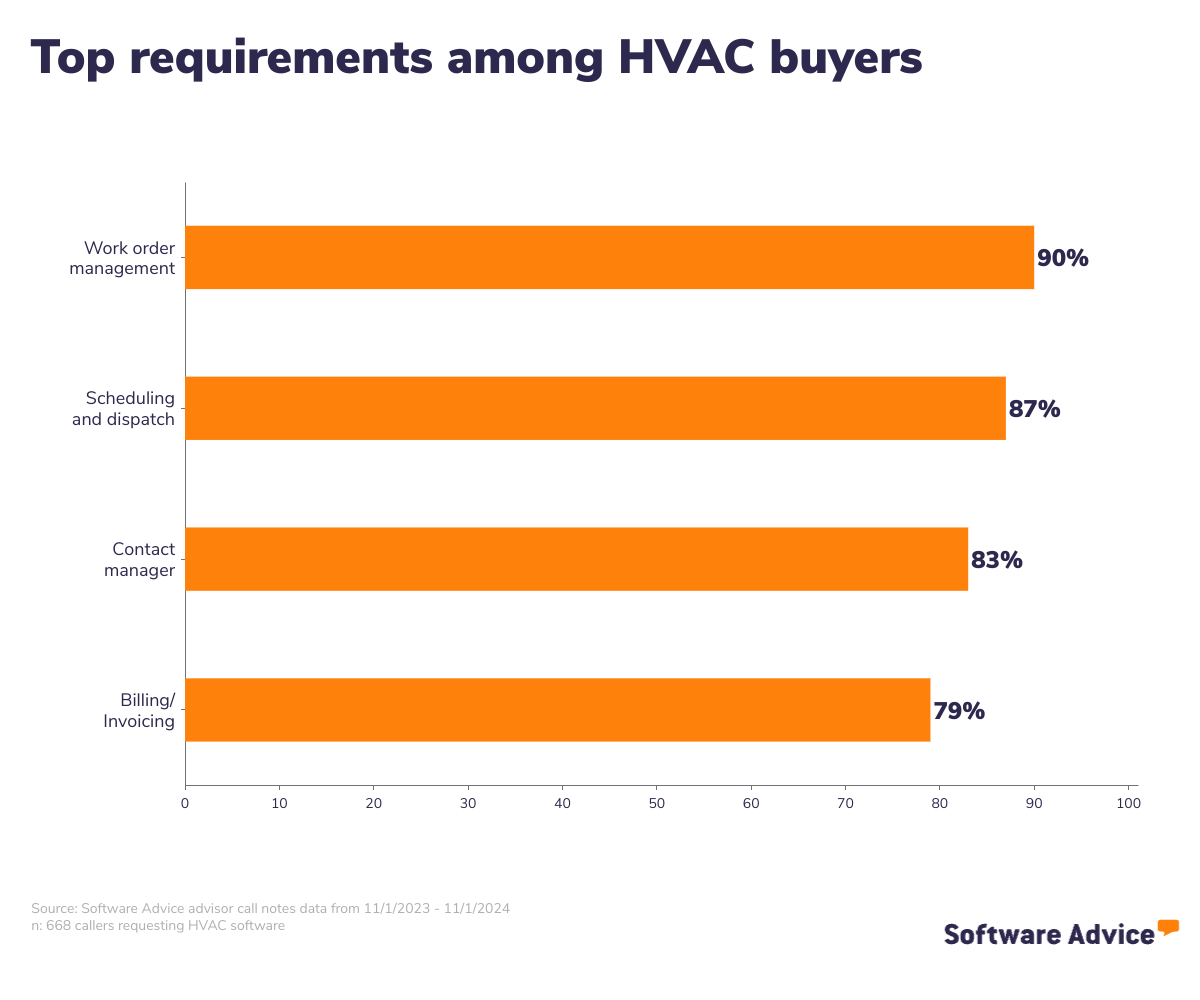
We analyzed thousands of user reviews to determine the most essential features of HVAC software:
Core HVAC software features
Work order management | Creating, assign, and track jobs and/or tasks for work orders. 82% of reviewers on our site rate this feature as critical or highly important. |
Scheduling | Plan availability and assign specific time slots for tasks and resources. 80% of reviewers on our site rate this feature as critical or highly important. |
Dispatch management | Manage sending personnel and resources to a site as needed. 59% of reviewers on our site rate this feature as critical or highly important. |
Common HVAC software features
Communication management | Manage and track all internal and external communication conducted via calls, email, text, or chat. 100% of reviewers on our site rate this feature as critical or highly important. |
Electronic payments | Electronically collect payments for goods or services. 100% of reviewers on our site rate this feature as critical or highly important. |
Real-time notifications | Notifications that are delivered to users as soon as an event occurs. 100% of reviewers on our site rate this feature as critical or highly important. |
Service history | Track work performed and resources used for past customers, sites, or assets. 81% of reviewers on our site rate this feature as critical or highly important. |
Mobile access | Access software remotely via mobile devices. 77% of reviewers on our site rate this feature as critical or highly important. |
Customer database | A collection of customer information such as contact details, demographics, previous interactions, etc. 56% of reviewers on our site rate this feature as critical or highly important. |
Benefits and competitive advantages of using HVAC software
A member of our advisor team, Jakub Vaughn, notes that “A lot of HVAC software buyers really like the ability to not only assign jobs to their technicians out in the field, but to streamline the work through different processes, like attach work orders to scheduled events in a calendar, or pull up the work order.”
In addition to streamlining operations, our data shows the other benefits of HVAC software:
Team collaboration: HVAC systems aid team collaboration by providing a centralized platform where team members can share information, monitor progress, and coordinate activities in real time.
Implementation improvements: HVAC software users can efficiently allocate resources, plan activities, and monitor progress, ensuring that projects are completed on time and on budget.
Customer service: HVAC software helps companies improve their customer service by providing a centralized hub for managing customer information and service contracts. It can provide quick access to service history and preferences, enabling teams to provide personalized and efficient service to clients.
Learning curve: HVAC software is often appreciated by users because they tend to have a small learning curve for new users. With built-in training modules and ongoing support, teams can quickly learn how to navigate and use the software effectively.
How to choose the best HVAC software for your business
1. Define your requirements
Before choosing an HVAC software, it's fundamental to define what needs your business has. This will help you get to the point where you can select the tool best suited to your needs. You can ask yourself the following questions:
What is our allocated budget?
How much does HVAC software cost on average?
What functionality do we need?
What integrations are critical to my business?
After asking yourself these questions, you'll have a better idea of what HVAC software you'll need, and then you can begin to make an initial selection.
2. Make a shortlist of HVAC software
With so many HVAC software options to choose from, it can be a challenge to narrow down the options that are right for your business—but with the right resources and support, it doesn’t have to be.
Get qualified help from an advisor: At Software Advice, our advisor Jakub Vaughn has experience helping hundreds of HVAC customers identify solutions that match their needs and budgets. If you need guidance, you can chat online now with an advisor or schedule a phone call. Your advisor will help you identify a shortlist of options that align with your requirements.
Explore our list of HVAC software FrontRunners: If it’s not the right moment to speak to an advisor yet, you can also start compiling your own shortlist of HVAC software with our FrontRunners report. Only products that earned top user ratings make this list. Check out our full methodology description for more detail on how the report is compiled.
3. Pick the best option for your business
Once the options have been narrowed down, the next step is to schedule demos with potential vendors. These sessions allow you to explore features in depth, gain clarity on pricing, and make an informed investment decision. To maximize the benefits of these demos, thorough preparation is essential. Attend the demo with a list of any questions you might have, prepare a project or use-case and ask them to show you how they would handle it in their system, and don’t be afraid to request to see specific features.
4. Make the most of your HVAC software
Once you have chosen the HVAC software that matches the needs of your business and aligns with your budget and the functionality you need, the implementation process begins. Implementing new software can be a critical process and, if not done correctly, could result in failure.
Whether you’re switching from one HVAC software to another, or going from paper charts to your first electronic system, there are some important considerations you’ll want to pay attention to during this process:
Maintain constant communication: Keep the communication open with your team, the vendor, and all the stakeholders involved. Establish a predefined method of communication and assign it a single space so that all information is kept in one place.
Train your staff: Once you opt for a specific HVAC system, be sure that every person who will be using it is trained accordingly. Maybe you will need to schedule some sessions with the vendor to have the best education.
Create checkpoints: Most vendors provide a template for the implementation process, which can be customized to meet your specific needs. However, given the importance of this task, it is critical to formally outline the checkpoints and milestones to ensure that everything goes as planned.
Software related to HVAC
Depending on the size and needs of your business, you may need some related software in order to get the most efficient results. Some types of software that are closely related to HVAC, but may or may not be included in your system, include:
Building maintenance software: Building maintenance refers to the practice that helps restore or improve the physical conditions and services of building premises. It involves various processes that can range from general upkeep related to plumbing, HVAC, and electricity, to more complicated ones such as landscape management.
Equipment maintenance software: Equipment management software tracks an organization’s mechanical equipment, ensuring that upkeep and repairs are done on schedule and on budget.
Field service management software: Field service management systems help companies schedule and track field operations. For representatives, it provides schedules, routes, customer information, and information regarding necessary supplies and parts. Managers can schedule field agents and resources, track customer history, and manage work orders.
Maintenance management software: Maintenance management systems (or CMMSs) simplify equipment maintenance, management, and planning processes, helping organizations ensure greater efficiency and consistent performance.
Service dispatch software: Service dispatch software increases productivity and efficiency by allowing the dispatch office and external staff to stay in constant contact.
More resources for your HVAC software search
About our contributors
Author
Giorgia Pisano is a content associate at Software Advice. She is always in search of the latest technology trends for small and midsize businesses, with a focus on retail and customer experience insights.
Giorgia’s research and analysis is informed by more than 120,000 authentic user reviews on Software Advice and nearly 8,000 interactions between Software Advice software advisors and retail software buyers. Giorgia also regularly analyzes market sentiment by conducting surveys of retail and restaurant leaders, as well as consumers, so she can provide the most up-to-date and helpful information to small and midsize businesses purchasing software or services.
Her research has been featured in various media publications including , , and . She has a bachelor's degree in public relations and a master's degree in marketing and management.
Editor
Kathryn Todd is a senior editor at Software Advice. She specializes in editing data-driven research reports that cover the latest technology trends. She has almost a decade of experience writing and editing content to help small businesses stay ahead of trends and find the best tech solutions for their needs. Kathryn holds a bachelor's degree in English Language and Linguistics from Sheffield Hallam University in the U.K. When not editing content herself, she enjoys reading content other people have edited and can usually be found with her head in a fiction book and a cup of tea in hand.
Advisor
Jakub Vaughn is a senior advisor. He joined Software Advice in 2022 as a software advisor. He is based in Fort Myers, FL.
As part of the software advisor team, Jakub helps professionals from a wide range of industries who are seeking tools including CMMS, manufacturing, inventory management, and help desk software. He provides a short list of personalized technology recommendations based on budget, business goals, and other specific needs.
Jakub’s favorite part of being a software advisor is educating buyers with different needs on software systems available to them and their business.
Sources
Market Guide for Commercial and Industrial Energy Management and Optimization Systems, Gartner
Software Advice advisor call notes: Findings are based on data from telephonic conversations that Software Advice’s advisor team had with small-to-midsize businesses seeking ophthalmologic tools. For this report, we analyzed phone interactions from November 1, 2023, to November 1, 2024. Read the complete methodology.
Software Advice reviews data: Software Advice reviews are collected from verified users for individual software products. For this report, we analyzed reviews from the past year as of the production date. Learn more about our review verification process.
Emerging Tech: Explore Opportunities in Emerging Smart Spaces, Gartner
Software Advice software pricing data: Only products with publicly available pricing information and qualified software products within the category, as of November 5, 2024, are included in the pricing analysis. Read the complete methodology.
HVAC FAQs
- How much does HVAC software cost?
HVAC platforms on the market are generally priced on a “per month” basic, and entry-level pricing plans typically cost around $469 per month. Premium and advanced system subscriptions commonly cost about $1,702 per month.
- Which software is used in HVAC?
HVAC software automates service management for heating, ventilation, and air conditioning contractors. According to our analysis of products with high market demand and reviews, FieldPulse, Workiz, Jobber, Sera, ServiceTrade, Service Fusion, mHelpDesk, and ServiceTitan are popular choices.
- What is HVAC business software?
HVAC business software automates service management for heating, ventilation and air conditioning contractors. It includes a wide range of functionalities, including business management tasks like accounting, customer relationship management, and inventory management. By automating routine tasks, it allows HVAC businesses to focus on growth and customer satisfaction.
- What is HVAC service software?
HVAC service software is a solution tailored for managing service operations in heating, ventilation, and air conditioning businesses. HVAC service software assists with task scheduling, technician dispatching, work order management, and invoicing. By optimizing these processes, the software enhances operational efficiency, improves customer service, and supports business growth.
- What is the best HVAC system out there?
According to our analysis of products with high market demand and reviews in the HVAC software category, Fieldpulse has the highest overall rating from verified reviewers on Software Advice.