
Best Form Builder Software of 2026
Updated March 27, 2026 at 7:48 AM

Written by Supriya Deka
Market Research Specialist

Edited by Carolyn Santa Maria
Senior Editor
- FrontRunners
- Popular Comparisons
- Buyers Guide
Compare Products
Showing 1 - 25 of 174 products
Compare Products
Sort by
Reviews: Sorts listings by the number of user reviews we have published, greatest to least.
Average Rating: Sorts listings by overall star rating based on user reviews, highest to lowest.
Alphabetically (A-Z): Sorts listings by product name from A to Z.

Adobe Experience Manager is a content management platform that combines digital asset management, a content management system, a...Read more about Adobe Experience Manager


Adobe Experience Manager's Best Rated Features
See All
Adobe Experience Manager's Worst Rated Features
See All

Jotform is a cloud-based form automation solution that enables users to publish online forms and record customer responses. It h...Read more about Jotform


Jotform's Best Rated Features
See All
Jotform's Worst Rated Features
See All

SurveyLegend is a cloud-based survey solution for individuals and businesses of all sizes. The solution enables users to create ...Read more about SurveyLegend

SurveyLegend's Best Rated Features
See All
SurveyLegend's Worst Rated Features
See All

We built Less Annoying CRM 17 years ago for the thousands of independent consultants, agents, and small business owners who are ...Read more about Less Annoying CRM

Less Annoying CRM's Best Rated Features
See All
Less Annoying CRM's Worst Rated Features
See All

**Forms On Fire: Tailored Mobile Solutions for Field Service Automation** Forms On Fire offers a revolutionary mobile app desig...Read more about Forms On Fire


Submit Forms 83.3% Faster! Replace Inspection Sheets, Time Cards, Maintenance Or Safety Checklists, Job Cards & More With A Sin...Read more about Appenate

Appenate's Best Rated Features
See All
Appenate's Worst Rated Features
See All

Droplet is a forms and workflow automation solution that helps businesses design web forms and manage workflows. It enables orga...Read more about Droplet


Droplet's Best Rated Features
See All
Droplet's Worst Rated Features
See All

TrackVia is a low-code workflow management platform designed to automate approvals, data capture, and reporting processes across...Read more about TrackVia

TrackVia's Best Rated Features
See All
TrackVia's Worst Rated Features
See All

Quizell is a polling software that helps businesses create and distribute product quizzes to gain insights into data about custo...Read more about Quizell

Alboom Prosite is a cloud-based landing page solution designed to help businesses utilize built-in themes to create professional...Read more about Alboom Prosite


Alboom Prosite's Best Rated Features
See All
Alboom Prosite's Worst Rated Features
See All

Google Workspace (formerly G Suite) is a cloud-based suite of collaboration and document management tools designed to help busin...Read more about Google Workspace
Google Workspace's Best Rated Features
See All
Google Workspace's Worst Rated Features
See All

Omnisend is an email marketing software designed for eCommerce brands. It provides tools for automation, SMS messaging, and emai...Read more about Omnisend

Omnisend's Best Rated Features
See All
Omnisend's Worst Rated Features
See All

Adobe Acrobat helps teams create, edit, sign, and share documents securely — trusted worldwide for reliable PDF workflows. As on...Read more about Adobe Acrobat
Adobe Acrobat's Best Rated Features
See All
Adobe Acrobat's Worst Rated Features
See All

Phonexa is an enterprise-grade tracking software for performance, affiliate and partner marketing. The Phonexa Suite is the unde...Read more about Phonexa

Phonexa's Best Rated Features
See All
Phonexa's Worst Rated Features
See All

Landingi is a comprehensive platform designed to empower creating conversion-driven landing pages, microsites, one-pagers, pop-u...Read more about Landingi
Landingi's Best Rated Features
See All
Landingi's Worst Rated Features
See All

Vagaro is an online booking platform that connects customers with salon, spa, and fitness professionals for scheduling appointme...Read more about Vagaro

Vagaro's Best Rated Features
See All
Vagaro's Worst Rated Features
See All

Commusoft is built for commercial and industrial HVAC, plumbing, refrigeration, generators installers, and facility maintenance ...Read more about Commusoft
Commusoft's Best Rated Features
See All
Commusoft's Worst Rated Features
See All

Culverdocs is a fully configurable, no-code platform that allows you to convert your existing paper-based documents into digital...Read more about Culverdocs
Culverdocs's Best Rated Features
See All
Culverdocs's Worst Rated Features
See All

Build beautiful forms, access-controlled databases, and highly customizable business apps without any code - all in one place. ...Read more about Formaloo
Formaloo's Best Rated Features
See All
Formaloo's Worst Rated Features
See All

GoFormz is a platform used for creating digital forms and collecting data, used by teams of every industry and size. Using GoFor...Read more about GoFormz
GoFormz's Best Rated Features
See All
GoFormz's Worst Rated Features
See All

Connecteam was designed and built as a true all-in-one solution. Easily engage and manage non-desk employees with a true all-in-...Read more about Connecteam


Connecteam's Best Rated Features
See All
Connecteam's Worst Rated Features
See All

Typeform’s form builder helps you create beautiful, conversational forms without needing design or technical skills. Get started...Read more about Typeform
Typeform's Best Rated Features
See All
Typeform's Worst Rated Features
See All

Fulcrum is a field-first SaaS platform designed to transform how organizations manage field data collection and inspections for ...Read more about Fulcrum
Fulcrum's Best Rated Features
See All
Fulcrum's Worst Rated Features
See All

AidaForm is a cloud-based survey solution that enables businesses to create online forms, collect customer feedback using templa...Read more about AidaForm

AidaForm's Best Rated Features
See All
AidaForm's Worst Rated Features
See All

Paperform is an all-in-one tool designed for small businesses and teams looking to create forms without having to be tech-savvy....Read more about Paperform
Paperform's Best Rated Features
See All
Paperform's Worst Rated Features
See All
Popular Comparisons



Your Guide to Top Form Builder Software, January 2025
Software Advice uses reviews from real software users to highlight the top-rated Form Builder products in North America.
Learn how products are chosenExplore FrontRunners


“Usability” includes user ratings for Functionality and Ease of Use.
“Customer Satisfaction” includes user ratings for Customer Support, Likelihood to Recommend and Value for Money.
Reviews analysis period: The reviews analysis period spans two years and ends the 15th of the month prior to publication.
Buyers Guide
This detailed guide will help you find and buy the right form builder software for you and your business.
Last Updated on April 24, 2025You already know the importance of collecting data from your customers. It helps you understand their perspectives, likes and dislikes, and much more. Whether it’s for a college application, opening a bank account, order forms, or simply collecting feedback, using forms to gather information is a common practice.
Due to technology advancements, you no longer have to use pen and paper to create forms and surveys. You can use form builder software to create and design any kind of form and collect data from customers wherever they are located.
Online form builder software can help you create visually appealing forms to collect information from anyone (e.g., a visitor on your website). This not only helps you sell products or services but can also help you build a meaningful relationship with your customers.
This buyers guide will discuss what exactly this software tool is, and what its common features and benefits look like.
Here’s what we'll cover:
What is form builder software?
Form builder software provides the interface for users to create interactive web forms without any coding skills. Users can create an unlimited number of forms, such as quizzes, surveys, questionnaires, order forms, and RSVP sheets, that can be shared with an audience or embedded on websites to collect data.
Form builder software saves the collected responses within the application itself which you can download for further analysis. Some customer relationship management software, lead capture software, and survey software include the built-in functionality of form building.
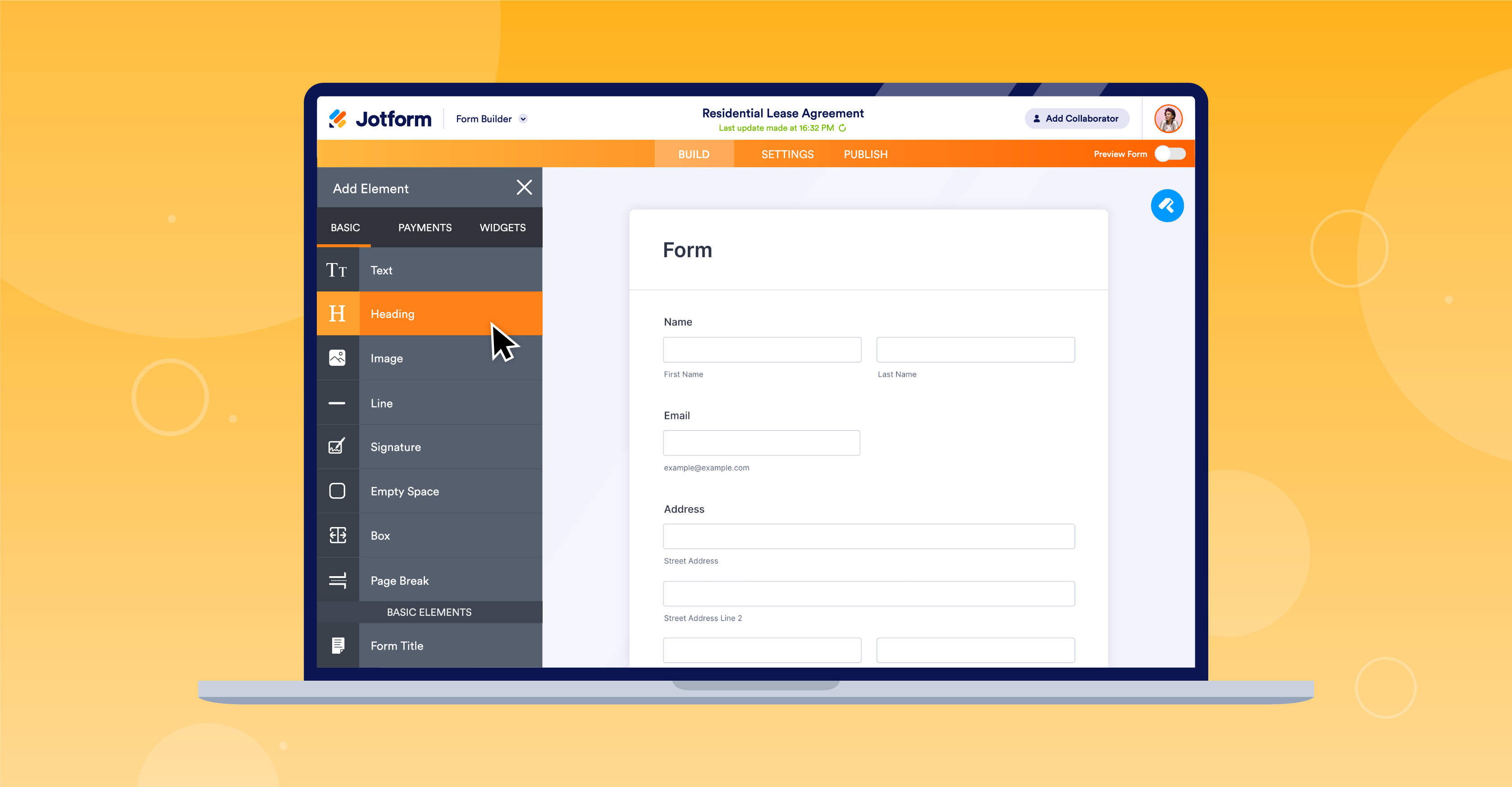
Form creation and design feature in Jotform Software (Source)
Common features of form builder software
The exact features vary depending on the product but most online form builder solutions generally have the following overlapping features.
Form creation and design | Create and design new forms from scratch within the software. You can also use existing forms, and change their design and text in the system. |
Template management | Create and save templates to be used frequently for emails, forms, surveys, and campaigns. |
Autofill | Automatically fill in fields with information such as email ID, gender, and addresses of recipients within forms. Such data can be extracted through integration with other systems, such as a CRM or ERP software. |
Customizable branding | Add company logos, themes, and color to the interface for a more personalized user interface. |
Data capture and transfer | Extract and save responses of participants from multiple sources. Users can perform analysis within the system and data can be synced to all other integrated apps. |
Drag-and-drop interface | Drag and rearrange pre-built components such as images, logos, and fields to create interactive forms. Users are not required to have coding skills to create forms in a form builder tool. |
Forms management | Organize all forms and form templates in a centralized location. Users can re-use templates and easily find all forms for further analysis, reference, or distribution to others. |
Reporting and statistics | Provide a structured overview of all responses gathered in the form of charts and graphs. These reports can be downloaded from the software to perform individual analysis for business decisions. |
Multi-channel distribution | Distribute all kinds of forms such as surveys, questionnaires, polls, and quizzes through different mediums, including email, social media, website, SMS, and so on. |
What type of buyer are you?
Before purchasing a solution, you should assess what kind of a buyer you are. The majority of buyers fall into these categories:
For businesses: Buyers in this category are business professionals, sales teams, marketing folks, and support executives who try to sell their products or services to consumers. For a product to be successful, it is important for these businesses to understand the customer mindset and experiences with their product. They need software that can help users create any kind of form in order to collect responses from customers on things such as contact information, their likes and perspectives, their experience with the brand, and so on. A form builder software with multi-channel distribution, customization, email auto-responder, payment acceptance, and drag-and-drop functionality is a good bet for these buyers. The system should integrate with their website as well as other types of software, such as email marketing, online payments, help desk, and social media platforms to bring in potential customers and boost sales to a greater extent.
For educational institutes: Digitization of education and information has made the buyers of this segment rely on digital/online forms for applications, quizzes, evaluation, or parental consent. They need software that has an easy drag-and-drop interface. A form builder software solution with reporting, conditional logic, online class registration, PDF conversion, and payment integration functionalities would be suitable for these buyers. They should opt for a software that has a low cost configuration with their school legacy systems, such as accounting and document management software.
Benefits of form builder software
Below is a comprehensive list of benefits you can expect from investing in online form builder software:
Lead generation: Form builder software lets you create custom questions to collect names and email addresses of your prospective customers which helps you in lead generation. You can send personalized emails to your leads whenever they complete a form in order to use any service on your website. This will keep them engaged and interested in your products and offers which, over time, will help you convert them to loyal clients.
Better user experience: The software lets you create visually appealing forms with options to set themes and colors, as well as add images and videos to your forms. You also have the option to personalize forms for your customers. This creates a better user experience for your customers while providing them with necessary information, and also allows them to relate more to your brand.
Saves time and cost: The drag-and-drop interface of online form builder software allows you to easily design forms. This saves a lot of time and cost that goes toward creating offline forms.
Key considerations when purchasing form builder software
Integration with third-party apps: The form builder software that you choose should integrate with other applications used within your organization, such as online payment, document management, electronic signature, and email marketing software. This can help you create more interactive and personalized forms. Additionally, the software should also provide the capability to embed the forms you create into your website so you can easily collect contact details and understand the perspective of your customers.
Mobility: Mobile form builder apps will help you collect data on any smartphone or tablet. Being able to visualize the collected data from anywhere using your mobile device can help you make informed decisions on things such as resource allocation or tracking projects. The software you choose should let you share forms with participants who can access them directly from their smartphones or tablets. The push notification feature reminds your participants about deadlines or if something in the form has not been filled out.
Your business’s needs: Before you decide on an online form builder software solution, you should assess your needs as well as your end goals. If you need forms for personal needs or to collect data within your organization, then you should opt for a free form builder software solution. But if you need to create custom forms, reach out to your customers through a variety of channels, pose an unlimited number of questions, integrate with other software, and have access to analytics and reporting, then go for a commercial or premium version of form builder software. This can help you make dynamic forms, create themes, and increase the quality of your customers’ experience.
Market trend to understand
Here’s a recent trend in the form builder software market that you should be aware of:
Use natural language processing (NLP) for deeper insights into the voice of the customer: NLP paired with form builder software can help derive valuable insights from millions of responses quickly. The technology can help users perform text analysis on the gathered responses to understand what customers love about the product, features they dislike, problems that need to be addressed, and then perform sentiment analysis. Vendors that integrate NLP technology with their form builder software are helping businesses identify trends in the responses which may otherwise get missed. This can help you take a deep dive into data to get to the root of the problem in a matter of minutes and take immediate action.
Note: The applications mentioned in this article are examples to show a feature in context and are not intended as endorsements or recommendations. They have been obtained from sources believed to be reliable at the time of publication.