


Best Manufacturing Software of 2026
Updated March 3, 2026 at 8:23 AM

Written by Molly Burke
Senior Specialist Analyst

Edited by Mehar Luthra
Team Lead, Content

Reviewed by Cameron Pugh
Senior Advisor

Talk with us for a free 15-min consultation
Expert advisors like Jacqueline, who have helped 1,000+ companies, can find the right software for your needs.
- All Software
- Buyer's Guide
- Software Advice FrontRunners
- Frequently Asked Questions
- Popular Comparisons
Manufacturing software helps production planners, plant managers, and operations teams schedule jobs, manage inventory, and monitor performance. Navigating more than 400 products, each built for different production models, team sizes, or compliance needs, can be overwhelming. To help you narrow it down, I worked with our manufacturing software advisors to curate a list of recommended productsi and a list of the manufacturing software FrontRunners based on user reviews. For further information, read my manufacturing software buyer's guide.
Manufacturing Software
Sort by
Reviews: Sorts listings by the number of user reviews we have published, greatest to least.
Average Rating: Sorts listings by overall star rating based on user reviews, highest to lowest.
Alphabetically (A-Z): Sorts listings by product name from A to Z.

NetSuite is an AI-powered cloud-based business management suite that incorporates ERP, financial management, CRM and eCommerce f...Read more about NetSuite


NetSuite's Best Rated Features
See All
NetSuite's Worst Rated Features
See All

Striven is a cloud-based enterprise resource planning (ERP) solution suitable for many industries and organizations of all sizes...Read more about Striven


Striven's Best Rated Features
See All
Striven's Worst Rated Features
See All

JobBOSS² is a job shop management software designed for custom manufacturers and machine shops. It supports make-to-order manufa...Read more about JobBOSS²


JobBOSS²'s Best Rated Features
See All
JobBOSS²'s Worst Rated Features
See All

Global Shop Solutions provides a comprehensive suite of enterprise resource planning (ERP) tools and solutions designed to help ...Read more about Global Shop Solutions


Cetec ERP is a manufacturing enterprise resource planning software built for small and medium sized businesses. Cetec ERP's clou...Read more about Cetec ERP


Cetec ERP's Best Rated Features
See All
Cetec ERP's Worst Rated Features
See All
Software Advice FrontRunners 2026

(1877)

(1290)

(504)

(1082)

(239)

(157)

(268)

(114)

(106)

(110)
Best for Customization
NetSuite

In our analysis of Manufacturing products with the most market demand, NetSuite is the most requested by users for customization out of the most popular tools.
NetSuite is best for organizations that require extensive customization to align software with unique business processes. Our reviewers say its robust customization options—such as custom forms, workflows, and fields—enable businesses to tailor the system for greater workflow efficiency and adaptability.
- Reviewers Perspective
"Time to automate various accounting processes which reduces manual data entry, minimizes errors and saves time allowing us to focus on more strategic financial activities."
FSFlorence Schlensog
Trade Advisor
Used for 2+ years
We analyzed 760 verified user reviews for NetSuite to find out what actual users really think.
Features
NetSuite covers ERP, CRM, project management, HR, and more, supporting diverse business needs. Its scalability and flexibility allow organizations to manage multiple processes in one system, reducing software sprawl.Accounting and Financial Management
Teams automate routine accounting tasks, access real-time financial data, and consolidate financials across subsidiaries. This improves accuracy, supports compliance, and streamlines operations for both SMBs and larger firms.Data Management
NetSuite consolidates information from various departments, providing a single source of truth. Real-time access, automation, and customizable fields support better decision-making and operational efficiency. - Key FeaturesNetSuite's scoreCategory average
Inventory Management
4.214.38 category average
Production Management
4.174.43 category average
Purchase Order Management
4.334.38 category average
- Screenshots


Highly Rated for Quick Adoption/Easy Adoption

Odoo

Odoo is the highest rated for quick adoption/easy adoption out of the most popular tools.
Odoo is highly rated for quick adoption, making it ideal for SMBs seeking a fast, flexible solution to digitize and integrate diverse business functions. Our reviewers point out that its intuitive interface and modular design enable rapid onboarding and seamless integration across departments.
- Reviewers Perspective
"The fact that everything is integrated into one system – sales, accounting, inventory, and marketing – really helps make workflows smoother and improves overall visibility into operations."
GMGustavo Medina
Manager
Used for 1-2 years
We analyzed 567 verified user reviews for Odoo to find out what actual users really think.
Customer Support
Service quality depends on contract level, with some users experiencing slow responses or superficial help, especially on lower-tier plans or in certain regions. This impacts timely issue resolution for SMBs needing consistent support.Customization
Businesses can tailor modules, workflows, and reports to their needs. While open-source flexibility is a strength, advanced changes may require technical expertise or outside help, making it best suited for teams with some IT resources.Modules
Odoo’s modular approach lets companies add or remove functions as they grow. The interface supports easy navigation, but some modules are less mature and may require extra learning or investment for advanced use. - Key FeaturesOdoo 's scoreCategory average
Inventory Management
4.164.38 category average
Production Management
3.574.43 category average
Purchase Order Management
4.184.38 category average
- Screenshots


Best for Quick Implementation


Of the products listed on our FrontRunners report, inFlow Inventory is the most requested by users for quick implementation out of the most popular tools.
inFlow Inventory is best for SMBs seeking quick implementation of inventory management with minimal training. Our reviewers say its straightforward interface and easy onboarding process allow teams to efficiently manage inventory, sales, and purchasing from day one.
- Reviewers Perspective
"We've been able to set up BOMs, track inventory, handle parts sales, etc., all with real time updates."
KFKarla Folstad
Corporate Office Liaison and Compliance Analyst
Used for 2+ years
We analyzed 352 verified user reviews for inFlow Inventory to find out what actual users really think.
Ease of Use
Staff adapt quickly to inFlow Inventory’s simple setup and intuitive navigation. The platform supports a range of business needs with minimal training, saving time and reducing errors.Customer Support
Support staff are responsive and knowledgeable, providing timely help via email and phone. Regular updates and an active user community ensure users’ needs are addressed and feedback is incorporated.Invoicing
Users manage quotes, sales orders, and invoices in one place, with flexible document customization and direct email options. Integration with inventory management simplifies record-keeping and financial tracking. - Key FeaturesinFlow Inventory's scoreCategory average
Inventory Management
4.654.38 category average
Purchase Order Management
4.504.38 category average
- Screenshots


Highly Rated for User Interface

Fishbowl

According to our user reviews, Fishbowl is the highest rated for user interface out of the most popular tools.
Fishbowl is highly rated for its user interface, making it well-suited for SMBs that value ease of navigation in inventory and warehouse management. Our reviewers say the intuitive dashboard and logical workflows simplify daily tasks and reduce training time for new users.
- Reviewers Perspective
"What I liked most about Fishbowl is its powerful inventory and order management features, which make tracking stock, processing orders, and maintaining accuracy across multiple locations incredibly efficient and reliable."
MMManuele Mazzanti
CFO
Used for 1-2 years
We analyzed 572 verified user reviews for Fishbowl to find out what actual users really think.
Customer Support
Fishbowl’s support staff provide timely, clear guidance throughout implementation and daily use. This helps SMBs resolve technical issues quickly and adapt to changing business needs.Inventory Management
Teams streamline inventory tracking, automate reorder points, and maintain accuracy across warehouses. Features like barcode scanning and integration with accounting systems support complex inventory needs for growing businesses.Training and Learning Curve
On-site sessions, online tutorials, and responsive trainers help users adapt to Fishbowl’s system. Consistent support and documentation ease the learning curve, enabling smoother workflows after onboarding. - Key FeaturesFishbowl's scoreCategory average
Inventory Management
4.284.38 category average
Production Management
4.374.43 category average
Purchase Order Management
4.334.38 category average
- Screenshots


Best for Automation Capabilities

Craftybase

Of the products listed on our FrontRunners report, Craftybase is the most requested by users for automation capabilities out of the most popular tools.
Craftybase is best for SMBs prioritizing automation capabilities in inventory and production tracking. Our reviewers say its automated inventory adjustments, recipe management, and integrated reporting streamline workflows and reduce manual effort for craft-based businesses.
- Reviewers Perspective
"Craftybase helps me keep track of my inventory - both raw materials and finished products - while also providing me with the forms and reports I need to monitor my business."
DMDeanna McKinney
Business owner
Used for 1-2 years
We analyzed 169 verified user reviews for Craftybase to find out what actual users really think.
Customer Support
The support team provides quick, effective solutions and accessible help resources. Staff work with users until issues are resolved, making onboarding and troubleshooting smoother for small manufacturers.Small Business
Craftybase’s design, pricing, and scalability suit small businesses, especially in handmade or craft-based industries. Features scale as companies grow, helping organize operations and support expansion.Recipe Management
Users store, organize, and cost out product recipes, tracking ingredients and maintaining batch consistency. Centralized recipe management streamlines production planning and supports accurate pricing and inventory control. - Key FeaturesCraftybase's scoreCategory average
Inventory Management
4.604.38 category average
Production Management
4.404.43 category average
Purchase Order Management
4.894.38 category average
- Screenshots


Most Rated for SMBs

MRPeasy

In our analysis of Manufacturing products with the most market demand, MRPeasy is the most requested by small businesses out of the most popular tools.
MRPeasy is most rated for SMBs, making it a strong fit for small and midsize manufacturers seeking accessible MRP and inventory management. Our reviewers highlight its ease of use, clear workflows, and efficient onboarding for teams with limited ERP experience.
- Reviewers Perspective
"We now have ultimate stock control and manufacturing accuracy which was loose before we started with the program. As the site manager I can track costs and inventory saving me huge amounts of time and improving our profit margins by monitoring expences and overheads."
BHBen Hunt
Winery Manager
Used for 6-12 months
We analyzed 123 verified user reviews for MRPeasy to find out what actual users really think.
Customer Support
Support tickets are typically answered quickly, with knowledgeable staff assisting onboarding and troubleshooting. Consultants are available for implementation, supporting SMBs with limited internal IT resources.Production Process
MRPeasy enables logical workflows for production planning, material requirements, and BOM management. Inventory pegging and support for complex assemblies help manufacturers improve operational efficiency.Inventory Management
Businesses track inventory, materials, and costs in real time, reducing errors and improving cost control. Integration with other functions and flexible stock location management support growth and forecasting. - Key FeaturesMRPeasy's scoreCategory average
Inventory Management
4.594.38 category average
Production Management
4.384.43 category average
Purchase Order Management
4.354.38 category average
- Screenshots


Most Used By Mechanical/Industrial Engineering


According to our user reviews, Autodesk Fusion is the most requested by users in mechanical/industrial engineering out of the most popular tools.
Autodesk Fusion is most used by mechanical and industrial engineering teams needing advanced 3D modeling and simulation. Our reviewers say its comprehensive toolset and accessible learning resources support both novice and experienced users in engineering design workflows.
- Reviewers Perspective
"Fusion 360 is a perfect software to introduce the user to professional CAD, and its similarities with AutoCAD allow users to jump into more advanced work with a minimal learning curve."
TBThomas Birnie-Wortley
Student
Used for 6-12 months
We analyzed 191 verified user reviews for Autodesk Fusion to find out what actual users really think.
Ease of Use
Users adapt quickly to Autodesk Fusion’s interface, which supports both beginners and experienced designers. Clear tool organization and abundant learning materials help teams get productive with minimal training.3D Modeling
The platform supports a wide range of 3D modeling tasks, from parametric modeling to simulation. Flexible editing and export options enable efficient design workflows for engineering, education, and hobbyist projects.3D Printing
Autodesk Fusion simplifies designing and preparing models for 3D printing, offering straightforward export to printable formats and compatibility with various printers. This supports rapid prototyping and custom part creation. - Screenshots


Best for Usability

QT9 QMS

In our analysis of Manufacturing products with the most market demand, QT9 QMS is the highest rated for its usability out of the most popular tools.
QT9 QMS is best for usability, making it ideal for SMBs seeking a quality management system that is easy to learn and navigate. Our reviewers point out that its intuitive interface and consistent module design minimize the learning curve and support efficient compliance processes.
- Reviewers Perspective
"QT9 as a QMS has helped to digitize many processes that would otherwise have been handled through paper documentation."
DPDevin Plowman
VP of Supply Chain
Used for 2+ years
We analyzed 89 verified user reviews for QT9 QMS to find out what actual users really think.
Ease of Use
Teams adapt quickly to QT9 QMS thanks to its consistent module design and clear layout. This reduces the learning curve and helps both new and experienced users manage quality processes efficiently.Document Management
Organizations transition from paper to digital workflows, using revision history, electronic signatures, and customizable fields to support compliance and collaboration. Document creation and updates are streamlined.Quality Management
QT9 QMS brings together non-conformance management, risk assessment, and audit support in one platform. This helps maintain ISO standards, enhances efficiency, and reduces administrative burdens for quality teams. - Screenshots


Most Used By Construction

Sage X3

Sage X3 is the most requested by users in construction out of the most popular tools.
Sage X3 is most used by construction firms and organizations managing complex, multi-site operations. Our reviewers say its robust inventory and manufacturing modules, along with strong financial tracking, support efficient management of distributed business activities.
- Reviewers Perspective
"Sage X3 is a robust and flexible ERP system that excels in managing complex business operations across multiple departments, locations, and even countries."
PTPreci Thomas
Representative
Used for 6-12 months
We analyzed 57 verified user reviews for Sage X3 to find out what actual users really think.
Management
Sage X3 supports complex business operations across departments, locations, and companies. Its comprehensive features for accounting, procurement, warehousing, and sales help streamline daily processes and optimize workflows.Inventory and Manufacturing
Users oversee purchasing, logistics, production, and accounting in one platform. The system handles complex stock systems and traceability, supporting productivity and consolidation for organizations with multiple sites.Ease of Use
The user interface is intuitive, with clear functions and helpful search features. This enables a wide range of users to quickly become proficient, reducing the learning curve and supporting efficient workflows. - Key FeaturesSage X3's scoreCategory average
Inventory Management
4.274.38 category average
Purchase Order Management
4.104.38 category average
- Screenshots


Best for Customer Satisfaction

Easy8

According to our user reviews, Easy Redmine is the highest rated for customer satisfaction out of the most popular tools.
Easy Redmine is best for customer satisfaction, making it a strong choice for teams seeking responsive support and a user-friendly project management experience. Our reviewers say the support team is accessible and helpful, ensuring smooth onboarding and ongoing use.
- Reviewers Perspective
"We appreciate that Easy Redmine blends hybrid project planning, IT service desk, and integrated Git repositories in one on-premise package, giving us full data sovereignty while AI reports continually warn us about schedule or budget risks."
AŠAdam Škodík
Marketing Specialist
Used for 1-2 years
We analyzed 84 verified user reviews for Easy Redmine to find out what actual users really think.
Customer Support
Support staff address questions, assist with setup, and resolve issues, helping teams deliver better service to internal and external clients. Accessible documentation and regular updates further support daily operations.Customization
Organizations tailor workflows, dashboards, and ticket processes to fit business needs. While initial configuration can be complex, the system’s adaptability supports evolving requirements across departments.Features
Easy Redmine offers a broad set of tools for project management, reporting, and change management. Continuous plugin development and export options support evolving business needs and daily operations. - Screenshots


Genius ERP

- Reviewers Perspective
"The one aspect that matters most to me is how engineering and production runs concurrently. When a design is complete in CAD format, the BOM and routing can be imported into the system so there is no need to re-enter specifications and save money from not realizing an expensive error."
WGWaleed Gomaa
Project Manager
Used for 1-2 years
We analyzed 123 verified user reviews for Genius ERP to find out what actual users really think.
Custom Manufacturing
Engineering teams manage complex custom manufacturing by importing CAD designs and updating multi-level BOMs. The software adapts to high-mix, low-volume production and supports engineering lifecycle management.Production Scheduling
Production managers plan, allocate, and track jobs across work centers and machines. Transparency in order status and resource management helps identify bottlenecks and improve delivery timelines.Training and Learning Curve
New users access webinars, Genius Academy, and tailored sessions. While the initial learning curve is steep, ongoing support and knowledgeable trainers help teams achieve proficiency and maximize system power. - Key FeaturesGenius ERP's scoreCategory average
Inventory Management
4.324.38 category average
Production Management
4.224.43 category average
Purchase Order Management
4.384.38 category average
- Screenshots


- Reviewers Perspective
"Using SAP has made checking inventory of certain parts, organizing service calls for our technicians and correcting billing issues on the back-end incredibility straightforward."
CECydrina Espinosa
Technical Service Helpdesk
Used for 1-2 years
We analyzed 204 verified user reviews for SAP Business One to find out what actual users really think.
Inventory Management
Teams track inventory and manage warehouse operations across locations. Automated stock processes, accurate costing, and tools for procurement and production help reduce manual work and improve fulfillment.Small and Medium Business
SMBs use SAP Business One’s full suite of modules to automate and digitize operations. The platform supports growth, subsidiaries, and diverse business needs, though complexity and cost may be considerations.Customization
Organizations tailor SAP Business One with tools for modifying dashboards, workflows, and modules. Custom development supports advanced requirements, enabling adaptation to specific operational goals. - Key FeaturesSAP Business One's scoreCategory average
Inventory Management
4.324.38 category average
Production Management
5.04.43 category average
Purchase Order Management
4.154.38 category average
- Screenshots


- Reviewers Perspective
"SAP S/4HANA Cloud has advanced Ai capabilities which enables efficient automation of manual process and optimization of financial operations."
LBLucia Bergoglio
HR Manager
Used for 2+ years
We analyzed 226 verified user reviews for SAP S/4HANA Cloud to find out what actual users really think.
Data Management
Teams use SAP S/4HANA Cloud to automate repetitive tasks, reduce errors, and access up-to-date business data. Real-time reporting and flexible querying support decision-making and efficient analytics across departments.Integrations
Organizations integrate SAP S/4HANA Cloud with various business modules and external systems. Once setup is complete, seamless data flow and process automation enhance operational efficiency across departments.Business Processes
Manufacturing and logistics teams streamline operations using industry-standard workflows and pre-configured modules. Tools for analyzing and optimizing processes help organizations adapt to changing needs and manage complex tasks. - Key FeaturesSAP S/4HANA Cloud's scoreCategory average
Inventory Management
4.634.38 category average
Purchase Order Management
4.524.38 category average
- Screenshots


ERPAG

- Reviewers Perspective
"It helped us streamline operations, track inventory, manage orders, and improve productivity."
THTINNUS HATTINGH
C.O.O
Used for 1-2 years
We analyzed 249 verified user reviews for ERPAG to find out what actual users really think.
Customer Support
Teams receive prompt help from ERPAG’s customer support via live chat and email. Manuals and online resources contribute to smooth setup and ongoing use, fostering confidence in the software.Features
Businesses centralize operations with ERPAG’s broad feature set, including document templates, notification systems, and mobile access. Flexibility and customization options support varied workflows across manufacturing and sales.Inventory Management
Inventory managers track stock levels, manage orders, and streamline production planning. ERPAG handles raw materials, finished goods, and permissions across locations, improving supply chain control and transitioning from spreadsheets. - Key FeaturesERPAG's scoreCategory average
Inventory Management
4.614.38 category average
Production Management
4.334.43 category average
Purchase Order Management
4.414.38 category average
- Screenshots


- Reviewers Perspective
"The system has ultimately provided our business with improved real-time visibility, better automation capabilities, and the flexibility to scale as we grow."
DADominic Albrecht
Head of Analytics
Used for 2+ years
We analyzed 110 verified user reviews for Acumatica Cloud ERP to find out what actual users really think.
Customization
Managers modify dashboards and add custom fields to tailor Acumatica Cloud ERP for unique business processes. User-level configuration options support diverse industries, while advanced customization may require technical expertise.Cloud Accessibility
Teams access Acumatica Cloud ERP from any location, supporting collaboration and streamlined operations. Mobile access and automated upgrades enable real-time updates without on-premise servers, meeting modern business demands.Integrations
Businesses link Acumatica Cloud ERP with CRM, e-commerce, and productivity tools using open APIs. Integration flexibility allows for expanded functionality and automation, maintaining real-time visibility across operations. - Key FeaturesAcumatica Cloud ERP's scoreCategory average
Inventory Management
4.134.38 category average
Purchase Order Management
4.354.38 category average
- Screenshots


- Reviewers Perspective
"Properly creating record templates allows for a lot more consistency across manufacturing lines and facilities."
DMDaniel Merkulovich
Manufacturing Operations Engineer
Used for 1-2 years
We analyzed 117 verified user reviews for MasterControl Manufacturing Excellence to find out what actual users really think.
Ease of Use
Manufacturing teams navigate daily tasks easily with MasterControl’s intuitive design. The platform reduces reliance on paper, and clear options help new users quickly become comfortable across roles.Training and Learning Curve
Organizations use self-study courses, compliance modules, and summits to master MasterControl. Effective training and support resources help track employee competencies and optimize system use despite initial complexity.Production Records
Manufacturing lines create production records using templates and automation. Digital tracking, remote monitoring, and integration with quality control procedures simplify documentation and enhance visibility. - Key FeaturesMasterControl Manufacturing Excellence's scoreCategory average
Inventory Management
3.564.38 category average
Production Management
4.394.43 category average
- Screenshots


Datacor ERP

- Reviewers Perspective
"For a complex system, the tool is fairly intuitive and allows me to find what I need in due time."
DBDerek Brown
VP, Supply Chain
Used for 2+ years
We analyzed 56 verified user reviews for Datacor ERP to find out what actual users really think.
Customer Support
Users request system changes and receive timely assistance from Datacor ERP’s support staff. Regular updates introduce new features, and the team is patient and well-versed in troubleshooting and implementation.Ease of Use
Office and supply chain staff efficiently locate information using Datacor ERP’s adaptable screens and user-friendly menus. Improved documentation and help resources support quick learning and flexible workflows.Navigation
Teams navigate Datacor ERP using multiple search options and menu paths. Help sections and shortcuts enhance workflow, making it easier to manage business processes once familiar with the system. - Key FeaturesDatacor ERP's scoreCategory average
Inventory Management
4.164.38 category average
Purchase Order Management
4.634.38 category average
- Screenshots


JobBOSS²

- Reviewers Perspective
"Recently quoted parts, RFQ, etc. are all easy to use for us."
MCMilt Cummings
Project Manager
Used for 2+ years
We analyzed 540 verified user reviews for JobBOSS² to find out what actual users really think.
Training and Learning Curve
New staff get up to speed quickly with JobBOSS²’s online tutorials, videos, webinars, and in-person sessions. Extensive documentation and support resources enable ongoing skill development and adaptation.Reports and Customization
Managers generate detailed reports and export data for analysis. Customizing reports often requires Crystal Reports knowledge or technical support, adding cost and complexity for tailored information.Ease of Use
Teams manage jobs, orders, and data entry efficiently with JobBOSS²’s straightforward navigation. Minimal training is needed, and the design helps new employees quickly become productive. - Key FeaturesJobBOSS²'s scoreCategory average
Inventory Management
3.674.38 category average
Production Management
4.714.43 category average
Purchase Order Management
4.154.38 category average
- Screenshots


Cin7 Core

- Reviewers Perspective
"We love how straightforward it is to monitor stock levels, sync orders from Shopify and Amazon, and track profitability all in real time. Plus, the native integrations with QuickBooks Online and ShipStation save us hours each week since we no longer have to juggle multiple spreadsheets or manually update separate systems.”"
PGPierre Goldie 🌱
Co-Founder
Used for 2+ years
We analyzed 492 verified user reviews for Cin7 Core to find out what actual users really think.
Inventory Management
Warehouse managers monitor stock levels, automate inventory tracking, and access detailed reporting. Batch tracking, multi-location support, and real-time updates reduce manual errors and improve operational efficiency.Ease of Use
Staff navigate Cin7 Core’s clean dashboard and extensive tutorials with ease. Even less tech-savvy employees adapt quickly, making daily operations smoother and minimizing training time.Integrations
Businesses synchronize data across platforms like Shopify, QuickBooks Online, and ShipStation. Straightforward setup and ongoing improvements support a wide range of workflows and reduce manual entry. - Key FeaturesCin7 Core's scoreCategory average
Inventory Management
4.414.38 category average
Production Management
3.754.43 category average
Purchase Order Management
4.314.38 category average
- Screenshots


- Reviewers Perspective
"I like the fact that the L2L dispatch system is easy to create new dispatches for maintenance technicians, and the fact that the dispatches show up nearly instantaneously with the automatic refresh feature on the dispatch page."
KCKenji Cha
Electrical Controls Technician
Used for 2+ years
We analyzed 60 verified user reviews for L2L Connected Workforce Platform to find out what actual users really think.
Customer Support
Teams can access L2L Connected Workforce Platform support via multiple channels for prompt help. Manufacturing managers benefit from training resources and guidance, making onboarding straightforward and resolving issues efficiently.Ease of Use
Operators and managers quickly navigate daily tasks with L2L’s user-friendly interface. Minimal training and clear documentation enable new hires to become productive fast, streamlining workflows in manufacturing environments.Maintenance Scheduling
Maintenance teams input and revise preventative work, track history, and attach instructions directly to jobs. Real-time status updates and centralized documentation reduce technician repair time and improve visibility across departments. - Key FeaturesL2L Connected Workforce Platform's scoreCategory average
Inventory Management
4.204.38 category average
Production Management
4.04.43 category average
- Screenshots


Methodology
The research for the best manufacturing software list was conducted in October 2025. We evaluated data (user reviews and demand signals) from the past 24 months as of the research date. Read the complete methodology.
Popular Manufacturing Comparisons


Buyer's Guide
This detailed guide will help you find and buy the right manufacturing software for you and your business.
Last Updated on March 23, 2026Here's what we'll cover:
What is manufacturing software?
5 steps to buying manufacturing software
What are the features of manufacturing software?
Who uses manufacturing software?
What is manufacturing software?
Manufacturing software helps production managers, operations managers, and other manufacturing professionals optimize the production lifecycle, including managing workflows and tracking everything from materials to labor to project tasks. This kind of software helps manufacturers ensure the quality of their output by automating data entry, monitoring machine performance and managing supply chains.
Manufacturing software comprises an enormous marketplace. Our site features over 400 manufacturing software vendors and has published more than 6,000 reviews in the past year alone. [1] Our analysis of those reviews and advisor calls with real software buyers, combined with our research on manufacturing software buyers, gives us insights into how manufacturers approach new software investments, the most important features they consider, and how to successfully purchase and implement new tools. [2]
According to our 2026 Software Buying Trends Survey, 77% of manufacturers plan to spend more on software in 2026, and 78% of surveyed manufacturers anticipate that their business will grow over the next 18 months. [3] With high needs around supporting scaled operations and increased budgets, it’s essential for buyers to make the right choices with software investments.
It’s important for buyers to recognize that while finding the right software needn’t be an arduous, drawn-out process, making a successful purchase does require planning, aligning team members, and engaging with vendors. On average, successful software adopters spend just 3 months selecting software, and they follow 5 key steps to ensure their purchase pays off. [3]
Types of manufacturing software
As a category, manufacturing software covers a wide range of tools and capabilities to support every aspect of production.
“With manufacturing software, you’ve got two main components. One term you’ll hear is materials requirements and planning (MRP). This is basically for tracking inventory of raw materials, generating a bill of materials and a work order, and all of your pre-production scheduling. The other main component is a manufacturing execution system (MES), which tracks your work in progress on the actual production floor,” says Cameron Pugh, senior manufacturing software advisor.
Here’s a deeper dive into the two main components of manufacturing software:
Material Requirements Planning (MRP), the system that supports pre-production tasks, including scheduling, generating work orders and bills of materials, and tracking inventory. This software calculates the resources needed to meet production demands, so businesses can estimate costs and timing.
Manufacturing Execution System (MES), which supports factory-floor operations with real-time data and complex monitoring of production workflows, such as quality management tasks, performance analysis, and alerts for constraints or bottlenecks. This software helps ensure resources are allocated properly and production is efficient, compliant, and traceable.
Other key features and capabilities buyers tend to look for in manufacturing software systems include:
Accounting
Project management (PM)
Quality management (QMS)
Customer relationship management (CRM)
Supply chain management (SCM)
Product lifecycle management (PLM)
Configure, price, quote (CPQ)
These capabilities are often bundled into MRP/MES systems, though some are best purchased as standalone tools. Some businesses opt for enterprise resource planning (ERP) suites to cover all of their bases within one large platform. Some manufacturing software systems are specialized by product or production type. Your need for specialization and bundled or standalone features often comes down to the type of manufacturing you do.
For instance:
Made-to-order manufacturers tend to need a CPQ system so sales teams can create customer quotes in the field.
Engineered-to-order manufacturers may need a robust PM system for engineering teams which integrates with MRP and MES functions.
Batch manufacturers may need specialized tools for chemical or food and beverage manufacturing.
When evaluating manufacturing software options, it’s critical to understand your business’s needs, including must-have features and budget.
Expert tip for SMBs:
“You may have heard you need an ERP system to manage your entire business in one place. But keep in mind that your business may not need all the bells and whistles of a unified suite. Alternatively, you may need best-of-breed tools for specific areas of your business, which you can then integrate with your other software.” - Molly Burke
5 steps to buying manufacturing software
With so many options to consider, it’s important for manufacturers to follow a plan for making successful software purchases. As our research on software buyers shows, it’s all too easy to end up with a disappointing investment. In fact, just 34% of software buyers end up finding the tool that meets their needs; the other 66% experience disruptions during implementation, regret, or both. [3]
Why this matters: This five-step buyer’s guide uses the data-driven methods of successful software adopters to provide a path toward positive and measurable ROI for your next software purchase. It helps buyers avoid common mistakes, stay on budget, and smoothly implement their new tool so they can stay on the path to long-term growth.
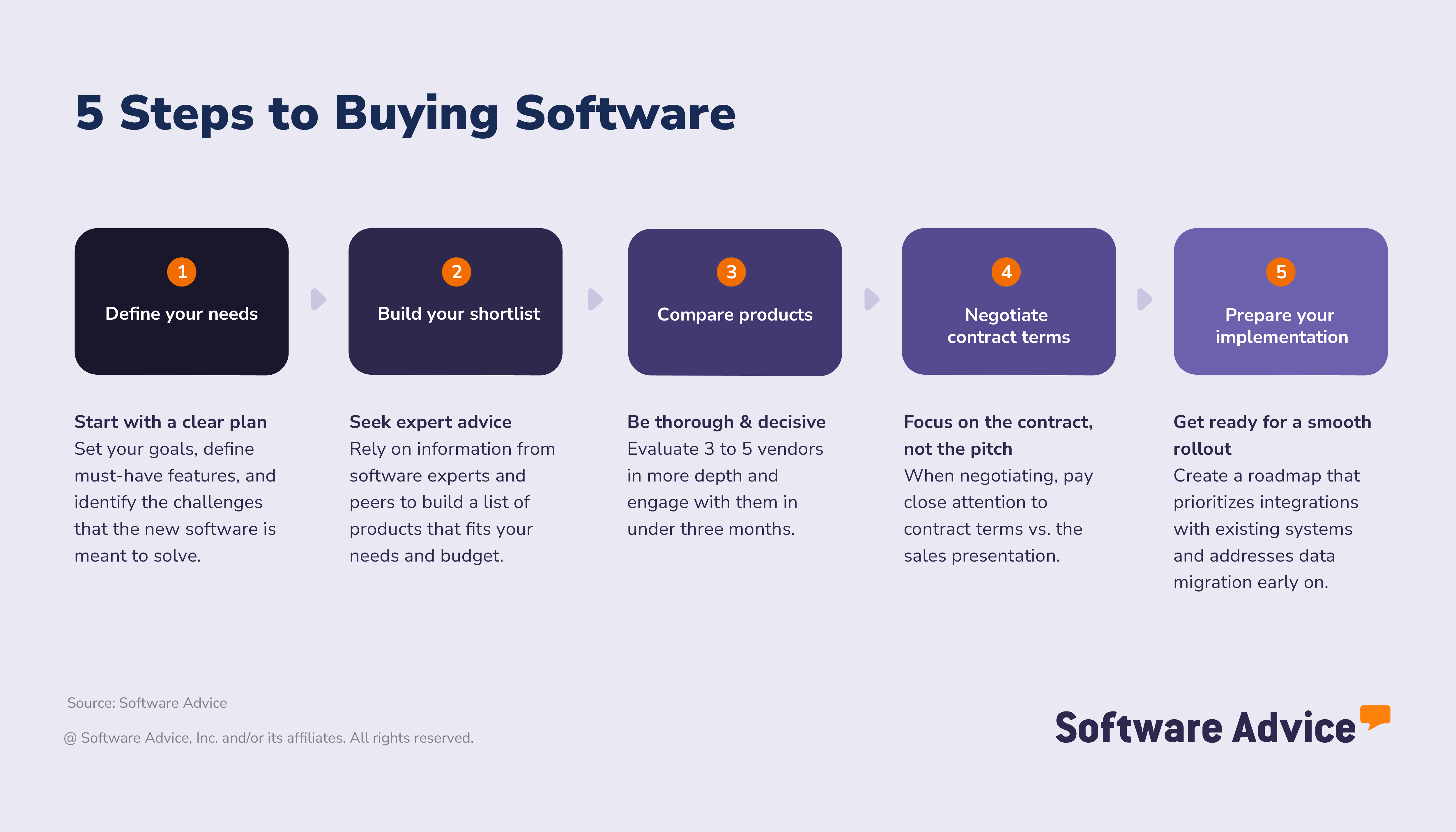
Step 1: Define your needs and goals
A successful software purchase starts with understanding how you need your new tool to perform. Over half of successful adopters take time to plan ahead and clearly define the desired outcomes of their investment. [3] Starting with a clear vision helps you avoid distractions during product research and contract negotiations and helps eliminate any potential surprises during implementation.
Set your goals: What challenges do you want to solve with your manufacturing software?
Before you think about features, start by identifying the results you want to achieve with your new software. What does success look like for your team with the new tool? Use real-world scenarios, connecting everyday challenges you experience at your business with clear, measurable goals and metrics.
Consider current and future challenges
A successful software investment supports your business now and into the future. Consider what your current challenges are, as well as what might come up as your business changes over the next several years.
Here are some reasons why manufacturers buy new software or switch vendors:
Old systems slow everything down: Frustration with older or outdated systems that don’t support current production needs.
Weak support turns small issues into big bottlenecks: A lack of accessible vendor support that turns small technical issues into critical delays.
Paying too much for too little: Overpaying for software that doesn’t perform.
Shifts in operations create new needs: Scaling or downsizing operations has created new requirements.
Set measurable success metrics
Once you’ve set goals, identify the key performance indicators (KPIs) you’ll use to track the progress and ROI of your software investment. Putting a number to a goal makes it more achievable and improves visibility during implementation.
Here are some examples of manufacturing KPIs to consider:
Cycle time reduction
Increased overall equipment effectiveness (OEE)
Reduced downtime
Reduced cost of goods sold (COGs)
Lowered customer acquisition cost (CAC)
Keep an eye on scope
Some manufacturing software suites can cover nearly every aspect of the business, from production to accounting to sales. But tools with this scope can come at a high price point, with long implementation runways and modules that don’t always perform to buyers’ standards. Consider whether your business would benefit from suites with a more focused scope and from integrating with best-of-breed standalone apps for non-production areas like HR, IT, or marketing.
“Sometimes buyers tell me they want everything under the sun–accounting, HR, supply chain–all in one. One thing I like to recommend is integration. I give them an analogy: Sometimes people have multiple different cars. They've got a minivan for all the kids and they've got a sports car for the weekend and then a truck if they're hauling lumber. That way you're getting the best of each system. A huge manufacturing suite might not have the greatest HR functionality, but a vendor that focuses on HR is gonna be really good at HR. And if they do integrate, it's basically like they're in the same system.” says Cameron Pugh, senior manufacturing software advisor.
Set your requirements: Map business goals to features
The next step is to map your goals to software features, so you can filter your search for tools that can deliver on your desired outcomes. Identifying those must-have features helps you cut through the marketing noise as you search for tools and, later, discern sales language from real contractual terms during vendor negotiations.
Here are some examples of how a manufacturer’s goals could align with software features:
Goal area | Business goal (outcome) | Helpful software & features |
Operational efficiency | Reduce cycle time Increase capacity utilization rate Increase throughput Prevent downtime | Quality management software Production scheduling Inventory management Real-time data & automated alerts Preventive maintenance Maintenance scheduling Root cause analysis |
Supply chain | Reduce CoGS Prevent overstock Meet demand | Demand forecasting Supplier relationship management Inventory tracking |
Customer acquisition | Reduce CAC Faster quote generation Better sales performance in the field | CPQ software Contact management Price and cost calculations Product configurator |
Getting specific about mapping goals to features is particularly helpful for staying on budget. Buyers often start their search for manufacturing software convinced they need an expensive, all-in-one suite, when many would actually benefit from a pared-down tool that supports specific needs and has a lower price point.
“I can have someone that I'm talking to asking for an ERP system. I ask what they actually need, and all they want is an inventory management system. People can say ‘ERP’ and mean something else. I would say, OK, well, what does ERP mean to you? It's a pretty loosely used term.” points out Cameron Pugh, senior manufacturing software advisor.
Identify selection stakeholders: Who needs to be involved for a successful purchase?
Even at the smallest businesses, the most successful software buyers don’t make decisions alone. Assembling a team of decision-making stakeholders is among the most crucial steps in the software selection process, according to both successful adopters and disappointed buyers who would change their approach for future purchases.
Why this matters: Having multiple perspectives helps ensure all goals and requirements are addressed and round out knowledge gaps that could lead to overlooked limitations during implementation.
“Most of the time our buyers are not very tech-savvy. A lot of them come from small to mid-sized businesses, so they don’t have that full IT department. So a lot of people are new to software selection, or it’s gonna be a technician that has worked for big companies in the past, so they asked him to do it because he’s used some of these software systems.” says Cameron Pugh, senior manufacturing software advisor.
Here are the stakeholders you’ll want to assemble for your cross-functional selection team:
Production or plant managers: These will be your primary decision drivers. Next to end users, these managers are closest to daily operations and feel the pain points the software needs to solve. They’ll be able to weigh in on desired user count and KPIs.
Intended end users: Getting feedback during the selection process from real end-users at your business helps prevent or anticipate issues around user-friendliness, training needs, and interface requirements.
Engineering team leads: If your company uses engineer-to-order workflows or needs systems aligned with design and engineering processes, include these folks.
IT team leads: If your company is large enough to have an IT team, it’s essential to include them in product research and planning for implementation tasks such as integration, data migration, and cybersecurity maintenance.
People with previous experience purchasing B2B software: Institutional knowledge on how your company’s software purchases have gone in the past is invaluable. Incorporate lessons learned and advice from experienced team members as you move through this 5-step plan.
Expert tip for SMBs:
“If your business is large enough to have an IT team, collaborate with them on product research, shortlisting, and vendor engagement to address overlooked requirements, ensure alignment with security goals, and get the best value from your purchase,” underscores Molly Burke, senior analyst for manufacturing at Software Advice
Step 2: Build your shortlist and seek expert advice
In large part, the success or failure of your purchase comes down to the quality of information you consume during product research. As you consider your options, keep in mind that not all information about vendors and products is equally reliable.
For example, disappointed buyers tend to prioritize generative AI (GenAI) tools and online forums as the source of truth for software purchase decisions. By contrast, while successful buyers do consider these sources, they primarily lean on insights from industry experts and software review/comparison sites. [3]
Get real advice from real people
Our software advisors are a great resource for software buyers who want structured guidance based on real-world implementation scenarios, not just product spec sheets. Our advisors help manufacturers:
Understand which features align with their goals, workflows, business size, and production type
Compare vendors on cost, support, and integration capabilities
Plan for a smooth implementation
Speaking with an advisor can help clarify your shortlist and reduce the risk of costly mistakes. Need help choosing the right manufacturing software? Connect with an advisor for tailored, one-on-one guidance.
How to leverage user reviews
User reviews are one of the most valuable resources when researching manufacturing software. In fact, nearly a third of global software buyers say that real user feedback is the most influential part of their decision-making process. [3] For manufacturers, reviews can offer insights into how a system performs in real-world production environments, often revealing details you won’t find in vendor marketing materials.
Here’s how to make the most of user reviews during your software search:
Seek out reviews from similar manufacturing operations: Focus on feedback from companies that match your production type, industry (such as food & beverage, electronics, or medical devices), facility size, and compliance requirements. Their experiences will be most relevant to your own.
Look for specifics about manufacturing workflows: Pay attention to comments on onboarding, production scheduling, inventory management, and how the software handles day-to-day shop floor operations. Details about mobile access and integration with equipment or enterprise resource planning (ERP) systems are especially valuable.
Prioritize recent feedback: Manufacturing software evolves quickly. Sort for reviews from the past 6–12 months to get the most accurate picture of current features, updates, and support quality.
Balance star ratings with written feedback: A lower star rating with a detailed explanation can be more informative than a generic 5-star review.
Spot recurring themes: If you notice multiple reviewers mentioning issues with system integrations, reporting, or customer support, treat these as important discussion points with vendors during your evaluation.
Expert tip for SMBs:
“By focusing on user reviews that reflect your specific manufacturing environment, you’ll gain a clearer sense of which solutions can truly support your production goals, and which ones may fall short.” says Molly Burke, senior analyst for manufacturing at Software Advice
How much does manufacturing software cost?
Manufacturing software is typically priced at a per-month basis. Entry-level tools start at roughly $230 per month, while high-end tools range from $780 to $2,500 per month. On average, businesses budget $245 per user, per month for this type of software. [4]
However, manufacturing software pricing depends on your business needs and the complexity of your operations, your industry, number of users, and integration requirements, among other factors.
Understanding the factors that influence cost will help you budget effectively and avoid unexpected expenses.
Several elements impact the price of manufacturing software:
Number of users: Most vendors charge based on the number of users or seats. Larger teams or multiple facilities will require more licenses, increasing overall costs.
Feature set and regulatory compliance: Advanced features, such as robust quality control, compliance management, or traceability, often come at a premium. If your industry is highly regulated (e.g., medical devices, food production), expect to pay more for specialized modules that support compliance.
Integration requirements: If you need the software to connect with existing systems like ERP, quality management, or supply chain platforms, integration costs may apply. Custom integrations or application programming interface (API) access can add to your upfront investment.
Technical support and training: Comprehensive vendor support, onboarding assistance, and ongoing training can influence pricing. Some providers include these services in their subscription, while others charge separately.
Deployment model: Cloud-based (SaaS) solutions usually have monthly or annual subscription fees. On-premise software may require a one-time license fee, plus maintenance and upgrade costs.
When evaluating manufacturing software, request detailed pricing information from vendors. Ask about all potential fees, including setup, customization, and future upgrades, to ensure you have a clear picture of total ownership costs.
How do manufacturing pricing models compare?
Manufacturing software vendors offer a variety of pricing models, each with its own advantages and considerations. Understanding how these models work will help you choose the best fit for your organization’s budget and operational needs.
Subscription (cloud/SaaS): Many modern manufacturing solutions use a subscription-based model, where you pay a monthly or annual fee. This typically covers software access, updates, and basic support. Pricing may be based on the number of users, modules, or production sites. Subscription models offer predictable costs and flexibility, making them ideal for growing businesses or those seeking minimal upfront investment.
Perpetual license (on-premise): Some vendors offer a one-time purchase option for on-premise software. You own the license and host the software on your servers. While this can mean higher upfront costs, it may be more cost-effective over time for larger organizations. However, ongoing expenses for maintenance, upgrades, and technical support should also be factored in.
Usage-based pricing: Certain solutions charge based on usage metrics, such as the number of transactions, production runs, or data processed. This model can be beneficial for manufacturers with fluctuating production volumes, as you’ll only pay for what you use.
Modular pricing: Manufacturing software often comes in modules (e.g., inventory, production scheduling, quality control). Vendors may allow you to purchase only the features you need, tailoring costs to your requirements. This approach helps avoid paying for unnecessary functionality.
When comparing pricing models, always consider your business size, growth plans, and IT infrastructure. Choosing the right model ensures you get the features and flexibility you need at a cost that aligns with your budget.
Expert tip for SMBs:
“Remember that what you see on a vendor’s pricing page does not necessarily match what your total cost of ownership will be. Hidden fees for onboarding, support, and additional user seats are par for the course. So is the time you’ll spend transitioning to the new tool, which could result in downtime and costly errors if you don’t properly plan for implementation.” - Molly Burke
Step 3: Compare products and act decisively
Once you’ve done your research and identified vendors that might fit your requirements, it’s time to narrow your options. You’ll do this by carefully comparing products and engaging with vendors through product demos and free trials, so you can get an up-close look at the tools.
It’s important not to lose momentum at this phase of your buyer journey. Successful software adopters tend to keep their vendor shortlists and timelines short:
61% narrow their vendor shortlist to three or fewer options
68% make a final purchase decision within three months of starting their search for new software [3]
Also, as you whittle your shortlist, keep an eye on:
Vendor support and implementation help: Look for vendors that offer the level of customer support you need, and will help you migrate data and integrate with your existing tech stack.
Regulatory compatibility: If your business is subject to compliance regulations, make sure that vendors on your shortlist support the necessary standards and documentation.
Industry alignment: Choose software that supports your type of manufacturing.
Setup costs: The total cost of ownership for manufacturing tools often includes additional fees for data migration, customizations, training, and hardware upgrades. These can add up quickly, so make sure you understand what setup costs before you make your decision.
Ease of use and training needs: Have an idea of how much training your end users will need in order to use the new software effectively day-to-day.
How to schedule demos with vendors
Scheduling product demos with vendors lets you see how manufacturing software tools can fit into your workflows. Bring purchase decision stakeholders to these meetings so there’s clarity and alignment on the strengths and weaknesses of each tool.
Request tailored demos: Ask the vendor reps to walk you through how the software will handle your production workflows.
Test mobile access: Verify that the mobile app version of shortlisted software actually works. This is critical for on-the-go tasks like scanning barcodes, capturing inspection photos, or completing inspection checklists, for example.
What should you ask during demos?
Use your demo conversation to ask specific questions about how you and the vendor will work together. You should walk away from the demo with an understanding of how the tool will support your business’s workflows, team, and long-term goals.
Consider the following questions:
How does your platform handle mobile access and notifications?
What support do you provide for onboarding and training?
How long should I expect onboarding to take, based on the complexity of my operations?
How do you manage data backups and security?
Will this tool integrate with my existing tools?
Use our software comparison scorecard
Stay organized during and after your vendor demos by using a structured comparison scorecard. Our scorecard allows you to compare three different vendors side-by-side, with built-in scoring, notes sections, and auto-calculated totals. You’ll be able to easily keep track of critical details about features, support, and fees, so you can quickly identify which vendor best meets your needs.
Expert tip for SMBs:
“It helps to book two vendor demos: one where you’ll see how the software handles your daily workflows, and another to gauge security and integration compatibility. That way, you can cover your bases while optimizing technical stakeholders’ meeting availability.” - Molly Burke
Step 4: Negotiate contract terms and pricing
Don’t settle for off-the-shelf pricing and packages if customizing your contract would better suit your needs. Vendors typically have flexibility around pricing and bundling, and should be willing to discuss in detail the terms of your contract before you sign.
Glossary of contract terms
Understand these common manufacturing software contract terms before you start negotiating with your vendor.
Master services agreement (MSA): The main contract that defines the relationship between the service provider and client, and includes responsibilities, scope, payment terms, and dispute resolution procedures.
Service level agreement (SLA): Specifies measurable service expectations, including uptime, response time, performance standards, and compensation for downtime.
Implementation scope and change-order rules: Cost overruns, schedule slips, and operational disruptions tend to originate from a poorly-defined statement of work (SOW). Make sure you know exactly what work the vendor will perform, how it will be delivered and when, and what the success criteria are.
License scope and deployment rights: These spell out where and how you are authorized to use the software. They also determine whether you can manage multiple plants or test environments.
Named and concurrent user licenses: Named user licenses are designed to be used exclusively by specific employees, whereas concurrent user licenses are designed to be shared among multiple users. Costs for multiple named user licenses can quickly add up. Concurrent licenses tend to be more cost-effective for shift-based usage. You may want some of each type of license for different areas of your business.
Device and machine licensing: Hardware such as handhelds, kiosks, or machine data connectors can come with additional fees.
Data ownership: Defines who owns your data and how it can be exported.
Tips for negotiation
Here are some points to bring up with your vendor:
Understand the total cost of ownership: Ask for a detailed breakdown of monthly or annual subscription fees, onboarding costs, contract renewal or cancellation terms, and any additional fees you might incur over the course of your contract.
Negotiate price: Work with the vendor on a quote that includes discounts for multi-year contracts or bundled features. Vendors often have the flexibility to match competitor pricing or adjust rates to secure your business.
Clarify support and service levels: Ask for clear commitments on response times, escalation procedures, and ongoing support availability.
Negotiate data ownership and compliance terms: Ensure your organization retains control over its data and that the vendor meets all relevant regulatory and security requirements.
Customize your contract: Ask for a tailored package that best fits your goals and requirements. Ask to remove features you won’t use and focus on the capabilities that matter most to your team. Vendors may be willing to adjust pricing or offer add-ons at no extra cost.
Expert tip for SMBs:
“If some of the language in your contract is vague, get clarification from your vendor until it’s crystal-clear. Don’t close an agreement without understanding every aspect of your contract and addressing every operational, compliance, and workflow requirement.” - Molly Burke
Step 5: Prepare for implementation
Especially for manufacturers, finding the right software for your business is only half the battle. Integrating your new tools, migrating data, and training users can present significant obstacles if not managed effectively. The implementation phase often makes or breaks the success of your investment, so planning ahead is critical. Here’s a handy guide on how to set your team up for success.
Onboarding
Point of contact: Identify a main point of contact from your team and the vendor to streamline communication.
Timeframe: Set clear milestones for onboarding, from initial setup to full rollout.
Team involvement: Clarify which departments (production, IT, engineering, sales, etc.) need to participate in testing and launch.
Integration and data migration
Data to migrate: Decide which records, workflows, maintenance, histories, and inventory lists need to be imported.
Integrations: List any APIs or connections required with existing systems (e.g., ERP, accounting, CRM).
Vendor support: Confirm what migration and integration support the vendor provides.
Testing
Configuration checks: Assign team members to test workflows, access permissions, and notifications to confirm readiness for daily operations.
Efficiency review: Review whether the configuration supports existing business processes and enables a successful rollout.
Documentation and rollout
Process documentation: Determine who will document best practices, user permissions, and workflow steps.
Training: Appoint a leader for training sessions for end users and provide ongoing support.
Expert tip for SMBs:
“Schedule regular check-ins to gauge progress during an implementation. Post-launch reviews are your time to gather feedback, address issues, and unlock long-term value from your new software.” - Molly Burke
What are the features of manufacturing software?
Manufacturing software is designed to support the unique demands of production environments, whether you’re building complex machinery, food products, or medical devices. The right system helps you manage every aspect of your operation, from materials sourcing to final delivery.
Core manufacturing software features
Each year, we speak to hundreds of manufacturing software users. We have analyzed those conversations to better understand which features are most critical to organizations. [2]
When evaluating solutions, focus first on the foundational capabilities that drive efficiency and accuracy in manufacturing:
Bills of material (BOM): A BOM is the backbone of manufacturing planning. It’s a detailed list of all materials, components, and assemblies needed to build a product, along with their associated costs. Well-managed BOMs help ensure accurate production planning, cost control, and regulatory compliance.
Inventory management: Maintaining the right inventory levels is critical. Inventory management features let you track raw materials, work-in-progress, and finished goods in real time. This helps prevent shortages, reduce excess stock, and keep production running smoothly.
Production management: Production management tools oversee the end-to-end manufacturing process. From scheduling and resource allocation to monitoring progress on the shop floor, these features ensure that every job moves efficiently from start to finish.
Common manufacturing software features
Beyond the essentials, most manufacturing software platforms include a suite of common features to support daily operations and long-term growth:
Compliance management: Track and manage adherence to policies, standards, and regulations for products, processes, and suppliers.
Financial management: Plan, manage, and track financial activities, including budgeting, costing, and expense monitoring.
Job management: Organize and monitor all job-related information and associated tasks for each order or project.
Maintenance management: Schedule and track maintenance for assets and equipment to minimize downtime and extend lifespan.
Product lifecycle management: Oversee every stage of a product’s life, from conception and design to development and deployment.
Production scheduling: Plan and allocate production resources efficiently to meet deadlines and optimize throughput.
Production tracking: Monitor the progress of materials and items throughout the production cycle.
Purchase order management: Create, send, and track purchase orders, ensuring timely procurement of materials.
Quality control: Ensure products meet quality standards and regulatory requirements across all production stages.
Shop floor management: Control and optimize operations directly on the factory floor, from resource allocation to real-time monitoring.
Supplier management: Manage relationships, data, and performance for all suppliers.
Supply chain management: Coordinate planning and execution of supply chain activities for seamless operations.
Warehouse management: Track and manage inventory and workflows within warehouses.
Work order management: Create, assign, and monitor jobs or tasks associated with work orders.
What advanced manufacturing management capabilities should you consider?
For larger manufacturers or those in highly regulated industries, advanced features can offer significant advantages:
Industrial internet of things (IIoT): Connect machines and sensors for real-time data and predictive insights.
Predictive maintenance: Use analytics to anticipate equipment issues and schedule proactive repairs.
Robotic process automation: Automate repetitive tasks to boost efficiency and reduce errors.
Advanced analytics: Leverage AI and machine learning for forecasting, optimization, and continuous improvement.
When selecting manufacturing software, prioritize features that align with your production style, industry requirements, and business size. The right combination of core and advanced capabilities will help you streamline operations, maintain quality, and drive growth.
Related software
Who uses manufacturing software?
Manufacturing software is used by manufacturing businesses of all sizes and production types. End users tend to include shopfloor workers, production or plant managers, and engineers.
Our advisors speak to buyers representing a wide swath of production types, including:
Metal fabrication
Industrial machinery, equipment, and supplies
Food and beverage
Consumer goods
Medical equipment
Building and garden materials
Aerospace
Job shops
Electronics
What are the most common use cases of manufacturing software by industry?
Here’s a rundown of how different manufacturing sub-industries use manufacturing software.
Metal fabrication
Attribute-based inventory management: tracking component parts such as sheets, plates, and coils by size, gauge, grade, and finish.
Bill of materials: defining requirements around cutting, forming, welding, and finishing for accurate costing and scheduling.
Advanced planning and scheduling: optimizing workflows and managing constraints to minimize shop floor delays.
Industrial machinery
Predictive maintenance: using analytics and sensor data to predict and prevent equipment failures.
Throughput and production optimization: analyzing real‑time machine and production data to remove bottlenecks and increase output efficiency.
Demand forecasting and inventory planning: leveraging manufacturing analytics to better plan production, reduce stockouts, and align supply chain operations.
Food and beverage
Batch and formula management: guiding operators through batching steps, ensuring recipe accuracy, and maintaining consistent product quality.
Lot traceability and regulatory compliance: tracking ingredients, allergens, and production steps to meet FDA/FSMA/HACCP regulations.
Shelf‑life and expiration control: managing FEFO rotation, expiration dates, and warehouse inventory for perishable goods.
Consumer goods
Supply chain optimization with ERP data: integrating multiple ERP systems into a unified model to optimize COGS, reduce waste, and improve production decisions.
Product formulation and profitability modeling: analyzing SKU‑level costs to adjust raw material choices, improve margins, and refine product builds.
Demand forecasting and dynamic production planning: using data/AI to anticipate demand shifts, reduce stockouts, and synchronize production with market needs.
Medical equipment
Regulatory compliance & traceability management – supporting FDA requirements, device history records, cleanroom routing, and serial/lot tracking.
MES‑driven production control – using MES to improve workflow visibility, reduce errors, and manage real‑time WIP with electronic records.
Quality control and documentation management – embedding inspections, CAPA workflows, and audit‑ready documentation directly in production processes.
Expert tip for SMBs:
“Not all manufacturing software is created equal. Consider your business’s area of specialization and seek out tools that support those specialized needs.” - Molly Burke
About our contributors
Author
Molly Burke is a senior analyst for Software Advice, covering manufacturing and inventory management. Her research helps business owners make software investment decisions that will help them navigate all aspects of production.
Molly’s research and analysis is informed by more than 120,000 authentic user reviews on Software Advice and nearly 8,000 interactions between Software Advice software advisors and manufacturing software buyers. Molly also regularly analyzes market sentiment by conducting surveys of manufacturing leaders, as well as consumers, so she can provide the most up-to-date and helpful information to small and midsize businesses purchasing software or services.
Her insights have been featured in The New York Times, Vogue, BBC, CNBC, Forbes, and the Financial Times, among other publications.
Editor
Mehar Luthra is a team lead at Software Advice and specializes in editing reports that cover the latest trends affecting small businesses. With nearly a decade of experience, she has edited a multitude of research articles, top-rated software reports, and thought leadership articles for diverse markets such as Brazil, Japan, Canada, France, Australia, and India. She finds it particularly rewarding to produce content that provides small-business owners with practical tips and helpful advice on topics such as the digitalisation of small businesses, eCommerce trends, and HR developments.
Armed with a double bachelor’s in law (LL.B.) and business economics from Delhi University, she won a full scholarship to study for a master’s in creative writing at the National University of Ireland, Galway. In addition, she has written blog articles spanning a variety of topics such as fiction and non-fiction books, mental health and anxiety, the latest restaurants, and more. Her articles have been featured in Ireland’s national magazine The Village, among other publications. A die-hard journaling fan, she enjoys watching psychological thrillers, reading fiction books, and drinking iced coffee (even in the winter).
Advisors
Cameron Pugh is a senior advisor. He joined Software Advice in 2022, and he is based in Austin, TX.
Cameron works directly with small business leaders to connect them with best fit software providers. He assesses the technology needs of small businesses seeking tools such as CMMS, inventory management, call center, and facilities software through one-to-one conversations and provides a short list of potential matches.
His favorite part of being a software advisor is experiencing the buyer’s gratitude and relief when he finds the best software solution for their needs.
Sources
Software Advice reviews data: Reviews are collected from verified users for individual software products.
Software Advice advisor call notes: Findings are based on data from telephonic conversations that Software Advice’s advisor team had with small to mid-sized businesses seeking manufacturing software.
The Software Advice 2026 Software Buying Trends survey was conducted online in August 2025 among 3,385 respondents in Australia (n=281), Brazil (n=278), Canada (n=293), France (n=283), Germany (n=279), India (n=260), Italy (n=263), Mexico (n=288), Spain (n=273), the U.K. (n=299), and the U.S. (n=588), at businesses across multiple industries (including 389 respondents in manufacturing roles), ages (1 year in business or longer), and sizes (5 or more employees). Business sizes represented in the survey include: 1,676 small (5-249 full-time employees), 822 midsize (250-999), and 887 enterprise (1,000+). The goal of this study was to understand the timelines, organizational challenges, research behaviors, and adoption processes of business software buyers. Respondents were screened to ensure their involvement in business software purchasing decisions.
Software Advice software pricing data: Only products with publicly available pricing information and qualified software products within the category are included in the pricing analysis.
Manufacturing FAQs
- What is manufacturing software?
Manufacturing software helps manage and optimize production by tracking inventory, scheduling jobs, monitoring processes, and ensuring quality and compliance. It improves efficiency, reduces errors, and supports better decision-making across manufacturing operations through real-time data and streamlined workflows. Key areas of functionality of manufacturing software include inventory management, bills of material, production management, quality control, and product tracking, among others.
- Do I need ERP, MES, or MRP?
Whether or not your business needs ERP, MES, or MRP software depends on which part of your operations you need to support. ERP manages the business side of manufacturing, including ordering, finance, purchasing, inventory management, and accounting. Choose ERP if you need one system to run company-wide operations and link manufacturing to finance, sales, and procurement. MRP ensures you have the right materials at the right time by handling demand planning, inventory levels, work orders, and production scheduling. Choose MRP if your main challenge is planning materials, avoiding shortages, or improving production scheduling accuracy. MES manages your shop floor by tracking machine data, operator activity, quality checks, downtime, and real-time production status. Choose MES if you need better visibility and control during production, especially for compliance, efficiency, or machine‑level performance.
- How long does manufacturing software implementation take?
Implementing new manufacturing software can take weeks to months, depending on the complexity of your operations, data migration needs, and desired integrations. A detailed implementation plan can help prevent delays.
- What does manufacturing software need to integrate with?
Manufacturers tend to integrate manufacturing software (primarily MRP and MES) with ERP, accounting, warehouse management, quality management, and product life cycle management tools.
- What does QAD stand for in manufacturing?
In manufacturing, QAD stands for quality, assurance, and delivery, three core principles that guide efficient production. Quality ensures products meet standards, assurance focuses on process reliability, and delivery emphasizes timely distribution.
- What is SAP used for in manufacturing?
SAP (or systems, applications, and products) is used in manufacturing to integrate and manage core business processes like production planning, inventory control, procurement, and quality management. It helps manufacturers improve efficiency and gain real-time visibility across supply chains, finance, and shop floor activities.
- Who can use manufacturing software?
Manufacturing software is used by companies that produce goods, from small factories to global manufacturers. Its features and tools typically enable inventory control, production scheduling, quality management, and compliance tracking, making the process more efficient and less costly for businesses.