


Best Preventive Maintenance Software of 2026
Updated February 18, 2026 at 5:32 AM


Talk with us for a free 15-min consultation
Expert advisors like Jacqueline, who have helped 1,000+ companies, can find the right software for your needs.
- All Software
- Buyer's Guide
- Software Advice FrontRunners
- Frequently Asked Questions
- Popular Comparisons
Preventive maintenance software helps facilities and asset teams schedule inspections, track equipment health, and reduce downtime. With more than 240 tools across industries like manufacturing and utilities, the market is complex due to diverse assets and compliance needs. To help you narrow it down, I worked with our preventive maintenance software advisors to curate a list of recommended productsi and a list of the Preventive Maintenance software FrontRunners based on user reviews. For further information, read my Preventive maintenance software buyer's guide.
Preventive Maintenance Software
Sort by
Reviews: Sorts listings by the number of user reviews we have published, greatest to least.
Average Rating: Sorts listings by overall star rating based on user reviews, highest to lowest.
Alphabetically (A-Z): Sorts listings by product name from A to Z.

MaintainX is a maintenance and asset management platform built for industrial and frontline teams. It helps organizations stream...Read more about MaintainX


MaintainX's Best Rated Features
See All
MaintainX's Worst Rated Features
See All

Coast is a leading maintenance management software, designed to help the deskless workforce succeed. Our all-in-one, adaptable s...Read more about Coast
Coast's Best Rated Features
See All
Coast's Worst Rated Features
See All

Fiix is a cloud-based computerized maintenance management system (CMMS) that helps businesses organize their maintenance departm...Read more about Fiix


Fiix's Best Rated Features
See All
Fiix's Worst Rated Features
See All

Maint CMMS is a cloud-based solution that enables maintenance professionals to monitor, capture, store and share historical asse...Read more about eMaint CMMS
eMaint CMMS's Best Rated Features
See All
eMaint CMMS's Worst Rated Features
See All

Click Maint is a maintenance management solution designed for businesses across a wide range of industries such as manufacturing...Read more about Click Maint CMMS
Click Maint CMMS's Best Rated Features
See All
Click Maint CMMS's Worst Rated Features
See All
Software Advice FrontRunners 2026

(985)

(737)

(1289)

(417)

(1772)

(1320)

(90)

(91)

(284)

(1543)
Best for Mobile app
MaintainX

In our analysis of Preventive Maintenance products with the most market demand, MaintainX is the most requested by users for mobile app out of the most popular tools.
MaintainX is best for teams seeking a robust mobile app to manage maintenance and work orders in the field. Our reviewers say its mobile-first design makes it easy for technicians to create, update, and close work orders on the go, streamlining communication and boosting workflow efficiency.
- Reviewers Perspective
"MaintainX offers an impressive level of flexibility, allowing teams across various industries to tailor the platform to meet their specific operational requirements, workflows, and maintenance protocols—regardless of size, complexity, or sector."
MPMike Pugsley
Engineering Supervisor
Used for 6-12 months
We analyzed 515 verified user reviews for MaintainX to find out what actual users really think.
Maintenance Management
Teams track tasks, manage assets, and schedule preventive maintenance in a centralized platform. Mobile-first design, customizable checklists, and equipment documentation support proactive maintenance and accountability.Work Orders
Technicians create, update, and track work orders from desktop or mobile devices. Real-time notifications, photo uploads, and automated work order generation keep teams organized and responsive.Ease of Use
MaintainX’s intuitive interface and straightforward setup enable quick adoption across teams. The platform simplifies daily operations, making digital maintenance processes accessible for all staff. - Key FeaturesMaintainX's scoreCategory average
Preventive Maintenance
4.784.68 category average
Task Management
4.764.70 category average
Work Order Management
4.764.63 category average
- Screenshots


Best for Customer Satisfaction

Limble

Of the products listed on our FrontRunners report, Limble is the highest rated for customer satisfaction out of the most popular tools.
Limble is best for organizations prioritizing customer satisfaction in maintenance management. Our reviewers say the platform’s responsive customer support and intuitive onboarding help teams quickly improve maintenance efficiency and achieve measurable results.
- Reviewers Perspective
"I gave us the capacity to go from reactive maintenance to more preventative maintenance, and building our ability to go further with the invaluable data it is providing my team and take steps to be proactive in our maintenance approach."
ECEric Capone
Delivery Manager
Used for 1-2 years
We analyzed 495 verified user reviews for Limble to find out what actual users really think.
Maintenance Management
Teams move from reactive to proactive maintenance with automated scheduling and centralized tracking. Work order management, asset tracking, and real-time reporting support efficiency and compliance.Ease of Use
Staff quickly implement Limble with minimal training. The interface and layout reduce the learning curve, enabling efficient task and workflow management for all user levels.Asset Management
Organizations create, track, and organize assets across locations. QR code generation, customizable fields, and detailed histories streamline asset data management and maintenance scheduling. - Key FeaturesLimble's scoreCategory average
Preventive Maintenance
4.784.68 category average
Task Management
4.754.70 category average
Work Order Management
4.784.63 category average
- Screenshots


Best for Customization

Odoo

In our analysis of Preventive Maintenance products with the most market demand, Odoo is the most requested by users for customization out of the most popular tools.
Odoo is best for businesses that need extensive customization across their operations. Our reviewers point out that its high degree of customization and modular design allow organizations to tailor workflows and features to their specific needs, supporting efficient and integrated business processes.
- Reviewers Perspective
"The fact that everything is integrated into one system – sales, accounting, inventory, and marketing – really helps make workflows smoother and improves overall visibility into operations."
GMGustavo Medina
Manager
Used for 1-2 years
We analyzed 567 verified user reviews for Odoo to find out what actual users really think.
Customization
Teams can tailor Odoo modules, workflows, and reports to fit specific business needs. Open-source flexibility lets organizations adjust features, branding, and processes, either through built-in tools or by working with partners.Modules
Organizations expand Odoo’s platform by adding or customizing modules for CRM, accounting, inventory, and HR. The modular system supports evolving workflows and structures, though not all modules are equally mature.Inventory Management
Managers use Odoo to track stock levels, manage inventory across warehouses, and integrate inventory with sales, purchasing, and accounting. Real-time visibility and streamlined order processing support operational efficiency. - Key FeaturesOdoo 's scoreCategory average
Preventive Maintenance
4.504.68 category average
Task Management
4.224.70 category average
Work Order Management
3.04.63 category average
- Screenshots


Most Used By Facilities Services

FMX

In our analysis of Preventive Maintenance products with the most market demand, FMX is the most requested by users in facilities services out of the most popular tools.
FMX is most used by facilities services teams that require centralized maintenance and scheduling tools. Our reviewers say it streamlines maintenance requests and asset tracking, with easy onboarding and strong customer support for quick adoption across departments.
- Reviewers Perspective
"Thankful to have it available to my maintenance, transportation, and custodial teams as well as a great tool to keep a facilities usage calendar for our entire school system to use."
MMMichael Mischler
VP of Operations
Used for 2+ years
We analyzed 306 verified user reviews for FMX to find out what actual users really think.
Ease of Use
Staff manage facilities, enter work orders, and access information with minimal training. FMX’s intuitive interface streamlines processes and reduces adoption barriers.Maintenance Requests
Teams organize, track, and resolve maintenance requests efficiently. FMX centralizes work orders, automates preventive scheduling, and provides visibility into progress and completion.Staff Communication
Employees across departments collaborate, submit work orders, and stay informed. FMX’s centralized platform keeps everyone accountable and ensures updates are accessible. - Key FeaturesFMX's scoreCategory average
Preventive Maintenance
4.654.68 category average
Task Management
5.04.70 category average
Work Order Management
4.804.63 category average
- Screenshots


Best for Quick Adoption/Easy Adoption

Fracttal One

According to our user reviews, Fracttal One is the highest rated for its easy adoption out of the most popular tools.
Fracttal One is best for organizations seeking quick adoption and easy onboarding for maintenance and asset management. Our reviewers say the platform’s intuitive interface and centralized information make it simple to implement, enabling teams to efficiently manage work orders and preventive maintenance.
- Reviewers Perspective
"Excellent tool for optimizing maintenance tasks for medical equipment in the hospital center, allowing us to determine and take actions depending on the statistics it provides."
IEIng. Emanuel Gonzalez
Ingeniero Biomedico
Used for 1-2 years
We analyzed 697 verified user reviews for Fracttal One to find out what actual users really think.
Maintenance Management
Teams organize preventive, predictive, and corrective maintenance. Real-time indicators and detailed reports support decision-making, planning, and operational control.Asset Management
Organizations manage assets in one place, track histories, schedule maintenance, and monitor costs. Tools for asset traceability and preventive planning improve operational efficiency.Ease of Use
Staff perform daily operations with minimal training. Fracttal One’s clear interface and practical organization streamline workflows and reduce the learning curve. - Key FeaturesFracttal One's scoreCategory average
Preventive Maintenance
4.644.68 category average
Task Management
4.634.70 category average
Work Order Management
4.534.63 category average
- Screenshots


Most Used By Computer & Network Security

UpKeep

In our analysis of Preventive Maintenance products with the most market demand, UpKeep is the most requested by users in computer & network security out of the most popular tools.
UpKeep is most used by computer and network security teams needing maintenance management across multiple sites. Our reviewers say its mobile app and real-time updates help teams track assets, assign work orders, and communicate efficiently, even in distributed environments.
- Reviewers Perspective
"It's alright, mobile app was nice for my technicians, and I was able to track the reporting on my work orders for my team"
CJClark Jennings
Founder
Used for 6-12 months
We analyzed 646 verified user reviews for UpKeep to find out what actual users really think.
Order Management
Teams create, assign, and monitor work orders in real time. Mobile access and customizable workflows keep technicians informed, while task prioritization and document sharing streamline daily operations.Ease of Use
Staff with varying technical backgrounds can quickly set up and navigate UpKeep. Tutorials and clear organization reduce the learning curve, enabling efficient task management and information entry.Maintenance Management
Organizations centralize maintenance requests, schedule preventive tasks, and track repairs. Asset management, cost monitoring, and reporting tools support continuous improvement in maintenance operations. - Key FeaturesUpKeep's scoreCategory average
Preventive Maintenance
4.134.68 category average
Task Management
5.04.70 category average
Work Order Management
4.214.63 category average
- Screenshots


Most Rated for Enterprise

FlowPath

In our analysis of Preventive Maintenance products with the most market demand, FlowPath is the most requested by enterprises out of the most popular tools.
FlowPath is most rated for enterprise users managing complex facilities operations. Our reviewers say it offers customizable workflows and an intuitive interface, making it easy for large teams to track work orders, streamline processes, and adapt the system to organizational needs.
- Reviewers Perspective
"My maintenance team loves that they are able to navigate all their tasks with ease and the system is not to tech demanding."
JIJeff Infinger
Coordinator of Facilities
Used for 6-12 months
We analyzed 77 verified user reviews for FlowPath to find out what actual users really think.
Maintenance Management
Maintenance teams schedule preventative tasks, monitor costs, and share information across locations. FlowPath supports clear job histories and improves communication and accountability.Customer Support
Organizations receive responsive, helpful support. The team addresses questions swiftly, resolves issues, and follows up thoroughly, making software adoption easier.Ease of Use
Staff with diverse technical backgrounds adapt quickly to FlowPath. The clear layout and straightforward workflows reduce onboarding time and support efficient task management. - Key FeaturesFlowPath's scoreCategory average
Preventive Maintenance
4.494.68 category average
Task Management
4.754.70 category average
Work Order Management
4.754.63 category average
- Screenshots


Most Used By Business Supplies and Equipment

BlueFolder

Of the products listed on our FrontRunners report, BlueFolder is the most requested by users in business supplies and equipment out of the most popular tools.
BlueFolder is most used by business supplies and equipment service providers seeking effective field service management. Our reviewers say it simplifies ticketing, scheduling, and customer communication, with responsive support and features that reduce administrative workload.
- Reviewers Perspective
"For basic ticketing system needs, it does exceptionally well, and I could see service shops and small IT departments benefiting from it; however, without investments into some basic updates, it's hard to recommend to anybody looking for a ticketing system."
RGRandy Gargotta
AVP - Systems Administrator
Used for 2+ years
We analyzed 73 verified user reviews for BlueFolder to find out what actual users really think.
Customer Support
BlueFolder’s support team addresses questions and concerns quickly. Users benefit from respectful service, helpful solutions, and ongoing platform improvements based on feedback.Ease of Use
Teams organize operations with minimal training. The interface, search functions, and dashboard simplify daily tasks, supporting productivity for both new and experienced users.Mobile Access
Field teams manage customer information on the go. While mobile access supports remote work, some users report challenges with app reliability and usability during travel. - Key FeaturesBlueFolder's scoreCategory average
Preventive Maintenance
4.204.68 category average
Task Management
4.334.70 category average
Work Order Management
4.554.63 category average
- Screenshots


Most Rated for SMBs


Asset Essentials is the most requested by small businesses out of the most popular tools, based on our analysis of Preventive Maintenance products with the most market demand.
Asset Essentials is most rated for SMBs looking for comprehensive maintenance and work order tracking. Our reviewers say it offers easy setup, flexible scheduling, and a user-friendly interface, helping teams efficiently manage preventive maintenance and asset records.
- Reviewers Perspective
"Asset Essentials is a powerful and reliable CMMS that provides a centralized solution for complex asset and maintenance management."
CGCourtney Greene
Maintenance Tech
Used for 2+ years
We analyzed 175 verified user reviews for Asset Essentials to find out what actual users really think.
Maintenance Tracking
Teams document, schedule, and track preventive maintenance, repairs, and equipment history. The system supports compliance, task prioritization, and technician activity monitoring.Ease of Use
Staff quickly become comfortable with Asset Essentials. The user-friendly design and tutorials enable easy navigation and support productivity for new users.Features
Organizations adapt Asset Essentials to workflows and access tools for tracking, scheduling, and reporting. Some features require multiple steps or present challenges with search and setup. - Key FeaturesAsset Essentials's scoreCategory average
Preventive Maintenance
4.474.68 category average
Task Management
5.04.70 category average
Work Order Management
4.604.63 category average
- Screenshots


Best for User Interface

EZO

In our analysis of Preventive Maintenance products with the most market demand, EZO is the highest rated for its user interface out of the most popular tools.
EZO is best for users who value a strong user interface for inventory and asset tracking. Our reviewers say its intuitive and customizable UI streamlines inventory management, making it easy to track assets, manage checkouts, and onboard new users quickly.
- Reviewers Perspective
"The multi-type asset tracking feature is my favorite as it doesn't restrict us to 1 or a few methods to track assets."
ABAlok Bhardwaj
Lead Analyst
Used for 1-2 years
We analyzed 761 verified user reviews for EZO to find out what actual users really think.
Asset Tracking
Teams monitor asset status, location, and ownership efficiently. Custom tracking fields, real-time updates, and historical records support audits, maintenance, and accountability.Ease of Use
Staff set up and navigate EZO easily. The interface accommodates both tech-savvy and less experienced users, simplifying daily tasks and improving productivity.Asset Management
Organizations use customizable fields, asset grouping, and lifecycle tracking to manage resources. Reporting, search, and assignment tools maintain visibility, though some users seek improved bulk editing and navigation. - Key FeaturesEZO's scoreCategory average
Preventive Maintenance
4.474.68 category average
Task Management
4.334.70 category average
Work Order Management
4.254.63 category average
- Screenshots


AkitaBox

- Reviewers Perspective
"It's a comprehensive package that allows us to stay in one software program for proactive, reactive and Capital needs / issues"
JBJohn Berglund
Facilities Supervisor
Used for 2+ years
We analyzed 68 verified user reviews for AkitaBox to find out what actual users really think.
Asset Management
Users value AkitaBox’s asset management capabilities, especially the ability to visualize assets on interactive maps and attach important documents for future reference. They find it intuitive to add and track assets, and appreciate features like asset photos and quick access to asset histories for planning and maintenance. Reviewers also highlight that AkitaBox supports efficient management of large numbers of assets across multiple sites, making it a useful tool for facilities of various sizes.Work Orders
Users appreciate that AkitaBox centralizes work orders, making it easy to submit, update, and access them from a single location. They find features like sorting by worker and attaching pictures helpful, but some reviewers report challenges with search functionality, screen reloading, and limited options for organizing or closing work orders. While the system streamlines many aspects of work order management, users note that improvements in navigation and categorization would enhance their experience.Team Efficiency
Users report that AkitaBox has significantly improved their team’s efficiency and productivity by streamlining workflows and reducing manual processes. They find the platform intuitive for organizing tasks, transferring information, and collaborating on facility management projects. Reviewers note that the transition to AkitaBox led to noticeable improvements in team coordination and overall operational effectiveness. - Key FeaturesAkitaBox's scoreCategory average
Preventive Maintenance
4.524.68 category average
Task Management
4.504.70 category average
Work Order Management
4.554.63 category average
- Screenshots


Trackplan

- Reviewers Perspective
"One of the standout features is the ability to create custom forms that our resources can complete in real time, which enhances our team's productivity and data accuracy. Although we’ve encountered some limitations, the support from [sensitive content hidden] has been invaluable in resolving any issues."
ABAtlanta Bush
Contract Support
Used for 2+ years
We analyzed 47 verified user reviews for Trackplan to find out what actual users really think.
- Key FeaturesTrackplan's scoreCategory average
Preventive Maintenance
4.644.68 category average
Work Order Management
4.754.63 category average
- Screenshots


eMaint CMMS

- Reviewers Perspective
"Once the end users get familiar and comfortable with the software the information that is collected regarding parts being used, equipment failures, workorder field requests and scheduling of work it is a valuable tool for the department especially with documentation and again control inventory."
KNKevin Nowakowski
Maintenance Planner
Used for 2+ years
We analyzed 235 verified user reviews for eMaint CMMS to find out what actual users really think.
Customer Support
Users consistently highlight eMaint CMMS for its responsive and knowledgeable customer support team, which is available through multiple channels and provides prompt assistance for a wide range of issues. They appreciate being able to resolve problems quickly, customize features, and access training resources without relying on third-party consultants. Many reviewers mention that ongoing support, proactive updates, and dedicated representatives contribute to a smooth experience, making it easier to adapt the software as their needs evolve.Maintenance Management
Users rely on eMaint CMMS to centralize and streamline maintenance management, allowing them to schedule preventive tasks, track equipment history, and manage work orders efficiently. They appreciate the flexibility to adapt workflows for different departments, monitor technician performance, and reduce downtime by making informed decisions about repairs and replacements. Reviewers note that the software’s comprehensive features enable both proactive and reactive maintenance, supporting asset management and improving overall operational reliability.Reporting
Users value eMaint CMMS for its robust reporting capabilities, including customizable dashboards and the ability to generate reports tailored to their specific needs. They find the flexibility and depth of reporting useful for audits, management updates, and tracking maintenance activities, though some mention that creating and formatting complex reports can be challenging and time-consuming. While support is available for report setup, reviewers note that certain limitations and quirks in exporting or customizing reports may require additional training or assistance. - Key FeatureseMaint CMMS's scoreCategory average
Preventive Maintenance
4.344.68 category average
Work Order Management
4.564.63 category average
- Screenshots


- Reviewers Perspective
"every page is laid out the same so navigating the software is made easy and only takes 3 clicks to get things done."
SOSharef Omar
Mechanical Maintenance and Compounding Manager
Used for 6-12 months
We analyzed 80 verified user reviews for Click Maint CMMS to find out what actual users really think.
Ease of Use
Users find Click Maint CMMS to be highly user-friendly, with an intuitive interface that allows them to quickly learn and navigate the software. They appreciate that tasks such as submitting work requests, generating preventive maintenance, and organizing information can be accomplished with minimal technical expertise. Reviewers highlight the straightforward setup process, consistent page layouts, and responsive support, which together make Click Maint CMMS accessible and efficient for a wide range of users.Customer Support
Users consistently praise Click Maint CMMS for its responsive and knowledgeable customer support team, who are readily available to address questions and provide guidance. They value the quick response times, professional assistance, and willingness of staff to accommodate feedback and help with onboarding. Reviewers note that the support team’s approachability and effectiveness contribute to a smooth implementation and ongoing positive experience with Click Maint CMMS.Maintenance
Users rely on Click Maint CMMS to streamline maintenance operations by organizing work orders, tracking equipment history, and scheduling preventive maintenance. They appreciate features such as public request portals, timely notifications, and compliance tools that help them stay proactive and organized. Reviewers find that Click Maint CMMS simplifies daily maintenance tasks, supports record keeping, and enables their teams to manage repairs, contractors, and costs efficiently. - Key FeaturesClick Maint CMMS's scoreCategory average
Preventive Maintenance
4.734.68 category average
Task Management
5.04.70 category average
Work Order Management
4.864.63 category average
- Screenshots


Commusoft

- Reviewers Perspective
"We are a small company and Commusoft has allowed us the freedom add jobs and invoice on the go."
DGDarren Gregory
Director
Used for 2+ years
We analyzed 181 verified user reviews for Commusoft to find out what actual users really think.
Ease of Use
Users find Commusoft highly intuitive, with a straightforward interface that streamlines daily operations for both office staff and engineers. They appreciate being able to manage job scheduling, notes, certificates, and invoicing from one central location, which reduces paperwork and improves communication. Many reviewers note that Commusoft’s automation, real-time updates, and customization options save time and make it easy for teams of varying technical backgrounds to adapt quickly and efficiently.Customer Support
Users consistently highlight Commusoft’s customer support as knowledgeable, responsive, and patient, making onboarding and ongoing use much smoother. They value the comprehensive help resources, prompt assistance, and willingness of the support team to tailor the software to their business needs. Many reviewers mention that the support team’s guidance and training help them maximize the software’s features and resolve any issues efficiently.Invoicing
Users appreciate that Commusoft allows them to manage the entire invoicing process, from job completion to sending invoices and tracking payments, all in one place. They find the invoicing features reliable and easy to use, with helpful reporting tools and accounting software compatibility, though some mention that certain tasks require multiple steps and editing invoices after sending is not possible. Reviewers note that while invoicing is generally efficient, they would like more flexibility in customizing invoices and a more seamless workflow between the app and desktop versions. - Key FeaturesCommusoft's scoreCategory average
Preventive Maintenance
3.864.68 category average
Task Management
5.04.70 category average
Work Order Management
4.334.63 category average
- Screenshots


TheWorxHub

- Reviewers Perspective
"Ease of use I like that I can add notes to my orders"
SMScott Morris
Grounds mechanic
Used for 1-2 years
We analyzed 133 verified user reviews for TheWorxHub to find out what actual users really think.
Ease of Use
Users consistently find TheWorxHub easy to navigate, with its intuitive design making daily tasks straightforward for staff and customers alike. They appreciate how quickly new team members can learn the system, noting that training others and accessing information is simple and efficient. Reviewers highlight the customizable layout and logical processes, which help them manage workloads and communicate effectively throughout their organizations.Customer Support
Users value TheWorxHub’s customer support, describing the team as responsive, professional, and eager to address any concerns or questions that arise. They mention that assistance is readily available through chat or help sections, and appreciate that customer suggestions are often incorporated into product updates. Reviewers also note that regular improvements and clear communication from support staff contribute to a positive experience with the software.Work Orders
Users find TheWorxHub’s work order system helpful for organizing tasks, tracking progress, and consolidating information in one accessible location. They appreciate features like note-taking, status updates, and the ability to manage multiple orders, which streamline operations and improve efficiency. However, reviewers mention that completing work orders can require many steps, and some find the process time-consuming or difficult to navigate, especially for repetitive or simple requests. - Key FeaturesTheWorxHub's scoreCategory average
Preventive Maintenance
4.724.68 category average
Task Management
5.04.70 category average
Work Order Management
4.574.63 category average
- Screenshots


- Reviewers Perspective
"The 24/7 tenant portal enhances communication, speeds up response times, and boosts tenant satisfaction, making eWorkOrders essential for our property management company."
SRSue Roscher
Maintenance Manager
Used for 2+ years
We analyzed 89 verified user reviews for eWorkOrders CMMS to find out what actual users really think.
Customer Support
Users consistently highlight the responsiveness and professionalism of the eWorkOrders CMMS customer support team, noting that inquiries are addressed quickly and thoroughly. They appreciate the accessible training resources, including helpful videos, and value the ongoing assistance provided during setup, implementation, and daily use. Reviewers mention that the support staff is knowledgeable, courteous, and proactive in resolving issues, making it easier to navigate and maximize the software’s capabilities.Ease of Use
Users find eWorkOrders CMMS intuitive and straightforward, allowing them to manage assets and work orders with minimal effort. They mention that the platform is easy to learn, with clear navigation and user-friendly features that simplify daily tasks. Reviewers also appreciate the helpful support and instructional videos, which make it easier to resolve questions and adapt to new processes within the system.Training and Learning Curve
Users report that eWorkOrders CMMS requires minimal training due to its user-friendly interface and clear navigation, making it accessible for staff with varying technical backgrounds. They note that training modules and support resources help teams quickly adapt, even when transitioning from manual systems. Reviewers acknowledge a brief learning curve but emphasize that ongoing assistance and customization options make the process manageable and effective. - Key FeatureseWorkOrders CMMS's scoreCategory average
Preventive Maintenance
4.974.68 category average
Work Order Management
5.04.63 category average
- Screenshots


Zoidii

- Reviewers Perspective
"One of the standout features I really like is the ability to upload multiple photos to work orders, which helps in documenting pre and post-repair conditions."
DADon Arsenault Jr
Director Of Maintenance
Used for 1-2 years
We analyzed 42 verified user reviews for Zoidii to find out what actual users really think.
- Key FeaturesZoidii's scoreCategory average
Preventive Maintenance
4.794.68 category average
Task Management
4.04.70 category average
Work Order Management
4.654.63 category average
- Screenshots


MPulse

- Reviewers Perspective
"MPulse has become a very much have to have part of our daily lives as we work through our maintenance day"
TSTim Smart
maint mgr
Used for 2+ years
We analyzed 121 verified user reviews for MPulse to find out what actual users really think.
Customer Support
Users consistently highlight MPulse for its responsive and knowledgeable customer support team, which is available throughout implementation and ongoing use. They find the support staff helpful, patient, and quick to resolve questions or technical issues, making it easier to maximize the software’s benefits. Many reviewers mention that MPulse’s customer service stands out for its accessibility and willingness to assist with training, troubleshooting, and product updates.Training and Learning Curve
Users appreciate MPulse’s comprehensive training resources, including webinars, instructional videos, and hands-on guidance from knowledgeable trainers. They find that the initial learning curve is manageable due to the support provided, with ongoing training opportunities helping staff adapt to new features and best practices. Reviewers note that MPulse’s training sessions and materials make it easier to implement the software and ensure employees are comfortable using its functions.Maintenance
Users rely on MPulse to streamline maintenance scheduling, asset management, and preventive maintenance tracking across various facilities and equipment. They value features that help organize work orders, automate reminders for inspections, and provide detailed records for predictive maintenance and reporting. Reviewers mention that MPulse is effective for both basic and advanced maintenance needs, supporting daily operations and long-term planning. - Key FeaturesMPulse's scoreCategory average
Preventive Maintenance
4.354.68 category average
Task Management
5.04.70 category average
Work Order Management
3.954.63 category average
- Screenshots


Joblogic

- Reviewers Perspective
"One thing I really liked about Joblogic is that the system is very easy to use and train people on."
ANAli Najaf
Operations Lead
Used for 6-12 months
We analyzed 55 verified user reviews for Joblogic to find out what actual users really think.
Customer Support
Users find Joblogic’s customer support team highly responsive and helpful, providing assistance through live chat, phone, and email whenever needed. They appreciate the proactive approach of the onboarding staff, the availability of training resources, and the reliability of support for both technical and operational queries. Many reviewers note that Joblogic’s support staff consistently address issues quickly, making users feel valued and ensuring smooth daily operations for both office and field teams.Ease of Use
Users describe Joblogic as easy to set up and intuitive to navigate, which helps them reduce paperwork and transition to a more efficient, paperless workflow. They find the platform straightforward for managing jobs, training new staff, and adapting familiar processes, making daily tasks less complicated. Reviewers highlight that Joblogic’s user-friendly interface allows them to move jobs around and access essential features without unnecessary complexity.Training and Learning Curve
Users report that Joblogic offers effective training sessions, with trainers who explain features in accessible, non-technical language and provide ongoing support. They find classroom training and onboarding resources helpful for quickly learning the system, even when transitioning from older processes. Although some users mention the learning curve can be steep for new software users, they appreciate that Joblogic’s training makes it easier to train employees and refine business operations. - Key FeaturesJoblogic's scoreCategory average
Preventive Maintenance
4.214.68 category average
Work Order Management
4.04.63 category average
- Screenshots


Methodology
The research for the best preventive maintenance software list was conducted in October 2025. We evaluated data (user reviews and demand signals) from the past 24 months as of the research date. Read the complete methodology.
Popular Preventive Maintenance Comparisons


Buyer's Guide
This detailed guide will help you find and buy the right preventive maintenance software for you and your business.
Last Updated on February 04, 2025Here's what we'll cover:
What is preventive maintenance software?
Who uses preventive maintenance software?
Features of preventive maintenance software
Benefits of preventive maintenance software
How to choose the right preventive maintenance software
Understanding preventive maintenance software trends
Preventive maintenance software essentials
Preventive maintenance software, also known as preventative maintenance software, is one of the core components of a computerized maintenance management system (CMMS). It helps businesses maximize their resources, minimize operational downtime, extend asset life spans and reduce costs of maintaining assets.
A preventive maintenance system schedules standard asset upkeep tasks at the necessary intervals for equipment (e.g., oil changes for vehicles every 3,000 miles). These tasks are often determined by manufacturer recommendations, requirements based on codes or legislation, “expert” suggestions, or the standard care for similar assets based on frequency of use and performance metrics. By doing this, it supports ongoing asset care that’s based on hours in use, frequency of use or other variables. It also creates a schedule for regular upkeep that alerts staff of upcoming tasks, generates work orders, schedules necessary vendors for routine care and arranges the tools and resources necessary to complete a task.
Some buyers search for preventive maintenance software when they actually mean to look for predictive maintenance software, or vice versa. Predictive maintenance is a similar but distinct category of CMMS software wherein meters or sensors predict when a machine may break down. Repairs are thus performed when a machine shows signs of potential failure, as opposed to the preventive method of using past repairs data to set a schedule for future repairs.
CMMS tools such as preventive maintenance are typically priced on a per month basis, starting at $21 for basic systems. [1] More advanced platforms can cost upwards of $649 and often include premium support services and in-house or outsourced IT consultants. Be aware, however, that businesses often overestimate the number of users they will need, which can drive up estimated costs.
First-time buyers should consider their budget, the number of users needed, specific use cases, and necessary integrations. Consulting stakeholders to determine key questions for vendors can help find the best system. Questions for vendors may include:
Does the tool have a free trial or demo version I can try out first?
Can I alternate between time- and usage-based preventive maintenance with this system?
How easily can I customize your solution to my desired maintenance tasks?
Does your solution use AI to enhance its preventative maintenance capabilities and if so, how?
Because there are 238 different preventive maintenance vendors on Software Advice, choosing the right option can be a long process. In this guide, you’ll learn the essential components of preventive maintenance tools and get step-by-step guidance on how to choose the right tool for your company. If you’d prefer to chat with one of our experienced maintenance management software advisors, such as Jakub Vaughn and Cameron Pugh—who have led buyers to the right software over a combined four years—schedule a call or start a chat with us.
What is preventive maintenance software?
Preventive maintenance programs are an application of computerized maintenance management software (CMMS) that help organizations manage preventive care, as opposed to corrective or predictive care, of assets. These assets can include, for instance, manufacturing equipment, medical equipment, HVAC equipment and furniture.
The primary objective of maintenance schedule software is to prolong the life of an asset with a preventative upkeep schedule. This maximizes asset value and limits unnecessary replacement costs. It achieves this by scheduling regular equipment upkeep, reducing downtime by combining routine tasks when possible, and subsequently reducing repair-based expenditures and losses resulting from delayed or halted production.
A preventive maintenance system schedules standard asset upkeep tasks at the necessary intervals for equipment (e.g., replacing parts and refilling fluids). It supports ongoing asset care that’s based on hours in use, frequency of use or other variables. It also creates a schedule for regular upkeep that alerts staff of upcoming tasks, generates work orders, schedules necessary vendors for routine care and arranges the tools and resources necessary to complete a task.
Before we get started, there's an important distinction to be made between preventive maintenance and predictive maintenance. “The difference is that preventive maintenance is usually time-based, operating on a three-, six-, or 12-month schedule,” explains Vaughn. “Predictive maintenance tools are connected to specific assets and trigger maintenance events based on their performance.”
Despite this distinction, it’s common for buyers to confuse the two types of software. “I’ve had buyers ask for predictive maintenance solutions so they can build a three- or six-month maintenance plan for their HVAC unit,” says Pugh. “I usually explain that in this case, they can use a preventive maintenance tool that doesn’t require extra hardware to attach onto assets.”
Who uses preventive maintenance software?
We analyzed our extensive preventive maintenance software reviews and found that a wide variety of industries use preventive maintenance software, including construction, food and beverage, automotive, and healthcare. [2] Forty-eight percent of those reviews come from small to midsize businesses having 11-200 employees, and 45% of buyers are from enterprise-grade companies with over 200 employees.
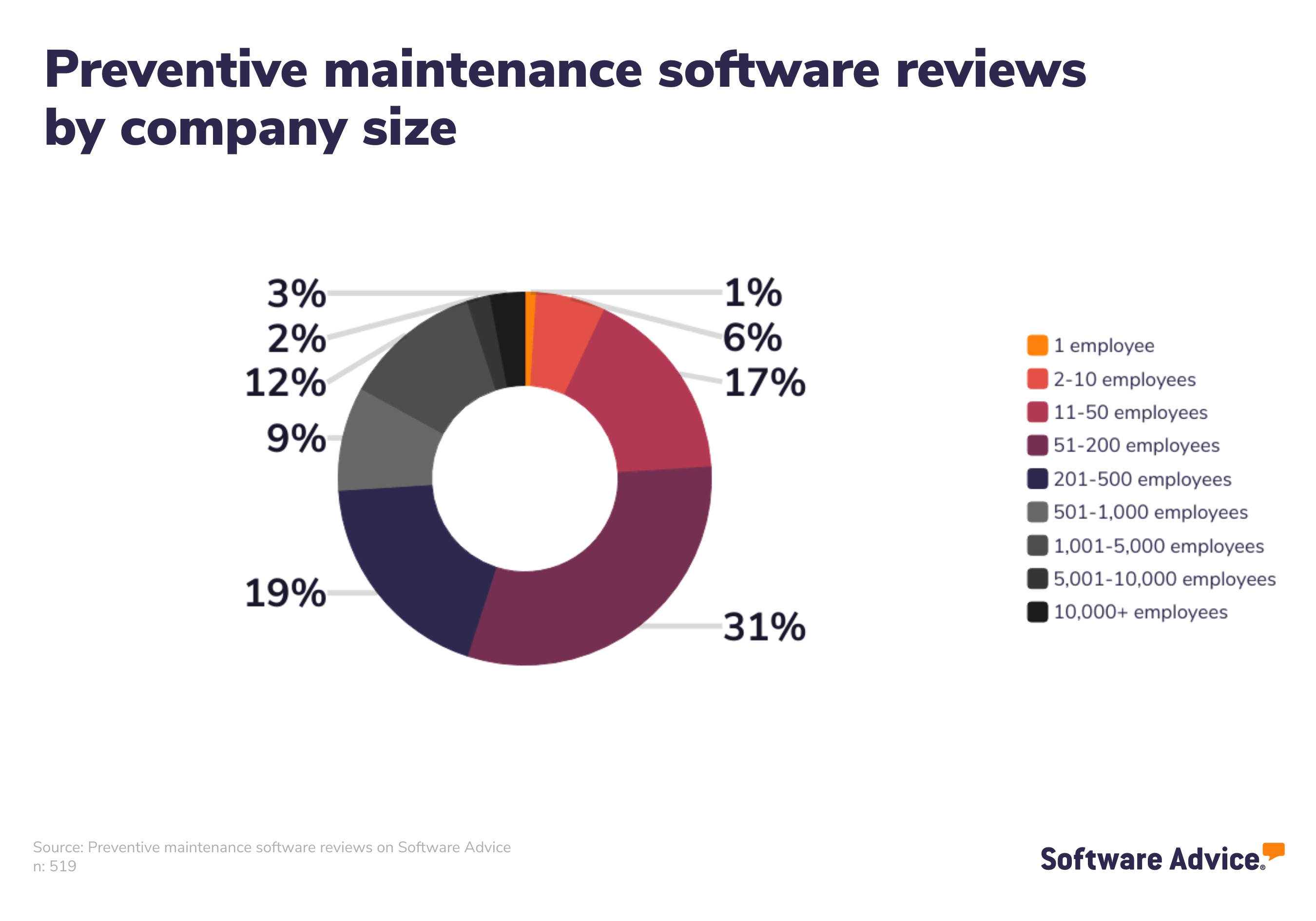
But any business that relies on equipment for its day-to-day operations would benefit from preventive maintenance. Here are a few examples:
Manufacturing: Any business that manufactures products using machinery is a great candidate for preventive maintenance, whether it’s producing furniture, cars, shoes, or potato chips.
Fleet management: Moving, shipping, and construction companies all rely on vehicles. Preventive maintenance ensures that company vehicles are in good shape to carry out daily operations and transport drivers safely. See the image below for an example of preventive maintenance software used for fleet maintenance management.
Commercial real estate: Whether you’re renting out apartments or brick-and-mortar storefronts, preventive maintenance ensures that appliances and HVAC systems are in working order.
Medical: Preventive maintenance is especially important for hospitals and medical practices, where the ability of equipment to function properly can have serious consequences.
If your business has a lot of equipment, such as the examples listed above, preventive maintenance software is a must-have. The primary objective of preventive maintenance software is to prolong the life of an asset with a preventative upkeep schedule, which maximizes asset value and limits unnecessary replacement costs. It achieves this by scheduling regular equipment upkeep, reducing downtime by combining routine tasks when possible, and subsequently reducing repair-based expenses and losses resulting from delayed or halted production. It also allows your maintenance team to keep track of work order data so that unplanned maintenance work can be accommodated in addition to regular maintenance.
Features of preventive maintenance software
All preventive maintenance software includes maintenance scheduling and preventive maintenance features. Most share a variety of common features such as asset tracking, calendar management, inspection management, inventory management, and mobile access.
Core preventive maintenance software features
Each year we speak to hundreds of preventive maintenance users. We have analyzed those conversations to give you a better understanding of which features are most critical to maintenance professionals. [3]
Feature | Description |
Preventative maintenance | Minimizes equipment failures and optimize asset reliability through scheduled inspections, repairs, and replacements. 79% of preventive maintenance users we spoke to rate this feature as critical or highly important. |
Maintenance scheduling | Create, assign, and track jobs and/or tasks for work orders. 66% of preventive maintenance users we spoke to rate this feature as critical or highly important. |
Common preventive maintenance software features
Feature | Description |
Predictive maintenance | Identifies potential asset failures and maintenance activities using real-time data and predictive algorithms. 100% of preventive maintenance users we spoke to rate this feature as critical or highly important. |
Reminders | Timed notification for any upcoming task, deadline, appointment, or activity. 100% of preventive maintenance users we spoke to rate this feature as critical or highly important. |
Work order management | Creating, assign, and track jobs and/or tasks for work orders. 72% of preventive maintenance users we spoke to rate this feature as critical or highly important. |
Asset tracking | Monitor the usage of assets—such as equipment, tools, software, etc.—throughout their lifecycle. 52% of preventive maintenance users we spoke to rate this feature as critical or highly important. |
Inspection management | Track and manage inspections for worksites, vehicles, and/or equipment to remain compliant with industry standards. 50% of preventive maintenance users we spoke to rate this feature as critical or highly important. |
Mobile access | Access software remotely via mobile devices. 45% of preventive maintenance users we spoke to rate this feature as critical or highly important. |
Inventory management | Track and manage inventory levels to maintain proper supply. 36% of preventive maintenance users we spoke to rate this feature as critical or highly important. |
Calendar management | Track and manage schedules and meetings via an integrated calendar. 33% of preventive maintenance users we spoke to rate this feature as critical or highly important. |
Purchase order management | Create, send, and track purchase orders and their statuses. 27% of preventive maintenance users we spoke to rate this feature as highly important. |
Benefits of preventive maintenance software
Preventive maintenance software is beneficial because it allows for more efficient facility management. When you forgo routine maintenance in favor of maintaining equipment as needed, there are more variables that are beyond your control, such as the cost of repairs and duration of downtime.
Other benefits of preventive maintenance software include:
A safer working environment for your employees. Regular inspection and maintenance of machinery can help minimize safety hazards, prevent accidents caused by equipment failure or malfunction, and reduce the risk of injuries or fatalities.
More reliable equipment. Anticipating everyday wear and tear by performing regular inspections helps you keep assets in optimal working condition for longer. It also helps you save on replacement costs because longer-lived assets are less frequently replaced.
Fewer interruptions to day-to-day operations. Unplanned downtime can throw a serious wrench in your production schedule and cost money. By proactively implementing maintenance tasks into your maintenance strategy, you can stop unexpected equipment outages before they occur.
Easier compliance maintenance. Many companies are required to meet industry-specific regulations enforced by government agencies such as OSHA. Preventive software makes it easier to ensure you are complying with the national and international regulations that apply to your company and industry and to file appropriate reports. This reduces the risk of penalties that result from non-compliance.
How to choose the right preventive maintenance software
When you start the process of checking out potential preventive maintenance solutions, you should detail all your requirements and categorize them based on their importance. Nice-to-have features, such as barcode/ticket scanning, can come at the very end. Therefore, the solutions you’re considering should address all your crucial needs first.
Step 1: Define your requirements
Before you talk to a single preventive maintenance software vendor, you first have to decide on your priorities. These might include:
Your preferred deployment method. Preventive maintenance software can be deployed over the web (also known as Software-as-a-Service, or SaaS) or installed on your premises. Both options have benefits and drawbacks, so it’s important to consider which one is best suited for your situation. For instance, web-based or “cloud” software has lower initial costs and reduces the need for a dedicated IT team because the vendor provides support. However, if your facility is based in a remote location with poor Internet bandwidth, this may not be the best option. Additionally, if you need complex customizations, SaaS may not be the best fit. Meanwhile, on-premise systems generally cost more up-front and may require IT for maintenance and upgrades.
Whether or not you’ll need mobile access. Most preventive maintenance systems now offer mobile capabilities, which means that technicians in the field can complete tasks and access information on the go. For example, technicians and maintenance managers can:
Log real-time updates on repair jobs
Take and upload pictures of assets for condition reports
Access schedules, work orders, asset databases and parts inventories
Scan QR codes on equipment to retrieve asset history, maintenance schedules and more.
These mobile capabilities expedite maintenance resolution, boost staff efficiency, cut costs and improve communication between personnel and management.
You’ll also want to get an idea of your price range before you speak with a vendor.
How to find the right preventive maintenance price range
Assess your maintenance needs. Begin by understanding your business’s maintenance requirements. Identify the number of assets, equipment, and facilities you need to manage. Determine the complexity of your maintenance tasks, such as work order management, inventory control, and asset tracking.
Consider scalability. Think about your business’s growth potential. Ensure the preventive maintenance software can scale with your needs as your assets and maintenance operations expand. Consider how the software accommodates additional users, assets, or locations.
Identify essential preventive maintenance features. Create a list of must-have features and functionalities your business needs in a preventive maintenance tool. Prioritize these based on your maintenance goals and operational requirements.
Step 2: Make a shortlist of preventive maintenance software
With so many preventive maintenance software options to choose from, it can be a challenge to narrow down the options that are right for your practice—but with the right resources and support, it doesn’t have to be.
Get qualified help from an advisor
At Software Advice, our advisors like Vaughn and Pugh have experience helping hundreds of managers and maintenance professionals identify solutions that match their needs and budgets.
If you need guidance, you can chat online now with an advisor or schedule a phone call. In just a few minutes, your advisor will help you identify a shortlist of options that align with your organization’s requirements.
Explore our list of preventive maintenance FrontRunners
If you’re not ready to speak to an advisor just yet, you can also start compiling your shortlist of preventive maintenance software with our FrontRunners report. Only products that earn top user ratings make this list. To be eligible for consideration, a product must:
Have at least 20 unique user reviews in the last 24 months
Be a stand-alone preventive maintenance software product
Offer these features: preventive maintenance and maintenance scheduling
Check out our full methodology description for more detail on how the report is compiled.
Step 3: Schedule vendor demos to help select your best option
Now that you’ve compiled a list of top choices, you should start scheduling vendor demos.
These sessions help you explore features, understand pricing, and ultimately make the right investment. Preparation is key to getting the most out of these sessions.
How to prepare for vendor demos
Once you’ve compiled your shortlist of preventive maintenance software systems, schedule demo sessions with each vendor in order to learn more about their product. This is your chance to ask questions about preventive maintenance-specific features they offer, pricing, technical support, training tools, and anything else that might be an important factor in choosing the right system.
Some questions you should consider asking vendors in each demo include:
Does the tool have a free trial or demo version? A free trial or a demo version of preventive maintenance software allows you to assess the software's suitability for your specific needs without commitment. It offers hands-on experience, showcasing features, ease of use, and compatibility. You can evaluate if the software aligns with your maintenance requirements and workflows, ensuring you make an informed decision, mitigate risks, and avoid investing in a solution that may not meet your expectations or deliver the desired ROI.
Is there an open source version of the software? Open source versions of preventive maintenance software offer greater flexibility and control. It allows you to access, modify, and customize the code to fit your unique requirements. This fosters independence from vendor restrictions, reduces long-term costs, and ensures adaptability to evolving needs. Additionally, the open source community provides ongoing support and enhancements. Exploring this option allows you to harness the benefits of transparency, collaboration, and cost-efficiency in your preventive maintenance solution.
Are there any add-on functionalities? Add-on functionalities in preventive maintenance software ensure that the software can evolve with the business's changing needs. These add-ons provide the flexibility to expand and enhance the system's capabilities, whether through advanced reporting, predictive maintenance, or specific industry-related features. By considering add-ons during the purchase, you can plan for future growth, prevent the need for costly software replacements, and maintain a competitive edge with a preventive maintenance solution that adapts to evolving maintenance requirements.
Understanding preventive maintenance software trends
Improve internal processes using GenAI: Leading communication service providers (CSPs) such as BT, Deutsche Telekom and NTT are using generative artificial intelligence (GenAI) to improve internal processes and enhance their preventive maintenance strategies. For example, GenAI is helping them automate the creation of detailed reports and analyses that save time and effort in getting deeper insights into operational performance and making more informed decisions. [4]
Note: Questions and responses have been edited for brevity and clarity.
About our contributors
Author
Shubham Gupta is a writer at Software Advice, specializing in project management. His focus is to guide project managers from planning to execution and beyond. His expertise also spans construction, manufacturing, and other related topics. Shubham’s research and writing for Software Advice is informed by nearly 200,000 authentic user reviews and more than 10,000 interactions between Software Advice software advisors and project management software buyers. Shubham also regularly speaks to project managers and PMO leaders so he can provide the most up-to-date and helpful information to small and midsize businesses purchasing software or services.
Outside work, Shubham likes to explore the depth of Urdu poetry and enjoys his time with his dog.
Editor
Parul Sharma is a content editor at Software Advice with expertise in curating content for various niches, including SaaS, digital marketing, and search engine optimization. With over half a decade of experience in content writing and editing, Parul has the expertise to simplify complex terms into engaging, valuable content for targeted audiences. She completed her graduation and post-graduation in English literature from Delhi University and was awarded the Dr. Asha Sahni Memorial Award for being the highest scorer in her graduating class.
Parul has contributed to the news, lifestyle, education, and health verticle of DNA India, India’s premier media channel. Outside of work, she can be found curating healthy recipes, coloring in mandala books, and spending quality time with her family.
Advisors
Cameron Pugh is a senior advisor. He joined Software Advice in 2022, and is based in Austin, TX.
Cameron works directly with small business leaders to connect them with best fit software providers. He assesses the technology needs of small businesses seeking tools such as CMMS, inventory management, call center, and facilities software through one-to-one conversations and provides a short list of potential matches.
His favorite part of being a software advisor is experiencing the buyer’s gratitude and relief when he finds the best software solution for their needs.
Jakub Vaughn is a senior advisor. He joined Software Advice in 2022 as a software advisor. He is based in Fort Myers, FL.
As part of the software advisor team, Jakub helps professionals from a wide range of industries who are seeking tools including CMMS, manufacturing, inventory management, and help desk software. He provides a short list of personalized technology recommendations based on budget, business goals, and other specific needs.
Jakub’s favorite part of being a software advisor is educating buyers with different needs on software systems available to them and their business.
Sources
Software Advice software pricing data: Only products with publicly available pricing information and qualified software products within the category, as of December 9, 2023, are included in the pricing analysis.
Software Advice reviews data: Software Advice reviews are collected from verified users for individual software products. For this report, we analyzed reviews from August 31, 2023 to August 31, 2024.
Software Advice advisor call notes: Findings are based on data from telephonic conversations that Software Advice’s advisor team had with small-to-midsize businesses seeking CMMS tools. For this report, we analyzed phone interactions from August 31, 2023 to August 31, 2024.
Market Trend: Generative AI Transforms Operations for CSP Enterprise Network Services, Gartner
Preventive Maintenance FAQs
- What is PM in CMMS?
PM in CMMS refers to an application of computerized maintenance management software (CMMS) systems. PM, or preventive maintenance, systems help businesses manage preventive care of their assets, as opposed to corrective maintenance or reactive maintenance, where tasks are performed only when needed or when equipment has already broken down.
- What is planned maintenance software?
Planned maintenance software is another term for CMMS software. It’s the broader category that preventive maintenance software falls under, and its main function is to create a virtual repository of data on a business’s entire maintenance operations so that businesses can see more clearly which assets are due for maintenance and when.
- What is preventive maintenance software?
Preventive maintenance software helps organizations manage preventive care of assets such as manufacturing equipment, medical equipment, HVAC equipment, or furniture. The primary objective of these tools is to prolong the life of an asset, maximize asset value, and limit unnecessary replacement costs.
- What is the PdM maintenance program?
PdM maintenance, or predictive maintenance, is a type of preventive maintenance that is usage-based rather than time-based. Instead of scheduling maintenance tasks based on the time of last service, a PdM program schedules maintenance jobs based on real-time usage data from sensors installed on the equipment.
- Is CMMS free?
Some CMMS vendors offer free or trial versions of their products, allowing you to assess whether the software is a fit for your specific needs without commitment. Free or trial versions can help you make an informed decision, mitigate risks, and avoid investing in a solution that may not meet your expectations or deliver the desired ROI.