


Best Course Authoring Software of 2026
Updated January 27, 2025 at 9:57 AM
- Popular Comparisons
- FrontRunners
- Buyers Guide
- Related Software
Compare Products
Showing 1 - 25 of 232 products
Compare Products
Sort by
Reviews: Sorts listings by the number of user reviews we have published, greatest to least.
Average Rating: Sorts listings by overall star rating based on user reviews, highest to lowest.
Alphabetically (A-Z): Sorts listings by product name from A to Z.

Absorb LMS is a learning management system designed to help enterprises scale training programs. The platform caters to a wide r...Read more about Absorb LMS


Absorb LMS's Best Rated Features
See All
Absorb LMS's Worst Rated Features
See All

Thinkific is an award-winning learning commerce platform where courses and community come together to power business growth. Thi...Read more about Thinkific
Thinkific's Best Rated Features
See All
Thinkific's Worst Rated Features
See All

Echo360 is a hybrid learning and engagement software designed to help businesses in corporate, education, public sector and othe...Read more about Echo360


Travitor makes it easy to create, deliver, and track training. Plus get hundreds of top-rated courses in Compliance, Business, S...Read more about Travitor

Travitor's Best Rated Features
See All
Travitor's Worst Rated Features
See All

360Learning is a collaborative LMS tool that helps businesses author and conduct interactive learning experiences so learners ca...Read more about 360Learning


360Learning's Best Rated Features
See All
360Learning's Worst Rated Features
See All

Docebo is an AI-powered learning platform designed to support continuous learning across employees, partners, and customers. Mo...Read more about Docebo
Docebo's Best Rated Features
See All
Docebo's Worst Rated Features
See All

LearnUpon is a learning management system (LMS) designed to provide a streamlined and engaging learning experience for diverse a...Read more about LearnUpon
LearnUpon's Best Rated Features
See All
LearnUpon's Worst Rated Features
See All

TrainingToday is an online training solution and learning management system (LMS) designed for organizations across various indu...Read more about TrainingToday


TrainingToday's Best Rated Features
See All
TrainingToday's Worst Rated Features
See All

Brightspace is a learning management system designed to transform the learning experience. It supports unique learning journeys ...Read more about Brightspace

Brightspace's Best Rated Features
See All
Brightspace's Worst Rated Features
See All

Introducing humanagement.io, the employee management software created to help CEOs, Execs and HR managers manage business and em...Read more about Humanagement


Totara Learn is an enterprise learning management system (LMS) powered by open source technology and trusted by the USDA, Wester...Read more about Totara Learn

Totara Learn's Best Rated Features
See All
Totara Learn's Worst Rated Features
See All

dominKnow provides enterprise course authoring and management software to deliver responsive, re-usable, and interactive eLearni...Read more about dominKnow | ONE


CYPHER Learning exists to give learners the power to succeed in a rapidly changing world. Trainers, learning and development (L&...Read more about CYPHER Learning
CYPHER Learning's Best Rated Features
See All
CYPHER Learning's Worst Rated Features
See All

Empower your workforce with our real-time training and assessment platform that delivers for skills-driven, high-performance org...Read more about Cloud Assess

Cloud Assess's Best Rated Features
See All
Cloud Assess's Worst Rated Features
See All

"Articulate 360 is the #1 e-learning platform for creating workplace training. It’s one subscription that empowers you to: - Get...Read more about Articulate 360

Articulate 360's Best Rated Features
See All
Articulate 360's Worst Rated Features
See All

Teachlr Organizations is a cloud-based learning management solution designed for businesses of all sizes, from small startups to...Read more about Teachlr Organizations
Teachlr Organizations's Best Rated Features
See All
Teachlr Organizations's Worst Rated Features
See All

Easygenerator is a cloud-based e-learning authoring solution. The tool allows users to create e-learning courses from scratch wi...Read more about Easygenerator


Easygenerator's Best Rated Features
See All
Easygenerator's Worst Rated Features
See All

Academy Of Mine is a learning management platform leveraged by providers in continuing education, employee training and professi...Read more about Academy Of Mine
Academy Of Mine's Best Rated Features
See All
Academy Of Mine's Worst Rated Features
See All

LearnWorlds is a learning management system (LMS) designed for organizations and creators who want to run online learning as a s...Read more about LearnWorlds

LearnWorlds's Best Rated Features
See All
LearnWorlds's Worst Rated Features
See All

Continu is a modern learning management system (LMS) designed for mid to large-scale organizations. The platform is built to cen...Read more about Continu
Continu's Best Rated Features
See All
Continu's Worst Rated Features
See All

Lessonly by Seismic is a cloud-based learning management system that allows users to build, share and track training materials a...Read more about Lessonly
Lessonly 's Best Rated Features
See All
Lessonly 's Worst Rated Features
See All

Whether a coach, therapist, trainer, consultant or any other type of professional service provider, Profi is a one-stop solution...Read more about Profi

Profi's Best Rated Features
See All
Profi's Worst Rated Features
See All

GoSkills is an award-winning online learning platform that helps organizations deliver engaging, personalized training with ease...Read more about GoSkills
GoSkills's Best Rated Features
See All
GoSkills's Worst Rated Features
See All

myQuest is an action-based Learning Management System that allows you to create highly engaging learning content using less time...Read more about myQuest
myQuest's Best Rated Features
See All
myQuest's Worst Rated Features
See All

Transform your organization's learning experience with Tovuti LMS, the all-in-one learning platform that makes training effortle...Read more about Tovuti
Tovuti's Best Rated Features
See All
Tovuti's Worst Rated Features
See All
Popular Comparisons



Your Guide to Top Course Authoring Software, October 2024
Software Advice uses reviews from real software users to highlight the top-rated Course Authoring products in North America.
Learn how products are chosenExplore FrontRunners


“Usability” includes user ratings for Functionality and Ease of Use.
“Customer Satisfaction” includes user ratings for Customer Support, Likelihood to Recommend and Value for Money.
Reviews analysis period: The reviews analysis period spans two years and ends the 15th of the month prior to publication.

Buyers Guide
This detailed guide will help you find and buy the right course creation software for you and your business.
Last Updated on January 27, 2025The major challenges for people who develop eLearning courses are time and budget. On average, it takes 100-160 hours and costs about $18,760 to create an hour of online content. This is because course developers need to add variety of engaging elements such as quizzes, 3D elements and interactive PDFs, in the lessons.
So, how can you create courses engaging courses without going over budget and still ensure on-time delivery of your course?
The answer is course creation software.
Course creation software helps businesses create customized lesson, quizzes and other course materials without having to invest a ton of time and money. Most course creation software vendors offer free trials and demos, which allow you to explore features and benefits, without having to pay for it.
With hundreds of tools in the market, choosing one solution for your needs isn't easy. How do you decide which software is right? After all, it needs to meet the expectations of all your stakeholders such as the authoring team, finance team and your end users.
To help out eLearning professionals like you, we created this guide on course creation software. The guide discusses the software's features and considerations to help you find the right fit for your small business or institution.
In this guide, we'll cover:
What Is Course Creation Software?
Common Features of Course Creation Software
What is Course Creation Software?
Course creation software allows you to create, design and deliver online courses for various training needs. Many vendors follow the Sharable Content Object Reference Model (SCORM) as a standard framework for integrating content with learning management systems (LMS).
The unique feature of course creation software is the ability to create courses without having to write a program or code. The programming features are built-in, which lets authors create a course without complex coding.
The three main components of course creation software are:
Content organization: Allows users to structure and sequence the instructional content and media.
Control of course delivery: Lets users set the pace of delivering the content.
Type(s) of assessment: Allows users to set learning outcomes, usually in the form of tests, discussions, assignments and other activities for evaluation.
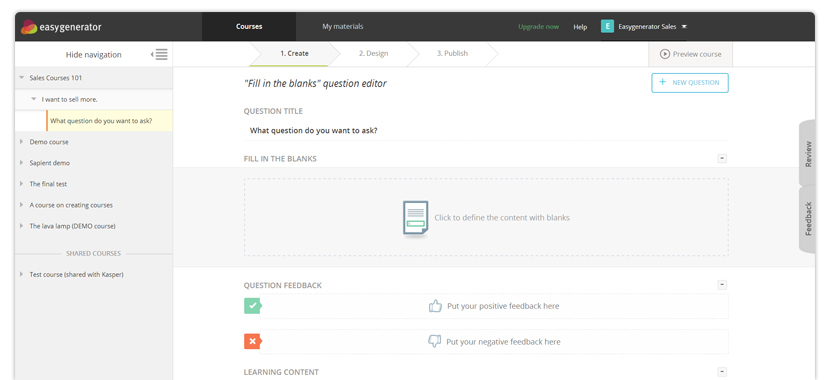
Easygenerator question creation view (Source)
When contacting various vendors, look out for the following functionality in their course creation software:
Create multimedia content in the form of text, audio or videos.
Publish course material on a third-party platform or built-in LMS.
Support for the latest industry standard in content interoperability.
Common Features of Course Creation Software
In this section, we've covered the key software features that a buyer should be aware of before they purchase a solution. Most small businesses and educational institutions will need some (or all) of these features in course creation software.
Course builder | Allows users to author their own content and design the courses using multimedia content (text, audio, videos etc.) |
Test/quiz creation | Embed any quiz or survey into a course, after a set of lessons, to test the knowledge of learners or take their feedback. |
Template management | Use pre-configured templates to create different types of eLearning materials such as lessons or quizzes. This makes it easier for users to create courses as they won't have to design courses from scratch. |
Storyline editing | Trim, crop, mix, match and rearrange eLearning components easily. Users can also adjust the brightness or contrast and insert colors in the content material. |
Gamification | Integrate gaming elements, such as badges, leaderboards and dashboards, into the courses to increase learner engagement. |
Interactive content | Add elements, such as pop-ups, click-and-reveal features and animated GIFs, which the students can interact with during a lesson or course. |
Content import/export | Upload your content to third-party sources or import interactive elements, such as infographics, charts, tables, designs and diagrams, into your course material. |
To further understand these features and the vendors in this category, call our advisors at (844) 687-6771 for free, no-obligation help. They'll help you narrow down your options by understanding your requirements and recommending the best-suited solutions for your business.
What Type of Buyer Are You?
Before you start shortlisting course creation software for your business, you need to understand the type of buyer you are to correctly estimate your needs. The next section breaks down the most common buyer types. Based on our research, buyers of this software fall into one of the following category:
Corporate buyers: These buyers need to frequently provide job-specific training or impart best practices to their employees. They need course creation software to create in-house content that contains sensitive company information. E.g., a video course where a leader discusses the organization's specific techniques to deal with customers.
Moreover, corporate professionals prefer training material in the form of bite-sized modules of shorter duration (not more than 3-4 minutes). It also reduces the cost of training delivery, thus increasing the ROI of training budgets.
Educational institutions: Such buyers seek to have engaging courses and lessons by making it more digital and less reliant on paper. They seek multimedia options such as HD video lectures for classroom learning, distance learning, flipped learning and massive open online course MOOCs.
They should ask for the storyline editing feature to create online interactive courses using character templates, voice elements, animation and advanced editing tools. These can help them boost learner engagement. For example, if you want to add audio or animation in your courses, use the storyline editing feature to record and edit the audio/video.
Market Trends to Understand
The tools and technologies used in the content creation space are manifold. To keep up with all the advancements in this space, you should be aware of the following market trends:
Microlearning to disrupt eLearning market: Microlearning or course creation in bite-sized modules was a key trend in 2018 that will continue in 2019. Businesses are increasingly looking at microlearning to impart short courses in a short time at a minimal cost. Even learners prefer to access short courses (of two to five minutes) over daylong training sessions. Microlearning helps them retain more information and learn a specific skill one at a time.
Interactive infographics to boost learner engagement: Interactive infographics let you present complex information in a concise, engaging and easy-to-understand way. That's why sixty-five percent of marketers use infographics for content creation.
The addition of interactive elements, such as pop-ups, click-and-reveal features and animated GIFs, decrease the learning time and allow you to disseminate lessons in an engaging manner and concise format. Infographics-based courses will only increase in number and be an important trend in 2019 and beyond.