
Best Bug Tracking Software of 2026
Updated March 27, 2026 at 6:19 AM
- FrontRunners
- Popular Comparisons
- Buyers Guide
Compare Products
Showing 1 - 25 of 90 products
Compare Products
Sort by
Reviews: Sorts listings by the number of user reviews we have published, greatest to least.
Average Rating: Sorts listings by overall star rating based on user reviews, highest to lowest.
Alphabetically (A-Z): Sorts listings by product name from A to Z.

Zoho Sprints is a cloud-based product roadmap solution for businesses of all sizes. The solution is designed to be used by agile...Read more about Zoho Sprints


Zoho Sprints's Best Rated Features
See All
Zoho Sprints's Worst Rated Features
See All

SpiraTeam is a project management solution that offers collaboration and quality assurance tools for businesses of all sizes and...Read more about SpiraTeam


It's easy for clients and teams to leave website feedback and report on bugs when they use BugHerd. There's no need for client...Read more about BugHerd

BugHerd's Best Rated Features
See All
BugHerd's Worst Rated Features
See All

GitHub is a project management and code sharing platform that allows users to share their codes with others and create/iterate u...Read more about GitHub

GitHub's Best Rated Features
See All
GitHub's Worst Rated Features
See All

ClickUp is a productivity platform designed to unify work tools within a single workspace. It supports various teams and industr...Read more about ClickUp
ClickUp's Best Rated Features
See All
ClickUp's Worst Rated Features
See All

QA Wolf is a simple, fast, and free end-to-end testing tool, fully optimized for the entire team. With QA Wolf, users can create...Read more about QA Wolf

QA Wolf's Best Rated Features
See All
QA Wolf's Worst Rated Features
See All

LambdaTest is a GenAI-powered Quality Engineering Platform that empowers teams to test intelligently, smarter, and ship faster. ...Read more about TestMu AI
TestMu AI's Best Rated Features
See All
TestMu AI's Worst Rated Features
See All

Ensure customers find your most valuable digital content with 24/7 website monitoring from ContentKing, now part of the #1 enter...Read more about ContentKing

ContentKing's Best Rated Features
See All
ContentKing's Worst Rated Features
See All

CaseCamp by DevelopScripts is a cloud-based project management solution designed for businesses of all sizes. The product caters...Read more about CaseCamp

GoodDay is a cloud-based project management solution that caters to businesses of all sizes across various industries. Features ...Read more about GoodDay
GoodDay's Best Rated Features
See All
GoodDay's Worst Rated Features
See All

BrowserStack is the leading test platform built for developers & QAs to expand test coverage, scale, and optimize testing. Brows...Read more about BrowserStack
BrowserStack's Best Rated Features
See All
BrowserStack's Worst Rated Features
See All

Bordio is a new project management solution designed to optimize team productivity and streamline project workflows. Here you ca...Read more about Bordio

Bordio's Best Rated Features
See All
Bordio's Worst Rated Features
See All

Userback is a powerful user feedback and bug-tracking tool designed to help product teams collect more feedback and act on it fa...Read more about Userback
Userback's Best Rated Features
See All
Userback's Worst Rated Features
See All

Smartlook is a cloud- and mobile-based quantitative analytics solution that helps businesses of all sizes with user behavior and...Read more about Smartlook

Smartlook's Best Rated Features
See All
Smartlook's Worst Rated Features
See All

Feedbucket is an easy-to-use website feedback and bug-reporting tool. Get more effective feedback and bug-reporting process for ...Read more about Feedbucket
Feedbucket's Best Rated Features
See All
Feedbucket's Worst Rated Features
See All

BugTracker by Zoho is a cloud-based bug-tracking solution designed for businesses of all sizes. Key features include bug automat...Read more about Zoho BugTracker

Zoho BugTracker's Best Rated Features
See All
Zoho BugTracker's Worst Rated Features
See All

Marker is a visual feedback and bug reporting tool. Marker is designed for software teams that want an easy way to capture and s...Read more about Marker

Shortcut is a cloud-based project management platform that helps small to large enterprises manage tasks and streamline communic...Read more about Shortcut
Shortcut's Best Rated Features
See All
Shortcut's Worst Rated Features
See All

Caspio is a cloud-based, no-code, application development solution for organizations of all sizes. The platform is suitable for ...Read more about Caspio

Caspio's Best Rated Features
See All
Caspio's Worst Rated Features
See All

Shake is a bug tracking and reporting solution that enables development and QC teams to handle issues across mobile applications...Read more about Shake
Shake's Best Rated Features
See All
Shake's Worst Rated Features
See All

Usersnap is a user feedback platform to capture, organize, respond, and scale user insights for agile product testing and instan...Read more about Usersnap

LogRocket combines session replay, product analytics, and error tracking – empowering software teams to create the ideal product...Read more about LogRocket

Webvizio is a single platform for clients, managers, and dev teams to leave visual feedback & effectively collaborate on web dev...Read more about Webvizio
Webvizio's Best Rated Features
See All
Webvizio's Worst Rated Features
See All

HelpSpace, a German startup founded in 2020, offers helpdesk support for small to medium-sized businesses. Its goal is to provid...Read more about HelpSpace

HelpSpace's Best Rated Features
See All
HelpSpace's Worst Rated Features
See All

Volley is a cloud-based solution that helps businesses utilize built-in collaboration tools to review, streamline and improve de...Read more about Volley
Popular Comparisons



Your Guide to Top Bug Tracking Software, November 2023
Software Advice uses reviews from real software users to highlight the top-rated Bug Tracking products in North America.
Learn how products are chosenExplore FrontRunners


“Usability” includes user ratings for Functionality and Ease of Use.
“Customer Satisfaction” includes user ratings for Customer Support, Likelihood to Recommend and Value for Money.
Reviews analysis period: The reviews analysis period spans two years and ends the 15th of the month prior to publication.
Buyers Guide
This detailed guide will help you find and buy the right bug tracking software for you and your business.
Last Updated on January 27, 2025Bug tracking software allows teams to track and resolve bugs that arise during a project. These systems help centralize and standardize issue management processes. They are most often used for software and web development projects.
This guide will help you understand the role of bug tracking tools within the larger project management market, so you can make a more informed purchase. We'll cover:
What Is Bug Tracking Software?
Common Features of Bug Tracking Software
Benefits of Bug Tracking Software
Key Considerations for Bug Tracking Software Buyers
What Is Bug Tracking Software?
Similar in function to task tracking solutions, bug trackers are specifically designed to separate bugs from regular project tasks and prioritize them appropriately. Capabilities vary, but these systems typically follow these steps:
Bug Tracking Process
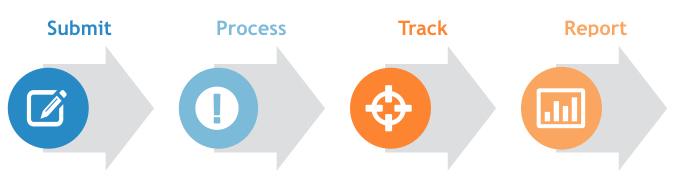
Submit: Work order is created by a project team member, or through an IT ticketing system or emailed service request from a customer or end user.
Process: Bug is assigned to a team member, prioritized by importance and labeled according to status, e.g., ''new'' or ''reopened.'' The system classifies the bug, e.g., ''security'' or ''user interface.''
Track: Employee tries to resolve the problem and provides frequent status updates, e.g., ''blocked,'' ''testing'' or ''reviewing.''
Report: Bug tracking systems can offer valuable information about issues, how quickly they're resolved and more. These insights help in planning future projects.
Common Features of Bug Tracking Software
Common capabilities of bug tracking systems include:
Custom fields | Ability to customize fields, views and workflows to your team and business needs.E.g., add a corresponding customer ID number to bugs submitted by customers. |
Time tracking | Tracks time to resolution: how long the bug has been open, if it's past due, percent complete, etc. |
Collaboration tools | Upload files to tickets, post comments and receive email or in-app notifications. Some platforms include interactive discussion forums with similar collaborative capabilities. |
Dashboard | View individual or team dashboards to monitor status and progress of open bugs. Some platforms include an activity stream or notification center on the dashboard. |
Reporting and analytics | Track progress of open bugs and milestones reached. Visualize and document trends regarding the quantity, severity and category of bugs, team productivity and more. |
Knowledge base | Centralized repository of solved and unsolved bugs with notes about resolutions etc. that teams can refer to, learn from and add to. |
Integration with code repositories | Connect code repositories (e.g, Git or SVN) to bug tracking software so source code updates from the repository are automatically reflected in the bug tracker. |
The Vendor Landscape
Bug tracking software is available in both on-premise or cloud-based solutions. Typically, bug tracking can be purchased in one of the following ways:
Offered in suite,as one application included as part of a comprehensive project management (PM) system. Purchasing a PM platform that includes issue management helps ensure that bug tracking is fully integrated with other key project management processes, such as scheduling resources and project tracking. This integrated environment allows data to transfer seamlessly between applications, increasing visibility and keeping everyone on the same page. Some examples are:
Best-of-breed, or stand-alone. A business may choose to purchase bug tracking best-of-breed for several reasons. For example, their current PM platform may not offer bug tracking—or, perhaps it does, but doesn’t have all the features their team needs. Businesses purchasing best-of-breed solutions should first ensure the bug tracker integrates with the other software systems their team uses: Namely, their PM platform, but also their code repository or communication tools, such as Slack. Examples of this include:
SprintGround
Additionally, because bug tracking tools are critical for software development teams—who typically use agile project management methods—it is commonly included with Scrum and Kanban project management solutions. For example:
Benefits of Bug Tracking Software
Bug tracking software provides teams with several benefits, such as:

Improved organization: Work order requests and resolution strategies are centralized and automated, adding structure to team workflows and standardizing bug management strategies.

Increased productivity: Assignments and progress toward resolution are displayed on dashboards, making it obvious if someone falls behind or if bottlenecks occur. Users know what bugs they are responsible for, and the priority and due date. This helps increase project efficiency and improve performance.

Useful insights: Reports and analytics help create permanent project and issue management records that can influence future business decisions.
Key Considerations for Bug Tracking Software Buyers
Here are the top things to keep in mind when choosing a bug tracking solution:
Powerful yet simple workflow. Workflow management is an important functionality of bug tracking software. An effective system will help you catch issues early and offer resolutions faster. To gauge the efficiency of the workflow, check how it helps you do the following tasks:
Capture and report. The system should allow you to raise tickets, ask questions, discuss issues and share ideas on a centralized platform.
Prioritize and assign. There could be a number of issues at one time. The solution you choose should help you create priority lists and assign the most important tasks first.
Resolve and review. Workflows should be designed to help you push issues toward resolution. Additionally, an effective review system should be in place, which allows you to catch any bugs that may have slipped through the cracks.
Ease-of-use. An efficient bug tracking solution is one that can be used with little to no special training. A simple dashboard with a drag-and-drop workflow helps employees—even those without any technical knowledge—create tickets and track their status. On the other hand, a cumbersome solution with functionalities that demand technical expertise of its users can be a tremendous strain on your company’s time.
Open source or paid software. There are many free, open source software solutions available, but they come with certain limitations. For instance, you must host the software on internal servers and manage its maintenance. This is not much of an issue for small businesses, but as your business grows, you need a solution that automates the tracking of thousands of tickets. At that level, you need a flexible solution that can be customized to your needs and offers back-end support.