


Best School Facilities Management Software of 2026
Updated March 24, 2026 at 7:34 AM
- Popular Comparisons
- Buyers Guide
Compare Products
Showing 1 - 25 of 32 products
Compare Products
Sort by
Reviews: Sorts listings by the number of user reviews we have published, greatest to least.
Average Rating: Sorts listings by overall star rating based on user reviews, highest to lowest.
Alphabetically (A-Z): Sorts listings by product name from A to Z.

Coast is a leading maintenance management software, designed to help the deskless workforce succeed. Our all-in-one, adaptable s...Read more about Coast
Coast's Best Rated Features
See All
Coast's Worst Rated Features
See All

MaintainX is a maintenance and asset management platform built for industrial and frontline teams. It helps organizations stream...Read more about MaintainX


MaintainX's Best Rated Features
See All
MaintainX's Worst Rated Features
See All

Click Maint is a maintenance management solution designed for businesses across a wide range of industries such as manufacturing...Read more about Click Maint CMMS
Click Maint CMMS's Best Rated Features
See All
Click Maint CMMS's Worst Rated Features
See All

FMX is a web-based facilities and maintenance management solution designed for K-12 schools, higher education institutions, muni...Read more about FMX

FMX's Best Rated Features
See All
FMX's Worst Rated Features
See All

Empower your workforce with Archibus by Eptura, a single integrated platform for managing all aspects of your organization’s fac...Read more about Archibus

Asset Essentials is a cloud-based maintenance solution that generates operational insights from asset and work order management ...Read more about Asset Essentials

Asset Essentials's Best Rated Features
See All
Asset Essentials's Worst Rated Features
See All

Maint CMMS is a cloud-based solution that enables maintenance professionals to monitor, capture, store and share historical asse...Read more about eMaint CMMS
eMaint CMMS's Best Rated Features
See All
eMaint CMMS's Worst Rated Features
See All

UpKeep is a web-based CMMS offering a mobile-first solution for maintenance teams, streamlining operations with asset and workfl...Read more about UpKeep
UpKeep's Best Rated Features
See All
UpKeep's Worst Rated Features
See All

Limble is a CMMS platform designed to optimize maintenance operations and improve compliance. Its work order management allows u...Read more about Limble

Limble's Best Rated Features
See All
Limble's Worst Rated Features
See All

eWorkOrders CMMS is a cloud-based computerized maintenance management system designed to streamline maintenance operations and e...Read more about eWorkOrders CMMS
eWorkOrders CMMS's Best Rated Features
See All
eWorkOrders CMMS's Worst Rated Features
See All

Streamline your hotel’s maintenance operations with Snapfix. Designed for simplicity, Snapfix uses photos for clear communicati...Read more about Snapfix


Snapfix's Best Rated Features
See All
Snapfix's Worst Rated Features
See All

Transcendent is a maintenance management solution that caters to businesses in industries such as cable, communications, facilit...Read more about Transcendent

Asset Panda is a cloud-based platform for facility managers that offers a suite of applications including asset tracking and mai...Read more about Asset Panda

Asset Panda's Best Rated Features
See All
Asset Panda's Worst Rated Features
See All

Q Ware CMMS is a cloud-based maintenance management solution designed for small and midsize businesses. It offers work order man...Read more about Q Ware CMMS

Q Ware CMMS's Best Rated Features
See All
Q Ware CMMS's Worst Rated Features
See All

eFACiLiTY is a facility and workforce management solution designed to help businesses manage enterprise assets and maintenance o...Read more about eFACiLiTY

FAMIS 360 is purpose-built for higher education, CRE, and the public sector, and it has key functionalities – like key control a...Read more about FAMIS 360

Simple. Secure. Seamless. And so much more than a CMMS. Easy enough for everyone on your team to use. Powerful enough to handle ...Read more about AkitaBox

AkitaBox's Best Rated Features
See All
AkitaBox's Worst Rated Features
See All

Megamation offers a fully customizable cloud-based CMMS (computerized maintenance management system). Maintenance software custo...Read more about DirectLine


With MYBOS, facility and building managers can take control of their properties through a range of features, including work orde...Read more about MYBOS


MYBOS's Best Rated Features
See All
MYBOS's Worst Rated Features
See All

NetFacilities offers computerized maintenance management software (CMMS) tools that allow organizations to provide work orders a...Read more about NetFacilities

EZO is a cloud-based asset management software designed to help organizations track, manage, and maintain physical assets from a...Read more about EZO


EZO's Best Rated Features
See All
EZO's Worst Rated Features
See All

In a constantly evolving world of work, it's never been more important to stay nimble and ensure your office is adaptable to the...Read more about Eptura Workplace


FTMaintenance Select is a computerized maintenance management system (CMMS) that enables maintenance professionals to easily doc...Read more about FTMaintenance Select

Facilitron is the world’s largest public spaces marketplace and a comprehensive facility management platform designed for both p...Read more about Facilitron

FM:Systems provides workplace management technology that enables Facility and Real Estate teams to identify, plan, and deliver t...Read more about OpenBlue Workplace


OpenBlue Workplace's Best Rated Features
See All
OpenBlue Workplace's Worst Rated Features
See All
Popular Comparisons


Buyers Guide
This detailed guide will help you find and buy the right facilities management software for schools for you and your business.
Last Updated on January 27, 2025As a school administrator, you know that managing a school campus can be cumbersome. In addition to the classrooms and hallways, the expansive property also includes a playground, gymnasium, cafeteria, auditorium, science labs, and health center. Each of these has its own unique maintenance needs. Additionally, there are compliance requirements from city councils and state and central governance bodies.
Relying on spreadsheets or pen and paper to manage school facilities can quickly get out of hand. Maintenance and repair requests can pile up, and even essentials such as HVAC and water can get disrupted.
A facilities management system can help ensure that everything runs smoothly and all issues are taken care of in time.
To help you choose a facilities management software for your school, we've prepared this guide.
Here, we'll cover:
Common features of facilities management software for schools
Key considerations when purchasing facilities management software for schools
What is facilities management software for schools?
Facility management software for schools helps school administrators track and manage premise maintenance needs. It helps ensure infrastructure is in proper working order, meets all compliance requirements, and is at par with applicable standards.
Most basic tools offer features such as work orders, work requests, reporting, maintenance checklists, inventory management, and workflow automation. However, some advanced tools also offer features such as preventive maintenance and depreciation and warranty tracking to help you address issues ahead of time.
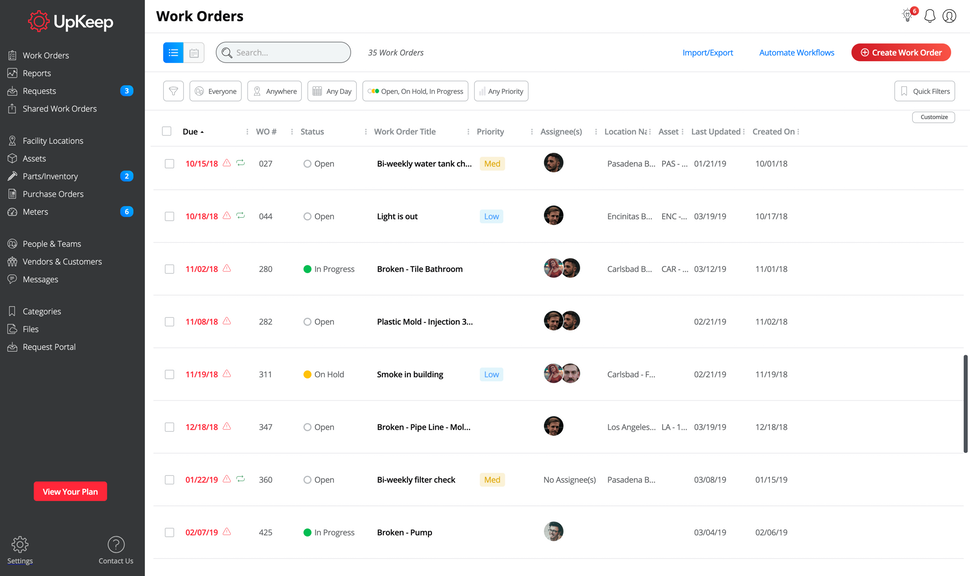
Work orders in UpKeep (Source)
Common features of facilities management software for schools
Work orders | Create and manage one-time or recurring work orders for maintenance needs and repairs. |
Work requests | Submit requests for maintenance or repair through a mobile app or the software's web page. |
Workflow automation | Automatically assign work orders to the correct technicians based on pre-set parameters. |
Maintenance checklists | Add pre-made checklists of things to do for each work order. |
Inventory management | Track usage of consumable supplies and parts for replacement. |
Purchase orders | Create purchase orders for new parts and consumable supplies. |
Reporting | Create customizable and standard reports to evaluate work order completion rate, maintenance costs, technician productivity, and inventory levels. |
What type of buyer are you?
What an independently operated school needs from facilities management software is very different from what a chain of schools needs. Thus, before you select a tool, it is important to understand what type of buyer you are.
Buyers of facilities management software for schools usually fall in one of the following two categories:
Independent establishments: Such schools usually need a facilities management tool with basic features like work orders, work requests, and reporting. A cloud-based tool, with a per user/per month pricing model could be a good option.
Chain or franchise of schools: Such schools have multiple locations and need to juggle maintenance needs across all locations. Accordingly, they would need a facilities management tool with comparatively advanced features such as inventory management, warranty tracking, preventive maintenance, and advanced reporting. They can explore both cloud-based and on-premise deployment models based on the level of upfront investment they want to incur.
Benefits of facilities management software for schools
Facilities management software helps schools maintain their infrastructure and stay on top of all maintenance needs. Its benefits are as follows:
Prompt redressal of issue: Instead of having maintenance and repair requests raised by your staff and students pile in a corner in your office, have them addressed promptly.
Reduce disruption due to maintenance requests: Keep regular school days from being disrupted by routine maintenance tasks by scheduling recurring or preventive maintenance requests for holidays and day-offs.
Know where your resources are being spent: Track exactly where your resources and staff's time is being spent with the help of customized reports. Also, ascertain if there are any recurring problems your staff is dealing with.
Minimize emergency repairs: Identify trends in your maintenance needs, and schedule preventive maintenance requests to reduce the need for emergency repairs.
Key considerations when purchasing facilities management software for schools
The right facilities management software can help you improve maintenance procedures and reduce cost. However, choosing a solution can be tricky. Here are a couple points to keep in mind:
Check for mobile capabilities: An important part of facilities management is being able to snap photos and report issues while on the go. If users need to open up a laptop for everything they need to raise a request, the solution might not be as effective as you want for it to be. So make sure the solution you choose has mobile capabilities, either through an app or mobile browser.
Don't get confused with the jargon: Vendors use different names to describe their software functionality, such as computer-aided facility management (CAFM), computerized maintenance management software (CMMS), enterprise asset management (EAM), and integrated workplace management systems (IWMS). Don't let jargon confuse you and focus on the features of the solution instead.
Note: The applications selected in this article are examples to show a feature in context and are not intended as endorsements or recommendations. They have been obtained from sources believed to be reliable at the time of publication.