


Best Construction Software for Mac of 2026: which is right for you?

- Popular Comparisons
- Buyers Guide
Compare Products
Showing 1 - 25 of 282 products
Compare Products
Sort by
Reviews: Sorts listings by the number of user reviews we have published, greatest to least.
Average Rating: Sorts listings by overall star rating based on user reviews, highest to lowest.
Alphabetically (A-Z): Sorts listings by product name from A to Z.

Houzz Pro is a business solution that streamlines operations for construction and design professionals. The platform offers plan...Read more about Houzz Pro


Houzz Pro's Best Rated Features
See All
Houzz Pro's Worst Rated Features
See All

Autodesk Construction Cloud is a construction management software platform. It serves as a central source of information for eve...Read more about Autodesk Construction Cloud

Autodesk Construction Cloud's Best Rated Features
See All
Autodesk Construction Cloud's Worst Rated Features
See All

The Sage Construction Suite includes a range of solutions tailored to meet the diverse needs of construction companies. The suit...Read more about Sage Construction Suite


Sage Construction Suite's Best Rated Features
See All
Sage Construction Suite's Worst Rated Features
See All

Procore Construction Management Software offers a comprehensive and integrated platform designed to revolutionize the constructi...Read more about Procore


Procore's Best Rated Features
See All
Procore's Worst Rated Features
See All

Smartsheet is a work execution platform and collaboration tool with a familiar spreadsheet-like interface that helps teams plan,...Read more about Smartsheet
Smartsheet's Best Rated Features
See All
Smartsheet's Worst Rated Features
See All

ComputerEase, offered by Deltek, is construction accounting software designed specifically for the construction industry. The pl...Read more about ComputerEase

ComputerEase's Best Rated Features
See All
ComputerEase's Worst Rated Features
See All

Knowify helps contractors Budget, manage, and invoice every construction project and service job with precision, and get insight...Read more about Knowify


Knowify's Best Rated Features
See All
Knowify's Worst Rated Features
See All

Designed by contractors for contractors. Take your job from lead to work complete in one comprehensive construction CRM. Want ...Read more about Leap


Leap's Best Rated Features
See All
Leap's Worst Rated Features
See All

JobNimbus is a customer relationship management (CRM) and project management solution tailored to meet the needs of contractors,...Read more about JobNimbus

JobNimbus's Best Rated Features
See All
JobNimbus's Worst Rated Features
See All

JOBPOWER is an integrated construction accounting management system. JOBPOWER includes accounting, detailed job costing, constru...Read more about JOBPOWER

Buildertrend is a cloud-based solution designed for the construction industry, aiming to streamline project management, customer...Read more about Buildertrend

Buildertrend's Best Rated Features
See All
Buildertrend's Worst Rated Features
See All

Never miss the right job opportunity again. AI-powered estimating built for the busy builder who does it all. Designed for resi...Read more about Buildxact
Buildxact's Best Rated Features
See All
Buildxact's Worst Rated Features
See All

Premier Construction Software is a global, AI-powered construction ERP that helps growing general contractors control job costs,...Read more about Premier Construction Software
Premier Construction Software's Best Rated Features
See All
Premier Construction Software's Worst Rated Features
See All

eSUB is a mobile application and cloud-based project management solution that helps commercial subcontractors across various tra...Read more about eSUB

eSUB's Best Rated Features
See All
eSUB's Worst Rated Features
See All

UDA Technologies’ ConstructionOnline offers a web-based, integrated approach to project management, project scheduling, and cust...Read more about ConstructionOnline
ConstructionOnline's Best Rated Features
See All
ConstructionOnline's Worst Rated Features
See All

eCMS offers a comprehensive suite of software applications that help commercial contractors manage all aspects of their financia...Read more about eCMS

eCMS's Best Rated Features
See All
eCMS's Worst Rated Features
See All

InEight is a construction project management software that provides centralized control and data management for capital projects...Read more about InEight


Handling complex construction jobs is made easier with the right software. Give your company an edge over the competition with i...Read more about Viewpoint Vista
Viewpoint Vista's Best Rated Features
See All
Viewpoint Vista's Worst Rated Features
See All

Spectrum is a construction management solution designed to centralize business operations for construction companies. It connect...Read more about Viewpoint Spectrum


Viewpoint Spectrum's Best Rated Features
See All
Viewpoint Spectrum's Worst Rated Features
See All

FOUNDATION is construction accounting solution designed for contractors in the construction industry. It combines job costing, p...Read more about FOUNDATION

FOUNDATION's Best Rated Features
See All
FOUNDATION's Worst Rated Features
See All

HeavyBid is a construction estimating and bidding software used by estimators across multiple companies including ENR heavy civi...Read more about HeavyBid

Ventus is a service and construction ERP solution that incorporates CRM, takeoff estimating, job costing, project management, se...Read more about Ventus

123worx is a cloud-based construction management software solution that is efficient, flexible, and easy to use. Businesses can ...Read more about 123worx

Traqspera is an easy to use, cloud-based solution that connects field crews and office staff. All relevant information is captur...Read more about Traqspera


Simpro is a field service management solution designed for trade and field service businesses. It streamlines operational workfl...Read more about Simpro
Simpro's Best Rated Features
See All
Simpro's Worst Rated Features
See All
Popular Comparisons


Buyers Guide
This detailed guide will help you find and buy the right construction software for mac for you and your business.
Last Updated on January 27, 2025Project managers in the construction industry have to juggle between various processes such as job costing, payroll management, and labor management. They need technologies to manage all these processes quickly and efficiently. And most of them prefer Macs and iPads, the reason being the slick intuitive designs and ease of use.
If you also prefer Apple products for business, there are two options. You could get construction management software that offers an iOS app and install it locally. Or, you could choose a cloud-based solution and access it via a browser.
At Software Advice, we recommend cloud-based construction software, especially for small businesses that use Macs. These tools have lower up-front costs, shorter implementation time, and automatic updates. You also get better support for remote usage, can scale more easily, and minimize the need for IT staff.
This guide will help you navigate through hundreds of tools in the market to choose one solution that suits your needs. As software requirements vary based on business size and budget, it becomes important to thoroughly understand the features, benefits, and considerations for Apple products before purchasing a tool.
What is construction software for Mac?
Common features of construction software for Mac
Benefits of construction software for Mac
What is construction software for Mac?
Construction software for Mac is a tool that runs on Apple's operating system (OS). The reason why businesses use Apple products is quite evident–the smooth interface and easy-to-use functionality. The tool helps project managers automate critical processes in a project such as scheduling, budgeting, estimating, and tracking.
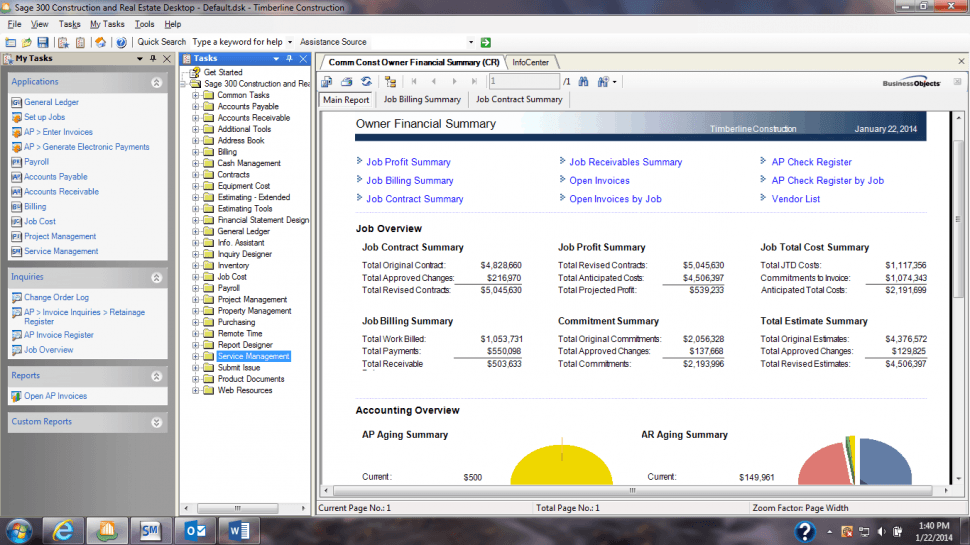
Project finances in Sage300
While using the standalone software should suffice for most businesses, sometimes construction managers end up multitasking. They have to handle the estimation of project costs, accounts management, and labor management. In that case, use/integrate the following related tools with your construction software to manage the above tasks:
Takeoff: Measures the construction plans (blueprints and drawings) to determine the volume of materials and labor required for a job.
Estimating: Calculates the material costs and labor takeoff to produce bid proposals.
Accounting: Manages core accounting, fixed asset accounting, and payroll.
Bid management: Helps businesses solicit bids from subcontractors and suppliers before submitting a job quote.
Common features of construction software for Mac
This section analyzes the key features of construction software for Mac devices that you should look for when evaluating a solution for your business.
Project scheduling | Manages and plans resources, such as equipment and labor, which are required to complete a project in a given time. |
Document management | Stores and manages all kinds of documents, such as purchase orders, invoices, submittals, and transmittals, in a centralized repository. |
Project tracking | Allows managers to monitor the progress of tasks on a periodic basis (daily, weekly, or monthly). Set task deadlines and milestones to ensure that projects are completed on time. |
Job costing | Calculate and track the actual project budget against estimated expenses such as for labor and equipment. |
Core accounting | Performs core accounting functions, such as accounts payable and general ledger, and runs other financial management processes such as payroll management. |
Timesheet tracking | Allows managers to record employee work hours, breaks, and overtime on job sites. The feature helps businesses calculate employee pay based on the number of working hours. |
Bid management | Helps businesses solicit and procure bids from subcontractors and store those in a central location. Project managers can track the status of bids in the prequalification, review, or approval stages. |
Change orders | Tracks all changes in the scope of work submitted across projects and modifies the budget accordingly to reflect the updated costs. |
Equipment and resource management | Tracks materials and equipment used on job sites. This feature is typically used by contractors who are performing the work, not owners or managers. |
What type of buyer are you?
Before you begin shortlisting your options for construction software, it's important to understand the buyer category that your business is most like. This will help you understand your requirements so that you can prioritize software features as "must-have" or "optional."
Here is our breakdown of the three most common buyer types based on market research:
General contractors. These buyers have to juggle numerous tasks everyday, including bids submissions, managing the updated versions of blueprints, and tracking project progress. Contractors need construction software to better organize the entire project cycle from billing to managing labor and resources. The primary features that general contractors need are project scheduling, bid management, and document management.
Government contractors. Public and government contractors have specific performance metrics, such as labor utilization, proposal win rate, and profit, which influence their business decisions. The construction software should analyze these metrics to provide insights on running their business more efficiently. The main features for these buyers are project tracking, bid management, and timesheet tracking.
Civil contractors. These buyers need construction software that performs unit billing, fixed asset accounting, contract management, and spare parts inventory management. They also have substantial requirements for dispatching and tracking work crews. Some other features they require are equipment and resource management, core accounting, and change orders.
Benefits of construction software for Mac
Selecting the best construction software for Mac shouldn't be tricky; you just need to realize how the tool will benefit your business in terms of productivity, efficiency, and scalability. In this section, we've listed the key benefits of construction software for Mac devices. Read on to assess the need for this software in your business.
Fewer calculation errors: Calculating job costs and payroll manually is not only time consuming but also prone to errors. These errors can lead to loss of money (as wages) and tax penalties. Construction software for Mac provides accounting modules and templates that help construction managers complete accounting, cost estimation, and the paperwork online in a shorter time and with greater accuracy.
Simplified document management: Businesses need to organize documents such as contracts, blueprints, purchase orders, and invoices. Construction software helps users better manage these documents as it creates a virtual paper trail for plans, RFIs, change orders, submittals, etc. All these documents are stored in a centralized repository, with tracking and version control, which is easily searchable.
Scalability for future growth: The tool helps project managers plan, control, and coordinate projects in an organized manner. With organized and efficient business processes, they can complete the projects faster, which will allow you to manage a greater number of jobs at the same time.
Key considerations
Now that you know about the features and benefits of construction software for Mac, here are five important factors that should influence your purchase decision. For instance, you might find a solution with all the relevant features but no data security. Considering these factors will help you shortlist your options even further.
Total cost of ownership (TCO): Usually, cloud-based solutions have a monthly or annual subscription fee, which includes a one-time license fee, data backup costs, and maintenance charges. Check whether the vendor charges for support (email or phone), customizations, or software training. The vendor's initial offering may not be the final TCO if you keep adding users and features during negotiations or post purchase.
Ensure software scalability for your business: The tool you choose should be able to scale-up in terms of the number of licenses or users. This will help you prepare for future growth, as you can add new users when needed. Businesses could opt for cloud-based solutions as it provides greater flexibility—you pay for what you use and can easily scale-up as well. On the other hand, on-premise solutions require deploying additional hardware, which is expensive.
Data transfer and synchronization services: Migrating from an old system requires transferring all your data to the new system. Most vendors include data transfer fee in the software license cost, but others charge extra for it. In some cases, you may have to hire a third-party vendor to transfer data, which will increase the software's total cost.