


Best Construction Management Apps software of 2026

- Popular Comparisons
- Buyers Guide
Compare Products
Showing 1 - 25 of 322 products
Compare Products
Sort by
Reviews: Sorts listings by the number of user reviews we have published, greatest to least.
Average Rating: Sorts listings by overall star rating based on user reviews, highest to lowest.
Alphabetically (A-Z): Sorts listings by product name from A to Z.

Autodesk Forma provides best-in-class solutions to unite office and field teams throughout the entire project lifecycle. Connect...Read more about Autodesk Forma


Autodesk Forma's Best Rated Features
See All
Autodesk Forma's Worst Rated Features
See All

Houzz Pro is a business solution that streamlines operations for construction and design professionals. The platform offers plan...Read more about Houzz Pro

Houzz Pro's Best Rated Features
See All
Houzz Pro's Worst Rated Features
See All

The Sage Construction Suite includes a range of solutions tailored to meet the diverse needs of construction companies. The suit...Read more about Sage Construction Suite


Sage Construction Suite's Best Rated Features
See All
Sage Construction Suite's Worst Rated Features
See All

Procore is a cloud-based construction management platform designed to connect field and office teams throughout the project life...Read more about Procore


Procore's Best Rated Features
See All
Procore's Worst Rated Features
See All

ComputerEase, offered by Deltek, is construction accounting software designed specifically for the construction industry. The pl...Read more about ComputerEase

ComputerEase's Best Rated Features
See All
ComputerEase's Worst Rated Features
See All

Smartsheet is a work execution platform and collaboration tool with a familiar spreadsheet-like interface that helps teams plan,...Read more about Smartsheet
Smartsheet's Best Rated Features
See All
Smartsheet's Worst Rated Features
See All

Premier Construction Software is a global, AI-powered construction ERP that helps growing general contractors control job costs,...Read more about Premier Construction Software

Premier Construction Software's Best Rated Features
See All
Premier Construction Software's Worst Rated Features
See All

Knowify helps contractors budget, manage and invoice every construction project and service job with precision and get insights....Read more about Knowify


Knowify's Best Rated Features
See All
Knowify's Worst Rated Features
See All

Buildertrend is a cloud-based solution designed for the construction industry, aiming to streamline project management, customer...Read more about Buildertrend

Buildertrend's Best Rated Features
See All
Buildertrend's Worst Rated Features
See All

Leap is the complete platform for home improvement contractors — built by people who understand how contractors actually sell an...Read more about Leap

Leap's Best Rated Features
See All
Leap's Worst Rated Features
See All

JobNimbus is a customer relationship management (CRM) and project management solution tailored to meet the needs of contractors,...Read more about JobNimbus

JobNimbus's Best Rated Features
See All
JobNimbus's Worst Rated Features
See All

JOBPOWER is an integrated construction accounting management system. JOBPOWER includes accounting, detailed job costing, constru...Read more about JOBPOWER

Plexxis offers comprehensive solutions created specifically for the most demanding specialty sub-contractors. With on premise, s...Read more about plexxis
plexxis's Best Rated Features
See All
plexxis's Worst Rated Features
See All

Never miss the right job opportunity again. AI-powered estimating built for the busy builder who does it all. Designed for resi...Read more about Buildxact
Buildxact's Best Rated Features
See All
Buildxact's Worst Rated Features
See All

Aurigo provides modern, cloud-based solutions for capital infrastructure and private owners to help plan with confidence, build ...Read more about Aurigo Masterworks


eSUB is a mobile application and cloud-based project management solution that helps commercial subcontractors across various tra...Read more about eSUB

eSUB's Best Rated Features
See All
eSUB's Worst Rated Features
See All

eCMS offers a comprehensive suite of software applications that help commercial contractors manage all aspects of their financia...Read more about eCMS

eCMS's Best Rated Features
See All
eCMS's Worst Rated Features
See All

Ventus is an integrated service and construction management platform designed for contractors who require precision, visibility,...Read more about Ventus

FOUNDATION is construction accounting solution designed for contractors in the construction industry. It combines job costing, p...Read more about FOUNDATION

FOUNDATION's Best Rated Features
See All
FOUNDATION's Worst Rated Features
See All

Trimble’s project management solution from the developers of Prolog, ProjectSight, combines a construction budget and cost manag...Read more about ProjectSight


ProjectSight's Best Rated Features
See All
ProjectSight's Worst Rated Features
See All

Simpro is a field service management solution designed for trade and field service businesses. It streamlines operational workfl...Read more about Simpro
Simpro's Best Rated Features
See All
Simpro's Worst Rated Features
See All

Spectrum is a construction management solution designed to centralize business operations for construction companies. It connect...Read more about Viewpoint Spectrum


Viewpoint Spectrum's Best Rated Features
See All
Viewpoint Spectrum's Worst Rated Features
See All

Designed for construction businesses, TimeSuite is a cloud-based platform that helps manage job costing, inventory transactions,...Read more about TimeSuite

UDA Technologies’ ConstructionOnline offers a web-based, integrated approach to project management, project scheduling, and cust...Read more about ConstructionOnline
ConstructionOnline's Best Rated Features
See All
ConstructionOnline's Worst Rated Features
See All

PlanHub is a construction project and bid management solution. It helps contractors, subcontractors, suppliers and owners stream...Read more about PlanHub

PlanHub's Best Rated Features
See All
PlanHub's Worst Rated Features
See All
Popular Comparisons


Buyers Guide
This detailed guide will help you find and buy the right construction management apps software for you and your business.
Last Updated on January 27, 2025Mobile construction applications (or "apps") are almost a necessity these days. Modern construction professionals can use them to:
Draw up plans
Communicate change orders
Calculate precise estimates
We created this guide to help construction professionals understand how they can benefit from these apps. Here’s what we’ll cover:
Common Features of Apps for iOS and Android Devices
Key Considerations When Selecting Construction Apps
What Are Construction Apps?
Increasingly, construction professionals have sought to harness the power of mobile devices to do their jobs more effectively. In response, more and more construction software vendors are offering companion applications (some being fully featured while others only offer a few core features) for iOS, Android and Windows smart devices.
The flexibility these apps provide allows construction professionals to be where they’re needed most—at the work site instead of the office—while still being able to execute on critical tasks.
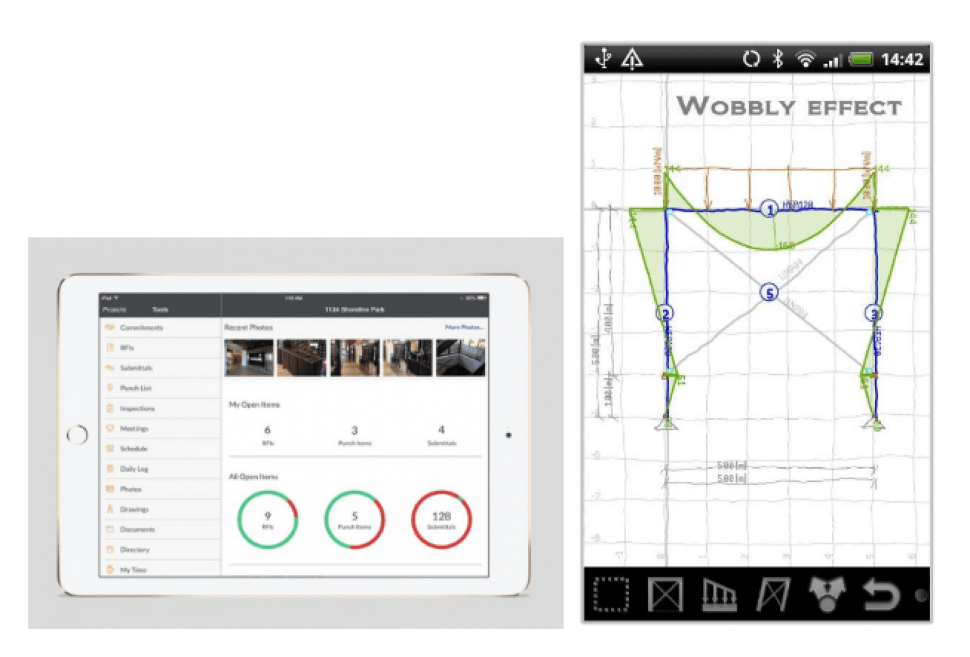
Example of iOS and Android construction management apps
One important thing to note is that some construction apps are not standalone apps, meaning that you will have to have purchased the desktop or subscription software before you can use the app. These “paired” apps are generally free from the app store but will not work unless you have an associated account with the software vendor.
On the other hand, some construction apps are standalone, meaning you can purchase them from the app store without having to purchase or subscribe to any additional software or services. Standalone apps, while cheaper in general, might not be as fully featured as apps that are paired with traditional software.
This guide covers general construction management apps. To see our guide specifically for electrician apps, click here.
Common Features of Apps for iOS and Android Devices
Here are some common features you’ll find in many mobile construction management apps both Android and iOS:
Estimates | Allows users to digitally create estimates for construction projects on the spot. Users can then sync the estimates back to their office system. Most cost estimator apps will have a material costs database that is regularly updated with market prices. |
Bid management | Allows users to create, manage and send out bids for construction contracts. |
Change orders | Allows users to receive—and in some cases carry out—change orders to plans and blueprints from customers. |
Project management | Allows users to monitor project status and track the time it takes to complete various project stages. |
Customer relationship management | Allows users to organize and store customer information and work order information associated with that account. |
Document control | Manages documents, bids, RFQs and other important documents in one place so the user can easily find and edit them. |
Scheduling | Users can schedule jobs and plan where and when to schedule their crews. Typically integrates with project management features to give users a total view of scheduling for a project. |
Blueprints | Some apps will allow the user to draw up and modify existing blueprints, allowing the user to export the blueprint in a variety of file formats. |
Construction Apps Pricing
In general, construction software is priced one of two ways: subscription pricing or a perpetual license. With subscription, you typically pay a monthly fee to use the software. That monthly fee is usually dependent on the size of your business or the volume of construction work your business does.
With a perpetual license, you pay a one-time fee upfront and can use the software indefinitely. However, even with a perpetual license, you might have to pay annual fees for support, maintenance and/or upgrades. The lifecycle for perpetual licensed software runs around five years, meaning you’ll likely want to upgrade to something new at that point.
When it comes to mobile construction apps, you likely won’t pay anything to use the mobile version of construction software that you are already using, unless the mobile version offers separate features or applications. You may have to pay more for standalone apps that are not paired with other software.
The Vendor Landscape
There are many vendors that offer construction management apps—each targeting different segments and business sizes within the construction industry. Whether you’re a solo general contractor or a multinational construction company, there is a solution to meet your mobile needs.
Below are some of the most popular vendors with mobile offerings:
BuilderTREND
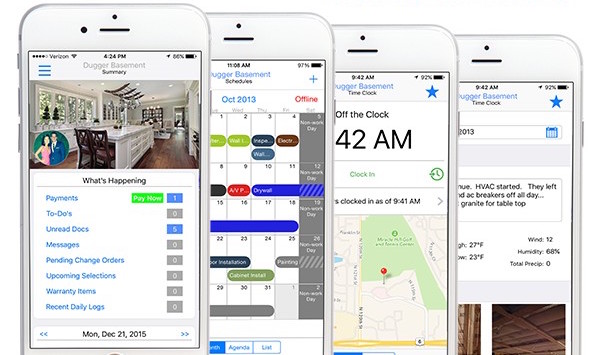
BuilderTREND’s mobile application includes project management, CRM and time tracking
BuilderTREND offers a fully-featured construction project management and customer relationship management (CRM) application for iOS devices. Users can do everything on BuilderTREND’s mobile app that they can do with its desktop web application.
Co-Construct
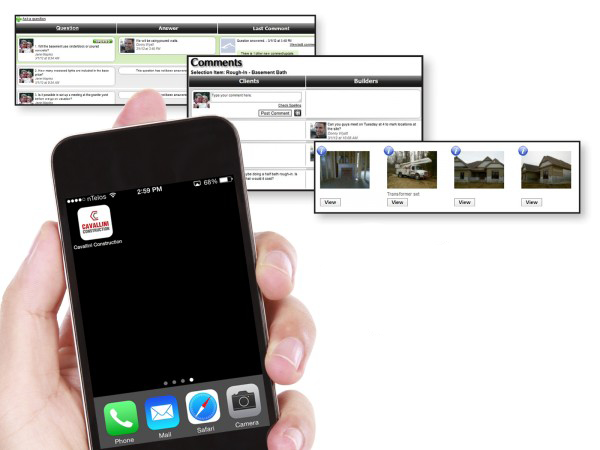
Co-Construct’s mobile app includes project management, time tracking and scheduling
Co-Construct features project management and document control capabilities (such as managing plans, estimates, bids, etc.), allowing users to track and document the progress of their projects. Users can send, receive and edit documents via the mobile app.
Procore
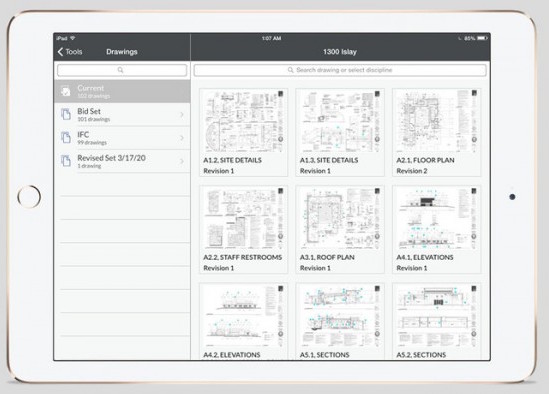
Procore’s mobile app includes project management, scheduling and document control
Procore’s mobile application helps with managing bids, document control and blueprint creation by allowing users to access all of a project’s data when they are out on the job site.
Users can access Procore’s main features via the mobile application, allowing them to make changes to plans, check off completed tasks and monitor the status of requests for information (RFIs) they have sent out.
Key Considerations When Selecting Construction Apps
Mobile applications have taken the construction industry by storm in recent years, making contractors’ jobs easier and preventing many headaches. There are a few things to keep in mind, however, when making your selection.
Wireless availability. If you’re a contractor on-the-go in rural areas or areas without great cellular or data service, consider how well the mobile app will work for you. Does it require being online to use, or can it sync data later when it is connected? If it’s the former, you might want to look at other options.
Multiple users. If multiple people in your business are going to use a mobile application, consider what it will take to get everyone trained on it. Also consider how advanced the user permissions are. For example, you might want to limit certain functionalities to certain users so inadvertent changes can’t be made to a set of blueprints.