
Best Meeting Software of 2026
Updated March 20, 2026 at 5:52 AM

Written by Kritika Tyagi
Writer

Edited by Stephanie Sandoval
Content Editor
- Popular Comparisons
- FrontRunners
- Buyers Guide
Compare Products
Showing 1 - 25 of 255 products
Compare Products
Sort by
Reviews: Sorts listings by the number of user reviews we have published, greatest to least.
Average Rating: Sorts listings by overall star rating based on user reviews, highest to lowest.
Alphabetically (A-Z): Sorts listings by product name from A to Z.

eShow is a cloud-based event management solution, designed to help organizations of all sizes to control live, virtual and hybri...Read more about eShow


eShow's Best Rated Features
See All
eShow's Worst Rated Features
See All

Ninety is a cloud-based business operating system that helps small and midsized organizations build great companies by turning f...Read more about Ninety


Ninety's Best Rated Features
See All
Ninety's Worst Rated Features
See All

Tripleseat is an event management platform designed for restaurants and unique venues. It helps hospitality businesses, includin...Read more about Tripleseat

Tripleseat's Best Rated Features
See All
Tripleseat's Worst Rated Features
See All

OnBoard is an AI-powered board management software designed to simplify governance processes for boards and leadership teams acr...Read more about OnBoard


OnBoard's Best Rated Features
See All
OnBoard's Worst Rated Features
See All

Nasdaq Boardvantage is a comprehensive board management solution and portal. It is designed to enhance efficiency, productivity ...Read more about Nasdaq Boardvantage

Nasdaq Boardvantage's Best Rated Features
See All
Nasdaq Boardvantage's Worst Rated Features
See All

Accruent’s EMS helps higher education facilities and businesses in every industry optimize physical spaces. The room booking, de...Read more about EMS
EMS's Best Rated Features
See All
EMS's Worst Rated Features
See All

Zoom Workplace brings communication, employee engagement, spaces, and productivity solutions together on a single platform with ...Read more about Zoom Workplace

Zoom Workplace's Best Rated Features
See All
Zoom Workplace's Worst Rated Features
See All

CivicPlus Agenda and Meeting Management is a comprehensive software solution that facilitates the automation and streamlining of...Read more about CivicPlus Agenda & Meeting Management
No reviews yet


Fathom serves as an AI meeting assistant, capturing, transcribing, and summarizing meetings. The application allows users to con...Read more about Fathom


Fathom's Best Rated Features
See All
Fathom's Worst Rated Features
See All

Deel is the only global-first people platform that enables companies to hire, relocate, pay, manage, equip, and support talent i...Read more about Deel
Deel's Best Rated Features
See All
Deel's Worst Rated Features
See All

BoardPro is a cloud-based board management platform to manage board workflows, daily enterprise functions and documentation. It ...Read more about BoardPro
BoardPro's Best Rated Features
See All
BoardPro's Worst Rated Features
See All

Zoho Assist is a cloud-based remote support software designed for organizations of all sizes. The solution allows IT technicians...Read more about Zoho Assist

Zoho Assist's Best Rated Features
See All
Zoho Assist's Worst Rated Features
See All

Vevox is a cloud-based polling and Q&A platform designed to help educational institutions and businesses improve employee/studen...Read more about Vevox

Vevox's Best Rated Features
See All
Vevox's Worst Rated Features
See All

Google Workspace (formerly G Suite) is a cloud-based suite of collaboration and document management tools designed to help busin...Read more about Google Workspace

Google Workspace's Best Rated Features
See All
Google Workspace's Worst Rated Features
See All

Figma is a cloud-based design tool, which helps businesses create, test, and deliver product designs in a collaborative manner. ...Read more about Figma

Figma's Best Rated Features
See All
Figma's Worst Rated Features
See All

Miro is a visual workspace for innovation that enables distributed teams of any size to dream, design, and build the future toge...Read more about Miro
Miro's Best Rated Features
See All
Miro's Worst Rated Features
See All

Slack is a cloud-based project collaboration and team interaction tool designed to facilitate communication across organizations...Read more about Slack
Slack's Best Rated Features
See All
Slack's Worst Rated Features
See All

Othership is a remote work platform that helps businesses choose from a distributed network of free and paid spaces to work. Man...Read more about Othership
Othership's Best Rated Features
See All
Othership's Worst Rated Features
See All

ScreenConnect is a cloud-based operations management solution that allows technicians to perform remote support, gain remote acc...Read more about ScreenConnect


ScreenConnect's Best Rated Features
See All
ScreenConnect's Worst Rated Features
See All

Brevo is a cloud-based email marketing tool suited for organizations of all sizes. It offers marketing automation, email campaig...Read more about Brevo

Brevo's Best Rated Features
See All
Brevo's Worst Rated Features
See All

Eventsquid is cloud-based event management solution for small, midsize and large businesses that caters to corporations, sports ...Read more about Eventsquid

Eventsquid's Best Rated Features
See All
Eventsquid's Worst Rated Features
See All

Knowa is a multi-award-winning Board Management and Governance platform, recognised for its AI-powered technology, ease of use, ...Read more about Knowa


Knowa's Best Rated Features
See All
Knowa's Worst Rated Features
See All

Livestorm enables powerful, yet pain-free video engagements at scale. Our end-to-end video engagement platform enables organizat...Read more about Livestorm
Livestorm's Best Rated Features
See All
Livestorm's Worst Rated Features
See All

Vectera is a meeting management solution, which helps businesses streamline processes related to appointment scheduling, video c...Read more about Vectera

Vectera's Best Rated Features
See All
Vectera's Worst Rated Features
See All

BoardPAC is a board governance solution that provides a set of tools to manage, schedule, and monitor board activities. The plat...Read more about BoardPAC

BoardPAC's Best Rated Features
See All
BoardPAC's Worst Rated Features
See All
Popular Comparisons



Your Guide to Top Meeting Software, March 2025
Software Advice uses reviews from real software users to highlight the top-rated Meeting products in North America.
Learn how products are chosenExplore FrontRunners


“Usability” includes user ratings for Functionality and Ease of Use.
“Customer Satisfaction” includes user ratings for Customer Support, Likelihood to Recommend and Value for Money.
Reviews analysis period: The reviews analysis period spans two years and ends the 15th of the month prior to publication.
Buyers Guide
This detailed guide will help you find and buy the right meeting software for you and your business.
Last Updated on October 14, 2025Software Applications for Meeting
Collaboration is a key to a successful business, whether small or large, as it helps with problem-solving, teamwork, and client management. With remote working on the rise, it has become more crucial for businesses to manage workplace collaboration effectively.
Meeting software enables and enhances communication within businesses. Communication can be through text, audio, video, and content sharing. While collaboration is the basic requirement, security, ease of use, and scalability are additional benefits provided by this software.
In this buyers guide, we’ll look at common features, benefits, and key considerations before purchasing meeting software.
Here’s what we'll cover:
What is meeting software?
Meeting software streamlines organizing, scheduling, conducting, and attending meetings. These meetings can be team meets, training sessions, webinars, presentations, and interviews. With the dynamic need for this technology, meeting software applications offer features that suit a particular meeting type or multiple use cases.
The meeting management software increases engagement between teammates, departments, and business partners. The web conferencing solution is cost-effective, sustainable and saves time as it reduces travel and expenses incurred for in-person meetings.
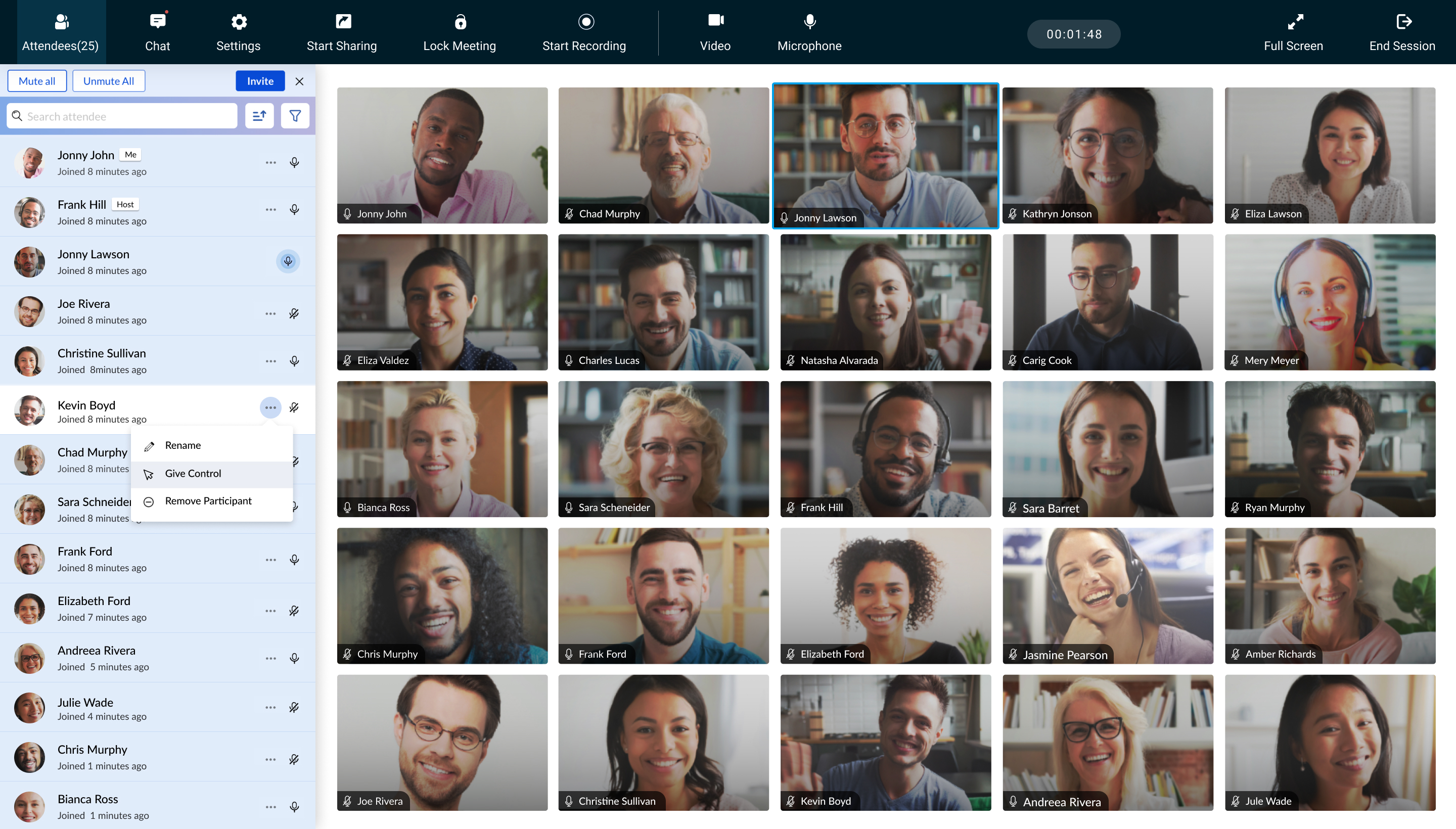
Video conferencing platform of Zoho Meeting (Source)
Common features of meeting software
The contemporary workplace has required online communication to become more significant than ever due to employees working remotely and across geographical locations, and outsourcing work to freelancers. Meeting software has evolved to meet the communication requirements.
Take a look at the common features that a web conferencing software solution includes:
Allow team members to communicate, collaborate, share media files, and work together through a single platform. | |
Meeting management | Plan, schedule and conduct meetings to accomplish team goals. |
Private chat | Send private chat messages to the selected individual(s) within an online meeting. |
Recording | Record live video calls to review later or send to people who couldn’t attend. |
Reporting/Analytics | Create metrics such as attendance, meeting agenda, duration, and participants feedback to analyze assemblies. |
Screen sharing | Allow users to share screens digitally, give access to meeting participants, and let them watch your activity in real-time. |
Third-party integrations | Integrate functionalities from third parties to leverage more features and applications. |
Hold face-to-face meetings over the web. | |
Video layouts/views | Choose different layouts to let participants view meetings in a way that focuses on what you want to display. |
Virtual backgrounds | Upload or use pre-set virtual backgrounds during a video meeting. |
Application encryption | Secure the data shared in a meeting through end-to-end encryption meaning the software vendor cannot decrypt data/video/chats shared during the meeting. |
Audio calls | Make voice calls to meeting participants. |
Digitally send and receive files during meetings. | |
HD audio/video | High-definition audio and video capabilities are available for better call quality. |
Host controls | Enables hosts with special privileges to control various aspects of the call such as putting participants on mute, blocking screen sharing and chats, etc. |
Chat online in real-time to make sessions more interactive. |
What type of buyer are you?
Before deciding on which software to choose from, you should understand which buyer category you belong to so that you choose the right software. Most buyers belong to one of the following categories:
Small and midsize enterprises (up to 500 employees): Whether you are in legal, marketing, education, fitness, medical or any other industry, you are required to communicate with your clients and customers. As social gatherings continue to move to hybrid and remote models, you need to make online sessions more lively, accessible, and interactive. Thus, buyers in this category should look for software solutions that provide creative backgrounds, reactions, hand raising, mobile device integration and live chat options.
Businesses who are in education should opt for a collaboration tool that enables students to move beyond classroom walls by connecting with relevant people, places, and events. Meetings hosts have controls to disable chat options, mute and remove participants to manage virtual classrooms. Sessions can be pre-recorded so that participants can watch them at a later time or refer back to for future references.
Large enterprises (over 500 employees): These buyers need conferencing solutions to communicate with teammates, departments, business partners, and clients. Government agencies, public sector institutions, hospitals and private enterprises fall under this category. Beyond collaboration, these buyers are looking for tools that are secure with end to end encryption, enable integrations with their industry-specific devices, CRM, marketing and sales tools, support webcasts at massive scales, and provide real-time translations for diverse audiences.
Benefits of meeting software
The key benefits of meeting software include:
Unified communication: As employees use multiple communication methods such as chat, phone calls, video conferencing, etc., meeting software streamlines communication by offering multiple channels in one platform.
Lower costs: If your employees live in different countries or cities, bringing them together for a team meeting takes a toll on your budget. Meeting software allows employees to communicate from anywhere at any time. Thus, saving valuable time and money. Web conferencing software has also reduced the need for establishing board meeting rooms. These conference rooms require expensive equipment and have limited seating. With video conferencing software, the applications are installed in every system and reduces the need to buy additional equipment.
Productive meetings: Since meetings are planned in advance, you can create agendas beforehand. The sessions are more likely to be productive as participants adhere to the agendas without spending time on idle conversations.
Ease of measuring results: Virtual meeting software provides insights into important aspects of meeting data such as cost, attendance, duration, engagement, and feedback from participants. These reports help you in analyzing which meetings were most productive, allowing you to adopt best practices for future meetings.
Maintain records: Meeting software enables organizers to record sessions, and maintain transcripts. With recorded meetings, non-attendees do not miss out on discussions and visuals. These logs can also be used for future references.
Market trends:
Artificial intelligence (AI) can help make meeting software more interactive: With AI-driven technology, meeting software enhances the way people communicate by adding more human elements. This software is capable of adjusting the position of your eye, therefore, it seems like you are looking straight at the other person. The continuous learning capability of meeting software makes it easier to conduct virtual meetings with low-speed internet as well. The software collects key points from a person’s facial muscles and creates a realistic video with low bandwidth data. AI-driven meeting tools bring more inclusion through real-time translations within assemblies.
Note: The application selected in this article is an example to show a feature in context and is not intended as an endorsement or a recommendation. It has been obtained from sources believed to be reliable at the time of publication.