


Best Accounting Software of 2026
Updated March 23, 2026 at 11:14 AM

Written by David Jani
Content Analyst

Edited by Parul Sharma
Editor

Reviewed by Bryan Dengler
Senior Advisor

Talk with us for a free 15-min consultation
Expert advisors like Jacqueline, who have helped 1,000+ companies, can find the right software for your needs.
- All Software
- Software Advice FrontRunners
- Popular Comparisons
- Buyer's Guide
- Frequently Asked Questions
Accounting software is a crucial tool for businesses, streamlining financial processes such as bookkeeping, invoicing, payroll, and financial reporting. It enhances accuracy, saves time by automating routine tasks, and provides valuable insights into financial health. To help you navigate through more than 500 accounting software available on our website, I worked with our advisors to curate a list of recommended productsi and a list of the accounting software FrontRunners based on user reviews. For further information, read my accounting software buyer's guide.
Accounting Software
Sort by
Reviews: Sorts listings by the number of user reviews we have published, greatest to least.
Average Rating: Sorts listings by overall star rating based on user reviews, highest to lowest.
Alphabetically (A-Z): Sorts listings by product name from A to Z.

Sage Intacct operates within the Sage Business Cloud portfolio as a comprehensive cloud-based financial management software, exp...Read more about Sage Intacct


Sage Intacct's Best Rated Features
See All
Sage Intacct's Worst Rated Features
See All

Vena is a financial planning and analysis (FP&A) platform. It is designed to work with Microsoft 365 apps, cloud technology, and...Read more about Vena


Vena's Best Rated Features
See All
Vena's Worst Rated Features
See All

Sage 50 Accounting is an accounting solution designed to cater to the needs of small and medium-sized businesses. It offers a su...Read more about Sage 50 Accounting

Sage 50 Accounting's Best Rated Features
See All
Sage 50 Accounting's Worst Rated Features
See All

Xledger is a cloud-based enterprise resource planning (ERP) solution that caters to midsize and large businesses and helps them ...Read more about Xledger


NetSuite is an AI-powered cloud-based business management suite that incorporates ERP, financial management, CRM and eCommerce f...Read more about NetSuite


NetSuite's Best Rated Features
See All
NetSuite's Worst Rated Features
See All
Software Advice FrontRunners 2026

(8375)

(3266)

(1718)

(20606)

(4503)

(1934)

(1290)

(671)

(604)

(178)
Best for Quick Implementation


According to our user reviews, QuickBooks Online is the most requested by users for quick implementation out of the most popular tools.
QuickBooks Online is best suited for SMBs seeking rapid implementation, as our reviewers say setup is straightforward and automation features like recurring invoices and easy accountant collaboration help streamline onboarding and daily financial tasks.
- Reviewers Perspective
"QuickBooks Online offers features that enables me to streamline processes such as invoicing, time tracking on projects and billing."
PMPatrick Muruthi
Chief Accountant
Used for 2+ years
We analyzed 787 verified user reviews for QuickBooks Online to find out what actual users really think.
Invoicing
QuickBooks Online lets teams create, customize, and send invoices, automate recurring billing, and track payments. Integration with payment methods and reporting tools streamlines billing workflows.Small Business
Small businesses use QuickBooks Online to track income, expenses, and growth. The platform’s affordability and comprehensive features support startups and expanding organizations.Accounting
QuickBooks Online automates repetitive accounting tasks, provides real-time access, and supports collaboration with accountants. Teams organize finances and prepare for audits efficiently. - Key FeaturesQuickBooks Online's scoreCategory average
Chart of Accounts
4.474.54 category average
Financial Reporting
4.444.42 category average
Income & Balance Sheet
4.514.48 category average
- Screenshots


Highly Rated for Automation

Xero

According to our user reviews, Xero is the highest rated for automation out of the most popular tools.
Xero is ideal for SMBs prioritizing automation in their accounting workflows; our reviewers say it automates repetitive tasks such as invoicing and bank reconciliation, saving significant time and improving productivity.
- Reviewers Perspective
"If fully utilised Xero is a very powerful business tool that can encapsulate everything financial - from integrated stock systems and product costing, to sales tracking and customer management."
MWMatt White
Founder and Director
Used for 1-2 years
We analyzed 768 verified user reviews for Xero to find out what actual users really think.
Accounting
Xero automates repetitive accounting processes, enabling efficient management of invoicing, reconciliation, and reporting. Teams collaborate with accountants and access financial data from anywhere.Invoicing
Users create, customize, and send invoices from any device. Automated reminders, recurring invoices, and real-time payment tracking streamline billing and reduce manual effort.Ease of Use
Xero’s clean design and straightforward navigation require minimal training. Both tech-savvy and new users quickly complete tasks and adapt the software to their business needs. - Key FeaturesXero's scoreCategory average
Financial Reporting
4.424.42 category average
Income & Balance Sheet
4.564.48 category average
- Screenshots


Best for User Interface

Wave

In our analysis of Accounting products with the most market demand, Wave is the highest rated for its user interface out of the most popular tools.
Wave is a strong fit for users who value an intuitive user interface, with reviewers noting its easy navigation, customizable invoicing, and seamless bank integration make financial management accessible even for those with limited accounting experience.
- Reviewers Perspective
"I have been using Wave for our small business bookkeeping for the past five or six years and love the ability to connect my bank accounts and credit cards and run weekly, monthly, and yearly reports."
BCBrigitte Chapman
Co-Owner
Used for 2+ years
We analyzed 720 verified user reviews for Wave to find out what actual users really think.
Accounting
Wave offers essential accounting features for startups and small businesses. Teams record transactions, generate reports, and reconcile accounts in a cloud-based environment.Small Business Use
Wave handles bookkeeping, invoicing, and expense tracking without subscription fees. Freelancers and small businesses manage finances efficiently, though advanced features are limited.Ease of Use
Wave’s intuitive interface and minimal learning curve let users start managing finances quickly. The design helps teams stay organized and reduces administrative workload. - Key FeaturesWave's scoreCategory average
Chart of Accounts
5.04.54 category average
Financial Reporting
4.394.42 category average
Income & Balance Sheet
4.494.48 category average
- Screenshots


Highly Rated for Customization


According to our user reviews, QuickBooks Enterprise is the highest rated for customization out of the most popular tools.
QuickBooks Enterprise is highly rated for organizations needing extensive customization, with reviewers highlighting the ability to tailor reports, workflows, and modules to specific business needs, enhancing financial oversight and reporting efficiency.
- Reviewers Perspective
"QuickBooks is a user friendly software that has helped me a lot not only in my accounting capabilities, but also in adaptability, scalability, and robust integration."
LSLouisa Semnebe
Manager
Used for 2+ years
We analyzed 963 verified user reviews for QuickBooks Enterprise to find out what actual users really think.
Accounting
QuickBooks Enterprise streamlines accounting for growing businesses. Teams can manage invoicing, expense tracking, and reporting in a single platform, supporting multi-entity operations and organized financial records.Financial Reporting
Generating tailored financial reports is straightforward in QuickBooks Enterprise. Businesses track income, expenses, and budgets, consolidate data for audits, and analyze trends for informed decisions.QuickBooks
QuickBooks Enterprise lets users manage payments, inventory, payroll, and multiple companies from any device. This flexibility supports daily accounting and business data organization across industries. - Key FeaturesQuickBooks Enterprise's scoreCategory average
Chart of Accounts
4.484.54 category average
Financial Reporting
4.554.42 category average
Income & Balance Sheet
4.604.48 category average
- Screenshots


Best for Mobile app

FreshBooks

Of the products listed on our FrontRunners report, FreshBooks is the most requested by users for mobile app out of the most popular tools.
FreshBooks is best for SMBs that rely on mobile access, as our reviewers say its mobile app offers full invoicing, expense tracking, and time management capabilities, making it easy to manage finances on the go.
- Reviewers Perspective
"FreshBooks has streamlined my invoicing process significantly, reducing the time I spend on administrative tasks and giving me more time to focus on my work. While it’s not perfect, the platform offers a robust set of features that cater well to small businesses and freelancers."
MLMatt Lee
Owner
Used for 1-2 years
We analyzed 838 verified user reviews for FreshBooks to find out what actual users really think.
Invoicing
FreshBooks lets businesses create, customize, and track invoices efficiently. Automation features reduce manual work, while time-tracking and reporting tools support billing accuracy.Ease of Use
FreshBooks’ interface and tutorials make onboarding and daily operations smooth. Minimal technical skills are needed, allowing users to manage business tasks with ease.Accounting
FreshBooks consolidates bookkeeping, expense tracking, and reporting in one tool. Small businesses and freelancers manage finances and stay organized without advanced accounting knowledge. - Key FeaturesFreshBooks's scoreCategory average
Chart of Accounts
5.04.54 category average
Financial Reporting
4.474.42 category average
Income & Balance Sheet
4.414.48 category average
- Screenshots


Highly Rated for Integrations
NetSuite

According to our user reviews, NetSuite is the highest rated for integrations out of the most popular tools.
NetSuite is highly rated for businesses that require robust integrations, with reviewers noting its seamless connections to third-party platforms and unified data management streamline operations and improve workflow efficiency.
- Reviewers Perspective
"Time to automate various accounting processes which reduces manual data entry, minimizes errors and saves time allowing us to focus on more strategic financial activities."
FSFlorence Schlensog
Trade Advisor
Used for 2+ years
We analyzed 760 verified user reviews for NetSuite to find out what actual users really think.
Features
NetSuite provides ERP, CRM, and project management tools in a unified platform. Teams manage real-time data, automate processes, and access comprehensive reporting for diverse business needs.Accounting and Financial Management
NetSuite supports general ledger, accounts payable/receivable, tax management, and automated reporting. Businesses streamline processes, improve accuracy, and manage multi-entity operations.Data Management
NetSuite centralizes data from multiple departments, automates entry, and reduces errors. Customizable dashboards and advanced search support collaboration and maintain data integrity. - Key FeaturesNetSuite's scoreCategory average
Chart of Accounts
4.454.54 category average
Financial Reporting
4.304.42 category average
Income & Balance Sheet
4.384.48 category average
- Screenshots


Highly Rated for Quick Adoption/Easy Adoption

Odoo

In our analysis of Accounting products with the most market demand, Odoo is the highest rated for easy adoption out of the most popular tools.
Odoo is highly rated for quick adoption, making it well-suited for SMBs seeking an easy-to-implement ERP; our reviewers point out its intuitive interface and effective onboarding resources help teams get up and running rapidly.
- Reviewers Perspective
"Odoo has been instrumental in streamlining our manufacturing and customer operations, providing flexibility and control over processes like inventory, accounting, and approvals."
MWmohammed widad
Adminstraion manager And odoo system admin
Used for 1-2 years
We analyzed 567 verified user reviews for Odoo to find out what actual users really think.
Customization
Teams adapt Odoo modules and workflows to fit unique business needs. Custom fields and integrations support both simple and advanced adjustments, though some changes require technical expertise.Modules
Businesses activate only the modules they need—CRM, accounting, HR, inventory, and more—scaling as requirements evolve. Most modules integrate easily, but some lack depth for specialized tasks.Inventory Management
Odoo centralizes stock tracking, warehouse operations, and order processing. Multi-location tracking and barcode scanning improve efficiency, with integration to sales and purchasing for streamlined operations. - Key FeaturesOdoo 's scoreCategory average
Financial Reporting
4.154.42 category average
Income & Balance Sheet
4.064.48 category average
- Screenshots


Most Used By Health, Wellness and Fitness

Zoho Books

In our analysis of Accounting products with the most market demand, Zoho Books is the most requested by users in Health, Wellness and Fitness out of the most popular tools.
Zoho Books is most used by health, wellness, and fitness businesses, with reviewers noting its user-friendly invoicing, automation, and integrated payment options help streamline financial processes in these sectors.
- Reviewers Perspective
"Zoho Book is quite different from other similar softwares their time tracking functions that make it easy to bill the invoice, their API and their reporting tool is amazing and one of the best thing is their interface."
SJSotis Jake
Account Executive
Used for 6-12 months
We analyzed 415 verified user reviews for Zoho Books to find out what actual users really think.
Payment Gateway
Zoho Books enables online payment processing, automated reminders, and real-time tracking. Teams accept multiple payment methods and manage payments for customers and vendors efficiently.Integrations
Zoho Books integrates with CRM, inventory, and project management modules. Businesses unify processes and data, though connecting with some external platforms may require additional setup.Accounting
Zoho Books offers intuitive automation and accessibility for tracking finances and generating reports. Collaboration with accountants is supported, with a learning curve for advanced functions. - Key FeaturesZoho Books's scoreCategory average
Financial Reporting
4.464.42 category average
Income & Balance Sheet
4.564.48 category average
- Screenshots


Highly Rated for Security and Access Control
Sage Intacct

According to our user reviews, Sage Intacct is the highest rated for security and access control out of the most popular tools.
Sage Intacct is highly rated for organizations needing strong security and access control, as reviewers highlight its robust internal controls and audit trails that support secure, compliant financial management.
- Reviewers Perspective
"We have used almost 7 years and it has served us well in all aspects of accounting, payables, cash management, General Ledger and Reporting."
SFSteve Fooskas
Accounting Manager
Used for 2+ years
We analyzed 360 verified user reviews for Sage Intacct to find out what actual users really think.
Accounting
Sage Intacct provides real-time access, audit trails, and robust controls for general ledger, payables, and cash management. Automation and customization support efficient daily operations across industries.Ease of Use
Teams navigate Sage Intacct’s logical interface and simple setup with minimal training. The clean design helps new users manage business operations efficiently.Financial Reporting
Organizations create custom financial reports, analyze data across dimensions, and automate workflows for real-time insights. Reporting tools streamline audits and support compliance. - Key FeaturesSage Intacct's scoreCategory average
Chart of Accounts
4.584.54 category average
Financial Reporting
4.074.42 category average
Income & Balance Sheet
4.414.48 category average
- Screenshots


Most Used By Individual & Family Services

FreeAgent

According to our user reviews, FreeAgent is the most requested by users in individual & family services out of the most popular tools.
FreeAgent is most used by individual and family services professionals, with reviewers saying its straightforward invoicing, easy bank integration, and clear financial overviews simplify accounting for small service-based businesses.
- Reviewers Perspective
"It has made my yearly accounts so much easier to finish on time with the direct contact with my accountant."
MLMick Lowe
Graphic designer
Used for 1-2 years
We analyzed 128 verified user reviews for FreeAgent to find out what actual users really think.
Invoicing
FreeAgent enables quick creation, sending, and tracking of invoices. Automated reminders and recurring invoices simplify monthly reconciliations and reduce administrative time.Accounting
Teams use FreeAgent to manage finances, generate reports, and stay compliant. Cloud access supports collaboration between business owners and accountants for organized accounts.Customer Support
FreeAgent’s support team provides prompt replies and detailed assistance. Online resources and staff enhance user experience, making it easier to maximize platform features. - Key FeaturesFreeAgent's scoreCategory average
Financial Reporting
4.674.42 category average
Income & Balance Sheet
4.784.48 category average
- Screenshots


DualEntry

- Reviewers Perspective
"The match bank data sections ease of matching payments is another feature i love. And if I make some mistake like matching the wrong things that have the same amount, it is very easy to go back and fix the error."
ELEmile Larochelle
Finance Manager
Used for 6-12 months
We analyzed 15 verified user reviews for DualEntry to find out what actual users really think.
- Screenshots


- Reviewers Perspective
"It is simple enough with a little help from tech support I am able to keep track of my accounting and hand it over to my accountant at years end to close out my books."
JDJay Ditsworth
Preo
Used for 1-2 years
We analyzed 333 verified user reviews for Patriot Accounting to find out what actual users really think.
Accounting
Small business owners manage double-entry accounting, reconciliation, and reporting without advanced expertise. The platform streamlines expense tracking and reduces reliance on external accountants.Customer Support
Administrators access Patriot Accounting’s support via chat, phone, and email. The team provides clear guidance during setup and troubleshooting, reducing confusion and downtime.Payroll
Managers process payroll for employees and contractors with quick setup and reliable direct deposit. Some users encounter challenges with custom reports and multi-rate management. - Key FeaturesPatriot Accounting's scoreCategory average
Chart of Accounts
4.304.54 category average
Financial Reporting
4.444.42 category average
Income & Balance Sheet
4.194.48 category average
- Screenshots


- Reviewers Perspective
"Its intuitive interface, secure cloud-based platform, and clear visibility into cash flow make it a practical choice for everyday accounting tasks. While customer support and mobile performance could be improved, and customization options are somewhat limited compared to premium competitors, Sage delivers solid value for money."
ALAlain Le Breton
IT
Used for 2+ years
We analyzed 331 verified user reviews for Sage Accounting to find out what actual users really think.
Accounting
Accountants and business owners use Sage Accounting for routine bookkeeping, reporting, and reconciliation. The intuitive interface and cloud platform support both simple and advanced tasks, making it accessible for beginners and professionals.Invoice Management
Users create and send invoices from any device, track payments, and manage recurring billing. The system keeps financial records organized, though some seek more customization and batch processing options.Setup
New users onboard quickly with Sage Accounting’s straightforward installation and clear setup steps. Tutorials and guides support a smooth start, even for those with limited technical experience. - Key FeaturesSage Accounting's scoreCategory average
Financial Reporting
4.264.42 category average
Income & Balance Sheet
4.394.48 category average
- Screenshots


- Reviewers Perspective
"D365 is a great ERP packed full of features for mid-sized companies."
AVAlexandra Van Ness
People Business Partner
Used for 2+ years
We analyzed 105 verified user reviews for Dynamics 365 Business Central to find out what actual users really think.
Integrations
Organizations unify business data and processes by connecting with Office 365, Power BI, and Outlook. The platform streamlines collaboration and reporting, and connects with POS and automation systems.Data Management
Teams store, access, and manage business data securely from any location. The structure enables easy reporting and analysis, with Excel compatibility and customization options.Productivity
Managers monitor performance and streamline processes with real-time metrics and device accessibility. Integration with Microsoft Office reduces paperwork and saves time across departments. - Key FeaturesDynamics 365 Business Central's scoreCategory average
Financial Reporting
3.864.42 category average
Income & Balance Sheet
4.204.48 category average
- Screenshots


- Reviewers Perspective
"Using SAP has made checking inventory of certain parts, organizing service calls for our technicians and correcting billing issues on the back-end incredibility straightforward."
CECydrina Espinosa
Technical Service Helpdesk
Used for 1-2 years
We analyzed 204 verified user reviews for SAP Business One to find out what actual users really think.
Inventory Management
Inventory teams monitor stock, warehouse locations, and documentation with real-time updates. Automation reduces manual work and supports demand planning and supply chain management.Small and Medium Business
SMBs use SAP Business One’s integrated modules to manage core processes and scale operations. The platform supports automation and efficiency for growing organizations.Customization
Administrators tailor dashboards, modules, and layouts to fit business requirements. Customization supports evolving workflows and industry standards. - Key FeaturesSAP Business One's scoreCategory average
Financial Reporting
4.384.42 category average
Income & Balance Sheet
4.264.48 category average
- Screenshots


- Reviewers Perspective
"The integration with banking systems and the automated bookkeeping features save an incredible amount of time, making it ideal for busy professionals."
BTBobby Taslimi
Digital Marketing Consultant
Used for 6-12 months
We analyzed 43 verified user reviews for ReInvestWealth to find out what actual users really think.
- Key FeaturesReInvestWealth's scoreCategory average
Financial Reporting
4.804.42 category average
Income & Balance Sheet
4.814.48 category average
- Screenshots


- Reviewers Perspective
"Multiview is a flexible platform that allows us to have one chart of account across our three entities."
JFJustin Field
CFO
Used for 1-2 years
We analyzed 72 verified user reviews for Multiview ERP to find out what actual users really think.
Customer Support
Administrators use Multiview ERP’s support portal for quick help during implementation and daily use. The support team is accessible and knowledgeable, streamlining issue resolution.Accounting
Organizations manage transactions across entities and periods, leveraging consolidated accounting and efficient audit processes. The system supports fund accounting and standard reports.Customization
Users configure interfaces, departmental tracking, and workflows to match business needs. Customization options help streamline processes and adapt to organizational changes. - Key FeaturesMultiview ERP's scoreCategory average
Chart of Accounts
5.04.54 category average
Financial Reporting
4.114.42 category average
- Screenshots


- Reviewers Perspective
"QuickBooks offers a wide range of functions that help organize the company’s operations, including managing invoices, payments, and inventory."
FCFannie Chen
Estimator
Used for 2+ years
We analyzed 9 verified user reviews for QuickBooks Solopreneur to find out what actual users really think.
- Screenshots


- Reviewers Perspective
"The ability to customize Acumatica to fit our industry's workflow is a driving factor for why we chose them."
RWRyan Woodhead
System Admin
Used for 2+ years
We analyzed 110 verified user reviews for Acumatica Cloud ERP to find out what actual users really think.
Customization
Users configure Acumatica Cloud ERP to match unique workflows and dashboards without coding. This flexibility supports industry-specific processes and user-level efficiency, though complex changes may require technical help.Cloud Accessibility
Teams access Acumatica Cloud ERP from any location with internet, enabling real-time collaboration and automated updates. This eliminates on-premise server needs and supports flexible work environments.Reporting
Finance teams use built-in and downloadable reporting tools for basic needs, but advanced or specialty reports often require technical support. Some essential reports are missing and report modification can be unintuitive for non-developers. - Key FeaturesAcumatica Cloud ERP's scoreCategory average
Chart of Accounts
4.504.54 category average
Financial Reporting
3.984.42 category average
Income & Balance Sheet
3.754.48 category average
- Screenshots


- Reviewers Perspective
"The ability to customize Acumatica to fit our industry's workflow is a driving factor for why we chose them."
RWRyan Woodhead
System Admin
Used for 2+ years
We analyzed 110 verified user reviews for Acumatica Cloud ERP to find out what actual users really think.
Customization
Users configure Acumatica Cloud ERP to match unique workflows and dashboards without coding. This flexibility supports industry-specific processes and user-level efficiency, though complex changes may require technical help.Cloud Accessibility
Teams access Acumatica Cloud ERP from any location with internet, enabling real-time collaboration and automated updates. This eliminates on-premise server needs and supports flexible work environments.Reporting
Finance teams use built-in and downloadable reporting tools for basic needs, but advanced or specialty reports often require technical support. Some essential reports are missing and report modification can be unintuitive for non-developers. - Key FeaturesAcumatica Cloud ERP's scoreCategory average
Chart of Accounts
4.504.54 category average
Financial Reporting
3.984.42 category average
Income & Balance Sheet
3.754.48 category average
- Screenshots

ProfitBooks

- Reviewers Perspective
"Its intuitive interface makes invoicing, expense tracking, inventory, payroll, and GST/tax compliance remarkably simple, even without accounting expertise"
DBDeepa Bajaj
Creative Director
Used for 1-2 years
We analyzed 73 verified user reviews for ProfitBooks to find out what actual users really think.
Inventory and Accounting
Small businesses manage invoicing, inventory, and accounting in one system. The intuitive interface supports expense tracking, payroll, and GST/tax compliance without advanced knowledge.Customer Support
Users receive timely, helpful support—even outside business hours. The support team’s responsiveness helps resolve issues and builds user confidence.Small Business
Micro and small enterprises access core features for finance, invoicing, and inventory. ProfitBooks is designed to support business growth without unnecessary complexity. - Key FeaturesProfitBooks's scoreCategory average
Financial Reporting
4.284.42 category average
Income & Balance Sheet
4.144.48 category average
- Screenshots

- Reviewers Perspective
"its a very basic accounting software, not much else. If your just using for accounting its great, but if you need things like estimation, tracking, PO's etc choose something else."
PGPaul Goetz
Project Manager
Used for 6-12 months
We analyzed 305 verified user reviews for Sage 50 Accounting to find out what actual users really think.
Accounting
Accountants and bookkeepers use Sage 50cloud Accounting for invoicing, reporting, budgeting, and cash flow management. The software follows standard principles and supports both basic and advanced needs.Small Business
Small and medium businesses manage billing, inventory, and reporting without excessive complexity. The platform supports growth and keeps books organized for routine operations.Training and Learning Curve
New users leverage tutorials and guides to become proficient quickly. The familiar design and learning materials reduce the initial training burden. - Key FeaturesSage 50 Accounting's scoreCategory average
Financial Reporting
4.154.42 category average
Income & Balance Sheet
4.404.48 category average
- Screenshots


Sage 100

- Reviewers Perspective
"I consider that Sage 100 is a complete accounting application, which allows you to adapt to the needs of customers."
COCarlos Ortiz
Supervisor - Financial Application Support Service
Used for 2+ years
We analyzed 252 verified user reviews for Sage 100 to find out what actual users really think.
Accounting
Accountants manage financials, audit trails, and compliance with accepted principles. Sage 100 centralizes operations and supports both small and midsize businesses.Small Business
Small and midsize companies handle core business functions with scalable features. The platform balances affordability and ease of implementation for evolving needs.Payroll
Payroll managers automate pay methods, direct deposit, and reporting. The module integrates with business processes, though some users seek enhanced HR features. - Key FeaturesSage 100's scoreCategory average
Chart of Accounts
5.04.54 category average
Financial Reporting
4.274.42 category average
Income & Balance Sheet
4.384.48 category average
- Screenshots


TallyPrime

- Reviewers Perspective
"TallyPrime software is useful in accounting purpose."
ATAkshay Thombare
Payroll Executive
Used for 2+ years
We analyzed 192 verified user reviews for TallyPrime to find out what actual users really think.
Features
Businesses prepare GST returns, support audits, and configure TallyPrime for various needs. The platform adapts to different industries with remote access and robust reporting.Accounting
Teams manage accounts, suppliers, and multi-currency transactions with automated calculations and reporting. TallyPrime supports accurate records and GST compliance for diverse business sizes.Inventory Management
Inventory managers track stock, sales, and purchases with automated reports and easy configuration. The tools support efficient control and decision-making across operations. - Key FeaturesTallyPrime's scoreCategory average
Financial Reporting
4.254.42 category average
Income & Balance Sheet
4.424.48 category average
- Screenshots


Methodology
The research for the best accounting software list was conducted in October 2025. We evaluated data (user reviews and demand signals) from the past 24 months as of the research date. Read the complete methodology.
Popular Accounting Comparisons


Buyer's Guide
This detailed guide will help you find and buy the right accounting software buyer’s guide: how to choose accounting software in 2026 for you and your business.
Last Updated on March 23, 2026Here’s what we’ll cover:
5-steps to picking the best accounting software for your business
What are the features of accounting software?
What is accounting software?
Accounting software is an essential tool that helps companies manage financial processes, record, and track transactions, and generate financial reports. Business accounting software allows financial professionals and company bookkeepers to track payments and receipts, monitor cash flow and spending, and generate insights on financial performance.
Accounting software packages are vital to maintain internal financial compliance. They also help small and midsize businesses (SMBs) automate bookkeeping and accounting tasks, reducing manual entry while collecting data that provides clearer visibility into both real-time and predicted future performance.
Many businesses update their accounting software often. Nearly one-third (32%) of software buyers purchased a new accounting suite in the last 12 months, and one in ten are considering a purchase in the coming year. As capabilities such as AI features and improved analytics become more common in these tools, firms look to capitalize on the better efficiency and oversight these updates offer. [1]
5-steps to picking the best accounting software for your business
Choosing software is increasingly pivotal to business success. 83% of accounting software buyers expect heightened revenue growth over the coming 18 months, with 72% increasing their software spend.
However, 44% in accounting are disappointed with their eventual choice, and accounting buyers have the highest regret from finding a more suitable system after a purchase. The pressures of this choice are high. [1]
Before comparing systems, careful planning is needed. Businesses need to assess their priorities and how accounting software can help them achieve key goals, such as automating invoicing or reconciliation, or gaining better insights from data. Clear goals can help map your organization’s needs to the software you ultimately choose.
The following five-step roadmap can help SMBs avoid disappointment and select tools that help them achieve their growth potential.
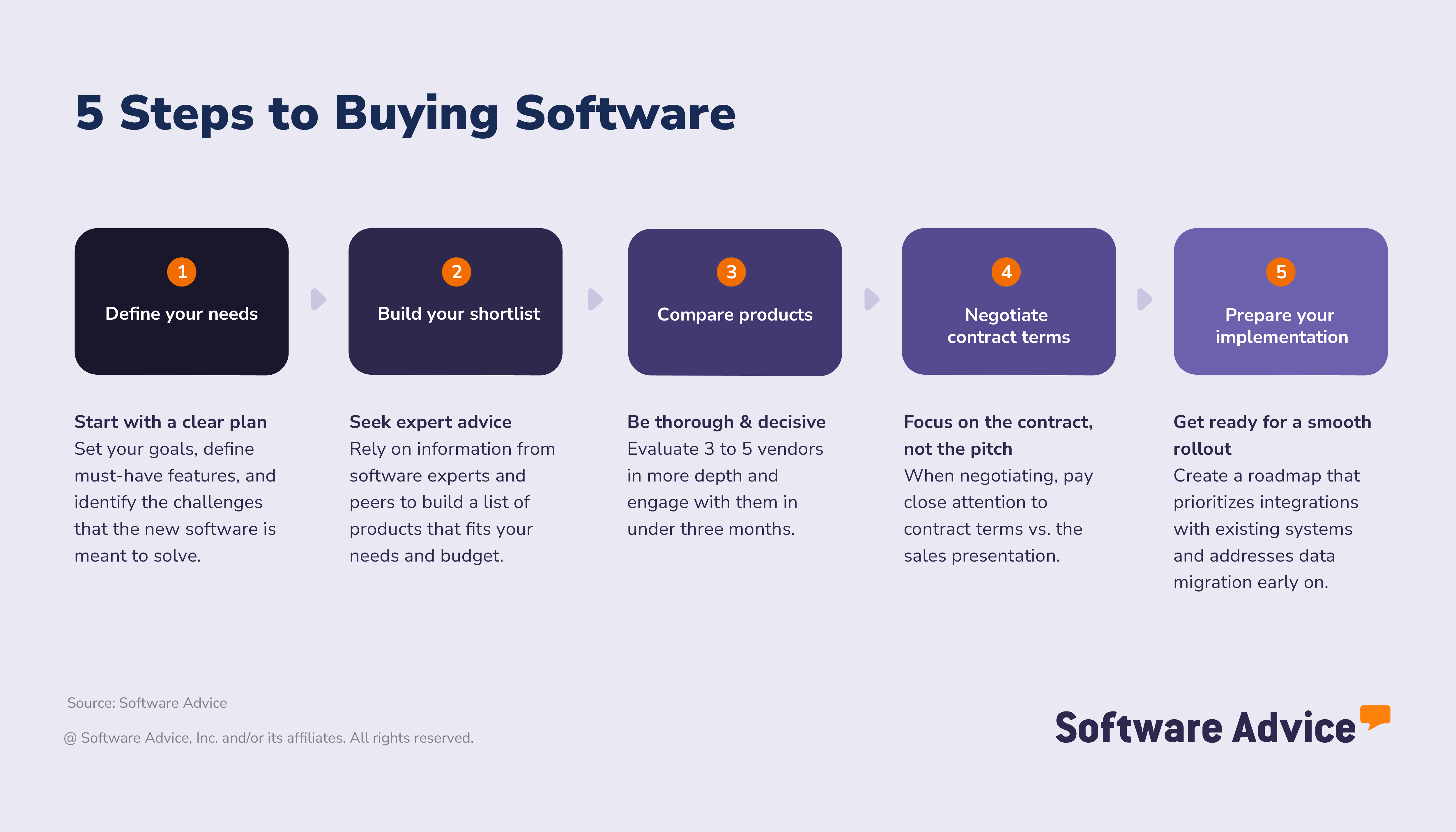
Step 1. Define your accounting software needs
Set your goals and success metrics: What challenges do you want to solve?
Accounting software is used across almost every sector, and users often need tools to track assets, transactions, and values specific to their industry. An accounting system adopted by a legal office, for example, will have very different requirements from one used by a retail business.
Understanding the priority goals and metrics for your use case, business type and size is vital. Scenario-based goal-setting can help SMBs get more on top of these requirements and focus primarily on solving key operational challenges and improving software ROI.
Accounting Senior Software Advisor Bryan Dengler sums up why it’s also important to assess your current situation to plan ahead: "Understanding your current solution and the bottlenecks your team is experiencing is key. Are these bottlenecks helping you achieve your overall goals for the business?"
To plan for your own business’s necessities, our guide to scenario-based goal setting in accounting can help narrow down your core requirements.
Examples of common business goals and accounting software benefits:
Operational efficiency: Automated transaction entry, reconciliation, and reporting tools help teams move faster and reduce manual errors.
Clearer reporting: Real-time data, standardized graphs and charts as well as configurable reports offer a clearer view of financial performance.
Better invoicing and payments: Maintain better performance when sending and receiving payment via payment status tracking, reminders and invoice creation tools.
Improved team collaboration: Centralize your staff around a single-source-of-truth for financial data with shared dashboards, automated reporting and built-in communication tools.
Optimized financial management: Gain better oversight of incomes, expenses and assets to track a company’s performance and financial position more precisely.
Synchronization and integration: Connect with standalone tools for payroll, billing, or inventory to prevent the duplication of records and workload.
Set measurable success metrics:
Better financial visibility at an organizational level
Faster invoicing and payment times
Fewer errors in the general ledger
Real-time reconciliations
More staff time dedicated to performance and analytics vs. manual tasks
Set your requirements - Map your business goals to features
Start with the essentials
Accounting software systems should simplify core financial workflows rather than add extra steps. Therefore, it should support at the very minimum:
Goal area | Business goal (outcome) | Helpful features |
Accounts payable | Ensure timely payments to vendors and suppliers, simplify approvals, and prevent duplicate or erroneous payments. | Automated bill capture Approval workflows Electronic payments |
Accounts receivable | Receive payments faster, reduce late payments, and keep cash flow information up-to-date. | Automated invoicing Payment reminders Online payment options |
Bank reconciliation | Maintain a clear picture of cash balances and reduce errors in accounts. | Automated bank feeds Real-time reconciliation Rules-based transaction matching |
Financial reporting | Understand business performance better through accurate, audit-ready statements. | Custom reports Data dashboards Export tools |
General ledger | Keep financial records accurate and support compliance by properly categorizing transactions. | Journal entry control Multi-entity support Audit trail logs |
Billing and invoicing | Improve payment fluidity and ease for customers. | Scenario modeling Customized invoicing Recurring billing |
Software Advisor Manager Niko Bernardone illustrates why aligning features around your key goals can achieve better results, "It’s important to understand the ROI you are looking for specifically. Are you looking for time saving automation, so your employees can work on other tasks, or is it strictly to save money. Understanding this will allow you to better target the features your business needs to solve for your goals."
For additional guidance, our software advisors can help your team in defining the key priorities for accounting and mapping them to specific software features. For personalized assistance, chat online now or schedule a call with an advisor.
Once you’ve clearly understood which features help you achieve your key goals, the next step is to plan out how your requirements might evolve as you grow. SMBs using more basic features could unlock better performance with more advanced functionality, especially as requirements shift and compliance changes.
Identify stakeholders - who needs to be involved?
Software selection is a team effort. Accounting software choices shouldn’t sit only with the finance department. You’ll need inputs from your technical team, external CPAs, and management stakeholders to ensure functionality across the business.
Cross-functional input reduces risk. Less than half (43%) of accounting buyers involve a multi-functional team, with many disappointed accounting buyers (31%) saying they would involve a more diverse group of stakeholders in future decisions with hindsight.
Which teams should evaluate features and functionality?
Ideally, your end users in the accounting and finance team, or any external CPAs, should be involved in feature selection, and you will also typically involve some members of your IT operations team to ensure technical feasibility.
Who should evaluate the price, fine print, and terms?
The final terms of the contract should be reviewed by your end users (accounting team), IT, and the business's CFO to ensure no essential points are missed.
Which teams need to sign off on the final decision?
Final approval needs broad oversight. Consider getting sign-off from your legal, procurement, and leadership decision-makers.
Why does this matter?
Misalignment with stakeholders can lead to mismatched purchase. Accountants we surveyed who were disappointed with a software purchase in the last 18 months say that in future software selection processes, they’d improve stakeholder communication (34%) and engage with a more diverse group of stakeholders (31%).
Expert tip for SMEs:
“It’s important to get viewpoints from various stakeholders in your business to assess the impact of the new tool on the eventual end-users, as well as the wider organization. This ensures your key requirements are met, and your technical stack has the capability to run your chosen software, especially if resources are tight.” - David Jani
Step 2. Compare accounting vendors
There are hundreds of accounting systems available. Using reliable sources, rather than guesswork, can aid the differentiation and comparison process. SMBs can benefit especially from expert-led content and verified user feedback for more in-depth analysis rather than quick summaries or more context-light discussions.
Which sources of information create better outcomes?
Some information sources have a greater impact on the success or failure of product choices than others. When we compared successful software adopters (34% of global software buyers, who found the right tool without disruption or regret) with disappointed software buyers (40% who experienced both) we found that those with better outcomes rely more on these factors:
Industry experts (52% vs. 38%)
Software review and comparison sites (43% vs. 35%)
User reviews (33% vs. 32%)
On the other hand, disappointed buyers comparatively use tools such as generative AI tools (32% vs. 42%). These tools can save time summarizing information but lack the same assurances of verifiable information or expert analysis, which can undermine their overall reliability in the software section process.
Other resources that correlated with successful outcomes included:
Professional and industry associations
Vendor-provided content
User reviews
Get real advice from the experts
Speaking with experienced software advisors can help SMBs avoid common pitfalls of accounting software selection. Our representatives offer structured guidance based on real-world situations businesses face when implementing and using accounting systems. They help SMBs:
Understand the key accounting features that align with their processes, business sizes and sector.
Compare vendors based on their functionality, support and integration capacity.
Plan for implementation with fewer disruptions.
Advisors can help focus your shortlist and avoid possible missteps. If you’re looking for support with your accounting software selection connect with an advisor for expert guidance.
Leverage user reviews
Direct user feedback is a powerful resource and accounting buyers are well aware. 45% of buyers in the sector favor software review and comparison sites and 36% value user reviews as influencing factors, higher than overall global averages. These insights offer practical context you won’t find in product descriptions alone.
How to get the most value from user reviews
Focus feedback from similar organizations. Accounting software is incredibly versatile and if you have specific requirements for accounting in your industry seeking out similar companies can help understand if it fits your functionality and compliance needs.
Look for detailed user experience. Focus especially on comments about daily workflows, reconciliation functionality, and analytical tool access.
Prioritize recent reviews. Software changes a lot over time, therefore prioritizing reviews from the last 6-12 months can help you understand recent product updates and shifts.
Compare star ratings and written feedback. Lower ratings backed up by detailed explanations (e.g., “regular bugs during reconciliation tasks”) can prove more useful than a single sentence generic 5-star review.
Spot recurring theme. An issue that appears across multiple reviews about features, faults or poor support is a clue on where to dive deeper during your evaluation.
Expert tip for SMBs:
“Once you’ve narrowed down your top choices to approximately 2-3 vendors, make sure to get hands-on with the software via a demo or free trial. This can help test out your exact use cases to see if they really match your requirements.” - David Jani
How much does accounting software typically cost?
Pricing for accounting software is usually charged monthly, more commonly as a flat fee but sometimes on a per user per month basis. Monthly costs usually start from $68 per month for an entry level system but can start from as much as $321 for an advanced option. [4]
As pricing amounts vary, buyers may sometimes find themselves overspending due to misunderstandings about user licenses needed or adding unnecessary functionality.
As Software Advisor Manager Niko Bernardone outlines: "It’s important for you to balance cost and user experience during your software search. When it comes to implementing a software, understanding what you can afford will be crucial. From there, finding the best user friendly system for your team is ideal. The more expensive option within your price range might be worth it for you if the UX of the system is better than cheaper solutions."
Budgeting tip: When considering costs for your eventual accounting software plan around the full ownership cost of the product rather than just the monthly fee. This should factor in implementation, training, migration and support fees that may arise to help assess the longer term costs of running the software.
How do accounting software pricing models compare?
Having a clear picture of accounting software pricing is key to avoiding hidden costs and expenses and getting the best value. With accounting systems this may mean weighing up the following options:
Subscription vs. per user: Monthly or annual fees could be charged as a flat fee or per individual user seat.
Flexible models: Some platforms offer free trial periods, perpetual licenses, tiered subscription pricing based on features needed, or pay-as-you go options.
Hidden fees: Be mindful of often extra costs associated with data migration, onboarding, storage, or adding premium support.
Understanding user feedback on accounting packages for small businesses can provide incisive focus and clarity during the process of deciding on accounting software.
Expert tips for SMBs:
“Be sure to ask vendors to provide a clear breakdown of the pricing plans they offer ahead of a final purchase. This should include all potential costs you might incur like support, migration or even future upgrades. This information can help you create a cost comparison chart between your final options so you can pick the option offering the best long term value.” - David Jani
Step 3. Build your shortlist and take action decisively
After exploring the many options on the market, the next step is to narrow the choices down and focus on hands-on tests of the systems you are seriously considering. At this stage you can switch priorities to signing up for trials, booking demos and comparing specific products.
Successful software buyers usually go about this in a relatively short timeframe and keep their shortlists focused:
92% will shortlist five or fewer products
68% decide on software within three months or less
With hundreds of accounting software options available, screening vendors effectively and efficiently becomes the goal so that you prioritize those who cater to your exact requirements. Focus especially on:
Business fit: Focus on tools that are designed around your business size or offer flexible subscription plans to cater to needs such as a distributed team.
Industry focus: Accounting standards vary between sectors, therefore it’s best to focus on a tool that is commonly used or has a proven track record in your particular industry.
Regulatory compatibility: Compliance is stricter in sectors such as legal, government, insurance, and banking for accounting. The tool you pick must support the necessary standards and documentation.
Integration potential: Prioritize solutions that can connect easily with existing software and tools in your business to support digital workflows.
Implementation support: Look out for vendors that offer clear onboarding guidance, training resources and effective customer support.
Pricing transparency: Opt for software vendors who offer clear pricing tiers, free trials and flexible subscription options.
User experience: Utilize feedback from users in a similar situation to your own and analyze how their experience with the software helped them solve business issues or real-world implementation challenges.When your shortlist is ready, the next stage focuses on evaluating vendors against your core needs, ensuring the solution fits with your specific workflows and understanding any implementation risks.
Evaluation checklist
Use our checklist to assess whether a specific accounting system aligns with the requirements of your organization and operations. This is designed to identify practical factors that might be overlooked during a product demonstration or trial, especially those that affect usability, scalability and long-term value.
How to schedule demos with accounting vendors
Booking demonstrations with shortlisted vendors is a vital way to assess how an accounting platform may practically carry out tasks and workflows. Regardless of whether you’re focusing on account bookkeeping software, systems prioritizing payments and payroll, or a compliant tool for your industry, targeted demos can provide better clarity on whether it really works in practice.
Request tailored demos: Ask for examples of essential day-to-day features and workflows performed in your company, such as reconciliations from bank feeds or invoicing automations.
Test integrations: If you need a connection between your accounting system and another tool such as for CRM, inventory or payroll, be sure to check it functions effectively.
Expert tip for SMBs:
“Make sure you get a demo each for your end-users to try out essential company workflows and for your IT team to test out the security and API features. This will make sure you end up with a usable system that operates smoothly in your tech stack.” - David Jani
What should you ask vendors when evaluating accounting systems
When you meet with vendors to do your final evaluations of the accounting software options on your shortlist, don’t just focus on features and pricing. This is the moment to ask key questions to help pinpoint how the product can fit in with your company’s working practices, team and key performance indicators (KPIs)
Try starting with these questions:
How does the system handle reminders and notifications?
What customization is offered?
What is the onboarding and training process?
How does the system handle data backups and security
Does the tool have tools for compliance?
What integrations can be used out of the box?
Step 4. Review pricing and contract terms
Before you make your final choice you need to dedicate some time to the costs and contract details, as well as who to involve with the purchasing process. Here it is essential to make sure you understand pricing fully and that the terms you're agreeing to are clear and understood, to avoid disappointment down the line.
Glossary of accounting software contract terms
When you evaluate an accounting system contract you should be able to understand the key terms that define responsibilities, service expectations and compliance obligations. These can help you form the basis of a solid agreement and minimize risk.
Master Services Agreement (MSA): This represents the main contract that defines the relationship between service provider and client. This outlines responsibilities, scope, payment terms, and dispute resolution.
Service Level Agreement (SLA): This agreement specifies the measurable service expectations of the deal, including uptime, response times, and performance standards. For example, this may cover expected updates, maintenance and technical support provided by the vendor and remediation if these targets are not met.
Audit trails: System-generated records of financial activity and user actions (e.g. edits, approvals, deletions). These are essential for compliance, tax readiness and fraud prevention.
Data migration: The process of importing historical data into your newly chosen system. This can include chart of accounts, balances, vendors, customers, and transactions. This may affect costs based on data volume and complexity.
Payment processing fees: Fees charged when customers pay invoices by card or automated clearing house (ACH). These might represent additional costs to your subscription.
API and integration limits: These limitations define the number of connections or data calls your plan can manage. This is especially important for businesses running one or more integrations with other software.
Compliance and reporting requirements: Detail how both parties ensure adherence to regulatory practices (e.g. GAAP, Soc, or HIPAA) and who provides documentation for audits.
Implementation fees: One-off costs for onboarding, configuration, data migration, training or customizations.
Downtime and performance penalties: Explain how downtime reduction is measured and the financial or service penalties that apply if thresholds are exceeded.
Expert tip for SMBs:
“As you review the agreement, really think through the key necessities for your team and business and make sure they are included and that you’re not signing up to extra, unnecessary services. Always ask for clarification on any vague language.” - David Jani
What tips can help negotiate with accounting software vendors?
Vendor prices online are not always set in stone, they can be the starting point for your negotiations. Explore the opportunities to get a better deal by focusing closely on addressing the key needs of your business, rather than simply signing up to a standard package that provides tools that will go unused.
Clarify support and service levels. Ask for clarity about how response times, escalation and support availability will be managed.
Discuss price locks and renewal caps. Request limitations on future price increases within a specific timeframe to keep costs stable.
Negotiate data ownership and compliance terms. Make sure your company maintains control of its data and that vendors meet essential regulatory and security requirements.
Customize your package. Explore the possibilities of tailored packages. This should move to remove unneeded features and to optimize around those that you and your team need most.
Review contract flexibility. Assess options for scalability, to see how you may be able to downgrade or upgrade your package depending on your situation or exit the agreement early without penalization.
Negotiate price. You don’t have to accept the first quote! Ask for areas where the pricing can be discounted in return for specific feature bundling or longer payment terms. If you’ve received better offers from other vendors see if you can get their prices matched from a better fitting provider.
To keep costs within your budget, confirm who on your team will need a license. Not every member of staff necessarily requires full access. For example:
Accounting managers/staff or those needing regular or day-to-day access will most likely need dedicated seats allocated to them.
Clients/suppliers or other third parties who you pay or receive payment will probably only need limited access if any.
Supervisors or PMs may only need access to data resources like dashboards or reports, without the need for specific login access.
Aligning the number of licenses around roles can reduce costs without limiting functionality or access to the system:
Expert tip for SMBs: “As soon as you’re sure that a vendor is a top contender, request a sample contract. This can give you more time and space to spot any clauses that could represent deal-breakers or that might need more negotiation efforts.” - David Jani
Step 5. Prepare for implementation and long-term success
The process of adopting accounting software doesn’t end when the contract is signed. The rollout stage plays a vital part in making sure that your purchase succeeds longer term. Here’s how to set up for success:
How to create an implementation roadmap—from onboarding to data migration
Onboarding
Assign responsibility: Choose a MVP who will be your primary contact for your team and the vendor to centralize communication.
Set a timeframe: Plan milestones for onboarding to cover each stage from initial setup to full rollout.
Team involvement: Choose which departments (accounting, IT, legal) need to be on hand for the testing and launch.
Integration and data migration
Data to migrate: Decide which financial records, customer and vendor data, tax information or other specialized information need to be copied across.
Integrations: List any tools or API accessing nodes that connect with your current system (e.g., CRM, Payroll, security).
Vendor support: Identify what support the vendor offers for migration and integration with other systems.
Testing
Configuration checks: Have team members test how workflows, permissions and notifications align with your existing workflows to evaluate if the system is ready for daily use.
Efficiency review: Make sure the setup aligns with your business processes without interruptions or significant pain points.
Documentation and rollout
Process documentation: Decide who will create documentation outlining best practices, user permission and step-by-step workflows.
Training: Pick a leader for the training sessions that will instruct end-users and to provide ongoing support.
Expert tip for SMBs:
“Be sure to review things regularly after you finally go live, within the first 1-2 months. This is vital to go over feedback, fix initial issues and optimize workflows further. This can make sure your final choice of accounting software keeps on delivering in the future.” - David Jani
What are the features of accounting software?
At Software Advice, we speak to hundreds of accounting software buyers every year to understand their critical requirements. We have analyzed those conversations to provide insights into the features that are most needed by finance staff, managers, and leadership teams for accounting work. [2]
Core accounting software features
General ledger | Centralized recording of all financial transactions and activity. 92% of our reviewers rate this feature as critical or highly important. |
Financial reporting | Real-time and period-end reports, balance sheets, and income statements. 91% of our reviewers rate this feature as critical or highly important. |
Accounts payable | Tools to manage vendor invoices, approval workflows, payment scheduling, and expense categorization. 88% of our reviewers rate this feature as critical or highly important. |
Bank reconciliation | Record synchronisation of internal records with bank feeds and logged transactions to reduce errors. 86% of our reviewers rate this feature as critical or highly important. |
Accounts receivable | Tools that track customer invoices, payment status, and outstanding balances to support cash flow management. 79% of our reviewers rate this feature as critical or highly important. |
Common accounting software features
Expense tracking | Monitors and captures receipts, organizes spending, and supports tax preparation. 92% of our reviewers rate this feature as critical or highly important. |
Financial management | Provides views for budgets, performance monitoring functionality, and features to manage financial health. 91% of our reviewers rate this feature as critical or highly important. |
Billing and invoicing | Tools for creating branded invoices, automating reminders, and tracking payments. 88% of our reviewers rate this feature as critical or highly important. |
Payroll management | Processes payment of employee salaries, deductions, filings, and employee tax reporting. 76% of our reviewers rate this feature as critical or highly important. |
Compliance management | Manages essential regulations, audit documentation, and financial controls. 76% of our reviewers rate this feature as critical or highly important. |
Tax management | Calculates tax contributions, filings for state and federal tax authorities, and handles tax compliance documents. 65% of our reviewers rate this feature as critical or highly important. |
What advanced features of accounting software should you consider?
Single-user or small teams may get what they need from basic accounting features, however for bigger or scaling companies advanced capabilities may become strategic necessities. Look for tools that offer the following:
Multi-entity and multicurrency support to consolidate financial information across bigger organizations.
Predictive forecasting to predict revenue and expenditure.
Advanced reporting and dimensional tagging to track financial performance by department, product, campaign, or another criteria.
Operational data integrations to allow the sharing of data with CRM, POS and billing tools.
Beyond these features, accounting vendors are introducing new functionality designed to improve workloads and analytical decision making, such as:
AI-assisted automation: to automate categorization or anomaly detection.
Smart GL: to streamline account entry, update in real-time, and reduce errors.
Smart invoicing: to generate compliant invoices and facilitate faster payments.
AI assistants: complete tasks and monitor systems with natural language interfaces.
These newer features reduce manual work and limit errors that can affect compliance and performance. When assessing accounting software, focus on capabilities that support your growth plans or address current gaps. This approach helps you build a clear shortlist and involve the right internal teams.
Expert tip for SMBs:
“As businesses grow their accounting needs get more complex and smaller scale inefficiencies can also mount. More reliable functionality for expenses and invoices then becomes paramount as does more detailed tools for predictive analysis, financial performance monitoring and compliance.” - David Jani
Who uses accounting software?
Accounting software is necessary in virtually every business sector and for organizations of all shapes and sizes. While in many cases they will be used primarily by finance-focused staff such as financial controllers or accountants, owners and office managers also commonly use them to get an up-to-date financial picture of a business.
Online accounting software or on-premises accounting systems are often brought in to replace more manual financial tracking methods, such as Excel spreadsheets. They also ensure that vendor expenses are tracked and paid on time, income is properly assessed, and financial data reflects the company’s real position.
Our conversations with thousands of accounting buyers [3] show that accounting software is most commonly used in the following sectors:
Non-profits
Accounting and finance
Manufacturing
Maintenance and field service
Retail
What are the common use cases of accounting software by industry?
Here’s how different sectors typically use these tools:
Non profits
Fund accounting: Separate restricted and unrestricted funds for accurate budgeting, reporting, and grant compliance.
Donation tracking: Record donation sources and amounts, manage gift acknowledgements, and monitor fundraising performance across campaigns.
Project level reporting: Track expenses from programs and initiatives to demonstrate their impact and meet annual reporting requirements.
Accounting and finance
General ledger management: Maintain accurate ledger records, reconcile accounts, and support month-end close activities.
Automation: Use rules to automate tasks, such as consistently classifying income and expenses.
Financial reporting: Create standardized statements that meet compliance standards while generating real-time data dashboards for decision-making.
Manufacturing
Job costing: Assess project-specific costs across production runs to evaluate efficiency and compare planned vs. actual costs.
Inventory valuation: Align inventory counts with financial records to track levels of stock, costs-of-goods-sold (COGS) and to keep visibility of raw materials and finished goods.
Production cost tracking: Monitor labor, materials and other overhead expenses to understand unit-level profitability.
Maintenance and field service
Profitability tracking: Compare job value estimates with each job's actual costs to optimize performance and pricing.
Invoicing and payments: Create standard format invoices to record parts, labor, and travel costs for accurate pricing and financial tracking.
Billing and reconciliation: Link service orders to invoices to make customer billing easier once work is completed.
Retail
Tax management: Automate tax rates used across site locations and channels for local and regional requirements.
Sales tracking: Integrate point-of-sale (POS) to synchronize sales data with accounting records, for better cash flow tracking and reconciliation.
Inventory-linked financial tracking: Monitor COGS and stock valuation to support purchasing decisions and margin analysis.
Understanding how accounting software gets used across industries can help you decide on the features that matter most to your business.
Software Advice Senior Advisor Bryan Dengler explains: "To assess accounting features within a specific sector, businesses should understand its potential growth opportunities and expansion rate. This will help reveal constraints in your current system. I encourage emerging companies to evaluate their growth potential and look for features matching that rate."
About our contributors
Author
David Jani is a content analyst at Software Advice. With a background in tech journalism, public relations, professional training, and marketing, he uses his extensive experience to investigate small business technology trends, with a focus on marketing and cybersecurity, to provide timely, actionable insights for small and midsize businesses.
David’s research and analysis is informed by more than 150,000 authentic user reviews on Software Advice and nearly 3,000 interactions between Software Advice software advisors and software buyers. David also regularly analyzes market sentiment by conducting surveys of IT and marketing leaders so he can provide the most up-to-date and helpful information to small and midsize businesses purchasing software or services.
His thought leadership work has been featured in TechRadar, Maddyness, Daily Express, Startups Magazine and Raconteur.
Editor
Parul Sharma is a content editor at Software Advice with expertise in curating content for various niches, including SaaS, digital marketing, and search engine optimization. With over half a decade of experience in content writing and editing, Parul has the expertise to simplify complex terms into engaging, valuable content for targeted audiences. She completed her graduation and post-graduation in English literature from Delhi University and was awarded the Dr. Asha Sahni Memorial Award for being the highest scorer in her graduating class.
Parul has contributed to the news, lifestyle, education, and health verticle of DNA India, India’s premier media channel. Outside of work, she can be found curating healthy recipes, coloring in mandala books, and spending quality time with her family.
Advisors
Bryan Dengler is a senior advisor. He joined Software Advice in 2022, and is based in Austin, TX.
As part of the software advisor team, Bryan helps professionals from a wide range of industries who are seeking accounting, project management, manufacturing, learning management, and supply chain software. He provides a shortlist of personalized technology recommendations based on budget, business goals, and other specific needs.
Bryan’s favorite part of being a software advisor is knowing he’s made a valuable difference in a buyer’s life with each advising session he holds.
Niko Bernardone is an advisor manager. He joined Software Advice in 2020 as a software advisor, and now he manages a team of 8 software advisors. He is based in Fort Myers, FL.
Niko and his team help small businesses find the right accounting, project management, manufacturing, and learning management software for their needs each year. They’re able to do this through one-to-one conversations designed to narrow down the list of potential tools to only those that are the best fit.
His favorite part of being a Software Advice advisor team manager is the opportunity to help buyers navigate complex issues and help them find the solutions that drive the results they need.
Accounting FAQs
- What is the most commonly used accounting software?
Our advisor, Chris Soltani, notes that many of the accountants he converses with start off on QuickBooks, although many later switch to other software depending on the additional features and requirements they need. Similarly, QuickBooks Enterprise has the most reviews on Software Advice, with over 21,000 all-time reviews.
- What is the simplest accounting software?
Based on our analysis of the most popular accounting software, FreshBooks has received the highest rating for ease of use on Software Advice by users, with an average all-time rating of 4.5 out of 5 for this feature.
- Which software is best for an accountant?
While accountants can prefer different accounting software depending on the size of the companies they work in, our analysis of popular accounting software notes that NetSuite is the most requested by certified public accountants.
- What do most companies use for accounting?
Different companies use different tools depending on multiple factors. For example, according to our analysis, Aplos is the most requested tool for non-profits. In other sectors, such as manufacturing, retail, or healthcare, Sage is the most requested tool in our all-time analysis. Different sectors and businesses may have different needs depending on their industry and size, and this will be reflected in the tools they use.
- Is there a free accounting software?
Many accounting tools are premium, but some free solutions are available, while others offer a free trial. Of the most popular accounting tools, Zoho Books is the highest-rated application that also offers a free plan.