


Best Computer Inventory software of 2026

- Popular Comparisons
- Buyers Guide
Compare Products
Showing 1 - 25 of 107 products
Compare Products
Sort by
Reviews: Sorts listings by the number of user reviews we have published, greatest to least.
Average Rating: Sorts listings by overall star rating based on user reviews, highest to lowest.
Alphabetically (A-Z): Sorts listings by product name from A to Z.

NinjaOne is an IT management software platform designed to consolidate various IT operations into a single console. It provides ...Read more about NinjaOne


NinjaOne's Best Rated Features
See All
NinjaOne's Worst Rated Features
See All

SysAid is an IT service management (ITSM) platform that helps organizations automate workflows and optimize IT service delivery....Read more about SysAid

SysAid's Best Rated Features
See All
SysAid's Worst Rated Features
See All

SolarWinds Service Desk is suitable for companies seeking a help desk solution that offers IT service management (ITSM) function...Read more about SolarWinds Service Desk

SolarWinds Service Desk's Best Rated Features
See All
SolarWinds Service Desk's Worst Rated Features
See All

Xurrent is the modern service management platform that moves work forward. It unifies ITSM, ESM, and ITOM on one secure, multi-t...Read more about Xurrent

Xurrent's Best Rated Features
See All
Xurrent's Worst Rated Features
See All

ChangeGear is a premier IT Service Management solution. ChangeGear delivers a comprehensive platform for enterprise with innov...Read more about ChangeGear


Atera is a cloud-based and AI-enabled platform that enables IT professionals to gain access, visibility and control over their n...Read more about Atera

Atera's Best Rated Features
See All
Atera's Worst Rated Features
See All

Salesforce Service Cloud is a customer service platform designed to support organizations in managing interactions across multip...Read more about Salesforce Service Cloud


Salesforce Service Cloud's Best Rated Features
See All
Salesforce Service Cloud's Worst Rated Features
See All

EZO AssetSonar is a comprehensive IT asset management platform that provides real-time visibility into your entire digital infra...Read more about AssetSonar


AssetSonar's Best Rated Features
See All
AssetSonar's Worst Rated Features
See All

Asset Panda is a cloud-based platform for facility managers that offers a suite of applications including asset tracking and mai...Read more about Asset Panda

Asset Panda's Best Rated Features
See All
Asset Panda's Worst Rated Features
See All

UpKeep is a web-based CMMS offering a mobile-first solution for maintenance teams, streamlining operations with asset and workfl...Read more about UpKeep

UpKeep's Best Rated Features
See All
UpKeep's Worst Rated Features
See All

TeamViewer is a digital workplace platform designed for remote desktop access, IT support, and device management. It is used by ...Read more about TeamViewer
TeamViewer's Best Rated Features
See All
TeamViewer's Worst Rated Features
See All

IT Glue is a cloud-based IT documentation solution that caters to small businesses across various industries. Features include c...Read more about IT Glue

IT Glue's Best Rated Features
See All
IT Glue's Worst Rated Features
See All

Giva is a cloud-based IT help desk that offers ticketing, knowledgebase, asset management, change management, dashboards, self-s...Read more about Giva
Giva's Best Rated Features
See All
Giva's Worst Rated Features
See All

Pulseway is an integrated IT assets and network monitoring solution designed for IT administrators to remotely monitor and contr...Read more about Pulseway

Pulseway's Best Rated Features
See All
Pulseway's Worst Rated Features
See All

Device42 is an asset management solution that enables IT administrators to track hardware, software, devices and networks. The k...Read more about Device42
Device42's Best Rated Features
See All
Device42's Worst Rated Features
See All

Remote Desktop Manager (RDM) is an all-in-one remote connection and credential management solution designed to help IT professio...Read more about Remote Desktop Manager

Remote Desktop Manager's Best Rated Features
See All
Remote Desktop Manager's Worst Rated Features
See All

BOSSDesk ITSM Help Desk Ticketing System on the Cloud and On Premise Turning ticket management into an exceptional customer exp...Read more about BOSSDesk

BOSSDesk's Best Rated Features
See All
BOSSDesk's Worst Rated Features
See All

Mothernode CRM is a SaaS-based CRM solution designed to help small and midsized businesses manage customer relationships and cre...Read more about Mothernode CRM


Endpoint Central MSP is an on-premise desktop and mobile device management (MDM) solution designed for managed service providers...Read more about ManageEngine Endpoint Central MSP
ManageEngine Endpoint Central MSP's Best Rated Features
See All
ManageEngine Endpoint Central MSP's Worst Rated Features
See All

EZO is a cloud-based asset management software designed to help organizations track, manage, and maintain physical assets from a...Read more about EZO
EZO's Best Rated Features
See All
EZO's Worst Rated Features
See All

Seismic is a cloud-based enablement platform that provides a unified solution for managing sales content, training and coaching ...Read more about Seismic
Seismic's Best Rated Features
See All
Seismic's Worst Rated Features
See All

Perimeter 81 is the first Cybersecurity Experience Platform to streamline SASE through its groundbreaking ease-of-use and unifie...Read more about Perimeter 81

Perimeter 81's Best Rated Features
See All
Perimeter 81's Worst Rated Features
See All

Crisp is a cloud-based helpdesk platform designed to help small to midsize enterprises improve communications with website visit...Read more about Crisp
Crisp's Best Rated Features
See All
Crisp's Worst Rated Features
See All

Mint Service Desk is a cloud-based ITSM solution designed to help businesses monitor, track and exchange information about resou...Read more about Mint Service Desk


Mint Service Desk's Best Rated Features
See All
Mint Service Desk's Worst Rated Features
See All

ServoDesk powered by Simplisys provides SaaS solution to organizations of all sizes, helping streamline processes for customer s...Read more about ServoDesk
Popular Comparisons


Buyers Guide
This detailed guide will help you find and buy the right computer inventory software for you and your business.
Last Updated on January 27, 2025Businesses use so many IT assets that network administrators may struggle to keep track of them all. But, just as with a warehouse of goods, your business must track your inventory of IT assets. These include: desktops, laptops, servers, processors, hard disks, operating systems software, anti-virus software etc. To help you keep an accurate inventory without constantly making manual updates, there are dedicated computer inventory software systems.
Computer inventory software scans your overall IT network infrastructure and records every detail about each computer on the network, including software installed and the operating system. You just set up the software with a domain or local administrator password.
This Buyer's Guide will help you better understand how computer inventory software works. We've included all the essential details that you should know before selecting a solution for your business.
Here's what we'll cover:
What Is Computer Inventory Software?
Common Functionality of Computer Inventory Software
Benefits of Computer Inventory Software
What Is Computer Inventory Software?
Computer inventory software lets users automatically discover and track all the assets in their organization that are on the same network across multiple locations and throughout the life cycle of each asset.
These solutions monitor assets on your IT network and generate reports that include details of software and hardware configurations, such as the operating system, motherboard, random access memory (RAM) and hard drive of each computer.
This software helps businesses stay compliant with software license agreements. It also lets you evaluate each computer's readiness for technology upgrades, installation or platform migration.
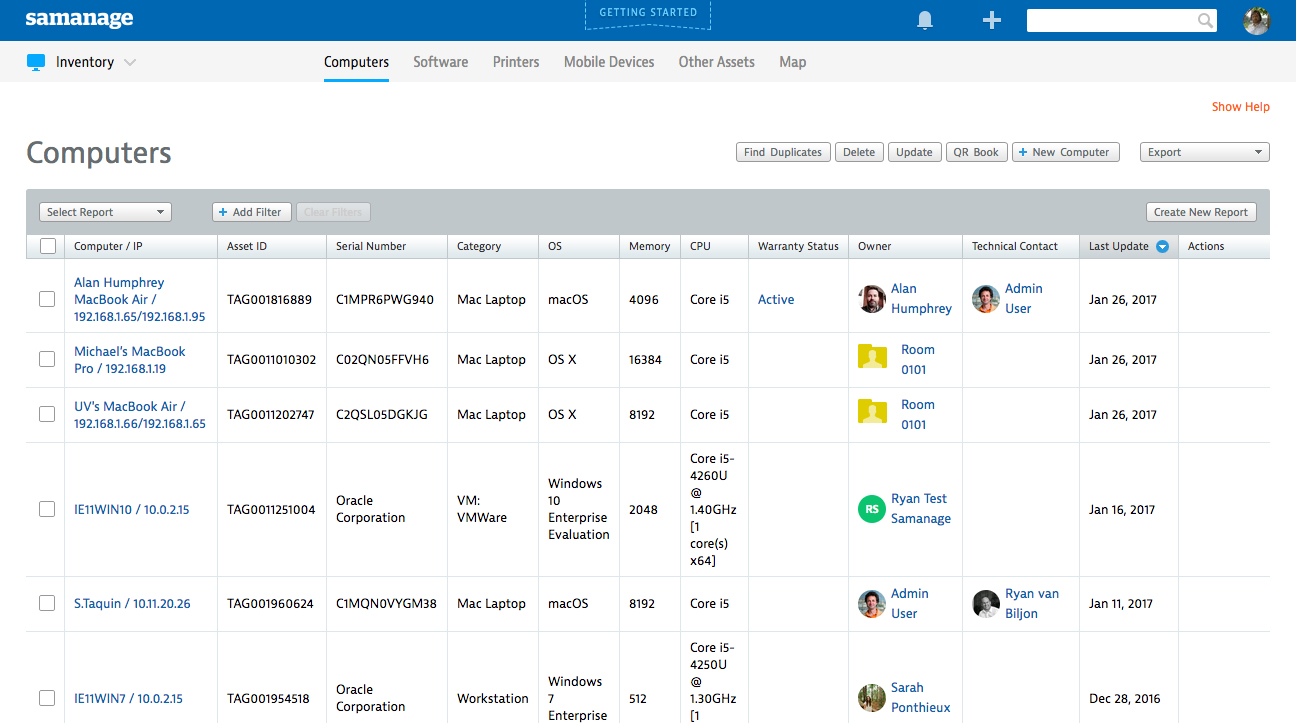
Computer inventory management in Samanage software (Source)
Common Features of Computer Inventory Software
To help you understand the finer points of computer inventory software, we've broken down the most common features below. Read on to find out the different capabilities that computer inventory software offers.
Vendors offer a variety of functional depth and breadth in their solutions, but most of them will offer some or all of the following capabilities:
Data discovery and storage | Allows you to automatically identify, collect and store new computer inventory details as soon as they're added to your IT network. These details include information about the computer system and firmware updates, memory storage size, USB ports, removable media, processors, network interfaces and operating system. |
Asset tracking | Lets you track details throughout the life cycle of an asset such as asset purchase dates, asset manufacture dates, as well as hardware and software installation/expiry dates. |
Reporting | Generates printable reports on the hardware and software details of computers in your network such as existing asset usage data, model number, dates of previous updates, administrators involved in the installation process, total resources utilized and unused hardware. You can also export, filter, search, share and copy the reports. |
Alert notifications | Sends email notifications whenever prohibited software is detected in the IT network or when new hardware or software is installed/uninstalled on an asset in the network. |
Warranty management | Tracks the warranty information of all the hardware and software assets that are part of your organization's IT network. |
Third-party integrations | Lets you integrate the computer inventory software with other software in your organization such as knowledge management or network monitoring software. |
To find out which vendors offer specific features, give our advisors a call at (844) 852-3639 for a free consultation. This will help you shortlist solutions from the ones listed on this page.
What Type of Buyer Are You?
Before you start evaluating different computer inventory software options, you should understand your needs in comparison to those of the overall market. Most buyers of computer inventory software will fall into one of the following categories:
Small businesses. These buyers focus on daily requirements such as collecting, storing and tracking information about their computer hardware and software assets (around 250 to 300 assets). They need basic computer inventory software that helps them progress from spreadsheets to a digital inventory process. They want to streamline their tracking process, but at a low cost.
Midsize businesses. These buyers often need additional features not offered in the basic plans, such as alert notifications and warranty management. Midsize businesses usually have a significant number of assets (around 2,500 to 3,000) but lack the expertise to manage their growing numbers.
Large businesses. These buyers require a system that offers majority of the features listed. They will also seek a solution that integrates with their existing platforms, including network monitoring software. With a large employee count, such businesses have a large volume of hardware and software assets (15,000+).
Benefits of Computer Inventory Software
We've mentioned some benefits of computer inventory software above, such as automatically discovering and storing inventory data, tracking inventory and create reports. Here's a comprehensive list of the primary benefits:
Efficient allocation of existing hardware and software resources. The software alerts you if there's an unused laptop or desktop in a department, so you can reassign it either to a new hire or an existing employee who needs it. This process saves your business the money, time and effort needed to purchase a new device.
Avoid unnecessary purchase of hardware and software. At times, you may have purchased hardware or software that you already owned but weren't aware of, either because you forgot about it or it got lost in the long list of IT assets that are yet to be checked. That's why you need a thorough inventory system. It will prevent unnecessary or double purchases of IT assets, as well as help you efficiently manage their use and maximize their utilization.
Prohibit installation of illegal or prohibited software. When employees install prohibited software on their systems, it poses a threat to your whole network. Unfortunately, this happens more than you may think. Illegal software installations put your business at risk of virus infections. But computer inventory software helps prevent these situations, as it alerts IT admins whenever illegal software is being installed on any system.
Key Considerations
Despite the benefits, you should keep the following considerations in mind when you're evaluating vendors:
Does the software support integrations? Check with the vendor whether its solution supports integrations with your existing applications, such as knowledge management or network monitoring software. Smooth integrations between both systems allows for the efficient import and export of data.
Is the software scalable? Ask the vendor whether their solution can scale up as your organization grows. The software must be able to support the multilocation IT network infrastructure that expanding businesses often need.
Does the vendor offer customer support? Check whether the vendor offers support 24/7 or only during business hours or not at all. Also, ask for available support options such as email, phone or live chat.