


Best IT Management Software of 2026
Updated February 18, 2026 at 6:08 AM

Written by David Jani
Content Analyst

Edited by Caroline Rousseau
Senior Editor

Reviewed by Jakub Vaughn
Senior Advisor

Talk with us for a free 15-min consultation
Expert advisors like Jacqueline, who have helped 1,000+ companies, can find the right software for your needs.
- All Software
- Software Advice FrontRunners
- Popular Comparisons
- Buyer's Guide
- Frequently Asked Questions
IT management software helps IT teams monitor systems, manage assets, and support users across networks and devices. Navigating approximately 300 products built for different use cases, team structures, or industry-specific demands can be daunting. To help you narrow it down, I worked with our IT management software advisors to curate a list of recommended productsi and a list of the IT management software Frontrunners based on user reviews. For further information, read my IT management software buyer's guide.
IT Management Software
Sort by
Reviews: Sorts listings by the number of user reviews we have published, greatest to least.
Average Rating: Sorts listings by overall star rating based on user reviews, highest to lowest.
Alphabetically (A-Z): Sorts listings by product name from A to Z.

NinjaOne is an IT management software platform designed to consolidate various IT operations into a single console. It provides ...Read more about NinjaOne


NinjaOne's Best Rated Features
See All
NinjaOne's Worst Rated Features
See All

Freshservice is a cloud-based IT Help Desk and service management solution that enables organizations to simplify their IT opera...Read more about Freshservice

Freshservice's Best Rated Features
See All
Freshservice's Worst Rated Features
See All

SysAid is an IT service management (ITSM) platform that helps organizations automate workflows and optimize IT service delivery....Read more about SysAid

SysAid's Best Rated Features
See All
SysAid's Worst Rated Features
See All

ChangeGear is a premier IT Service Management solution. ChangeGear delivers a comprehensive platform for enterprise with innov...Read more about ChangeGear


ISL Online is a remote support solution for virtually all industry verticals including healthcare, information technology, unive...Read more about ISL Light


ISL Light's Best Rated Features
See All
ISL Light's Worst Rated Features
See All
Software Advice FrontRunners 2026

(237)

(343)

(446)

(730)

(1439)

(412)

(331)

(282)

(761)

(152)
Best for Quick Implementation

Action1

In our analysis of IT Management products with the most market demand, Action1 is the most requested by users for quick implementation out of the most popular tools.
Action1 is best for SMBs and MSPs seeking rapid implementation for endpoint management and patching. Our reviewers say onboarding is straightforward, with quick deployment, intuitive configuration, and time-saving automation that streamlines device setup and ongoing updates.
- Reviewers Perspective
"It’s incredibly smooth and reliable, allowing me to manage devices from anywhere without the hassle of setting up additional tools. Whether I need to deploy scripts, run diagnostics, or just check on system health."
ESElliot Smith
Assistant IT Manager
Used for 1-2 years
We analyzed 166 verified user reviews for Action1 to find out what actual users really think.
Patch Management
Action1 automates patching for operating systems and third-party apps, letting IT teams update endpoints across decentralized environments. Organizations streamline compliance and vulnerability management with real-time visibility and peer-to-peer bandwidth optimization.Deployment
IT managers use Action1 to deploy software, scripts, and updates remotely via a web interface. Custom installers and automated policies reduce onboarding time and centralize operations, supporting rapid rollouts and batch management without extra infrastructure.Endpoint Management
Action1 provides a cloud-based platform for managing hundreds of endpoints, offering transparency and automation. Small businesses benefit from the free tier and competitive pricing, while IT teams monitor, update, and secure devices remotely. - Key FeaturesAction1's scoreCategory average
Configuration Management
4.674.48 category average
Patch Management
4.914.54 category average
Real-Time Monitoring
4.714.59 category average
- Screenshots


Highly Rated for Customization

ServiceNow

According to our user reviews, ServiceNow is the highest rated for customization out of the most popular tools.
ServiceNow is highly rated for organizations that require extensive customization of workflows and service management processes. Our reviewers say its flexibility enables tailored ticketing and integrations, with many noting the ease of adapting the platform to unique business needs.
- Reviewers Perspective
"Great experience, ServiceNow used as a ticketing tool for access provisioning, change management processes, as well as to auto provision access to other applications."
RGRoman Gomon
Sr. Manager, Internal Audit
Used for 2+ years
We analyzed 227 verified user reviews for ServiceNow to find out what actual users really think.
Ticket Management
ServiceNow centralizes ticket tracking with customizable workflows and automation. IT teams monitor status, manage priorities, and use reporting features to enhance transparency and communication across incidents and requests.Service Management
ServiceNow supports IT, HR, and customer service functions within a unified platform. Organizations use customizable service portals and automated workflows to accelerate service delivery and improve internal collaboration.Ease of Use
ServiceNow offers intuitive navigation and educational resources for new users. IT managers access essential features easily, while training materials help teams overcome learning curves and become proficient quickly. - Screenshots


Highly Rated for Automation

Atera

According to our user reviews, Atera is the highest rated for automation out of the most popular tools.
Atera is highly rated for automation and suits MSPs and IT teams looking to streamline remote monitoring and management. Our reviewers point out that automation of routine tasks, integrated ticketing, and real-time monitoring improve workflow efficiency and reduce manual effort.
- Reviewers Perspective
"Elegant and pre-made clean UI and GUI adapted for seamless and harnessed patch management, RMM, ITSM, unified endpoint management (UEM) among other cloud remote monitoring services."
JDJesse Dele
Co-Founder
Used for 1-2 years
We analyzed 316 verified user reviews for Atera to find out what actual users really think.
Customer Support
Atera’s support team responds quickly to technical issues and feedback. IT managers use chat, email, and documentation resources to onboard staff and maintain smooth operations for clients.Remote Access
Technicians connect to client devices instantly for troubleshooting and support. Atera’s remote access features streamline patch management and automation, increasing productivity for distributed teams.Ticketing System
Atera’s ticketing system centralizes helpdesk operations, automating ticket assignment and AI-powered suggestions. IT teams efficiently manage, assign, and track support requests, improving response times and communication. - Key FeaturesAtera's scoreCategory average
Configuration Management
5.04.48 category average
Patch Management
4.484.54 category average
Real-Time Monitoring
4.644.59 category average
- Screenshots


Most Used By Information Technology and Services

Splashtop

According to our user reviews, Splashtop is the most requested by users in information technology and services out of the most popular tools.
Splashtop is most used by IT and service providers needing reliable, secure remote access across diverse environments. Our reviewers say it offers fast, user-friendly connections and easy deployment, making remote support and troubleshooting efficient for both IT teams and end users.
- Reviewers Perspective
"Really like that it's light weight, not a resource hog, and gives us high quality resolution so that we can quickly and securely remotely manage endpoints."
PAPaul Anderson
IT Lead
Used for 2+ years
We analyzed 442 verified user reviews for Splashtop to find out what actual users really think.
Remote Access
Splashtop enables remote access to computers and servers from any location. IT teams manage endpoints with fast connections, a user-friendly interface, and compatibility across devices, supporting both attended and unattended sessions.Ease of Use
Splashtop’s intuitive interface allows technical and non-technical users to set up and operate remote access with minimal training. Teams and clients adapt quickly, streamlining remote work and support.Installation
IT managers deploy Splashtop across operating systems with clear instructions and automation options. Distribution links and customizable setup streamline onboarding, while support resources assist with troubleshooting and maintenance. - Key FeaturesSplashtop's scoreCategory average
Configuration Management
4.404.48 category average
Real-Time Monitoring
4.674.59 category average
- Screenshots


Best for Seamless Upgrades


ManageEngine Endpoint Central is the most requested by users for seamless upgrades out of the most popular tools.
ManageEngine Endpoint Central is best for organizations prioritizing seamless upgrades and centralized endpoint management. Our reviewers say automated patching, software deployment, and unified dashboards simplify updates and reduce manual workload during upgrades.
- Reviewers Perspective
"I keep my system up-to-date, applying patches using a system-wide tool, and I have an updated software portal where users can install approved software without needing IT support through a service request."
IBIgor Becker
information security analyst
Used for 6-12 months
We analyzed 587 verified user reviews for ManageEngine Endpoint Central to find out what actual users really think.
Patch Management
ManageEngine Endpoint Central automates patch deployment and vulnerability management across diverse endpoints. IT teams use a centralized dashboard for scheduling, testing, and approving patches, minimizing manual effort and improving security.Customer Support
IT managers access responsive support via chat, phone, and documentation. Prompt assistance helps resolve issues and maximize product capabilities, supporting both technical teams and business stakeholders.Remote Control
ManageEngine Endpoint Central’s remote control features enable secure troubleshooting for on-premises and remote endpoints. IT teams use remote desktop sessions, file transfers, and command-line access to support distributed staff and resolve issues quickly. - Key FeaturesManageEngine Endpoint Central's scoreCategory average
Configuration Management
4.424.48 category average
Patch Management
4.614.54 category average
- Screenshots


Best for Integrations


According to our user reviews, Remote Desktop Manager is the most requested by users for integrations out of the most popular tools.
Remote Desktop Manager is best for users who need robust integrations to manage multiple remote connections and protocols. Our reviewers say it consolidates diverse connection types into a single interface, saving time and improving workflow efficiency for IT admins.
- Reviewers Perspective
"Devolutions RDP Manager is highly customizable, you can add quick connections, change the layout, and even see who may have been using a server actively before connecting in."
ABAndy Barag
Systems Administrator
Used for 2+ years
We analyzed 323 verified user reviews for Remote Desktop Manager to find out what actual users really think.
Connection Management
Remote Desktop Manager consolidates server and device connections in a centralized interface. IT professionals switch between RDP, SSH, VNC, and other protocols, using tabbed navigation and customizable settings to efficiently manage large numbers of connections.Remote Access
IT managers use Remote Desktop Manager to securely access computers, servers, and network devices from any location. The platform stores and manages remote connections, simplifying troubleshooting and daily administrative tasks.Ease of Use
Remote Desktop Manager offers an intuitive setup and user-friendly interface. IT teams and less experienced users quickly begin managing remote connections, reducing training time and focusing on operational tasks. - Key FeaturesRemote Desktop Manager's scoreCategory average
Patch Management
4.04.54 category average
Real-Time Monitoring
4.064.59 category average
- Screenshots


Highly Rated for Security and Access Control

IT Glue

IT Glue is the highest rated for security and access control out of the most popular tools.
IT Glue is highly rated for organizations prioritizing security and access control in IT documentation and password management. Our reviewers say granular permissions, audit logs, and integration with PSA/RMM tools support secure, efficient information management.
- Reviewers Perspective
"IT Glues core features work very well. When using just the website, the ability to easily add documentation (you can import directly from word or PDF documents), share passwords with OTP codes, and easily add network documentation from Lucid all work very well."
RGRandy Gargotta
AVP - Systems Administrator
Used for 1-2 years
We analyzed 268 verified user reviews for IT Glue to find out what actual users really think.
Documentation
IT Glue centralizes and organizes IT documentation, supporting customizable templates, version control, and audit logs. Teams quickly locate, update, and share critical information, streamlining internal operations and client support.Password Management
IT Glue consolidates password management with documentation, offering granular permissions, OTP support, audit logs, and password generators. IT teams securely store, organize, and share credentials for compliance and streamlined access.Client Information
IT Glue centralizes client information, enabling quick access, updates, and sharing of client environments and assets. The platform’s organizational structure supports efficient onboarding and support for MSPs and IT departments. - Screenshots


Highly Rated for User Interface
NinjaOne

In our analysis of IT Management products with the most market demand, NinjaOne is the highest rated for user interface out of the most popular tools.
NinjaOne is highly rated for its user interface and is ideal for MSPs and IT teams seeking an intuitive, easy-to-navigate RMM platform. Our reviewers say the streamlined dashboard, clear navigation, and quick onboarding help technicians work efficiently with minimal training.
- Reviewers Perspective
"Having a single pane of glass to review each morning saves a significant amount of time and allows me to be proactive in letting my end users know where troubles are, rather than having them report - helps show the value of purchasing the services from me."
EKEric Kobelski
Owner
Used for 1-2 years
We analyzed 177 verified user reviews for NinjaOne to find out what actual users really think.
Customer Support
NinjaOne’s support team is consistently available to resolve issues and provide guidance. IT service providers rely on proactive help and clear communication to deliver reliable services and expand business offerings.Ease of Use
IT managers navigate NinjaOne’s platform with minimal effort. The user-friendly layout streamlines device management and reduces onboarding and training time for new staff.Script Management
Teams automate patching, installations, and maintenance with NinjaOne’s script library and customizable options. Built-in resources and community support simplify deployment and troubleshooting across devices. - Key FeaturesNinjaOne's scoreCategory average
Patch Management
4.354.54 category average
Real-Time Monitoring
4.534.59 category average
- Screenshots


Highly Rated for Collaboration


According to our user reviews, JIRA Service Management is the highest rated for collaboration out of the most popular tools.
JIRA Service Management is highly rated for collaboration and is well-suited to teams needing integrated project tracking and communication. Our reviewers say features like real-time updates, customizable workflows, and seamless integration with Confluence enhance teamwork and visibility.
- Reviewers Perspective
"The SLA tracking and reporting features are particularly valuable for tracking performance metrics, and the interface is intuitive, helping teams stay organized and collaborative."
OSOlga Stanchevska
Automation QA Engineer
Used for 2+ years
We analyzed 427 verified user reviews for JIRA Service Management to find out what actual users really think.
Ticket Management
JIRA Service Management organizes, tracks, and prioritizes tickets across teams. Customizable workflows, SLA tracking, and automation streamline ticket submission and resolution, improving visibility and communication.Team Collaboration
Teams collaborate through comments, attachments, and real-time updates. JIRA Service Management supports cross-team cooperation, task delegation, and progress visibility, enhancing alignment and productivity.Customer Support
Support teams use JIRA Service Management’s intuitive interface, self-service portal, and knowledge base to manage incidents and requests. Integrated tools empower end users to resolve problems independently and reduce workload. - Key FeaturesJIRA Service Management's scoreCategory average
Configuration Management
4.504.48 category average
Patch Management
4.284.54 category average
Real-Time Monitoring
4.514.59 category average
- Screenshots


Most Used By Computer & Network Security

Automox

Automox is the most requested by users in computer & network security out of the most popular tools.
Automox is most used by computer and network security teams seeking automated, cross-platform patch management. Our reviewers say its quick setup, automation of patching policies, and centralized visibility simplify compliance and reduce manual intervention.
- Reviewers Perspective
"Worklets make it incredibly easy to automate complex configurations and remediations across platforms, while Patch Schedules allow precise control over when and how updates are applied—critical for minimizing business disruption."
ZTZac Turner
IT Systems Administrator
Used for 1-2 years
We analyzed 126 verified user reviews for Automox to find out what actual users really think.
Patch Management
Automox automates patch management for Windows, macOS, and Linux, streamlining updates for OS and third-party apps. IT teams use centralized dashboards and policy-based automation to maintain compliance and reduce manual effort.Customer Support
IT managers benefit from Automox’s responsive support team and active community. Regular check-ins, clear communication, and openness to feedback help organizations resolve issues and stay informed about product improvements.Deployment
Automox enables efficient deployment of agents and policies across diverse device fleets. The intuitive interface and minimal training requirements support cross-platform rollouts and automated software installations. - Key FeaturesAutomox's scoreCategory average
Configuration Management
4.754.48 category average
Patch Management
4.854.54 category average
Real-Time Monitoring
4.314.59 category average
- Screenshots


Pulseway

- Reviewers Perspective
"The mobile app is for me its standout feature, allowing me to monitor and manage systems administratively from anywhere with just a few taps – super convenient for on-the-go tasks!"
ABAdrian Brown
IT Specialist
Used for 2+ years
We analyzed 204 verified user reviews for Pulseway to find out what actual users really think.
Customer Support
IT managers rely on Pulseway’s support team for quick calls, helpful guidance, and proactive follow-up. Webinars and consulting advice help maximize platform potential and address user needs.Remote Monitoring
Administrators monitor servers, workstations, and network devices remotely. Real-time alerts, customizable monitoring, and mobile access help maintain system health and respond quickly to issues.Mobile App
IT teams use Pulseway’s mobile app to manage and monitor environments from smartphones. Real-time alerts and administrative task capabilities support efficiency and flexibility for remote operations. - Key FeaturesPulseway's scoreCategory average
Configuration Management
4.254.48 category average
Patch Management
4.554.54 category average
Real-Time Monitoring
4.654.59 category average
- Screenshots


Site24x7

- Reviewers Perspective
"I love the proactive monitoring capability of Site24x7. Because it uses multiply sites or datacentres in it services , you are able to pick quickly from the dashboard when services starts degrading."
PApeter awortwe
IT Asset,Configuration Manager, Service Catalog and Knowledge Manager
Used for 2+ years
We analyzed 255 verified user reviews for Site24x7 to find out what actual users really think.
Server Monitoring
IT teams monitor servers, websites, applications, and network devices from a single dashboard. Site24x7’s real-time tracking and customizable thresholds provide visibility across cloud and hybrid environments, supporting quick issue identification and streamlined maintenance.Alerts
Administrators configure Site24x7’s alerting system to receive notifications through various channels and customize thresholds. Timely alerts and detailed metrics help detect and resolve issues before escalation, though fine-tuning is needed to reduce alert noise.Monitoring Setup
IT managers set up monitoring in Site24x7 using an intuitive interface and a wide variety of monitor types. Automation, daily checks, and third-party integrations streamline oversight and troubleshooting, though selecting the right monitor type can be initially confusing. - Key FeaturesSite24x7's scoreCategory average
Patch Management
4.274.54 category average
Real-Time Monitoring
4.784.59 category average
- Screenshots


groundcover

- Reviewers Perspective
"By focusing on providing real-time, granular visibility into cloud environments, Groundcover helps teams identify issues faster and optimize systems more effectively."
APAshwat Prakash
Software engineer
Used for 2+ years
We analyzed 31 verified user reviews for groundcover to find out what actual users really think.
- Screenshots


- Reviewers Perspective
"With the help of ManageEngine OpManager I was able to monitor the health of network devices and servers in real-time, coupled to improving its uptime duration."
KSKhaled Sennoun
Project Manager
Used for 6-12 months
We analyzed 193 verified user reviews for ManageEngine OpManager to find out what actual users really think.
Network Monitoring
IT teams monitor devices and servers from a single dashboard, receiving real-time health status updates. Customizable reporting and proactive alerts help track performance and address issues before escalation.Network Device Management
Administrators manage network devices across diverse vendors using automatic discovery, Layer 2 mapping, and customizable alerts. These features streamline troubleshooting and proactive management.Setup and Deployment
IT managers deploy OpManager with straightforward installation and configuration processes. Rapid asset discovery and pre-configured templates simplify initial setup and ongoing management for small and mid-sized teams. - Screenshots


Dynatrace

- Reviewers Perspective
"Dynatrace is excellent with its AI engine, the engine that automates the RCA (root cause analysis), as it can replace the traditional monitoring tools by being able to identify and prioritize the real problems, offering actionable insights without requiring manual interventions."
MAMoustafa Abbas
IT Manager
Used for 1-2 years
We analyzed 62 verified user reviews for Dynatrace to find out what actual users really think.
Monitoring
IT teams deploy Dynatrace for real-time monitoring and observability across applications, servers, and business networks. Features like synthetic monitoring and code-level tracking help organizations validate end-user experience and unify monitoring at scale.Performance and Speed
Dynatrace enables proactive performance management with AI-driven root cause analysis and trend reporting. IT managers monitor distributed systems and track service health, simplifying error identification and optimizing application performance.Dashboard
Administrators create and share dashboards in Dynatrace to visualize system health and application performance. Custom views support incident management and performance tracking, though some users seek greater flexibility and UI improvements. - Screenshots

ISL Light

- Reviewers Perspective
"It offers seamless remote desktop access, allowing users to easily connect to and manage devices, which makes it ideal for IT support and troubleshooting tasks."
AŠAndrejs Ševčenko
Head of infrastructure
Used for 6-12 months
We analyzed 471 verified user reviews for ISL Light to find out what actual users really think.
Customer Support
IT support teams rely on ISL Light’s customer support for quick and efficient assistance. Multiple channels and responsive staff help resolve technical issues and guide users, enhancing the overall support experience.Ease of Use
Administrators and end users benefit from ISL Light’s straightforward interface and navigation. The platform is easy to install, set up, and operate, reducing onboarding time and simplifying daily workflows.Remote Access
IT managers use ISL Light for seamless and secure remote desktop access. Features like unattended access, quick connection setup, and administrative control enable efficient device management and troubleshooting. - Screenshots


- Reviewers Perspective
"With the help of ManageEngine OpManager I was able to monitor the health of network devices and servers in real-time, coupled to improving its uptime duration."
KSKhaled Sennoun
Project Manager
Used for 6-12 months
We analyzed 193 verified user reviews for ManageEngine OpManager to find out what actual users really think.
Network Monitoring
IT teams monitor devices and servers from a single dashboard, receiving real-time health status updates. Customizable reporting and proactive alerts help track performance and address issues before escalation.Network Device Management
Administrators manage network devices across diverse vendors using automatic discovery, Layer 2 mapping, and customizable alerts. These features streamline troubleshooting and proactive management.Setup and Deployment
IT managers deploy OpManager with straightforward installation and configuration processes. Rapid asset discovery and pre-configured templates simplify initial setup and ongoing management for small and mid-sized teams. - Screenshots

PRTG

- Reviewers Perspective
"PRTG captures a big picture overview of an organization's entire infrastructure, the good and the bad which creates a reliable source for users who are seeking for monitoring purposes."
KPKrunal Patel
Cybersecurity Analyst
Used for 2+ years
We analyzed 209 verified user reviews for PRTG to find out what actual users really think.
Network Monitoring
PRTG enables businesses to monitor devices, servers, and services in real time. Centralized dashboards and scheduled scanning help IT teams proactively identify and resolve network issues, improving management efficiency.Sensors
Small businesses use PRTG’s sensor system to tailor monitoring for varied needs. The free version supports up to 100 sensors, allowing organizations to evaluate capabilities before purchase, while custom sensors adapt to complex environments.Alerting
IT managers set thresholds and prioritize notifications with PRTG’s alerting system. Real-time alerts via email, SMS, or dashboard keep teams informed of network events, enabling quick responses to minimize downtime. - Key FeaturesPRTG's scoreCategory average
Configuration Management
3.334.48 category average
Patch Management
4.044.54 category average
Real-Time Monitoring
4.704.59 category average
- Screenshots


SysAid

- Reviewers Perspective
"What I liked most about SysAid is its strong capabilities in asset management and workflows, particularly how it effectively tracks and manages IT assets by linking Configuration Items (CIs) together."
CWClay Will
IT Project Management
Used for 2+ years
We analyzed 344 verified user reviews for SysAid to find out what actual users really think.
Customer Support
Organizations leverage SysAid’s live chat, self-service portal, and automation tools to streamline support. These features enable IT teams to resolve technical inquiries and empower users to address common issues independently, improving operational efficiency.Ticket Management
SysAid’s ticket management tools allow IT departments to prioritize and resolve requests quickly. Customizable templates, automated routing, and ticket history tracking help teams streamline workflows and enhance visibility across departments.Reporting
IT managers use SysAid’s reporting features to generate metrics and track performance. Customizable dashboards and scheduled reports support decision-making, though some users encounter challenges with ad hoc report creation and configuration. - Key FeaturesSysAid's scoreCategory average
Configuration Management
4.254.48 category average
Patch Management
4.504.54 category average
Real-Time Monitoring
4.674.59 category average
- Screenshots


Asset Panda

- Reviewers Perspective
"Asset Panda is an efficient and scalable platform to manage assets across multiple location but the search capabilities of old records can be enhanced with regard to the reliability of filtering."
JYJoe Yehya
IT Manager
Used for 1-2 years
We analyzed 706 verified user reviews for Asset Panda to find out what actual users really think.
Asset Management
Organizations use Asset Panda to track ownership, condition, and location across multiple sites. Custom workflows and mobile app features enable quick check-in/check-out, asset audits, and compliance management, supporting efficient daily operations.Customer Support
IT managers rely on Asset Panda’s support staff for guidance during setup and ongoing use. Tutorials, quick solutions, and willingness to accommodate feature requests help teams resolve issues and adapt the platform to their needs.Customization
Administrators customize Asset Panda’s interface, fields, and workflows to fit unique business requirements. Extensive options support diverse industries and processes, though initial setup may require extra effort to configure for specific needs. - Screenshots


Freshservice

- Reviewers Perspective
"I liked to layout of the ticketing system and how easy it is to go back and look at previous tickets, I also like the Reporting and tracking so i can keep on top of the work that my staff to."
NENathan Edwards
Systems Administrator
Used for 2+ years
We analyzed 397 verified user reviews for Freshservice to find out what actual users really think.
Ticket Management
IT teams use Freshservice’s ticket management system to organize and track support requests. Workflow automation, customizable forms, and easy assignment streamline operations and improve collaboration across departments.Customer Support
Administrators benefit from Freshservice’s knowledgeable support team, which helps resolve issues quickly. Multiple channels and onboarding support contribute to a more structured IT service management experience.Reporting
IT managers generate reports and track key metrics using Freshservice’s built-in tools. Customizable dashboards provide useful overviews, though advanced filtering and detailed report creation can be challenging. - Key FeaturesFreshservice's scoreCategory average
Configuration Management
3.604.48 category average
Patch Management
3.954.54 category average
Real-Time Monitoring
4.484.59 category average
- Screenshots


SuperOps

- Reviewers Perspective
"Real-time reporting is critical because it gives us immediate visibility into what's happening across our IT environment. Whether it's open tickets, system health, patch compliance, or performance metrics, having up-to-the-minute data helps us make f"
JHJamie Hirst
Director
Used for 1-2 years
We analyzed 65 verified user reviews for SuperOps to find out what actual users really think.
- Key FeaturesSuperOps's scoreCategory average
Patch Management
4.334.54 category average
Real-Time Monitoring
4.464.59 category average
- Screenshots


Auvik

- Reviewers Perspective
"Site separation is one of the best features, as it easily allows for managing networks across sites."
HKHemin Khaleel AL OMER
Network Engineer
Used for 6-12 months
We analyzed 83 verified user reviews for Auvik to find out what actual users really think.
Network Device Management
IT teams use Auvik to manage network devices across multiple sites, gaining a comprehensive view of device connections and configurations. Automated device discovery and topology visualization support efficient administration with limited staff.Alerting
Administrators configure Auvik’s alerting features to stay informed about network health. Customizable notifications via email, SMS, and integrations enhance visibility and enable proactive issue resolution for critical devices.Network Mapping
Auvik’s automated network mapping tools generate detailed, live visualizations of infrastructure. Export options and live updates help IT managers troubleshoot, document, and maintain accurate records efficiently. - Key FeaturesAuvik's scoreCategory average
Configuration Management
4.04.48 category average
Real-Time Monitoring
4.724.59 category average
- Screenshots


- Reviewers Perspective
"Patch Manager Plus allows us to manage patches across different operating systems from a single centralized console and automates most of the process."
EAEmre AKDAĞ
Senior Cyber Security Specialist
Used for 6-12 months
We analyzed 261 verified user reviews for ManageEngine Patch Manager Plus to find out what actual users really think.
Patch Management
IT teams automate patch deployment across multiple operating systems and third-party applications from a single console. Centralized views, automated testing, and granular control simplify compliance and vulnerability management.Setup and Deployment
Administrators install and configure Patch Manager Plus using an intuitive interface. Flexible deployment options and automation features reduce setup time and streamline compliance for both local and remote endpoints.Updates
IT managers monitor and control updates for operating systems and third-party applications from a single dashboard. Transparent scheduling and automation help keep systems current, though some updates may require manual intervention. - Screenshots


Reftab

- Reviewers Perspective
"The ability to check assets in and out, assign them to staff, and keep a clean history of each item has been especially helpful in keeping our inventory organized."
SSShub Sharma
Manager, System Admin
Used for 2+ years
We analyzed 93 verified user reviews for Reftab to find out what actual users really think.
Customer Support
Support teams assist during onboarding, troubleshooting, and feature requests, helping organizations avoid downtime and minimize training needs. This is especially useful for SMBs with limited IT resources.Asset Tracking
Teams check assets in and out, assign items to staff, and maintain clear histories. QR code labeling and mobile access simplify inventory management across multiple locations, reducing manual spreadsheets.Asset Management
Organizations bulk import assets, create custom fields, and generate detailed reports for audits or tax purposes. The mobile app and flexible pricing suit varied business sizes seeking reliable asset oversight. - Screenshots


Methodology
The research for the best IT Management software list was conducted in October 2025. We evaluated data (user reviews and demand signals) from the past 24 months as of the research date. Read the complete methodology.
Popular IT Management Comparisons


Buyer's Guide
This detailed guide will help you find and buy the right it management software for you and your business.
Last Updated on October 16, 2025Here’s what we’ll cover:
What you need to know about IT management software
What is IT management software?
Essential features of IT management software
Benefits and competitive advantages of using IT management software
How to choose the best IT management software for your business
Software related to IT management
More resources for your IT management journey
What you need to know about IT management software
IT management software is a multifunctional software system that businesses can use to control and monitor computer systems and networks. These tools encompass a broad range of IT functionality, such as network management, help desk, data management, IT service, and device asset management, allowing companies to keep their networks running smoothly and effectively provide support to end users. In the last year, we’ve spoken with over 150 help desk software buyers to help them identify the best solution to manage IT systems and support, and to identify essential insights on what businesses require to provide IT support. [1]
Good oversight of IT operations can be integral to company performance and essential for quickly resolving technical issues. There are over 300 IT management system products published on Software Advice, and we have published more than 6,000 verified reviews from buyers to help users identify products with the right functionality for their firms. Working without an IT management system in your business is non-negotiable but choosing the right system is vital to getting a positive return on investment.
Prices for IT management software vary depending on the level of system you want to adopt, although most are paid for on a monthly subscription basis, with typical prices costing $25 per month for basic plans. Mid-tier packages usually start from $46 per month, and premium or high systems typically cost $78. [2] However, it is also possible to identify systems that can be purchased with one-time licenses or even free open source options.
When investing in IT management systems for the first time, it’s important to start your buying journey by assessing the budget available, staffing requirements, devices you’ll be managing, and key functions that are vital for your business. These will help you narrow down the options available to you. You should also gather stakeholders and potential users in your organization to figure out some of the important questions you’ll need to answer when looking at vendors. Some examples include:
Does the product have the right technological profile for our business and its staff?
Can the system scale with our requirements as the business evolves?
Does the product offer remote desktop support, reporting, or other vital tools to support users/clients?
Does the system work as an all-in-one platform, or are integrations required?
Understanding the must-haves of your IT management system purchase will help make the selection process more effective. In the following guide, we’ll explain more about the essential elements of this type of software. This covers the key features and uses, benefits, buying tips, and considerations necessary to find the best fit for your business. We’ve also included expert pointers from our help desk software advisor, Jakub Vaughn. Reach out to schedule a consultation with him or any of our other advisors today.
What is IT management software?
IT management software helps track the deployment of an organization's IT assets and manage its operations, such as performance, usage, and security, from a central location. Its related products are generally available as suite solutions or as stand-alone tools.
Below, we discuss some of the key applications (some of them are also distinct software categories):
IT service management: Design, deliver, and manage all IT services, including change management, configuration management, and incident management.
IT asset management: Manage technical, physical, and financial aspects of both software and hardware components, including their purchase, deployment, and disposal.
Network management: Configure, monitor, and troubleshoot network devices; enables administrators with privilege rights; and supports access controls to limit users to a network.
Help desk management: Solve IT incidents or issues by automating ticket assignments to the right support staff and tracking and managing the status.
Data management: Create and enforce policies for systematic storage, update, and retrieval of organizational data.
Essential features of IT management software
When planning the purchase of an IT management system, there are a lot of important features you might look at during the buying process. Following an analysis of the thousands of reviews Software Advice received for this category, we can see that alerts and reporting are core features of these tools that are especially important to users. Additionally, common features that provide better visibility over the network and help IT staff provide efficient service to end users are also highly regarded. Our research identified the following as the most important features for IT management users. [3]
Core IT management software features
Alerts/notifications | Receive notifications or pop-up messages alerting users of changes in performance, unauthorized traffic, failures, and other key indicators. 77% of users rate this feature as important or highly important. |
IT reporting | Track data on tickets, helpdesk issues, costs, and device usage to understand service and business operational efficiency. 76% of users rate this feature as important or highly important. |
IT asset management | Monitor digital devices, software, and assets used in your IT infrastructure, alter network-wide configuration settings, and track changes in the use and performance of key elements used within the infrastructure. |
Common IT management software features
Real-time notifications | Receive alerts and notifications on incidents and events in your tech stack as soon as they occur. 85% of users rate this feature as important or highly important. |
Dashboard | Create visualizations of data collected from your IT network to track performance and general functionality. 80% of users rate this feature as important or highly important. |
Patch management | Deploy software updates, bug fixes, and other patches remotely to systems across an organization's network or to client users. 79% of users rate this feature as important or highly important. |
Remote access/control | Connect to applications remotely from outside a workplace or connect to external client IT systems to provide support. 76% of users rate this feature as important or highly important. |
Access control/permissions | Set authorization levels for access control of specific files, systems, and applications. 75% of users rate this feature as important or highly important. |
When initiating a search for IT management software that fits your business needs, it's essential to carefully judge the features that are essential for your organization. Amanda Johnstone, a technologist and CEO with over 20 years of experience, summarizes this principle: “Having a really clear knowledge and vision of what it is that you need, whether that's starting from the start with a new technology or adding additional features or things onto your technologies, to really know what those capabilities are that you require.” [4]
Benefits and competitive advantages of using IT management software
Based on our research of 6,329 reviews from verified IT management users, we observed a number of common advantages. Some of the most important benefits for buyers are the team support and collaboration it fosters, and the visibility of activities and incidents happening on the network.
Better staff collaboration: Staff can collaborate more effectively to improve the IT infrastructure in the business and respond more collectively when incidents and outages occur.
Visibility through dashboards: IT management tools help firms better manage informational dashboards, allowing them to govern endpoints from a centralized system and monitor managed locations and devices effectively.
Smoother client management: Using an IT management solution can help businesses communicate with clients and respond more efficiently and directly to tickets and cases generated by end users.
Monitoring core systems: Users can simplify the task of monitoring crucial elements of your IT infrastructure, such as servers, terminals, devices, and network traffic.
Our help desk software advisor, Jakub Vaughn, also highlights the importance of having a suitable IT management system in place to ensure more responsive support from your IT team. As he explains, “Businesses need a more streamlined way to handle issues. A lot of smaller companies sometimes just use email to contact IT when they don’t have dedicated software in place. Well, what happens if your email goes down? A help desk ticketing system allows you to access help through a company portal, which makes sure it's directed to the right agent.”
How to choose the best IT management software for your business
Step 1: Define your requirements
At the earliest stage of selecting an IT management system, it’s important to gain clarity over the key requirements you and your organization will need. To do this effectively, you should map out elements such as the budget available, the essential technical details of your IT devices and network, and the core performance goals you want to achieve.
Beyond the IT setup of your firm, other important questions should be raised about the requirements the new IT management system should fulfill in the business. In our conversation with CEO and technologist Amanda Johnstone, she summarized some of the key non-technical inquiries to make when weighing up the non-technical elements of these systems:
Does it scale?
Is it user-friendly?
Does it have intelligent alerts based on the level of consequence and urgency?
Are its features compliant (for example, for managing and protecting data)?
Does it customize to the different languages of users?[4]
How much does IT management software cost?
IT management software is usually available via a monthly subscription, with prices averaging $25 a month for entry-level options and rising to $46 per month for mid-range systems. The cost for higher-level or premium systems that provide more automated, customizable, and advanced solutions for reporting and workflows is typically $78 per month.
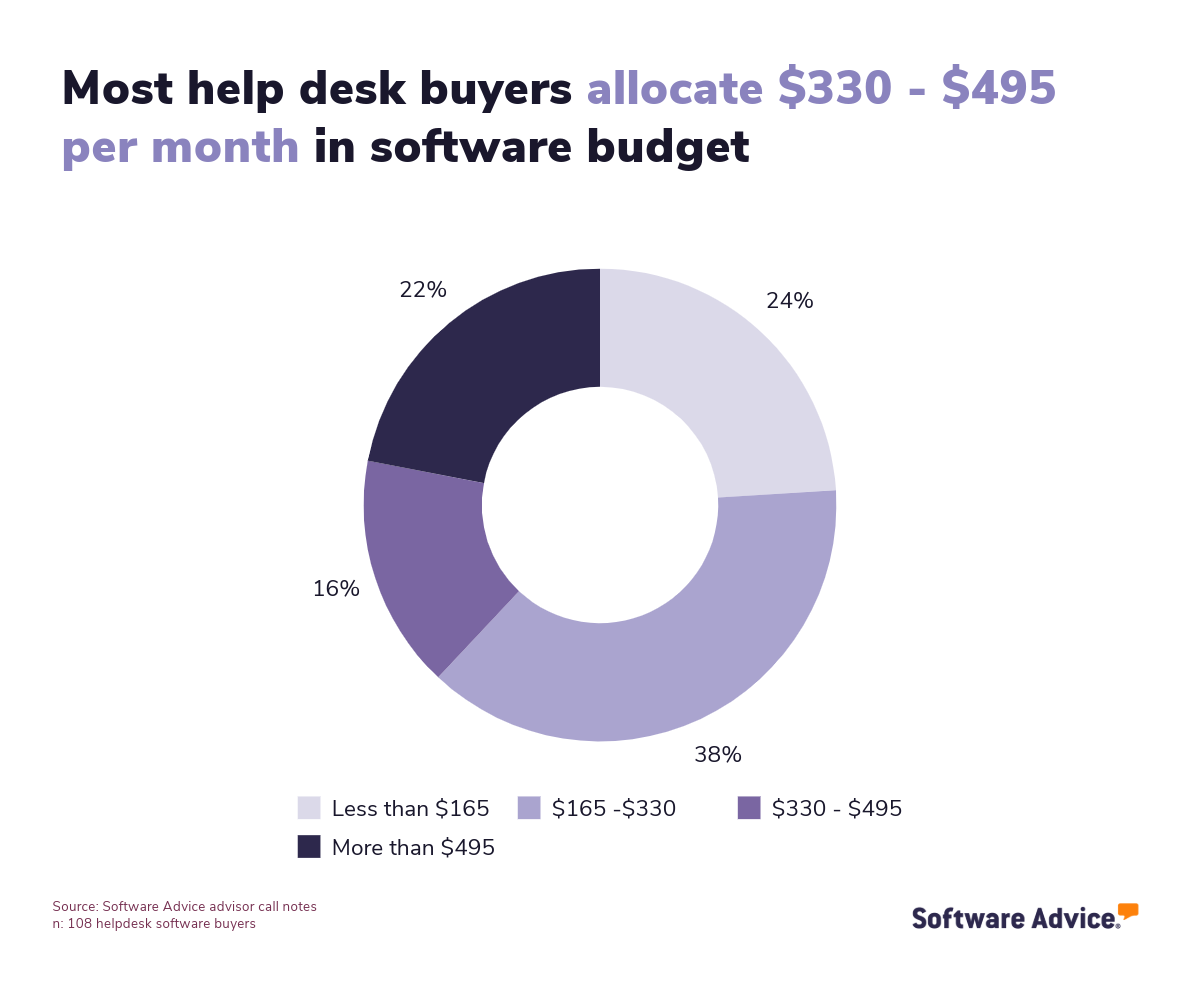
However, system pricing may be affected by factors such as the number of users, devices, or hosts connected. Nevertheless, these costs fit within the budgets that many enterprises allocate to software that handles system technical management. Based on our analysis of 108 help desk buyers who provided their budget plans for software solutions, we found that most organizations set aside $330 - $495 per month for these purposes in the last year.
 _CENTERED
Integration necessities for IT management software
IT management systems can come as complete, encompassing systems. However, there are times when it is necessary to integrate other software with your eventual purchase, especially if the functionality is already performed by a system you already run in your business.
Plan in depth around these requirements as you search for a possible IT solution, and check carefully to see if the options on your shortlist have integration support for any other systems you want to use alongside them.
Potential drawbacks of IT management systems
When choosing an IT management system, you should also consider some of the likely drawbacks that may affect your chosen software. As you review selected vendors and products, it can help to check user reviews and feedback on points that could impact the integration of one of your candidate systems. Understanding these issues at this stage could help sidestep potential disappointment.
Based on the analysis of user feedback from over 6,000 verified reviewers over the last year, we identified some common issues that buyers encounter when adopting an IT management product:
Performance speed: Bugs, faults, and slow performance in the user interface (UI) can delay fixes and responses to issues and negatively impact user experience.
Installation issues: Struggles with factors such as software setup complexity, the need for manual installations on some system terminals, and compatibility can make installing a new system more difficult.
Subscription dissatisfaction: High costs, hard-to-understand pricing structures, and limitations in purchased plans can lead to user discontent.
Unreliable connections: Issues with connection quality and limitations in low-bandwidth environments can prove problematic for users, especially when managing systems and clients remotely.
Step 2: Make a shortlist of potential IT management solutions
When considering an option from the hundreds of IT management products available, it can help to find ways to make the selection process simpler. There are a few ways you can approach this.
Get help from a qualified advisor
Software Advice offers direct support from expert advisors, who can help identify potential vendors to meet your company’s specific needs based on its goals, size, and budget. To get guidance from an advisor, chat online now with one of our team members or set up a phone consultation to identify possible solutions for your company.
Explore our list of IT management FrontRunners
To learn more about some of the most popular options for IT management software ahead of speaking to an advisor, our FrontRunners report, which lists products in this category with the best user ratings, can help get things started. Check out our full methodology for further details on how this report is compiled.
To discover more about simplifying shortlisting candidate products, take a look at our Ultimate Software Vendor Evaluation Guide. This studies the best ways to compare and evaluate software and provides a comprehensive comparison chart to review each specific option based on available features, training and support, costs, and deployment opportunities.
Step 3: Choosing the best option
Once you have narrowed down the options to the final few, you can start planning demonstrations and trials to make the selection. This is a particularly critical point of the process, as demonstrations give you a vital opportunity to resolve doubts directly with the vendor and test the product’s suitability before purchase.
How to prepare for vendor demonstrations
As you plan vendor demonstrations for IT management systems, it is important to consider some questions to ask during the trials. Bringing these to these vendor interactions can help you see for yourself if the product does the task you need it to perform and assess whether it is the correct fit or not. Some important questions to ask at this stage include:
How can we customize the product to our needs?
It is a good idea to see how flexible the product can fit around your company’s uses. There are many elements of IT management software where this could have a considerable impact on its performance and value to your organization. Some elements that can prove useful in this way are analysis dashboards, notifications, communication tools, data management, configuration management, and user interfaces. This should also address how the solution can scale as the business grows.
Which integrations does the platform support?
If you know that you will need the software to integrate with other platforms, this is a crucial question to ask at this stage. This can help you understand if your specific solution has the capacity to operate smoothly with other systems in the business. Even if you don’t plan on connecting integrations right now, it is still a good idea to ask anyway to understand the product's capabilities and how easy it might be to introduce connecting systems further down the line.
How can we access additional support and training?
An IT management system is a tool that may need regular support during its lifespan, and depending on its complexity, staff may need access to training and educational material for its use. This is especially vital if you don’t have as much technical capacity on-site to handle faults and bugs that occur and require extra expertise and guidance from the vendor.
Step 4: Successfully implementing a new IT management system
When you’ve made your final selection for an IT management system, you can start planning its implementation. These initial introductions to your staff and the wider business must be handled carefully to ensure that the system is configured correctly and is properly utilized by its end users.
Plan your implementation team
The first step in implementing any software is to identify the stakeholders who will oversee its introduction. You should appoint a person or people who can effectively manage this process, depending on the staff and capacity available in your business. In some cases, you may appoint a key person in your technical team to handle this task or perhaps use a dedicated product manager. They can then take on the responsibility for guiding the software introduction so the key performance, security, configuration and customization goals are met.
Deliver user training
Once the initial plan has been mapped out, the rest of your technical team and stakeholders need to be informed of the rollout and any necessary acclimatization and training given. This should start at a relatively early stage during the implementation, so they are aware of its core features and capacity. There should also be room for questions and doubts amongst the wider team to be addressed, so users of the software feel comfortable and confident in handling tasks using the tool.
Test your systems and devices
As you gradually ramp up your IT management system, you should do pilot tests of devices and connecting systems to ensure that the platform fully works before replacing any previous solutions entirely. This can help reduce errors and reveal any security gaps before full adoption is completed.
Our guide on the 5 Critical Steps to a Successful Software Implementation Plan can also provide more information about improving the onboarding of a new software system.
Software related to IT management
IT management systems usually come with numerous features and add-ons. Nevertheless, it may still be necessary to use other systems to get all the functionalities that you need for managing your tech stack effectively. Some systems that offer similar attributes to IT management software that may supplement missing capabilities include the following:
Business continuity software: Systems that can be used to conduct business-impact analysis, spot and prevent potential threats to key information assets, and plan for recovery after system failures.
IT asset management software: Tools that allow firms to conduct inventory and lifecycle management of software and hardware assets across the entirety of their organization.
Network monitoring software: Systems designed to precisely monitor network traffic and online devices, visualize network performance, and track issues.
Network security software: Prevent unauthorized access to company computer networks by detecting abnormalities, auditing security protections, and ensuring that regulatory compliance with data protection is met.
Remote monitoring and management software: Systems designed to remotely observe, manage, and maintain devices, networks, and endpoint machines in an organization’s tech stack.
SaaS management software: Applications businesses can use to oversee and administer SaaS (Software-as-a-Service) applications across an enterprise, and track and control subscription and other costs of the platforms.
Website monitoring software: Platforms designed to oversee websites and web-based applications to monitor uptime and performance, and provide alerts and locations of failures and faults.
More resources for your IT management journey
About our contributors
Author
David Jani is a content analyst at Software Advice. With a background in tech journalism, public relations, professional training, and marketing, he uses his extensive experience to investigate small business technology trends, with a focus on marketing and cybersecurity, to provide timely, actionable insights for small and midsize businesses.
David’s research and analysis is informed by more than 150,000 authentic user reviews on Software Advice and nearly 3,000 interactions between Software Advice software advisors and software buyers. David also regularly analyzes market sentiment by conducting surveys of IT and marketing leaders so he can provide the most up-to-date and helpful information to small and midsize businesses purchasing software or services.
His thought leadership work has been featured in TechRadar, Maddyness, Daily Express, Startups Magazine and Raconteur.
Editor
Caroline Rousseau is a senior content editor at Software Advice.
A former content analyst, Caroline has, for the past five years, built, written, and edited research reports about technological trends, opportunities, and challenges with an SMB audience in mind. Her content has been featured in French Tier 1 media including Le Monde, L’Express, and Le Figaro, among other publications.
Her previous experience as a graphic designer, translator, and LQA specialist in various industries converged into a skill set that allows her to create compelling content about today’s business matters. Caroline’s personal interests include literature and art and she has a passion for Albert Camus, graphic novels, and drawing.
Advisor
Jakub Vaughn is a senior advisor. He joined Software Advice in 2022 as a software advisor. He is based in Fort Myers, FL.
As part of the software advisor team, Jakub helps professionals from a wide range of industries who are seeking tools including CMMS, manufacturing, inventory management, and help desk software. He provides a short list of personalized technology recommendations based on budget, business goals, and other specific needs.
Jakub’s favorite part of being a software advisor is educating buyers with different needs on software systems available to them and their business.
Contributor
As one of Australia's most globally acknowledged AI technologists and technology communicators, Amanda's contributions have been celebrated by TIME as a Next Generation Leader and by The CEO Magazine with the Start-up Executive of the Year award, underscoring her significant impact in social impact technology. In 2023, LinkedIn awarded her as a Top Voice in Artificial Intelligence, one of only 1500 top voices globally of over 1 billion users.
Sources
Software Advice advisor call notes: Findings are based on data from telephonic conversations that Software Advice’s advisor team had with businesses seeking help desk software. For this report, we analyzed phone interactions from the past year as of the production date. Read the complete methodology.
Software Advice software pricing data: Only products with publicly available pricing information and qualified software products within the category, as of the production date, are included in the pricing analysis. Read the complete methodology.
Software Advice reviews data: Software Advice reviews are collected from verified users for individual software products. For this report, we analyzed reviews from the past year as of the production date. Read the complete methodology.
Amanda Johnstone, LinkedIn
IT Management FAQs
- What is an IT management system?
IT management software is a comprehensive platform of tools that can help firms administer many of their IT and technical services. This provides a range of important IT tasks such as network management, help desk, data management, and device management.
- What is an ITSM software?
IT service management (ITSM) software is a system used by IT service teams to provide technical support to customers. It gives them the tools necessary to remotely connect to client terminals, administer systems, and communicate with customers.
- What is IT management software used for?
IT management software helps companies maintain visibility over their IT systems. It provides support and fixes remotely to end users and proactively manages devices to maximize performance and security compliance.
- What does IT management include?
IT management encompasses several important technical practices to ensure proper support and utilization of computers, network devices, and technology. These practices can include IT asset management, IT strategy and governance, network monitoring, and data management, among others.
- What is an example of an IT system?
An example of an IT system is IT management software, which firms use to centralize control over essential IT systems such as network devices and computer terminals. Features such as alert notifications, data tracking, patch management, and access controls help.
- Which is the best IT management software?
Among the most popular IT management products we reviewed, Pulseway received the highest overall rating from verified reviewers. This platform is popular thanks to its quality customer support options, easy-to-use interface, effective alerts, and server monitoring tools.
- What are the basics of IT management?
Some of the main goals of IT management focus on optimizing performance across devices and networks, ensuring security protections are properly implemented and controlled, and repairing bugs and faults.
- How do I choose an IT management software?
To choose an IT system it is important to identify the key goals you want to achieve in its adoption, whether they be better security, more fluid service management, or better network performance. Once these are identified, you can move on to assessing choices on the market. Software Advice can help in this task with resources such as expert advisors and over 6,000 verified reviews on IT management software.
- What is an example of IT management?
A simple example of IT management is configuration management, which controls and tracks settings used by systems within an IT infrastructure. This feature is found in many IT management software products.