


Best Agile Project Management software of 2026

- Popular Comparisons
- FrontRunners
- Buyers Guide
Compare Products
Showing 1 - 25 of 174 products
Compare Products
Sort by
Reviews: Sorts listings by the number of user reviews we have published, greatest to least.
Average Rating: Sorts listings by overall star rating based on user reviews, highest to lowest.
Alphabetically (A-Z): Sorts listings by product name from A to Z.

Smartsheet is a work execution platform and collaboration tool with a familiar spreadsheet-like interface that helps teams plan,...Read more about Smartsheet


Smartsheet's Best Rated Features
See All
Smartsheet's Worst Rated Features
See All

monday.com is a work and project management platform that helps teams of all sizes plan, prioritize, manage, and execute work ef...Read more about monday.com
monday.com's Best Rated Features
See All
monday.com's Worst Rated Features
See All

Wrike is a cloud-based project management platform for teams of 20+ that is suitable for both large enterprises and SMBs. It sup...Read more about Wrike

Wrike's Best Rated Features
See All
Wrike's Worst Rated Features
See All

Nimble - Collaborative Lean/ Agile Work Management Platform. Nimble comes with a unique combination of features to manage tradit...Read more about Nimble Enterprise


Nimble Enterprise's Best Rated Features
See All
Nimble Enterprise's Worst Rated Features
See All

Planview ProjectAdvantage is a cloud-based project and portfolio management solution for enterprises that allows to strategicall...Read more about Planview ProjectAdvantage


Planview ProjectAdvantage's Best Rated Features
See All
Planview ProjectAdvantage's Worst Rated Features
See All

Quickbase is a work management and application platform designed to help organizations centralize and manage complex projects an...Read more about Quickbase
Quickbase's Best Rated Features
See All
Quickbase's Worst Rated Features
See All

MeisterTask is a web-based task, project, and work management software perfect for teams of any size. Its easy-to-use interfac...Read more about MeisterTask
MeisterTask's Best Rated Features
See All
MeisterTask's Worst Rated Features
See All

Miro is a visual workspace for innovation that enables distributed teams of any size to dream, design, and build the future toge...Read more about Miro
Miro's Best Rated Features
See All
Miro's Worst Rated Features
See All

Aha! is a product development software designed to support teams in managing the entire product lifecycle. It is used by roles s...Read more about Aha!
Aha!'s Best Rated Features
See All
Aha!'s Worst Rated Features
See All

Businessmap (formerly Kanbanize) is the most flexible Lean project & portfolio management platform for complete strategy executi...Read more about Businessmap
Businessmap's Best Rated Features
See All
Businessmap's Worst Rated Features
See All

Kanban Tool is a project management platform that enables users to visualize and organize their workflow. The solution offers re...Read more about Kanban Tool

Kanban Tool's Best Rated Features
See All
Kanban Tool's Worst Rated Features
See All

ClickUp is a productivity platform designed to unify work tools within a single workspace. It supports various teams and industr...Read more about ClickUp
ClickUp's Best Rated Features
See All
ClickUp's Worst Rated Features
See All

Nifty is a new-wave project management tool that reduces project development cycles and improves team productivity by combining ...Read more about Nifty
Nifty's Best Rated Features
See All
Nifty's Worst Rated Features
See All

GitLab is a cloud-based project management platform that allows software developers to develop and manage codes collaboratively....Read more about GitLab
GitLab's Best Rated Features
See All
GitLab's Worst Rated Features
See All

Zenkit is a cloud-based project management solution designed for businesses of all sizes. It offers collaboration, calendar mana...Read more about Zenkit
Zenkit's Best Rated Features
See All
Zenkit's Worst Rated Features
See All

Shortcut is a cloud-based project management platform that helps small to large enterprises manage tasks and streamline communic...Read more about Shortcut
Shortcut's Best Rated Features
See All
Shortcut's Worst Rated Features
See All

Productboard is the customer-driven product management system that empowers teams to get the right products to market, faster. I...Read more about Productboard

Productboard's Best Rated Features
See All
Productboard's Worst Rated Features
See All

wproject: the complete, flexible and easy-to-use project management software Twproject is the project management solution desig...Read more about Twproject

Triskell is a cloud-based project portfolio management solution for banking, insurance, pharmaceutical and other industries. Key...Read more about Triskell PPM

Triskell PPM's Best Rated Features
See All
Triskell PPM's Worst Rated Features
See All

Projectplace is a cloud-based project management and collaboration solution that helps organizations in a wide range of industri...Read more about Planview ProjectPlace

Backlog is a cloud-based project management and issue tracking solution that caters to development teams working with design, ma...Read more about Backlog
Backlog's Best Rated Features
See All
Backlog's Worst Rated Features
See All

ISETIA is a cloud-based project management solution that supports agile and scrum methodologies along with other ad-hoc project ...Read more about ISETIA
ISETIA's Best Rated Features
See All
ISETIA's Worst Rated Features
See All

Scrum Mate is an agile project management tool that helps organizations streamline operations related to task time tracking, pro...Read more about Scrum Mate

Here's the problem with other task management tools: they are designed by techies, for techies. People who aren't hardcore tech...Read more about Kerika
Kerika's Best Rated Features
See All
Kerika's Worst Rated Features
See All

Roundrush is a workflow management platform that helps developers and IT businesses streamline operations and improve work quali...Read more about Roundrush
Popular Comparisons



Your Guide to Top Agile Project Management Software, March 2025
Software Advice uses reviews from real software users to highlight the top-rated Agile Project Management products in North America.
Learn how products are chosenExplore FrontRunners


“Usability” includes user ratings for Functionality and Ease of Use.
“Customer Satisfaction” includes user ratings for Customer Support, Likelihood to Recommend and Value for Money.
Reviews analysis period: The reviews analysis period spans two years and ends the 15th of the month prior to publication.

Buyers Guide
This detailed guide will help you find and buy the right agile project management software for you and your business.
Last Updated on January 27, 2025Agile project management refers to an incremental approach to managing projects that helps teams address and respond to change and uncertainty over the course of a project life cycle.
Agile project management software supports this iterative process and facilitates the transparency and collaboration required by agile teams to successfully deliver value.
This guide will help you understand agile project management and how it differs from traditional project management. We’ll also explain the role of agile project management tools within the larger project management space, so you can choose the right software to fit your workflows.
Here’s what we’ll cover:
Agile vs. Waterfall Project Management
What Is Agile Project Management Software?
Common Capabilities of Agile Project Management Software
Agile vs. Waterfall Project Management
Agile and “waterfall,” i.e., traditional project management (PM), are different approaches, or methodologies, for managing projects.
Waterfall PM is sequential and change averse. Requirements are agreed upon at the start of a project and benchmarks set for scope, budget and timeline. Then, work flows from one phase to the next until completion, and project success is measured by how closely the project delivers against the initial plan.
Agile PM is iterative and designed to help teams embrace change. By completing work in incremental phases and incorporating feedback loops into their workflows, agile teams can address uncertainty and better adapt to changing needs over the course of a project life cycle.
Agile project success is measured by the ultimate value delivered to the end user/customer via “continuous improvement” throughout the project, rather than “breakthrough improvement” all at once at the close of a project.
Agile works well for projects (and industries) where requirements are uncertain at the start of a project, or are likely to change over the course of a project life cycle. For that reason, it's especially popular with IT teams and software developers.
Conversely, waterfall PM is best for projects (and industries) that require in-depth planning to iron out the scope, budget and timeline before work can begin, e.g., within construction.
What Is Agile Project Management Software?
The core principles of agile PM are largely based on the Agile Manifesto (initially developed for software development), and emphasize:
The importance of collaboration in fostering innovation
The significance of feedback loops and iterative workflows in facilitating inspection and continuous improvement
The value in embracing and responding to change over following a plan
According to Andrew Hunt, one of the 17 founders of the Agile Manifesto, the fundamental premise of agile is to inspect and adapt—to do something, get feedback, change what you’re doing and be responsive.
“Agile” is more of a mindset held by teams and/or organizations rather than a set of specific tools. However, there are specialized project management systems used by agile teams that help them accomplish their goals. For the purpose of this guide, we are referring to these specialized tools as “agile project management software.”
Agile project management software supports the above processes in several ways, including:
Creating a centralized workspace. The tool acts as a single repository and searchable database housing all project documentation and communication. This promotes transparency and creates a shared understanding of project (or product) goals, team workflows and KPIs for measuring success.
Facilitating collaboration. Users can view their individual tasks and team responsibilities on shared boards, participate in wikis and discussion forums and invite other users to share their ideas and input. Additionally, features such as file sharing, @mentions, activity feeds and shared boards allow teams to communicate with each other and stay up-to-date.
Tracking progress and measuring performance. The “single view” provided by the tool helps teams monitor the progression of work items, as well as give and receive feedback. Dashboards and reports track user performance, providing valuable data on user and team productivity, efficiency and output.
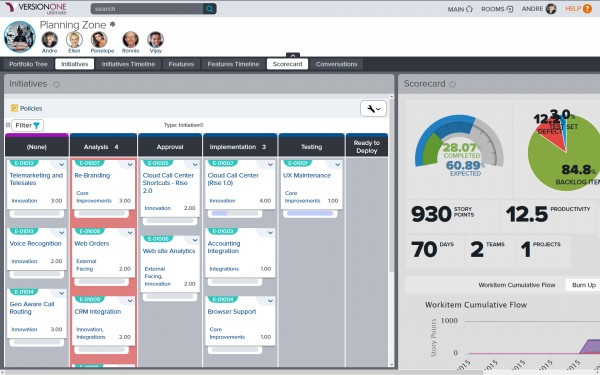
Planning room in VersionOne
Common Capabilities of Agile Project Management Software
Two of the most popular frameworks for implementing agile are scrum and kanban. Although both scrum and kanban systems have unique and defining features (click through to those category pages for a breakdown), there are several agile capabilities that each of these frameworks have in common.
These common capabilities are what you should look for as you evaluate agile solutions:
Visual project management | Increasing project visibility is crucial for agile teams. This transparency is achieved using boards, e.g., scrum or kanban boards. Boards can represent teams or projects. So for example, one board may encase a single team’s responsibilities across all projects, or it may include all cross-departmental tasks for just one project. Each board is broken down by columns that depict different stages in the team’s (or project’s) workflow. Tasks are represented by cards that users move across the board as the work item progresses through the workflow. |
Reporting | While both scrum and kanban teams track and report on success metrics, the individual KPIs will differ across disciplines. Scrum teams look at the rate at which teams complete work items and their pace of work (burndown and velocity charts). Kanban teams set guards to regulate the flow of tasks and track the throughput of tasks and the team’s pace of work (work-in-progress limits and lead and cycle time). |
Task management | As work items are placed on the board, assign tasks to users and schedule start and end dates. Users can set up automatic notifications to alert them of new assignments, impending due dates and status updates. Managers and users can track the progression of tasks as they move across the board. |
Time tracking | Time tracking is critical to both agile disciplines. This metric is used in calculating scrum team velocity as well as kanban team lead time and cycle time. It is an important KPI in judging individual user productivity and team efficiency and can help leadership make informed decisions when taking on new jobs as to the time required to finish the project. |
Workflow mapping | Another key aspect of agile transparency is a shared understanding of workflows. Workflows are visually depicted on the board, which helps users see at a glance where a work item came from and where it needs to go next. Teams can define workflows using labels and filters, which helps to standardize the process, meaning that any new person or fresh eyes on the project will share the same understanding as those deeply involved in the day-to-day project activities. |
What Type of Buyer Are You?
According to VersionOne’s 11th annual State of Agile report, the top industries practicing agile project management include:
Software
Financial services
Professional services
Additionally, the vast majority of organizations (80 percent) say their agile maturity is at or below “still maturing.”
This is likely indicative of the spread of agile into other industries besides software development (where it was initially pioneered), and shows that businesses and teams are still trying to learn, understand and fully adopt agile practices.
With so many organizations new to agile, it can be hard to know where to start when choosing agile PM software. It’s imperative for teams to establish basic agile workflow processes before implementing software, otherwise they risk a GIGO scenario (garbage in, garbage out), or may adapt their workflows to the tool and wind up “doing scrum” without being agile, for example.
We’ve outlined several tips for choosing the right agile project management system in our free e-book. These include:
Start off simple
Analyze your team’s workflows
Know which method (kanban or scrum) is best for which type of team
Assess purchase drivers
Evaluate integration requirements
Identify tools and vet products
(Click on the link above to download your free copy and learn which agile tool is right for you.)
Market Trends to Understand
The implementation of agile continues to expand outside the software development sphere. In Gartner’s 2016 Hype Cycle for Project and Portfolio Management, agile plays a much more extensive role as a relevant technology, methodology and discipline than it has in years past. For this report (and likely upcoming Hype Cycles as well) Gartner looks at the prevalence of agile past its typical application in the software development space and examines its use and expected impact on improving business agility. (The full report is available to Gartner clients.)
Although agile has become increasingly popular, it has not replaced waterfall. In a recent survey of current project management software user's, disciplines were split, nearly 50/50 among respondents. It’s important to remember that not every project is conducive for agile, just as every project is not conducive to waterfall. And of course, you’re likely to find more agile teams within certain fields than in others. However, at the end of the day bear in mind that while agile is becoming increasingly popular, it has not replaced waterfall (yet).