


Best Document Management Software of 2026
Updated February 18, 2026 at 9:44 AM

Written by Olivia Montgomery, PMP
Associate Principal Analyst

Edited by Caroline Rousseau
Senior Editor

Reviewed by Chris Soltani
Senior Advisor

Talk with us for a free 15-min consultation
Expert advisors like Jacqueline, who have helped 1,000+ companies, can find the right software for your needs.
- All Software
- Software Advice FrontRunners
- Popular Comparisons
- Buyer's Guide
- Frequently Asked Questions
Document management software helps businesses organize, store, and securely track documents, improving collaboration, compliance, and efficiency while reducing the risk of errors or data loss. With over 800 tools covering varied operational models, integration needs, or regulatory contexts, choosing the right system can be daunting. To help you narrow it down, I worked with our document management software advisors to curate a list of recommended productsi and a list of the document management software FrontRunners based on user reviews. For further information, read my document management software buyer's guide.
Document Management Software
Sort by
Reviews: Sorts listings by the number of user reviews we have published, greatest to least.
Average Rating: Sorts listings by overall star rating based on user reviews, highest to lowest.
Alphabetically (A-Z): Sorts listings by product name from A to Z.

Klyck is a modern AI-powered content and document management platform designed to eliminate confusing folder systems and scatter...Read more about Klyck


Klyck's Best Rated Features
See All
Klyck's Worst Rated Features
See All

Revver is a cloud-based document management solution that helps businesses organize, find, sign and share digital documents on a...Read more about Revver


Revver's Best Rated Features
See All
Revver's Worst Rated Features
See All

Square 9 is a document management solution that helps businesses handle and automate human resource processes. Teams can create ...Read more about Square 9


Square 9's Best Rated Features
See All
Square 9's Worst Rated Features
See All

FileHold Enterprise: Powerful Document Management for Large Organizations! FileHold Enterprise is a comprehensive document mana...Read more about FileHold


FileHold's Best Rated Features
See All
FileHold's Worst Rated Features
See All

Centralpoint, by Oxcyon is featured in Gartner’s Magic Quadrant for Digital Experience Platforms is a Microsoft based technology...Read more about Centralpoint


Software Advice FrontRunners 2026

(28376)

(12508)

(5614)

(5382)

(21672)

(272)

(110)

(417)

(979)

(439)
Best for Collaboration


Google Drive is the most requested by users for collaboration out of the most popular tools, based on our analysis of Document Management products with the most market demand.
Google Drive is best for teams and organizations seeking robust collaboration features. Our reviewers say its real-time editing, seamless sharing across devices, and integration with Google Workspace apps make it easy to work together efficiently and keep files organized.
- Reviewers Perspective
"The document management features make it simple to keep everything organized and accessible across all my devices, while collaboration tools like shared Docs and Sheets make working with others seamless and efficient."
MSMatt Street
ceo
Used for 2+ years
We analyzed 712 verified user reviews for Google Drive to find out what actual users really think.
File Sharing
Teams share and collaborate on documents using permission controls and real-time editing. Google Drive supports file-level access, link sharing, and compatibility with various file types for efficient teamwork.Cloud Storage
Organizations store files in the cloud with reliable access across devices. Free and paid plans offer scalable storage, supporting both individual and business data management needs.Ease of Use
Users navigate a clean interface with straightforward organization and sharing. Google Drive’s design and cross-platform compatibility help teams focus on tasks without technical barriers. - Key FeaturesGoogle Drive's scoreCategory average
Document Editing
4.434.62 category average
Document Storage
4.794.68 category average
Secure Data Storage
4.704.65 category average
- Screenshots


Highly Rated for Mobile app

OneDrive

According to our user reviews, OneDrive is the highest rated for mobile app out of the most popular tools.
OneDrive is highly rated for SMBs needing a strong mobile app experience and seamless Microsoft Office integration. Our reviewers say it enables easy file access and sharing from any device, with automatic syncing and collaborative editing directly in Office apps.
- Reviewers Perspective
"OneDrive works seamlessly with Microsoft Office applications like Word, Excel, and PowerPoint, allowing for easy collaboration on documents directly within the cloud."
RTRosaide Tiburcio
Case manager Paralegal
Used for 2+ years
We analyzed 792 verified user reviews for OneDrive to find out what actual users really think.
File Sharing
Users share files and folders securely, managing permissions and collaborating in real time. OneDrive’s integration with Microsoft tools supports efficient document exchange for remote and in-office teams.Ease of Use
Staff set up and use OneDrive with minimal training. The interface works across Windows, Mac, and mobile, enabling quick onboarding and daily file management for diverse teams.Document Management
Organizations organize, store, and access documents with powerful search and Microsoft Office integration. OneDrive supports autosave, real-time editing, and centralized storage for streamlined workflows. - Key FeaturesOneDrive's scoreCategory average
Document Storage
4.684.68 category average
Secure Data Storage
4.664.65 category average
- Screenshots


Highly Rated for Security and Access Control

Box

Box is the highest rated for security and access control out of the most popular tools, based on our analysis of Document Management products with the most market demand.
Box is highly rated for organizations prioritizing security and granular access control. Our reviewers point out that its robust permission settings, password-protected sharing, and audit trails help ensure sensitive information is protected while supporting efficient collaboration.
- Reviewers Perspective
"Box stands out for its seamless file sharing and collaboration features, robust security measures, and integrations with a wide range of productivity tools."
MFMassimo Ferrari
Sales
Used for 2+ years
We analyzed 817 verified user reviews for Box to find out what actual users really think.
File Sharing
Users share files securely with colleagues and partners, using customizable permissions and real-time collaboration. Box enables seamless sharing via links or email, supporting distributed teams and external stakeholders.Security and Access Control
Administrators set detailed access rights, encryption, and audit trails. Box supports compliance with HIPAA, GDPR, and other standards, making it suitable for industries handling confidential or regulated data.Document Management
Teams manage, edit, and e-sign documents with version history and compatibility for Microsoft Office and Google Docs. Box centralizes document workflows, ensuring files are accessible and organized across departments. - Key FeaturesBox's scoreCategory average
Document Editing
4.204.62 category average
Document Storage
4.694.68 category average
Secure Data Storage
4.724.65 category average
- Screenshots


Highly Rated for Integrations


According to our user reviews, Microsoft SharePoint is the highest rated for integrations out of the most popular tools.
Microsoft SharePoint is highly rated for businesses needing extensive integrations, especially within the Microsoft 365 ecosystem. Our reviewers say its seamless connection with Office apps and flexible access controls streamline document management and team collaboration.
- Reviewers Perspective
"I can access the files shared among various departments within the company from any location and it gives me the flexibility to make changes wherever required in those files as well."
CCChitranzan Chopra
Youth Support Worker
Used for 2+ years
We analyzed 816 verified user reviews for Microsoft SharePoint to find out what actual users really think.
Collaboration
Teams collaborate on documents, projects, and shared content in real time. SharePoint integrates with Microsoft 365, supporting communication and workflow management across departments and remote teams.Team Management
Managers create team sites, assign roles, and coordinate tasks. SharePoint’s flexible structure and integration with Microsoft tools streamline communication and workflow management for distributed teams.Document Management
Organizations store, edit, and manage documents with version control and customizable access. SharePoint supports real-time editing, document libraries, and secure management for handling large information volumes. - Screenshots


Highly Rated for Automation


In our analysis of Document Management products with the most market demand, Dropbox Business is the highest rated for automation out of the most popular tools.
Dropbox Business is highly rated for SMBs looking to automate workflows and file management. Our reviewers say its automation features, such as real-time sync and integration with tools like Office 365, improve efficiency and make file sharing effortless.
- Reviewers Perspective
"Dropbox Business files sharing features offers the best experience when sharing files and allows us to maintain file security during sharing using password protected sharing links."
KLKara Lee
Transportation Coordinator
Used for 2+ years
We analyzed 928 verified user reviews for Dropbox Business to find out what actual users really think.
File Sharing
Teams share files using password-protected links and permission controls. Dropbox Business supports real-time collaboration, large file uploads, and shared folder management, helping organizations coordinate work across locations.Cloud Storage
Organizations store and access files securely from anywhere. Smart Sync helps optimize local storage, and flexible plans accommodate different business needs, supporting both daily operations and long-term archiving.Document Management
Teams centralize, organize, and manage documents with e-signatures, permission controls, and version history. Dropbox Business streamlines workflows and enables secure, device-agnostic access for document collaboration. - Key FeaturesDropbox Business's scoreCategory average
Document Editing
5.04.62 category average
Document Storage
4.704.68 category average
Secure Data Storage
4.714.65 category average
- Screenshots


Highly Rated for Seamless Upgrades

M-Files

According to our user reviews, M-Files is the highest rated for seamless upgrades out of the most popular tools.
M-Files is highly rated for organizations needing seamless upgrades and advanced workflow automation. Our reviewers say its metadata-driven search and customizable workflows streamline document management and enable efficient, compliant processes.
- Reviewers Perspective
"M-Files lets me use metadata tags so that the specific document I want appears immediately. Since the AI-based classification learns my preferences, it becomes consistently accurate and intelligent after a few uses, to find files across systems."
MHMartin Herrera
Purchasing Analyst
Used for 1-2 years
We analyzed 212 verified user reviews for M-Files to find out what actual users really think.
Workflow Automation
Organizations automate approvals, document routing, and compliance tracking. Customizable workflows and notifications help digitize manual processes, saving time and ensuring tasks follow required steps.Document Search
Teams use metadata and AI classification to locate documents quickly. Search by keywords, tags, or properties eliminates manual browsing, supporting efficient document management across departments.Features
Users leverage AI-powered tools, customizable workflows, and flexible management options. M-Files supports diverse business needs with ongoing improvements and control over document handling. - Key FeaturesM-Files's scoreCategory average
Document Storage
4.714.68 category average
Secure Data Storage
4.684.65 category average
- Screenshots


Best for Usability

Clinked

In our analysis of Document Management products with the most market demand, Clinked is the highest rated for its usability out of the most popular tools.
Clinked is best for users seeking high usability in a client portal and collaboration platform. Our reviewers say its intuitive interface, easy branding, and quick onboarding make it simple to organize projects, share files, and communicate with clients.
- Reviewers Perspective
"With secure document sharing, task management, and real-time updates, Clinked has simplified and optimized our daily operations."
RZRay Zhou
Director
Used for 1-2 years
We analyzed 88 verified user reviews for Clinked to find out what actual users really think.
Client Portal
Businesses centralize project management, client communication, and secure file sharing in one portal. Custom branding and strong security support professional client experiences and efficient information access across multiple workspaces.File Sharing
Teams share documents securely with granular permissions, bulk uploads, and offline access. Real-time updates and remote accessibility help manage large files and ongoing project discussions across distributed teams.File and Document Management
Users keep files organized with version control, download tracking, and document previews. Permission settings and commenting reduce confusion, ensuring teams and clients work from the latest information. - Key FeaturesClinked's scoreCategory average
Document Storage
5.04.68 category average
Secure Data Storage
4.924.65 category average
- Screenshots


Most Rated for SMBs

Glasscubes

Of the products listed on our FrontRunners report, Glasscubes is the most requested by small businesses out of the most popular tools.
Glasscubes is most rated by SMBs that need efficient team collaboration and document sharing. Our reviewers point out its centralized workspace, version control, and user-friendly interface help teams work together smoothly across locations.
- Reviewers Perspective
"I really love that this platform allows for asynchronous collaboration on projects as I've used this in my quality improvement education."
ECEvan Cochuyt
Quality Manager
Used for 1-2 years
We analyzed 277 verified user reviews for Glasscubes to find out what actual users really think.
Document Sharing
Teams use Glasscubes to share and manage documents securely, leveraging its intuitive folder structure. This centralizes document storage and sharing, reducing tool sprawl and keeping everyone updated, especially when collaborating with external partners.Team Collaboration
Organizations coordinate projects using Glasscubes’ customizable workspaces and role-based access. Instant notifications and organized resources help distributed teams track progress and ensure everyone works with the latest information.Customer Support
Businesses resolve onboarding and troubleshooting issues quickly with Glasscubes’ responsive support. Users benefit from regular updates, clear documentation, and proactive engagement, supporting smooth daily operations. - Key FeaturesGlasscubes's scoreCategory average
Document Storage
4.824.68 category average
Secure Data Storage
4.794.65 category average
- Screenshots


Most Used By Marketing and Advertising

Bitrix24

According to our user reviews, Bitrix24 is the most requested by users in marketing and advertising out of the most popular tools.
Bitrix24 is most used by marketing and advertising teams seeking an all-in-one collaboration and CRM platform. Our reviewers say its integrated project management, communication tools, and customizable workflows support efficient teamwork and client engagement.
- Reviewers Perspective
"Bitrix24 is a customizable and easily integrated multi-tool that allows you to build literally any pre-sales, sales and post-sales process on it."
JSJohann Sebastian Kreusch
Líder Técnico
Used for 2+ years
We analyzed 526 verified user reviews for Bitrix24 to find out what actual users really think.
Project Management
Teams organize and monitor projects using Kanban boards, Gantt charts, and customizable workspaces. Bitrix24 centralizes project management, supporting coordination and visibility across departments.Task Management
Managers assign tasks, set deadlines, and monitor progress with automation and analytics. Bitrix24 helps align teams, reduce meeting time, and streamline daily operations.Team Communication
Organizations communicate via chat, video calls, and file sharing in one platform. Bitrix24 supports internal and external collaboration, keeping conversations and work organized across teams. - Key FeaturesBitrix24's scoreCategory average
Document Editing
5.04.62 category average
Document Storage
4.044.68 category average
- Screenshots


Most Used By Information Technology and Services


Progress ShareFile is the most requested by users in Information Technology and Services out of the most popular tools.
Progress ShareFile is most used by information technology and services firms needing secure file sharing with clients and partners. Our reviewers say its strong encryption, customizable permissions, and easy link generation simplify secure document exchange and compliance.
- Reviewers Perspective
"The easy integration with Microsoft Office 365 is a massive game-changer where i can easily share, edit, and save documents."
KHKyeshuan Hardy
Ceo
Used for 1-2 years
We analyzed 300 verified user reviews for Progress ShareFile to find out what actual users really think.
File Sharing
You can securely share documents with internal and external parties using links, user IDs, and permissions. ShareFile streamlines distribution, supports large file transfers, and centralizes collaboration for teams needing reliable document exchange.File Management
Teams organize, store, and track documents with customizable folders, notifications, and version history. Uploading, downloading, and managing files is straightforward, while permission settings and alerts help monitor activity across business operations.Security and Access Control
Administrators set encryption, permissions, and audit trails to protect sensitive data. ShareFile enables folder- and file-level controls, link expirations, and user activity tracking, supporting compliance for industries with strict privacy needs. - Key FeaturesProgress ShareFile's scoreCategory average
- Screenshots


- Reviewers Perspective
"This platform gives users instant access to team collaboration features that let them write, edit, sign, share, review, or get immediate access to the exact latest version of client affidavits."
BYBrian Young
Visa Consulting Specialist
Used for 2+ years
We analyzed 75 verified user reviews for Zoho WorkDrive to find out what actual users really think.
Team Collaboration
Users value Zoho WorkDrive for its real-time collaboration features, which enable them to write, edit, share, and review documents with their teams efficiently. They appreciate being able to organize files in categorized folders, manage team workspaces, and communicate directly within the platform, reducing reliance on email threads. Their teams benefit from seamless file sharing, instant updates on edits, and secure access controls, making remote work and project management straightforward and effective.Document Management
Users rely on Zoho WorkDrive to store, organize, and manage a wide range of files, including music, photos, and sensitive documents, all in a secure online environment. They find the unlimited file versioning, activity timelines, and selective access features helpful for tracking changes, restoring previous versions, and maintaining a managed document repository. Their workflow is streamlined by the platform’s intuitive navigation, mobile app support, and ability to back up and recover files easily.Security and Access Control
Users feel confident using Zoho WorkDrive due to its robust security measures, including file encryption, password protection for shared links, and compliance with industry standards. They appreciate the advanced access controls, which allow administrators to monitor activities, manage permissions, and transfer file ownership when roles change within their organization. Their experience is enhanced by the platform’s reliable system, which ensures information remains protected and accessible only to authorized users. - Key FeaturesZoho WorkDrive's scoreCategory average
Document Editing
4.04.62 category average
Document Storage
4.584.68 category average
Secure Data Storage
4.534.65 category average
- Screenshots


Laserfiche

- Reviewers Perspective
"Efficient document management, easy access, user-friendly, streamlined workflows, enhanced productivity."
BTbinu tiruwa
Production Operative
Used for 6-12 months
We analyzed 50 verified user reviews for Laserfiche to find out what actual users really think.
Document Management
Users find Laserfiche significantly reduces the time and effort required for everyday document management tasks through intelligent automation and streamlined workflows. They appreciate the user-friendly interface, which allows them to organize, label, and access documents quickly, while also benefiting from robust security and compliance features that protect sensitive information. Additionally, users value the ability to add notes, control access levels, archive important documents, and retrieve files from any location, making Laserfiche a comprehensive solution for managing records in regulated environments.Ease of Use
Users describe Laserfiche as simple to learn and navigate, with an intuitive interface that helps them feel confident when managing permissions and tracking activities. They find the product easy to use for organizing information, noting that most users can become proficient in a short amount of time. While some mention that there are even more user-friendly programs available, they generally agree that Laserfiche meets their needs without unnecessary complexity.Customer Support
Users report that Laserfiche provides strong customer support, with knowledgeable staff who are readily available to assist with setup and ongoing issues. They appreciate the company's engagement with its customers, frequent product improvements, and the collaborative environment fostered by the support team and community resources. Many users highlight the ease of task assignment and team collaboration, which helps them achieve goals efficiently and resolve questions quickly. - Screenshots


DocuWare

- Reviewers Perspective
"DocuWare makes all document management easier to manage, for example searching for documents, classifying and filing, it saves time by having this organized and when I need a document it is much easier to find and not waste a lot of time searching, and each document is secure"
JRJulian Ramirez
Finance and foreign trade
Used for 1-2 years
We analyzed 68 verified user reviews for DocuWare to find out what actual users really think.
Document Management
Users find DocuWare simplifies document management by making it easier to organize, store, and retrieve files securely. They appreciate the platform’s user-friendly interface, robust indexing, and ability to handle large volumes of documents efficiently, which streamlines office workflows and reduces reliance on paper. Many reviewers highlight that DocuWare’s digital repository helps keep files safe, supports eSignature solutions, and enables quick sharing and archiving across departments.Document Search
Users value DocuWare for its efficient search capabilities, which allow them to quickly locate documents using advanced OCR and indexing features. They mention that the intelligent search function saves time and supports fast responses to client inquiries, especially when dealing with large databases. While most reviewers find the search intuitive, some note that searching can be challenging if document names are inconsistent or if exact matches are required.Document Access
Users appreciate DocuWare’s cloud-based approach, which enables secure access to documents from any device and location. They find it easy to collaborate, share, and manage files online, benefiting from features like document trays and user profile administration. Reviewers also highlight the strong security measures in DocuWare that protect sensitive information and facilitate smooth group work and document retrieval. - Key FeaturesDocuWare's scoreCategory average
Document Storage
4.694.68 category average
Secure Data Storage
4.794.65 category average
- Screenshots


Square 9

- Reviewers Perspective
"Its performance is solid, and since we primarily use it for the retrieval of finalized AP and AR documents, it has proven to be a reliable system for accessing files when we need them—especially during accounting and tax audits."
GCGreg Carls
Vice-President of Finance and Administration
Used for 2+ years
We analyzed 104 verified user reviews for Square 9 to find out what actual users really think.
Ease of Use
Users find Square 9 intuitive and straightforward, allowing them to quickly store, locate, and manage documents with minimal training. They appreciate features like drag-and-drop uploading, customizable search options, and an interface that supports users with varying levels of computer literacy. Many reviewers note that Square 9 simplifies daily tasks, reduces time spent searching for files, and provides a smooth transition from traditional paper-based systems.Document Management
Users rely on Square 9 for secure and efficient document storage, retrieval, and sharing, which streamlines collaboration across teams. They highlight the platform’s robust indexing, advanced search filters, and customizable metadata as tools that improve organization and make audits or compliance tasks more manageable. Reviewers also value the reduction in physical paperwork, the ability to automate document capture, and the seamless access to both active and archived files.Customer Support
Users consistently describe Square 9’s customer support as responsive and knowledgeable, helping them resolve issues quickly and efficiently. They appreciate the ease of contacting support and the promptness of responses, especially when urgent assistance is needed. Many reviewers mention that the support team treats their concerns seriously, making it easier to maintain and troubleshoot the software with confidence. - Key FeaturesSquare 9's scoreCategory average
Document Storage
4.694.68 category average
Secure Data Storage
4.674.65 category average
- Screenshots


Revver

- Reviewers Perspective
"Revver is used across all departments in my organization to digitize, organize, search and securely store documents in one central repository."
DSDilak Shakya
Senior Experience Designer
Used for 1-2 years
We analyzed 572 verified user reviews for Revver to find out what actual users really think.
File Management
Users find Revver highly effective for organizing, storing, and retrieving files, which streamlines their daily workflows and reduces reliance on physical paperwork. They appreciate features such as customizable folder templates, automated naming conventions, and the ability to manage large volumes of documents across multiple locations. Reviewers note that file access is secure and convenient from any device, and they value the time saved by quickly locating, moving, and sharing files within Revver’s structured environment.Customer Support
Users consistently describe Revver’s customer support as responsive, knowledgeable, and helpful, making onboarding and troubleshooting straightforward. They value the prompt assistance from support staff, whether through phone, chat, or tutorials, and appreciate the clear communication provided during issue resolution. Reviewers mention that ongoing support remains reliable, with the team addressing technical concerns efficiently and ensuring users can maximize the software’s capabilities.Document Management
Users rely on Revver for comprehensive document management, allowing them to digitize, organize, and securely store a wide range of documents in a central repository. They highlight the ease of searching, sharing, and collaborating on documents, as well as features like document retention, version control, and real-time editing. Reviewers appreciate that Revver reduces paper clutter, improves productivity, and supports compliance by making document retrieval and workflow management efficient. - Key FeaturesRevver's scoreCategory average
Document Editing
5.04.62 category average
Document Storage
4.564.68 category average
Secure Data Storage
4.644.65 category average
- Screenshots


Fluix

- Reviewers Perspective
"The ability of editing fillable files by adding photos, screenshots, notes and even drawings sparks my creativity to simplify technically complex explanations."
IBIstvan Bosnyak
Offshore Windturbine Lead Technician
Used for 2+ years
We analyzed 69 verified user reviews for Fluix to find out what actual users really think.
- Key FeaturesFluix's scoreCategory average
Document Storage
4.634.68 category average
Secure Data Storage
4.334.65 category average
- Screenshots


- Reviewers Perspective
"What we liked best was the simple automation of document processes – it saves a lot of time and works reliably."
DFDaniel Flotta
EInkauf
Used for 2+ years
We analyzed 54 verified user reviews for Plumsail Documents to find out what actual users really think.
Document Generation
Users rely on Plumsail Documents to automate the creation, conversion, and management of various document formats, which has helped streamline their workflows and improve consistency. They appreciate the tool’s ability to generate high-quality Word, PDF, Excel, and PowerPoint files from templates, as well as its flexibility in handling batch processing and document merging. Many users highlight that Plumsail Documents saves significant time and reduces manual effort, especially when integrated with platforms like Power Automate, Airtable, and Zapier for repetitive or high-volume tasks.Setup
Users find that setting up Plumsail Documents is generally straightforward, with clear instructions and helpful documentation making the initial configuration process manageable. They note that while some aspects of customization or adapting to specific requirements can be challenging, the platform is easy to deploy and integrate into existing workflows once the setup is complete. Many reviewers mention that the ability to quickly implement Plumsail Documents into environments like SharePoint or Microsoft Flow has allowed them to start automating document processes with minimal delay.Bugs and Issues
Users value that Plumsail Documents offers a simple subscription process, straightforward API access, and a reliable platform for document generation and automation. They appreciate the ease of using tokens, the transparency of subscription details, and the helpfulness of trial options, but some users have encountered issues such as disappearing subscriptions, confusing error messages, and occasional bugs like problems with bullet point formatting. While many find the service beneficial for streamlining operations, they express a desire for more robust subscription management and clearer troubleshooting resources to address technical disruptions. - Key FeaturesPlumsail Documents's scoreCategory average
Document Storage
4.504.68 category average
Secure Data Storage
4.504.65 category average
- Screenshots


- Reviewers Perspective
"Currently, we leverage the Document Control, Permit Management, and NC/CAPA modules, all of which have been instrumental in streamlining our operations."
AWAdam Womack
Pharmacist In Charge
Used for 2+ years
We analyzed 55 verified user reviews for Qualityze Suite to find out what actual users really think.
Quality Management Processes
Users rely on Qualityze Suite to streamline and enhance their quality management processes, benefiting from tools that support calibration, document management, and continuous improvement initiatives. They value the product’s ability to centralize quality systems, automate workflows, and incorporate industry best practices, which helps them maintain high standards and adapt to evolving business needs. Reviewers also note that Qualityze Suite’s proactive approach to system updates and personalized support enables organizations to achieve greater efficiency, cost reduction, and strategic quality goals.Customer Support
Users consistently praise Qualityze Suite for its responsive and knowledgeable customer support, which ensures that questions and issues are addressed promptly and effectively. They note that the support team’s patience, flexibility, and commitment to customer satisfaction make the implementation process smoother and foster long-term confidence in the platform. Reviewers highlight the ongoing guidance and willingness of the Qualityze team to tailor solutions, emphasizing the value of having dedicated support throughout their quality management journey.Module Implementation
Users appreciate that Qualityze Suite offers a wide range of modules, allowing them to streamline operations by consolidating quality management functions within a single system. They find the implementation process to be well-supported, with the Qualityze team providing detailed guidance, timely responses, and training to ensure modules are configured to meet organizational requirements. Reviewers look forward to expanding their use of Qualityze Suite by adding new modules, noting that the flexibility and scalability of the platform support ongoing quality improvements. - Key FeaturesQualityze Suite's scoreCategory average
Document Storage
5.04.68 category average
Secure Data Storage
5.04.65 category average
- Screenshots

Klyck

- Reviewers Perspective
"Klyck’s Knowledge Base Management makes it easy to store, update, and share critical information, ensuring teams always have the latest resources."
HGHeldor Godoy
Marketing Manager
Used for 6-12 months
We analyzed 29 verified user reviews for Klyck to find out what actual users really think.
- Key FeaturesKlyck's scoreCategory average
Document Storage
5.04.68 category average
Secure Data Storage
5.04.65 category average
- Screenshots


Methodology
The research for the best document management software list was conducted in October 2025. We evaluated data (user reviews and demand signals) from the past 24 months as of the research date. Read the complete methodology.
Popular Document Management Comparisons


Buyer's Guide
This detailed guide will help you find and buy the right document management software for you and your business.
Last Updated on October 16, 2025Here's what we'll cover:
What you need to know about document management software
What is document management software?
Essential features of document management software
Benefits and competitive advantages of using document management software
How to choose the best document management software for your business
Software related to document management
More resources for your document management journey
What you need to know about document management software
Document management software (DMS) streamlines and centralizes the organization, storage, and tracking of files, securely and quickly. Our analysis of nearly 11,300 user reviews from the past year finds that DMS improves team collaboration and increases productivity. Users say that documents are easier to search and retrieve, reducing their time spent on manual tracking or sifting through emails.
Our experienced software advisor, Chris Saltoni, shares that “a common misconception about DMS is that it is an external file-sharing tool for sharing and signing documents with clients. And while many solutions can do that, DMS is designed to be a secure system for storing and managing internal documents.”
For example, an IT team can use DMS to store configuration files, system logs, and software documentation in a centralized, secure location. With version control, team members can easily access the latest file versions, track changes, and collaborate on troubleshooting and development efforts.
To give you an idea of the market, we have 901 different document management products on our site, and we’ve published 11,238 reviews for 390 products since January 2024. The majority of user reviews (54%) come from small businesses with 50 or fewer employees, and another 25% of reviewers have 51 - 500 employees. Information technology (IT) is the largest industry represented, followed by computer software and education management. [1]
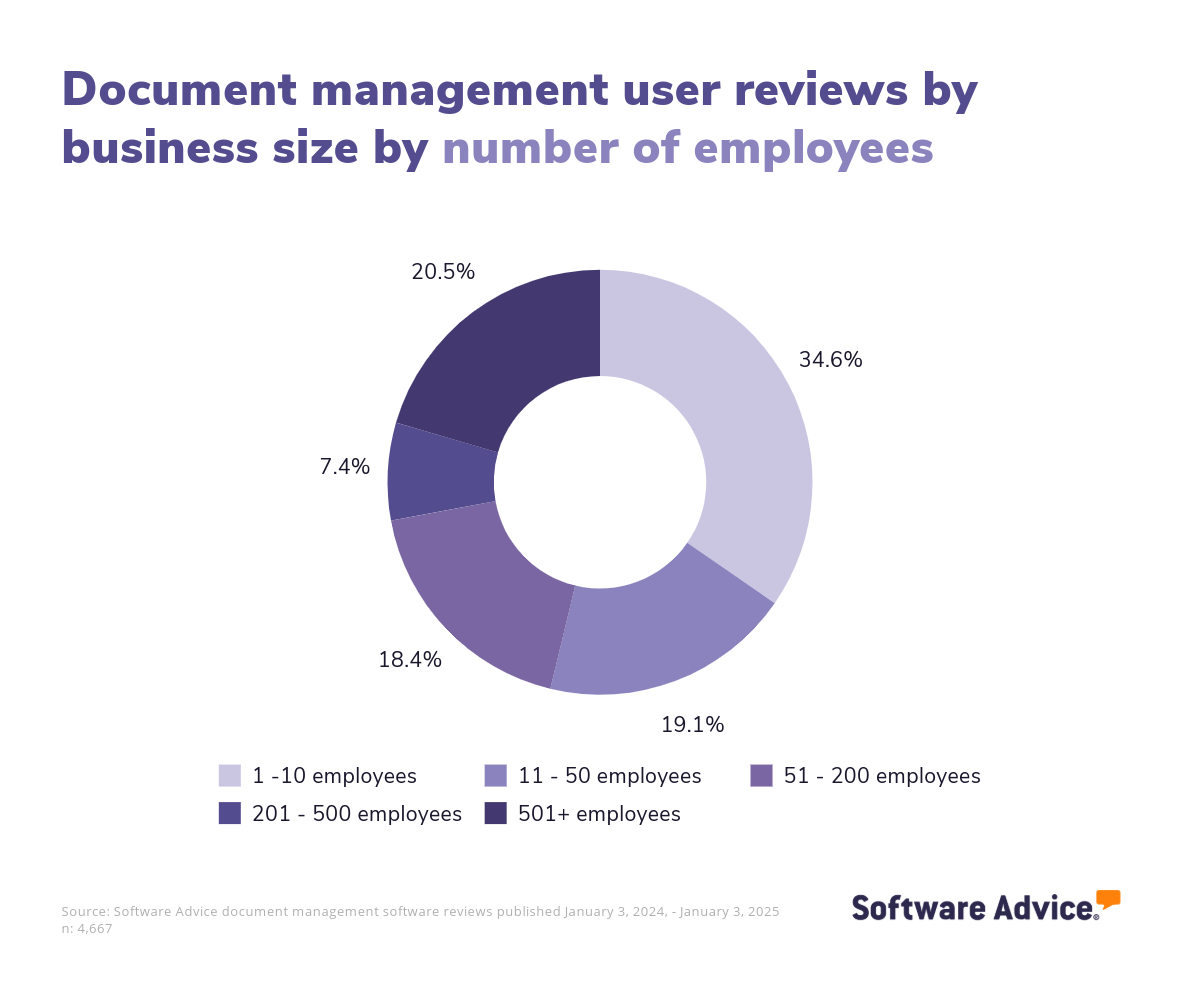
Most document management systems are priced on a “per-month” basis. [2] Entry-level plans cost an average of $110 per month and offer basic features, such as document storage and collaboration for up to 10 users. Mid-tier and high-end plans cost an average of $296 and $880 per month, respectively, and may include additional features such as electronic signature and audit trails.
If you’re a first-time buyer, consider your use cases, features, budget, number of users, and required integrations. Discuss requirements with stakeholders to gather questions you should ask vendors during an evaluation. Our software advisors, Tyler Cole and Saltoni, share the following questions to get you started:
Does the tool support the types of files you store, such as videos or spreadsheets?
Can you securely and easily share documents externally with your clients and partners?
Does the tool integrate with the specific systems you need it to, such as your project management and/or accounting software?
If you would prefer to speak with one of our experienced purchase order software advisors like Cole or Saltoni, schedule a call or chat with us.
What is document management software?
Document management software, which falls within the larger content management systems (CMS) category, helps business users digitally upload, track, and archive documents while keeping them secure. Many document management systems include workflow tools to manage the life cycle of specific documents, such as articles or legal contracts.
Capterra’s 2025 Software Buying Behavior Survey finds that 52% of respondents bought document management software in the past 12 months, and 37% already had it. This reflects both the scale of information companies today must oversee and the diversity of available solutions. [3]
We've created this buyer's guide to help you better understand this technology and how it works so you can choose the best document management software for your business.
Essential features of document management software
When comparing document management systems, knowing what features you can expect to see is important. Some functionality, like document storage and full-text search capabilities, are core features available in every DMS. Other features, such as collaboration tools, file sharing, and access controls and permissions, are commonly offered. We analyzed over 4,500 reviews from the past year to determine what we believe are the core and most important features of document management software. [3]
Document management software provides businesses with the following functionality:
Core document management features
Secure data storage | Securely stores data to prevent data loss or breaches. 90% of our reviewers rate this feature as critical or highly important. |
Document storage | Store and organize documents in a centralized system, minimizing the risk of losing or damaging records. 88% of our reviewers rate this feature as critical or highly important. |
Full-text search | Search for specific words or phrases within a document or database. 77% of our reviewers rate this feature as critical or highly important. |
Document capture | Scan, move, or upload electronic files within the software's repository. 76% of our reviewers rate this feature as critical or highly important. |
Common document management features
File sharing | Public or private sharing of digital files such as documents, audio/video, images, etc. 86% of our reviewers rate this feature as critical or highly important. |
Search/filter | Search and filter data across systems to locate required information by entering keywords or certain criteria. 83% of our reviewers rate this feature as critical or highly important. |
Access controls/permissions | Define authorization levels for access to specific files or systems. 82% of our reviewers rate this feature as critical or highly important. |
Collaboration tools | Provides a channel for team members to share media files, communicate, and work together. 82% of our reviewers rate this feature as critical or highly important. |
Document generation | Custom forms to streamline repetitious aspects of a document. 80% of our reviewers rate this feature as critical or highly important. |
Electronic signature | Digitally sign online documents. 74% of our reviewers rate this feature as critical or highly important. |
Document management software is also helpful for companies seeking to implement rules-based workflow processes, such as reviewing and approving documents before publication and/or release.
Businesses that frequently use and/or maintain records containing sensitive personal information, such as those in the medical or financial industries, may especially benefit from document control software. These solutions can help industry-specific document compliance while providing the appropriate users with quick, reliable access to records.
Benefits and competitive advantages of using document management software
Our analysis of 4,503 user reviews from the past year shows that document and team collaboration, office productivity, file sharing, and, of course, document management are the top-rated benefits of document management software. These features directly address the core needs of document management, including securely maintaining and organizing documents so that the right people can access the right files when needed.
Here’s an overview of the top benefits, listed in order from the highest user sentiment rating.
Document collaboration: Improve teamwork and efficiency by allowing multiple users to edit and comment on documents at the same time, reducing the time spent on revisions and improving overall quality.
Team collaboration: Centralizes communication, including comments, approvals, and document sharing, making it easier for teams to stay aligned and access the latest updates.
Office productivity: Streamline daily tasks through features like word processing and spreadsheets, boosting efficiency and enabling employees to focus on higher-value activities.
File sharing: Simplify access and distribution of documents, ensuring all stakeholders have the latest information, which improves decision-making and project execution.
Document management: Organize and secure documents, improving compliance and accessibility while reducing the risk of data loss, thus providing a strategic advantage in managing information assets.
How to choose the best document management software for your business
Step 1: Define your requirements
Before selecting a document management system, start by defining your specific requirements, such as the volume and types of documents you need to manage. Consider the software's functionality, budget constraints, training needs, data migration capabilities, and necessary integrations. These requirements will guide you toward a system that aligns with your current document management processes and supports your long-term goals.
What is the cost of document management software?
Document management software is generally offered on a monthly subscription model, with costs dependent on the features and number of users the business requires. Entry-level plans, averaging $110 per month, provide fundamental functionalities like document storage and collaboration for up to 10 users, making them suitable for smaller teams or businesses with basic needs.
For more comprehensive solutions, mid−tier plans average $296 per month, while high-end plans can cost up to $880 monthly. These advanced plans often include enhanced features such as e-signatures and audit trails, catering to businesses with more complex document management requirements and a need for compliance and security measures. [2]
Integration considerations for document management software
Integration is a key consideration when choosing document management software. Many businesses need their DMS to work with other tools like customer relationship management (CRM), enterprise resource planning (ERP), or project management software systems. For example, integrating with a CRM system allows teams to attach relevant documents to client profiles. These integrations enhance collaboration, reduce miscommunication, and help stakeholders have access to the most up-to-date documents.
Different industries may have specific integration needs. For instance, legal firms often require integration with case management systems, while healthcare organizations benefit from linking document management systems with electronic health records (EHR) to ensure compliance and improve patient care.
Be aware of potential drawbacks
While document management software offers numerous benefits, there are potential pitfalls to be aware of:
Complexity: Some document management systems can be complex, with a steep learning curve. This complexity may overwhelm new users, particularly in smaller businesses without dedicated IT staff, leading to confusion and underutilizing key features.
Integration challenges: Integration with other business systems can sometimes lead to data silos or inconsistencies, complicating workflows and requiring manual intervention, which undermines the efficiency the software is meant to provide.
Step 2: Make a shortlist of document management software
With numerous document management software options available, selecting the best one for your business can be challenging. Here are some tips to make the process easier.
Get qualified help from an advisor
At Software Advice, our advisors have experience helping businesses identify solutions that match their needs and budgets. You can chat online with an advisor or schedule a phone call if you need guidance. In a few minutes, your advisor will help you identify a shortlist of options that align with your document management needs.
For further assistance after your consultation, check out After Your Advisor Call: 4 Tips To Keep Your Software Purchase on Track.
Explore our list of document management FrontRunners
If you’re not ready to speak to an advisor, start compiling your shortlist with our FrontRunners report. Only products with top user ratings make this list. Check out our methodology for details on how we compile the report.
For more help creating a shortlist and a free, downloadable comparison chart, check out The Ultimate Software Vendor Evaluation Guide. This guide will help you compare software evaluation criteria for each prospective vendor by tracking functionalities, training and support offerings, costs, and deployment options.
Step 3: Pick your best option
After narrowing down your options, vendor demos are the next step. These sessions allow you to explore features and ask questions to make an informed investment. Being well-prepared is essential to maximize the benefits of these demos.
How to prepare for vendor demos
Once you’ve compiled your shortlist, schedule demo sessions with each vendor to learn more about their product. The demo is your opportunity to ask questions about features, pricing, technical support, training, and other factors critical to choosing the right document management system for your needs.
Consider asking the following questions during demos:
How customizable is your software to fit our specific document processes?
Every business has unique document management needs, so it's important to know if the software allows for customizing workflows, templates, and reporting formats. Ask if the system can be tailored to suit your specific document lifecycle processes without requiring complex coding or technical expertise.
What integrations does your software support?
Understanding available integrations ensures the document management software can connect with your current tools. This question helps you assess whether the software will enhance productivity by centralizing document data and eliminating manual entry. Clarify whether required integrations are out-of-the-box or custom options and whether the vendor will perform and maintain them.
How is ongoing support and training provided?
Effective onboarding and ongoing support are crucial for smooth adoption and troubleshooting. Ask about the types of training provided, such as live sessions or tutorials, and the availability of customer support. Knowing what resources and help are available will give you confidence in your team’s ability to leverage the software fully in the long term.
For more help and additional questions to ask during the demos, check out How To Cut Through the Sales Pitch During Software Demos. This guide helps you prepare for the personalized, real-time software demonstration the vendor will show you—not the initial discussions or video walkthroughs found online.
Step 4: Successful implementation of the new document management software
Once you’ve selected and signed the contract for a new document management system, the implementation process begins. Whether transitioning from another tool or manual processes, there are key considerations to focus on during this phase:
Establish clear change management communication: Develop a communication plan detailing the implementation process, benefits, and workflow changes. Ensure all team members know key dates, training sessions, and milestones. Transparent communication reduces resistance and prepares the team for a smoother transition.
Provide training and change support: Schedule hands-on training for all users, covering both basic and advanced features that enhance efficiency. Clearly explain how the tool will impact workflows and set expectations for its use. Ongoing support, including Q&A sessions, can ease adoption and minimize resistance.
Ensure data accuracy and migration: Before fully implementing the new document management system, thoroughly review and clean existing document data to ensure accuracy. Plan and execute a careful data migration process to transfer documents into the new system, verifying that all information is correctly imported. This step minimizes errors and ensures a seamless transition to the new platform.
For more details on ensuring a smooth transition, check out our 5 Critical Steps to a Successful Software Implementation Plan guide.
Software related to document management
When searching for document management solutions, buyers may see related software types, such as content management systems (CMS) and digital asset management tools. These tools offer overlapping functionalities like data organization and workflow automation. These systems can often be integrated with document management software to enhance overall efficiency and streamline business processes.
Content management software: Keep internal sites organized and up to date by allowing you to structure, plan, and publish fresh content dynamically without touching any underlying code.
Digital asset management software: Store and organize media files and protect brand assets. It also lets users collaborate and distribute files internally and with people outside the organization.
Entity management software: Helps businesses efficiently manage and maintain comprehensive records of legal entities, including compliance, governance, and corporate data.
Forms automation software: Create digital versions of paper forms, including applications, surveys, contracts, work orders, etc.
IT asset management software: Manage IT tasks by providing a single repository for all information relating to hard and soft technologies, plus other inventory that falls under the purview of the IT department.
Knowledge management software: Collect data in a central knowledge base, contextualize it, and make it easily searchable so that users can find the information they need on their own.
Legal document management software: A form of document management software made specifically for lawyers, law firms, or any entity operating in the field of law.
Proposal management software: Proposal management software is a tool that streamlines the creation, organization, and tracking of business proposals, supporting collaboration and efficiency throughout the proposal development process.
More resources for your document management journey
About our contributors
Author
Olivia Montgomery is an associate principal analyst at Software Advice, covering program and project management with a focus on the strategic alignment of IT and operations to optimize digital transformation. Drawing from her experience as a former IT PMO leader and her background in humanities studies, Olivia delivers data-driven insights that empower business leaders to drive business growth through projects.
Olivia’s research and analysis is informed by nearly 200,000 authentic user reviews on Software Advice and over 10,000 interactions between Software Advice software advisors and project management software buyers. Olivia also regularly analyzes market sentiment by conducting surveys of project managers and PMO leaders so she can provide the most up-to-date and helpful information to small and midsize businesses purchasing software or services.
Her expertise is featured in Forbes, Bloomberg, CIO Dive, and TechRepublic, as well as in podcasts, such as The Digital Project Manager. Recently, she presented her research on emotional intelligence (EQ) and decision-making at PMI's Global Summit conference, shedding light on the crucial role of EQ in driving project success. When she's not analyzing tech trends, you can find Olivia horseback riding or re-watching Jurassic Park.
Editor
Caroline Rousseau is a senior content editor at Software Advice.
A former content analyst, Caroline has, for the past five years, built, written, and edited research reports about technological trends, opportunities, and challenges with an SMB audience in mind. Her content has been featured in French Tier 1 media including Le Monde, L’Express, and Le Figaro, among other publications.
Her previous experience as a graphic designer, translator, and LQA specialist in various industries converged into a skill set that allows her to create compelling content about today’s business matters. Caroline’s personal interests include literature and art and she has a passion for Albert Camus, graphic novels, and drawing.
Advisor
Tyler Cole is a senior advisor manager. He joined Software Advice in 2013 as a software advisor, and now he manages a team of 5 software advisors. He is based in Austin, TX.
Tyler and his team help about 5,000 small businesses find the right medical and legal software for their needs each year. They’re able to do this through one-to-one conversations designed to narrow down the list of potential tools to only those that are the best fit.
His favorite part of being a Software Advice advisor team manager is stepping into a buyer’s selection process and helping point them in the right direction, setting them up for success.
Chris Soltani is a senior advisor. He joined Software Advice in 2013 as a software advisor, and he is based in Austin, TX.
As part of the software advisor team, Chris helps accounting, project management, and supply chain industry professionals find budgeting, collaboration, inventory management, and billing and invoicing tools. He provides a short list of personalized technology recommendations based on budget, business goals, and other specific needs.
Chris’s favorite part of being a software advisor is truly helping buyers overcome challenges when they’re researching the hundreds of software options online.
Document Management FAQs
- Which tool is best for document management?
According to our analysis of products with high market demand and reviews, Google Drive has the highest overall rating for document management software based on ratings from verified reviewers on Capterra. According to reviews, DocuWare is rated best for functionality in document management software.
- What is an example of document management software?
An example of document management software is Google Drive. According to our analysis of products with high market demand and reviews, Google Drive received the highest overall rating for document management software based on ratings from verified reviewers on Capterra, highlighting its popularity and effectiveness in managing documents efficiently.
- Is Office 365 a document management system?
Microsoft Office 365 is not exclusively a document management system (DMS) but includes document management features through SharePoint and OneDrive. For those seeking a new DMS, Google Docs is highly recommended as the best free DMS based on Capterra reviews, offering helpful document management capabilities like collaboration and real-time editing.
- What is the best way to manage documents?
The best way to manage documents is by using reliable document management software. According to our analysis, Google Drive received the highest overall rating for document management based on verified Capterra reviews, while PandaDoc is rated best for ease of use. These tools streamline document storage, collaboration, and accessibility, making them excellent choices for efficient document management.
- Is a document management system secure?
Yes, document management software (DMS) is generally secure, offering features such as encryption, access controls, and audit trails to protect sensitive information. However, security levels can vary by vendor. Choosing a DMS with robust security measures and regularly updating security protocols is important to ensure data protection and compliance with industry standards.
- What is the best document management software for free?
According to our analysis of products with high market demand and reviews, Google Docs is the best free document management software based on ratings from verified reviewers on Capterra. Our analysis of the 349 reviews for Google Docs in the past year finds users most appreciate the team and document collaboration features and mobile access.
- How do you evaluate document management tools?
To evaluate document management software, consider key factors like ease of use, collaboration features, file-sharing capabilities, and customization options. Read user reviews on Capterra, ask about customer support, and make sure the tool fits your team’s size, budget, and workflow needs. Always test with a free trial if possible.