
Best Internal Communications Software of 2026
Updated March 25, 2026 at 11:13 AM
- FrontRunners
- Popular Comparisons
- Buyers Guide
Compare Products
Showing 1 - 25 of 257 products
Compare Products
Sort by
Reviews: Sorts listings by the number of user reviews we have published, greatest to least.
Average Rating: Sorts listings by overall star rating based on user reviews, highest to lowest.
Alphabetically (A-Z): Sorts listings by product name from A to Z.

OnBoard is an AI-powered board management software designed to simplify governance processes for boards and leadership teams acr...Read more about OnBoard


OnBoard's Best Rated Features
See All
OnBoard's Worst Rated Features
See All

All-in-One Platform to Detect, Understand, and Respond to Risk AlertMedia is purpose-built to enable fast, confident decision...Read more about AlertMedia


AlertMedia's Best Rated Features
See All
AlertMedia's Worst Rated Features
See All

Haiilo’s AI-Powered intranet is the digital home your employees actually want to use – built to inform, connect, and engage your...Read more about Haiilo


HUB is the go-to intranet for SMEs looking to find a smarter way to work and communicate as a team, at an affordable rate. With...Read more about Hub
Hub's Best Rated Features
See All
Hub's Worst Rated Features
See All

Unily is the award-winning Employee Experience Platform trusted by many of the world’s most iconic enterprises—from British Airw...Read more about Unily

Unily's Best Rated Features
See All
Unily's Worst Rated Features
See All

Blink is the mobile-first employee experience platform that connects your people, systems, and culture in one super-app. It brid...Read more about Blink

Blink's Best Rated Features
See All
Blink's Worst Rated Features
See All

DeskAlerts is a cloud-based and on-premise solution designed to help small to large enterprises send critical notifications to e...Read more about DeskAlerts


Staffbase is the first AI-native employee experience platform. Staffbase enables HR, IT and internal communication teams to rea...Read more about Staffbase


Staffbase's Best Rated Features
See All
Staffbase's Worst Rated Features
See All

Edworking is the unified, AI powered workspace for planning, communication, and content. Teams manage projects with list and kan...Read more about Edworking


Edworking's Best Rated Features
See All
Edworking's Worst Rated Features
See All

Proze is a SaaS employee communications platform with powerful drag & drop functionality for creating engaging and effective mul...Read more about Proze

Noodle: Your All-in-One Collaboration Workspace. Noodle unites your team’s knowledge, projects, and communication in one custom...Read more about Noodle

Your all‑in‑one control center for managing your team's tasks, project, calendar, and chat. All-in one intuitive app that costs ...Read more about Any.do
Any.do's Best Rated Features
See All
Any.do's Worst Rated Features
See All

Slack is a cloud-based project collaboration and team interaction tool designed to facilitate communication across organizations...Read more about Slack
Slack's Best Rated Features
See All
Slack's Worst Rated Features
See All

Miro is a visual workspace for innovation that enables distributed teams of any size to dream, design, and build the future toge...Read more about Miro
Miro's Best Rated Features
See All
Miro's Worst Rated Features
See All

Zulip is the only modern team chat app that is designed for both live and asynchronous conversations. Zulip topics create a sepa...Read more about Zulip
Zulip's Best Rated Features
See All
Zulip's Worst Rated Features
See All

Zoom Workplace brings communication, employee engagement, spaces, and productivity solutions together on a single platform with ...Read more about Zoom Workplace

Zoom Workplace's Best Rated Features
See All
Zoom Workplace's Worst Rated Features
See All

Connecteam was designed and built as a true all-in-one solution. Easily engage and manage non-desk employees with a true all-in-...Read more about Connecteam


Connecteam's Best Rated Features
See All
Connecteam's Worst Rated Features
See All

Text Request is the business texting platform built to ignite customer engagement. We’ve crafted plug-and-play messaging solutio...Read more about Text Request


Text Request's Best Rated Features
See All
Text Request's Worst Rated Features
See All

Missive is an inbox collaboration platform that allows teams to work together on email without disrupting their existing workflo...Read more about Missive
Missive's Best Rated Features
See All
Missive's Worst Rated Features
See All

Clinked is a powerful cloud-based portal software that provides an efficient platform for businesses to collaborate, manage proj...Read more about Clinked
Clinked's Best Rated Features
See All
Clinked's Worst Rated Features
See All

Simpplr is an AI-powered employee experience platform designed to enhance workplace communication, engagement, and task manageme...Read more about Simpplr
Simpplr's Best Rated Features
See All
Simpplr's Worst Rated Features
See All

ThoughtFarmer is a best-in-class intranet platform that helps organizations connect employees, streamline internal communication...Read more about ThoughtFarmer
ThoughtFarmer's Best Rated Features
See All
ThoughtFarmer's Worst Rated Features
See All

Talkspirit is a cloud-based collaboration tool suitable for organizations of all sizes. Key features include user groups, a proj...Read more about Talkspirit
Talkspirit's Best Rated Features
See All
Talkspirit's Worst Rated Features
See All

HulerHub reduces tech sprawl and supports HR teams to deliver first-class personalised digital experiences to employees on any d...Read more about HulerHub

HulerHub's Best Rated Features
See All
HulerHub's Worst Rated Features
See All

Avaza is a business management solution which includes features for project management, resource scheduling, online timesheets, ...Read more about Avaza
Avaza's Best Rated Features
See All
Avaza's Worst Rated Features
See All
Popular Comparisons



Your Guide to Top Internal Communications Software, August 2025
Software Advice uses reviews from real software users to highlight the top-rated Internal Communications products in North America.
Learn how products are chosenExplore FrontRunners


“Usability” includes user ratings for Functionality and Ease of Use.
“Customer Satisfaction” includes user ratings for Customer Support, Likelihood to Recommend and Value for Money.
Reviews analysis period: The reviews analysis period spans two years and ends the 15th of the month prior to publication.
Buyers Guide
This detailed guide will help you find and buy the right internal communications software for you and your business.
Last Updated on January 27, 2025Imagine, you asked a colleague a question via email two days ago, and you still haven't heard back yet. The email you sent is buried somewhere deep in their inbox, among dozens of other messages.
Sound frustrating but familiar?
Whether your team has 50 people or 500, internal communications can quickly become unmanageable. Email messages can feel like a dump of information and team members hitting "reply all" can clutter inboxes. As a team lead or manager, dealing with unorganized communications can become one of your biggest challenges.
If this sounds like you, it's time you consider internal communications software to simplify communications within your team and create a space for team collaboration.
In this guide, we'll cover:
What is internal communications software?
Internal communications software is software that serves as the core messaging system within a team or organization. It helps users share information and files and stay connected with team members via private and group channels.
In addition to chat, internal communications tools typically support voice and video calls. Some internal communications tools also offer screen sharing, allowing users to present information during meetings or resolve problems as a group.
A few advanced tools may also provide project management features such as task management, making it easier for teams to collaborate on projects.
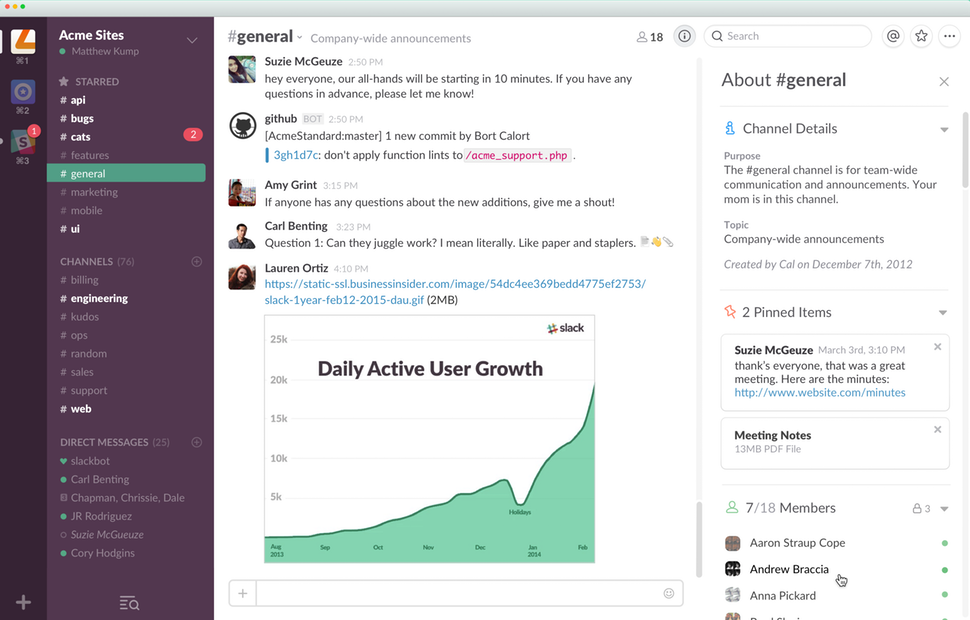
Channels can be used for group communications in Slack
Common features of internal communications software
Text chat | Chat with one or more team members. Create active chat rooms (sometimes called "channels") for team members to communicate in. |
File sharing | Share different types of files with one or multiple team members. |
Conversation history | Maintain archives of individual and group conversations, and search for information in old chats. |
Voice/video calls | Interact with team members via voice and/or video calls. |
Meetings | Schedule meetings with team members and maintain individual and group calendars. Also, conduct meetings via group voice and/or video calls. |
What type of buyer are you?
What a team of 20 people needs in an internal communications tool is very different from what a business of 5,000 people needs. Before you select a tool, it's important to understand your business needs and identify what type of buyer you are.
Buyers of internal communications software usually fall in one of the following three categories:
Small businesses with up to 50 peopleSuch businesses usually need an internal communications tool for basic tasks such as chats and sharing information and files. A cloud-based tool with minimal features will usually suit these businesses best. In addition, the per user per month pricing model of cloud tools suit the limited upfront investment viable for most small businesses.
Midsize businesses with 50 to 1,000 people: Such businesses usually have multiple teams (possibly at multiple locations) and need an internal communications tool that works for individual as well as group needs. In addition to sharing information and files, these businesses usually need to conduct meetings and presentations digitally. Therefore, these buyers should explore relatively advanced tools with features such as screen sharing and digital meetings. Cloud-based deployment with per user per month pricing will be suitable for most midsize businesses.
Large businesses with over 1,000 people: Like midsize businesses, such businesses have multiple teams (typically at multiple locations). However, their internal communications needs also include resolving issues and addressing complaints, in addition to sharing information and files. Therefore, they should explore tools with features that allow setting up an internal help desk as well as remotely raising complaints and troubleshooting issues. This buyer category can explore both cloud-based and on-premise tools. The former option is more suitable if scalability is the prime requirement while the latter is apt for users who want absolute control over their data.
Benefits of internal communications software
Internal communications software helps your team members communicate effectively with each other. Its benefits include:
Increased productivity: These tools help save time that would otherwise have been spent going back and forth in email trails or setting up meetings.
Reduce communication errors: These tools also help ensure that all team members are on the same page—they know what is going on, what they need to do, and where their teammates are on each project. This reduces the possibility of communication gaps and misunderstandings as well as possible day-to-day conflicts between team members.
Increased flexibility in workplace: With an internal communications tool in place, team members no longer need to be in the office to remain connected with their teammates. This makes it easier for them to work from home or other locations, as well as stay connected while traveling for work.
Key considerations when purchasing internal communications software
Choosing between multiple internal communications tools can be an overwhelming experience. However, keeping the following things in mind will make it easier to select one:
Don't confuse internal communications with project management: While features such as @mentions, tagging, and sharing files are present in both project management tools and internal communication tools, the two are very different. Project management tools help organize work whereas internal communications tools aid team members in communicating. Make sure you're clear about how you plan to use the tool, and evaluate the features accordingly.
Explore collaboration tools: Collaboration tools are designed to enable teams to work on common goals or objectives and share ideas, regardless of their location. Typically, these tools also offer features such as channels (chatrooms for team members) and private messaging, and can be used for internal communications. Before you choose an internal communications tool, explore collaboration tools and see if they more closely align with your needs.
Find a tool that complements your existing digital ecosystem: If you already have Microsoft Office 365 or Google Suite in place, you can explore the internal communications tools offered within these suites (Microsoft offers Teams and Yammer, and Google offers Hangouts and Meet). If you don't want to use one of these tools, make sure the one you choose works smoothly within your existing digital ecosystem and your team doesn't have to go out of their way to use it.
Note: The applications selected in this article are examples to show a feature in context and are not intended as endorsements or recommendations. They have been obtained from sources believed to be reliable at the time of publication.