


Best Kanban Tools Software of 2026
Updated January 27, 2025 at 9:59 AM
- Popular Comparisons
- FrontRunners
- Buyers Guide
Compare Products
Showing 1 - 25 of 116 products
Compare Products
Sort by
Reviews: Sorts listings by the number of user reviews we have published, greatest to least.
Average Rating: Sorts listings by overall star rating based on user reviews, highest to lowest.
Alphabetically (A-Z): Sorts listings by product name from A to Z.

Smartsheet is a work execution platform and collaboration tool with a familiar spreadsheet-like interface that helps teams plan,...Read more about Smartsheet
Smartsheet's Best Rated Features
See All
Smartsheet's Worst Rated Features
See All

Wrike is a cloud-based project management platform for teams of 20+ that is suitable for both large enterprises and SMBs. It sup...Read more about Wrike
Wrike's Best Rated Features
See All
Wrike's Worst Rated Features
See All

monday.com is a work and project management platform that helps teams of all sizes plan, prioritize, manage, and execute work ef...Read more about monday.com
monday.com's Best Rated Features
See All
monday.com's Worst Rated Features
See All

MeisterTask is a web-based task, project, and work management software perfect for teams of any size. Its easy-to-use interfac...Read more about MeisterTask
MeisterTask's Best Rated Features
See All
MeisterTask's Worst Rated Features
See All

Miro is a visual workspace for innovation that enables distributed teams of any size to dream, design, and build the future toge...Read more about Miro
Miro's Best Rated Features
See All
Miro's Worst Rated Features
See All

ClickUp is a productivity platform designed to unify work tools within a single workspace. It supports various teams and industr...Read more about ClickUp
ClickUp's Best Rated Features
See All
ClickUp's Worst Rated Features
See All

Aha! is a product development software designed to support teams in managing the entire product lifecycle. It is used by roles s...Read more about Aha!
Aha!'s Best Rated Features
See All
Aha!'s Worst Rated Features
See All

Businessmap (formerly Kanbanize) is the most flexible Lean project & portfolio management platform for complete strategy executi...Read more about Businessmap
Businessmap's Best Rated Features
See All
Businessmap's Worst Rated Features
See All

Kanban Tool is a project management platform that enables users to visualize and organize their workflow. The solution offers re...Read more about Kanban Tool
Kanban Tool's Best Rated Features
See All
Kanban Tool's Worst Rated Features
See All

GoodDay is a cloud-based project management solution that caters to businesses of all sizes across various industries. Features ...Read more about GoodDay
GoodDay's Best Rated Features
See All
GoodDay's Worst Rated Features
See All

Zenkit is a cloud-based project management solution designed for businesses of all sizes. It offers collaboration, calendar mana...Read more about Zenkit
Zenkit's Best Rated Features
See All
Zenkit's Worst Rated Features
See All

Productboard is the customer-driven product management system that empowers teams to get the right products to market, faster. I...Read more about Productboard
Productboard's Best Rated Features
See All
Productboard's Worst Rated Features
See All

Trello is a visual collaboration tool for planning tasks and projects. While commonly used by agile software development teams, ...Read more about Trello
Trello's Best Rated Features
See All
Trello's Worst Rated Features
See All

Stackby is a task management solution designed to help businesses create or automate workflows, collaborate with team members an...Read more about Stackby
Stackby's Best Rated Features
See All
Stackby's Worst Rated Features
See All

Kanban Zone is a visual collaboration platform that embeds the Kanban method pioneered by Toyota, into the most intuitive and fl...Read more about Kanban Zone

Projectplace is a cloud-based project management and collaboration solution that helps organizations in a wide range of industri...Read more about Planview ProjectPlace

Backlog is a cloud-based project management and issue tracking solution that caters to development teams working with design, ma...Read more about Backlog
Backlog's Best Rated Features
See All
Backlog's Worst Rated Features
See All

Hygger is a cloud-based project management solution for businesses of all sizes. The solution allows organizations to collect, o...Read more about Hygger
Hygger's Best Rated Features
See All
Hygger's Worst Rated Features
See All

Ravetree is a cloud-based project management solution with integrated resource planning, customer relationship management and ti...Read more about Ravetree

Here's the problem with other task management tools: they are designed by techies, for techies. People who aren't hardcore tech...Read more about Kerika
Kerika's Best Rated Features
See All
Kerika's Worst Rated Features
See All

Roundrush is a workflow management platform that helps developers and IT businesses streamline operations and improve work quali...Read more about Roundrush

Kantask is a cloud-based project management system which assists small to midsize businesses with task creation, progress evalua...Read more about Kantask

YouTrack is a project management tool that helps teams streamline their work and increase productivity. It allows teams to track...Read more about YouTrack
YouTrack's Best Rated Features
See All
YouTrack's Worst Rated Features
See All

Shorter Loop is a software platform that enables companies to understand customer problems, conceptualize solutions, and create ...Read more about Shorter Loop

Zoho Sprints is a cloud-based product roadmap solution for businesses of all sizes. The solution is designed to be used by agile...Read more about Zoho Sprints
Zoho Sprints's Best Rated Features
See All
Zoho Sprints's Worst Rated Features
See All
Popular Comparisons



Your Guide to Top Kanban Tools Software, May 2025
Software Advice uses reviews from real software users to highlight the top-rated Kanban Tools products in North America.
Learn how products are chosenExplore FrontRunners


“Usability” includes user ratings for Functionality and Ease of Use.
“Customer Satisfaction” includes user ratings for Customer Support, Likelihood to Recommend and Value for Money.
Reviews analysis period: The reviews analysis period spans two years and ends the 15th of the month prior to publication.

Buyers Guide
This detailed guide will help you find and buy the right kanban software for you and your business.
Last Updated on January 27, 2025Kanban is a prominent method used to implement agile project management (PM). It is less rigid and prescriptive than other agile frameworks (e.g., scrum), and is popular among teams that require the flexibility to reprioritize tasks as needed to accomplish project goals.
As the agile PM movement gains momentum, vendors are increasingly developing products designed to support scrum and kanban PM processes. Add these to the wealth of traditional PM tools already on the market and it can be difficult to know where to start.
In this guide, we’ll review the modern kanban PM method and explain how it fits within the larger PM space. We’ll also breakdown the kanban software available to you, so you can make a more informed purchase decision.
Here’s what we’ll cover:
What Is Kanban Project Management?
Common Features of Kanban Software
What Is Kanban Project Management?
Before we dive into kanban, here’s a short comparison of agile and waterfall project management:
Agile PM helps teams address and respond to change over the life of a project. Teams start with an overarching project goal and break work down into incremental phases, completing high priority items first. By incorporating more opportunities for inspection and review as the project is in progress, teams reduce waste and strive to deliver the most value to the end user/customer.
Waterfall PM is the traditional model of project management and is change averse. Requirements are agreed upon before the start of a project and benchmarks are set for scope, budget and timeline. Teams work sequentially, and work flows from one phase to the next until the project is completed. Success is measured by how closely the project adheres to the initial plan, i.e., “on-time and on-budget.”
The Kanban method is designed to reduce waste and improve team efficiency. Although less prescriptive than scrum, there are four key principles that define the kanban PM methodology:
Manage work visually. Kanban teams create a visual representation of their work and workflows by using a kanban board. The board is broken down into several columns that represent the team’s different workflow stages, and users move cards with task information across the board to represent where the task is in their workflow.
Limit work in progress. By limiting the amount of open work items on the board, teams can reduce the time it takes to complete a single task. Ultimately, this helps them complete work at a faster pace because they don’t suffer productivity losses due to context switching and juggling multiple tasks at once.
Work in a “continuous flow.” Whereas scrum is iterative and teams complete work in timeboxes, kanban teams complete work in a continuous flow. Users pull work through the system a single piece at a time and work on that task until it is complete. Then they pull the next highest-priority item from the backlog. Work-in-progress limits help to regulate the flow of tasks and eliminate bottlenecks, so teams work at their ideal pace and do not overextend themselves or get burned out.
Focus on “continuous improvement.” Continuous improvement is a cornerstone of agile project management. By embracing change and increasing opportunities for inspection and review over the course of the project, agile teams strive to maximize the value delivered to the customer and/or end user. This is why kanban allows for the re-prioritization of backlogs, so users work on and complete the highest-priority items first, i.e., balancing demand against throughput. This is also why teams track their flow, throughput and quality, and why they limit their open work items, so they can experiment and find their ideal pace and optimize their performance.
What Is Kanban Software?
Kanban software supports the above principles in several ways:
Helps teams visualize work and workflows. Digital kanban boards act as a team’s centralized project hub, helping to relate task and project status at a glance. Users can see instantly where a work item is in their workflow, meaning they know what stages it has already passed through and where it needs to go next.
Places actual limits on the number of open items. Kanban software allows teams to set work-in-progress (WIP) limits on a specific phase of work (i.e., column) or on the number of open tasks allowed for a specific user. Managers can put a “cap” on the number of open items permitted, and set up notifications to alert themselves and the user when they have reached the maximum number of open tasks permitted.
Easily reprioritizes work in the backlog, or “to-do” phase, as needed. Items in the backlog can be reprioritized as needed and placed at the top of the “to-do” column or prioritized in another way, either by marking the task as urgent or assigning an agreed-upon color-code (e.g., red for urgent, yellow for needs attention soon etc.).
Tracks the progression of work items and measuring performance. Kanban teams have two defining methods for tracking the flow and progression of work and measuring team performance: lead and cycle time and cumulative flow (more on these in the next section). Kanban software helps automate these reports, allowing managers to schedule them to run on a recurring basis. The findings can be mirrored onto a dashboard or collated into a project status report for stakeholders. Tracking these items helps teams make more informed decisions about their rate of throughput and how to effectively use tools such as WIP limits, so they can work to continuously improve their efficiency.
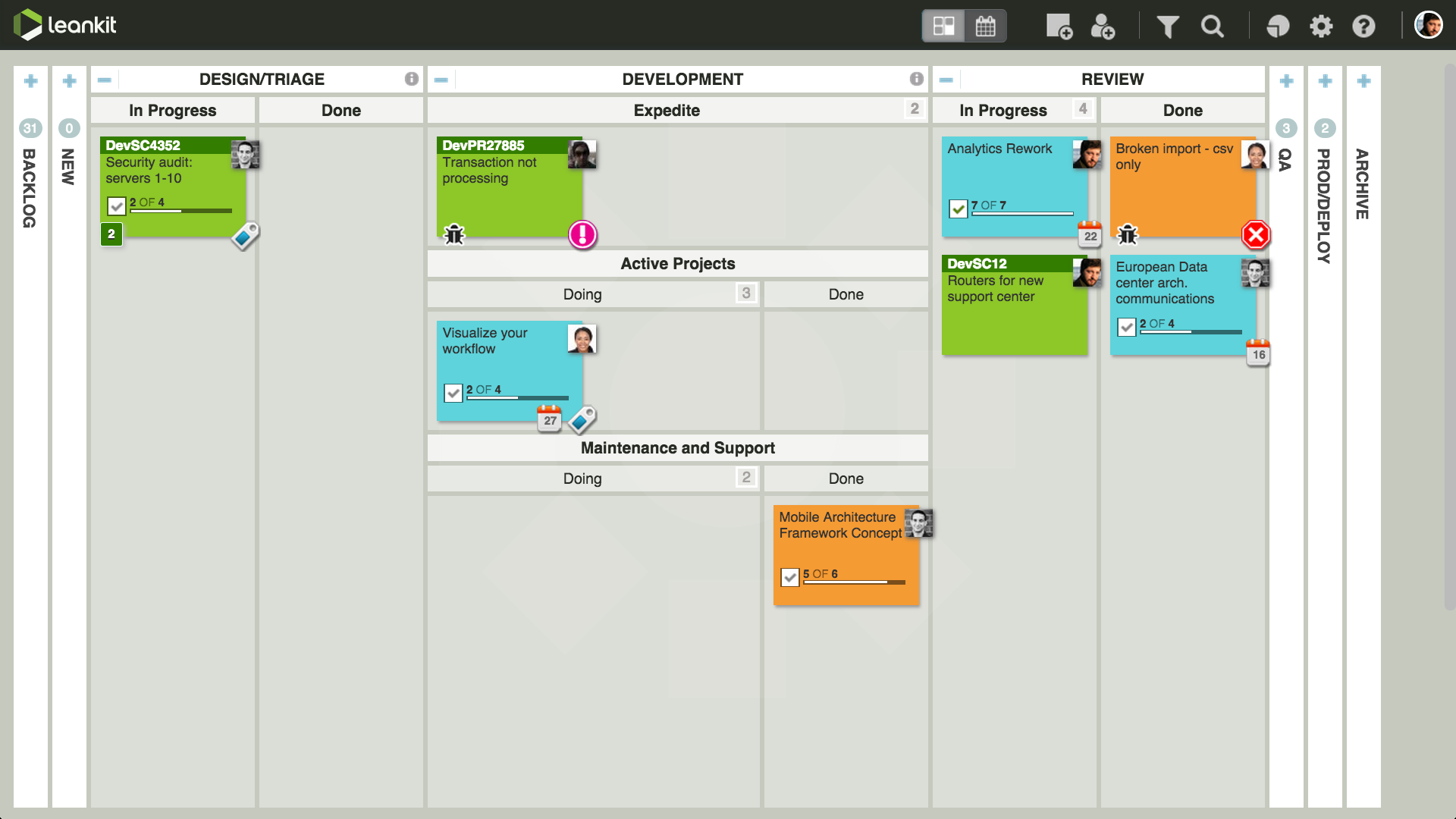
Kanban board in LeanKit
Common Features of Kanban Software
Look for the following features as you evaluate and compare kanban software solutions:
Kanban boards | A visualization of a team’s workflows. The boards are broken down by columns which represent different workflow stages. Tasks are represented by cards that workers pull from the backlog according to highest priority and then move across the board (drag-and-drop to different columns) as the task progresses through the various stages. |
Work-in-progress (WIP) limits | A “cap” on the number of open tasks allowed in any one column or by any one user. WIP limits can help reduce bottlenecks between stages, such as those that can pile up when projects require specialized personnel resources, e.g., a certain type of programmer. In this example, a manager might set a limit on the number of tasks the programmer is working on to ensure they don’t get overloaded. |
Cumulative flow diagrams (CFDs) | CFDs are charts that show the status of work items over time. The x-axis plots time and the y-axis shows the number of tasks within a project. Colored lanes represent the workflow stages on the board. CFDs are used to track the flow of work and identify problem areas, e.g., bottlenecks or scope changes, that could impact completion. |
Lead and cycle time diagrams | Lead and cycle time diagrams are charts that measure the time elapsed from when a task is placed on the board in the “to-do” column until it is completed. Lead time encompasses the entire time elapsed, while cycle time refers to just the time spent actually working on a task (e.g., when it is pulled from the backlog). The goal is to shorten cycle times, enabling teams to improve lead time as well (i.e., if you’re working at an ideal pace, you’ll get to more of the backlog items more quickly). |
What Type of Buyer Are You?
Kanban works well for teams within fast-paced industries, such as marketing and communications, who have a backlog of continually evolving commitments. Kanban provides them the flexibility required to re-prioritize their backlog as often as needed.
Conversely, scrum teams work in fixed sprints, and changes and re-prioritization are not allowed mid-sprint. Scrum is still more accepting of change than traditional PM, but not as flexible as kanban.
Additionally, kanban doesn’t call for prescribed roles the way that scrum does, which means that it requires fewer organizational and team changes to get set up. If you’re interested in implementing agile PM, but receiving resistance to an entire agile overhaul, consider kanban as an easy stepping stone.
Furthermore, VersionOne found in their 11th annual State of Agile report, that a hybrid or blended kanban process is more popular than “pure” kanban. Again, this may lower the barrier to adoption for your team and/or organization, so consider flexible tools that allow for custom workflows, fields etc. so your teams can mold the tool to their exact needs.
For tips on how to successfully implement a new project management solution, check out this infographic.