


Best Small Business CRM software of 2026

- Popular Comparisons
- FrontRunners
- Buyers Guide
Compare Products
Showing 1 - 25 of 219 products
Compare Products
Sort by
Reviews: Sorts listings by the number of user reviews we have published, greatest to least.
Average Rating: Sorts listings by overall star rating based on user reviews, highest to lowest.
Alphabetically (A-Z): Sorts listings by product name from A to Z.

Thryv is an AI-powered marketing and sales platform built specifically for small businesses, helping you market smarter, sell mo...Read more about Thryv


Thryv's Best Rated Features
See All
Thryv's Worst Rated Features
See All

Claritysoft is a cloud-based customer relationship management (CRM) solution designed for midsize and large enterprise businesse...Read more about Claritysoft CRM


Claritysoft CRM's Best Rated Features
See All
Claritysoft CRM's Worst Rated Features
See All

Supercharge your sales process with Sales Hub, a powerful and easy-to-use sales CRM that includes sales engagement tools, config...Read more about HubSpot Sales Hub

HubSpot Sales Hub's Best Rated Features
See All
HubSpot Sales Hub's Worst Rated Features
See All

Pipeliner has revolutionized CRM with our unique visual interface, no-code workflow automation engine, and instant, dynamic insi...Read more about Pipeliner CRM


Pipeliner CRM's Best Rated Features
See All
Pipeliner CRM's Worst Rated Features
See All

monday CRM is a sales platform that helps businesses streamline sales cycle. The platform caters to a range of industries, such ...Read more about monday CRM

monday CRM's Best Rated Features
See All
monday CRM's Worst Rated Features
See All

Sales Cloud is equipped with customer relationship management (CRM) functionality that encompasses lead management, marketing au...Read more about Salesforce Sales Cloud
Salesforce Sales Cloud's Best Rated Features
See All
Salesforce Sales Cloud's Worst Rated Features
See All

Shape's cloud-based solution offers tools designed to manage online marketing and promotions, capture leads from online sources,...Read more about Shape

Shape's Best Rated Features
See All
Shape's Worst Rated Features
See All

*What is Topline?* Topline OS is an all-in-one growth operating system that brings together all the tools you need to run and gr...Read more about Topline

Topline's Best Rated Features
See All
Topline's Worst Rated Features
See All

LeadSquared is a cloud-based marketing automation and customer relationship management (CRM) solution for businesses of all size...Read more about LeadSquared

LeadSquared's Best Rated Features
See All
LeadSquared's Worst Rated Features
See All

Zoho CRM is a cloud-based business management platform that caters to businesses of all sizes. It offers sales and marketing aut...Read more about Zoho CRM
Zoho CRM's Best Rated Features
See All
Zoho CRM's Worst Rated Features
See All

Rolldog is a customer relationship management (CRM) solution, with the perks of sales enablement all rolled into one. Rolldog he...Read more about Rolldog
Rolldog's Best Rated Features
See All
Rolldog's Worst Rated Features
See All

SalesOutlook CRM is a comprehensive customer relationship management (CRM) and email marketing system that embeds into Microsoft...Read more about SalesOutlook CRM

SalesOutlook CRM's Best Rated Features
See All
SalesOutlook CRM's Worst Rated Features
See All

NetSuite is an AI-powered cloud-based business management suite that incorporates ERP, financial management, CRM and eCommerce f...Read more about NetSuite

NetSuite's Best Rated Features
See All
NetSuite's Worst Rated Features
See All

We built Less Annoying CRM 17 years ago for the thousands of independent consultants, agents, and small business owners who are ...Read more about Less Annoying CRM

Less Annoying CRM's Best Rated Features
See All
Less Annoying CRM's Worst Rated Features
See All

Bigin by Zoho CRM is a pipeline-centric CRM that is built and priced for small businesses. Minimal by design and focused on grea...Read more about Bigin by Zoho CRM
Bigin by Zoho CRM's Best Rated Features
See All
Bigin by Zoho CRM's Worst Rated Features
See All

HoneyBook is a client relationship platform designed to help small businesses manage proposals, contracts, invoices, payments, a...Read more about HoneyBook
HoneyBook's Best Rated Features
See All
HoneyBook's Worst Rated Features
See All

EngageBay is an AI-powered all-in-one CRM that helps small businesses and startups manage marketing, sales, and customer service...Read more about EngageBay CRM
EngageBay CRM's Best Rated Features
See All
EngageBay CRM's Worst Rated Features
See All

Turning sales actions into connections. noCRM helps salespeople focus on selling, not reporting. Capture leads anywhere, cut ad...Read more about noCRM

noCRM's Best Rated Features
See All
noCRM's Worst Rated Features
See All

98% of customers rate VipeCloud's Value For Money at 4 stars and above! VipeCloud is the Sales CRM with Marketing Suite that bui...Read more about VipeCloud
VipeCloud's Best Rated Features
See All
VipeCloud's Worst Rated Features
See All

Teamgate is a user-friendly, yet extremely powerful CRM for Sales and SaaS teams of all sizes. We pride ourselves on empowering...Read more about Teamgate
Teamgate's Best Rated Features
See All
Teamgate's Worst Rated Features
See All

OnePageCRM is a simple contact management tool. While it has all the usual features of a customer relationship management (CRM) ...Read more about OnePageCRM
OnePageCRM's Best Rated Features
See All
OnePageCRM's Worst Rated Features
See All

Sage Sales Management CRM, tailored for any-sized business with a field sales force, now integrates cutting-edge AI and Timeline...Read more about Sage Sales Management
Sage Sales Management's Best Rated Features
See All
Sage Sales Management's Worst Rated Features
See All

Close is a conversation-first CRM (customer relationship management) solution built for founders and small, scaling sales teams ...Read more about Close
Close's Best Rated Features
See All
Close's Worst Rated Features
See All

Running a service-based business means balancing clients, projects, and relationships while still finding time to grow. Too ofte...Read more about Daylite for Mac

Daylite for Mac's Best Rated Features
See All
Daylite for Mac's Worst Rated Features
See All

Pipedrive is a web-based sales CRM solution that helps sales teams of all sizes and industries close more deals. Pipedrive lets ...Read more about Pipedrive
Pipedrive's Best Rated Features
See All
Pipedrive's Worst Rated Features
See All
Popular Comparisons



Your Guide to Top Small Business CRM Software, August 2022
Software Advice uses reviews from real software users to highlight the top-rated Small Business CRM products in North America.
Learn how products are chosenExplore FrontRunners


“Usability” includes user ratings for Functionality and Ease of Use.
“Customer Satisfaction” includes user ratings for Customer Support, Likelihood to Recommend and Value for Money.
Reviews analysis period: The reviews analysis period spans two years and ends the 15th of the month prior to publication.

Buyers Guide
This detailed guide will help you find and buy the right small business crm software for you and your business.
Last Updated on January 27, 2025What is Small Business CRM Software?
Small Business CRM software is a tool for small businesses who need to manage interactions with both current and prospective customers. CRM systems offer tools for sales, marketing and customer support.
With the growing number of affordable, Web-based products on the market, more and more small businesses are looking for customer relationship management (CRM) software to manage interactions with both current and prospective customers.
Many are seeking to upgrade from basic email marketing or contact management systems. However, the capabilities of CRM systems can range widely, with varying levels of functionality for sales, marketing and customer support. We developed this guide to help buyers understand exactly what these products can offer, so they can select the solution that best meets their needs.
Here's what we'll cover:
What is Small Business CRM Software?
A Comparison of Top Small Business CRM Solutions
Common Reasons Small Businesses Shop for a CRM Solution
Common Features of Small Business CRM Software
Pricing: Web-Based vs. On-Premise
Key Considerations for Small Businesses
A Comparison of Top Small Business CRM Solutions
There are many popular small business CRM solutions on the market, and it can be hard to know what distinguishes one product from another and which is right for you. To help you better understand how the top small business CRM systems stack up against one another, we created a series of side-by-side product comparison pages that break down the details of what each solution offers in terms of pricing, applications, ease of use, support and more:
Top Insightly Comparisons | Top Zoho CRM Comparisons |
Insightly vs. Base Insightly vs. Nimble Insightly vs. Zoho CRM | Insightly vs. Zoho CRM SugarCRM vs. Zoho CRM |
Common Reasons Small Businesses Shop for a CRM Solution
Thousands of small businesses contact us every year, looking for advice to help them select the CRM solution best suited to their company. Some are just getting started, while others are looking to replace an outdated or problematic system.
Startups may have their own needs, in some cases related to but unique from the needs of small businesses in general. If you're a startup, check out our guide to CRM for startups here.
Small businesses most commonly look to purchase a CRM system because they are:
Hoping to consolidate customer records and reduce double-entry.
Seeking to automate functions (alerts, follow-up emails etc.).
Looking to generate, track and manage leads more efficiently.
Needing specific features (e.g., trouble ticket management).
Frustrated with current CRM software (too complicated or not enough features).
Experiencing transition or company growth.
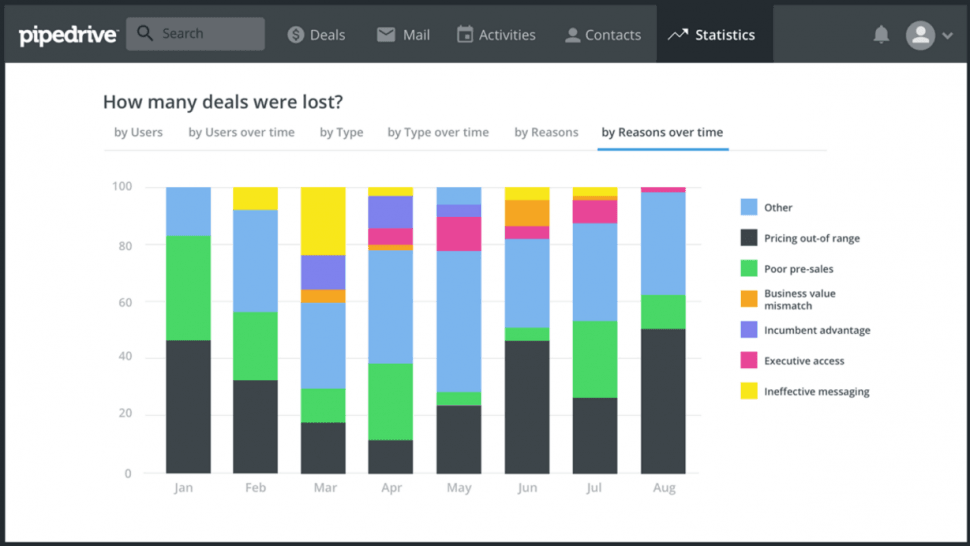
Live dashboard in Pipedrive
Core CRM Applications for Small Businesses
Application | Function | Best for... |
Contact management | The core component of any CRM solution, contact management systems consolidate critical customer data (e.g., names, addresses and company info) into a single database, as opposed to scattering it across many individual inboxes or address books. | Most small businesses; any business that needs to organize contact information or associate notifications, tasks, notes, files etc. with specific customers. |
Sales management | Basic sales management applications allow businesses to track deals at different stages of the sales pipeline, integrating sales activities and appointments with the general contact database. Some may also include limited automation (e.g., automatically sending follow-up emails or setting up reminders) and reporting. | Any small business with a dedicated sales team, or that needs to organize a high volume of leads and automate follow-up (e.g., real estate agencies). |
Marketing automation | Entry-level marketing automation applications allow small businesses to quickly set up landing pages, Web forms and email templates that inspire potential customers to take action. They may also offer some degree of automation to send targeted, personalized messages based on prospects’ behavior. | Small businesses with a dedicated marketing team, and/or looking to attract potential customers through email marketing or Web traffic. |
Customer service management | Simpler customer service applications typically focus on basic trouble ticket management, which allows small businesses to document, track and resolve customer issues. | Small businesses with a dedicated customer service team, or any business that needs to resolve a high volume of customer inquiries and/or complaints (e.g., software companies). |
Pricing: Web-Based vs. On-Premise CRM
Most small businesses should consider hosted, cloud-based CRM solutions. Because these systems are hosted by the vendor, they eliminate the need for you to have a dedicated IT team for managing and maintaining your own server. They also drastically reduce upfront investment and installation costs.
In addition, they typically offer monthly subscription pricing, which makes them scale well for fast-growing companies that need to add additional user licenses or features down the road.
However, small businesses with sufficient IT resources and capital may still benefit from on-premise CRM systems. These solutions usually require purchasing an expensive perpetual license up front, but they may become the cheaper option if you use the same system over an extended period of time.
You can see how pricing for these two models compares to figure out what works best for you using this tool. However, keep in mind that with on-premise solutions, you might also pay additionally for upgrades, customizations or maintenance.
Key Considerations for Small Businesses
With so many options and feature sets to choose from, selecting the right CRM for your small business can quickly become an overwhelming task. To narrow things down, here are four key factors for small businesses in particular to keep in mind as they evaluate different products:
Which Applications to Prioritize?
Because CRM encompasses so many functions (e.g., sales, marketing and customer service), many entry-level products are actually “best-of-breed” solutions. This means they focus on only one of the core applications listed above (although all CRM systems will provide some level of contact management functionality). “Integrated suites,” meaning solutions combining multiple applications in one software package (often billed as “professional” or “enterprise” editions) are much more expensive.
So before you begin shopping, start with a clear assessment of exactly which functions you need. The “Best for...” column in the chart above provides recommendations as to which types of companies may need which applications.
System Complexity and Ease-of-Use
Many small businesses we speak with say they’re replacing their CRM system because it’s too complicated or difficult to use. And if your employees find it too burdensome to input data into your program, you’ll wind up with a spotty, incomplete customer database, which defeats the entire purpose of having a system in place.
As a result, small businesses should pay particular attention to ease-of-use as they evaluate CRM software options. Consider solutions with smart, intuitive interfaces. Also, take advantage of the demos and trials offered by many companies to get a real sense of how user-friendly a system is.
Integration Considerations
While small businesses may not have as many integration requirements as larger companies, you should still consider CRM solutions that integrate with programs that you and your employees already use, such as email clients, calendars and accounting software.
For instance, integration with email clients such as Outlook and Gmail will make it much easier to import contacts and conversations into your new system. It also allows your employees to continue using the programs they’re comfortable with, while ensuring your contact database remains comprehensive and up-to-date.