


Best Construction software of 2026

- Popular Comparisons
- Buyers Guide
Compare Products
Showing 1 - 25 of 386 products
Compare Products
Sort by
Reviews: Sorts listings by the number of user reviews we have published, greatest to least.
Average Rating: Sorts listings by overall star rating based on user reviews, highest to lowest.
Alphabetically (A-Z): Sorts listings by product name from A to Z.

Houzz Pro is a business solution that streamlines operations for construction and design professionals. The platform offers plan...Read more about Houzz Pro


Houzz Pro's Best Rated Features
See All
Houzz Pro's Worst Rated Features
See All

Autodesk Construction Cloud is a construction management software platform. It serves as a central source of information for eve...Read more about Autodesk Construction Cloud

Autodesk Construction Cloud's Best Rated Features
See All
Autodesk Construction Cloud's Worst Rated Features
See All

Procore is a cloud-based construction management platform designed to connect field and office teams throughout the project life...Read more about Procore


Procore's Best Rated Features
See All
Procore's Worst Rated Features
See All

The Sage Construction Suite includes a range of solutions tailored to meet the diverse needs of construction companies. The suit...Read more about Sage Construction Suite


Sage Construction Suite's Best Rated Features
See All
Sage Construction Suite's Worst Rated Features
See All

Meet Ressio, the ideal companion for builders and contractors to manage their construction projects. With a modern design and a ...Read more about Ressio Software
Ressio Software's Best Rated Features
See All
Ressio Software's Worst Rated Features
See All

ComputerEase, offered by Deltek, is construction accounting software designed specifically for the construction industry. The pl...Read more about ComputerEase

ComputerEase's Best Rated Features
See All
ComputerEase's Worst Rated Features
See All

Smartsheet is a work execution platform and collaboration tool with a familiar spreadsheet-like interface that helps teams plan,...Read more about Smartsheet
Smartsheet's Best Rated Features
See All
Smartsheet's Worst Rated Features
See All

Knowify helps contractors budget, manage and invoice every construction project and service job with precision and get insights....Read more about Knowify


Knowify's Best Rated Features
See All
Knowify's Worst Rated Features
See All

Premier Construction Software is a global, AI-powered construction ERP that helps growing general contractors control job costs,...Read more about Premier Construction Software

Premier Construction Software's Best Rated Features
See All
Premier Construction Software's Worst Rated Features
See All

Contractors Software Group (CSG): Smarter Software for Smarter Builders Contractors Software Group offers a powerful suite of in...Read more about Contractors Software Group

JobNimbus is a customer relationship management (CRM) and project management solution tailored to meet the needs of contractors,...Read more about JobNimbus

JobNimbus's Best Rated Features
See All
JobNimbus's Worst Rated Features
See All

JOBPOWER is an integrated construction accounting management system. JOBPOWER includes accounting, detailed job costing, constru...Read more about JOBPOWER

Leap is the complete platform for home improvement contractors — built by people who understand how contractors actually sell an...Read more about Leap


Leap's Best Rated Features
See All
Leap's Worst Rated Features
See All

Buildertrend is a cloud-based solution designed for the construction industry, aiming to streamline project management, customer...Read more about Buildertrend
Buildertrend's Best Rated Features
See All
Buildertrend's Worst Rated Features
See All

Plexxis offers comprehensive solutions created specifically for the most demanding specialty sub-contractors. With on premise, s...Read more about plexxis
plexxis's Best Rated Features
See All
plexxis's Worst Rated Features
See All

Roctek’s WinEx Grade is a quantity takeoff and analysis tool. This solution allows you to take a PDF or other supported image fo...Read more about WinEx
WinEx's Best Rated Features
See All
WinEx's Worst Rated Features
See All

eCMS offers a comprehensive suite of software applications that help commercial contractors manage all aspects of their financia...Read more about eCMS

eCMS's Best Rated Features
See All
eCMS's Worst Rated Features
See All

Never miss the right job opportunity again. AI-powered estimating built for the busy builder who does it all. Designed for resi...Read more about Buildxact
Buildxact's Best Rated Features
See All
Buildxact's Worst Rated Features
See All

eSUB is a mobile application and cloud-based project management solution that helps commercial subcontractors across various tra...Read more about eSUB

eSUB's Best Rated Features
See All
eSUB's Worst Rated Features
See All

SharpeSoft Estimator is an on-premise & cloud cost estimating software for contractors and sub-contractors in the construction i...Read more about SharpeSoft Estimator


Electrical Bid Manager Enterprise by Vision InfoSoft is designed to serve the bid management needs of commercial and residential...Read more about Electrical Bid Manager

Aurigo provides modern, cloud-based solutions for capital infrastructure and private owners to help plan with confidence, build ...Read more about Aurigo Masterworks


Trimble’s project management solution from the developers of Prolog, ProjectSight, combines a construction budget and cost manag...Read more about ProjectSight


ProjectSight's Best Rated Features
See All
ProjectSight's Worst Rated Features
See All

FOUNDATION is construction accounting solution designed for contractors in the construction industry. It combines job costing, p...Read more about FOUNDATION

FOUNDATION's Best Rated Features
See All
FOUNDATION's Worst Rated Features
See All

Ventus is a service and construction ERP solution that incorporates CRM, takeoff estimating, job costing, project management, se...Read more about Ventus
Popular Comparisons


Buyers Guide
This detailed guide will help you find and buy the right construction software for you and your business.
Last Updated on January 27, 2025Here’s what we’ll cover:
What Is Construction Software?
Benefits of Construction Software
Competitive Advantages of Construction Software
Business Sizes Using Construction Software
Software Related to Construction Software
What Businesses Typically Budget for Construction Software
How Popular Is Cloud-Based Construction Software?
What Is Construction Software?
Construction software helps firms automate critical processes such as takeoff, estimating, project management and accounting, and integrates various applications and stages of the project life cycle, from pre-sale through building and final billing. These tools can help firms modernize, grow their business and operate more efficiently.
Benefits of Construction Software
Implementing construction software can benefit your business two key ways:
Win more bids. Performing takeoff and estimating calculations by hand is not only time consuming, but error prone as well. Construction management software for builders and contractors can read a blueprint and perform these calculations in less time and with greater accuracy because it syncs with an online database of labor and material costs), saving you time and helping your firm win more bids.
Provide an audit trail. The sheer volume of documentation—blueprints, quotes, contracts, purchase orders, RFIs, change orders, punch lists and invoices—needed for any construction project is enough to make your head spin. Construction software acts as a centralized database, allowing users to upload and store this information in a single, searchable location. This database provides firms with a virtual paper trail for every project.
Competitive Advantages of Construction Software
Here are a few examples of how these tools can help you gain a competitive advantage in the marketplace:
Scale your business. If you're trying to manage multiple jobs and coordinate paperwork across job sites, mistakes are likely to happen. Software helps avoid costly legal fees and offers a more disciplined approach to managing projects, especially as you take on more projects and complexity multiplies.
Operate more efficiently. Whether you're looking for a best-of-breed estimating system or an integrated suite to manage the entire project life cycle, construction software can help you standardize processes and automate tedious functions, which ultimately increases the productivity of users.
Provide more value to clients. Even if you outbid a competitor, should they provide an itemized quote detailing every cost and outlining various "what-if" scenarios, they may have a better chance of winning a contract than you do. Construction software helps standardize your processes, increase efficiency and provide more value to clients.
Business Sizes Using Construction Software
Among things that will influence your construction software purchase are the size of your business, your availability of IT resources and your trade specialization.
Business size and IT resources typically breakdown as follows:
Single user: Less than $1 million in annual revenue. This is likely a small, family firm with no IT department and a single software user.
Small business buyer: $50 million or less in annual revenue; 2 - 100 employees; likely no IT department; requiring 2 - 10 software user licenses.
Medium business buyer: $100 million or less in annual revenue, 2 - 100 employees; IT department; 11 - 100 user licenses.
Midsize - enterprise buyer: $100 million+ in annual revenue, 100+ employees, IT department; 100+ user licenses.
Common buyer demographic segments and trade specializations include:
Demographic Segments | Trade Specializations |
• Architect • Building owner • Construction manager • Design/build • Engineer • General contractor (commercial or residential) • Home builder (custom or production) • Residential remodeler • Specialty contractor | • Electrical • Concrete • Earthwork/excavating • Heavy/highway • Landscaping • Mechanical/HVAC • Masonry/stone • Plumbing • Roofing/siding |
Software Related to Construction Software
Construction software is designed to help you manage the entire project life cycle, from blueprint to billing. Here are some related tools that focus more on one stage in the project life cycle:
Construction project management (PM) software: This software helps contractors manage the entire build process, from scheduling through to client billing. These tools provide firms with the the oversight and document control needed to monitor RFIs, change orders and purchase orders, so project budgets and timelines aren't disrupted.
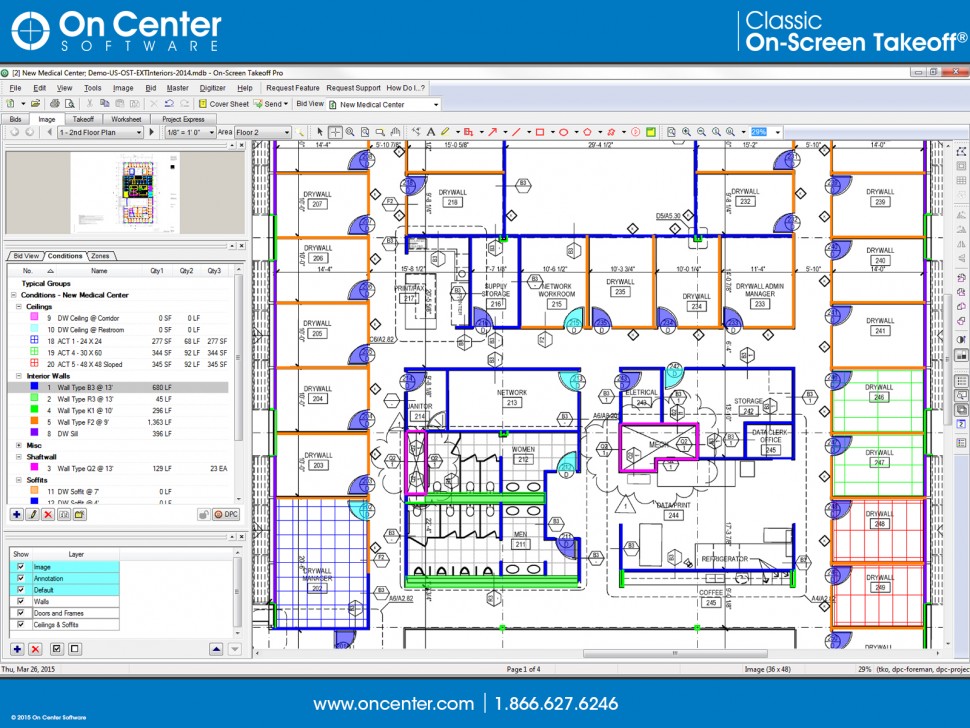
Takeoff: Takeoff is a pre-sale process in which the estimator measures construction plans (blueprints and drawings) to determine the amount of materials and labor required for a job. Takeoff software is commonly sold as a standalone application or grouped together with estimating, or as part of a comprehensive, integrated suite.
Estimating: Estimating software is used to calculate the material costs and labor takeoff to produce bid proposals. It's sold either as a standalone system or grouped with takeoff or as part of a comprehensive, integrated suite.
Bid management: Bid management, in which a contractor solicits bids from subcontractors and suppliers before submitting a job quote, is a process that helps bridge the gap between pre-sale and project management. Bidding can be found as an application within many construction systems or can be purchased as a standalone software.
Accounting: Construction accounting software helps firms manage their job costing, core accounting, fixed asset accounting and payroll. It's common to find some job costing and budgeting in construction PM software; however, if the PM systems you're evaluating don't offer core accounting, you should look for integrations with general accounting systems, such as QuickBooks or Xero.
Features Guide
A List of Common Construction Software Features
In the table below, we profile the most common applications that you can expect to come across as you evaluate solutions.
Enables faster and more accurate takeoffs by allowing the estimator to measure paper blueprints or digital files (e.g., CAD drawings or PDFs). | |
Calculate material and labor costs based on your takeoff and create a bid proposal from those estimates. | |
Manages procurement, purchasing and contract management processes. | |
Helps managers schedule people, resources and equipment for various projects. | |
Helps managers track project costs, manage important documentation and collaborate with all parties involved on a project. | |
Handles the core accounting and job costing needs of contractors. Job costing allows accounting staff to allocate costs by the job. |
Feature Details and Examples
Takeoff: Takeoff measures blueprints and drawings electronically to determine accurate material quantities and volume. Many systems allow you to perform takeoff entirely electronically, eliminating the need for paper records. This process, coupled with estimating, largely informs the scope of a project.
Estimating: Estimating calculates labor and material costs for a project based on up-to-date pricing data and then generate itemized proposals from those estimates. To increase the accuracy of estimates—and profitability of projects—the system pulls current labor and materials prices from a costs database. Additionally, you can Maintain a historical database of your past projects so you can reference data from past jobs with comparable materials and labor requirements.
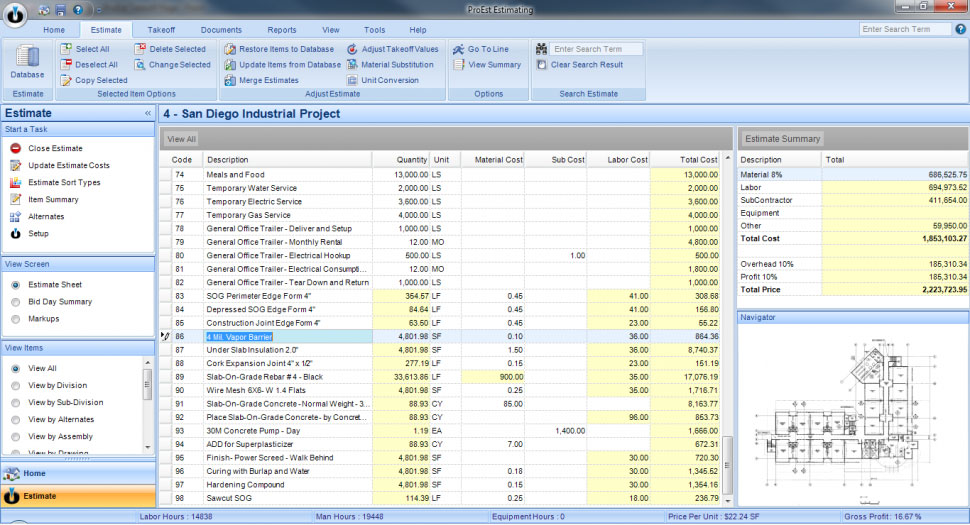
Estimate sheet in ProEst
Bid management: Bid management is closely tied to both the estimating and project scheduling processes. It helps general contractors coordinate the solicitation and procurement of bids from subcontractors and suppliers during the estimating and proposal generation process. It maintains subcontractor and supplier database, which stores all contacts and communications between relevant parties. It also manages procurement, purchasing and contract management processes.
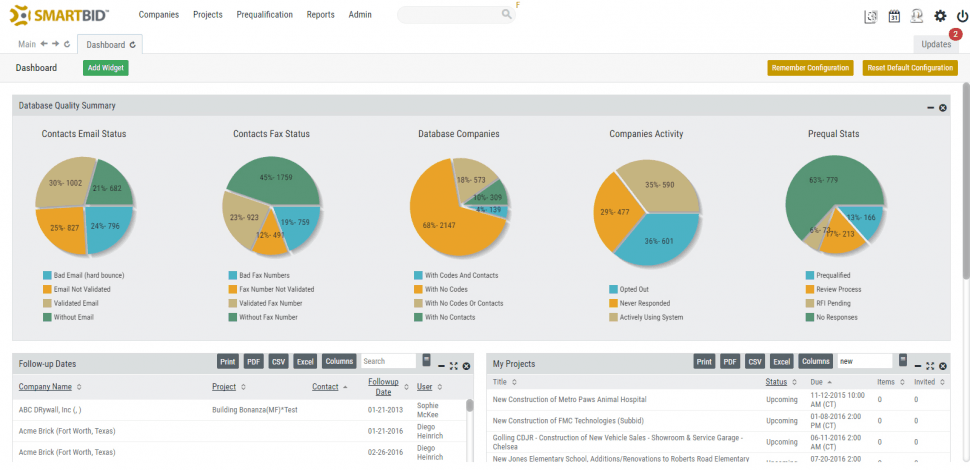
Dashboard in SmartBid
Project scheduling: Once you've won the job, project scheduling software tracks who is working where, what their start and end dates are and when project materials and equipment need to arrive to a job site. Often, managers will use the critical path method and Gantt charts to visualize the project timeline and identify constraints and dependencies than might impact the completion date. Scheduling is often included with or closely integrated project management applications.
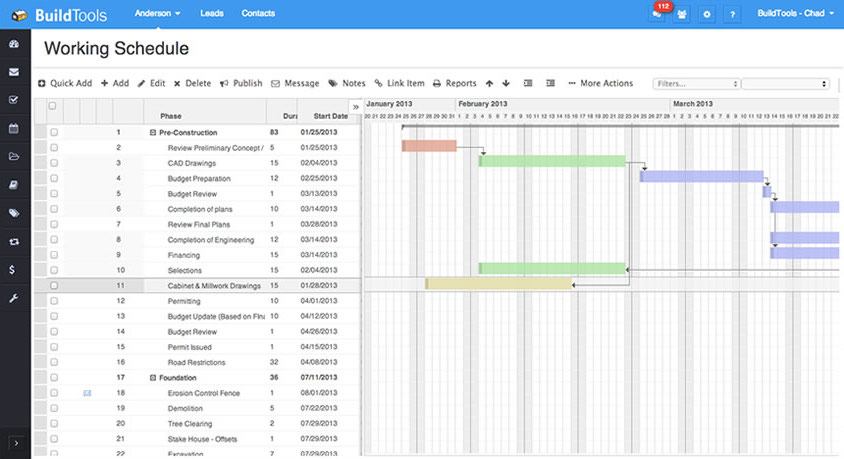
Scheduling in BuildTools
Project management: Construction project management helps users manage project schedules, track costs compared to budgets, view and store important documentation (e.g., RFIs, punch lists and change orders), and collaborate with other users (i.e., field techs, office staff and clients). Often it includes time tracking, task management, automatic alerts and mobile access. Users can also typically centralize storage for drawings, photos, change orders—any and all important documentation that impacts a contract and informs the audit trail. Additional tracking capabilities include a job-specific dashboard or a program dashboard offering insights into all open projects.
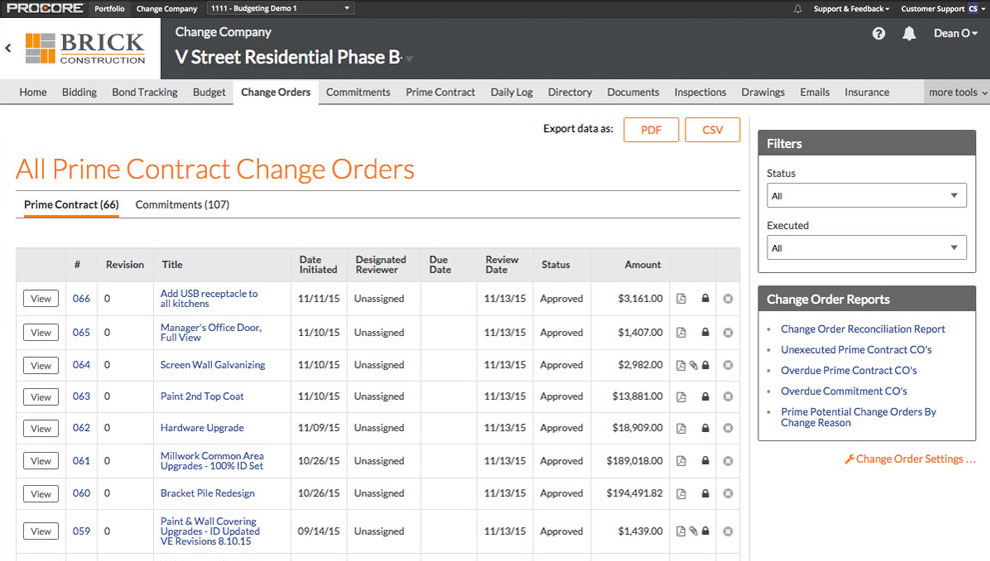
Change orders in Procore
Accounting: Accounting helps you balance your core accounting with industry-specific needs, including maintaining fixed assets and depreciation schedules for equipment, tracking timesheets and managing subcontractor payroll and facilitating job costing, e.g. allocating job costs by job and CSI code. While sales invoicing is often available, unless the system offers "core accounting," i.e., general ledger, accounts payable, accounts receivable and bank reconciliation, it does not offer full accounting functionality.
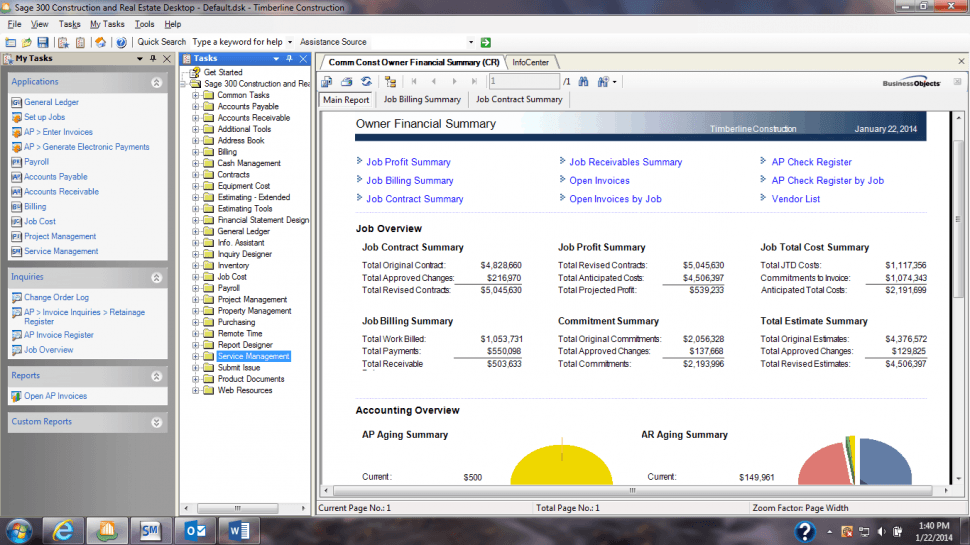
Job overview dashboard in Sage 300
Construction Software Buyers' Most Requested Features
Construction software capabilities most-often requested by buyers include:
Project management
Cost estimating
Measure takeoff
Accounting & job costing
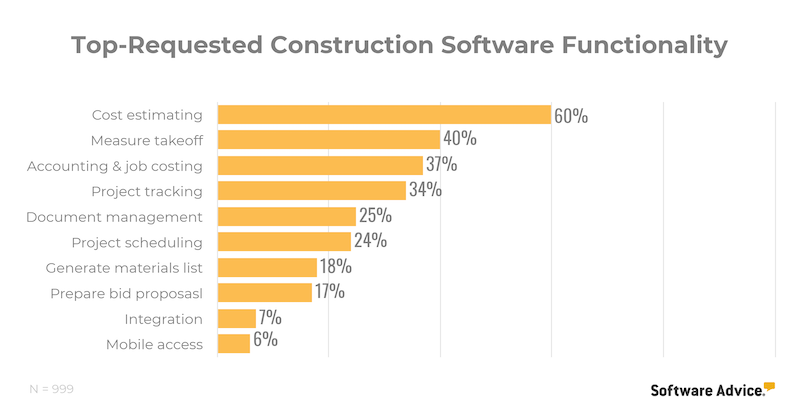
The Construction Software Features You Really Need
Your construction needs will be largely influenced by the size of your business. Startup firms won't require the same breadth of features as a growing business looking to optimize their processes.
Small business
Estimating: Create professional-looking bids based on your takeoff. Free estimating tools can help you win more jobs without breaking the bank.
Project management: Many cloud-based construction management tools can help small businesses operate more efficiently without a hefty upfront investment.
Medium business
Accounting and job-costing: Manage your business's core financials and track job costs across projects.
Midsize - enterprise business
Customer relationship management: Manage interactions with current and prospective clients throughout the entire customer life cycle.
Program management: Manage a portfolio of projects, track costs across job sites and look to optimize profitability.
See the above section "Business Sizes Using Construction Software" for business size breakdown.
Pricing Guide
How Construction Software Is Priced and Hosted
Construction software pricing varies drastically from product to product, and it can be difficult to apply a blanket pricing structure when categorizing these tools.
Products are also sold via perpetual and subscription licensing just as they are in every market, but there are other pricing considerations to keep in mind as well. For example:
Some construction management products are priced per project and include unlimited users. Other project management tools may follow a more standard subscription licensing priced per user (on a monthly or annual contract) and include a fixed or unlimited amount of projects.
Bid management tools offer "plan rooms" that allow for unlimited projects and are priced by number of users.
It's common for integrated construction business management suites to be sold "buffet-style," meaning, products are designed with an array of applications and can be configured according to the specific needs of the buyer.
Additionally, many vendors will offer discounts for purchasing annual contracts or a high volume of projects or user licenses. As such, it's common for product pricing to be hidden on vendor websites and they ask that buyers contact them directly for a customized quote.
What Businesses Typically Budget for Construction Software
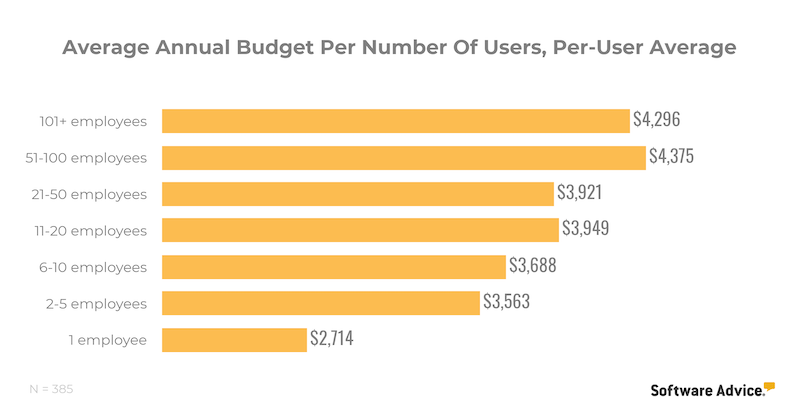
As "construction software" can refer to both standalone applications as well as an integrated suite, it can be hard to know what you should budget for these tools.
To give an idea of what your peers are spending, we analyzed a random sample of consultations with prospective buyers and compared budgets among those looking to purchase a single platform spanning the entire project life cycle, from pre-sale through to building to final billing.
Here's what we found:
Large firms of over 500 employees had a wide range of per-user pricing preferences, with some firms expecting to pay just $100 per user per month and at least one firm willing to pay $12,000 per user annually (although the high end was usually around $5,000 per user).
A significant portion of firms surveyed expected to pay setup costs, sometimes of more than $10,000.
Real estate developers were the market segment most likely to be a small business, with more than half of firms surveyed reporting 10 or fewer employees.
Firms overwhelmingly wanted small licenses, with 87 percent of respondents seeking licenses for five or fewer users.
FAQs
What Questions Should I Ask Construction Software Vendors?
When evaluating products, be sure to ask vendors about the following:
What does the software not do?
This is perhaps the most important question you should ask vendors. Knowing how a product aligns with your requirements will let you know if it will be able to scale with you or if you'll need to supplement or integrate with another solution. Be sure to discuss your product requirements and business needs with each vendor on your product shortlist and ask them directly about the product's attributes as well as its limitations.
What is the average implementation timeline?
Implementation timelines can vary drastically depending on the tool you choose. If you're implementing an integrated business management platform, this will require a much more significant investment of time and resources than a standalone tool. Consider the time you'll need to get the new tool up and running and to get your users trained on a new system.
What data transfer services do you offer?
Some vendors will include data transfer within the cost of the software license, while other vendors may only offer data transfer at an additional cost. Asking about this service upfront can help you avoid sticker shock when you receive a price quote from the vendor. If data transfer services aren't included at all, you may have to hire a third-party to help you move your data into the new system, which would require an additional investment of time and resources.
What support and training services do you offer?
Support and training can make or break and implementation. Before you start evaluating systems, consider your end users and the type of support they'll require over the life of the tool. Would they prefer support services over the phone or over chat? Are they tech savvy enough to help themselves by reading support forums and discussion boards? Ask vendors about the support and training services they offer, and at what cost, so you can be sure to choose a tool that aligns with the needs of your users.
How Popular Is Cloud-Based Construction Software?
Cloud-based construction software products are becoming increasingly popular among construction firms, especially cloud construction management tools.
In fact, according to JBKnowledge in their annual Construction Technology Report, when firms are using standalone systems, they are more likely to use cloud-based bid management, project management and CRM systems than they are to use cloud-based estimating/takeoff and accounting products.
One reason for this is the need for mobility on job sites. Whereas presale functions, i.e., takeoff and estimating, mostly require internet access and connection to a database, during-construction activities requires more immediacy, both in terms of connectivity and rate of data transfer, than is available with on-premise software.
Prospective buyers looking to purchase an integrated construction business management suite should consider a cloud-based platform so as to provide project managers and contractors the ease of access they need to remain competitive in the industry.
What Are the Hidden Costs of Construction Software?
Evaluating construction software doesn't have to end in sticker shock. Here we outline a few common fees so you'll know what expenses to expect and what hidden costs to look out for as you compare vendor price quotes.
Purchasing Construction Software: Common Fees and Expenses
Software license | Construction software is sold via perpetual license (one-time, upfront fee where you own the rights to the software) or subscription license (recurring monthly or annual subscription, where the vendor owns the software and you pay to use it) |
Data migration | Costs of migrating data from your old system into the new. |
Installation/setup | Fees associated with installing the software on client servers (perpetual license) or setting up user accounts on the vendor or service provider's server (subscription license). |
Hardware | Can include costs for personal computers, mobile devices, networking gear, backup drives as well as servers. |
Maintenance/support | Perpetual license software often requires you to purchase maintenance and support services separately, costing about 20 percent of the software license fee. Subscription license software includes the costs for basic maintenance and support in the cost of the software license, but users can often purchase premium support services for an additional fee. |
Training | Training is critical to a successful software implementation and training services can range from vendor-supplied free online guides, to over-the-phone support, up to expensive on-site learning tutorials. |
What Are Some Drawbacks I Should Watch Out For?
Although construction software can offer your firm a competitive advantage, it's unlikely that it will check every box for every user.
The following are some common sources of dissatisfaction we've seen among users, along with the real reviews:
High cost: "Prohibitively expensive in some cases." - Jordan from SKANSKA
Poor integration: "It still doesn't integrate perfectly with Sage for the financial aspects and it is very expensive to buy." - David from Hedrick Brothers Construction
Limited or lacking accounting functionality: "The financial tools fall short and do not compare to standalone financial tools." - Aaron from William Charles Construction
Custom report options limited: "The biggest con for us is the limited customization when it comes to reports and forms." - Brandon from Caddell Construction
Tips & Tools
Build a Business Case for Construction Software
How do you justify an investment in construction software? Typically, you'll want to start with ROI. Don't fret, though, we've provided a template to help you build your business case.
Relevant Articles
Some of our latest articles include:
"State of the Construction Labor Market: What Firms Need To Know"
"Essential Construction Management Features for General Contractors"
"How a Construction Communication Plan Can Help You Win Bids"
What Are Some Popular Product Comparisons?
Over the last decade, a few integrated construction business software suites have positioned themselves as market leaders. This list includes Procore, Buildertrend and CoConstruct, among others.
To see how these products compare to one another, click on any of the following pages for more information:
Buildertrend vs Co-construct
Procore vs Plangrid
Buildertrend vs PlanGrid