


Best Employee Engagement Software of 2026
Updated February 18, 2026 at 9:27 AM

Written by Emilie Audubert
Content Analyst

Edited by Parul Sharma
Editor

Reviewed by Dan Schawbel
Contributor

Talk with us for a free 15-min consultation
Expert advisors like Jacqueline, who have helped 1,000+ companies, can find the right software for your needs.
- All Software
- Buyer's Guide
- Software Advice FrontRunners
- Frequently Asked Questions
- Popular Comparisons
Employee engagement software supports HR teams and people managers in boosting morale, tracking sentiment, and shaping workplace culture. With over 680 tools built for different team dynamics and feedback models, choosing the right one can be tough. To help you narrow it down, I worked with our employee engagement software advisors to curate a list of recommended productsi and a list of the employee engagement software FrontRunners based on user reviews. For further information, read my employee engagement software buyer's guide.
Employee Engagement Software
Sort by
Reviews: Sorts listings by the number of user reviews we have published, greatest to least.
Average Rating: Sorts listings by overall star rating based on user reviews, highest to lowest.
Alphabetically (A-Z): Sorts listings by product name from A to Z.

BambooHR centralizes your HR data, automating key tasks like payroll, benefits, and employee management. Streamline processes fr...Read more about BambooHR
BambooHR's Best Rated Features
See All
BambooHR's Worst Rated Features
See All

UKG Pro Human Capital Management (HCM) software is a workforce management solution designed to align people strategy with busine...Read more about UKG Pro
UKG Pro's Best Rated Features
See All
UKG Pro's Worst Rated Features
See All

Tired of juggling disconnected systems for HR, Finance, and IT? Wasted time and manual work slow your business down. Paylocity i...Read more about Paylocity
Paylocity's Best Rated Features
See All
Paylocity's Worst Rated Features
See All

HiBob is a human resources management platform that combines HR, talent management, payroll, and financial planning tools in one...Read more about HiBob
HiBob's Best Rated Features
See All
HiBob's Worst Rated Features
See All

Dayforce is an AI-powered people platform, delivering simplicity at scale with a full-suite HCM solution. Designed as a single, ...Read more about Dayforce HCM
Dayforce HCM's Best Rated Features
See All
Dayforce HCM's Worst Rated Features
See All
Software Advice FrontRunners 2026

(2905)

(738)

(576)

(518)

(1179)

(1117)

(201)

(134)

(150)

(175)
Best for User Interface

Achievers

In our analysis of Employee Engagement products with the most market demand, Achievers is the highest rated for its user interface out of the most popular tools.
Achievers is best for organizations prioritizing an exceptional user interface in their recognition and rewards program. Our reviewers say its intuitive navigation makes it easy for employees to recognize peers, redeem rewards, and track engagement, streamlining the recognition process for all users.
- Reviewers Perspective
"I really like that the app allows us to share the recognitions we receive with Workday, which helps us strengthen our resumes and support periodic performance evaluations."
EEEdgar Encastin
Design Engineer
Used for 2+ years
We analyzed 837 verified user reviews for Achievers to find out what actual users really think.
Gift Cards
HR teams offer employees a diverse marketplace of gift cards and merchandise. Achievers supports both virtual and physical cards, providing flexibility for everyday purchases and special occasions.Rewards
Managers motivate staff with a points system and customizable rewards. Achievers’ interface allows easy recognition, redemption, and performance tracking, supporting engagement across regions.User Interface
Employees use Achievers’ visually appealing interface to recognize peers and redeem rewards. The platform’s mobile accessibility and straightforward processes support efficient onboarding and daily use. - Key FeaturesAchievers's scoreCategory average
Communication Management
4.464.68 category average
Peer-to-Peer Recognition
4.764.73 category average
- Screenshots


Best for Usability

Nectar

According to our user reviews, Nectar is the highest rated for its usability out of the most popular tools.
Nectar is best for teams seeking high usability in employee recognition and rewards. Our reviewers point out that the platform is user-friendly, offers quick onboarding, and makes it easy to give recognition, redeem points for rewards, and automate celebrations, which streamlines engagement across the organization.
- Reviewers Perspective
"A simple, user-friendly platform that boosts employee morale through peer recognition, customizable rewards, automated celebrations, and strong integrations—all with solid security and support."
HHHeather Hancock
MA
Used for 2+ years
We analyzed 444 verified user reviews for Nectar to find out what actual users really think.
Employee Rewards
Managers recognize colleagues with points redeemable for gift cards, discounts, and donations. Nectar’s flexible rewards system supports both peer-to-peer and management-driven recognition, streamlining celebrations and boosting morale.Employee Recognition
HR teams use Nectar’s social feed and point system to acknowledge efforts across departments. Automated milestone features simplify recognition, helping organizations tie appreciation to company values.Gift Cards
Employees redeem points for gift cards from various vendors. Nectar’s process is convenient and secure, offering flexibility for different preferences and supporting tangible rewards for achievements. - Screenshots


Best for Customer Satisfaction

Recognize

Recognize is the highest rated for customer satisfaction out of the most popular tools, based on our analysis of Employee Engagement products with the most market demand.
Recognize is ideal for organizations focused on customer satisfaction with integrated recognition and rewards. Our reviewers say the seamless integration with tools like Slack and Yammer, along with easy reward redemption, makes it simple for employees to give and receive recognition without leaving their daily workflow.
- Reviewers Perspective
"Great way to recognize those those that are out in the field, working day in and day out that are the building blocks of the company for its nurse case management work."
DTDiane Thompson
Nurse Case Manager
Used for 1-2 years
We analyzed 325 verified user reviews for Recognize to find out what actual users really think.
Ease of Use
Managers and staff use Recognize’s clear interface to quickly show appreciation. Both web and app experiences are easy to navigate, supporting accessible recognition for all employees.Employee Recognition
HR teams foster positive culture by making it easy to highlight achievements across departments. Recognize supports public acknowledgment, boosting morale and engagement for remote and onsite staff.Coworker Recognition
Employees give shout-outs and feedback in real time, building stronger relationships among colleagues. Recognize provides a platform for peer-to-peer appreciation, supporting distributed teams. - Key FeaturesRecognize's scoreCategory average
Communication Management
4.424.68 category average
Employee Recognition
4.924.66 category average
Peer-to-Peer Recognition
4.784.73 category average
- Screenshots


Most Used By E-Learning

Tango

Tango is the most requested by users in e-learning out of the most popular tools, based on our analysis of Employee Engagement products with the most market demand.
Tango is most used by e-learning organizations looking for flexible, international reward distribution. Our reviewers say the platform’s instant processing, broad catalog of gift cards, and easy redemption process make it efficient for rewarding participants and managing incentives globally.
- Reviewers Perspective
"What I like most about tango is that you can send prepaid debit cards, gift cards, as well as rewards to anyone virtually."
WDWhitney D
Ceo
Used for 6-12 months
We analyzed 325 verified user reviews for Tango to find out what actual users really think.
Gift Cards and Rewards
HR and managers distribute digital gift cards and rewards to employees, clients, or survey participants. Tango offers a wide vendor selection and instant delivery, streamlining the gifting process.Ease of Use
Administrators and recipients manage incentives and recognition programs with minimal effort. Tango’s interface supports fast setup, customization, and hassle-free reward distribution.Customer Support
Support staff resolve issues quickly via chat or email. Tango provides dedicated help for both administrators and recipients, ensuring smooth reward management and communication. - Key FeaturesTango's scoreCategory average
Employee Recognition
4.774.66 category average
Peer-to-Peer Recognition
4.614.73 category average
- Screenshots


Best for Integrations

Motivosity

Motivosity is the most requested by users for integrations out of the most popular tools.
Motivosity is best for businesses seeking robust integrations in their recognition and rewards platform. Our reviewers point out that its integrations with tools like Slack and Teams, along with transparent monetary rewards and real-time recognition, help streamline appreciation and boost engagement across distributed teams.
- Reviewers Perspective
"Motivosity provides an affordable virtual platform for our remote team to celebrate each other, connect, and share beyond work topics."
CMClaire Manning
VP of HR
Used for 6-12 months
We analyzed 561 verified user reviews for Motivosity to find out what actual users really think.
Team Recognition
HR leaders foster team recognition across locations using Motivosity. The platform creates a secure environment for acknowledging contributions, strengthening connections among remote and onsite staff.Employee Recognition
Managers send quick notes or financial rewards to thank colleagues for accomplishments. Motivosity helps build a supportive workplace culture and ensures recognition is visible throughout the organization.Ease of Use
Staff navigate Motivosity’s intuitive interface with ease. The simplicity encourages frequent recognition and maintains a positive atmosphere, reducing barriers for new and experienced users. - Key FeaturesMotivosity's scoreCategory average
Communication Management
5.04.68 category average
Employee Recognition
4.864.66 category average
Peer-to-Peer Recognition
4.854.73 category average
- Screenshots


Most Used By Information Technology and Services

Kudos

Of the products listed on our FrontRunners report, Kudos is the most requested by users in Information Technology and Services out of the most popular tools.
Kudos is most used by information technology and services organizations that value peer-to-peer recognition and engagement analytics. Our reviewers say the platform’s accessible interface, real-time tracking, and flexible reward options make it easy to celebrate achievements and foster a culture of appreciation.
- Reviewers Perspective
"I really enjoy the ease of use and the point earning system that allows employees to then trade those points in for prizes or gifts"
MPMegan Pearson
Specialist
Used for 1-2 years
We analyzed 607 verified user reviews for Kudos to find out what actual users really think.
Rewards and Recognition
Managers use Kudos to recognize achievements and reward hard work with a points system. In industries like healthcare and manufacturing, this transparency motivates employees and streamlines the rewards process, making recognition meaningful and visible.Employee Recognition
Teams send public appreciation across departments using Kudos. The platform’s analytics help track recognition trends, supporting HR and managers in celebrating achievements and encouraging ongoing engagement.Ease of Use
Staff navigate Kudos easily, regardless of technical skill. The straightforward interface allows quick access to features, reducing onboarding time and encouraging regular participation. - Key FeaturesKudos's scoreCategory average
Communication Management
4.734.68 category average
Employee Recognition
4.744.66 category average
Peer-to-Peer Recognition
4.794.73 category average
- Screenshots


Best for Quick Implementation

Lattice

In our analysis of Employee Engagement products with the most market demand, Lattice is the most requested by users for quick implementation out of the most popular tools.
Lattice is best for organizations needing quick implementation of performance management and feedback tools. Our reviewers say onboarding is straightforward, and the platform’s intuitive design and Slack integration make it easy to manage reviews, feedback, and goal tracking efficiently.
- Reviewers Perspective
"Lattice has been a great tool to help manage the team, have effective communication as a group, and individually, conduct performance reviews, and give the team a greater sense that the company truly cares about their development as employees."
JLJames Line
Director of Finance
Used for 2+ years
We analyzed 136 verified user reviews for Lattice to find out what actual users really think.
Performance Review
Managers conduct 1:1s, track performance trends, and access historical feedback in Lattice. The platform streamlines performance management, supporting ongoing development and efficient review processes.Ease of Use
Staff adapt quickly to Lattice’s intuitive design. The platform simplifies navigation and task completion, making goal management and reviews accessible for all employees.Employee Management
HR professionals oversee multiple teams and roles in one place. Lattice’s design enables efficient management of employee profiles, praise channels, and troubleshooting, saving time for administrators. - Key FeaturesLattice's scoreCategory average
Communication Management
4.334.68 category average
Employee Recognition
4.544.66 category average
Peer-to-Peer Recognition
4.774.73 category average
- Screenshots


Most Used By Human Resources

Assembly

Of the products listed on our FrontRunners report, Assembly is the most requested by users in human resources out of the most popular tools.
Assembly is most used by human resources teams seeking to foster team collaboration and recognition. Our reviewers say it enables easy cross-departmental shoutouts, offers a wide variety of reward options, and supports a positive culture through its user-friendly, cloud-based environment.
- Reviewers Perspective
"I like that it allows you to recognize your coworkers. And by accumulating these recognition points, you can claim vouchers to spend on things you like."
JJJuan Jerez
Product Support Operations Specialist
Used for 2+ years
We analyzed 107 verified user reviews for Assembly to find out what actual users really think.
Team Collaboration
Managers link employees from separate departments, encouraging shoutouts and group appreciation. Assembly supports remote and onsite teams in maintaining a sense of connection and celebrating achievements.Ease of Use
New team members quickly adapt to Assembly’s interface. The platform streamlines recognition and task tracking, helping managers organize workflows and share appreciation efficiently.Rewards
HR teams customize recognition programs and select from various reward types. Assembly’s flexible rewards system keeps engagement high, allowing employees to redeem points for meaningful options. - Key FeaturesAssembly's scoreCategory average
Communication Management
4.674.68 category average
Employee Recognition
4.864.66 category average
Peer-to-Peer Recognition
4.814.73 category average
- Screenshots


Highly Rated for AI powered


Of the products listed on our FrontRunners report, Quantum Workplace is the highest rated for AI powered out of the most popular tools.
Quantum Workplace is highly rated for its AI-powered features, making it suitable for organizations seeking advanced analytics and actionable insights. Our reviewers point out that the AI tools simplify survey analysis, provide conversation prompts, and help managers focus on employee engagement and productivity.
- Reviewers Perspective
"Adding employee info is very simple, the Recognition feature has boosted morale, and the 1-on-1/Employee Review feature helps us keep track of employee productivity throughout the year."
ADAaron Decker
Tech Specialist
Used for 2+ years
We analyzed 124 verified user reviews for Quantum Workplace to find out what actual users really think.
Features
HR teams track 1-on-1s, recognition, and productivity in Quantum Workplace. The platform centralizes processes for supervisors and administrators, supporting engagement and performance management with customizable tools.Data Management
Organizations extract, filter, and visualize employee feedback across teams and timeframes. Quantum Workplace’s analytics help identify trends for reporting and decision-making, supporting both high-level and detailed analysis.User Interface
Administrators and employees use Quantum Workplace’s intuitive interface to manage information and customize surveys. The design supports efficient workflows, reducing complexity for HR and managers. - Key FeaturesQuantum Workplace's scoreCategory average
Communication Management
4.404.68 category average
Employee Recognition
4.114.66 category average
Peer-to-Peer Recognition
4.554.73 category average
- Screenshots


Most Used By Financial Services
HiBob

In our analysis of Employee Engagement products with the most market demand, HiBob is the most requested by users in financial services out of the most popular tools.
HiBob is most used by financial services organizations that require comprehensive employee management and a modern, intuitive interface. Our reviewers say the platform streamlines HR tasks, supports easy onboarding, and offers robust analytics, making it efficient for both HR teams and employees.
- Reviewers Perspective
"I like the UI, good use of space on the webpage and allows an employee to see shoutouts, essential links, upcoming work anniversaries, new hires etc."
DEDennis Estillero
Sales and Workplace Operations Lead
Used for 2+ years
We analyzed 138 verified user reviews for HiBob to find out what actual users really think.
Ease of Use
Employees and managers navigate HiBob’s interface easily. The platform’s design reduces training needs and supports a wide range of HR tasks, helping teams adapt quickly.Customer Support
HR teams receive responsive support for onboarding, troubleshooting, and customization. HiBob’s staff provide ongoing communication and resources, minimizing administrative burdens.HR Management
Organizations handle payroll, benefits, performance tracking, and compliance in one platform. HiBob’s user-centric design streamlines HR processes, supporting businesses of various sizes. - Screenshots


Workday HCM

- Reviewers Perspective
"It's an all-in-one application that centralizes so many business needs such as internal opportunities and positions, employee referrals, and additional company information."
TFTrinidad Flores
Remote Assistance Operator
Used for 1-2 years
We analyzed 782 verified user reviews for Workday HCM to find out what actual users really think.
Features
Organizations access a wide range of HR tools, from payroll and benefits to analytics. Tutorials and guides support learning, though the feature set may be overwhelming initially.Employee Management
HR professionals and employees manage onboarding, time tracking, and career development in one place. The design improves communication and supports organizations of all sizes.Payroll Access
Employees view pay stubs, manage direct deposits, and request time off via desktop or mobile. The platform consolidates payroll, tax documents, and time-off management for easy access. - Screenshots


UKG Pro

- Reviewers Perspective
"UKG Pro's features including managing teams, a user-friendly interface, seamless integration of payroll, time tracking, and other HR features made it very efficient tool."
SHSuman Humagain
Software Engineer
Used for 2+ years
We analyzed 434 verified user reviews for UKG Pro to find out what actual users really think.
Employee Information
HR teams access and update payroll, benefits, and personal data in one location. Self-service features let employees manage records and time off without HR intervention.Ease of Use
Users learn and navigate the system quickly, performing HR tasks efficiently. The platform keeps workflows organized for all experience levels.Reporting
Managers generate, customize, and schedule reports for HR and payroll. Drag-and-drop tools and export options support compliance and decision-making. - Screenshots


Kudoboard

- Reviewers Perspective
"A easy way to collaborate on and share heartfelt messages for retirements, key life events, etc. instead of a physical card (with lots more room and functionalities too)."
DMDanielle Morrison
Director, Regulatory Affairs
Used for 2+ years
We analyzed 486 verified user reviews for Kudoboard to find out what actual users really think.
Ease of Use
Users set up and personalize boards rapidly, enabling contributors of all backgrounds to add messages, images, and GIFs. This flexibility supports creative recognition across teams.Cards
Organizations replace physical cards with collaborative, personalized digital cards for events and milestones. Scheduled delivery and remote participation streamline group acknowledgments.GIFs and Images
Teams enhance messages with GIFs, images, and backgrounds from a large library or personal uploads. Visual customization makes celebrations more memorable for distributed teams. - Screenshots


- Reviewers Perspective
"Its ability to provide rewards, recognition, perks, and wellness programs can foster a positive work environment and boost employee morale."
JNJoel Neil Wellington Jr.
Specialist Recruiter
Used for 2+ years
We analyzed 788 verified user reviews for Vantage Circle to find out what actual users really think.
Employee Rewards
HR teams implement customizable reward programs and peer recognition, supporting employee engagement and morale. The platform offers a range of reward options for diverse workforces.Gift Cards
Employees redeem points for gift cards from major brands. The process is straightforward, with instant delivery and flexible denominations for various needs.Redemption Options
Users exchange points for rewards across numerous brands and platforms. Flexibility in redemption supports employee preferences, though some request more options and cash transfers. - Key FeaturesVantage Circle's scoreCategory average
Employee Recognition
4.624.66 category average
Peer-to-Peer Recognition
4.554.73 category average
- Screenshots


Culture Amp

- Reviewers Perspective
"I like the ability to be able to create multiple surveys for a variety of different purposes within Culture Amp from Onboarding and Engagement to 360 Reviews and Exit Interviews, it is helpful and can be as simple or complex as needed with the aid of the presets and templates offered."
JLJulie Lewis
Director
Used for 2+ years
We analyzed 102 verified user reviews for Culture Amp to find out what actual users really think.
Surveys
HR teams create, customize, and deploy surveys for engagement, onboarding, and reviews. Templates and benchmarking features streamline survey design and support actionable insights.Employee Performance
Organizations track development, conduct evaluations, and facilitate feedback in one environment. The platform supports continuous development and goal setting across teams.Data Analysis
Users segment results, generate reports, and identify trends by team or demographic. Visualizations support decision-making, though some users face a learning curve with data customization. - Screenshots


Chronus

- Reviewers Perspective
"What I liked about Chronus the user-friendly interface that is easily navigated, also the customizable mentorship that helped me connect to tutors that are aligned with what I need help with."
LBLatara baylis
Student
Used for 6-12 months
We analyzed 130 verified user reviews for Chronus to find out what actual users really think.
Mentoring Programs
Organizations run structured mentoring programs with customizable options and intelligent matching. Reporting tools help track progress and support professional development.Ease of Use
Administrators and participants quickly manage mentoring tasks with a logical dashboard. The interface supports efficient program management for all experience levels.Customer Support
Program managers receive prompt, personalized assistance from support staff. The team listens to feedback and helps with onboarding and ongoing improvements. - Screenshots


Qooper

- Reviewers Perspective
"It has been a fantastic way to sharpen my mentoring skills and help my mentees sharpen their leadership and human skills too."
DCDanette Conley
Director Employee Development
Used for 6-12 months
We analyzed 156 verified user reviews for Qooper to find out what actual users really think.
Mentorship Programs
HR teams organize mentorship programs with goal tracking, mentor matching, and accessible resources. Communication tools support meetings and progress monitoring for mentors and mentees.Ease of Use
Users navigate the platform easily, reducing the learning curve for all technical skill levels. The interface supports consistent engagement and task completion.User Interface
Participants find resources and complete tasks efficiently thanks to a straightforward homepage and clearly labeled tabs. The design supports both new and experienced users. - Key FeaturesQooper 's scoreCategory average
Communication Management
4.674.68 category average
Employee Recognition
4.04.66 category average
Peer-to-Peer Recognition
5.04.73 category average
- Screenshots


Mo

- Reviewers Perspective
"Not only that, each recognition message that we sent to congratulate colleagues achievement is coming with Mo's point that the message recipient can collect and exchange the point to different reward on the catalogue like gift card from popular store or voucher for shopping malls."
IJIlham Jamil
Senior Administrator
Used for 1-2 years
We analyzed 110 verified user reviews for Mo to find out what actual users really think.
Employee Rewards
Managers send recognition messages with points redeemable for rewards. The process supports transparent distribution and aligns with organizational reward strategies.Peer Recognition
Teams use Mo to recognize peer achievements and celebrate milestones. Features like 'Moments' encourage participation and strengthen workplace relationships.Employee Recognition
Managers and peers track performance and celebrate contributions with points and rewards. Interactive features support ongoing feedback and reinforce company values. - Key FeaturesMo's scoreCategory average
Employee Recognition
4.924.66 category average
Peer-to-Peer Recognition
4.944.73 category average
- Screenshots


WorkforceHub

- Reviewers Perspective
"WorkforceHub is user-friendly, offers excellent time tracking and scheduling, integrates well with payroll systems, and provides a convenient self-service portal for employees"
MWMorgan Williams
Property Developer
Used for 6-12 months
We analyzed 74 verified user reviews for WorkforceHub to find out what actual users really think.
Employee Scheduling
Managers set, adjust, and swap schedules in one platform. Web and mobile access support real-time updates and ensure coverage for teams needing 24/7 staffing.Time Tracking
Organizations track work hours and PTO in a single system. This integration reduces reliance on multiple platforms and simplifies payroll reporting.Ease of Use
Teams navigate the interface easily, making changes without external support. The platform’s multi-function capabilities streamline daily HR and scheduling tasks. - Screenshots


Dayforce HCM

- Reviewers Perspective
"What I appreciate most about Dayforce HCM is how seamlessly it brings together payroll, HR, time tracking, and benefits into one centralized platform."
APAnthoinette Palogan
Project Manager
Used for 6-12 months
We analyzed 601 verified user reviews for Dayforce HCM to find out what actual users really think.
Payroll
Organizations centralize payroll, HR, time tracking, and benefits management, supporting real-time calculations and compliance. The unified platform streamlines onboarding and payroll for diverse employee groups.Employee Management
Managers consolidate employee information, attendance, and performance data in one platform. Self-service features let staff update details and request time off without HR intervention.Pay and Paystubs
Employees view paystubs, paycheck details, and tax forms in one place. Automated calculations and mobile access simplify compensation tracking and direct deposit updates. - Screenshots


Bitrix24

- Reviewers Perspective
"Bitrix24 is a customizable and easily integrated multi-tool that allows you to build literally any pre-sales, sales and post-sales process on it."
JSJohann Sebastian Kreusch
Líder Técnico
Used for 2+ years
We analyzed 526 verified user reviews for Bitrix24 to find out what actual users really think.
Sales and Lead Management
Sales teams manage pipelines, track leads, and automate sales processes in one platform. Tools for lead capture, follow-up, and sales funnel visualization support performance tracking.Project Management
Organizations oversee projects with Kanban boards, Gantt charts, and dashboards. Integration with CRM and communication tools supports project-based workflows.Task Management
Managers assign, track, and automate tasks with deadlines, subtasks, and templates. Real-time updates and notifications keep teams coordinated and accountable. - Screenshots


UKG Ready

- Reviewers Perspective
"UKG Ready has been reliable and easy to use, with smooth scheduling, time tracking, and payroll processing. While there are occasional glitches and room for improvement in notifications, the system overall makes workforce management more efficient and user-friendly."
SKSANDHYA KHARAL
IT Engineer
Used for 1-2 years
We analyzed 512 verified user reviews for UKG Ready to find out what actual users really think.
Employee Payroll
Users manage payroll, time tracking, and employee data in one platform, streamlining HR processes and reducing administrative burdens. Mobile access and automated accruals support efficient payroll processing for distributed teams.Reporting
Teams customize, export, and automate reports for HR and payroll needs. Pulling data from multiple sources or creating ad hoc reports may require manual effort or support, affecting workflow speed.Ease of Use
Employees and managers quickly log hours, review paychecks, and manage schedules. The design supports fast onboarding and daily task completion, even for users less familiar with HR software. - Screenshots


Wrenly

- Reviewers Perspective
"As someone anxious about confrontations and addressing leadership, but also passionate about pointing out issues and presenting solutions, Wrenly has been an excellent aid for me to broach topics from a place of comfort and security, that I might otherwise be too intimidated to immediately present directly."
DRDejan Rokic
Inside Sales Rep
Used for 6-12 months
We analyzed 50 verified user reviews for Wrenly to find out what actual users really think.
- Key FeaturesWrenly's scoreCategory average
Employee Recognition
4.804.66 category average
Peer-to-Peer Recognition
4.884.73 category average
- Screenshots


Unifocus

- Reviewers Perspective
"UniFocus is a field service and workforce management platform designed to help businesses streamline job scheduling, dispatching, time tracking, and operational reporting, improving efficiency and customer service."
MHMohamed Hadhri
Engineer
Used for 6-12 months
We analyzed 59 verified user reviews for Unifocus to find out what actual users really think.
Payroll
Businesses track employee hours and reduce payroll errors, supporting compliance and efficient payroll management. Integration with scheduling systems streamlines data transfer.Scheduling
Managers assign jobs based on availability, location, and skills. Scheduling tools optimize resource use and ensure legal compliance for shift patterns.Ease of Use
Teams access the platform via desktop or mobile, with intuitive navigation for time tracking and daily operations. The system supports a broad user base, including non-native speakers. - Screenshots


Sage HR

- Reviewers Perspective
"It covers a broad range of HR functions, including recruitment, performance management, and payroll, which is beneficial for managing the entire employee lifecycle in one place."
JLJared Lewis
HR Manager
Used for 1-2 years
We analyzed 291 verified user reviews for Sage HR to find out what actual users really think.
Employee Management
HR teams manage recruitment, onboarding, payroll, and performance in one platform. Automated workflows and secure employee access streamline daily operations and data tracking.Ease of Use
Administrators and employees use a straightforward interface to automate HR tasks, centralize information, and book time off, reducing complexity for small and midsize businesses.HR Management
Organizations automate performance management, payroll, and communications. The platform supports both small and large businesses with a centralized HR solution. - Screenshots


Methodology
The research for the best employee engagement software list was conducted in October 2025. We evaluated data (user reviews and demand signals) from the past 24 months as of the research date. Read the complete methodology.
Popular Employee Engagement Comparisons


Buyer's Guide
This detailed guide will help you find and buy the right employee engagement software for you and your business.
Last Updated on October 14, 2025Here's what we'll cover:
What you need to know about employee engagement software
What is employee engagement software?
Essential features of employee engagement software
Benefits and competitive advantages of using employee engagement software
How to choose the best employee engagement software
Software related to employee engagement
More resources for your employee engagement journey
What you need to know about employee engagement software
Employee engagement tools are software solutions designed to help HR professionals and team leaders improve employee satisfaction, motivation, and overall commitment. They provide a variety of features that facilitate communication, feedback, recognition, and development, alongside analytics and reporting capabilities allowing to track progress and measure the impact of engagement initiatives.
To provide an overview of the market, we have almost 800 different employee management vendors on our site, and we've published more than 10,000 verified reviews for employee management products in the past year alone. For businesses seeking solutions to identify and address challenges and opportunities in their engagement strategies, the key decision isn't whether to use an engagement software tool, but which system best meets their specific needs.
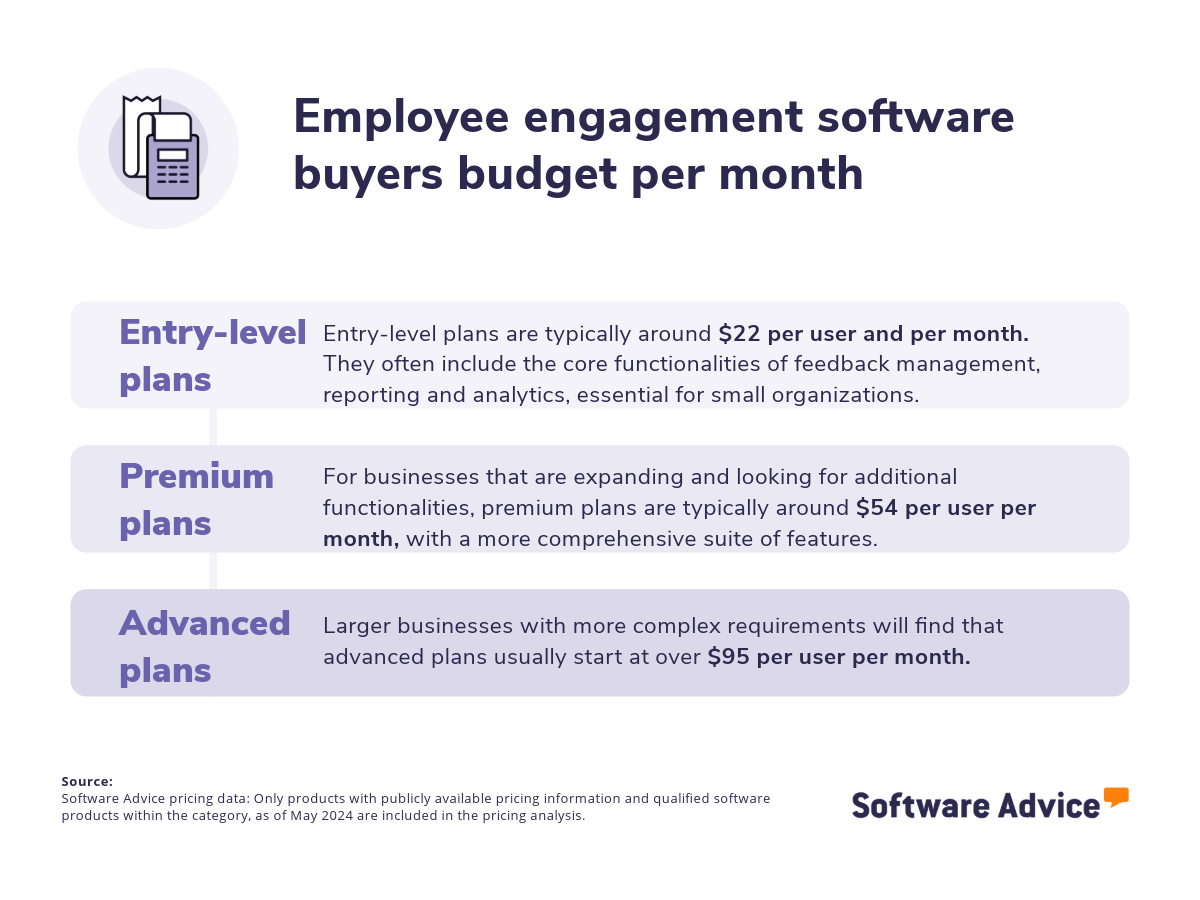
When exploring the landscape of employee engagement products, it's important to note that most options are structured on a “per-month” pricing model. Entry-level pricing plans average $22 per month, providing core functionalities suitable for businesses operating with limited budgets. For expanding businesses requiring enhanced features, premium plans typically offer a more comprehensive suite of capabilities, averaging $54 per month. Larger, more established businesses with sophisticated requirements will generally benefit from advanced plans beginning at over $95 per month. [1]
First-time buyers should be aware that the final price may differ depending on several factors, including the chosen billing frequency (monthly or annual), the number of users requiring access, and any additional HR features offered by the system, such as payroll or time tracking integration.
Collaborate with stakeholders to develop a list of critical questions to guide your evaluation process, such as:
What methods does the platform employ for collecting user feedback (e.g., surveys, polls, open-ended feedback forms)?
What specific reports does the system generate that are relevant to analyzing individual employee engagement trends?
What specific features does your software offer to directly address and improve employee engagement (e.g., recognition programs, feedback mechanisms, communication tools)?
How does the platform support performance reviews, goal setting, and continuous feedback?
Choosing the right employee engagement solution can be challenging given the many vendors available. This guide clarifies the features and benefits of employee engagement software, providing step-by-step guidance for making the best choice for your organization. You’ll also get analyst tips and advice, including insights from New York Times bestselling author and career expert, Dan Schawbel.
Reach out to schedule a consultation with any of our advisors.
What is employee engagement software?
Employee engagement platforms help organizations foster, monitor, measure, and understand workforce engagement. These tools typically include features to improve internal communications, gauge employee sentiment, shape the employee experience, recognize achievements, and promote work-life balance. For employees, engagement tools foster a stronger connection to the organization and alignment with business goals. They also empower employees with autonomy and flexibility, promoting better collaboration and communication. For HR and team leaders, these platforms centralize crucial information, providing actionable insights from real-time feedback, such as sentiment changes related to specific events or the effectiveness of internal communications.
Essential features of employee engagement software
When evaluating employee engagement software, it's crucial to understand the core features typically offered, such as feedback management and reporting/analytics. Additional features include employee recognition tools, performance management, or surveys and feedback. Through our analysis of user reviews and direct engagement with employee engagement software providers, we have identified several common features that enhance these core functionalities. [3]
Core employee engagement software features
Feedback management | Collecting, analyzing, and utilizing feedback from users or customers to improve a product or service. 64% of our reviewers rate this feature as critical or highly important. |
Reporting/analytics | View and track pertinent metrics to find patterns and gain insights from data. 76% of our reviewers rate this feature as critical or highly important. |
Common employee engagement software features
Activity dashboard | Dashboard to view the status of ongoing processes, identify current incidents and track past activities. 78% of our reviewers rate this feature as critical or highly important. |
Alerts/notifications | Alerts or notifications of various types such as pop-up messages, sounds, banners, or badges. 81% of our reviewers rate this feature as critical or highly important. |
Employee recognition | Acknowledge and reward employees for reaching specific goals and/or for exemplary performance. 88% of our reviewers rate this feature as critical or highly important. |
Engagement tracking | Tracks metrics that provide insight into how a user interacts with any interface or product. 75% of our reviewers rate this feature as critical or highly important. |
Peer-to-peer recognition | Allows employees to praise one another in a social network-like feed visible to the whole organization. 89% of our reviewers rate this feature as critical or highly important. |
Performance management | Organize and manage the accomplishments and development of employees or performance of applications or systems. 78% of our reviewers rate this feature as critical or highly important. |
Surveys and feedback | Gauge satisfaction and receive information for improvement and success. 79% of our reviewers rate this feature as critical or highly important. |
Benefits and competitive advantages of using employee engagement software
Our analysis of over 1,784 user reviews from the past year shows that employee recognition, performance improvement, and employee communication and support for learning and training initiatives are the top-rated benefits of employee engagement software.
Employee recognition: Employee engagement software fosters a culture of recognition by providing tools that enable both managers and employees to show appreciation. Manager-led recognition tools enable managers to publicly or privately acknowledge employee achievements, milestones, and contributions, while integrated reward systems and peer-to-peer recognition programs help employees to easily recognize and appreciate the contributions of their colleagues.
Performance management: Employee engagement software can aid in performance management by enhancing feedback mechanisms, and facilitating performance tracking. With capabilities such as data-driven performance metrics, 360-degree feedback, and peer review tools, HR and team leaders can gain a comprehensive understanding of employee performance, pinpoint areas for improvement, and make informed decisions about talent development and succession planning.
Internal communication: Employee engagement tools typically include instant messaging, group chats, and direct messaging options that facilitate real-time conversations and streamlined information sharing among teams. Additionally, these tools enhance communication by offering a platform for employees to express their views while allowing management to provide feedback and address any concerns raised.
Learning and training initiatives: Employee engagement software supports learning and training initiatives by providing a platform for accessing learning resources, tracking progress, and recognizing learning achievements. Some platforms include features that encourage knowledge sharing among employees, such as forums, discussion boards, and peer-to-peer learning opportunities, while also enabling personalized learning paths based on individual needs and goals.
How to choose the best employee engagement software
Step 1: Define your requirements
A successful employee engagement software selection begins with a thorough assessment of your specific needs. This requires defining key factors like user count, necessary integrations with existing HR technology, and how the software aligns with your goals and can be customized to address your unique challenges. The chosen solution must also be scalable to accommodate future growth and evolving needs. By carefully considering these factors alongside budget constraints and training assistance, organizations can select employee engagement software that not only meets their functional needs but also provides the necessary support to ensure successful implementation and maximize its long-term value.
What is the cost of employee engagement software?
Several factors influence the pricing of employee engagement software, including the number of users, the specific features required, and the level of customization needed. Our analysis suggests that entry-level plans generally range from $22 per month, while premium plans are available for an average of $54 per month. Advanced plans, catering to the needs of organizations with more complex requirements, generally start at over $95 per month.
Identifying hidden costs when purchasing new employee engagement software is also crucial for avoiding budget overruns and ensuring that the total cost of ownership aligns with the organization's financial expectations. It's important to clarify potential hidden costs with vendors, such as maintenance, training, and upgrades, as these are often overlooked aspects of the overall implementation costs. By addressing these factors upfront, organizations can make more informed decisions and better manage their budgets.
Integration considerations for employee engagement software
Seamless integration between employee engagement software and other HR systems, such as payroll, core HR, and performance management, is crucial for optimizing efficiency and data accuracy. By eliminating redundant data entry and automating workflows, these integrations streamline HR processes, improve decision-making, and enhance the overall employee experience. Common must-have integrations for employee engagement software encompass:
Payroll software: Payroll software simplifies payroll management by automating wage calculations, deduction management, and tax compliance. Integrating this with employee engagement software can contribute to minimizing errors and inconsistencies, streamlining operations, and aligning financial incentives with employee engagement initiatives.
Human resources software: Human resources software automates HR tasks like recruitment, onboarding, or employee data management. Integrating it with employee engagement software allows HR to combine data from various sources, providing valuable insights into employee sentiment and enabling data-driven decisions to improve engagement and retention.
Performance software: Performance software is a system used to track, manage, and evaluate employee performance. This can include setting goals, providing feedback, conducting performance reviews, and tracking employee development. Through the integration of these systems, organizations can merge performance data with insights into engagement levels, thereby achieving a more comprehensive understanding of both individual and team contributions.
Be aware of potential drawbacks
Although employee engagement software provides many advantages, it also comes with potential challenges for businesses. Sentiment analysis conducted on 1,784 verified user reviews over the past year has helped us to identify the following:
Email notifications: Excessive email notifications can overwhelm employees, causing them to disregard crucial messages and potentially diminish engagement. When configuring automated notifications, focus on delivering valuable, relevant, and timely information through your employee engagement software. Leverage the support and assistance offered by vendors before and during implementation to help HR and team leaders optimize their notification strategies. Dan Schawbel highlights the importance of well-timed communication: “The average attention span is just a few seconds now and so you really need to capture attention. You also need to ensure that people are getting the right feedback at the right time, that they're getting praised and supported. If they're not, then they sort of lose focus.”
Issue resolution: Some platforms may encounter usability challenges, including bugs and missing features. These issues can present challenges for users and hinder their ability to utilize the software effectively. Businesses can mitigate this by rigorously evaluating platforms before implementation, including thorough testing, seeking user feedback, and prioritizing vendors with strong support, regular updates, and clear service level agreements.
Voucher redemption: Some employee engagement software enables employees to redeem vouchers or rewards earned through their engagement activities, such as points, achievements, or milestones. However, challenges such as limited redemption options and technical issues with voucher codes can arise. To ensure they select the right vendor, businesses should carefully define their specific requirements, including desired voucher types, and redemption methods. Additionally, it's crucial to inquire about the vendor's support and maintenance services to address potential technical issues and ensure a successful redemption process.
By acknowledging these drawbacks, companies can implement strategies to minimize their impact and ensure their employee engagement initiatives yield optimal results.
Step 2: Make a shortlist of software
Selecting the ideal employee engagement software from the numerous options available can be overwhelming. However, with the right guidance and support, the selection process can be significantly simplified.
Explore our list of employee engagement FrontRunners
If you'd like to start your research independently, explore our FrontRunners report. This curated list highlights the highest-rated employee engagement software, helping you quickly identify the best options for your needs. For a detailed explanation of our selection process, visit our methodology page
Step 3: Pick your best option
After carefully evaluating your options, the next crucial step is to schedule vendor demos. These sessions provide a valuable opportunity to gain a deeper understanding of each product's capabilities and address your specific concerns. Effective preparation will ensure you get the most out of these demos.
How to prepare for vendor demos
Once you've narrowed down your options to a shortlist of employee engagement systems, the next crucial step is to schedule demonstrations with each vendor. During these sessions, you can explore various aspects of their products, including features, pricing, support, training, and any other factors essential for selecting a system that perfectly aligns with your business's specific needs.
Here are some key questions to consider asking vendors during the demos:
Can you demonstrate how the platform facilitates employee feedback collection (surveys, pulse checks, 360-degree feedback)?
Employee feedback is essential for effective engagement strategies. It helps evaluate platforms that offer diverse methods for collecting insights, such as pulse checks, annual surveys, and 360-degree feedback. A suitable platform should be user-friendly for both administrators and employees, encouraging easy survey creation, participation, and feedback analysis. Additionally, the demo should highlight customizable reporting features to help organizations track trends and measure the impact of their engagement initiatives.
Analyst tip: To enhance your demo experience, consider sharing a prior survey or feedback evaluation with the vendor ahead of the scheduled session. This will enable you to ask them to replicate it within their software, allowing you to evaluate the user interface from both the employee and management perspectives and effectively visualize the final product.
How does the system support goal setting, tracking, and performance reviews?
When employees possess a clear understanding of their roles and responsibilities, as well as how their contributions align with broader organizational objectives, this factor enhances their motivation and commitment to their work. Consequently, evaluating the effectiveness of an employee engagement tool in streamlining the performance review process is an essential aspect to consider during a demo. Features like goal setting, continuous feedback, and peer recognition can provide a more holistic and ongoing view of an employee's performance, rather than relying solely on an annual review.
Analyst tip: To assess whether the platform aligns with your organization's specific goal-setting methodologies, evaluate how the goals set up in the employee engagement software respond to your needs and foster coherence between individual and team objectives. For example, if the tool allows you to define goals using the SMART methodology or structure them based on OKRs, how users interact around these goals can be key considerations to test.
What kind of customer support do you offer during implementation?
When selecting an employee engagement platform, it's crucial to look beyond the features and consider the vendor's implementation support. Many implementations can present challenges because companies don't receive the necessary help to set up and utilize the platform properly. Team adoption often poses difficulties during this process, and thorough training emerges as a highly effective strategy for ensuring a successful transition.
It's advisable to inquire about the vendor's training options, such as live sessions or tutorials, and the availability of customer support. Understanding the resources and assistance provided will enhance your team's confidence in their ability to use the software effectively long-term.
Every business is unique, so finding the right employee engagement software requires careful consideration of your specific needs and goals. By following the steps outlined above and prioritizing the features that matter most to your organization, you can select a platform that will not only support your employee engagement initiatives but also streamline your operations. For further guidance and additional questions to ask during demos, consult our guide: How To Cut Through the Sales Pitch During Software Demos.
Step 4: Make the most of your employee engagement software
With the selection of your new employee engagement system finalized and the contract executed, the next critical stage is implementation. This phase, which involves transitioning from your current approach to the new platform, necessitates careful attention to several key factors to ensure a smooth and successful integration. These factors include:
Data management and security: Transitioning to a new system requires careful handling of employee data. This involves meticulously mapping data from your existing systems to the new platform to prevent data loss and ensure a smooth transfer. If the new software needs to integrate with other systems like payroll or performance management, these integrations must be thoroughly planned and tested. Equally important is ensuring that data migration and ongoing use of the platform comply with all relevant data privacy regulations.
Training availability: Once your new employee engagement system is fully operational, prioritize comprehensive user training to ensure your team can effectively utilize its features and functionalities. Leverage the expertise of your chosen vendor to conduct thorough training sessions, providing a variety of learning resources tailored to different roles and skill levels. Be prepared to facilitate different training sessions, offer ongoing support, and conduct periodic refresher courses to reinforce learning and address evolving needs.
Continuous monitoring and improvement: Implementation doesn't end with the initial rollout. Establish clear metrics to track the software's impact on key areas like employee engagement, productivity, and retention. Regularly gather feedback from users to identify any pain points, areas for improvement, or unmet needs. Use this data and feedback to iteratively enhance the platform's configuration, training, and support processes, ensuring that it continues to deliver value and meet your evolving requirements.
For additional information on ensuring a seamless transition, refer to our guide here.
Software related to employee engagement
During your software search, you may find some tools that are closely related to employee engagement software. Some of them are:
Community software: Community software allows employees to connect with each other by creating a space for sharing ideas, collecting opinions, storing Q&A data, and interacting with fellow customers and business representatives. Community software insights can break down silos and encourage collaboration between departments like customer support, product development, and marketing.
Gamification software: Talent management software gives employers the tools to accurately manage, evaluate, and compensate employees based on their performance. By tracking performance and standards, Talent management software allows companies to create and maintain a high-performance workforce. Key features of this type of software include employee learning, compensation evaluations, policy compliance, and succession planning, all of which help companies manage personnel growth.
Human resources software: Human resources software, often referred to as a Human Resources Information System (HRIS) or Human Resources Management System (HRMS), facilitates the management of employee records and information within an organization. This type of software allows for the organization of contact information, departmental assignments, attendance records, salary details, training programs, and benefits.
Learning experience platform software: Learning experience platforms (LCMS) centralize training resources, offering personalized learning paths while allowing content authors to create and modify various learning objects. They also serve as a secure repository for these objects, promoting reuse and reducing duplicative development efforts within organizations.
Survey software: Survey software enables businesses to create and oversee electronic surveys, polls, and questionnaires for purposes such as market research, assessing customer satisfaction, gathering employee input, and additional uses. It aids in automating the design, scheduling, publication, and execution of surveys through diverse user feedback collection formats. The solutions also cater to different methodological approaches and offer data reporting tools.
Talent management Software: Talent management software provides employers with the resources to effectively handle, assess, and compensate employees according to their performance. By monitoring performance and standards, talent management software enables organizations to build and sustain a high-performing workforce. Essential aspects of this software category encompass employee training, salary assessments, adherence to policies, and succession management, all of which assist organizations in overseeing workforce development.
More resources for your employee engagement journey
3 Key 360 Degree Feedback Software Features and Top Products That Offer Them
How To Increase Employee Productivity Through Feedback and Fairness
About our contributors
Author
Emilie Audubert is a content analyst at Software Advice. Always on the lookout for the latest technological and strategic trends for small and midsize businesses, she specializes in human resources topics.
Emilie’s research and analysis is informed by more than 250,000 authentic user reviews on Software Advice and over 20,000 interactions between Software Advice software advisors and HR software buyers. Emilie also regularly analyzes market sentiment by conducting surveys of HR leaders and practitioners so she can provide the most up-to-date and helpful information to small and midsize businesses purchasing software or services.
Her research has been featured in Forbes, CB News, Sud-Ouest, BPI France, and Siècle Digital, as well as on BSMART TV channel, covering topics such the challenges of employee retention or the state of women in the workplace.
Passionate about writing and storytelling in all its forms, she produces audio podcasts. She is fond of pugs and '70s rock.
Editor
Parul Sharma is a content editor at Software Advice with expertise in curating content for various niches, including SaaS, digital marketing, and search engine optimization. With over half a decade of experience in content writing and editing, Parul has the expertise to simplify complex terms into engaging, valuable content for targeted audiences. She completed her graduation and post-graduation in English literature from Delhi University and was awarded the Dr. Asha Sahni Memorial Award for being the highest scorer in her graduating class.
Parul has contributed to the news, lifestyle, education, and health verticle of DNA India, India’s premier media channel. Outside of work, she can be found curating healthy recipes, coloring in mandala books, and spending quality time with her family.
Contributor
Dan Schawbel is a New York Times bestselling author, Managing Partner of Workplace Intelligence, workplace researcher, global keynote speaker, podcast host, and career expert.
Sources
Software Advice advisor call notes: Findings are based on data from telephonic conversations that Software Advice’s advisor team had with businesses seeking employee engagement software. For this report, we analyzed phone interactions from January 10, 2024, to January 10, 2025. Read the complete methodology.
Software Advice software pricing data: Only products with publicly available pricing information and qualified software products within the category, as of May 2024, are included in the pricing analysis. Read the complete methodology.
Software Advice reviews data: Software Advice reviews are collected from verified users for individual software products. For this report, we analyzed reviews from the past year as of the production date. Read the complete methodology.
Employee Engagement FAQs
- What is an employee engagement software?
Employee engagement platforms support HR professionals and team leaders in assessing, enhancing, and overseeing employee engagement metrics. This software includes functionalities, such as employee surveys and feedback mechanisms, performance management systems, and retention initiatives that enable teams to gather employee insights, pinpoint areas needing attention, and develop strategies to elevate employee morale, efficiency, and overall job satisfaction.
- Is employee engagement the same as employee performance?
Performance management focuses on enhancing individual effectiveness and output, while employee engagement refers to an employee's connection and dedication to their role, coworkers, and the organization. There is a reciprocal relationship where work engagement and performance impact one another. Employees who are more engaged tend to achieve higher performance levels, and improvements in performance can also foster greater employee engagement. Specific tools like performance management software can automate regular employee evaluations, while employee engagement software can help identify areas of challenge and opportunities to improve engagement.
- How does HR measure employee engagement?
Among the various metrics that the HR department can utilize to assess the engagement levels within their teams is the Net Promoter Score (NPS), which facilitates the assessment of employees' job satisfaction, employee turnover rate, and involvement in professional development initiatives. These metrics can be evaluated through surveys, feedback forms, and the analysis of performance data, capabilities that are accessible through employee engagement software.
- Which is the best employee engagement software?
According to our analysis of products with high market demand and reviews, Kudos has the highest overall rating from verified reviewers on Software Advice. Check out our full methodology description for more details on this selection process.